Implementing Structured Logging and a Feedback Dialog in a Google Chat Bot to Drive the KB Improvement Cycle

This page has been translated by machine translation. View original
Introduction
In the previous article, I covered the sync pitfalls when updating a knowledge base (KB) with Vertex AI RAG Engine.
Once you start operating a KB, the next question is "how do we continuously improve the bot's answer quality?" Without visibility into what users are asking, how satisfied they are, and which questions go unanswered, you can't tell where to improve the KB.
This time, I'll show how I implemented structured logging and a feedback dialog in a Google Chat Bot, and built a KB improvement cycle using Cloud Logging → BigQuery → Looker Studio.
What we want to achieve
The improvement cycle we want is as follows.
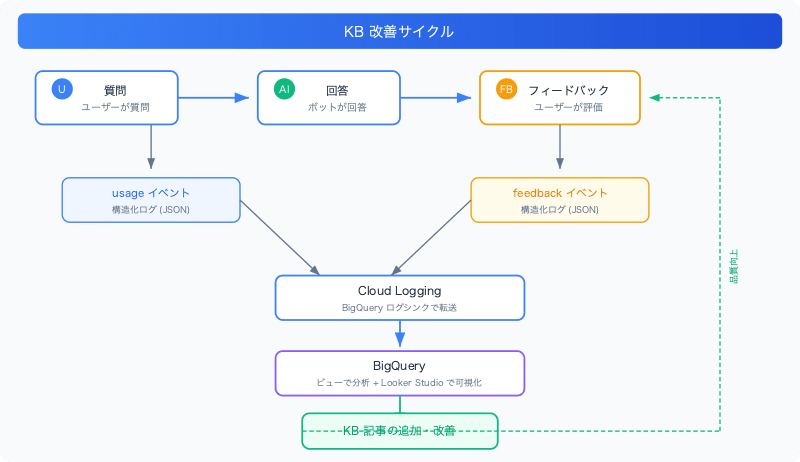
Specifically, we capture three signals.
| Signal | Meaning | How it's captured |
|---|---|---|
| Successful answer | The user's question was answered | usage event (is_fallback=false) |
| Fallback | The KB has no relevant information, so no answer | usage event (is_fallback=true, severity=WARNING) |
| User rating | Whether the answer was helpful | feedback event (vote + reason category + comment) |
Architecture
| Item | Choice |
|---|---|
| Runtime | Cloud Functions 2nd gen (Cloud Run based) |
| Language | Python 3.14 |
| Logging | Cloud Logging (automatically collected from Cloud Run stdout) |
| Analytics | BigQuery (forwarded via log sink) |
| Visualization | Looker Studio (connected to BigQuery) |
Structured log design
Why structured logs
On Cloud Run, simply writing JSON to stdout makes Cloud Logging parse it automatically. The severity field controls the log level, and the logging.googleapis.com/trace field links entries to request traces.
No external library is needed; Python's json.dumps + print is enough.
Implementing the log module
I created a thin module as bot/log_events.py. It's named log_events.py to avoid a name collision with the stdlib logging.
import json
import os
import threading
from typing import Any

_local = threading.local()
_PROJECT_ID = os.environ.get("GCP_PROJECT_ID", "")

def set_request_context(*, trace_header: str = "") -> None:
    """リクエストごとのトレースコンテキストを設定する。"""
    trace = ""
    if trace_header and _PROJECT_ID:
        trace_id = trace_header.split("/")[0]
        trace = f"projects/{_PROJECT_ID}/traces/{trace_id}"
    _local.trace = trace

def log_event(severity: str, event_type: str, **fields: Any) -> None:
    """構造化 JSON ログエントリを stdout に書き出す。"""
    entry: dict[str, Any] = {
        "severity": severity,
        "event_type": event_type,
        **fields,
    }
    trace = getattr(_local, "trace", "")
    if trace:
        entry["logging.googleapis.com/trace"] = trace

    print(json.dumps(entry, ensure_ascii=False, default=str), flush=True)
Key points:
threading.local()holds the trace ID per thread, matching the bot's structure of processing in background threads- The trace ID is extracted from the
X-Cloud-Trace-Contextheader to support Cloud Logging trace correlation ensure_ascii=Falseoutputs Japanese as-is without escaping
Event schema
I defined two kinds of events.
usage event (one per query):
{
  "severity": "INFO",
  "event_type": "usage",
  "user_id": "users/123456",
  "space_id": "spaces/AAAA",
  "message_id": "spaces/AAAA/messages/BBBB",
  "query_text": "有給の申請方法は?",
  "query_length": 10,
  "rag_confidence": 0.35,
  "rag_sources_count": 3,
  "response_text": "有給休暇の申請は、社内ポータルの「勤怠管理」から...",
  "response_length": 520,
  "latency_ms": 3200,
  "is_fallback": false,
  "error": null
}
feedback event (when a user presses a rating button):
{
  "severity": "INFO",
  "event_type": "feedback",
  "user_id": "users/123456",
  "space_id": "spaces/AAAA",
  "message_id": "spaces/AAAA/messages/BBBB",
  "vote": "down",
  "reason_category": "inaccurate",
  "comment_text": "参照先が古い"
}
message_id is the join key between the two events. Joining in BigQuery lets you link which question received which feedback.
Fallbacks (cases where the KB lacks information and no answer is possible) are captured via is_fallback=true in the usage event, with severity raised to WARNING. They stand out in Cloud Logging, so they're harder to miss.
Feedback UX design
Industry best practice: tiered feedback
Surveying the feedback UX of major chatbots such as ChatGPT and Copilot, I found that tiered feedback is the standard pattern.
| Tier | Content | Friction | Response rate |
|---|---|---|---|
| Tier 1 | 👍 / 👎 buttons | None | 15-30% |
| Tier 2 | Reason category (👎 only) | Low | About 50% of Tier 1 |
| Tier 3 | Free text (optional) | Medium | 10-20% of Tier 2 |
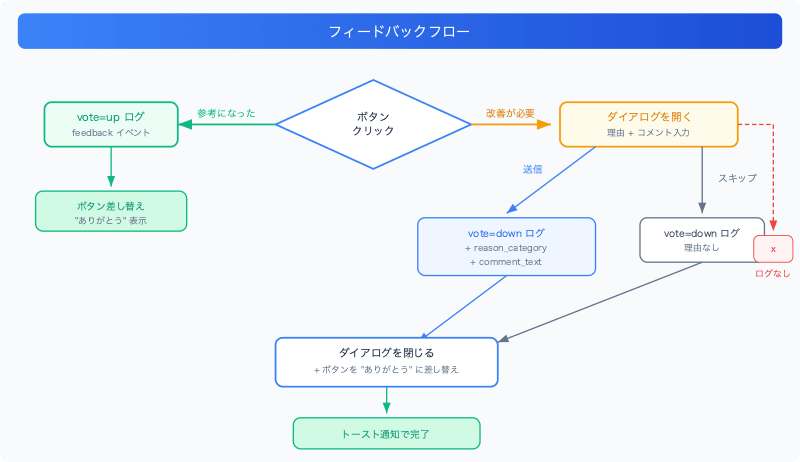
As a key design decision, 👍 completes with one click, and only 👎 shows a dialog. Data on "why it was good" rarely translates directly into improvement actions, while data on "why it was bad" gives concrete hints about what to fix in the KB.
Google Chat dialog API
The Google Chat API provides the ability to open a dialog (modal form) from a button click. If you set "interaction": "OPEN_DIALOG" in the button's onClick.action, the card body returned in the response is displayed as a dialog.
Feedback flow
The implemented flow is as follows.
Implementation
Changing the feedback buttons
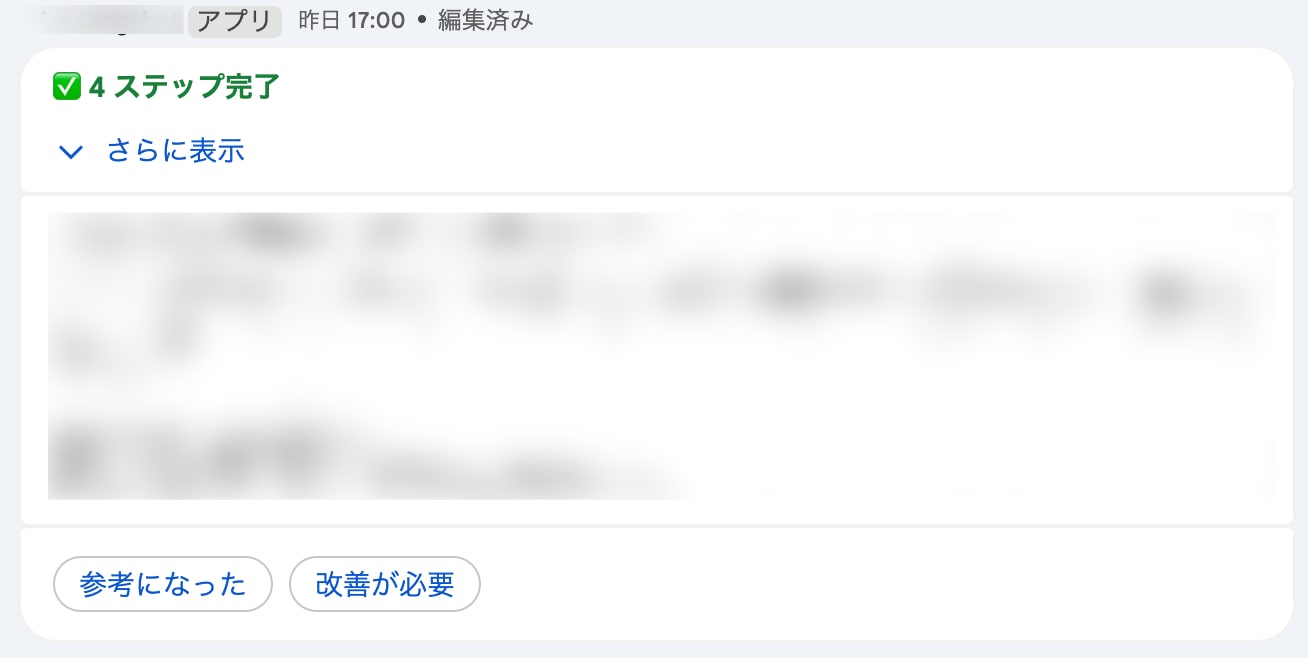
I modified the existing feedback buttons, changing the labels to Japanese and adding OPEN_DIALOG to the 👎 button.
def _build_feedback_section(message_name, endpoint_url):
    msg_id = message_name or ""
    function_url = endpoint_url or ""
    return {
        "widgets": [{
            "buttonList": {
                "buttons": [
                    {
                        "text": "参考になった",
                        "onClick": {
                            "action": {
                                "function": function_url,
                                "parameters": [
                                    {"key": "action", "value": "feedback"},
                                    {"key": "vote", "value": "up"},
                                    {"key": "message_id", "value": msg_id},
                                ],
                            }
                        },
                    },
                    {
                        "text": "改善が必要",
                        "onClick": {
                            "action": {
                                "function": function_url,
                                "interaction": "OPEN_DIALOG",  # Open the dialog
                                "parameters": [
                                    {"key": "action", "value": "feedback"},
                                    {"key": "vote", "value": "down"},
                                    {"key": "message_id", "value": msg_id},
                                ],
                            }
                        },
                    },
                ]
            }
        }]
    }
Place "interaction": "OPEN_DIALOG" directly under onClick.action. With this set, Google Chat sends a CARD_CLICKED event on button click and displays the bot's response as a dialog.
Building the dialog card
This is the card body returned when 👎 is clicked.
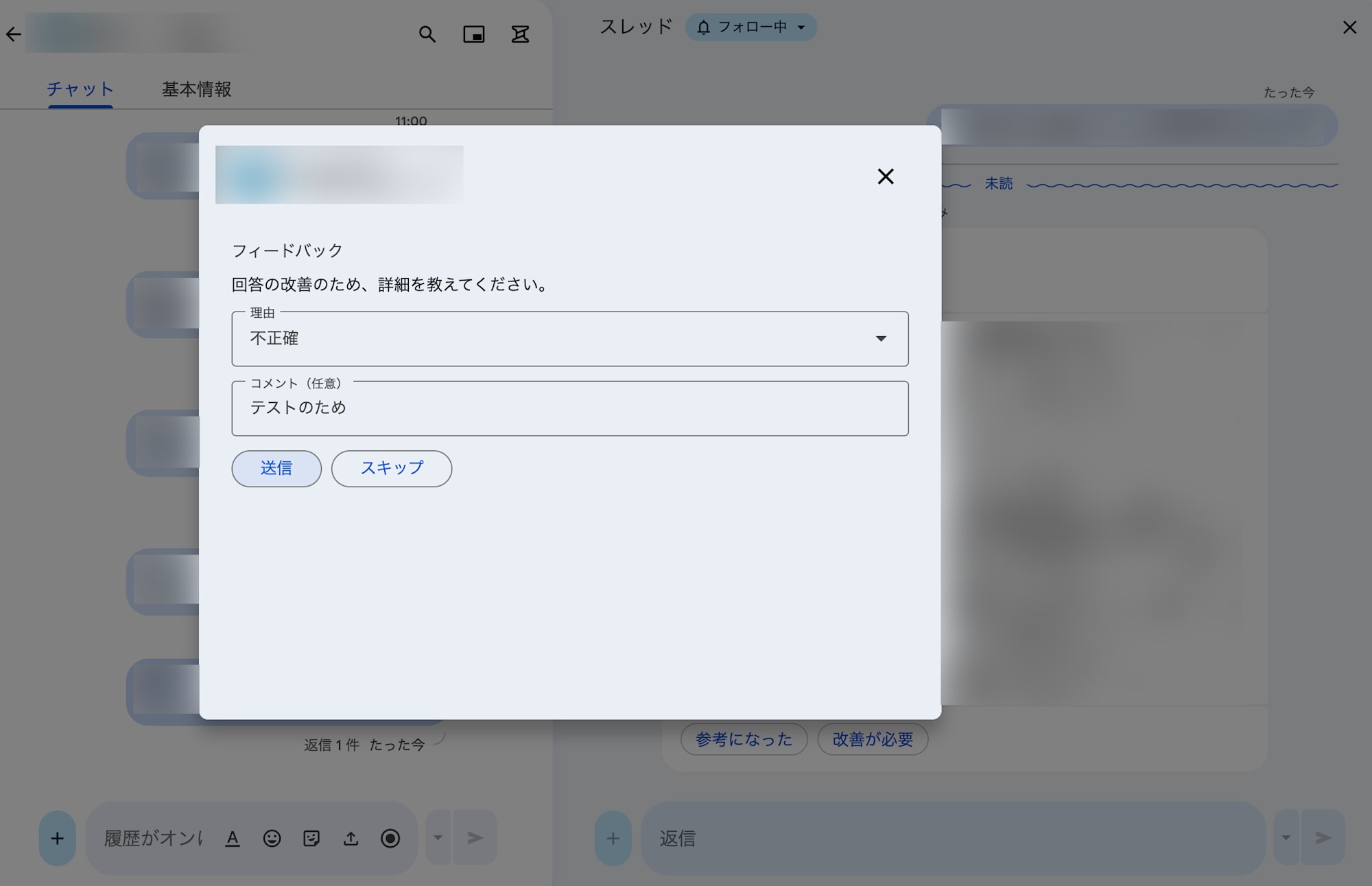
def build_feedback_dialog(message_id, endpoint_url):
    function_url = endpoint_url or ""
    msg_id = message_id or ""
    return {
        "action": {
            "navigations": [{
                "pushCard": {
                    "sections": [{
                        "header": "フィードバック",
                        "widgets": [
                            {
                                "textParagraph": {
                                    "text": "回答の改善のため、詳細を教えてください。",
                                }
                            },
                            {
                                "selectionInput": {
                                    "type": "DROPDOWN",
                                    "label": "理由",
                                    "name": "reason_category",
                                    "items": [
                                        {"text": "不正確", "value": "inaccurate", "selected": True},
                                        {"text": "関連性が低い", "value": "irrelevant"},
                                        {"text": "不完全", "value": "incomplete"},
                                        {"text": "その他", "value": "other"},
                                    ],
                                }
                            },
                            {
                                "textInput": {
                                    "label": "コメント(任意)",
                                    "type": "MULTIPLE_LINE",
                                    "name": "comment_text",
                                }
                            },
                            {
                                "buttonList": {
                                    "buttons": [
                                        {
                                            "text": "送信",
                                            "onClick": {
                                                "action": {
                                                    "function": function_url,
                                                    "parameters": [
                                                        {"key": "action", "value": "feedback"},
                                                        {"key": "vote", "value": "down"},
                                                        {"key": "message_id", "value": msg_id},
                                                        {"key": "submit", "value": "true"},
                                                    ],
                                                }
                                            },
                                        },
                                        {
                                            "text": "スキップ",
                                            "onClick": {
                                                "action": {
                                                    "function": function_url,
                                                    "parameters": [
                                                        {"key": "action", "value": "feedback"},
                                                        {"key": "vote", "value": "down"},
                                                        {"key": "message_id", "value": msg_id},
                                                        {"key": "submit", "value": "true"},
                                                        {"key": "skipped", "value": "true"},
                                                    ],
                                                }
                                            },
                                        },
                                    ]
                                }
                            },
                        ]
                    }]
                }
            }]
        }
    }
Important: In Workspace Add-ons (HTTP endpoint style), the dialog response format differs from the regular Chat API. The regular Chat API documentation describes actionResponse.type = "DIALOG" → dialogAction.dialog.body, but Add-ons use the action.navigations[{pushCard}] format. I explain this difference in detail in "Gotchas" below.
The submit button inside the dialog has a {"key": "submit", "value": "true"} parameter. This is needed to distinguish a dialog submission from the initial downvote click (reason explained later).
Extending the routing
Button click events are detected by the presence of chat.buttonClickedPayload. Furthermore, submit button clicks inside the dialog are distinguished by the submit parameter.
chat = body.get("chat", {})
common_event = body.get("commonEventObject", {})
params = common_event.get("parameters", {})

host = request.headers.get("X-Forwarded-Host") or request.headers.get("Host", "")
scheme = request.headers.get("X-Forwarded-Proto", "https")
service = os.environ.get("K_SERVICE", "")
endpoint_url = f"{scheme}://{host}/{service}" if host else ""

if "buttonClickedPayload" in chat:
    if params.get("action") != "feedback":
        return {}

    # Dialog submission (submit/skip button)
    if params.get("submit") == "true":
        return feedback.handle_dialog_submit(body)

    # Card button click (helpful / needs improvement)
    return feedback.handle_card_click(body, endpoint_url=endpoint_url)
In Workspace Add-ons, invokedFunction is an empty string, so it can't be used for routing. Instead, we check for the presence of the buttonClickedPayload key. The endpoint_url must also be built from the request headers (see "Gotchas" below for details).
Feedback handler branching
If you replace the entire original answer card after feedback is submitted, the user can no longer refer to the answer. So I adopted a GET-then-PATCH approach: fetch the current card content with messages.get, then replace only the feedback button section with a "thank you" text.
_THANK_YOU_TEXT = "フィードバックありがとうございます!"

def _build_thank_you_body(current_message):
    """既存セクションを保持し、フィードバックボタンだけを「ありがとう」に差し替える。"""
    cards_v2 = current_message.get("cardsV2", [])
    if not cards_v2:
        return _fallback_thank_you_card()

    card = cards_v2[0].get("card", {})
    sections = list(card.get("sections", []))
    if not sections:
        return _fallback_thank_you_card()

    last_section = sections[-1]
    last_widgets = last_section.get("widgets", [])

    # Idempotency guard: skip if the "thank you" text is already there
    if (len(last_widgets) == 1
            and "textParagraph" in last_widgets[0]
            and _THANK_YOU_TEXT in last_widgets[0]["textParagraph"].get("text", "")):
        return None

    # Remove the feedback button section
    if any("buttonList" in w for w in last_widgets):
        sections = sections[:-1]

    sections.append({
        "widgets": [{"textParagraph": {"text": _THANK_YOU_TEXT}}]
    })
    return {
        "cardsV2": [{
            "cardId": cards_v2[0].get("cardId", "progressive-card"),
            "card": {"sections": sections},
        }]
    }

def _replace_feedback_with_thanks(client, message_id):
    """GET → 加工 → PATCH でフィードバックボタンを「ありがとう」に差し替える。"""
    current_message = client.get_message(message_id)
    body = _build_thank_you_body(current_message)
    if body is not None:
        client.patch_message(message_id, body, "cardsV2")
_build_thank_you_body gets the card's section list from the API response, removes the last section if it contains a buttonList, appends a "thank you" text section, and returns the result. If the thank-you text already exists, it returns None (idempotency guard) and the patch is skipped.
Handlers call the common helper _replace_feedback_with_thanks.
def handle_card_click(event_body, endpoint_url=""):
    vote, message_id, user_id, space_id = _extract_feedback_params(event_body)

    if vote == "up":
        log_event("INFO", "feedback",
                  user_id=user_id, space_id=space_id,
                  message_id=message_id, vote=vote,
                  reason_category=None, comment_text=None)
        try:
            client = ChatApiClient()
            _replace_feedback_with_thanks(client, message_id)
        except Exception:
            logger.warning("Failed to patch message after upvote", exc_info=True)
        return {}

    # vote == "down": ダイアログを開く(この時点ではログしない)
    return build_feedback_dialog(message_id, endpoint_url)

def handle_dialog_submit(event_body):
    common_event = event_body.get("commonEventObject", {})
    params = common_event.get("parameters", {})
    form_inputs = common_event.get("formInputs", {})

    vote, message_id, user_id, space_id = _extract_feedback_params(event_body)
    skipped = params.get("skipped", "false") == "true"

    reason_category = None
    comment_text = None
    if not skipped:
        reason_raw = form_inputs.get("reason_category", {})
        reason_values = reason_raw.get("stringInputs", {}).get("value", [])
        reason_category = reason_values[0] if reason_values else None

        comment_raw = form_inputs.get("comment_text", {})
        comment_values = comment_raw.get("stringInputs", {}).get("value", [])
        comment_text = comment_values[0] if comment_values else None

    log_event("INFO", "feedback",
              user_id=user_id, space_id=space_id,
              message_id=message_id, vote=vote,
              reason_category=reason_category, comment_text=comment_text)

    # 元のメッセージのフィードバックボタンを「ありがとう」に差し替え
    try:
        client = ChatApiClient()
        _replace_feedback_with_thanks(client, message_id)
    except Exception:
        logger.warning("Failed to patch message after feedback", exc_info=True)

    # ダイアログを閉じる
    return {
        "action": {
            "navigations": [{
                "endNavigation": {"action": "CLOSE_DIALOG"},
            }],
            "notification": {
                "text": _THANK_YOU_TEXT,
            },
        }
    }
The dialog's form data is in commonEventObject.formInputs. Use each widget's name as the key and get the value from stringInputs.value.
To close the dialog, return action.navigations[{endNavigation: {action: "CLOSE_DIALOG"}}]. You can also show a toast notification with notification.text. However, this alone leaves the feedback buttons on the original message, so _replace_feedback_with_thanks does the GET-then-PATCH.
Emitting usage events
A usage event is emitted after the pipeline finishes (whether it succeeded or failed).
def _emit_usage_event(start_time, user_name, space_name, message_name,
                      user_text, contexts, state, error_str, is_fallback):
    latency_ms = int((time.monotonic() - start_time) * 1000)
    best_score = contexts[0]["score"] if contexts else None
    severity = "ERROR" if error_str else ("WARNING" if is_fallback else "INFO")
    log_event(
        severity, "usage",
        user_id=user_name, space_id=space_name,
        message_id=message_name,
        query_text=user_text, query_length=len(user_text),
        rag_confidence=best_score, rag_sources_count=len(contexts),
        response_text="\n".join(state.content_paragraphs),
        response_length=sum(len(p) for p in state.content_paragraphs),
        latency_ms=latency_ms, is_fallback=is_fallback, error=error_str,
    )
is_fallback is determined beforehand by the caller and passed in as a parameter (the logic is explained later in "Fallback detection pitfalls").
The severity usage is key.
INFO: normal successful answerWARNING: fallback (KB gap) — stands out in Cloud LoggingERROR: pipeline execution error
Why Cloud Logging alone isn't enough
At this point the structured logging and feedback mechanism is complete, and clean JSON lines up in Cloud Logging. But when you try to "use it to improve the KB," you hit several walls.
Typing queries by hand every time
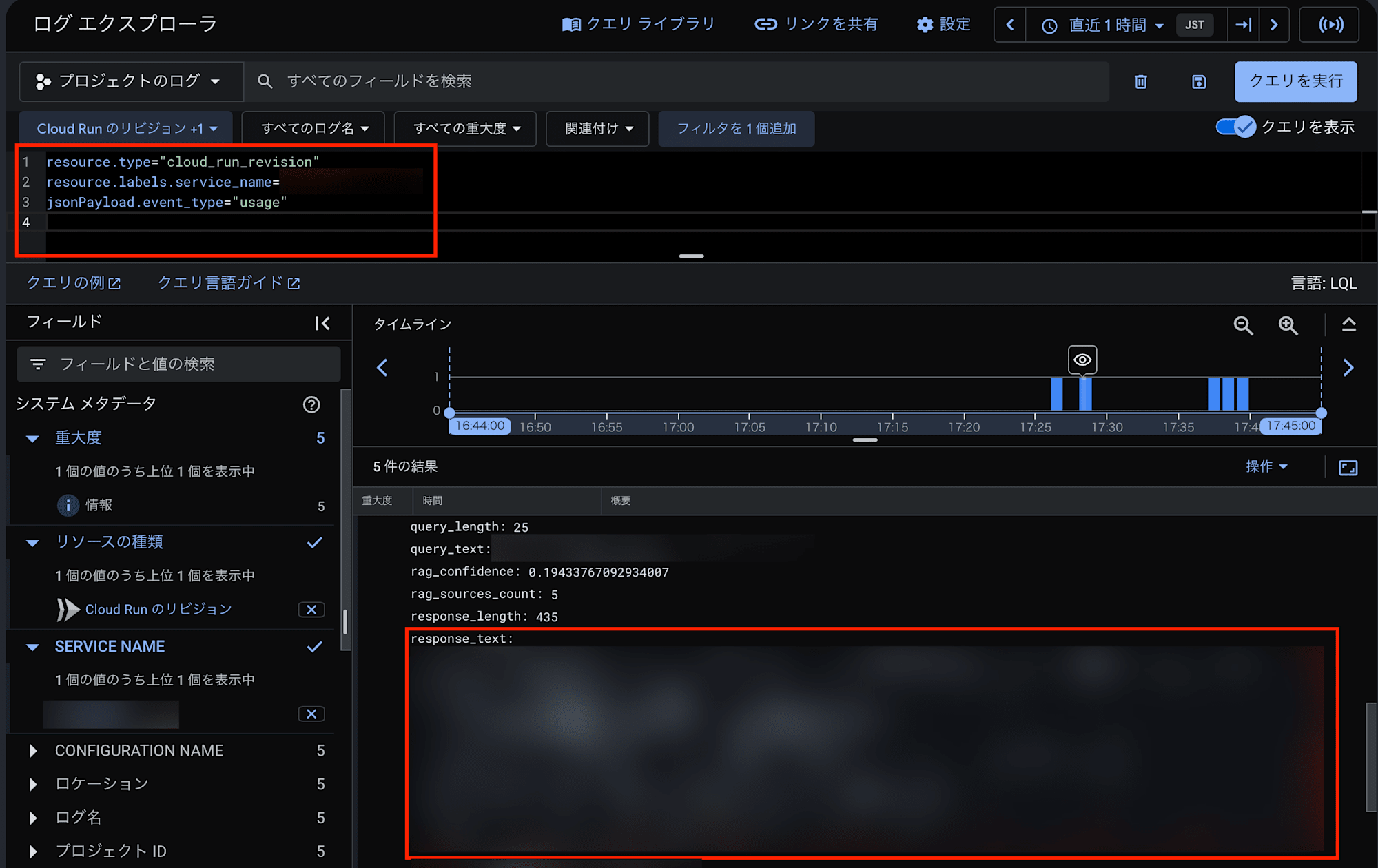
To check feedback in Cloud Logging, you have to type a filter query like this every time.
resource.type="cloud_run_revision"
AND resource.labels.service_name="your-bot-name"
AND jsonPayload.event_type="feedback"
AND jsonPayload.vote="down"
"I want to see unanswered questions" → rewrite the query. "How many uses this week?" → rewrite again. Saved queries exist, but they're a weak way to manage and share queries by purpose.
Expanding JSON one entry at a time
Search results are a list of JSON entries. To check query_text or reason_category, you have to expand each entry and read the jsonPayload. That's fine for about 10 entries, but "review all of last month's low ratings" is unrealistic.
No aggregation or cross-analysis
Cloud Logging is a search tool, not an analytics tool. The following are all impossible:
- Weekly usage counts and fallback rate trends
- Aggregation of low ratings by reason category
- Joining usage and feedback events ("which questions got low ratings for which reasons")
The lack of JOIN is especially fatal. I designed message_id as the join key in the structured logs, but in Cloud Logging the only option is to run two queries and match message_id by eye.
Data disappears after 30 days
Cloud Logging's default retention period is 30 days. To run the KB improvement cycle you want to follow monthly and quarterly trends, but data older than 30 days is gone for good.
Forwarding to BigQuery
A Cloud Logging → BigQuery log sink solves all of these problems. It automatically forwards structured logs to a BigQuery table, and setup takes just two commands.
# Create the BigQuery dataset
bq mk --dataset --location=asia-northeast1 YOUR_PROJECT:chat_analytics

# Create the log sink (forward only usage and feedback events)
gcloud logging sinks create kb-analytics-sink \
  bigquery.googleapis.com/projects/YOUR_PROJECT/datasets/chat_analytics \
  --log-filter='jsonPayload.event_type=("usage" OR "feedback")'
Grant the "BigQuery Data Editor" role on the BigQuery dataset to the service account shown when the log sink is created, and subsequent logs flow into BigQuery automatically. Log sinks have no TTL and BigQuery tables have no default expiration, so data is retained permanently.
Cost isn't a concern either. At the bot's usage volume (a few dozen requests per day), both BigQuery storage and queries fit within the free tier, and it runs for under $1 per month.
Simplifying queries with BigQuery views
Tables forwarded from Cloud Logging are deeply nested, like jsonPayload.query_text, which is tedious to write every time. Creating views that flatten them makes analysis much easier.
-- View for usage events
CREATE OR REPLACE VIEW `chat_analytics.usage_events` AS
SELECT
  timestamp,
  jsonPayload.user_id,
  jsonPayload.space_id,
  jsonPayload.message_id,
  jsonPayload.query_text,
  jsonPayload.response_text,
  jsonPayload.rag_confidence,
  jsonPayload.rag_sources_count,
  jsonPayload.latency_ms,
  jsonPayload.is_fallback,
  jsonPayload.error
FROM `chat_analytics.YOUR_TABLE`
WHERE jsonPayload.event_type = 'usage';

-- View for feedback events
CREATE OR REPLACE VIEW `chat_analytics.feedback_events` AS
SELECT
  timestamp,
  jsonPayload.user_id,
  jsonPayload.space_id,
  jsonPayload.message_id,
  jsonPayload.vote,
  jsonPayload.reason_category,
  jsonPayload.comment_text
FROM `chat_analytics.YOUR_TABLE`
WHERE jsonPayload.event_type = 'feedback';
With the views, analyses that were impossible in Cloud Logging can be done instantly with simple SQL.
Show unanswered questions (KB gaps) by frequency:
SELECT query_text, COUNT(*) as count
FROM `chat_analytics.usage_events`
WHERE is_fallback = true
GROUP BY query_text
ORDER BY count DESC
Recurring queries are candidates for articles to add to the KB.
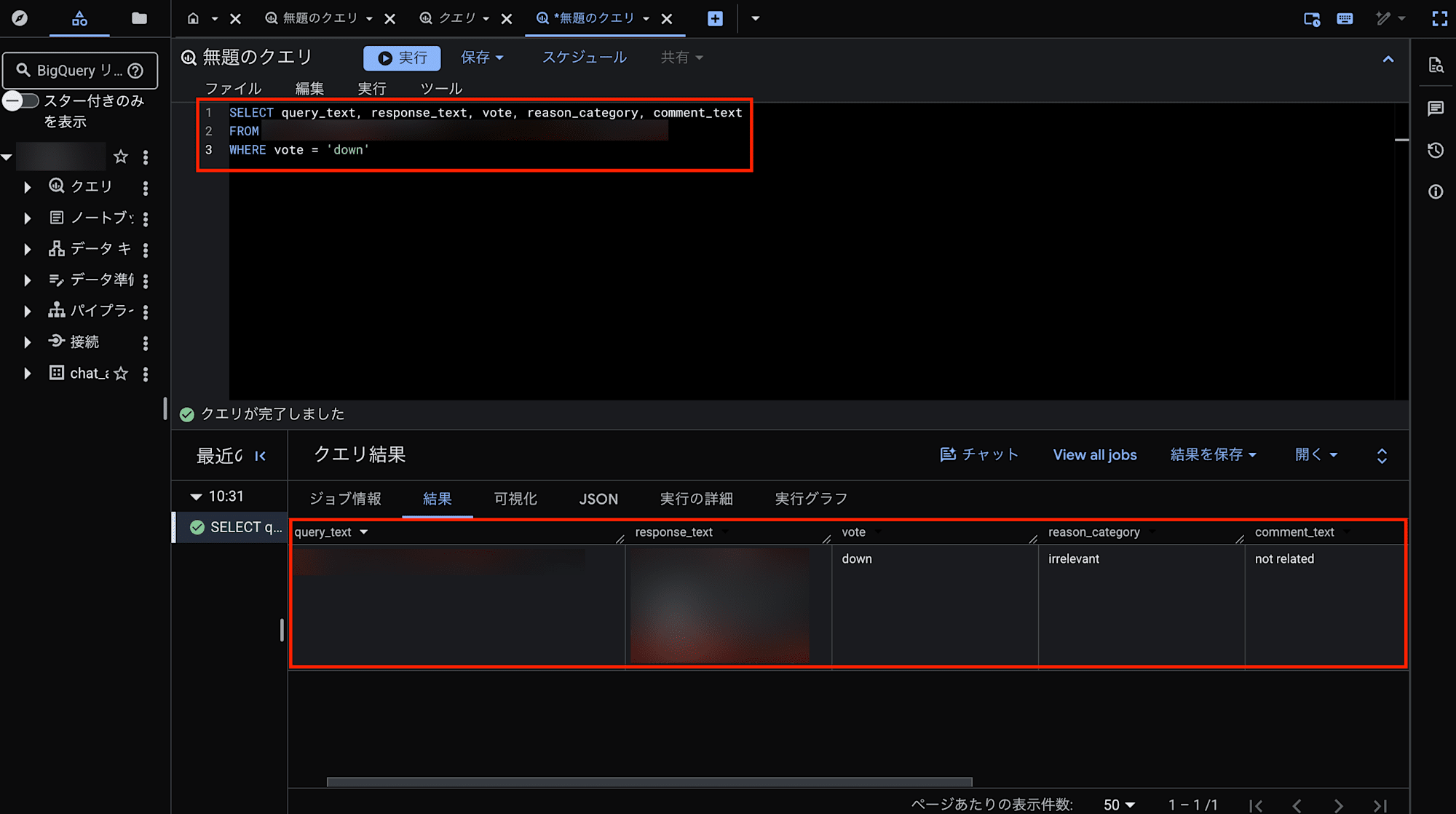
List low-rated answers with the question, answer, and reason:
SELECT u.query_text, u.response_text,
       f.reason_category, f.comment_text
FROM `chat_analytics.usage_events` u
JOIN `chat_analytics.feedback_events` f
  ON u.message_id = f.message_id
WHERE f.vote = 'down'
ORDER BY f.timestamp DESC
The work of running two queries in Cloud Logging and matching message_id by eye is now done with a single JOIN. You can see at a glance which question got a low rating for which reason, which helps decide which KB articles to improve.
Building a dashboard with Looker Studio
BigQuery now enables SQL analysis, but a problem remains: only people who can write SQL can use it. KB improvement isn't done only by engineers. Ideally, operations staff and knowledge managers can check the status themselves.
This is where Looker Studio (formerly Google Data Studio) comes in. You can build dashboards by connecting to BigQuery views, and it's completely free.
| Dashboard item | Content | Improvement action |
|---|---|---|
| Weekly usage count | Trend of bot usage | Measure effect of adoption efforts |
| Fallback rate | Share of questions that couldn't be answered | KPI for KB coverage |
| Unanswered query list | Questions that should be added to the KB | Add KB articles |
| Low-rated answers | Question, answer, and reason on one screen | Improve existing KB articles |
| Rating ratio | Trend of positive/negative ratings | Measure effect of improvements |
Just bookmark the dashboard URL and open it. No GCP console operations or SQL knowledge are needed, and the data automatically reflects the latest logs.
Division of roles among Cloud Logging / BigQuery / Looker Studio
The final architecture has three layers: log collection → analytics → visualization.
| Item | Cloud Logging | BigQuery | Looker Studio |
|---|---|---|---|
| Role | Real-time log search and debugging | Data analysis and aggregation | Dashboards and visualization |
| Target users | Engineers | People who can write SQL | Anyone |
| Checking data | Type a query each time | Save and reuse SQL | Just open a URL |
| Aggregation/analysis | Not possible | GROUP BY, COUNT, JOIN, etc. | Automatic visualization with charts and tables |
| Trend analysis | Not possible | Possible | Clear at a glance with charts |
| Data retention | 30 days | Unlimited | (Depends on BigQuery) |
| Cost | Free (included with Cloud Run) | Nearly free (~$0/month) | Free |
I'm not dismissing Cloud Logging. It's the best fit for real-time debugging and error investigation. But for the goal of a KB improvement cycle, a pipeline that sends structured logs to BigQuery and visualizes them in Looker Studio was necessary.
Gotchas: event format differences between Workspace Add-ons and the Chat API
The hardest part this time was that the event format of Workspace Add-ons (HTTP endpoint style) differs from the documentation for the regular Chat API (for Apps Script and Cloud Functions). Google's official documentation mainly assumes the regular Chat API, with little about Add-ons-specific behavior, so I had to discover it through debugging on real devices.
Below are the problems I hit and their solutions.
1. invokedFunction is an empty string
Problem: The official documentation says commonEventObject.invokedFunction contains the button's function URL. In Add-ons, however, this field is always an empty string "".
# ❌ Doesn't work (an empty string is falsy)
if common_event.get("invokedFunction"):
    ...
Solution: Use the presence of the chat.buttonClickedPayload key to detect button clicks.
# ✅ Correct way to detect
if "buttonClickedPayload" in chat:
    ...
Also, since invokedFunction is empty, you have to build the function URL for buttons in the dialog yourself.
host = request.headers.get("X-Forwarded-Host") or request.headers.get("Host", "")
scheme = request.headers.get("X-Forwarded-Proto", "https")
service = os.environ.get("K_SERVICE", "")
endpoint_url = f"{scheme}://{host}/{service}" if host else ""
2. Response-based card updates don't work
Problem: In the regular Chat API, you can update a card by returning {"actionResponse": {"type": "UPDATE_MESSAGE"}, "cardsV2": [...]} in response to a button click. In Add-ons, this format is ignored.
# ❌ No effect in Add-ons
return {"actionResponse": {"type": "UPDATE_MESSAGE"}, **thank_you_card}
Solution: Fetch the current card content with the Chat API's messages.get, replace only the feedback button section, and update with patch_message. Return an empty {} as the response.
# ✅ Replace only the buttons while keeping the original answer via GET-then-PATCH
client = ChatApiClient()
current_message = client.get_message(message_id)
body = _build_thank_you_body(current_message)  # Remove buttons + add thank-you
if body is not None:
    client.patch_message(message_id, body, "cardsV2")
return {}
If you simply replace the whole card with a "thank you" card, the original answer content disappears. By fetching the current card structure with messages.get and removing only the feedback button section, you can keep the status steps and answer text.
3. The dialog response format is different
Problem: The regular Chat API documentation describes the following format as the response that opens a dialog.
# ❌ Regular Chat API format (doesn't work in Add-ons)
return {
    "actionResponse": {
        "type": "DIALOG",
        "dialogAction": {
            "dialog": {"body": {"sections": [...]}}
        }
    }
}
In Add-ons, returning this format makes the dialog flash briefly and close immediately.
Solution: In Add-ons, use the action.navigations format.
# ✅ Open a dialog in Add-ons
return {
    "action": {
        "navigations": [{
            "pushCard": {"sections": [...]}
        }]
    }
}

# ✅ Close a dialog in Add-ons
return {
    "action": {
        "navigations": [{
            "endNavigation": {"action": "CLOSE_DIALOG"}
        }],
        "notification": {"text": "完了しました"},
    }
}
4. dialogEventType is not sent
Problem: In the regular Chat API, clicking a button in a dialog includes the dialogEventType: "SUBMIT_DIALOG" field in the event. In Add-ons, however, this field is not sent.
That means a submit button click in the dialog arrives as a buttonClickedPayload event just like a regular card button click, and the two can't be distinguished from the event structure.
# ❌ dialogEventType doesn't exist in Add-ons
if body.get("dialogEventType") == "SUBMIT_DIALOG":
    ...
As a result, the downvote button click (open the dialog) and the submit button click in the dialog (close the dialog) were routed to the same handler, and every time the submit button was pressed the dialog opened again.
Solution: Add a custom submit parameter to buttons in the dialog to distinguish them.
# Add the submit=true parameter to the submit button in the dialog
{"key": "submit", "value": "true"}

# Decide in the routing
if params.get("submit") == "true":
    return feedback.handle_dialog_submit(body)  # Dialog submission
return feedback.handle_card_click(body, ...)     # Card button click
5. Fallback detection pitfalls: from keyword matching to structured output
Problem 1 — dead code: Initially, I determined fallbacks based on the vector distance score. But since retrieve_context() passes vector_distance_threshold=0.6 to the RAG Engine API, the API excludes chunks with distance > 0.6 server-side. The code that rechecked the same threshold on the client side was dead code.
What actually happened: for "Tell me how to use Box", even though the KB had no relevant article, RAG Engine returned chunks that were close in vector space (but unrelated). The distance score was ≤ 0.6, so it slipped past the fallback check, and is_fallback in the usage log stayed false.
Problem 2 — fragility of keyword matching: I removed the distance-based check and switched to post-generation text matching. The system prompt instructed the model to answer "No relevant information was found", and I checked for that phrase. But Gemini rephrases regardless of prompt instructions. Variations like "No information or steps were found" and "It is not registered in the knowledge base" kept appearing, turning it into a cat-and-mouse game of adding keywords.
Solution: Use Gemini's Structured Output to have the LLM itself explicitly classify whether it could answer.
from pydantic import BaseModel, Field

class RagAnswer(BaseModel):
    answer: str = Field(description="ナレッジベースの情報に基づく回答(Markdown形式)")
    is_answerable: bool = Field(
        description="ナレッジベースに質問に該当する情報があり回答できた場合はtrue、"
        "該当情報がなく回答できなかった場合はfalse",
    )
from google import genai
from google.genai import types

def generate_answer(question: str, contexts: list[dict]) -> RagAnswer:
    # ...
    response = client.models.generate_content(
        model=MODEL_ID,
        contents=prompt,
        config=types.GenerateContentConfig(
            system_instruction=SYSTEM_PROMPT,
            response_schema=RagAnswer,          # Can pass the Pydantic model directly
            response_mime_type="application/json",
        ),
    )
    return response.parsed  # Validated RagAnswer instance
result = generate_answer(user_text, contexts)
is_fallback = not result.is_answerable  # No keyword matching needed
Why this approach works:
response_schemaenforces a JSON schema, so Gemini always returns the{answer, is_answerable}structureis_answerableis a boolean, so there's no variation in wording- The
google-genaiSDK natively supports Pydantic models and returns a validated instance viaresponse.parsed - Adding and maintaining keywords is no longer necessary, and detection accuracy reached 100%
Lesson: For fallback detection in a RAG pipeline, both retrieval scores and keyword matching are fragile. Having the LLM classify explicitly via structured output is the most robust approach.
Summary table
| Item | Regular Chat API | Workspace Add-ons |
|---|---|---|
| Button click detection | invokedFunction |
Presence of buttonClickedPayload key |
| Card update | UPDATE_MESSAGE in the response |
messages.get → patch_message (GET-then-PATCH) |
| Open a dialog | actionResponse.DIALOG.dialogAction.dialog.body |
action.navigations[{pushCard}] |
| Close a dialog | actionResponse.DIALOG.dialogAction.actionStatus |
action.navigations[{endNavigation}] |
| Detecting dialog submission | dialogEventType: "SUBMIT_DIALOG" |
Custom parameter (submit=true) |
function URL |
Obtained from invokedFunction |
Built from request headers |
When implementing dialogs in Workspace Add-ons, be careful: following the regular Chat API documentation as-is often won't work.
Summary
I implemented structured logging and a feedback dialog in a Google Chat Bot and built the foundation for a KB improvement cycle.
| Item | What was implemented |
|---|---|
| Structured logging | Just write JSON to stdout and Cloud Logging parses it automatically |
| usage event | Records query_text, RAG metrics, latency, etc. per query |
| Fallback detection | Gemini structured output (is_answerable boolean) lets the LLM itself classify "unanswerable"; is_fallback=true + severity=WARNING visualizes KB gaps |
| Feedback UX | 👍 is one click; 👎 collects a reason + comment via dialog |
| Data analysis | Cloud Logging → BigQuery log sink → flatten with views → visualize in Looker Studio |
Here are some takeaways from the implementation.
- Cloud Run structured logging needs no external library.
json.dumps+printis enough - A Google Chat dialog opens just by setting
interaction: "OPEN_DIALOG"on the button. However, the response that closes the dialog doesn't update the original message, so you need the GET-then-PATCH approach: fetch the current card withmessages.getand replace only the feedback buttons withpatch_message. This updates only the buttons while keeping the original answer content - Workspace Add-ons event formats differ from the regular Chat API.
invokedFunctionis empty,dialogEventTypeis not sent, and the response format usesaction.navigations. The official documentation is written assuming the regular Chat API, so Add-ons-specific behavior must be confirmed through debugging on real devices - For feedback design, treating "closing the dialog = cancel" and allowing reasonless votes via a "skip" button makes for natural UX
- Retrieval scores and keyword matching are not enough for RAG fallback detection. Retrieval scores duplicate the server-side filter and become dead code, and keyword matching can't keep up with LLM wording variation. Having Gemini return an
is_answerableboolean via structured output (response_schema+ Pydantic) is the most robust - Emitting structured logs is not enough. Cloud Logging is ideal for real-time debugging but can't do aggregation, JOINs, or trend analysis. With a three-layer setup of a BigQuery log sink (two commands, nearly free) → flattening views → Looker Studio (free) visualization, a KB improvement cycle that includes non-engineers becomes possible
References
- Write structured logs | Cloud Run | Google Cloud
- Structured logging | Cloud Logging | Google Cloud
- Support interactive dialogs | Google Chat | Google for Developers
- Collect and process information from Google Chat users | Google for Developers
- Google Workspace Add-ons with alternate runtimes | Google for Developers
- Implementing progressive UX with cardsV2 in a Google Chat Bot was full of walls
- Pitfalls I hit when updating a Vertex AI RAG Engine knowledge base