
I tried Grok 4.6 on Amazon Bedrock with Grok Build CLI

This page has been translated by machine translation. View original
Introduction
On August 19, 2026, xAI's Grok 4.6 became available on Amazon Bedrock.
I previously tried Grok Build CLI with Grok 4.5 on X Premium+.
This time, I had the opportunity to configure a custom model in Grok Build CLI (1.0.5) and verify the use of Grok 4.6 via Amazon Bedrock, so I'd like to share that here. I will not be verifying its functionality as a coding agent.
What Was Tested
I proceeded in the following order: installation and Bedrock configuration, verifying operation in interactive mode, headless execution, and checking data retention settings.
Test Environment
The environment that serves as the basis for these results.
| Item | Value |
|---|---|
| OS | Fedora Asahi Remix 44 (Linux 7.1.6-400.asahi.fc44.aarch64+16k) |
| Architecture | aarch64 (Apple Silicon) |
| Grok Build CLI | 1.0.5 (stable) |
| Bedrock Region | us-west-2 |
| Model ID | xai.grok-4.6 |
| Custom Model Name | grok-4.6-bedrock |
Installation and Bedrock Configuration
Grok Build CLI was installed using the official installer.
curl -fsSL https://x.ai/cli/install.sh | bash
The version after installation was grok 1.0.5 (5115b46bc9) [stable].
In Grok Build CLI, you can define custom models in ~/.grok/config.toml and call any OpenAI-compatible endpoint. The specification for configuration items is described in the CLI's bundled documentation (~/.grok/docs/user-guide/11-custom-models.md) and on the official website.
Amazon Bedrock provides an OpenAI-compatible API at the bedrock-mantle.{region}.api.aws endpoint.
Endpoints by region can be checked in the following list.
For the custom model grok-4.6-bedrock for Amazon Bedrock, I configured the following values. Since the model name contains ., the section name is enclosed in quotes in TOML.
[model."grok-4.6-bedrock"]
model = "xai.grok-4.6"
base_url = "https://bedrock-mantle.us-west-2.api.aws/openai/v1"
api_backend = "chat_completions"
env_key = "GROK_BEDROCK_TOKEN"
Bearer Token is used for authentication on the Bedrock side. Using the Python library aws_bedrock_token_generator provided by AWS, you can generate a short-lived Bearer Token from AWS credentials. The token's validity period is up to 12 hours. The package name at install time uses hyphens, while the import name uses underscores.
pip install aws-bedrock-token-generator
The installation procedure and token validity period are explained on the following page.
I set the value returned by provide_token(region=...) to the environment variable specified by env_key, then launched Grok Build CLI.
export GROK_BEDROCK_TOKEN="$(python -c 'from aws_bedrock_token_generator import provide_token; print(provide_token(region="us-west-2"))')"
Verifying Operation in Interactive Mode
First, I confirmed that the AWS credentials used to generate the Bearer Token were pointing to the expected account.
aws sts get-caller-identity --query Account --output text
XXXXXXXXXXXX
I launched interactive mode with the custom model specified as an argument.
grok -m grok-4.6-bedrock
The startup screen displayed "Grok 4.6 (Amazon Bedrock)" and "Logged in with API key."
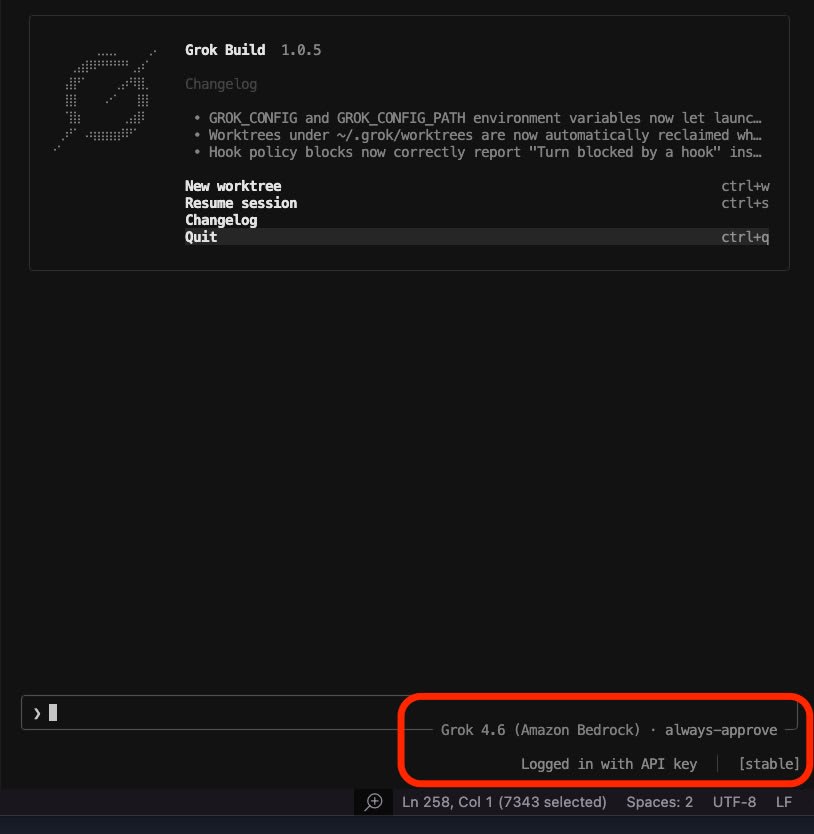
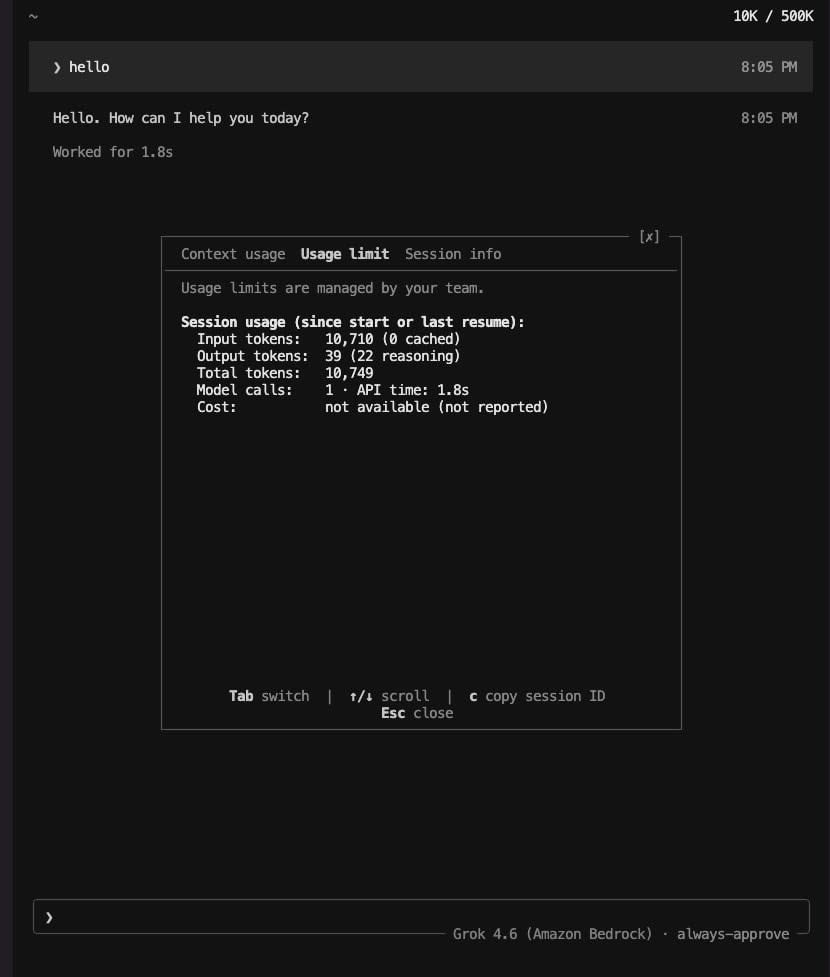
After one exchange of prompts, I switched tabs to check the Usage-related screens. The call via Bedrock succeeded, and token usage was recorded in Grok Build CLI's session summary.
The Usage limit screen showed Session usage (since start or last resume).
The values were Input tokens 10,710 / Output tokens 39 (22 reasoning) / Total tokens 10,749.
Model calls 1 · API time 1.8s and Cost: not available (not reported) were also displayed alongside.
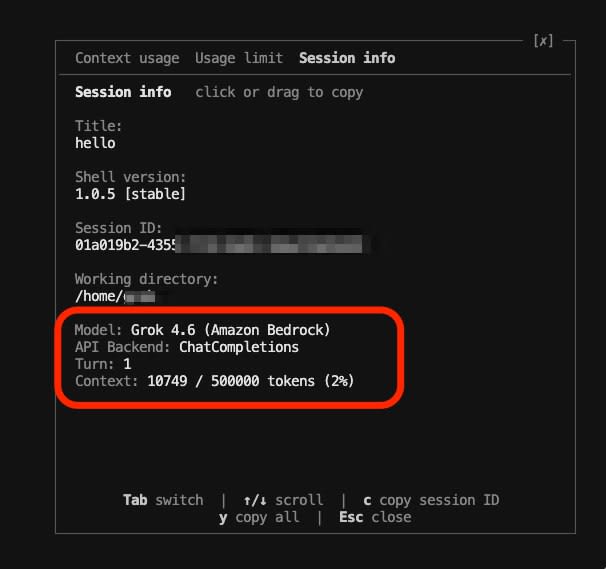
In Session info, Model: Grok 4.6 (Amazon Bedrock) and API Backend: ChatCompletions appeared side by side.
Turn: 1 and Context: 10749 / 500000 tokens (2%) were also readable on this screen.
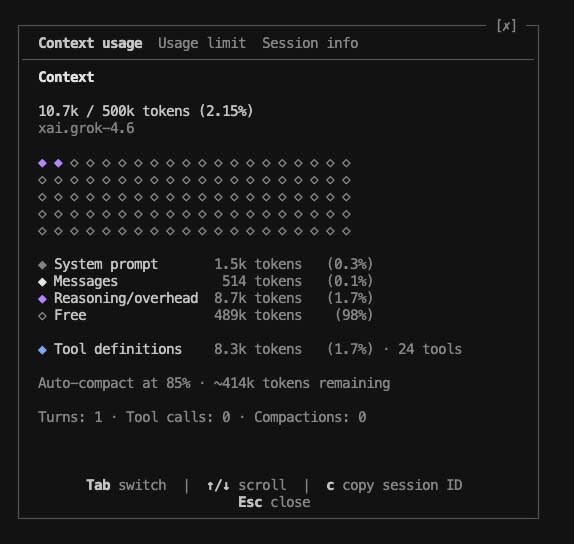
Switching to Context usage, the model label was xai.grok-4.6 and the context limit was 500k tokens.
Headless Execution
Separately from interactive mode, I submitted a Japanese-language prompt in headless mode.
grok -m grok-4.6-bedrock \
  -p "日本語で挨拶してください。今日のAWSの調子はどうですか?" \
  --output-format json
The beginning of the response is as follows.
I will greet you in Japanese and check the operational status of AWS today. Hello. I look forward to working with you today as well.
This is the JSON output obtained with --output-format json. Only the beginning of the response body (text) is shown, and the session identifier is masked.
{
  "text": "日本語でご挨拶しつつ、今日のAWSの稼働状況を確認します。こんにちは。今日もよろしくお願いします。\n\n(以下略)",
  "stopReason": "end_turn",
  "sessionId": "XXXXXXXX-XXXX-XXXX-XXXX-XXXXXXXXXXXX",
  "requestId": "XXXXXXXX-XXXX-XXXX-XXXX-XXXXXXXXXXXX",
  "usage": {
    "input_tokens": 44827,
    "cache_read_input_tokens": 1536,
    "cache_creation_input_tokens": 0,
    "output_tokens": 911,
    "reasoning_tokens": 193,
    "total_tokens": 47274
  },
  "num_turns": 4,
  "modelUsage": {
    "xai.grok-4.6": {
      "inputTokens": 44827,
      "outputTokens": 911,
      "cacheReadInputTokens": 1536,
      "cacheCreationInputTokens": 0,
      "modelCalls": 4
    }
  }
}
The model ID xai.grok-4.6 is recorded as the key in modelUsage, from which I can determine that the call via Bedrock succeeded.
For a single prompt execution, both modelCalls and num_turns at the top level of the JSON were 4.
Summary
Simply by registering a custom model and passing the Bearer Token via an environment variable, it was possible to use Grok 4.6 on Bedrock from Grok Build CLI.
Since Bedrock uses pay-as-you-go pricing based on token volume, there are no fixed monthly costs. If you want to consolidate authentication and billing under an AWS account, or if you want to use Grok 4.6 without passing inputs and outputs to the model provider, please try the configuration introduced here.
