I migrated my terminal multiplexer from tmux to zellij Wait, "herdr" doesn't match any known terminal multiplexer. Let me provide a direct translation: I migrated my terminal multiplexer from tmux to herdr

This page has been translated by machine translation. View original
Introduction
Hello, I'm Shimada from Classmethod's Manufacturing Business Technology Department.
This time, I migrated my terminal multiplexer from tmux to herdr.
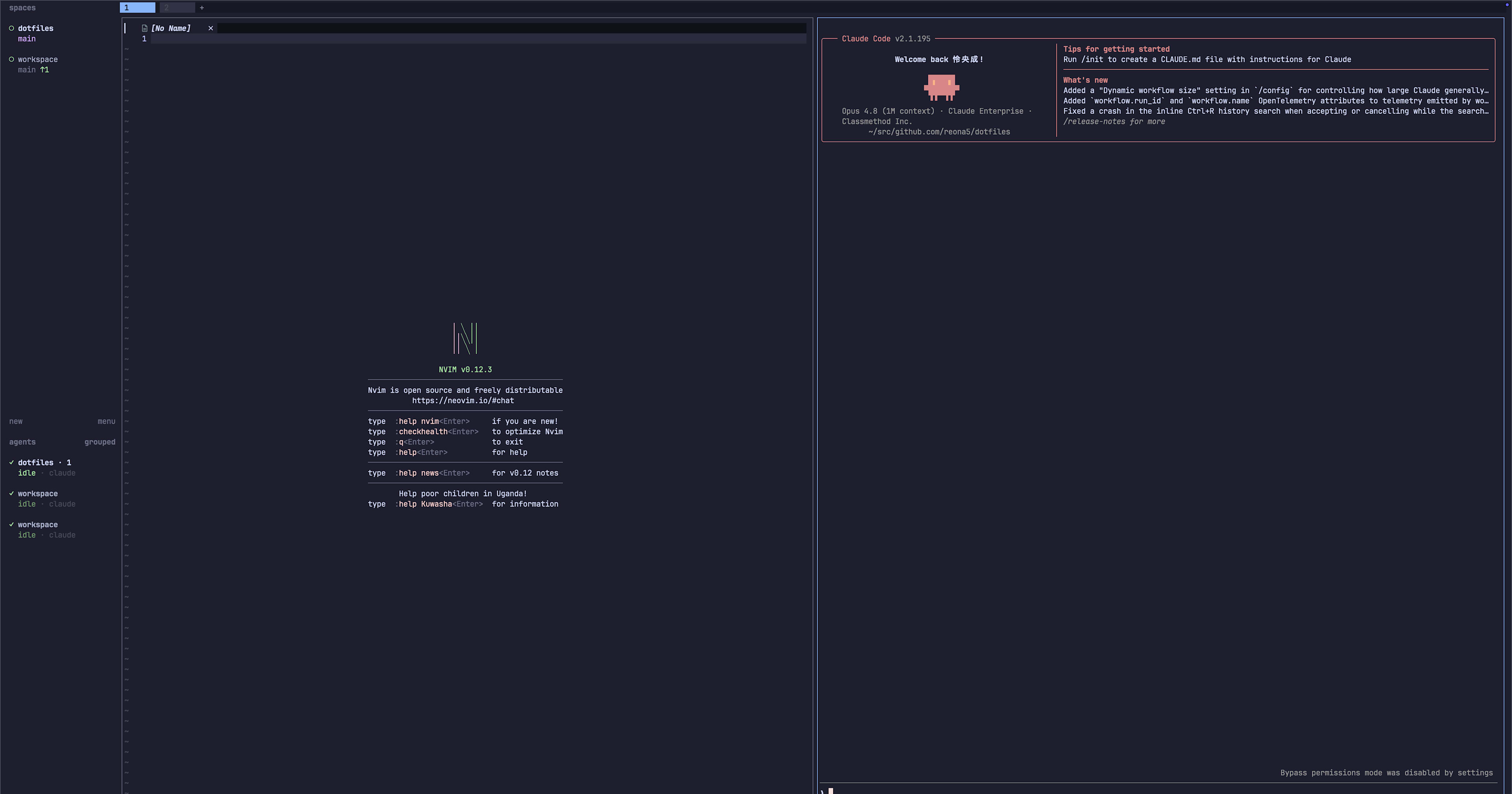
herdr is a terminal multiplexer specialized for running AI coding agents. Like tmux, it persists panes, tabs, and sessions, while natively displaying the state of agents running in each pane (idle / working / blocked / done) in a sidebar. The implementation uses Rust and the TUI library Ratatui. The official tagline is "one terminal for the whole herd," and it advertises being Electron-free, account-free, and telemetry-free.
This article introduces the steps I took to replace my environment, which was built with tmux and the tmux-agent-sidebar plugin, with herdr. This is a record of actually integrating it into my own dotfiles.
Note that herdr is at version 0.7.1 at the time of writing this article. Behavior and configuration may change with future updates. Please check the official documentation for the latest information.
Configuration Before Migration
Before the migration, I used tmux as my multiplexer and hiroppy/tmux-agent-sidebar for displaying agent status.
This plugin calls a script from agent hooks and renders the state in a tmux sidebar. In my environment, I had it integrated with Codex, configured to call hook.sh from ~/.codex/hooks.json.
The tmux setup was as follows:
- Plugin management: tpm (Tmux Plugin Manager)
- Theme: catppuccin (mocha)
- Status bar: battery / cpu / online-status / prefix-highlight
- Session persistence: continuum / resurrect
Why Migrate
The motivation for migration was wanting to handle agent state display more naturally.
tmux-agent-sidebar is a mechanism that retrofits agent awareness onto tmux, a "tool designed before agents existed." herdr, on the other hand, places agent state display at its core from the start. It identifies processes running in panes as agents and displays their state with colored indicators in the sidebar.
Additionally, herdr has features like native mouse operation and remote attaching via SSH. I decided it was worth trying as an option that leverages tmux assets while leaning toward agent operations.
I previously tried Zellij as an alternative multiplexer. However, it didn't fit my usage style and I decided not to adopt it at the time.
The main reason was that I couldn't bring over the C-q prefix I was using in tmux. Zellij uses a modal keybinding approach rather than tmux's single-prefix style. By default, you enter modes with the Primary Modifier (Ctrl) and execute common operations with the Secondary Modifier (Alt) (Zellij documentation).
Keybindings and modifier keys themselves can be customized in config.kdl. However, it is fundamentally different from the tmux-style design of "converging to a single prefix."
In that regard, herdr uses the same single-prefix style as tmux. I was able to reproduce C-q as-is with a single line of prefix = "ctrl+q". This ease of migration was also one of the reasons I chose herdr.
Installation
herdr is registered in Homebrew's core formula. Since I manage my dotfiles with Homebrew, I installed it with brew.
$ brew install herdr
After installation, verify the version.
$ herdr --version
herdr 0.7.1
I removed the tmux line from my dotfiles' .Brewfile and added herdr in its place.
brew "herdr"
Configuration
herdr's configuration file is ~/.config/herdr/config.toml. You can output the default configuration with the following command.
$ herdr --default-config
Looking at the output, pane movement in [keys] was assigned by default to prefix+h / prefix+j / prefix+k / prefix+l. This matched the Vim-style keybindings I was using in tmux, so I could use this part as-is.
I ported the main settings from my old .tmux.conf as follows:
| tmux setting | herdr setting |
|---|---|
prefix C-q |
[keys] prefix = "ctrl+q" |
Pane movement h/j/k/l |
Default focus_pane_left/down/up/right (prefix+h/j/k/l) |
| for horizontal split |
split_vertical (default prefix+v) |
- for vertical split |
split_horizontal (default prefix+minus) |
bind g to launch lazygit |
[[keys.command]] to launch lazygit in a pane |
| catppuccin mocha | [theme] name = "catppuccin" |
default-shell /bin/zsh |
[terminal] default_shell = "/bin/zsh" |
mouse on |
[ui] mouse_capture = true |
I verified split directions using the herdr CLI. herdr pane split --direction right places a new pane to the right (horizontal split), and --direction down places it below (vertical split). To preserve the correspondence of the old | (horizontal) and - (vertical), I set split_vertical as the | equivalent and split_horizontal as the - equivalent.
The lazygit launch key required attention. I was using prefix + g in tmux, but in herdr, prefix+g is assigned by default to workspace navigation (goto). To avoid the conflict, I assigned it to prefix+alt+g following the official herdr examples.
The final config.toml is as follows. Items that remain at their default values are omitted.
[theme]
name = "catppuccin"

[terminal]
default_shell = "/bin/zsh"

[keys]
prefix = "ctrl+q"

[[keys.command]]
key = "prefix+alt+g"
type = "pane"
command = "lazygit"

[ui]
mouse_capture = true
Configuration changes can be applied without restarting the server using the following command.
$ herdr server reload-config
{"id":"cli:server:reload-config","result":{"diagnostics":[],"status":"applied","type":"config_reload"}}
If diagnostics is empty and status is applied, the configuration was parsed successfully.
Claude Code Integration
herdr has built-in integration with major agents. Integration is set up with herdr integration install <agent>.
This time I integrated it with Claude Code.
$ herdr integration install claude
installed claude integration hook to /Users/<user>/.claude/hooks/herdr-agent-state.sh
ensured claude settings at /Users/<user>/.claude/settings.json
This command makes two changes. One is generating a hook script at ~/.claude/hooks/herdr-agent-state.sh. The other is appending a SessionStart hook to ~/.claude/settings.json.
The appended hook looks like this:
{
  "hooks": {
    "SessionStart": [
      {
        "hooks": [
          {
            "command": "bash '/Users/<user>/.claude/hooks/herdr-agent-state.sh' session",
            "timeout": 10,
            "type": "command"
          }
        ],
        "matcher": "*"
      }
    ]
  }
}
You can check the integration status with herdr integration status.
$ herdr integration status
claude: current (v7) (/Users/<user>/.claude/hooks/herdr-agent-state.sh)
If current is displayed, the hook is up to date. When you launch Claude Code inside a herdr pane, the hook notifies herdr of the session information, which is reflected in the sidebar's state display.
Here is a note for dotfiles managers. The hooks written to the generated settings.json contain an absolute path like /Users/<user>/.claude/hooks/.... If you share dotfiles across multiple machines, be aware that the path includes the machine name. I placed the hook script under dotfiles management and adopted a workflow where I run herdr integration install claude on each machine during setup to keep settings.json consistent.
Furthermore, herdr provides a mechanism for agents themselves to operate herdr. By loading the SKILL.md from the official repository into an agent, the agent can autonomously perform operations such as creating workspaces, tabs, and panes, as well as running commands in other panes and collecting results, via the CLI and Unix socket API (this usage is covered in detail in a Zenn article). I placed this SKILL.md as a Claude Code user skill at ~/.claude/skills/herdr/SKILL.md (with the actual file under dotfiles management). Since I manage ~/.claude comprehensively with dotfiles along with hooks and settings.json, I can handle all herdr-related settings in one place. herdr's SKILL.md already comes with frontmatter containing name and description, so simply placing it in ~/.claude/skills/herdr/ is enough for Claude Code to recognize it as a skill.
Removing tmux
After confirming herdr was working, I removed the tmux-related configuration.
- Deleted
.tmux.conf - Removed
tmuxfrom.Brewfileand uninstalled tmux itself - Deleted the Codex hook configuration that called
tmux-agent-sidebar(~/.codex/hooks.jsonand the marketplace registration inconfig.toml) - Deleted
~/.tmux/plugins(tpm and each plugin)
Don't forget to rewrite the terminal auto-launch as well. I was auto-attaching to tmux from Alacritty.
# Before
args = ["-l", "-c", "tmux a -t default || tmux new -s default"]

# After
args = ["-l", "-c", "herdr"]
herdr as a standalone command handles both attaching to an existing persistent session and creating a new session. It covers the behavior equivalent to tmux's attach || new in a single command.
I also had a zsh hook that renamed the tmux session to the repository name when navigating with ghq. Since herdr automatically labels workspaces from the working directory, this hook became unnecessary.
Thoughts After Migration
Let me summarize what I gained and what I lost from the migration.
There are three things I gained:
- Native visualization of agent state. Rather than a plugin retrofit, herdr itself displays state in the sidebar.
- Mouse operation. Panes and tabs can be handled with clicks and drags.
- Remote attach. With
herdr --remote <ssh-target>, you can attach to a session on another machine.
On the other hand, there are things I lost. Widgets like battery / cpu / online-status that I was displaying in the tmux status bar have no equivalent in herdr. If you need this information, you will need to consider other means.
Regarding session persistence, my thinking shifted from automatic restoration at startup via continuum / resurrect to persistence via herdr's resident server. As long as the herdr server keeps running, it retains engines and panes, and agents continue running even when the client is detached.
Conclusion
I introduced the migration from tmux to herdr.
herdr is a multiplexer that inherits tmux's assets of persistence and pane operations while placing agent state display at its core. If your development style involves routinely running multiple agents, I felt it was worth trying.
On the other hand, herdr is still a young tool. If you place importance on tmux's rich plugin ecosystem and fine-grained customization, tmux currently has the advantage. Please evaluate whether it fits your own usage before deciding to adopt it.