
HTTP QUERY Method (RFC 10008) Implemented in Python: Experiencing the Differences from GET and POST

This page has been translated by machine translation. View original
Introduction
In June 2026, the new HTTP method QUERY was officially standardized as RFC 10008. I actually implemented a server in Python and ran this method, which takes the "best of both worlds" from GET and POST.
TL;DR
What is the QUERY Method
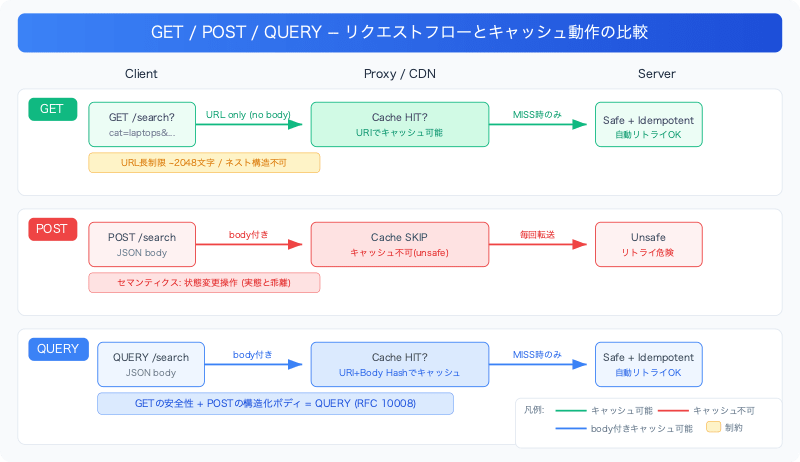
When designing search APIs in HTTP, developers have long struggled with this dilemma.
| Property | GET | POST | QUERY |
|---|---|---|---|
| Request Body | None | Yes | Yes |
| Safe | Yes | No | Yes |
| Idempotent | Yes | No | Yes |
| Cacheable | Yes | Limited | Yes |
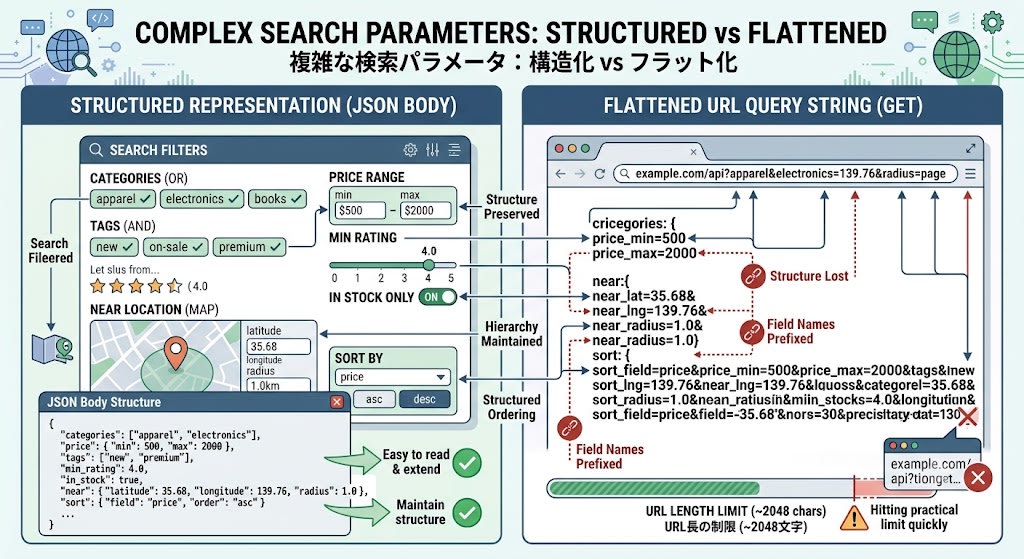
- GET is safe, idempotent, and cacheable, but cannot have a body. Complex search conditions must be crammed into URL query strings, causing pain with URL length limits (effectively around 2048 characters) and expressing nested structures
- POST can have a body, but carries the semantics of "an operation that modifies state." Proxies and caches treat it as "having side effects," making caching ineffective and automatic retries unsafe
QUERY is a method that maintains GET's safety, idempotency, and cacheability while allowing structured request bodies to be sent just like POST.
What are Safe, Idempotent, and Cacheable, and Why Do They Matter
Here is a concrete explanation of each of the three properties that appeared in the table above.
Safe
This means that the server's state does not change when a request is sent. Reading a page with GET is safe; deleting a record with DELETE is not safe.
Why it matters: Browsers, crawlers, and prefetch mechanisms freely send requests when the method is "safe." In 2005, Google Web Accelerator prefetched links, causing DELETE operations disguised as GET to fire and delete user data. The declaration of "safe" is an indispensable signal for the automation of the entire infrastructure.

Idempotent
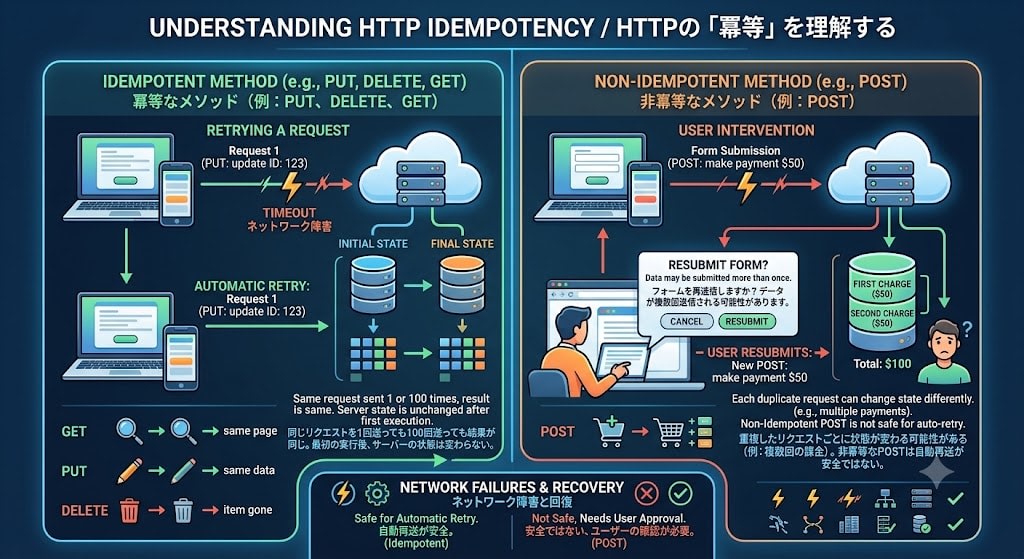
This means that sending the same request once or 100 times produces the same result. GET, PUT, and DELETE are idempotent. POST is not idempotent (sending a payment twice may result in two charges).
Why it matters: Automatic retries during network failures. When a request times out, clients and proxies can automatically resend if the method is idempotent. Resending a POST is not safe, which is why browsers show a confirmation dialog saying "Resubmit form?"
Cacheable
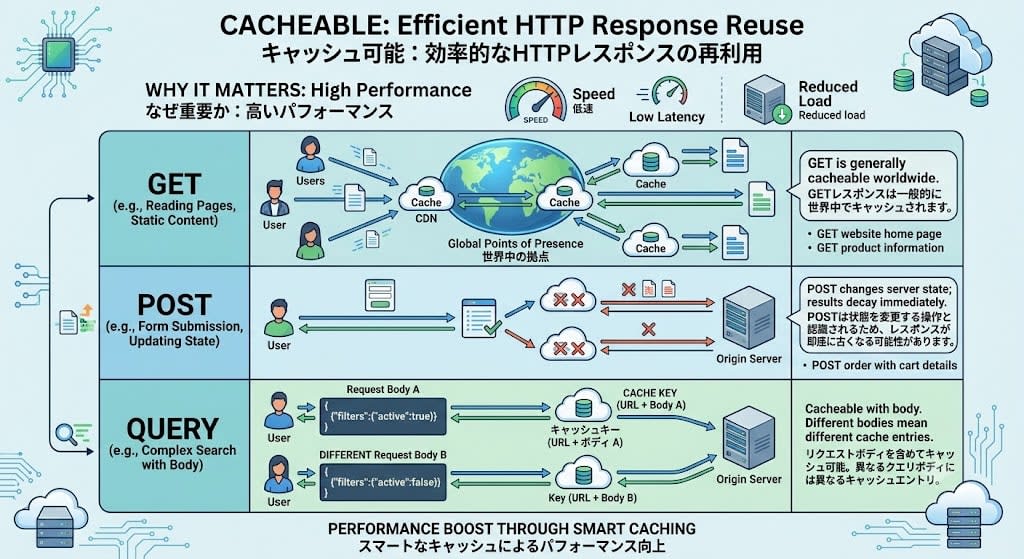
This means that responses can be stored and reused for identical requests.
Why it matters: Performance. CDNs cache GET responses at locations around the world. POST responses are generally not cached because caching mechanisms recognize POST as a state-modifying operation, meaning responses may become stale immediately. QUERY is cacheable just like GET, but includes the request body in the cache key, so different query bodies use different cache entries.
QUERY is Not a Replacement for GET or POST
QUERY is not a replacement for existing methods; it fills a use case where no appropriate method previously existed.
| Use Case | Appropriate Method | Reason |
|---|---|---|
| Fetching a resource by URL | GET | Simple, universal, URL itself is the resource identifier |
| Search with few parameters | GET | ?q=shoes&color=red level is sufficient in the URL |
| Creating, updating, deleting resources | POST/PUT/DELETE | Operations that modify state |
| Search with complex structured queries | QUERY | Search conditions that exceed GET's URL limitations |
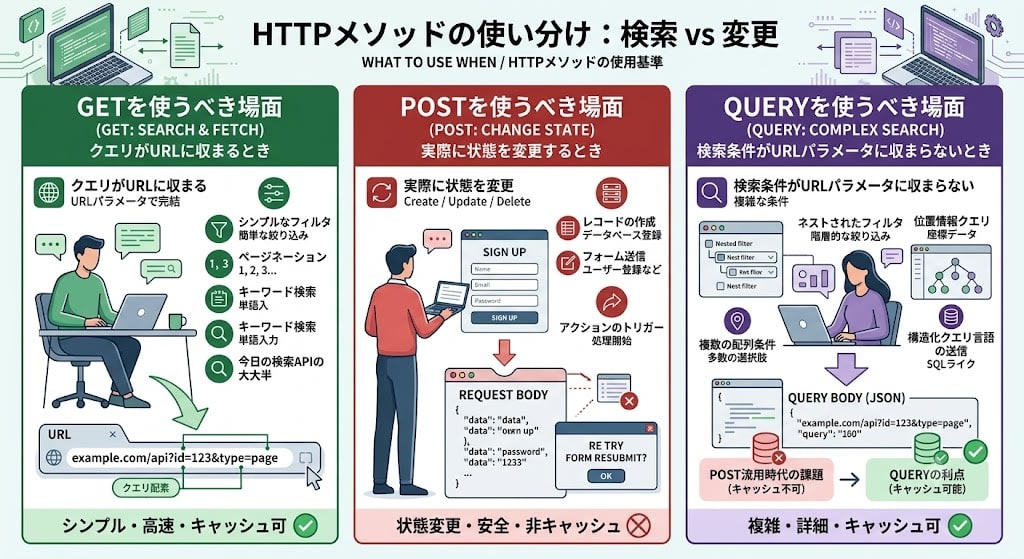
When to use GET: When the query fits in the URL. Simple filters, pagination, keyword search. The vast majority of today's search APIs are fine with GET.
When to use POST: When actually modifying state. Creating records, form submission, triggering actions.
When to use QUERY: When search conditions don't fit in URL parameters. Nested filters, geolocation queries, multiple array conditions, sending structured query languages. Before QUERY existed, POST was repurposed for this use, sacrificing cacheability.
Why It Didn't Exist Until Now
The co-authors of RFC 10008 are James Snell of Cloudflare and Mike Bishop of Akamai. The fact that engineers from two major CDN companies wrote the specification suggests that QUERY support at the CDN level may be realized relatively quickly.
For many years, the pattern "POST /search" was the de facto standard for search APIs, but this semantically means "create a search resource," which was at odds with the actual intent. The QUERY method fundamentally resolves this problem.
Prerequisites and Environment
- Python 3.12+
- Starlette 0.46+ (ASGI framework)
- uvicorn 0.34+
- httpx 0.28+ (client)
- uv (package manager)
The demo code is in the following repository:
Demo Overview
Using a product catalog search API as the subject, the same search conditions are executed with the three methods GET, POST, and QUERY to compare the differences.
Example search conditions:
{
  "categories": ["laptops", "phones"],
  "price": {"min": 500, "max": 2000},
  "tags": ["pro"],
  "min_rating": 4.5,
  "in_stock": true,
  "near": {"lat": 35.68, "lng": 139.76, "radius_deg": 1.0},
  "sort": {"field": "price", "order": "desc"}
}
Meaning of each field:
| Field | Type | Description |
|---|---|---|
categories |
string[] | Target categories. Multiple specified as an array (OR condition) |
price |
object | Price range. Nested range specification with min/max |
tags |
string[] | Product tags. Matches all items in array (AND condition) |
min_rating |
number | Minimum rating (0–5) |
in_stock |
boolean | Filter to only products in stock |
near |
object | Proximity search by geolocation. Latitude, longitude, and radius specified in nested form |
sort |
object | Sort conditions. Target field and ascending/descending order specified in nested form |
Notably, price, near, and sort are nested objects. Trying to express these in GET query strings requires flattening them like price_min=500&price_max=2000&near_lat=35.68&near_lng=139.76&near_radius=1.0, losing the structure. As the number of fields increases, the URL grows longer and quickly reaches the practical limit (approximately 2048 characters).
Server Implementation
Project Setup
# pyproject.toml
[project]
name = "http-query-demo"
version = "0.1.0"
requires-python = ">=3.12"
dependencies = [
    "starlette>=0.46",
    "uvicorn>=0.34",
    "httpx>=0.28",
]
uv sync
uv run uvicorn server:app --reload
Routing for the QUERY Method
As of June 2026, most web frameworks do not natively support the QUERY method. In Starlette, this was handled by passing a custom method name to the methods parameter of Route.
async def search_dispatcher(request: Request) -> JSONResponse:
    """Dispatch to handler based on HTTP method"""
    match request.method:
        case "GET":
            return await search_via_get(request)
        case "POST":
            return await search_via_post(request)
        case "QUERY":
            return await search_via_query(request)
        case "OPTIONS":
            return await product_search_options(request)
        case _:
            return JSONResponse(
                {"error": f"Method {request.method} not allowed"},
                status_code=405,
                headers={"Allow": "GET, POST, QUERY, OPTIONS"},
            )

routes = [
    Route(
        "/products/search",
        search_dispatcher,
        methods=["GET", "POST", "QUERY", "OPTIONS"],
    ),
]

app = Starlette(routes=routes)
The key point is that Starlette's Route accepts any string in the methods list. The framework does not explicitly support "QUERY"; it simply accepts unknown method names.
GET Handler: The Limits of Flat Query Strings
async def search_via_get(request: Request) -> JSONResponse:
    params = request.query_params
    query: dict[str, Any] = {}

    if cats := params.get("categories"):
        query["categories"] = cats.split(",")
    if price_min := params.get("price_min"):
        query.setdefault("price", {})["min"] = int(price_min)
    if price_max := params.get("price_max"):
        query.setdefault("price", {})["max"] = int(price_max)
    # ... individual parameters like near_lat, near_lng, near_radius are needed
To express nested structures (price.min, near.lat), you must define your own convention for flat parameter names (price_min, near_lat). This requires implicit agreements between client and server, and makes representation in OpenAPI schemas cumbersome.
POST Handler: Works, but Semantics Are Wrong
async def search_via_post(request: Request) -> JSONResponse:
    body = await request.body()
    content_type = request.headers.get("content-type", "")
    if "json" not in content_type:
        return JSONResponse(
            {"error": "Content-Type must be application/json"},
            status_code=415,
        )

    query = json.loads(body)
    data = search_products(query)
    return JSONResponse(data)
The code is simple, but the problem is HTTP semantics.
- Proxies and CDNs treat POST as "an operation involving state changes" and do not cache responses
- Automatic retries are not safe during network failures (sending the same POST twice may cause side effects twice)
- The browser asking "Resubmit form?" when pressing the back button is also a manifestation of POST not being safe
QUERY Handler: RFC 10008-Compliant Implementation
async def search_via_query(request: Request) -> JSONResponse:
    body = await request.body()

    # RFC 10008 §3: Content-Type header is required
    content_type = request.headers.get("content-type", "")
    if not content_type:
        return JSONResponse(
            {"error": "QUERY requests MUST include a Content-Type header (RFC 10008 §3)"},
            status_code=400,
        )

    # RFC 10008 §3: For unsupported media types, respond with 415 + Accept-Query header listing supported types
    if "json" not in content_type:
        return JSONResponse(
            {"error": f"Unsupported media type: {content_type}"},
            status_code=415,
            headers={"Accept-Query": '"application/json"'},
        )

    # RFC 10008 §4: QUERY responses are cacheable
    # Include a hash of the request body in the cache key
    cache_key = _cache_key("QUERY", request.url.path, body)
    if cached := _get_cached(cache_key):
        return JSONResponse(cached, headers={"X-Cache": "HIT"})

    try:
        query = json.loads(body)
    except json.JSONDecodeError as e:
        # RFC 10008 §3: Syntactically correct but semantically unprocessable → 422
        return JSONResponse(
            {"error": f"Unprocessable query content: {e}"},
            status_code=422,
        )

    data = search_products(query)
    _set_cache(cache_key, data)

    return JSONResponse(
        data,
        headers={
            "X-Cache": "MISS",
            "Accept-Query": '"application/json"',
        },
    )
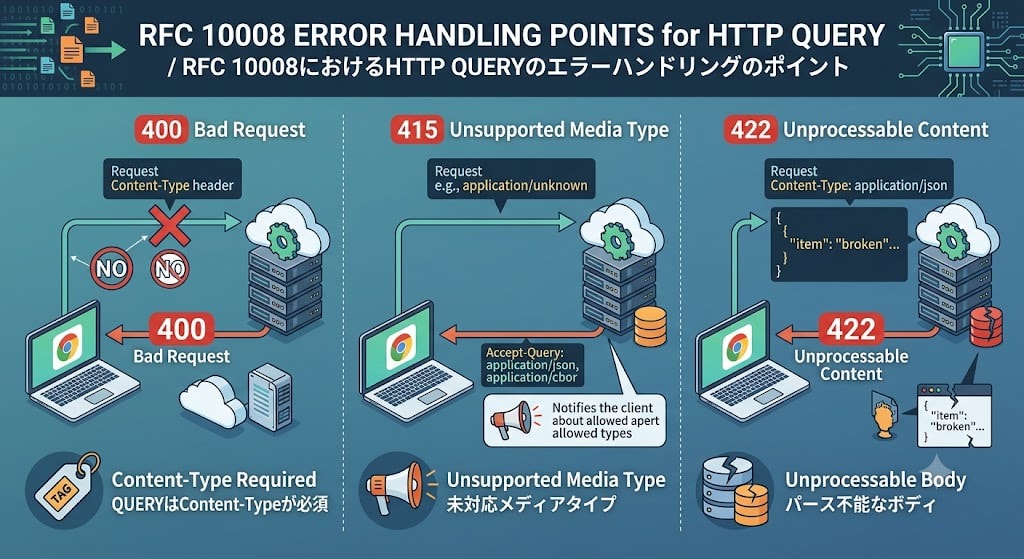
Key points of error handling defined by RFC 10008:
| Situation | Status Code | Description |
|---|---|---|
| No Content-Type header | 400 Bad Request | Content-Type is required for QUERY |
| Unsupported media type | 415 Unsupported Media Type | Notify of supported types via Accept-Query header |
| Unparseable body | 422 Unprocessable Content | Media type is correct but content is invalid |
Cache Implementation
The greatest advantage of QUERY is cacheability. Unlike GET, the cache key must include not only the URI but also the request body.
def _cache_key(method: str, path: str, body: bytes) -> str:
    body_hash = hashlib.sha256(body).hexdigest()[:16]
    return f"{method}:{path}:{body_hash}"
RFC 10008 §4 states that caches may normalize "semantically insignificant differences" in the body. For example, in JSON, differences in key order or indentation can be ignored. However, normalization must not be performed if the client specifies the no-transform cache directive.
Verification
Sending a QUERY Request with curl
curl -s -D - -X QUERY "http://localhost:8000/products/search" \
  -H "Content-Type: application/json" \
  -d '{
    "categories": ["laptops", "phones"],
    "price": {"min": 500, "max": 2000},
    "tags": ["pro"],
    "min_rating": 4.5,
    "in_stock": true,
    "near": {"lat": 35.68, "lng": 139.76, "radius_deg": 1.0},
    "sort": {"field": "price", "order": "desc"}
  }'
Since curl can specify any HTTP method with -X QUERY, it works as-is.
First Response (Cache MISS)
HTTP/1.1 200 OK
x-search-method: QUERY
x-cache: MISS
x-cache-key: QUERY:/products/search:7f73fb16e7395e7d
accept-query: "application/json"
x-note: Safe + idempotent + cacheable + structured body (RFC 10008)

{"total":1,"offset":0,"limit":10,"results":[{"id":4,"name":"iPhone 16 Pro",...}]}
Second Response (Cache HIT)
Sending the same request again:
HTTP/1.1 200 OK
x-search-method: QUERY
x-cache: HIT
x-cache-key: QUERY:/products/search:7f73fb16e7395e7d
It hits with the same cache key. This caching behavior cannot be achieved with POST by specification.
Python Client (httpx)
import httpx
import json

SEARCH_QUERY = {
    "categories": ["laptops", "phones"],
    "price": {"min": 500, "max": 2000},
    "tags": ["pro"],
}

with httpx.Client(base_url="http://localhost:8000") as client:
    # httpx supports custom HTTP methods via the request() method
    resp = client.request(
        "QUERY",
        "/products/search",
        content=json.dumps(SEARCH_QUERY),
        headers={"Content-Type": "application/json"},
    )
    print(resp.json())
Since httpx's client.request() accepts any HTTP method name as its first argument, QUERY requests can be sent without any special handling.
Visualizing GET URL Length Issues
From the Python client execution results, checking the URL length for GET:
GET /products/search?... (flat query string)
  → URL length: 212 chars
Even with today's simple search conditions, it's 212 characters. In practice, search conditions can have 20–30 fields, quickly reaching the practical URL limit (approximately 2048 characters).
Checking Error Handling
No Content-Type → 400: QUERY requests MUST include a Content-Type header (RFC 10008 §3)
Wrong Content-Type → 415: Unsupported media type: text/plain
  Accept-Query header: "application/json"
Malformed JSON → 422: Unprocessable query content: ...
Via the Accept-Query header, clients can automatically learn "which media types this endpoint accepts for QUERY."
Important Specification Points of the QUERY Method
Accept-Query Header
Servers can return Accept-Query in response headers to notify clients of the media types supported for QUERY.
Accept-Query: "application/json", application/sql;charset="UTF-8"
This becomes the foundation for content negotiation when supporting query languages other than JSON (SQL-like, JSONPath, etc.) in the future.
Redirect Behavior
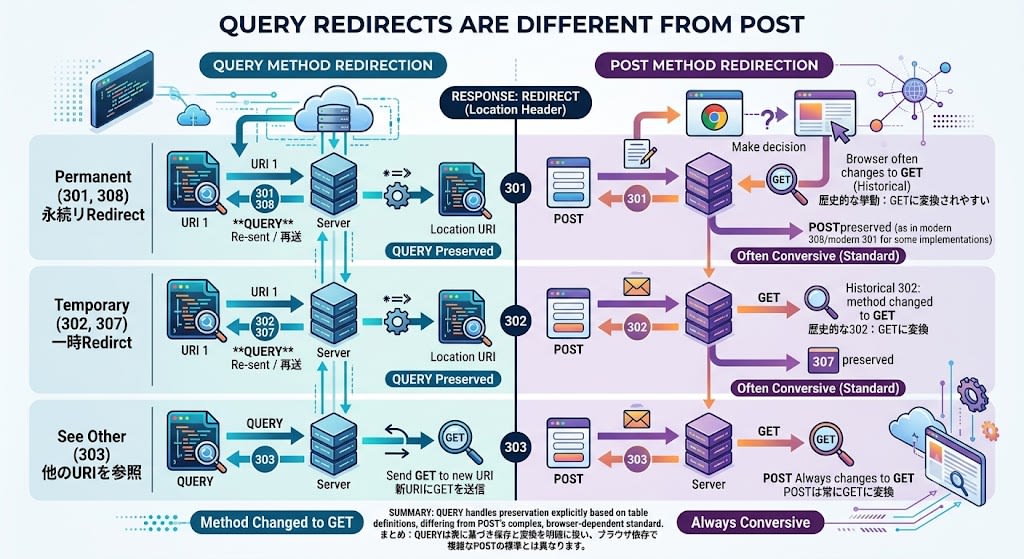
QUERY redirects differ from POST:
| Status | Behavior |
|---|---|
| 301/308 (Permanent) | Resend QUERY to new URI |
| 302/307 (Temporary) | Resend QUERY to new URI |
| 303 (See Other) | Send GET to new URI |
With POST, there was ambiguous behavior where methods changed to GET on 301/302, but with QUERY it is clearly defined.
CORS Impact
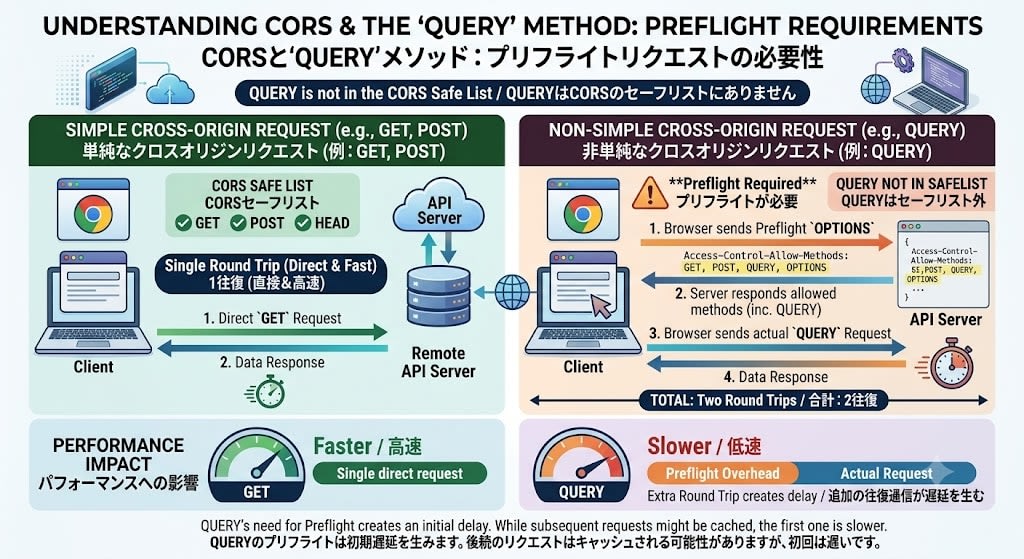
Since QUERY is not included in the CORS safelist, preflight requests (OPTIONS) are required when sending from a browser.
Access-Control-Allow-Methods: GET, POST, QUERY, OPTIONS
This may affect performance for browser client APIs (additional round-trip communication occurs).
Relationship with GraphQL: Complementary, Not Competing
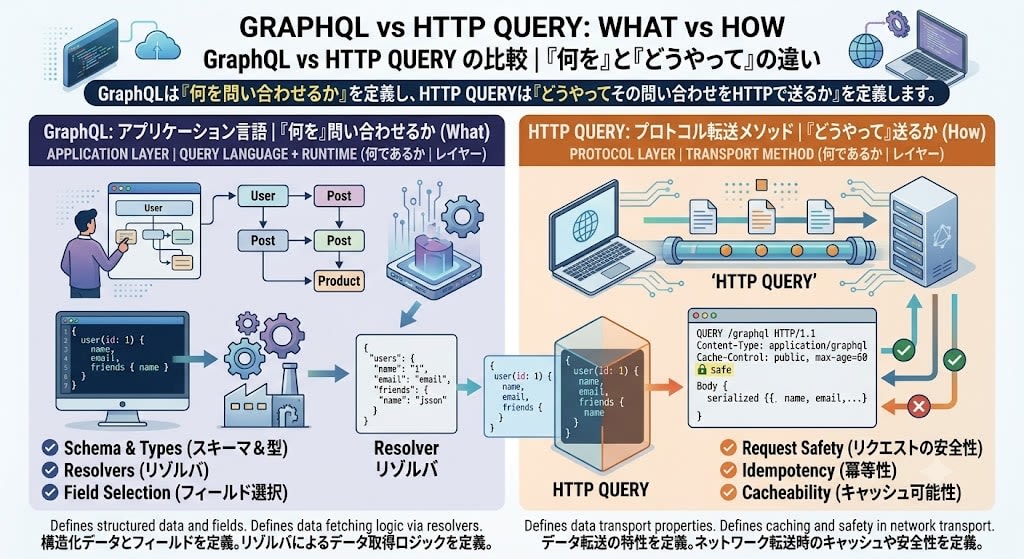
You might wonder, "Is the QUERY method trying to solve the same problem as GraphQL?" To conclude upfront: they are complementary, not competing. The two operate at different layers.
| GraphQL | HTTP QUERY | |
|---|---|---|
| What it is | Query language + runtime | Transport method |
| Layer | Application layer (how queries are expressed) | Protocol layer (how queries are sent) |
| What it defines | Schema, types, resolvers, field selection | Request safety, idempotency, cacheability |
GraphQL defines what to query, while HTTP QUERY defines how to send that query over HTTP.
GraphQL's Current Transport Problem
Today's GraphQL primarily sends queries via POST:
# Current common way to send GraphQL
curl -X POST https://api.example.com/graphql \
  -H "Content-Type: application/json" \
  -d '{"query": "{ products(category: \"laptops\") { name price } }"}'
As a result, GraphQL inherits POST's problems:
- CDNs don't cache responses (POST is treated as state-modifying)
- Cannot automatically retry on network failures
- No safety guarantees at the HTTP layer
Some GraphQL implementations also use GET (putting the query in the URL), but complex GraphQL queries quickly hit URL length limits.
QUERY Can Improve GraphQL's Transport
Sending GraphQL read queries using the QUERY method gives you the benefits of both:
# GraphQL over HTTP QUERY — an ideal combination
curl -X QUERY https://api.example.com/graphql \
  -H "Content-Type: application/graphql+json" \
  -d '{"query": "{ products(category: \"laptops\") { name price } }"}'
CDNs can determine "this is safe, idempotent, and cacheable." GraphQL mutations (data changes) remain as POST — since mutations actually modify state, POST semantics are correct.
The Real Axis of Competition
The market doesn't need to choose between GraphQL or QUERY. Competition exists at the level of API design philosophy:
| Comparison | Competing? |
|---|---|
| GraphQL vs REST | Yes — Different API design approaches |
| HTTP QUERY vs repurposing POST for search | Yes — QUERY replaces the POST workaround |
| GraphQL vs HTTP QUERY | No — Different layers, can be combined |
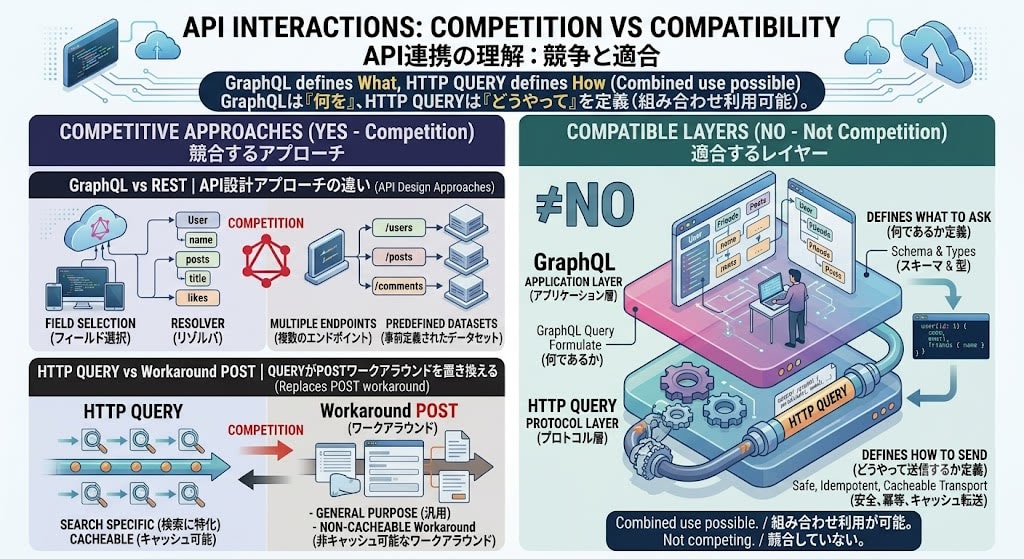
QUERY is actually good news for GraphQL teams, because there is a possibility that the caching problem at the HTTP transport layer can be resolved without changing GraphQL itself at all.
Framework Support Status (as of June 2026)
| Framework | QUERY Support | Notes |
|---|---|---|
| Starlette | Possible as custom method | Works with methods=["QUERY"] |
| Express.js | app.query() not implemented |
Can handle with app.all() + manual detection |
| FastAPI | Possible via Starlette | Native decorator not supported |
| Spring Boot | Custom annotation required | @RequestMapping(method="QUERY") |
| Ruby on Rails | Under discussion | Proposal on forum |
Production use is difficult until all of frameworks, reverse proxies, API gateways, CDNs, and WAFs support it. However, the fact that the specification's co-authors are engineers from Cloudflare and Akamai suggests CDN-level support may be realized early.
Summary
The HTTP QUERY method of RFC 10008 is the official answer to the long-standing workaround of "search APIs have no choice but to use POST."
What QUERY solves:
- Sending structured request bodies that were impossible with GET
- Restoring the safety, idempotency, and cacheability that were lost with POST
- Explicit content negotiation via the
Accept-Queryheader
Current limitations:
- Native framework support is nearly absent (many can handle it as a custom method)
- CDN, proxy, and WAF support is still forthcoming
- CORS preflight required (for browser client APIs)
This is not yet the phase for immediate production deployment, but it is worth understanding the specification and being prepared. In particular, when designing APIs with complex search conditions, it's a good idea to be mindful of "designs that make future migration to QUERY easy."