
The story of Jest hanging in CI, and the story of migrating to Floci because LocalStack became paid

This page has been translated by machine translation. View original
Introduction
"All tests are passing, but CI never finishes."
Have you ever experienced this? I ran into exactly this problem recently. On GitHub Actions, after all 44 server tests (Jest) passed, the Jest process wouldn't exit and the job kept hanging.
While investigating, I tried to reproduce the issue locally and discovered that LocalStack had discontinued its Community edition in March 2026. While searching for an alternative tool, I came across Floci.
This article summarizes that entire investigation and the steps taken to address it.
The Problem of Jest Hanging in CI
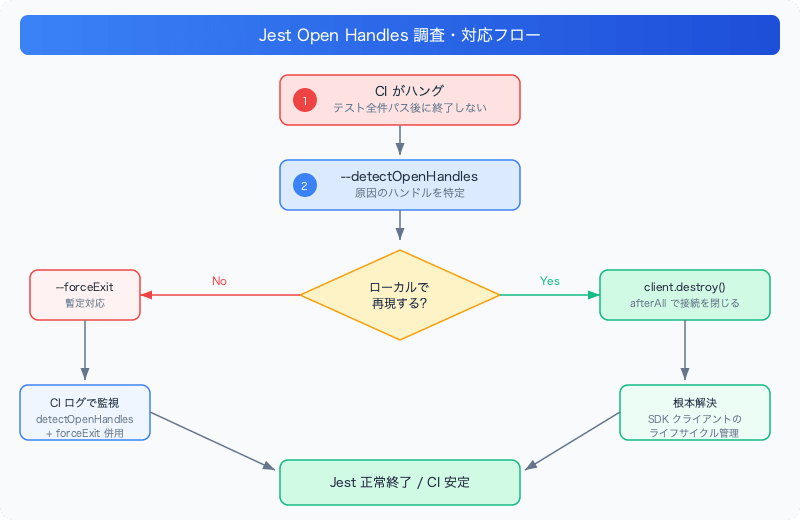
Symptoms
Looking at the GitHub Actions logs, this message appeared:
Tests:       44 passed, 44 total
Ran all test suites.

Jest did not exit one second after the test run has completed.

'This usually means that there are asynchronous operations that weren't stopped
in your tests. Consider running Jest with `--detectOpenHandles` to troubleshoot
this issue.'
All tests passed. However, the Jest process wouldn't exit, and the job kept waiting for a timeout or cancellation without executing subsequent steps.
Cause: Open Handles
When Jest can't terminate its process, the cause is usually that asynchronous connections or timers haven't been closed somewhere. Common examples:
- AWS SDK clients (DynamoDB / S3, etc.) holding connections open
- HTTP servers not being
close()d setInterval/setTimeoutnot beingclearInterval/clearTimeoutd
Investigation: --detectOpenHandles
Jest has an option to identify the cause.
jest --detectOpenHandles
Running with this flag outputs which handles are still open, along with a stack trace showing which file and line generated them.
● Jest has detected the following 1 open handle potentially keeping Jest from exiting:

  ● TCPWRAP

      17 |   const client = new DynamoDBClient({ region: "ap-northeast-1" });
         |                  ^
This makes it immediately clear which AWS SDK client is responsible.
Temporary Fix: --forceExit
Before getting to the root cause fix (such as calling destroy() on clients in afterAll), you can use --forceExit as a temporary measure to keep CI from stalling.
Simply add it to the test script in package.json.
{
  "scripts": {
    "test": "jest --runInBand --forceExit"
  }
}
--forceExit forcibly terminates Jest after tests complete. Open handles will remain, but CI will no longer hang. You can also combine it with --detectOpenHandles to output diagnostic information in CI logs while still exiting normally.
"test": "jest --runInBand --detectOpenHandles --forceExit"
Key Point: When the Issue Doesn't Reproduce Locally
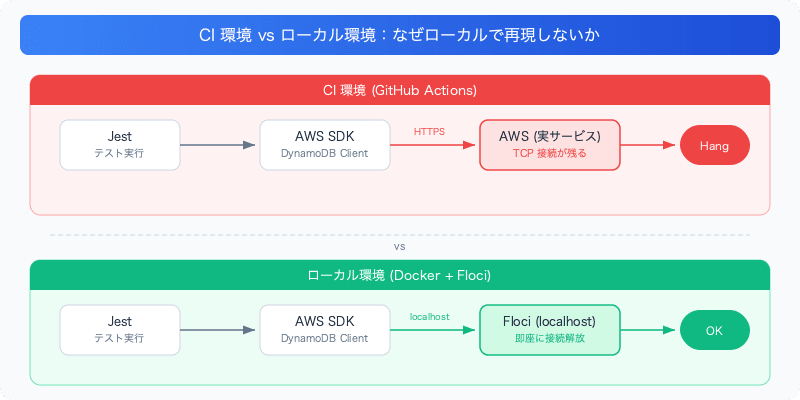
In this case, even with --detectOpenHandles enabled locally, the problem didn't reproduce and Jest exited normally.
The reason is that locally, a mock tool (Floci, described later) is used to emulate AWS, so all AWS API calls are contained locally. In CI, connections to actual AWS services (such as Kendra) remain open, which is likely what caused the hang.
In this situation, the practical approach is to use --forceExit to let CI exit normally while using the --detectOpenHandles logs to identify the source of the problem.
LocalStack Had Moved to a Paid Model
When I tried to reproduce the issue locally, I hit a wall when attempting to use LocalStack.
What Happened
License activation failed! 🔑❌

Reason: No credentials were found in the environment.
Please make sure to either set the LOCALSTACK_AUTH_TOKEN variable to a valid auth token.
Previously it was possible to start LocalStack with just docker run localstack/localstack, but now it requires an auth token and won't start.
Discontinuation of the LocalStack Community Edition
Upon investigation, I found that LocalStack discontinued its Community edition (free, no license required) on March 23, 2026.
| Period | Status |
|---|---|
| Up to March 2026 | localstack/localstack image available for free |
| After March 2026 | Auth token required for all images |
A legacy image called localstack/localstack:community-archive exists, but commercial use requires separate confirmation. The free tier for free accounts is explicitly stated to be for "personal and non-commercial" use.
For use in business projects, you'll need to obtain a commercial license or migrate to an alternative tool.
Floci: An MIT-Licensed LocalStack-Compatible Tool
When searching for a LocalStack alternative, Floci emerged as a strong candidate.
What Is Floci
- MIT license (commercial use allowed, free)
- Drop-in replacement for LocalStack Community (same port
4566, same credential format) - Emulates 50+ AWS services (DynamoDB, S3, SQS, Lambda, etc.)
- No auth token required
Since it uses the same endpoint as LocalStack (http://localhost:4566), you can switch over without changing any existing code.
Setup Instructions
1. Start Floci
docker run -d -p 4566:4566 floci/floci
Verify it's running:
curl -s http://localhost:4566/_localstack/health
If you see "dynamodb":"running" and "s3":"running", you're good to go.
2. Set Up AWS Resources
Since Floci doesn't persist data, you need to create tables and buckets every time it starts. If you have an existing setup script for LocalStack, you can use it as-is.
It works just by setting dummy AWS credentials (Floci doesn't validate credentials).
AWS_ACCESS_KEY_ID=test AWS_SECRET_ACCESS_KEY=test node scripts/setup.js
3. Run Tests
AWS_ACCESS_KEY_ID=test AWS_SECRET_ACCESS_KEY=test jest
If you're using Colima instead of Docker Desktop, start Colima first.
colima start
docker run -d -p 4566:4566 floci/floci
Comparison with LocalStack
| Item | LocalStack (after 2026) | Floci |
|---|---|---|
| License | Paid plan required for commercial use | MIT (commercial use allowed) |
| Auth token | Required | Not required |
| Port | 4566 | 4566 (compatible) |
| Number of supported services | Many (expanded with Pro plan) | 50+ |
| Startup speed | Somewhat slow | Fast (24ms) |
Summary
Here's a recap of the steps taken:
- Jest hanging → Identified the cause with
--detectOpenHandles, applied a temporary fix with--forceExit. If the issue doesn't reproduce locally, actual AWS connections in CI may be the cause. - LocalStack moving to paid → After March 2026, business use requires a paid plan or an alternative tool.
- Migration to Floci → MIT license, LocalStack-compatible, no auth token required, and a drop-in replacement.
"Only CI hangs but it doesn't reproduce locally" is a frustrating situation, but adding --detectOpenHandles --forceExit to CI and examining the logs is a reliable, if painstaking, approach to investigation. As for LocalStack's move to a paid model, alternatives like Floci are increasingly available, so I'd recommend choosing a tool that fits your licensing requirements.