Overview Explanation for React Beginners
This page has been translated by machine translation. View original
Introduction
When you start learning React, names like Node.js, npm, Vite, react-dom, and TypeScript appear one after another alongside React itself. The goal of this article is to help you always know where you stand by understanding where each of these terms fits in the overall picture. Rather than diving into how to write code, this article focuses solely on "what role each plays and where it operates."
The Big Picture
The following elements exist within the React ecosystem.
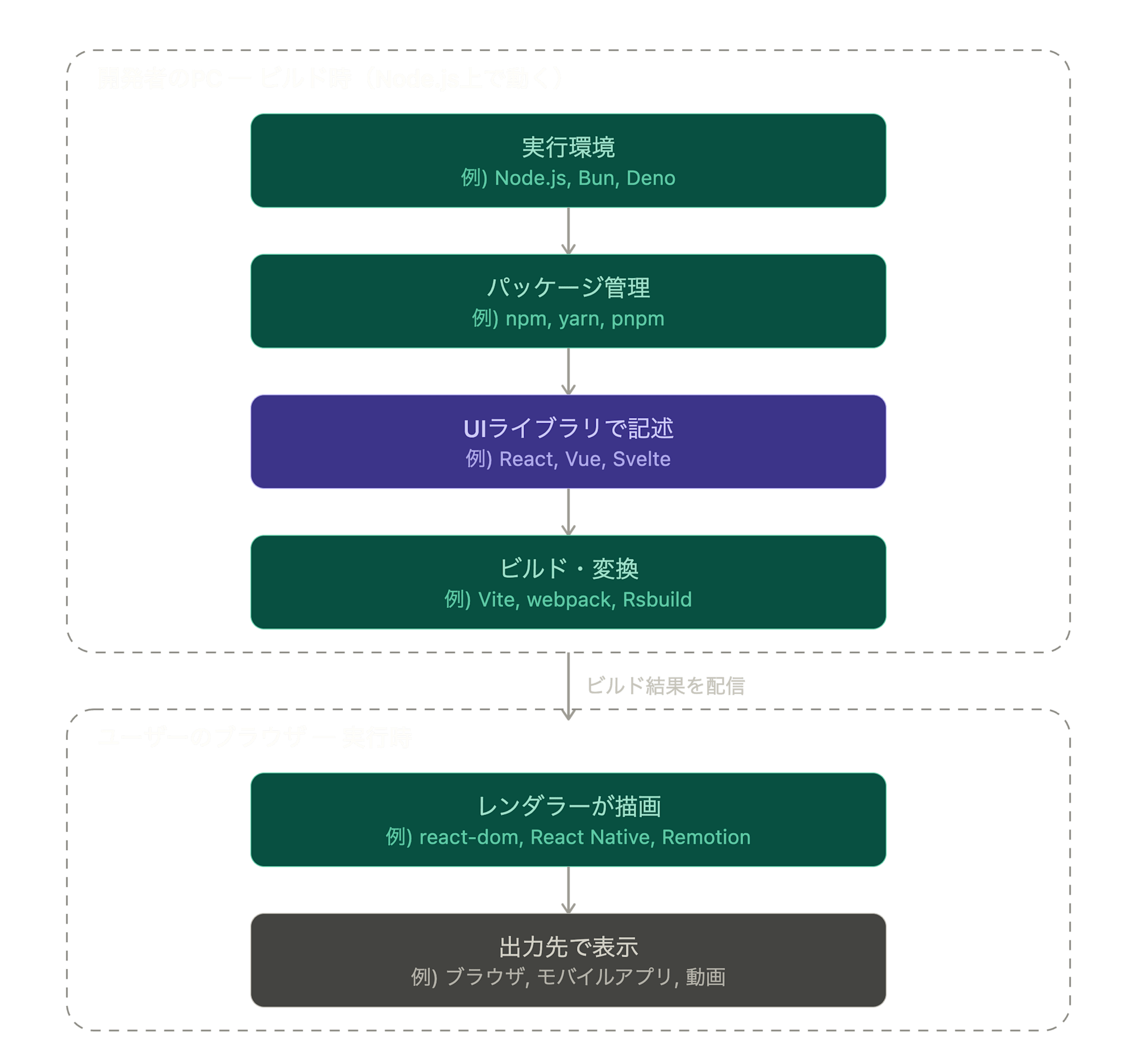
The flow goes like this: set up a runtime environment, use a package manager to obtain components, write code with a UI library, have a build tool transform and bundle everything, deliver it, and then on the browser side a renderer draws the screen and displays it.
However, it is important to note that build tools like Vite only transform and bundle code — they do not appear in the browser after delivery. What actually reaches the browser and operates at runtime is the "code written with the UI library" along with the "react-dom" bundled with it.
Roles and Scope by Category
From here, we will look at each element that appeared in the big picture, organized by category. Options within the same category are generally interchangeable, but the degree of freedom and how to choose differs by category.
Runtime Environment
A runtime environment is what loads and runs code and tools written in JavaScript outside the browser (on the developer's PC). Other development tools such as npm and Vite also run on top of it. Specific examples include the following.

| Name | Features |
|---|---|
| Node.js | The most widely used standard. Rich in information and compatible tools |
| Deno | A successor by the creator of Node.js. Can run TypeScript as-is and emphasizes security |
| Bun | A new runtime focused on speed. Also has built-in features for package management and testing |
While JavaScript also runs in browsers, the role is different. A browser runs JavaScript to display screens for end users, whereas a runtime environment runs JavaScript for development work on the developer's PC. Browsers have restrictions such as limited file read/write access for safety reasons, but runtime environments have no such restrictions and can perform development-necessary operations like file manipulation and package retrieval. This is why a runtime environment forms the foundation of React development.
Package Management
Package management is for obtaining and managing libraries such as React, and for running development commands. It operates on the developer's PC side. Specific examples include the following.

| Name | Features |
|---|---|
| npm | Bundled with Node.js and ready to use as a standard |
| yarn | Introduced to improve speed and functionality |
| pnpm | Characterized by saving components in a shared location to reduce disk usage |
Language
A language is what you use to write the code itself. What browsers can directly understand is JavaScript, and TypeScript is an extension of it with types added. Specific examples include the following.

| Name | Features |
|---|---|
| JavaScript | The foundational language that browsers and Node.js can interpret as-is |
| TypeScript | An extension of JavaScript with types added. Errors can be detected in advance, and it is converted to JavaScript at build time (type information does not remain at runtime) |
Build Tools
Build tools are for transforming the code you have written and the libraries you have loaded into a form that browsers can understand, and bundling them together. They operate on the developer's PC side (at build time) and do not appear at runtime after delivery. Specific examples include the following.

| Name | Features |
|---|---|
| Vite | Fast startup and instant reflection of changes on screen. Widely used today |
| webpack | The previous mainstream. Highly configurable and still widely used in existing projects |
| Rsbuild | Built with Rust for high speed. Aims for a similar experience to webpack |
UI Library (Core)
A UI library is the core for describing screens as combinations of "components." React, the main subject of this article, falls into this category. Representative examples that serve the same role include the following.

| Name | Features |
|---|---|
| React | Builds UIs by combining components. Extremely rich in compatible tools and information |
| Vue | A widely used option alongside React |
| Svelte | Uses an approach of optimizing and outputting in advance, resulting in lower runtime overhead |
These can substitute for each other, but if you switch React to a different system, the renderer and surrounding libraries mentioned next will also be replaced with ones specific to that system.
Renderer
A renderer is for drawing components written in React to the actual output destination. It operates at runtime. React itself does not determine "where to draw," and that is decided here. Unlike other categories, this is not something you swap out based on preference — it is chosen based on the output destination. Specific examples include the following.

| Name | Output Destination |
|---|---|
| react-dom | Web (browser DOM). The most standard |
| React Native | iOS / Android mobile apps |
| Remotion | Video files |
| React Three Fiber | 3D (WebGL) |
Surrounding Libraries
Surrounding libraries are for adding functionality that React alone does not provide, as needed. They operate at runtime. There are representative options for each domain, and you do not need to use all of them from the start. Specific examples include the following.

| Domain | Role | Representative Examples |
|---|---|---|
| Routing | Switches the displayed screen based on the URL | React Router |
| State Management | Manages data shared across multiple components | Zustand, Redux Toolkit |
| Data Fetching | Organizes and holds the results of server communication | TanStack Query |
| Styling | Applies visual appearance (CSS) | Tailwind CSS |
Summary
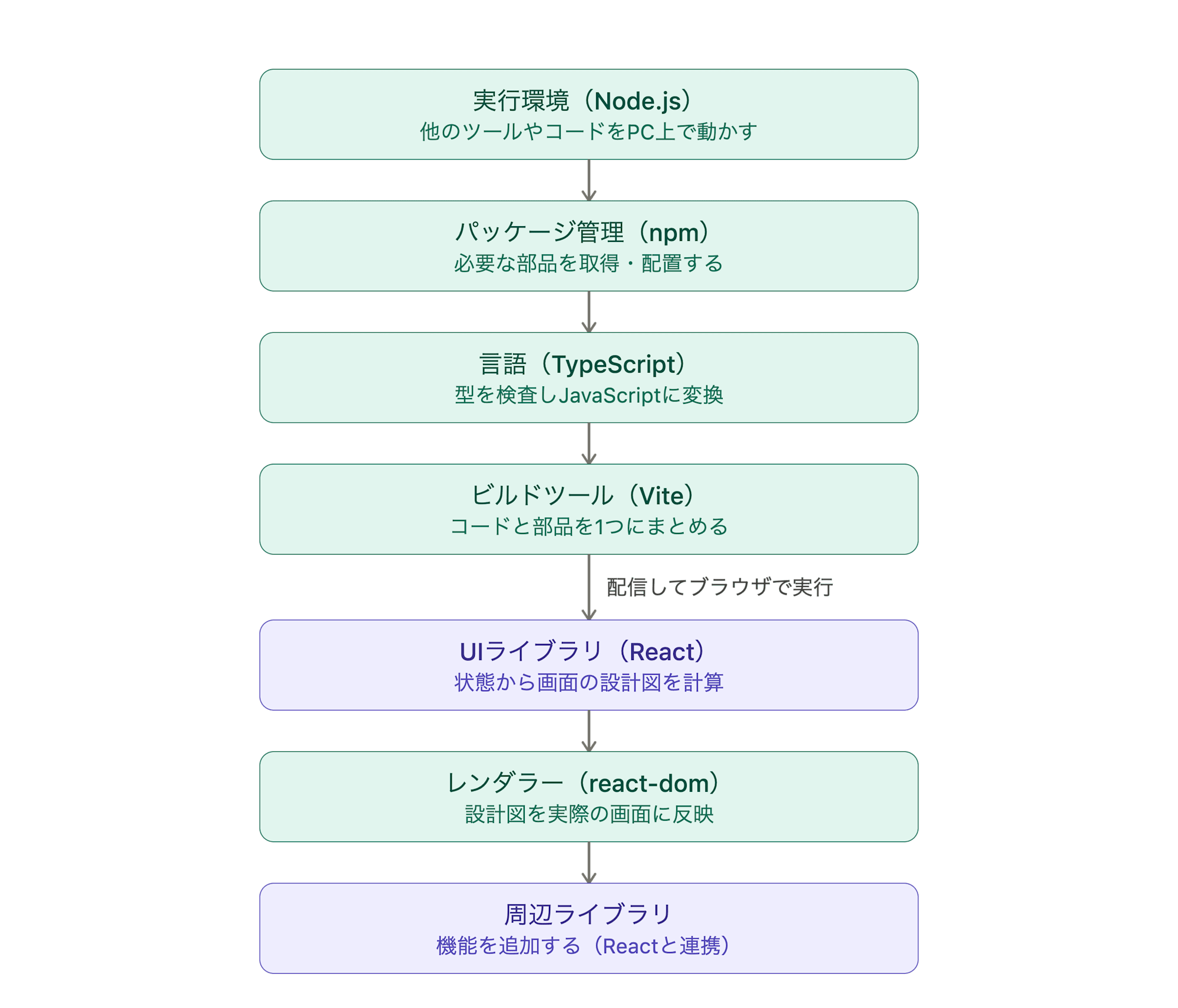
The overall picture of React can be organized with the following division of roles: "a language (JS/TS) is prepared by a package manager (npm) on a runtime environment (Node.js), transformed by a build tool (Vite), and a library (React + renderer) builds the screen."