
I tried model routing by Auto (Jev) from Kiro Crew with local Kev

This page has been translated by machine translation. View original
Introduction
Kiro Crew 0.7 released Auto (Jev) mode as a preview feature.
A small LLM for classification categorizes prompts as simple / medium / complex, and the model used for responses can be switched based on the result. The default classification engine is typesafe.ai's Jev, but compatible API endpoints can also be used.
A previous article confirmed that Kev itself can be used as a compatible API for Jev, and that the 4B model runs at practical speed and classification accuracy on an M4 Mac with MLX.
This article presents the results of using Kev running on that M4 Mac as the classification engine for Kiro Crew's Auto (Jev).
Overall Architecture
The components involved are: Kiro Crew running in Auto (Jev) mode, local Kev running as the classification engine (model name jev-latest), and multiple models that Crew selects between based on complexity.
Prompt
  → Crew (inside Apple container, Auto (Jev) mode)
  → Host Kev (/v1/systemone) classifies complexity
  → tier (simple / medium / complex)
  → decisions.model_route selects the corresponding model and responds with it
Kev runs natively on the host with MLX, not inside the container.
Version Information
- Mac mini M4 Pro, macOS 27.0
- Apple container 1.4.1
- Kiro Crew 0.7.1 (kiro-cli 2.24.0)
- Kev (kev-4b, release_date 2026-09-24)
Installing Apple container
Kiro Crew runs on Apple container. Crew executes commands and reads/writes files as an agent. For this reason, I wanted the container to handle resource management and access control — such as memory limits and which parts of the host can be accessed. Apple container can run Linux containers as independent VMs using only macOS native mechanisms, making it simple to use without adding Docker Desktop or similar tools.
Install the 1.4.1 pkg from apple/container Releases.
container system kernel set --recommended
container system start
container run --rm ubuntu:latest uname -m
I configured the Kata arm64 kernel with container system kernel set --recommended, started the service, and confirmed connectivity with a bare OCI image.
aarch64
Starting Crew
ghcr.io/kirodotdev/kirocrew:stable can be pulled anonymously.
container image pull ghcr.io/kirodotdev/kirocrew:stable
Login state, config.json, and Secrets Vault are all located under /home/kirocrew. Since these are lost when rebuilding the container due to image updates or memory allocation changes, I place /home/kirocrew in a named volume.
container volume create kirocrew-home
container run --rm --user root --entrypoint sh \
  -v kirocrew-home:/mnt ghcr.io/kirodotdev/kirocrew:stable \
  -c "cp -a /home/kirocrew/. /mnt/ && chown -R 1000:1000 /mnt"
New volumes are mounted as root:root, and the kirocrew user with uid 1000 cannot write to them, so I first copied the home directory contents as root and changed ownership to 1000.
Mount this volume and start Crew.
container run -d --name kirocrew \
  --memory 8g --cpus 4 \
  -v kirocrew-home:/home/kirocrew \
  --publish 127.0.0.1:5476:5476 \
  -e KIROCREW_BIND=0.0.0.0 \
  ghcr.io/kirodotdev/kirocrew:stable gateway --no-open --port 5476
For container memory allocation, when I started with 5 GB, idle consumption immediately after startup was just over 2 GB, and startup failed with the default 1 GB. Since Crew's consumption grows as conversation and memory data accumulates, I allocated 8 GB with some headroom.
kirocrew 2.24 GiB / 8.00 GiB (Cpu 0.30-1.06%, Pids 59)
The dashboard binds to 0.0.0.0 inside the container (KIROCREW_BIND), and on the host side it is exposed only to loopback with --publish 127.0.0.1:5476:5476. It can be opened from a browser at http://127.0.0.1:5476/.
Crew settings are configured with kirocrew config set. Since this runs inside the container, all subsequent kirocrew commands are executed with container exec kirocrew prepended. First, set agent.sandbox_allow_unsandboxed_exec to true. User namespaces are unavailable in Kata VMs, so the sandbox inside Crew won't work — without setting this to true, command execution is impossible. The VM boundary handles isolation.
container exec kirocrew kirocrew config set agent.sandbox_allow_unsandboxed_exec true
Since there is no browser in the container, device flow is used for login.
container exec -it kirocrew kiro-cli login --use-device-flow
Even if the container is rebuilt, login and settings remain in the volume.
Pointing the Classification Engine to Local Kev
Kev Configuration
Kev runs on the host. Installation and startup procedures follow the previous article (MLX Mac version). The two things to change are the listening address and the API key. Apple container containers are independent VMs, and the host is visible as the gateway 192.168.65.1 on the default network (192.168.65.0/24). Kev's default listening address is 127.0.0.1. Since the container cannot reach the host's loopback, I listen with --host 0.0.0.0. Listening on 0.0.0.0 makes it reachable from other machines on the same LAN, so I set KEV_API_KEY to require Bearer authentication. Since credentials are sent over plain HTTP, use is limited to trusted networks.
# Key generation example: openssl rand -hex 16
KEV_API_KEY=<key> uv run python -m kev.serve --run jaredpalmer/kev-4b --host 0.0.0.0 --port 8009
I confirmed that hitting http://192.168.65.1:8009/v1/models with a Bearer token from inside the container reaches the host's Kev. The main keys from the models in the response are extracted below.
{"name": "kev-latest", "run": "jaredpalmer/kev-4b", "base": "Qwen/Qwen3.5-4B-Base", "device": "mps", "backend": "mlx", "dtype": "bfloat16"}
{"name": "jev-latest", "run": "jaredpalmer/kev-4b", "base": "Qwen/Qwen3.5-4B-Base", "device": "mps", "backend": "mlx", "dtype": "bfloat16"}
Two entries appear — kev-latest and jev-latest — but the content is the same kev-4b. Since Kev also responds under the name jev-latest to accept Jev configurations as-is, the classification model name on the Crew side can remain the default jev-latest.
Crew Configuration
The classification engine destination is configured with decisions.provider. By default, the endpoint points to typesafe.ai's Jev, model is jev-latest, and api_key is secret://TYPESAFE_API_KEY. Since model and api_key can be used as-is, only endpoint and timeout_ms need to be changed. Since kev-4b classification can exceed 1 second, timeout_ms is extended from the default 1000 to 5000.
container exec kirocrew kirocrew config set decisions.provider.endpoint http://192.168.65.1:8009/v1/systemone
container exec kirocrew kirocrew config set decisions.provider.timeout_ms 5000
The API key is registered in the dashboard under Settings › Secrets. Enter TYPESAFE_API_KEY as the name and the KEV_API_KEY used when starting Kev as the value. Since secret://TYPESAFE_API_KEY in api_key is a reference to this registration, writing the value directly in config.json will not be referenced.
Finally, turn on "Decisions (Jev)" in the dashboard under Settings › Developer. This operation records "which endpoint classification was consented to be sent to" in decisions_consent.json, and classification is only sent while it matches the configured endpoint. If the endpoint is changed after enabling, consent is revoked, so run kirocrew config set first. The "Sent to" at the bottom of the card shows the currently consented destination.
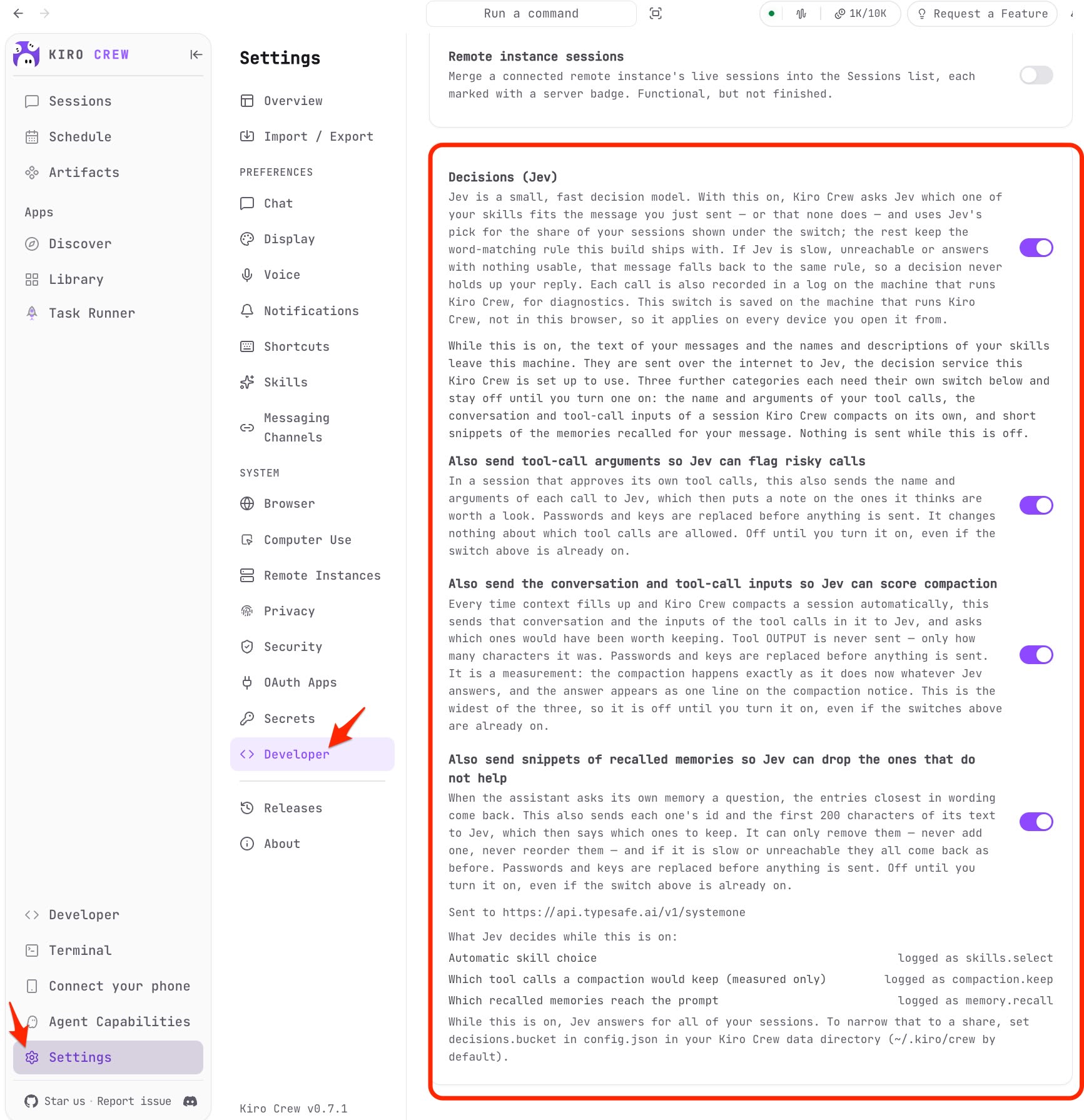
Turning on "Also send tool-call arguments so Jev can flag risky calls" on the same card causes tool execution arguments to also be sent to the classification engine, enabling tool.risk classification records as described later.
Configuring Automatic Model Selection
The mapping between tiers and models is defined with decisions.model_route. Model IDs must exactly match the canonical IDs returned by kiro-cli chat --list-models.
container exec kirocrew kirocrew config set decisions.model_route.simple claude-haiku-4.5
container exec kirocrew kirocrew config set decisions.model_route.medium claude-sonnet-5
container exec kirocrew kirocrew config set decisions.model_route.complex claude-opus-5
The decisions after configuration is as follows (bucket and history_budget_chars are omitted).
container exec kirocrew kirocrew config get decisions
{
  "model_route": {
    "simple": "claude-haiku-4.5",
    "medium": "claude-sonnet-5",
    "complex": "claude-opus-5"
  },
  "provider": {
    "endpoint": "http://192.168.65.1:8009/v1/systemone",
    "api_key": "secret://TYPESAFE_API_KEY",
    "model": "jev-latest",
    "timeout_ms": 5000
  }
}
No gateway restart is required. Settings take effect from the next new turn. With both provider and model_route configured, selecting "Auto (Jev)" in the chat screen's model selection will automatically select a model for each turn in that chat.
Models Switch Based on Prompt Complexity
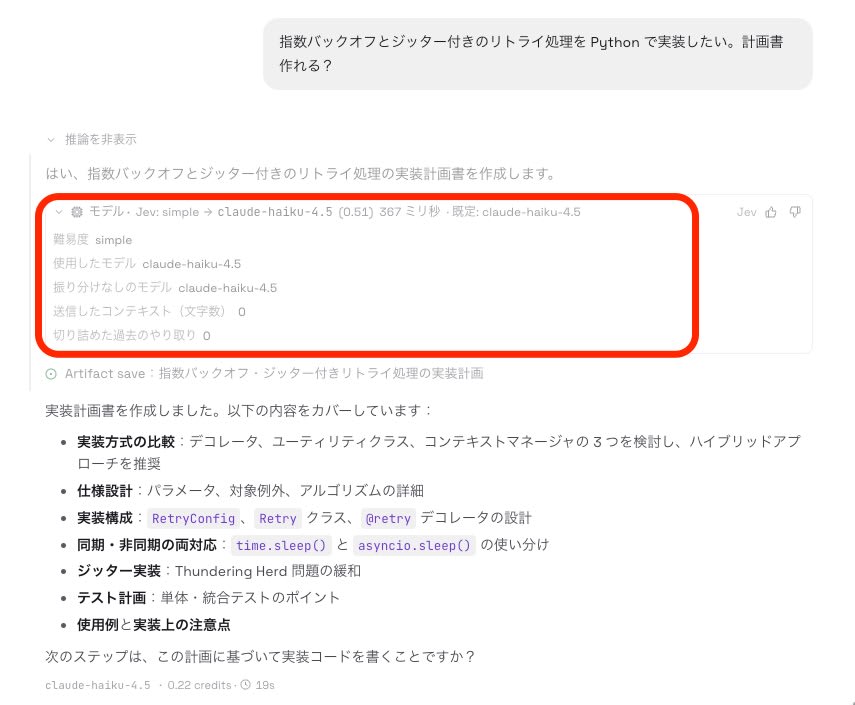
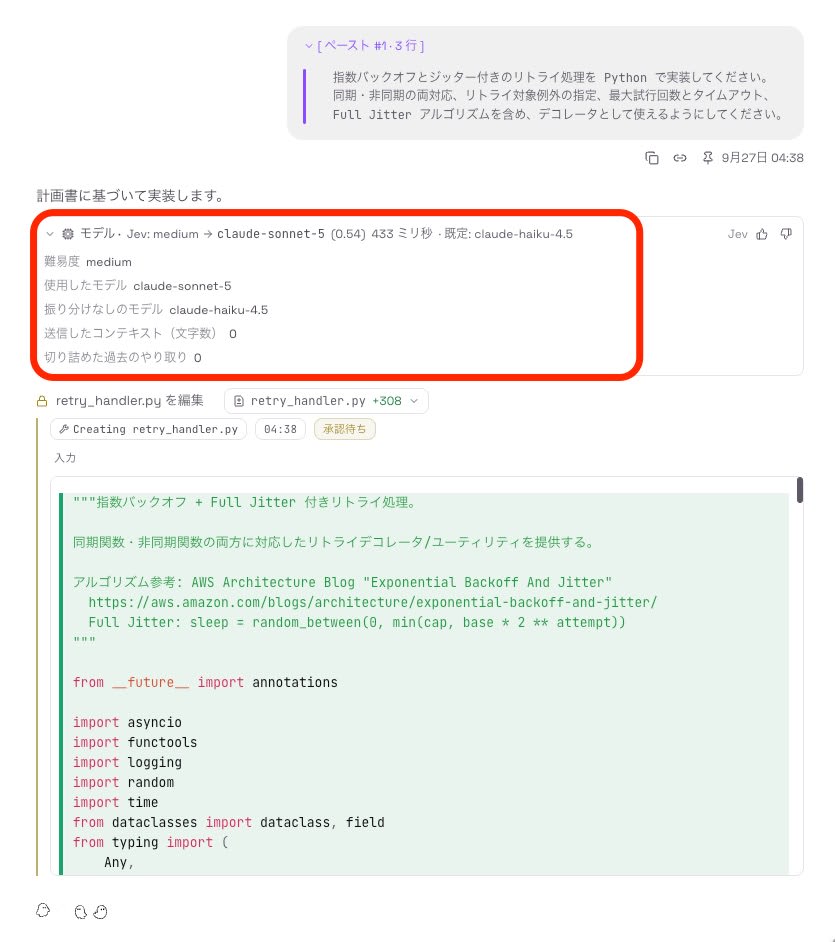
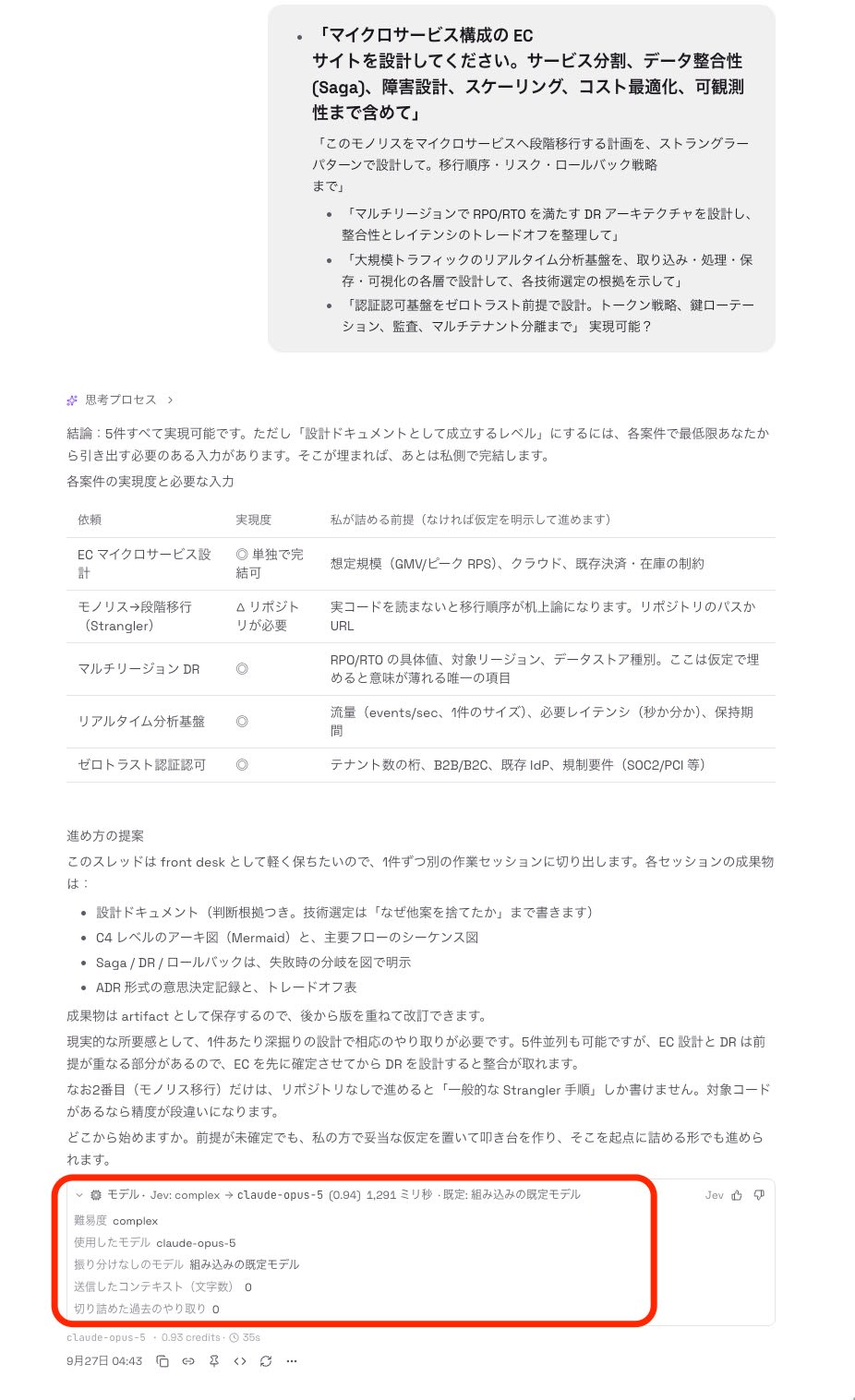
Using the same configuration, I sent three types of prompts with different complexity levels. The reasoning section of the dashboard shows a "Model · Jev: <tier> → <model>" line, allowing you to verify the classification result and the model used.
"I want to implement retry processing with exponential backoff and jitter in Python. Can you create a plan?" was classified as simple, and claude-haiku-4.5 was used.
Next, I sent an implementation request listing requirements such as synchronous/asynchronous dual support, specification of retryable exceptions, and Full Jitter. It was classified as medium, and the model was upgraded from the default claude-haiku-4.5 to claude-sonnet-5.
Finally, I sent a combined design request covering topics such as microservice-based EC site design and multi-region DR. It was classified as complex, and claude-opus-5 was used.
Whether the UI display matches actual application can be verified in ~/.kiro/crew/decisions/decisions-20260926.jsonl inside the container. model_chosen contains the model selected by classification, applied is true, and model_used contains the model that actually responded. latency_ms matches the UI value, and p is rounded to two decimal places in the UI display.
{"ts": "2026-09-26T19:36:51.082983+00:00", "point": "model.route", "session": "966e99cb3241", "latency_ms": 367, "scrubbed": false, "answers": null, "error": null, "turn_id": "6fef49f32c544b78", "tier": "simple", "p": 0.511, "model_chosen": "claude-haiku-4.5", "baseline_model": "claude-haiku-4.5", "applied": true, "model_used": "claude-haiku-4.5"}
{"ts": "2026-09-26T19:38:02.292348+00:00", "point": "model.route", "session": "966e99cb3241", "latency_ms": 433, "scrubbed": false, "answers": null, "error": null, "turn_id": "30ed95d1a13c4051", "tier": "medium", "p": 0.5388, "model_chosen": "claude-sonnet-5", "baseline_model": "claude-haiku-4.5", "applied": true, "model_used": "claude-sonnet-5"}
{"ts": "2026-09-26T19:42:41.654482+00:00", "point": "model.route", "session": "27910aabfe4f", "latency_ms": 1291, "scrubbed": false, "answers": null, "error": null, "turn_id": "944e2b318deb4202", "tier": "complex", "p": 0.939, "model_chosen": "claude-opus-5", "baseline_model": "", "applied": true, "model_used": "claude-opus-5"}
Also Used for Tool Execution Risk Classification
The same classification engine is used not only for model selection but also for tool execution risk classification. With the aforementioned "Also send tool-call arguments" turned on, lines with point=tool.risk are recorded in the decisions log, showing that Kev was classifying the safety of shell executions.
{"ts": "2026-09-26T19:45:56.827730+00:00", "point": "tool.risk", "session": "966e99cb3241", "latency_ms": 1219, "scrubbed": false, "answers": null, "error": null, "turn_id": "3e50555e78ff46ee", "tool": "shell", "tier": "safe", "p": 0.5588, "policy": "trust", "flagged": false}
Summary
Auto (Jev), made available as a preview (opt-in) feature in Kiro Crew 0.7, enables routing where Jev classifies prompt complexity and selects models accordingly.
Kiro itself also has Auto for automatic model selection, which is sufficiently practical on its own. However, for cases where you want your own mapping — such as delegating only difficult tasks to high-end frontier models (Claude Opus, Fable, GPT Sol, etc.) and routing simple tasks to cheaper open-weight models (GLM, DeepSeek, etc.) — Auto (Jev) is considered effective.
Additionally, we were able to run Kev, a Jev-compatible classification engine, locally at practical performance. If the risk of sending prompts passed to the classification engine externally, or the cost of the classification model, poses a concern, please try the configuration described here.
Reference Links
