Kiro supports Kimi K3, I tried comparing models and artifacts with Claude and GPT

This page has been translated by machine translation. View original
Introduction
On October 15, 2026, Kimi K3 became available as experimental in Kiro.
Kimi K3 is an open-weight model from Moonshot AI with a context window of 1M tokens. In this article, I submitted the same two requests to 5 models and compared their responses. The models compared were Kimi K3, Claude Opus 5.5, Claude Sonnet 5.5, GPT-5.6 Terra, and GPT-5.6 Luna. The requests were: identifying vulnerabilities in a CloudFormation template, and creating a draw.io architecture diagram from a three-tier web template.
Things to Check Before Use
Kimi K3 is available on the Pro, Pro+, Pro Max, and Power plans. It does not appear in the model selection for the Free tier. For Enterprise, administrators can select it by enabling model access management and adding Kimi K3 to the approved list. It is only available to users in the US geography. However, because it is experimental, requests may be processed not only within the US but also in commercial AWS regions around the world.
Kimi K3 is explicitly included in the Kiro Excluded Models. Models designated as experimental, pre-release, preview, or beta are treated the same way. The output indemnification under Section 50.10 of the AWS Service Terms does not apply to Kiro Excluded Models. Opus 5.5, Terra, and Luna compared this time also appear as Experimental preview when running kiro-cli chat --list-models.
  claude-opus-5.5      2.00x credits      Experimental preview of Claude Opus 5.5 model with 1M context window
  claude-sonnet-5.5    1.30x credits      Claude Sonnet 5.5 model with 1M context window
  ...
  gpt-5.6-terra        2.20x credits      Experimental preview of OpenAI GPT 5.6 Terra with 1M context window
  gpt-5.6-luna         0.60x credits      Experimental preview of OpenAI GPT 5.6 Luna with 1M context window
  ...
  kimi-k3              2.40x credits      Experimental preview of Kimi K3. Kimi K3 is a Kiro Excluded Model. For more info, see documentation.
Test Conditions
The version of kiro-cli used was 2.31.0 for the vulnerability identification runs with Kimi K3, Opus 5.5, and Sonnet 5.5, and 2.32.0 for all other runs. All runs were executed with no tools trusted, from an empty directory. The same request was submitted once to each of the 5 models. All values reported below are from those single runs. The request text was saved in prompt.txt. The only things changed per model were --model and --effort medium, which was added only for Opus 5.5. Since my environment settings set Opus 5.5's effort to high, I explicitly specified the model's default of medium. --effort was not specified for Kimi K3, Sonnet 5.5, Terra, or Luna, and the effort level did not appear in the output.
kiro-cli chat --model kimi-k3 --trust-tools= --output-format stream-json "$(cat prompt.txt)"
kiro-cli chat --model claude-opus-5.5 --effort medium --trust-tools= --output-format stream-json "$(cat prompt.txt)"
kiro-cli chat --model claude-sonnet-5.5 --trust-tools= --output-format stream-json "$(cat prompt.txt)"
kiro-cli chat --model gpt-5.6-terra --trust-tools= --output-format stream-json "$(cat prompt.txt)"
kiro-cli chat --model gpt-5.6-luna --trust-tools= --output-format stream-json "$(cat prompt.txt)"
The diagram request used the same command with only the content of prompt.txt changed. The diagram requests for all 5 models were executed in parallel. Credits consumed (meteringUsage) and elapsed time (turnDurationMs) were taken from the final metadata event in the stream-json output.
Asking Models to Identify Vulnerabilities in a CloudFormation Template
The input is a custom dummy template I created with intentional issues including wide-open security groups, IMDSv1, unencrypted EBS, public IPs, and unused resources. The request was: "Point out the security issues in this template, indicating the resource and property names. Include remediation suggestions." The full template followed on the next line after this single sentence.
Input Template (148 lines)
This is a validation template with intentional problems. Do not deploy it.
AWSTemplateFormatVersion: '2010-09-09'
Description: Sample EC2 stack with security group, EBS volume, ENI, EIP and launch template

Parameters:
  VpcId:
    Type: AWS::EC2::VPC::Id
  SubnetId:
    Type: AWS::EC2::Subnet::Id
  LatestAmiId:
    Type: AWS::SSM::Parameter::Value<AWS::EC2::Image::Id>
    Default: /aws/service/ami-amazon-linux-latest/al2023-ami-kernel-default-x86_64

Resources:
  Ec2SsmRole:
    Type: AWS::IAM::Role
    Properties:
      AssumeRolePolicyDocument:
        Version: '2012-10-17'
        Statement:
          - Effect: Allow
            Principal:
              Service: ec2.amazonaws.com
            Action: sts:AssumeRole
      ManagedPolicyArns:
        - arn:aws:iam::aws:policy/AmazonSSMManagedInstanceCore

  Ec2InstanceProfile:
    Type: AWS::IAM::InstanceProfile
    Properties:
      Roles:
        - !Ref Ec2SsmRole

  AppSG:
    Type: AWS::EC2::SecurityGroup
    Properties:
      GroupDescription: Security group for the application
      VpcId: !Ref VpcId
      SecurityGroupIngress:
        - IpProtocol: tcp
          FromPort: 22
          ToPort: 22
          CidrIp: 0.0.0.0/0
        - IpProtocol: tcp
          FromPort: 3389
          ToPort: 3389
          CidrIp: 0.0.0.0/0
        - IpProtocol: tcp
          FromPort: 22
          ToPort: 22
          CidrIpv6: '::/0'
        - IpProtocol: tcp
          FromPort: 3389
          ToPort: 3389
          CidrIpv6: '::/0'
        - IpProtocol: tcp
          FromPort: 8080
          ToPort: 8080
          CidrIp: 0.0.0.0/0
        - IpProtocol: tcp
          FromPort: 3306
          ToPort: 3306
          CidrIp: 0.0.0.0/0
        - IpProtocol: tcp
          FromPort: 5432
          ToPort: 5432
          CidrIp: 0.0.0.0/0

  AuxSG:
    Type: AWS::EC2::SecurityGroup
    Properties:
      GroupDescription: Security group for auxiliary use
      VpcId: !Ref VpcId

  AppInstance:
    Type: AWS::EC2::Instance
    Properties:
      InstanceType: t3.micro
      ImageId: !Ref LatestAmiId
      IamInstanceProfile: !Ref Ec2InstanceProfile
      MetadataOptions:
        HttpTokens: optional
        HttpEndpoint: enabled
      NetworkInterfaces:
        - DeviceIndex: 0
          SubnetId: !Ref SubnetId
          AssociatePublicIpAddress: true
          GroupSet:
            - !Ref AppSG

  DataVolume:
    Type: AWS::EC2::Volume
    Properties:
      AvailabilityZone: !GetAtt AppInstance.AvailabilityZone
      Size: 1
      Encrypted: false

  VolumeAttachment:
    Type: AWS::EC2::VolumeAttachment
    Properties:
      Device: /dev/xvdf
      InstanceId: !Ref AppInstance
      VolumeId: !Ref DataVolume

  ExtraENI:
    Type: AWS::EC2::NetworkInterface
    Properties:
      SubnetId: !Ref SubnetId
      GroupSet:
        - !Ref AppSG
      SourceDestCheck: false

  ENIAttachment:
    Type: AWS::EC2::NetworkInterfaceAttachment
    Properties:
      DeviceIndex: 1
      InstanceId: !Ref AppInstance
      NetworkInterfaceId: !Ref ExtraENI

  SpareEIP:
    Type: AWS::EC2::EIP
    Properties:
      Domain: vpc

  AppLaunchTemplate:
    Type: AWS::EC2::LaunchTemplate
    Properties:
      LaunchTemplateData:
        InstanceType: t3.micro
        ImageId: !Ref LatestAmiId
        MetadataOptions:
          HttpTokens: optional
          HttpEndpoint: enabled
        NetworkInterfaces:
          - DeviceIndex: 0
            AssociatePublicIpAddress: true
            Groups:
              - !Ref AppSG
        BlockDeviceMappings:
          - DeviceName: /dev/xvda
            Ebs:
              VolumeSize: 8
              Encrypted: false

Outputs:
  InstanceId:
    Value: !Ref AppInstance
  SecurityGroupId:
    Value: !Ref AppSG
Number of Issues Identified
The answer key is based on 22 EC2 controls from Security Hub that apply to this template, recounted as 21 items using resource-and-property pairs as the unit. The count does not match the number of controls because one item may map to multiple controls, and one control may span multiple items.
Answer Key — 21 Items
| # | Resource | Issue | Corresponding Controls |
|---|---|---|---|
| 1 | AppSG | SecurityGroupIngress 22/tcp has CidrIp: 0.0.0.0/0 | EC2.13, EC2.18, EC2.19, EC2.53 |
| 2 | AppSG | 3389/tcp has CidrIp: 0.0.0.0/0 | EC2.14, EC2.18, EC2.19, EC2.53 |
| 3 | AppSG | 22/tcp and 3389/tcp have CidrIpv6: ::/0 | EC2.13, EC2.14, EC2.18, EC2.19, EC2.54 |
| 4 | AppSG | 8080/tcp is open to 0.0.0.0/0 | EC2.18, EC2.19 |
| 5 | AppSG | 3306/tcp and 5432/tcp are open to 0.0.0.0/0 | EC2.18, EC2.19 |
| 6 | AppSG | No tags | EC2.43 |
| 7 | AuxSG | Not attached anywhere | EC2.22 |
| 8 | AppInstance | MetadataOptions.HttpTokens: optional | EC2.8 |
| 9 | AppInstance | NetworkInterfaces[0].AssociatePublicIpAddress: true | EC2.9 |
| 10 | AppInstance | No tags | EC2.38 |
| 11 | DataVolume | Encrypted: false | EC2.3 |
| 12 | DataVolume | No tags | EC2.45 |
| 13 | ExtraENI (ENIAttachment) | SourceDestCheck: false | EC2.180 |
| 14 | AppInstance / ENIAttachment | Adding an ENI as a second interface (DeviceIndex: 1) | EC2.17 |
| 15 | ExtraENI | No tags | EC2.35 |
| 16 | SpareEIP | Not associated with any instance or ENI (no EIPAssociation) | EC2.12 |
| 17 | SpareEIP | No tags | EC2.37 |
| 18 | AppLaunchTemplate | MetadataOptions.HttpTokens: optional | EC2.170 |
| 19 | AppLaunchTemplate | NetworkInterfaces[0].AssociatePublicIpAddress: true | EC2.25 |
| 20 | AppLaunchTemplate | BlockDeviceMappings[0].Ebs.Encrypted: false | EC2.181 |
| 21 | AppLaunchTemplate | No tags | EC2.175 |
Scoring was based only on the body of the final response.
| Model | Items identified out of 21 in answer key | Correct findings not in answer key |
|---|---|---|
| Kimi K3 | 13 | 2 |
| Opus 5.5 | 14 | 2 |
| Sonnet 5.5 | 14 | 3 |
| GPT-5.6 Terra | 13 | 1 |
| GPT-5.6 Luna | 13 | 1 |
The 13 items identified by all 5 models are as follows. (Numbers in parentheses correspond to the answer key.)
- AppSG: open access on 22, 3389, 22 and 3389 for IPv6 (::/0), 8080, 3306 and 5432 (#1–#5)
- AppInstance and AppLaunchTemplate: IMDSv1 and public IP (#8, #9, #18, #19)
- DataVolume and AppLaunchTemplate: no encryption (#11, #20)
- ExtraENI: SourceDestCheck (#13)
- SpareEIP: not associated (#16)
The reason Kimi K3, Terra, and Luna each found one fewer item is that they did not flag the unused AuxSG, which Opus 5.5 and Sonnet 5.5 did identify.
The 7 items that none of the 5 models identified were: missing tags on AppSG, AppInstance, DataVolume, ExtraENI, SpareEIP, and AppLaunchTemplate (6 items), plus the configuration of adding a second ENI. None of the final responses contained any mention of missing tags. The 13 items commonly identified and the 7 items commonly missed account for 20 of the 21 items, meaning the difference between the 5 models came down to just one item: AuxSG.
Content of the Findings
Among correct findings not in the answer key, the lack of explicit outbound rules (no SecurityGroupEgress, meaning all outbound traffic is allowed) was common to all 5 models. Opus 5.5 and Sonnet 5.5 additionally noted that BlockDeviceMappings was not specified for AppInstance, meaning root volume encryption depends on the account-level setting.
The fact that AppLaunchTemplate is not referenced by any other resource was noted only by Kimi K3 among the 5 models. Indeed, AppLaunchTemplate appears only once in the input template — in its own definition. Only Sonnet 5.5 noted that because LatestAmiId uses the SSM parameter type, it resolves to the latest value from Parameter Store each time the stack is updated.
The responses from Kimi K3 and Opus 5.5 each contained one statement that contradicts the documentation. Kimi K3 wrote the following in a supplementary note:
- `Ec2SsmRole` / `ManagedPolicyArns`: `AmazonSSMManagedInstanceCore` is a standard choice, but the `ssm:GetObject`-related S3 permissions are somewhat broad, so if strict least-privilege is required, consider replacing it with a custom policy.
The actions included in AmazonSSMManagedInstanceCore (default version v2), as retrieved via aws iam get-policy-version, are only those beginning with ssm:, ssmmessages:, and ec2messages:. No S3 actions are included. The action ssm:GetObject does not exist.
Opus 5.5 wrote the following in row 13 of the findings table in its response (no encryption in AppLaunchTemplate):
The root volume will not be encrypted. Even if the account's default encryption is enabled, explicitly setting `false` will override it, so caution is required.
According to the EBS documentation, the default encryption setting is per-region. When you enable default encryption for a region, you cannot disable it for individual volumes or snapshots within that region.
No similar discrepancies were found in the responses from Sonnet 5.5, Terra, or Luna.
The format of the remediation suggestions differed across the 5 models. Opus 5.5 produced a 15-row findings table and the full revised template. The allowed source SG IDs and KMS keys were added as parameters, making the template self-contained. Sonnet 5.5 produced severity-categorized findings and a single YAML block for the fixes. Terra produced a 13-row findings table and a single YAML block with the key remediation changes. Luna produced a 20-row findings table and per-item YAML snippets. Kimi K3 provided per-item explanations with accompanying YAML excerpts.
The AppSG excerpt from Kimi K3 contains the following line:
SourceSecurityGroupId: !Ref AlbSG
AlbSG is not defined anywhere in the input template or in the excerpt. The same line referencing an undefined AlbSG also appears in the remediation suggestions from Terra and Luna. Kimi K3 and Terra note in comments, and Luna in an annotation, that this is an example for when an ALB is deployed.
Asking Models to Create a draw.io Architecture Diagram
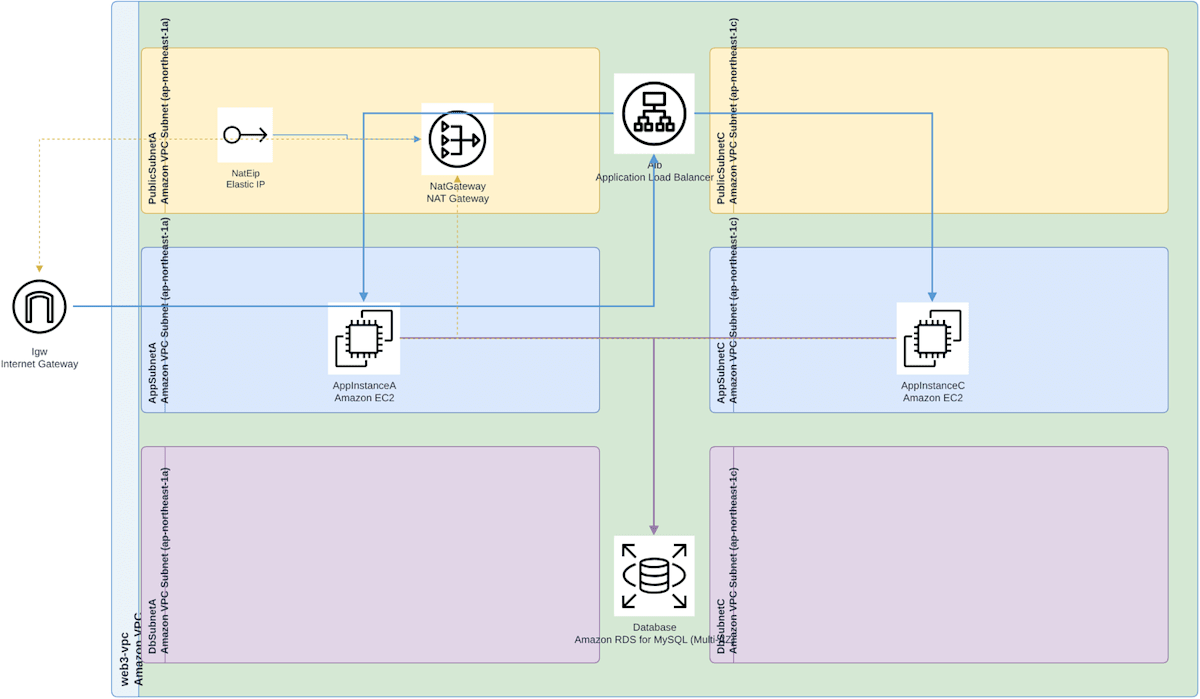
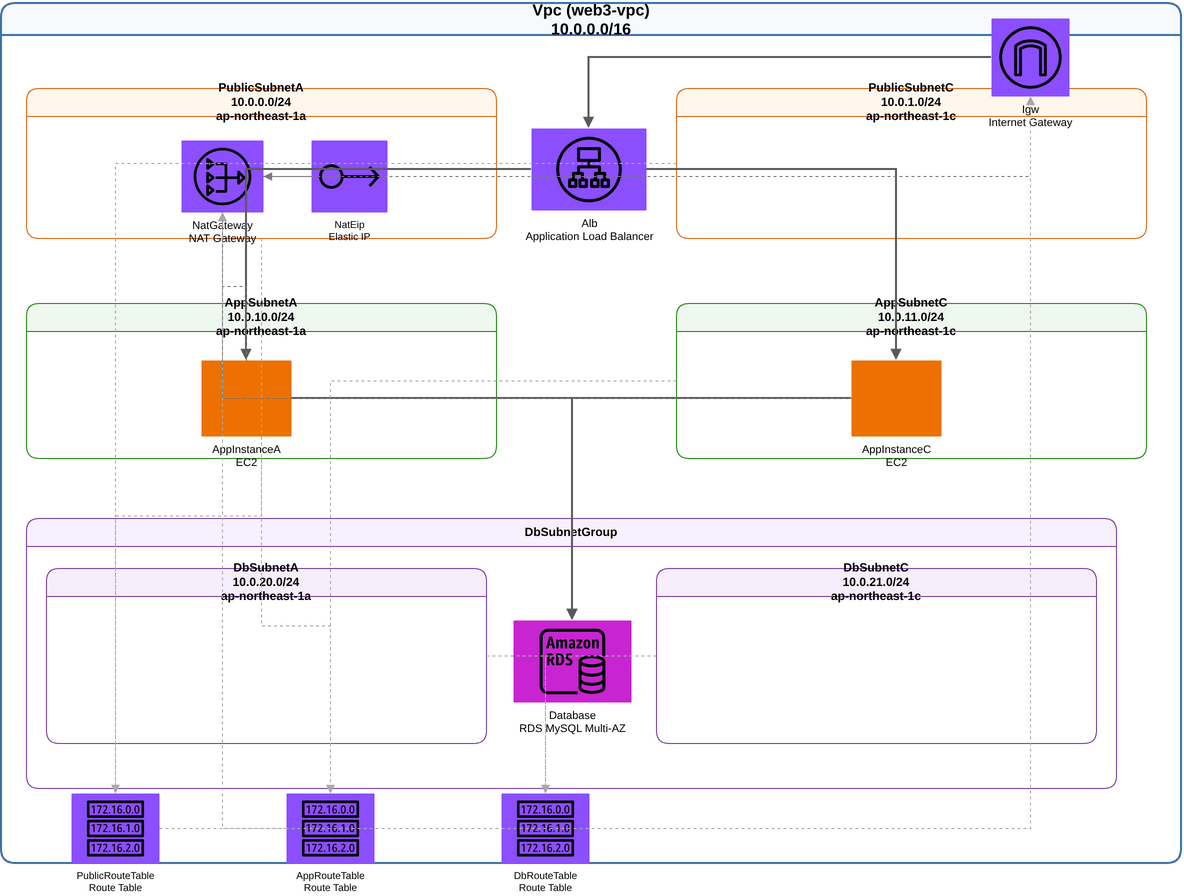
The input is a custom dummy template for a three-tier web architecture consisting of a 2-AZ VPC, ALB, 2 EC2 instances, RDS (Multi-AZ), IGW, and a NAT Gateway. The ALB is placed in two public subnets. The full request text is shown in the collapsible section under "Diagram Results." The key requirements were: respond with a single code block containing draw.io XML, use AWS architecture icons, represent the VPC and subnets as frames, and connect resources with lines. Additionally, the diagram should contain only icons with service name labels, lines, and areas (frames) — no comments, legends, annotations, or labels on lines. The visual details and layout were left to the model.
Input Template
AWSTemplateFormatVersion: '2010-09-09'
Description: Three-tier web application (ALB, EC2, RDS) in a new VPC across two AZs

Parameters:
  LatestAmiId:
    Type: AWS::SSM::Parameter::Value<AWS::EC2::Image::Id>
    Default: /aws/service/ami-amazon-linux-latest/al2023-ami-kernel-default-x86_64
  InstanceType:
    Type: String
    Default: t3.micro
  DbInstanceClass:
    Type: String
    Default: db.t3.micro

Resources:
  Vpc:
    Type: AWS::EC2::VPC
    Properties:
      CidrBlock: 10.0.0.0/16
      EnableDnsSupport: true
      EnableDnsHostnames: true
      Tags:
        - Key: Name
          Value: web3-vpc

  Igw:
    Type: AWS::EC2::InternetGateway

  IgwAttachment:
    Type: AWS::EC2::VPCGatewayAttachment
    Properties:
      VpcId: !Ref Vpc
      InternetGatewayId: !Ref Igw

  PublicSubnetA:
    Type: AWS::EC2::Subnet
    Properties:
      VpcId: !Ref Vpc
      CidrBlock: 10.0.0.0/24
      AvailabilityZone: ap-northeast-1a
  PublicSubnetC:
    Type: AWS::EC2::Subnet
    Properties:
      VpcId: !Ref Vpc
      CidrBlock: 10.0.1.0/24
      AvailabilityZone: ap-northeast-1c
  AppSubnetA:
    Type: AWS::EC2::Subnet
    Properties:
      VpcId: !Ref Vpc
      CidrBlock: 10.0.10.0/24
      AvailabilityZone: ap-northeast-1a
  AppSubnetC:
    Type: AWS::EC2::Subnet
    Properties:
      VpcId: !Ref Vpc
      CidrBlock: 10.0.11.0/24
      AvailabilityZone: ap-northeast-1c
  DbSubnetA:
    Type: AWS::EC2::Subnet
    Properties:
      VpcId: !Ref Vpc
      CidrBlock: 10.0.20.0/24
      AvailabilityZone: ap-northeast-1a
  DbSubnetC:
    Type: AWS::EC2::Subnet
    Properties:
      VpcId: !Ref Vpc
      CidrBlock: 10.0.21.0/24
      AvailabilityZone: ap-northeast-1c

  PublicRouteTable:
    Type: AWS::EC2::RouteTable
    Properties:
      VpcId: !Ref Vpc
  PublicDefaultRoute:
    Type: AWS::EC2::Route
    DependsOn: IgwAttachment
    Properties:
      RouteTableId: !Ref PublicRouteTable
      DestinationCidrBlock: 0.0.0.0/0
      GatewayId: !Ref Igw
  PublicSubnetAAssoc:
    Type: AWS::EC2::SubnetRouteTableAssociation
    Properties:
      SubnetId: !Ref PublicSubnetA
      RouteTableId: !Ref PublicRouteTable
  PublicSubnetCAssoc:
    Type: AWS::EC2::SubnetRouteTableAssociation
    Properties:
      SubnetId: !Ref PublicSubnetC
      RouteTableId: !Ref PublicRouteTable

  NatEip:
    Type: AWS::EC2::EIP
    Properties:
      Domain: vpc
  NatGateway:
    Type: AWS::EC2::NatGateway
    Properties:
      AllocationId: !GetAtt NatEip.AllocationId
      SubnetId: !Ref PublicSubnetA

  AppRouteTable:
    Type: AWS::EC2::RouteTable
    Properties:
      VpcId: !Ref Vpc
  AppDefaultRoute:
    Type: AWS::EC2::Route
    Properties:
      RouteTableId: !Ref AppRouteTable
      DestinationCidrBlock: 0.0.0.0/0
      NatGatewayId: !Ref NatGateway
  AppSubnetAAssoc:
    Type: AWS::EC2::SubnetRouteTableAssociation
    Properties:
      SubnetId: !Ref AppSubnetA
      RouteTableId: !Ref AppRouteTable
  AppSubnetCAssoc:
    Type: AWS::EC2::SubnetRouteTableAssociation
    Properties:
      SubnetId: !Ref AppSubnetC
      RouteTableId: !Ref AppRouteTable

  DbRouteTable:
    Type: AWS::EC2::RouteTable
    Properties:
      VpcId: !Ref Vpc
  DbSubnetAAssoc:
    Type: AWS::EC2::SubnetRouteTableAssociation
    Properties:
      SubnetId: !Ref DbSubnetA
      RouteTableId: !Ref DbRouteTable
  DbSubnetCAssoc:
    Type: AWS::EC2::SubnetRouteTableAssociation
    Properties:
      SubnetId: !Ref DbSubnetC
      RouteTableId: !Ref DbRouteTable

  AlbSg:
    Type: AWS::EC2::SecurityGroup
    Properties:
      GroupDescription: ALB
      VpcId: !Ref Vpc
      SecurityGroupIngress:
        - IpProtocol: tcp
          FromPort: 80
          ToPort: 80
          CidrIp: 0.0.0.0/0
  AppSg:
    Type: AWS::EC2::SecurityGroup
    Properties:
      GroupDescription: App servers
      VpcId: !Ref Vpc
      SecurityGroupIngress:
        - IpProtocol: tcp
          FromPort: 8080
          ToPort: 8080
          SourceSecurityGroupId: !Ref AlbSg
  DbSg:
    Type: AWS::EC2::SecurityGroup
    Properties:
      GroupDescription: Database
      VpcId: !Ref Vpc
      SecurityGroupIngress:
        - IpProtocol: tcp
          FromPort: 3306
          ToPort: 3306
          SourceSecurityGroupId: !Ref AppSg

  Alb:
    Type: AWS::ElasticLoadBalancingV2::LoadBalancer
    Properties:
      Type: application
      Scheme: internet-facing
      Subnets:
        - !Ref PublicSubnetA
        - !Ref PublicSubnetC
      SecurityGroups:
        - !Ref AlbSg
  AppTargetGroup:
    Type: AWS::ElasticLoadBalancingV2::TargetGroup
    Properties:
      VpcId: !Ref Vpc
      Protocol: HTTP
      Port: 8080
      TargetType: instance
      HealthCheckPath: /health
      Targets:
        - Id: !Ref AppInstanceA
        - Id: !Ref AppInstanceC
  HttpListener:
    Type: AWS::ElasticLoadBalancingV2::Listener
    Properties:
      LoadBalancerArn: !Ref Alb
      Protocol: HTTP
      Port: 80
      DefaultActions:
        - Type: forward
          TargetGroupArn: !Ref AppTargetGroup

  AppInstanceA:
    Type: AWS::EC2::Instance
    Properties:
      ImageId: !Ref LatestAmiId
      InstanceType: !Ref InstanceType
      SubnetId: !Ref AppSubnetA
      SecurityGroupIds:
        - !Ref AppSg
  AppInstanceC:
    Type: AWS::EC2::Instance
    Properties:
      ImageId: !Ref LatestAmiId
      InstanceType: !Ref InstanceType
      SubnetId: !Ref AppSubnetC
      SecurityGroupIds:
        - !Ref AppSg

  DbSubnetGroup:
    Type: AWS::RDS::DBSubnetGroup
    Properties:
      DBSubnetGroupDescription: Database subnets
      SubnetIds:
        - !Ref DbSubnetA
        - !Ref DbSubnetC
  Database:
    Type: AWS::RDS::DBInstance
    Properties:
      Engine: mysql
      DBInstanceClass: !Ref DbInstanceClass
      AllocatedStorage: 20
      MultiAZ: true
      PubliclyAccessible: false
      DBSubnetGroupName: !Ref DbSubnetGroup
      VPCSecurityGroups:
        - !Ref DbSg
      MasterUsername: admin
      ManageMasterUserPassword: true
Automated Scoring
The check covered 19 items. The main items were as follows:
- Parseable as XML
- IDs are unique, and line endpoints reference existing elements
- Subnets are inside the VPC frame, and EC2/RDS/NAT are inside the correct subnet frames
- IGW straddles the edge of the VPC frame or is outside it
- ALB is inside a public subnet frame or positioned between the two public subnets
- Subnet frames do not overlap each other, shapes do not overlap each other, and children do not extend outside their parent frame
Line routing was not included in the checks.
| Model | Items passed | Items failed |
|---|---|---|
| Kimi K3 | 19 / 19 | None |
| Opus 5.5 | 19 / 19 | None |
| Sonnet 5.5 | 18 / 19 | IGW is fully contained inside the VPC frame |
| GPT-5.6 Terra | 18 / 19 | RDS is not inside a DB subnet frame (places a single RDS between the two DB subnets) |
| GPT-5.6 Luna | 16 / 19 | RDS is not inside a DB subnet frame, IGW is fully contained inside the VPC frame, 1 overlapping shape |
All 4 models other than Opus 5.5 have all 6 subnets whose parent chain traces back to the VPC. In Opus 5.5's XML, all shapes use absolute coordinates and none of the 6 subnets are child elements of the VPC. Since the checks use coordinates to determine containment, this does not result in a failed check.
Diagram Results
The request text for the architecture diagram. The full input template followed this request text.
Diagram Request Text
Please create an architecture diagram of the following CloudFormation template in a format that can be opened with draw.io (diagrams.net). No tools are available.

Requirements:
- The response must be only a single ```xml code block containing the complete contents of the `.drawio` file (XML from `<mxfile>` to `</mxfile>`, uncompressed), with no other blocks. There must be exactly one block in the response.
- Use AWS architecture icons (draw.io AWS shapes)
- Represent the VPC and subnets as frames (groups) so that the placement of resources is clear
- Connect related resources and communication flows with lines (arrows)
- Label icons and frames so the resource names are clear
- Include only icons with service name labels, lines, and areas (frames). Do not include XML comments, legends, annotation or explanatory text shapes, or labels on lines

The visual details and layout of the diagram are up to you.
Rendered using headless drawing with the draw.io desktop application.
- Kimi K3
- Opus 5.5
- Sonnet 5.5
- GPT-5.6 Terra
- GPT-5.6 Luna
My visual inspection found the following differences.
| Model | AZ frames | ALB placement | RDS Multi-AZ | Line/text overlaps and layout |
|---|---|---|---|---|
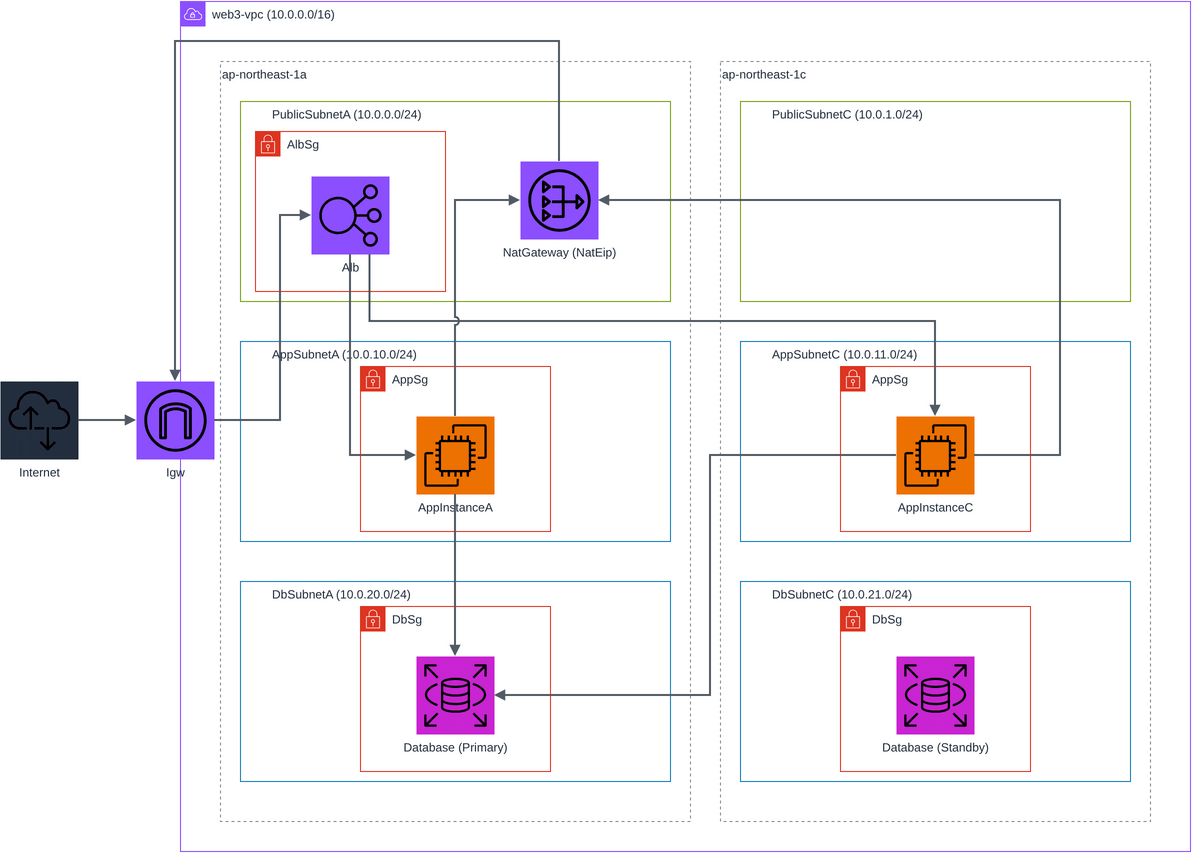
| Kimi K3 | Present (3 subnets each inside AZ frames) | Inside PublicSubnetA only | Two icons: Primary and Standby. Standby has no line connected | The line from NAT to IGW goes around the outside of the VPC frame |
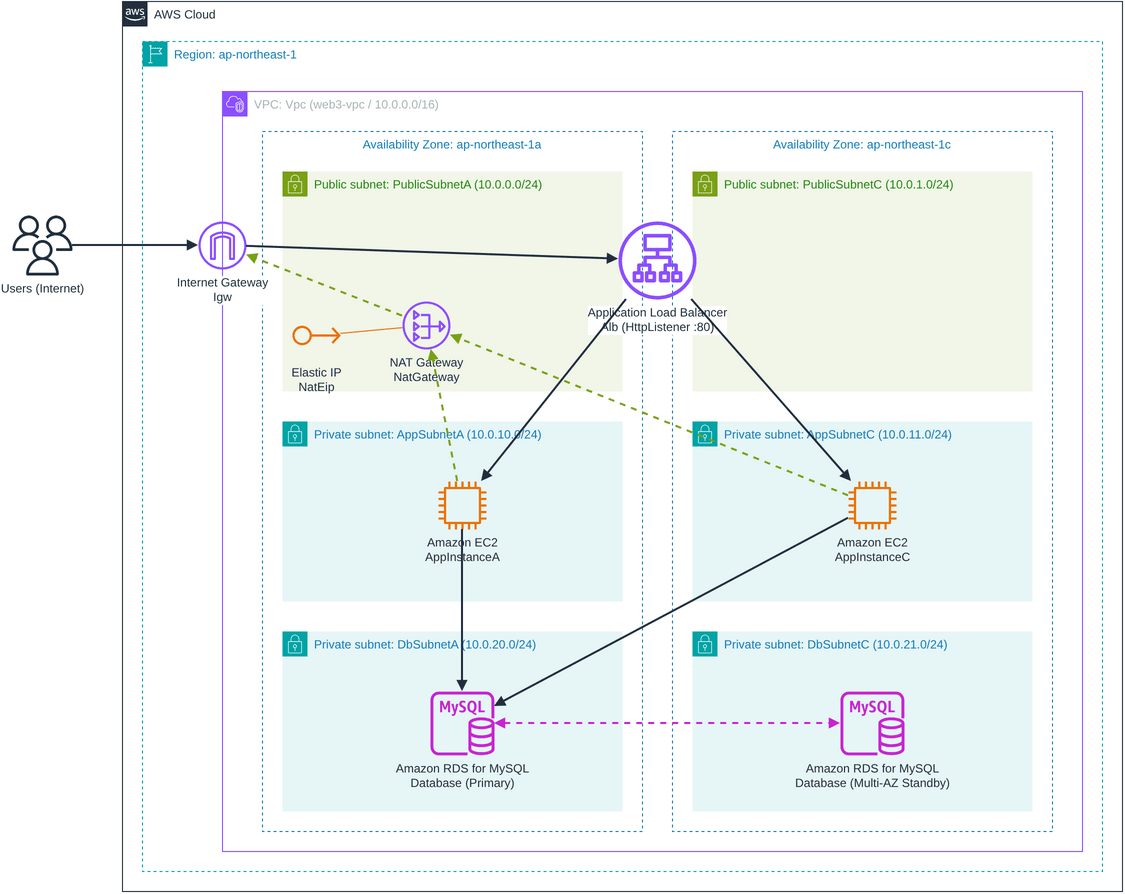
| Opus 5.5 | Present (dashed lines) | Between the two public subnets | Two icons: Primary and Standby, connected by a dashed double-headed arrow | Few overlaps (dashed line to NAT overlaps the AppSubnetC label) |
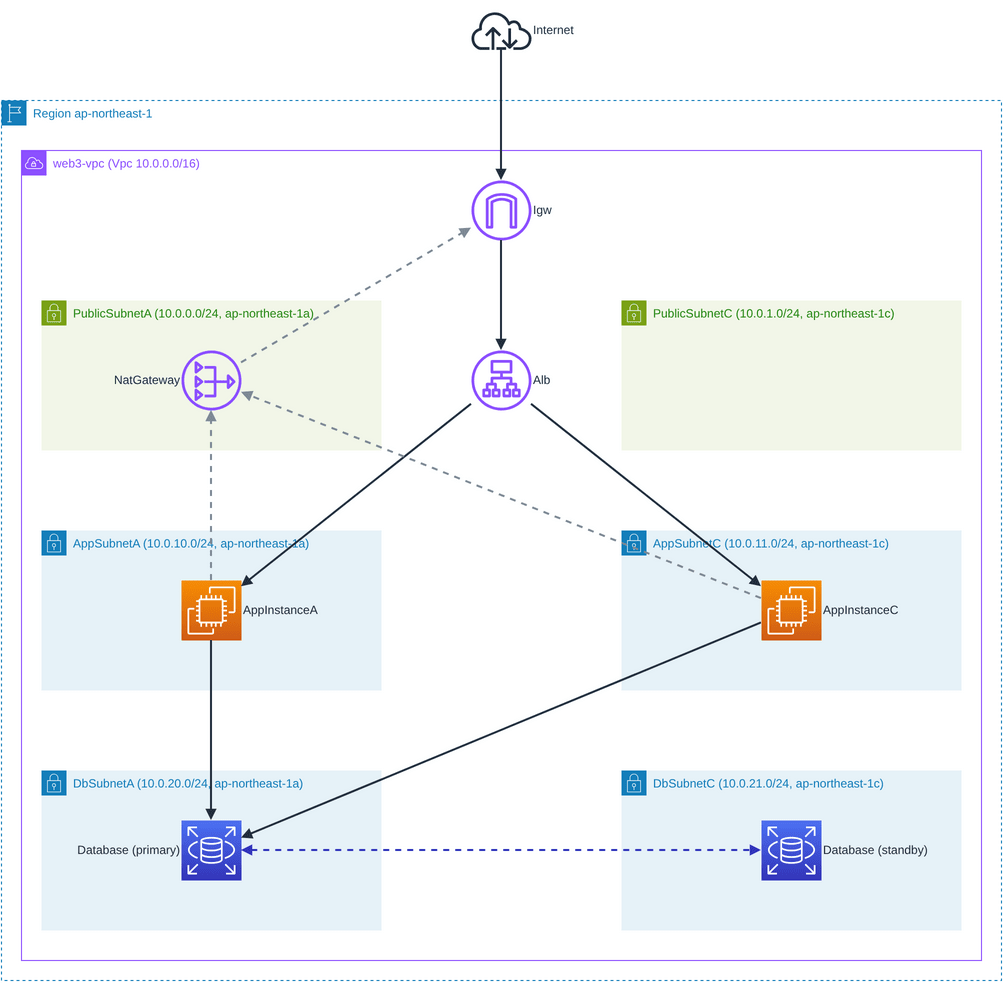
| Sonnet 5.5 | None (AZ written in subnet labels) | Between the two public subnets | Two icons: Primary and Standby, connected by a dashed double-headed arrow | Few overlaps (dashed line to NAT overlaps the AppSubnetC label) |
| GPT-5.6 Terra | None (AZ written in subnet labels) | Between the two public subnets | One icon only, placed between the two DB subnets | Subnet labels are rotated vertically, and the two lines of each label overlap. Long lines cross multiple subnets |
| GPT-5.6 Luna | None | Between the two public subnets | One icon only, placed between the two DB subnets inside a DbSubnetGroup frame | Many dashed lines cross numerous shapes and labels. Route tables are placed at the bottom inside the VPC frame |
Luna's EC2 icons used an incorrect icon name and rendered as orange squares with no glyph. The XML specifies resIcon=mxgraph.aws4.ec2_instance for EC2; changing it to resIcon=mxgraph.aws4.ec2 produces the correct glyph.
Credits and Time Required
Multipliers are displayed values; credits are actual measured values.
| Model (Multiplier) | Vulnerability Detection Credits | Vulnerability Detection Time | Architecture Diagram Credits | Architecture Diagram Time |
|---|---|---|---|---|
| Kimi K3 (2.40x) | 1.20 | 30 sec | 6.12 | 231 sec |
| Opus 5.5 (2.00x) | 1.55 | 52 sec | 2.96 | 98 sec |
| Sonnet 5.5 (1.30x) | 0.83 | 32 sec | 2.82 | 122 sec |
| GPT-5.6 Terra (2.20x) | 1.07 | 28 sec | 1.73 | 43 sec |
| GPT-5.6 Luna (0.60x) | 0.44 | 28 sec | 0.76 | 53 sec |
The order of highest credits did not match the order of highest multipliers. For the architecture diagram, Terra scored lower than both Opus 5.5 and Sonnet 5.5, and for vulnerability detection, both Kimi K3 and Terra scored lower than Opus 5.5.
Summary
Following its availability on Amazon Bedrock starting in September 2026, Kimi K3 has also become selectable as experimental in Kiro.
According to Artificial Analysis's report (July 2026), Kimi K3's overall performance is comparable to Opus 4.8 and GPT-5.5, but does not reach Fable 5 or GPT-5.6 Sol.
In this evaluation, the vulnerability findings for CloudFormation templates largely overlapped across all five models, and there were also findings raised exclusively by Kimi K3.
Please try out Kimi K3 as a way to handle tasks that Claude or GPT cannot solve, or as a second opinion to catch overlooked points.

