Using kubectl exec as an API Gateway — Practical Patterns in Enterprise Kubernetes

This page has been translated by machine translation. View original
Introduction
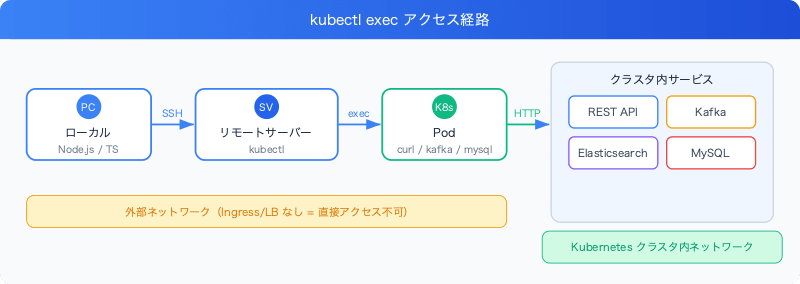
In enterprise Kubernetes clusters, exposing APIs to the outside may be restricted. When external access to Kafka, Elasticsearch, internal REST APIs, and similar services is unavailable, a useful pattern is to enter a Pod using kubectl exec and run curl or kafka-console-producer from within.
While it may sound "hacky," it actually has security benefits as well. This article introduces how we made this pattern maintainable using a TypeScript Builder class.
Prerequisites / Environment
- Kubernetes (environment where kubectl exec is available)
- Node.js + TypeScript
- Connect to a remote server via SSH and run kubectl exec from there
Why Use kubectl exec
Enterprise Kubernetes environments often have the following constraints:
- No Ingress/LoadBalancer configured for internal APIs
- Kafka brokers accessible only within the cluster network
- Elasticsearch not exposed externally
- Unable to reach Service IPs directly even via VPN
In such cases, running curl or kafka-console-producer from a Pod inside the cluster is the most reliable access method.
Sending Events to Kafka
Kafka brokers are accessible only from within the cluster. We run kafka-console-producer inside a Pod to send events.
class Kafka {
  private podName?: string;

  public async runEvent(config: EventConfig): Promise<void> {
    await this.checkPodname();

    const events = this.getEvents(config);

    for (const event of events) {
      const eventString = JSON.stringify(event).replace(/"/g, '\\"');

      const cmd = [
        `kubectl exec`,
        `${this.podName}`,
        `-- sh -c "unset KAFKA_JMX_OPTS`,  // Avoid JMX conflicts
        `&&`,
        `echo '${eventString}'`,
        `|`,
        `kafka-console-producer.sh`,
        `--topic YOUR_TOPIC_NAME`,
        `--broker-list kafka-broker-0:9092"`,
      ].join(" ");

      await Remote.execRemote(cmd);
    }
  }
unset KAFKA_JMX_OPTS is a workaround to avoid JMX port conflicts inside the Pod. When a Kafka broker is already running inside the Pod, attempting to start a producer with the same JMX settings causes a conflict.
Querying MySQL
Queries to the internal database also go through kubectl exec.
class MySQL {
  public async checkUser(userName: string): Promise<void> {
    const podName = (await Pod.getPodMySQL())[0] ?? "";
    const query = `USE mydb; SELECT id FROM records WHERE userName='${userName}';`;

    const cmd = [
      `kubectl exec -i`,  // Use -i instead of -it (non-interactive mode)
      `${podName}`,
      `-n ${this.namespace()}`,
      `-- mysqlsh`,
      `--user='${credentials.MYSQL_USERNAME}'`,
      `--password='${credentials.MYSQL_PASSWORD}'`,
      `-h ${podName}`,
      `-P ${ports.MYSQL_PORT}`,
      `--sql -e "${query}"`,
    ].join(" ");

    const result = await Remote.execRemote(cmd);
    // Parse text output and display as table
    const resultArray = result.split("\n").filter(Boolean);
    const key = resultArray[0] || "id";
    const values = resultArray.slice(1);
    console.table(values.map((value) => ({ [key]: value })));
  }
}
Notes:
- Use
-iinstead ofkubectl exec -it(interactive mode). TTY allocation is unnecessary for automation, and-itmay cause errors - Parsing the text output of
mysqlsh, though using--result-format=jsonwould be more robust
Tradeoffs of This Pattern
Advantages:
- Access any service inside the cluster without external exposure
- No additional Ingress or port-forwarding configuration required
- Controllable via RBAC (kubectl exec permissions)
Disadvantages:
- Parsing command results is fragile (relies on text output)
- Shell escaping is complex and prone to bugs
- Pod names change dynamically, requiring prior retrieval of the Pod name
Summary
We introduced a pattern that uses kubectl exec as a substitute for an API gateway.
- Centralize command construction and escaping with CommandBuilder
- Leverage for accessing in-cluster services such as Kafka and MySQL
- Input sanitization and protection against command injection are essential
It may not be the "official approach," but it is a valid strategy within the practical constraints of enterprise Kubernetes.