Obfuscating .env Secrets and Embedding Them in iOS Apps with Kura, a Swift-Built CLI Tool

This page has been translated by machine translation. View original
I've written several articles about secret management in iOS apps. Looking back, it has become something of a "history of the battle against Ruby dependencies."
- Use cocoapods‑keys to separate secret information from source code and handle it safely
- Preparing for the end of CocoaPods: migrating from cocoapods‑keys to Arkana + SPM
- bundle install fails on Xcode Cloud with Xcode 16.4 + macOS 26.0
- The bundle install failure on Xcode Cloud with Xcode 27 beta 1 + macOS 26.4 has come back
In preparation for CocoaPods being archived (it is scheduled to become read-only in December 2026), I migrated from cocoapods‑keys to Arkana + SPM. But because Arkana is written in Ruby, I ended up being at the mercy of Xcode Cloud's system Ruby 2.6. I have hit the problem of bundle install failing whenever the major versions of Xcode and macOS are out of sync twice now.
I had also considered not using the system Ruby in the first place, but it would add about 5 minutes to the build, so I didn't adopt it.
So this time, with the idea of cutting the Ruby dependency itself, I built a pure-Swift CLI tool called Kura. It obfuscates the secrets written in .env using XOR + salt and generates type-safe Swift code, and it works on Xcode Cloud as is. In this article, I introduce how Kura came about and how to use it.
Background: Why "Ditch Ruby"?
First, let me briefly summarize the issues covered in my past articles. They lead directly to the motivation for choosing Kura.
cocoapods‑keys and its end
Originally I used cocoapods‑keys, writing only the key names in the Podfile and keeping the values in the local Keychain, so that nothing was hardcoded in the source. However, cocoapods‑keys is a CocoaPods plugin, and once the CocoaPods Specs repository becomes read-only in December 2026, it will no longer receive updates.
Another downside is that using CocoaPods prevents you from using the folder-based format for Xcode projects.
Migrating to Arkana + SPM, and a new concern
So I migrated to Arkana, which is also recommended in the cocoapods‑keys README. Arkana is a CLI with SPM support, and it lets you manage secrets with two files: .arkana.yml and .env. I got away from the CocoaPods dependency, but since Arkana is written in Ruby, gems have to be resolved from RubyGems at build time.
This is where the Xcode Cloud system Ruby 2.6 problem surfaced. The latest Arkana (1.5.0 and later) requires Ruby 2.7 or later, so on a Ruby 2.6 environment, 1.4.0 is the upper limit. The CI script also became fairly complicated, for example installing Bundler in the user area on Xcode Cloud and then running bundle install.
Builds failed because the Xcode and macOS versions did not match
Furthermore, when building native extensions with system Ruby 2.6, I ran into a problem where the build fails due to an SDK path mismatch if the major versions of Xcode and macOS do not match.
- First time: With the combination of Xcode 16.4 + macOS 26.0, as soon as Xcode Cloud switched its default environment to macOS 26.0, the CocoaPods installation failed (it looked for
MacOSX15.5.sdk, which doesn't exist) - Second time: It happened again with Xcode 27 beta 1 + macOS 26.4.
MacOSX27.0.sdkonly contains the Ruby 2.6 headers foruniversal-darwin26, and theuniversal-darwin25that macOS 26.4 (darwin25) looks for is missing, so building thejsongem failed
And then a problem occurred with the connection between Xcode Cloud and the RubyGems server
From June 23 to 25, 2026, gem install bundler and bundle install started failing on Xcode Cloud. Builds failed 9 times out of 11 attempts.
The root cause of all of these is the same: CocoaPods and Arkana have a system dependency on Ruby. For the time being it can be avoided by "aligning the major versions of Xcode and macOS," but as long as we depend on Ruby, we can't fully escape this kind of problem.
I have already moved away from CocoaPods and install libraries via SPM. The only thing that needs Ruby is generating secrets.
So the starting point for Kura was the idea of removing the Ruby dependency from the secret generation tool entirely.
What is Kura?
Kura (蔵, "storehouse") is a pure-Swift CLI tool (kura-generator) that obfuscates the secrets in a .env file using XOR + salt and generates type-safe Swift code.
- No external runtime such as Ruby is needed. It is self-contained with SwiftPM alone
- Since it is a plain SwiftPM executable, you don't have to struggle with Xcode project or plugin sandboxes
- It works with Xcode Cloud as is via
ci_post_clone.sh - It handles both global secrets and per-environment secrets (debug/release, etc.)
- It can read some options from
.arkana.yml, which makes migrating from Arkana easy
Because it doesn't go through Ruby, neither network connections to the RubyGems server nor SDK path mismatches caused by Xcode/macOS version mismatches can occur in the first place. The key point is that the structural causes of the CI problems stemming from the Ruby runtime environment described above are removed altogether.
I also considered existing options. For example, I tried using a custom Ruby version on Xcode Cloud (related article), but it extended build time by about 5 minutes, so I decided against it. I also thought about modifying existing tools like CocoaPods or Arkana, but both are designed around the Ruby runtime itself, so partial modifications could not fundamentally solve this problem. That's why I decided to start over with a design that doesn't go through Ruby at all, and that became Kura.
Setup steps
From here, we'll actually introduce it into an iOS app project. There are four main steps.
- Create
BuildTools/Package.swiftand add Kura - Create
.kura.ymlin the project root - Create
.envin the project root - Run the generator and add the generated
KuraKeys/to the app as a local package
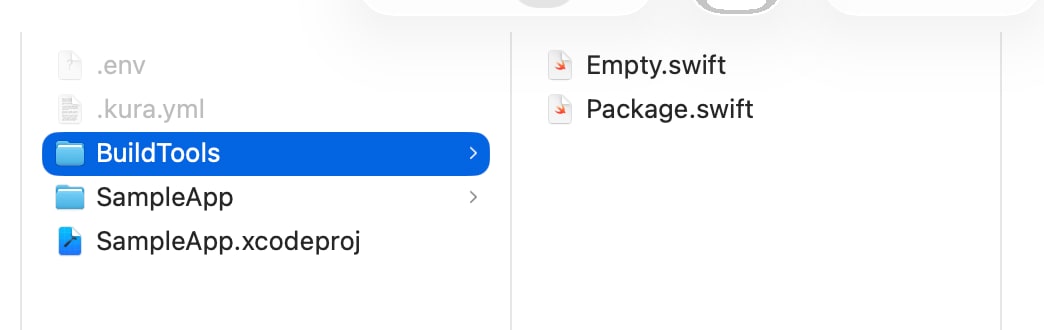
1. Add Kura to BuildTools
We recommend not adding Kura to the app's own Xcode project. Create a dedicated BuildTools/Package.swift and keep it contained there. This prevents Yams and other internal dependencies of Kura from getting mixed into the app's dependency graph (Package.resolved). It's the same idea as isolating build tools such as SwiftFormat in BuildTools/.
I chose this design because when I had integrated it directly into an Xcode project, the internal dependency Yams got mixed into the app's Package.resolved and made the dependencies harder to follow. To avoid repeating that mistake, Kura itself is structured so that it can be isolated on the BuildTools side.
Create a BuildTools/ directory in the project root and place the following Package.swift in it.
// swift-tools-version:5.9
import PackageDescription

let package = Package(
    name: "BuildTools",
    platforms: [.macOS(.v13)],
    dependencies: [
        .package(url: "https://github.com/CH3COOH/Kura.git", from: "1.0.2"),
    ],
    targets: [
        .target(
            name: "BuildTools",
            dependencies: [
                .product(name: "kura-generator", package: "Kura"),
            ],
            path: ""
        ),
    ]
)
For the target, place one empty Swift file inside BuildTools/.
$ touch BuildTools/Empty.swift
2. Create .kura.yml
Create the configuration file .kura.yml in the project root. The following is an example that explicitly specifies all the main options. If the default values are fine, you can skip ahead to "If you use the default settings" below.
import_name: KuraKeys      # Name of the generated Swift module (default: KuraKeys)
result_path: .             # Directory where KuraKeys/ is output (default: current directory)
swift_declaration: public  # public / internal (default: public)
                           # The generated output is a standalone package, so public is required if the app imports it.
                           # Choose internal only if you copy the generated .swift directly into the app target.
preserve_key_case: false   # If true, key names are used as property names as is, without camelCase conversion (default: false)

global_secrets:
  - API_KEY
  - ANALYTICS_TOKEN

environments:
  debug:
    - DEBUG_ENDPOINT
  release:
    - RELEASE_ENDPOINT
Write values that are shared across all environments under global_secrets, and values you want to switch per environment under environments.
Unless explicitly specified, the configuration file is searched for in the order .kura.yml → .kura.yaml → .arkana.yml. When migrating from Arkana, you can also have it read your existing .arkana.yml, but only the supported options are applied (see the migration section below for details).
If you use the default settings
Since import_name / result_path / swift_declaration / preserve_key_case all work with their default values when omitted, if the defaults are fine, you only need to define the keys you want to use, as follows.
global_secrets:
  - API_KEY
  - ANALYTICS_TOKEN

environments:
  debug:
    - DEBUG_ENDPOINT
  release:
    - RELEASE_ENDPOINT
3. Create .env
For local development, place a .env in the project root.
API_KEY="your_api_key_here"
ANALYTICS_TOKEN="your_token"
DEBUG_ENDPOINT="https://dev.example.com"
RELEASE_ENDPOINT="https://example.com"
After completing the steps so far, the project root should have a file structure like the following.
I want to avoid leaving .env on disk
The .env containing secrets must be added to .gitignore. As with Arkana, the rule is not to commit .env.
However, it isn't enough just to not commit it. Ideally, we'd like to avoid leaving .env on disk in plaintext in the first place. With 1Password Environments or the 1Password CLI (op), you can virtually mount .env with values from 1Password, so you don't have to write the actual secret values to disk. For details, please refer to the article I wrote previously.
To keep things simple, this article proceeds on the assumption of a regular .env.
4. Run the generator
In the directory containing .kura.yml / .env (the project root), run the following.
$ swift run --package-path BuildTools kura-generator
--package-path specifies "which package to build with," but the generated executable runs in the current directory at runtime. Therefore, the relative paths for .kura.yml / .env are resolved as is, and it works without specifying any options explicitly.
On success, a local Swift package named KuraKeys/ (the name specified by import_name) is generated.
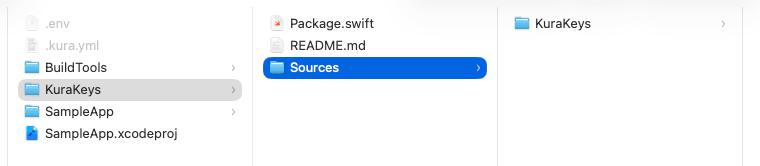
Add this to the app as a local package. In Xcode, the flow of specifying the inner KuraKeys folder via File → Add Packages → Add Local… is the same as when you added Arkana's ArkanaKeys.
// The app's Package.swift, or Xcode's Package Dependencies
.package(name: "KuraKeys", path: "KuraKeys")
Using the generated code
The generated output is Swift code like the following (the byte sequences and salt actually contain random values).
// AUTO-GENERATED by Kura — DO NOT EDIT

private func _kuraDecrypt(_ encoded: [UInt8], salt: [UInt8]) -> String { ... }

public enum KuraKeys {
    public enum Global {
        public static var apiKey: String { ... }
        public static var analyticsToken: String { ... }
    }
    public enum Debug {
        public static var debugEndpoint: String { ... }
    }
    public enum Release {
        public static var releaseEndpoint: String { ... }
    }
}
global_secrets are placed under Global, and per-environment secrets are nested under an enum named after the environment in PascalCase (Debug / Release, etc.). From the app, you can reference them in a type-safe way as follows.
import KuraKeys

let key = KuraKeys.Global.apiKey
let endpoint = KuraKeys.Release.releaseEndpoint
With Arkana you referenced values through an instance, like ArkanaKeys.Global().apiBaseUrl, but Kura uses static properties on an enum, so you can write KuraKeys.Global.apiKey without creating an instance. That is a slight difference.
Key name conversion rules
By default, the key names in .kura.yml are converted to camelCase property names.
Key in .kura.yml |
Generated property name |
|---|---|
API_KEY (underscore-separated) |
apiKey |
APIKEY (no separators) |
apikey (lowercased) |
With preserve_key_case: true, the conversion is skipped and the key name is used as is for the property name (API_KEY → API_KEY). This is handy when you want to migrate without changing existing generated property names.
Migrating from Arkana
If you're already using Arkana, you can have Kura read your .arkana.yml as is, but Kura only interprets the supported options. There are some points to be aware of when actually migrating.
import_nameandglobal_secretscan be read as is. If you only use global keys, you can migrate almost unchanged.- Per-environment secrets need to be written differently. Arkana's
.arkana.ymlwas structured withenvironments(a list of environment names) +environment_secrets(a list of keys), but Kura interpretsenvironmentsas a dictionary of "environment name → array of keys." So on the Kura side, rewrite it as follows.
# Arkana format (example)
environments:
  - Debug
  - Release
environment_secrets:
  - apiKey

# ↓ Rewritten in Kura format
environments:
  debug:
    - DEBUG_API_KEY
  release:
    - RELEASE_API_KEY
- If you want different values per environment, separate the key names. Arkana read
apiKeyDebug/apiKeyReleasefrom.envseparately based on the single keyapiKey. Kura looks up the key names in.env/ environment variables as they are, so if you want different values per environment, the design is to prepare separate key names such asDEBUG_API_KEY/RELEASE_API_KEYas above.
If your setup centers on global keys, migration is very easy, and only projects that provide different values per environment need to be mindful of this difference.
Configuration on Xcode Cloud
This is where switching from a Ruby-based tool really pays off.
When I previously ran Arkana on Xcode Cloud, to deal with the system area being read-only, I wrote a CI script that pointed GEM_HOME at the user area, installed Bundler, and then ran bundle install → bundle exec arkana. I also had to pay attention to unstable connections to the RubyGems server and the effort of aligning Xcode and macOS versions. Since Kura is pure Swift, you don't have to worry about any of that.
Also, when resolving secrets, Kura prioritizes environment variables over the .env file, so simply registering each key as an Environment Variable in the workflow is enough for the values to be resolved (this behavior of "referencing environment variables on CI" follows the same idea as cocoapods‑keys and Arkana).
Just running kura-generator in ci_scripts/ci_post_clone.sh creates the KuraKeys package.
#!/bin/sh
set -e

cd "$CI_PRIMARY_REPOSITORY_PATH/path/to/project"  # Move to the location of .kura.yml
swift run --package-path BuildTools kura-generator
With this, you no longer have to suffer from Xcode/macOS version mismatches on Xcode Cloud or unstable connections to the RubyGems server.
Operational tips
The generated KuraKeys.swift uses a random salt on every run, so its contents change every time even if the contents of .env are the same. As an operational policy, adding the generated KuraKeys/ to .gitignore and regenerating it each time helps avoid pointless diffs and conflicts. On Xcode Cloud it is generated every time by ci_post_clone.sh, so it's fine as is.
Summary
Migrating from cocoapods‑keys to Arkana + SPM removed the CocoaPods dependency, but as long as the Ruby dependency remained, I couldn't escape CI instability on Xcode Cloud caused by Xcode and macOS version mismatches and unstable connections to the RubyGems server.
Building Kura let me sort things out as follows.
- With a pure-Swift mechanism that doesn't depend on Ruby / RubyGems, troubles caused by the Ruby runtime environment on CI no longer occur structurally
- It's unaffected by the end of CocoaPods (it's SPM-based)
- Secrets written in
.envcan be referenced as type-safe Swift code - It's easy to migrate from Arkana's configuration and operations
On the other hand, the fact that it is obfuscation and not encryption hasn't changed. It's effective for the purpose of reducing plaintext exposure from the binary, but for values that truly need to be kept secret, please consider managing them outside the client, such as with a backend proxy. Also, if you don't want to keep .env on disk, please consider combining it with something like 1Password Environments.
I hope this serves as a reference for the next step for those struggling to move away from cocoapods‑keys, or with CI instability caused by Arkana's Ruby dependency. It's a freshly built tool and there are probably many rough edges, so I'd appreciate your feedback.
Related articles
The Kura repository is publicly available below.
The articles I've written while exploring how to move away from CocoaPods and cocoapods‑keys are as follows.
- Use cocoapods‑keys to separate secret information from source code and handle it safely
- Preparing for the end of CocoaPods: migrating from cocoapods‑keys to Arkana + SPM
- bundle install fails on Xcode Cloud with Xcode 16.4 + macOS 26.0
- The bundle install failure on Xcode Cloud with Xcode 27 beta 1 + macOS 26.4 has come back
For handling .env, please also refer to the following article.