I tried implementing Slack approval button waiting with Lambda Durable Functions without using Step Functions

This page has been translated by machine translation. View original
Hey there! I'm Yuji Nishimura from the Operations team!
The requirement of "pausing a workflow until a Slack approval button is pressed" has traditionally been handled using Step Functions' waitForTaskToken. Since Lambda durable functions, announced at re:Invent 2025, includes a waitForCallback that can wait for external callbacks, I decided to try whether the same thing could be achieved with Lambda alone, without using Step Functions.
As a result, I got "post a message with approval buttons to Slack → suspend until pressed → resume when pressed" working with just two Lambda functions and a Lambda Function URL. In addition to approval and rejection, timeout handling for when nobody presses the button can also be written in code. I'll summarize everything including the tricky parts I ran into.
What You Can Do with Lambda Durable Functions' waitForCallback
Lambda durable functions use a checkpoint-and-replay mechanism (saving the progress of processing and, upon resumption, re-executing the code from the beginning while reading back saved results to continue from where it left off), allowing you to write "long-running workflows that span multiple invocations" as the code of a single Lambda function. You enable durable execution when creating the function and wrap the handler with the Durable Execution SDK's withDurableExecution.
waitForCallback is used for waiting on external events. When called, it issues a callbackId, and execution is suspended until an external system calls the SendDurableExecutionCallbackSuccess API. No compute charges are incurred while suspended (for on-demand functions), and you can wait up to one year (the ExecutionTimeout upper limit of 31,622,400 seconds).
Mapping to the components used when doing the same thing with Step Functions:
| Step Functions (waitForTaskToken) | Lambda durable functions |
|---|---|
| State machine + ASL definition | Lambda function code |
| TaskToken | callbackId |
| SendTaskSuccess / SendTaskFailure | SendDurableExecutionCallbackSuccess / Failure |
| Timeout configured with TimeoutSeconds / HeartbeatSeconds | timeout option of waitForCallback |
This Configuration
There are only four components. No state machine or API Gateway.
- Approval flow main body (durable function): Posts a message with buttons to Slack and waits for a press using
waitForCallback - Callback receiver Lambda + Function URL: Receives Slack button presses (interactivity) and calls
SendDurableExecutionCallbackSuccess - Slack app: Sets the Function URL as the Request URL for Interactivity
- Secrets Manager: Stores the Slack Bot Token
The processing flow is as follows:
- Launch the approval flow main body with an asynchronous invocation
- Inside the
waitForCallbacksubmitter (the function that receives thecallbackIdand sends notifications to external systems), post a Block Kit message to Slack with thecallbackIdembedded in the button'svalue - The function suspends
- Button press → Slack POSTs an interaction payload to the Function URL
- The callback receiver Lambda extracts the
callbackIdfromvalueand callsSendDurableExecutionCallbackSuccess - The approval flow main body resumes via replay and executes subsequent processing based on the approval/rejection result
Let's Try It
Environment
- aws-cdk-lib 2.262.1
- @aws/durable-execution-sdk-js 2.2.0
- @aws-sdk/client-lambda 3.1097.0
- Node.js 22 / TypeScript 5.9
- Region: ap-northeast-1 (Tokyo region supported as of 2025-12-18)
1. Define the Durable Function with CDK
Starting from aws-cdk-lib v2.232.0, the Function L2 construct natively supports durableConfig. You only need to specify executionTimeout (required) and retentionPeriod (execution history retention period after completion, default 14 days).
import * as cdk from "aws-cdk-lib";
import * as lambda from "aws-cdk-lib/aws-lambda";
import * as nodejs from "aws-cdk-lib/aws-lambda-nodejs";
import * as iam from "aws-cdk-lib/aws-iam";
import * as secretsmanager from "aws-cdk-lib/aws-secretsmanager";
import { Construct } from "constructs";
import * as path from "path";

const BOT_TOKEN_SECRET_NAME = "dev/blog-verify/slack-bot-token";

export class DurableSlackApprovalStack extends cdk.Stack {
  constructor(scope: Construct, id: string, props?: cdk.StackProps) {
    super(scope, id, props);

    const botTokenSecret = secretsmanager.Secret.fromSecretNameV2(
      this,
      "BotTokenSecret",
      BOT_TOKEN_SECRET_NAME,
    );

    // Approval flow main body (durable function)
    const approvalFlowFn = new nodejs.NodejsFunction(this, "ApprovalFlowFn", {
      entry: path.join(__dirname, "../lambda/approval-flow.ts"),
      runtime: lambda.Runtime.NODEJS_22_X,
      timeout: cdk.Duration.seconds(60),
      durableConfig: {
        executionTimeout: cdk.Duration.hours(1),
        retentionPeriod: cdk.Duration.days(7),
      },
      environment: {
        BOT_TOKEN_SECRET: BOT_TOKEN_SECRET_NAME,
      },
    });
    botTokenSecret.grantRead(approvalFlowFn);

    // Lambda that receives Slack button presses and completes the callback
    const slackCallbackFn = new nodejs.NodejsFunction(this, "SlackCallbackFn", {
      entry: path.join(__dirname, "../lambda/slack-callback.ts"),
      runtime: lambda.Runtime.NODEJS_22_X,
      timeout: cdk.Duration.seconds(10),
    });
    // Since durable execution ARNs are in the format "function ARN:version/durable-execution/..."
    // the Resource must include a wildcard pattern up to :*
    slackCallbackFn.addToRolePolicy(
      new iam.PolicyStatement({
        actions: [
          "lambda:SendDurableExecutionCallbackSuccess",
          "lambda:SendDurableExecutionCallbackFailure",
        ],
        resources: [`${approvalFlowFn.functionArn}:*`],
      }),
    );

    const fnUrl = slackCallbackFn.addFunctionUrl({
      authType: lambda.FunctionUrlAuthType.NONE,
    });

    new cdk.CfnOutput(this, "CallbackUrl", { value: fnUrl.url });
    new cdk.CfnOutput(this, "ApprovalFlowFunctionName", {
      value: approvalFlowFn.functionName,
    });
  }
}
There are two key points.
- When
durableConfigis specified, CDK automatically grantsAWSLambdaBasicDurableExecutionRolePolicyinstead of the usualAWSLambdaBasicExecutionRoleto the generated execution role (it includes permissions for checkpoint storage). This could be verified in the synthesized template. - For the IAM on the callback completion side, always specify the Resource with a wildcard including the version part, like
function ARN:*. Since durable execution ARNs are in the formatfunction ARN:version/durable-execution/execution name/ID, writing just the function ARN won't match and will result in AccessDenied. (This is also explicitly stated in the official documentation.)
2. Implement the Approval Flow Main Body
Wrap the handler with withDurableExecution and call waitForCallback from the DurableContext passed as the second argument to the handler. The callbackId is passed to the submitter function, which is the second argument of waitForCallback, and Slack posting is performed inside it.
import {
  withDurableExecution,
  DurableContext,
  CallbackTimeoutError,
} from "@aws/durable-execution-sdk-js";
import {
  SecretsManagerClient,
  GetSecretValueCommand,
} from "@aws-sdk/client-secrets-manager";

const secretsManager = new SecretsManagerClient({});

interface ApprovalEvent {
  channel: string;
  summary: string;
  timeoutMinutes?: number;
}

interface Decision {
  approved: boolean;
  user: string;
}

// Retrieve token from Secrets Manager each time; do not persist in checkpoints
async function getBotToken(): Promise<string> {
  const res = await secretsManager.send(
    new GetSecretValueCommand({ SecretId: process.env.BOT_TOKEN_SECRET! }),
  );
  return res.SecretString!;
}

async function postSlackMessage(body: unknown): Promise<void> {
  const token = await getBotToken();
  const res = await fetch("https://slack.com/api/chat.postMessage", {
    method: "POST",
    headers: {
      "Content-Type": "application/json; charset=utf-8",
      Authorization: `Bearer ${token}`,
    },
    body: JSON.stringify(body),
  });
  const data = (await res.json()) as { ok: boolean; error?: string };
  if (!data.ok) {
    throw new Error(`Slack API error: ${data.error}`);
  }
}

export const handler = withDurableExecution(
  async (event: ApprovalEvent, context: DurableContext) => {
    let decision: Decision;
    try {
      // Post a message with approval buttons to Slack and wait until a button is pressed
      const result = await context.waitForCallback<string>(
        "wait-for-slack-approval",
        async (callbackId) => {
          await postSlackMessage({
            channel: event.channel,
            text: `Approval request: ${event.summary}`,
            blocks: [
              {
                type: "section",
                text: {
                  type: "mrkdwn",
                  text: `*Approval Request*\n${event.summary}`,
                },
              },
              {
                type: "actions",
                elements: [
                  {
                    type: "button",
                    text: { type: "plain_text", text: "Approve" },
                    style: "primary",
                    action_id: "approve",
                    value: callbackId,
                  },
                  {
                    type: "button",
                    text: { type: "plain_text", text: "Reject" },
                    style: "danger",
                    action_id: "reject",
                    value: callbackId,
                  },
                ],
              },
            ],
          });
        },
        { timeout: { minutes: event.timeoutMinutes ?? 5 } },
      );
      decision = JSON.parse(result) as Decision;
    } catch (err) {
      if (err instanceof CallbackTimeoutError) {
        // If nobody pressed before the deadline, treat it as automatic rejection
        await context.step("notify-timeout", async () => {
          await postSlackMessage({
            channel: event.channel,
            text: `The approval request has expired (automatically rejected): ${event.summary}`,
          });
        });
        return { status: "timeout" };
      }
      throw err;
    }

    await context.step("notify-result", async () => {
      await postSlackMessage({
        channel: event.channel,
        text: decision.approved
          ? `${decision.user} approved. Proceeding with subsequent processing: ${event.summary}`
          : `${decision.user} rejected: ${event.summary}`,
      });
    });

    return {
      status: decision.approved ? "approved" : "rejected",
      by: decision.user,
    };
  },
);
The callbackId is embedded directly into the button's value. The callbackId is a base64-like string of up to 1024 characters (347 characters in actual measurements for this case), so it fits within the Slack button value limit (2000 characters).
Timeout handling is written by catching CallbackTimeoutError. If timeout is not specified, it will keep waiting until ExecutionTimeout, so official best practices also recommend always setting it.
3. Implement the Endpoint for Slack Buttons
Receive the Slack interaction payload via Function URL and call SendDurableExecutionCallbackSuccess.
import {
  LambdaClient,
  SendDurableExecutionCallbackSuccessCommand,
} from "@aws-sdk/client-lambda";
import type {
  LambdaFunctionURLEvent,
  LambdaFunctionURLResult,
} from "aws-lambda";

const lambda = new LambdaClient({});

interface SlackInteractionPayload {
  user: { id: string; username?: string };
  actions: { action_id: string; value: string }[];
  response_url: string;
}

export const handler = async (
  event: LambdaFunctionURLEvent,
): Promise<LambdaFunctionURLResult> => {
  const rawBody = event.isBase64Encoded
    ? Buffer.from(event.body ?? "", "base64").toString()
    : (event.body ?? "");
  const params = new URLSearchParams(rawBody);

  // Return 200 for ssl_check verification POSTs sent by Slack when saving the Request URL
  // (If you don't return 200 for POSTs without a payload field, saving the URL will fail)
  const payloadStr = params.get("payload");
  if (!payloadStr) {
    return { statusCode: 200, body: "" };
  }
  const payload = JSON.parse(payloadStr) as SlackInteractionPayload;

  const action = payload.actions[0];
  const decision = {
    approved: action.action_id === "approve",
    user: payload.user.username ?? payload.user.id,
  };

  try {
    await lambda.send(
      new SendDurableExecutionCallbackSuccessCommand({
        CallbackId: action.value,
        // Result type is Uint8Array, so pass it using Buffer
        Result: Buffer.from(JSON.stringify(decision)),
      }),
    );
  } catch (err) {
    // Notify the user via Slack for button presses on expired or already-processed callbacks
    await fetch(payload.response_url, {
      method: "POST",
      headers: { "Content-Type": "application/json" },
      body: JSON.stringify({
        replace_original: true,
        text: `This approval request has already been processed or has expired (${(err as Error).name})`,
      }),
    });
    return { statusCode: 200, body: "" };
  }

  // Replace the original message with the button press result (prevents double-pressing)
  await fetch(payload.response_url, {
    method: "POST",
    headers: { "Content-Type": "application/json" },
    body: JSON.stringify({
      replace_original: true,
      text: decision.approved
        ? `${decision.user} approved`
        : `${decision.user} rejected`,
    }),
  });

  return { statusCode: 200, body: "" };
};
There are three implementation notes.
- A branch that returns 200 for POSTs without
payloadis required. Slack sends a verification POST withssl_check=1&token=...when saving the Request URL. At first, this branch was missing, causing the handler to crash and return 502. As a result, I got stuck in a situation where Slack kept failing to save the Request URL. - The type of
ResultisUint8Array. Unlike boto3, you can't pass a string directly, so useBuffer.from(JSON.stringify(...)). - Calling
SendDurableExecutionCallbackSuccessafter expiration or on a double-press will throw an exception (sending to a closed callback), so catch it and notify the user viaresponse_url.
4. Prepare the Slack App and Token
There are two things to prepare on the Slack app side. The Interactivity Request URL setting is done after deploying and obtaining the Function URL (step 7).
- Add
chat:writeto Bot Token Scopes and invite the Bot to the target channel (also addchannels:historyif you plan to do the standalone curl testing described later) - Register the Bot User OAuth Token (the string starting with
xoxb-) in Secrets Manager
Since the code reads SecretString as a plain string, save it directly rather than in JSON format.
aws secretsmanager create-secret \
  --name dev/blog-verify/slack-bot-token \
  --secret-string "xoxb-(Bot User OAuth Token)"
5. Deploy and Launch the Approval Flow
Install dependencies and run cdk deploy. Since NodejsFunction uses esbuild for bundling, include it in devDependencies (assuming cdk bootstrap has already been done).
pnpm add aws-cdk-lib constructs @aws/durable-execution-sdk-js \
  @aws-sdk/client-lambda @aws-sdk/client-secrets-manager
pnpm add -D aws-cdk tsx typescript esbuild @types/node @types/aws-lambda
pnpm exec cdk deploy
Note down the CallbackUrl (Function URL) and ApprovalFlowFunctionName from the deployment output, and set them as environment variables FUNCTION_URL / FUNCTION_NAME for use in subsequent commands.
Invoke the approval flow asynchronously (--invocation-type Event) with a version or alias appended to the function name. Durable functions can only be called with a qualified ARN (an ARN with a version, alias, or $LATEST appended). Also, synchronous invocations are subject to the 15-minute limit for the entire execution, so long-running workflows like approval waiting are premised on asynchronous invocation.
aws lambda invoke \
  --function-name "$FUNCTION_NAME:\$LATEST" \
  --invocation-type Event \
  --cli-binary-format raw-in-base64-out \
  --payload '{"channel":"C0XXXXXXXXX","summary":"Production environment deployment (release v1.2.3)","timeoutMinutes":30}' \
  /dev/null
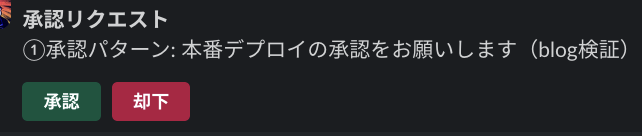
A message with buttons is posted to the channel.
Waiting executions can be confirmed as RUNNING status. Since my local AWS CLI (2.31.39) didn't yet have durable execution subcommands, I confirmed via the AWS SDK for JavaScript (ListDurableExecutionsByFunction / GetDurableExecution APIs).
{"summary":"Production environment deployment...","Status":"RUNNING","Started":"2026-07-30T09:02:36.386Z"}
6. Unit Test the Endpoint with curl
Before configuring Interactivity in the Slack app, you can verify the entire callback completion flow with curl. Simply POST the same format that Slack sends (a payload field in application/x-www-form-urlencoded) to the Function URL.
Since the callbackId is in the button value of the message posted in step 5, extract it from the conversations.history API.
# Extract callbackId from the most recent message (requires channels:history scope)
curl -s -H "Authorization: Bearer $SLACK_BOT_TOKEN" \
  "https://slack.com/api/conversations.history?channel=$CHANNEL_ID&limit=5" \
  -o hist.json
CALLBACK_ID=$(jq -r '.messages[0].blocks[] | select(.type=="actions") | .elements[] | select(.action_id=="approve") | .value' hist.json)

# POST a payload equivalent to pressing a button
jq -nc --arg v "$CALLBACK_ID" \
  '{type:"block_actions",user:{id:"UTEST",username:"curl-test"},actions:[{action_id:"approve",value:$v}],response_url:"https://example.com/dummy"}' \
  > payload.json
curl -s -o /dev/null -w "HTTP %{http_code}\n" -X POST "$FUNCTION_URL" \
  -H "Content-Type: application/x-www-form-urlencoded" \
  --data-urlencode "payload@payload.json"
Running this returns HTTP 200, and a few seconds later the durable function resumes and "curl-test approved. Proceeding with subsequent processing" is posted to Slack. The rejection side (action_id: "reject") worked the same way.
Note that handling JSON through variables in the shell can cause zsh's echo to expand \n into actual newlines, breaking jq parsing, so passing via a file as shown above is safer.
7. Configure Interactivity and Test with Buttons
Enable Interactivity & Shortcuts in the Slack app and set the CallbackUrl (Function URL) as the Request URL. Since the aforementioned ssl_check verification runs when saving, you can't save it until the receiver Lambda is deployed.
Launch the approval flow again and press "Approve": the original message is replaced with the button press result, and the durable function resumes and posts a completion notification.

Pressing "Reject" also resumes as a rejection in the same way.
A completed execution becomes Status: SUCCEEDED, and the handler's return value {"status":"approved","by":"..."} is recorded in the Result field.
8. Verify Timeout Behavior
When left idle with a 5-minute timeout setting, the CallbackTimeoutError catch clause triggered exactly 5 minutes later, and an automatic rejection message was posted.

Looking at the event history via the GetDurableExecutionHistory API clearly shows the flow of suspension and resumption.
ExecutionStarted     09:02:37
CallbackStarted      09:02:38   ← waitForCallback started
StepStarted          09:02:38   ← submitter (Slack posting)
StepSucceeded        09:02:40
InvocationCompleted  09:02:40   ← first invocation ends here (suspended)
CallbackTimedOut     09:07:38   ← callback expires 5 minutes later
StepStarted          09:07:39   ← notify-timeout step (resumes via replay)
StepSucceeded        09:07:40
ExecutionSucceeded   09:07:40   ← caught, so the execution itself succeeds
The key point is that if the timeout is caught, the execution status becomes SUCCEEDED.
I hit one trap here. When specifying 60 minutes for the callback's timeout, the deadlines of durableConfig's executionTimeout (1 hour) coincided, causing the entire execution to forcibly terminate with a TIMED_OUT status. In this case, the CallbackTimeoutError catch is not executed and the automatic rejection notification is not sent. The callback's timeout must always be set shorter than executionTimeout.
9. Verify Charges During Waiting
Durable function Lambda functions output structured JSON platform logs. Looking at platform.report for an execution that waited approximately 72 seconds before approval, the billable items were just two short invocations.
10:35:43  billed: 3642ms  ← 1st invocation (until posting to Slack and suspending)
10:36:57  billed: 1478ms  ← 2nd invocation (replay after receiving callback, completion processing)
The approximately 72 seconds of waiting is not subject to duration charges. Even if approval waiting takes hours or days, compute charges remain the same.
Note that durable functions-specific charges apply: durable operations (per-operation units such as execution start, step completion, wait creation) at $8.00/million operations, checkpoint data writes at $0.25/GB, and retention at $0.15/GB-month (us-east-1, as of 2026-07-30 from the pricing page. Unit prices for the Tokyo region can be confirmed on the pricing page). This approval flow has approximately 12 events per execution based on the event history, and a simple calculation of operation unit prices shows less than $0.0001, so the impact on charges is minimal.
Analysis of Verification Results
Compared to the standard Step Functions waitForTaskToken configuration (state machine + API Gateway + two Lambdas), the following became unnecessary with this configuration:
- State machine and ASL definition (the entire flow became TypeScript code)
- API Gateway (replaced with Function URL)
- TaskToken passing design (just embed callbackId in the button's
value)
On the other hand, the visual flow representation and 220+ service integrations available in Step Functions are not available. The official decision guide positions durable functions as optimized for "application development within Lambda," while Step Functions is intended for "workflow orchestration across AWS services." Decision criteria include not only the number of AWS services involved, but also multiple perspectives such as whether you want to write in standard programming languages or define in visual designer/ASL, and whether non-technical people need to review the workflow. An approval flow like this one is application logic within Lambda itself, making it a use case well-suited for durable functions.
The following constraints need to be kept in mind:
- Durable execution can only be enabled when creating a new function (cannot be added later)
- Invocation requires an ARN with a version or alias; long-running waits are premised on asynchronous invocation
- Code must be written deterministically with replay in mind (place external I/O inside steps or submitters)
My Impressions After Trying It
The API design where writing Slack posting inside the waitForCallback submitter packages "posting and waiting" as a set is intuitive. Compared to the old days of threading TaskTokens through environment variables or payloads in Step Functions, the flow is much clearer. I also liked that timeout handling for approvals can be written with try/catch, allowing branching like "auto-reject and notify Slack if expired" to be expressed as ordinary code.
On the other hand, things like responding to ssl_check and the relationship between two types of timeouts are things you'd be unlikely to notice without actually running it. It seems best to design the timeout values from the start.
Summary
- With Lambda durable functions'
waitForCallback, you can implement Slack approval button waiting and resuming without using Step Functions - The configuration consists of only 2 Lambda functions + Function URL + Slack app. There are no compute charges while waiting
- The 3 paths of approval, rejection, and timeout, as well as error handling for double-clicks, are all handled in code
- The 4 gotchas are: "200 response to ssl_check", "IAM Resource must be
function ARN:*", "Result's Uint8Array", and "the relationship between callback timeout and executionTimeout"
I hope this is helpful to someone.
Reference Links:
- AWS Lambda durable functions - AWS Lambda Developer Guide
- Callback - AWS Durable Execution SDK Developer Guide
- SendDurableExecutionCallbackSuccess - AWS Lambda API Reference
- Security in durable functions - IAM policy examples
- When to use durable functions vs. Step Functions
- aws-cdk-lib.aws_lambda.DurableConfig - AWS CDK API Reference
- AWS Lambda Pricing