
I tried appending rows to Google Sheets from AWS Lambda using OAuth 2.0

This page has been translated by machine translation. View original
Introduction
Have you ever wanted to write to Google Spreadsheets from AWS Lambda?
I had an opportunity to record the aggregation results of a batch job I was running on a schedule, line by line, in a spreadsheet shared with my team.
At first I planned to use a service account, but due to the Google Workspace settings in our organization, I couldn't share the spreadsheet with it. I ended up implementing it using OAuth 2.0 with a personal account.
Since others might get stuck in the same place, I'll summarize everything from selecting the authentication method, through implementation, to the procedure for reissuing refresh tokens.
What I Wanted to Do
What I wanted to do was simple — just these 2 things:
- There is a spreadsheet under a shared drive that I have edit access to
- I want to append execution results to that spreadsheet from Lambda
If read-only access were enough, there would be more options, but this time writing was required. Also, with the assumption that team members would change in the future, I aimed for a configuration where switching credentials wouldn't be a hassle.
Architecture
The overall flow looks like this.
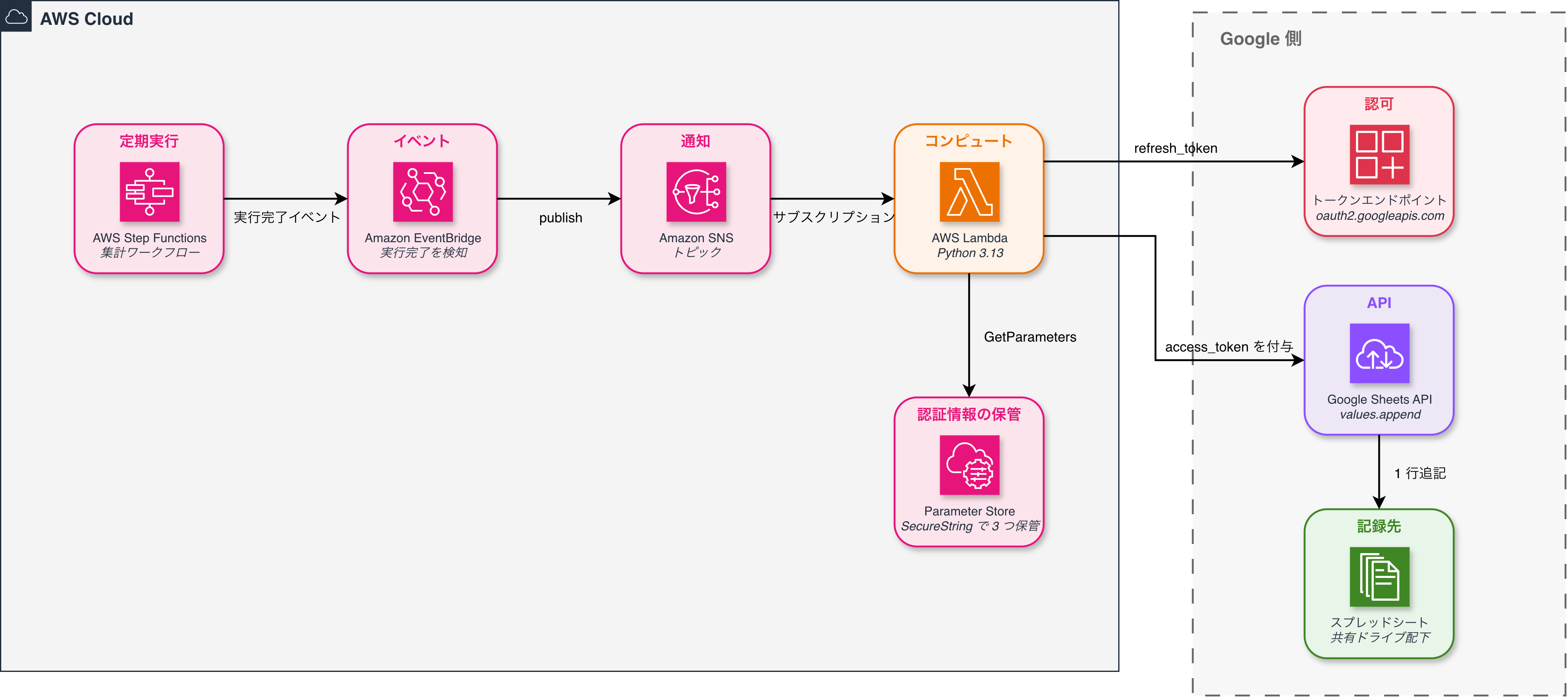
- Lambda retrieves the client ID, client secret, and refresh token from Parameter Store
- Using the refresh token, it obtains an access token from Google's token endpoint
- It attaches the access token and calls
values.appendin the Sheets API to append 1 row
This assumes you already have a Google Cloud project.
Enabling Google Sheets API
Once you have a Google Cloud project, first enable the API. Just find Google Sheets API in the "Library" under "APIs & Services" and enable it.
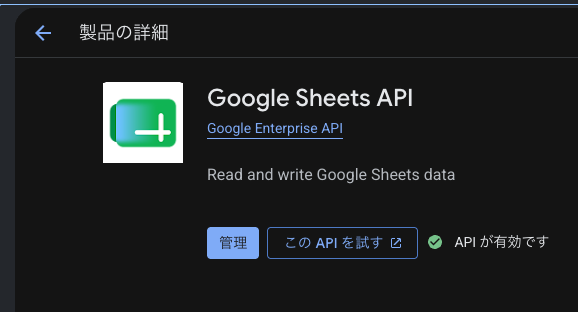
This step is just enabling it and is independent from the authentication settings.
Configuring the OAuth Consent Screen
Next, configure the OAuth consent screen. This needs to be done before creating a client ID.
The console menu name has changed — the former "OAuth consent screen" is now consolidated under "Google Auth Platform". It has the following 4 sub-menus:
| Menu | Content |
|---|---|
| Branding | App name, user support email |
| Audience | User type (Internal / External), publishing status |
| Data Access | Requested scopes |
| Clients | OAuth client ID |
For projects where this hasn't been configured, there is a setup flow that proceeds through Branding, Audience, contact information, and completion in order from the "Get Started" button. The screen where you choose the user type is "Audience."
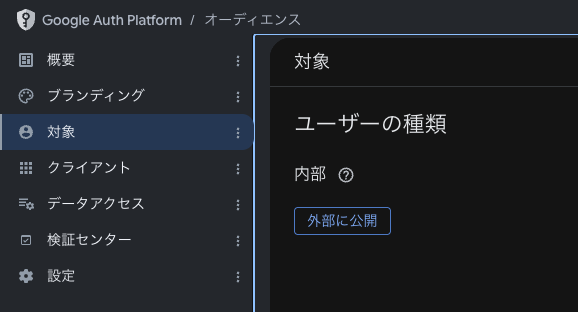
This time I selected user type "Internal." Only accounts within the organization can authorize, and Google review is not required. Note that "Internal" can only be selected for organizational accounts in Google Workspace. For projects created with a personal Gmail account, only "External" will appear, in which case you'll need to register test users.
There is one thing to note here. If you leave the publishing status as "Testing," the issued refresh tokens will expire after 7 days. For batch use cases, be sure to set it to published status.
Creating an OAuth Client
Once the consent screen is done, go to "Clients" in Google Auth Platform and proceed to "Create Client." All you need to configure is the name and the authorized redirect URIs — there is no field for specifying scopes here.
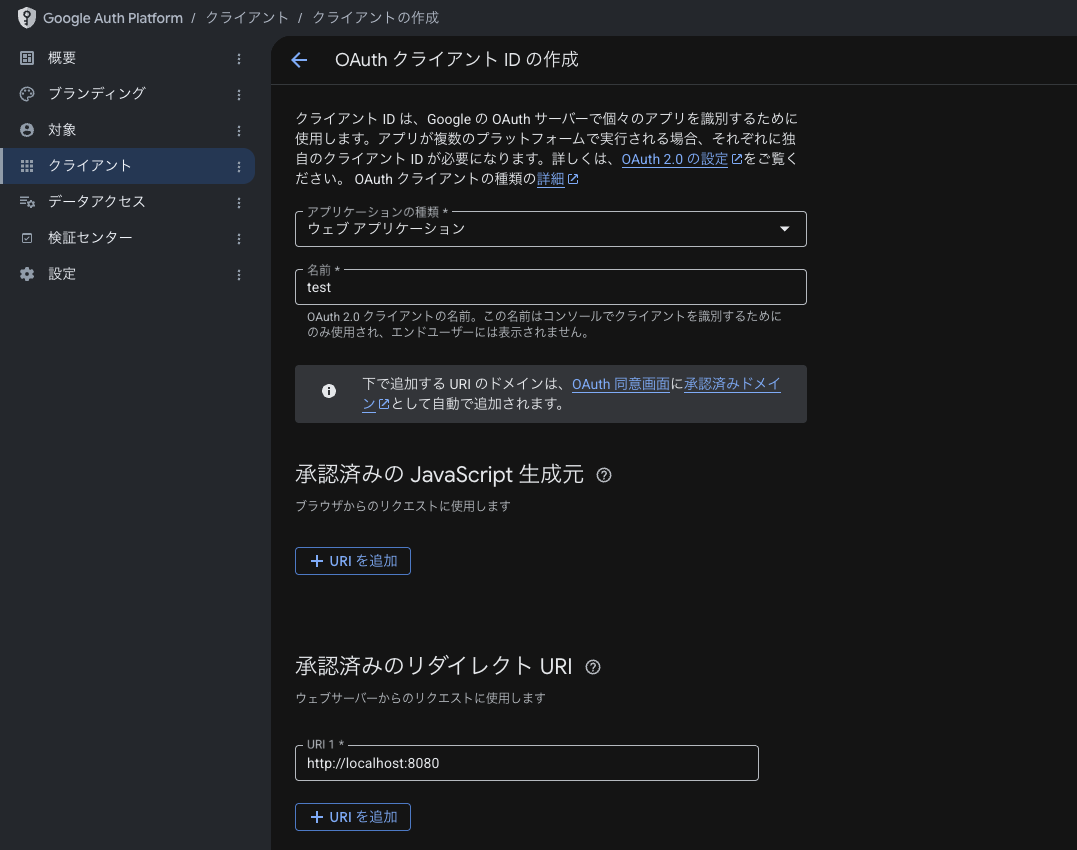
I selected "Web application" as the type and registered http://localhost:8080 as the authorized redirect URI.
Why Register localhost
The authorization code is returned appended as ?code=... to the URL where the browser is redirected after consent. In other words, you need to decide on a destination to receive the code in advance.
For use cases like this where the person in charge authorizes just once from their local browser, I don't want to set up a public web server just to receive the code. Using localhost means the redirect destination stays entirely within the local browser.
Since I haven't set up a server locally, the page itself will show an error, but what I want is the value showing as http://localhost:8080/?code=... in the address bar, so I paste this URL into the script to extract the code.
Redirect URIs generally require HTTPS, but localhost and loopback addresses are exceptions where http is permitted. Also, the redirect_uri must exactly match the registered value. Even a difference in scheme or a trailing slash will cause an error, so use the same value in both the authorization URL and the token exchange.
Note down the client ID and client secret that are displayed upon creation. These are the values you'll put into Parameter Store later.
Obtaining a Refresh Token
Login and consent via browser cannot be automated. So I prepared an interactive script that generates and displays an authorization URL, then has the user paste the URL after being redirected.
The parameters for the authorization URL look like this:
params = {
    "client_id": client_id,
    "redirect_uri": "http://localhost:8080",
    "response_type": "code",
    "scope": "https://www.googleapis.com/auth/spreadsheets",
    "access_type": "offline",   # Make it return a refresh token
    "prompt": "consent",        # Reissue even if already consented
    "state": state,             # CSRF protection. Verify match after redirect
}
url = "https://accounts.google.com/o/oauth2/v2/auth?" + urlencode(params)
Specifying the scope is done in this authorization URL. This time I use https://www.googleapis.com/auth/spreadsheets. Since writing is required, readonly isn't enough. If the user type is "Internal," it works even without registering it on the consent screen side.
After consenting, you'll be redirected to http://localhost:8080/?code=.... As mentioned earlier, use the URL in the address bar, not the displayed page.
Passing the extracted code to the token endpoint returns the refresh token.
# The request body is assembled on the Python side and passed via standard input
response=$(printf '%s' "$body" | curl -sS -X POST https://oauth2.googleapis.com/token \
  --connect-timeout 10 --max-time 30 \
  -H "Content-Type: application/x-www-form-urlencoded" \
  --data-binary @- \
  -w $'\n%{http_code}')
Thinking about future operations as well, I scripted these tasks. I'll include the full script too. By changing the scope and redirect URI, it should work as-is for APIs other than Sheets.
scripts/rotate-refresh-token.sh (click to expand)
#!/bin/bash

# Obtain a Google API OAuth 2.0 refresh token.
#
# Since login and consent via browser cannot be automated, this is interactive:
# it opens the authorization URL and asks the user to paste the redirected URL.
#
# This script does not write to Parameter Store.
# Manually write the output refresh token yourself.
#
# Usage:
#   scripts/rotate-refresh-token.sh <client_id>
#   (client_secret is entered via prompt after execution)

set -euo pipefail

redirect_uri="http://localhost:8080"
scope="https://www.googleapis.com/auth/spreadsheets"
parameter_name="/myapp/sheets/oauth/refresh-token"

client_id="${1:-}"

if [ -z "$client_id" ]; then
  echo "Usage: $0 <client_id>" >&2
  exit 1
fi

# client_secret is received via non-echoed input rather than arguments to avoid it appearing in the process list or shell history
read -rsp "Enter client_secret: " client_secret
echo
if [ -z "$client_secret" ]; then
  echo "client_secret was not entered." >&2
  exit 1
fi

function generate_state() {
  python3 -c 'import secrets; print(secrets.token_urlsafe(32), end="")'
}

function build_auth_url() {
  STATE="$1" CLIENT_ID="$client_id" REDIRECT_URI="$redirect_uri" SCOPE="$scope" python3 -c '
import os
from urllib.parse import urlencode

params = {
    "client_id": os.environ["CLIENT_ID"],
    "redirect_uri": os.environ["REDIRECT_URI"],
    "response_type": "code",
    "scope": os.environ["SCOPE"],
    "access_type": "offline",
    "prompt": "consent",
    "state": os.environ["STATE"],
}
print("https://accounts.google.com/o/oauth2/v2/auth?" + urlencode(params), end="")
'
}

# Validates the pasted URL and returns only the code to stdout.
# The code is a one-time value but to avoid putting it in argv, pass the URL via environment variable
function extract_code() {
  REDIRECTED_URL="$1" EXPECTED_STATE="$2" EXPECTED_REDIRECT_URI="$redirect_uri" python3 -c '
import os
import sys
from urllib.parse import parse_qs, urlparse

parsed = urlparse(os.environ["REDIRECTED_URL"])
expected = urlparse(os.environ["EXPECTED_REDIRECT_URI"])

if (parsed.scheme, parsed.hostname, parsed.port) != (expected.scheme, expected.hostname, expected.port):
    print(f"Redirect destination differs from expected: {parsed.scheme}://{parsed.netloc}", file=sys.stderr)
    sys.exit(1)

qs = parse_qs(parsed.query)

error = qs.get("error", [""])[0]
if error:
    print(f"Authorization was denied: {error}", file=sys.stderr)
    sys.exit(1)

# CSRF protection. Do not trust the code from a URL whose state does not match the one included in the authorization URL
if qs.get("state", [""])[0] != os.environ["EXPECTED_STATE"]:
    print("State does not match. Please reopen the authorization URL and try again.", file=sys.stderr)
    sys.exit(1)

code = qs.get("code", [""])[0]
if not code:
    print("Could not retrieve code from URL. Please check the URL you pasted.", file=sys.stderr)
    sys.exit(1)

print(code, end="")
'
}

function exchange_code_for_refresh_token() {
  local code="$1"
  local body response http_status response_body refresh_token

  # To avoid putting client_secret/code in curl's argv, assemble the request body and pass it via stdin
  body=$(CLIENT_ID="$client_id" CLIENT_SECRET="$client_secret" CODE="$code" REDIRECT_URI="$redirect_uri" python3 -c '
import os
from urllib.parse import urlencode

print(urlencode({
    "client_id": os.environ["CLIENT_ID"],
    "client_secret": os.environ["CLIENT_SECRET"],
    "code": os.environ["CODE"],
    "grant_type": "authorization_code",
    "redirect_uri": os.environ["REDIRECT_URI"],
}), end="")
')

  # The code is a one-time value, so explicitly set timeouts to avoid silently waiting during network delays
  response=$(printf '%s' "$body" | curl -sS -X POST https://oauth2.googleapis.com/token \
    --connect-timeout 10 --max-time 30 \
    -H "Content-Type: application/x-www-form-urlencoded" \
    --data-binary @- \
    -w $'\n%{http_code}') || {
    echo "Request to token endpoint failed." >&2
    return 1
  }

  http_status="${response##*$'\n'}"
  response_body="${response%$'\n'*}"

  if [ "$http_status" != "200" ]; then
    # The full response may contain access_token, so only output error and error_description
    echo "Token endpoint returned HTTP ${http_status}." >&2
    RESPONSE_BODY="$response_body" python3 -c '
import json
import os
import sys

try:
    data = json.loads(os.environ["RESPONSE_BODY"])
except json.JSONDecodeError:
    print("(Could not interpret response as JSON)", file=sys.stderr)
    sys.exit(0)

error = data.get("error")
error_description = data.get("error_description")
print(f"error: {error}, error_description: {error_description}", file=sys.stderr)
'
    return 1
  fi

  refresh_token=$(RESPONSE_BODY="$response_body" python3 -c '
import json
import os

print(json.loads(os.environ["RESPONSE_BODY"]).get("refresh_token", ""), end="")
')

  if [ -z "$refresh_token" ]; then
    echo "refresh_token was not included in the response." >&2
    echo "If you have already consented, please revoke this app's access at https://myaccount.google.com/permissions and run again." >&2
    return 1
  fi

  printf '%s' "$refresh_token"
}

function main() {
  local state auth_url redirected_url code refresh_token

  state=$(generate_state)
  auth_url=$(build_auth_url "$state")

  echo "Please open the following URL in your browser and log in / consent with the target Google account."
  echo "----------------------------"
  echo "$auth_url"
  echo "----------------------------"
  echo

  echo "Please paste the URL you are redirected to after consent (http://localhost:8080/?code=... — the page itself can show an error):"
  read -r redirected_url

  if ! code=$(extract_code "$redirected_url" "$state"); then
    exit 1
  fi

  # Command substitution does not automatically propagate a function's exit status, so check explicitly
  if ! refresh_token=$(exchange_code_for_refresh_token "$code"); then
    exit 1
  fi

  echo "----------------------------"
  echo "Obtained refresh_token:"
  echo "$refresh_token"
  echo "----------------------------"
  echo
  echo "Parameter Store has not been updated. Please update manually with the following command:"
  echo "  aws ssm put-parameter --name ${parameter_name} \\"
  echo "    --value \"<refresh_token>\" --type SecureString --overwrite"
}

main
Storing Credentials in Parameter Store
Save the obtained client ID, client secret, and refresh token as SecureString.
> aws ssm put-parameter --name /myapp/sheets/oauth/client-id --value "..." --type SecureString
> aws ssm put-parameter --name /myapp/sheets/oauth/client-secret --value "..." --type SecureString
> aws ssm put-parameter --name /myapp/sheets/oauth/refresh-token --value "..." --type SecureString
I'm registering these manually rather than creating them with CDK. This is to avoid leaving secret values in templates or repositories.
The reason I split them into 3 separate parameters is to limit what needs to be replaced when a team member changes to just one thing.
| Credential | Tied to | When a member changes |
|---|---|---|
| Client ID & Secret | Google Cloud project | No change needed |
| Refresh token | The personal Google account that authorized | New person in charge re-obtains and replaces |
| Access token | Generated each time from the refresh token | No action needed since it's not stored |
Secrets Manager would also work as the storage location. Since I'm not using automatic rotation this time, I went with the cheaper Parameter Store SecureString.
For IAM, I only allow ssm:GetParameters for the relevant path.
new iam.PolicyStatement({
  effect: iam.Effect.ALLOW,
  actions: ['ssm:GetParameters'],
  resources: [`arn:aws:ssm:${region}:${account}:parameter/myapp/sheets/oauth/*`],
})
Only the parameter paths, spreadsheet ID, and sheet name are passed as environment variables. Secret values are not passed.
Calling from Lambda
On the Lambda side, it simply retrieves the 3 values from Parameter Store, obtains an access token, and calls the Sheets API. Since I haven't added any extra libraries, it ends up making 2 HTTP calls with urllib3.
The append request looks like this:
# Wrap the sheet name in single quotes to avoid conflicts with named ranges
a1_range = f"'{sheet_name}'!A:O"
query = urlencode({"valueInputOption": "USER_ENTERED", "insertDataOption": "INSERT_ROWS"})
url = f"https://sheets.googleapis.com/v4/spreadsheets/{spreadsheet_id}/values/{quote(a1_range, safe='')}:append?{query}"

resp = append_http.request(
    "POST",
    url,
    headers={"Authorization": f"Bearer {access_token}", "Content-Type": "application/json"},
    body=json.dumps({"values": [row]}).encode("utf-8"),
)
The meaning of the query parameters is as follows:
| Parameter | Value | Meaning |
|---|---|---|
valueInputOption |
USER_ENTERED |
Interpreted the same as input from the screen. Dates and numbers are automatically type-converted |
insertDataOption |
INSERT_ROWS |
Inserts rows without overwriting existing ones |
Verification
I deployed to the staging environment and verified the behavior. Since the Lambda in this case is called from an SNS subscription, I publish a sample event to the topic.
> aws sns publish --topic-arn <Topic ARN> --message file://sample-event.json
I was able to confirm that Lambda is triggered by the SNS notification and a row is added to the spreadsheet. When the Sheets API succeeds, it returns updatedRange, so you can track which row was written from the response and logs.
When something goes wrong, looking at the token endpoint response first is the quickest approach. invalid_grant means the refresh token has expired, and invalid_client means a misconfiguration of the client ID or secret.
Reissuance Procedure When the Refresh Token Expires
Since this is OAuth with a personal account, I'll also prepare a procedure for when it expires. To summarize the conditions under which it expires:
| Event | Impact |
|---|---|
| The authorizing person leaves or their account is suspended | Expires |
| The authorizing person changes their password | Does not expire for just the Sheets scope |
| API has not been called for 6 months | Expires. Doesn't apply for daily or weekly batches |
| Consent screen is still in "Testing" mode | Expires after 7 days |
| The authorizing person revokes access | Expires |
When it expires, the token endpoint starts returning invalid_grant. In normal operations, the only case you'd encounter this is when a team member changes, so the frequency is low.
The procedure is simply to run the same script as at the beginning with the new person in charge's account, and overwrite with the resulting refresh token. The client ID and client secret can be used as-is.
> scripts/rotate-refresh-token.sh <client_id>

Please open the following URL in your browser and log in / consent with the target Google account.
----------------------------
https://accounts.google.com/o/oauth2/v2/auth?client_id=...
----------------------------
Apply the output refresh token to Parameter Store.
> aws ssm put-parameter --name /myapp/sheets/oauth/refresh-token \
    --value "<refresh_token>" --type SecureString --overwrite
Note that the old person's token can be revoked from Google Account access management. If the refresh token isn't returned during reissuance, revoking access there once and re-running will resolve it.
Other Methods Considered
I didn't adopt these this time, but I'll leave notes on the write methods I considered.
Service Account
If you're calling Google Sheets API from a machine, a service account is normally the first choice.
However, in Google Workspace where external sharing is restricted by an allowlist of "trusted domains," you cannot register the service account's domain in the allowlist. This is explicitly stated in the official documentation.
Google service accounts (with domain names ending in gserviceaccount.com) cannot be trusted domains.
In other words, service accounts are treated as external users outside the organization. When you try to share a spreadsheet, the operation to grant permissions itself fails with an error.
As a workaround, you could create a new dedicated Google account for automation. However, this requires submitting a request for account creation and separately requesting access to the shared drive, which is overkill for this use case.
On the other hand, with OAuth 2.0, you can write using the permissions of a personal account that already has access to the spreadsheet. No additional requests are needed.
| Method | Feasibility | Notes |
|---|---|---|
| Service account | Not usable | Cannot register the domain in the external sharing allowlist |
| Dedicated Google account for automation | Possible | Requires issuance request, license cost, and access permission request |
| Personal account OAuth 2.0 | Adopted | No additional request needed. The tradeoff is dependency on the authorizing person |
I adopted OAuth 2.0 authentication also from the perspective of ease.
Claude's Google Drive Connector
Since all I'm doing is appending a single row, I wanted to avoid writing Lambda code altogether. I thought combining Claude's scheduled execution with the Google Drive connector might let me do it without any code.
The conclusion was that the Drive connector couldn't write to an existing spreadsheet. The tools provided by the connector are the following 8, all limited to creation, copying, reading, searching, and metadata retrieval:
| Tool | Operation |
|---|---|
create_file |
Create new files/folders, upload |
copy_file |
Duplicate existing files |
read_file_content |
Read file contents |
download_file_content |
Download files |
search_files / list_recent_files |
Search/list files |
get_file_metadata / get_file_permissions |
Retrieve metadata and permissions |
create_file can create a new spreadsheet by specifying application/vnd.google-apps.spreadsheet as the mime type. read_file_content can also read the contents of a spreadsheet.
On the other hand, there is no tool for modifying the contents of an existing file. Operations equivalent to values.update or values.append in the Google Sheets API are not connected. In other words, it can create and read, but not edit. Creating a new sheet every time would work, but this wasn't adoptable for the current use case of accumulating rows in an existing table.
You could also create a custom connector for writing, but creating a remote MCP server and issuing OAuth tokens seemed too much, so I dropped that idea.
As a result, I chose the Lambda configuration where the execution infrastructure and credentials can be placed on the team's shared AWS account.
Summary
Even in an environment where service accounts can't be used, I was able to write to a spreadsheet from Lambda using OAuth 2.0 with a personal account. Since it can be implemented without additional libraries, it's more straightforward than I expected.
Setting up the configuration so that only the refresh token needs to be replaced makes the work much lighter when team members change.
If you ever get stuck with "couldn't share with a service account," consider the OAuth refresh token approach.
That's all from Suzuki Jun.
References
- Using OAuth 2.0 for Web Server Applications | Google Identity
- Method: spreadsheets.values.append | Google Sheets API
- OAuth 2.0 Scopes for Google APIs
- 信頼できるドメインとのみ外部共有を許可する | Google Workspace 管理者ヘルプ
- Use Google Workspace connectors | Claude Help Center
- Google Spreadsheet をサービスアカウントに共有せずに Google Spreadsheet API から読みだす方法 | Qiita
