
Is RDS Proxy No Longer Needed When Using Lambda Managed Instances? Verifying How to Think About Connection Pooling Based on Differences in Execution Models #AWSreInvent

This page has been translated by machine translation. View original
I'm Iwata from the Retail App Co-creation Department @ Osaka.
Lambda Functions that use Lambda Managed Instances have a different concurrency model from regular Lambda Functions. I examined and tested how this difference in model affects the use of connection pooling.
Environment
This is the environment used for this test.
- Lambda runtime: Node.js 24.x
- pg: 8.16.3
- PgBouncer: 1.25.1
- Aurora: Serverless v2 PostgreSQL 17.4 compatible
- EC2 instance type for Lambda Managed Instances: m8g.large
The Relationship Between Lambda's Concurrency Model and Connection Pooling
With regular Lambda, a single Lambda execution environment can process only one request at a time, and never processes two or more requests simultaneously. Because of this characteristic, even if you use connection pooling at the application layer, DB connections cannot be shared among multiple requests.
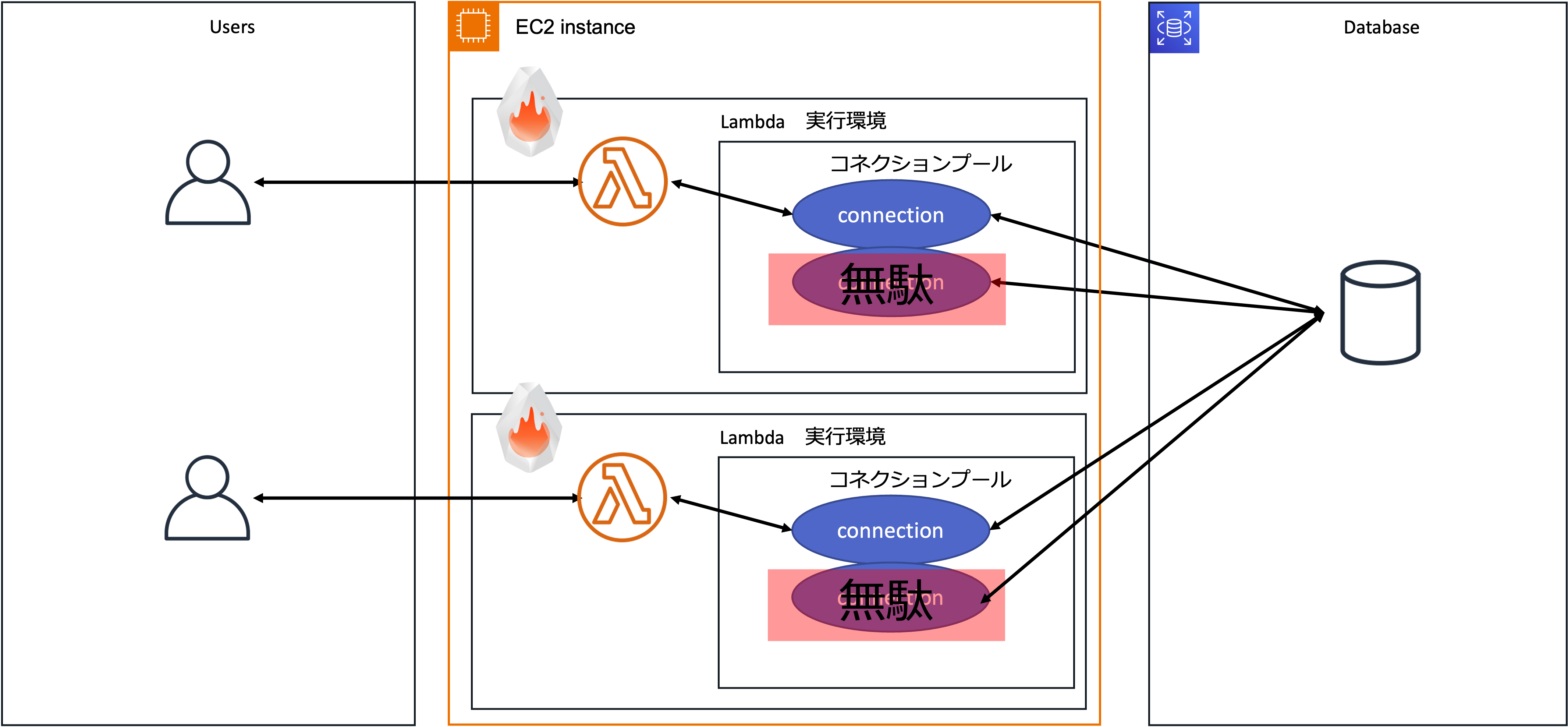
It was often said that "you can't use connection pooling with Lambda" or "there's no point in using connection pooling with Lambda." To solve this issue, connection pooling at the middleware layer, such as Pgpool-II or PgBouncer, is necessary, and RDS Proxy provides that as a managed service. I explained the details of this and RDS Proxy in my talk at Developers.IO 2020, so please take a look if you're interested.
In contrast, when using Lambda Managed Instances, a single Lambda execution environment processes multiple requests concurrently.
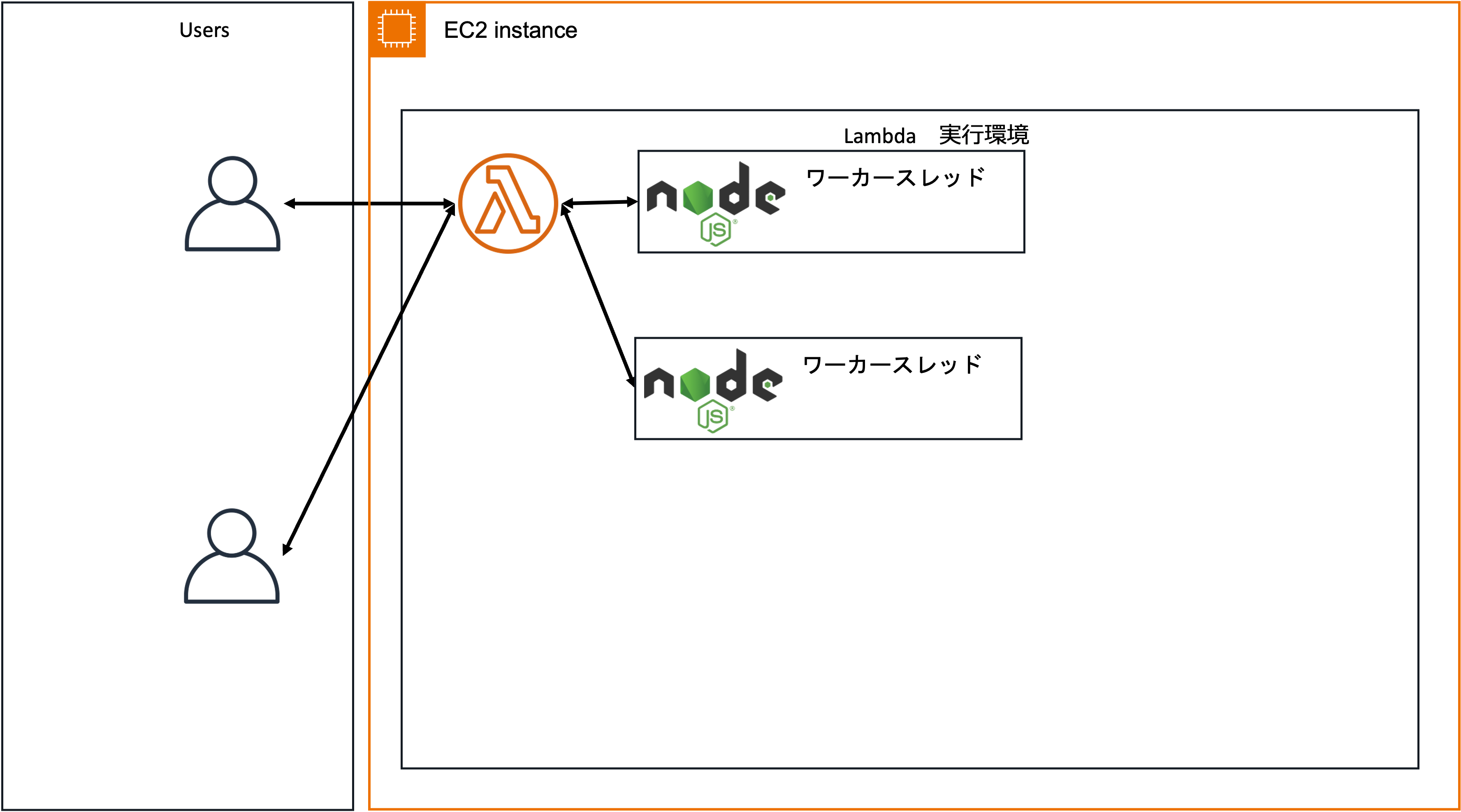
This difference in model changes how we should think about connection pooling. Since there is no VM layer at the boundary between Lambda Function instances during Invoke, placing a connection pooling component inside the VM should allow connections to be shared among Lambda Function instances.
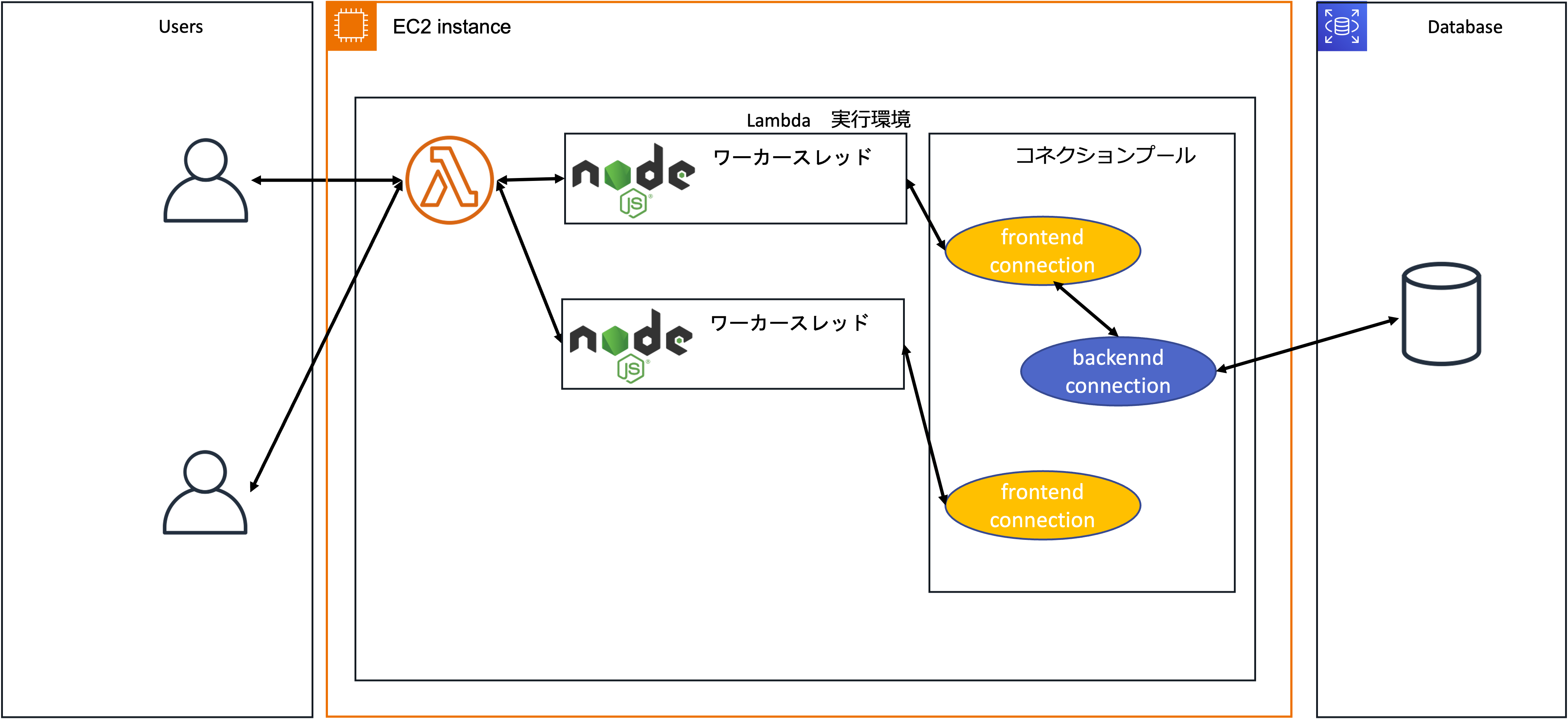
Let's verify this hypothesis.
Trying It Out
I will start PgBouncer inside the Lambda execution environment, run a process that connects to Aurora via PgBouncer, and check how DB connection consumption changes between a regular Lambda execution environment and Lambda Managed Instances.
Test Code
The following code was used for the test.
import { Client } from 'pg'

const sleep = (ms) => new Promise(resolve => setTimeout(resolve, ms));

export const handler = async (event) => {

  const client = new Client({
    host: '127.0.0.1',
    port: 5432,
    database: 'aurora',
    user: process.env.DB_USER,
    password: process.env.DB_PASSWORD,
  })
  await client.connect();
  await client.query('select now()');
  await sleep(5000);
  await client.query('select now()');
  await client.end();

  const response = {
    statusCode: 200,
    body: JSON.stringify('Hello from Lambda!'),
  };
  return response;
};
The outline of the process is as follows.
- Connect to PgBouncer deployed using a Lambda Extension
- Issue a query
- Sleep for 5 seconds
- Issue a query
- Disconnect from PgBouncer
The connection to PgBouncer lasts just under 5 seconds, but no DB access is made during those 5 seconds, so we want PgBouncer to manage the actual connections to Aurora well and keep the number of concurrent connections to Aurora low. I will deploy this code together with the PgBouncer Extension created later, and check how the number of concurrent connections to Aurora changes in a regular Lambda execution environment and in a Managed Instances execution environment.
Creating the PgBouncer Lambda Extension
Now let's create the Extension for starting PgBouncer inside the Lambda execution environment.
First, prepare the following shell script with the file name build.sh.
#!bin/bash

dnf install -y tar gcc gzip postgresql17-devel libtool libevent-devel
cd /tmp
curl -O --location https://github.com/jgm/pandoc/releases/download/3.8.3/pandoc-3.8.3-linux-arm64.tar.gz
tar zxvf pandoc-3.8.3-linux-arm64.tar.gz --strip-components 1 -C /usr/local

curl -O --location https://www.pgbouncer.org/downloads/files/1.25.1/pgbouncer-1.25.1.tar.gz
tar -xvzf pgbouncer-1.25.1.tar.gz
cd pgbouncer-1.25.1

./autogen.sh
./configure --prefix=/opt/
make
make install

mkdir /opt/lib
cp /usr/lib64/libevent* /opt/lib/
Run this shell script inside an Amazon Linux 2023 container image to extract the built PgBouncer binary and its dependent libraries.
docker run --rm -v $(PWD):/opt/ amazonlinux:2023 /opt/build.sh
After the shell script finishes, the current directory looks like this.
.
├── bin
│   └── pgbouncer
├── build.sh
├── lib
│   ├── libevent_core-2.1.so.7
│   ├── libevent_core-2.1.so.7.0.1
│   ├── libevent_core.so
│   ├── libevent_extra-2.1.so.7
│   ├── libevent_extra-2.1.so.7.0.1
│   ├── libevent_extra.so
│   ├── libevent_openssl-2.1.so.7
│   ├── libevent_openssl-2.1.so.7.0.1
│   ├── libevent_openssl.so
│   ├── libevent_pthreads-2.1.so.7
│   ├── libevent_pthreads-2.1.so.7.0.1
│   ├── libevent_pthreads.so
│   ├── libevent-2.1.so.7
│   ├── libevent-2.1.so.7.0.1
│   └── libevent.so
└── share
    ├── doc
    │   └── pgbouncer
    │       ├── NEWS.md
    │       ├── pgbouncer-minimal.ini
    │       ├── pgbouncer.ini
    │       ├── pgbouncer.service
    │       ├── pgbouncer.socket
    │       ├── README.md
    │       └── userlist.txt
    └── man
        ├── man1
        │   └── pgbouncer.1
        └── man5
            └── pgbouncer.5
Next, create a shell script that starts PgBouncer.
mkdir extensions
touch extensions/pgbouncer-extension.sh
The body of the script is as follows. I referred to the Lambda Extension sample published on GitHub, but since this is for testing, I omitted things like signal handling.
#!/bin/bash

set -euo pipefail

OWN_FILENAME="$(basename $0)"
LAMBDA_EXTENSION_NAME="$OWN_FILENAME" # (external) extension name has to match the filename
TMPFILE=/tmp/$OWN_FILENAME

echo "[extension:bash] launching ${LAMBDA_EXTENSION_NAME}"

cat << EOF > "/tmp/pgbouncer.ini"
[databases]
aurora = host=${DB_HOST} dbname=postgres

[pgbouncer]
logfile = /tmp/pgbouncer.log
pidfile = /tmp/pgbouncer.pid
listen_addr = 127.0.0.1
listen_port = 5432
auth_type = trust
auth_file = /tmp/userlist.txt
pool_mode = transaction
server_reset_query = DISCARD ALL
max_client_conn = 1000
EOF

cat << EOF > "/tmp/userlist.txt"
"${DB_USER}" "${DB_PASSWORD}"
EOF

/opt/bin/pgbouncer /tmp/pgbouncer.ini -d

HEADERS="$(mktemp)"
echo "[${LAMBDA_EXTENSION_NAME}] Registering at http://${AWS_LAMBDA_RUNTIME_API}/2020-01-01/extension/register"
curl -sS -LD "$HEADERS" -XPOST "http://${AWS_LAMBDA_RUNTIME_API}/2020-01-01/extension/register" --header "Lambda-Extension-Name: ${LAMBDA_EXTENSION_NAME}" -d "{}" > $TMPFILE

RESPONSE=$(<$TMPFILE)
HEADINFO=$(<$HEADERS)
EXTENSION_ID=$(grep -Fi Lambda-Extension-Identifier "$HEADERS" | tr -d '[:space:]' | cut -d: -f2)
echo "[${LAMBDA_EXTENSION_NAME}] Registration response: ${RESPONSE} with EXTENSION_ID ${EXTENSION_ID}"
curl -sS -L -XGET "http://${AWS_LAMBDA_RUNTIME_API}/2020-01-01/extension/event/next" --header "Lambda-Extension-Identifier: ${EXTENSION_ID}"
Roughly, it does the following.
- Create the PgBouncer configuration file
- Create the PgBouncer credentials file
- Start the PgBouncer process
- Register the Lambda Extension
Let's go through it step by step. First is creating the PgBouncer configuration file.
cat << EOF > "/tmp/pgbouncer.ini"
[databases]
aurora = host=${DB_HOST} dbname=postgres

[pgbouncer]
logfile = /tmp/pgbouncer.log
pidfile = /tmp/pgbouncer.pid
listen_addr = 127.0.0.1
listen_port = 5432
auth_type = trust
auth_file = /tmp/userlist.txt
pool_mode = transaction
server_reset_query = DISCARD ALL
max_client_conn = 1000
EOF
The code above creates the configuration file at /tmp/pgbouncer.ini. The URL of the backend DB is expanded from the environment variable DB_HOST.
Next is creating the credentials file.
cat << EOF > "/tmp/userlist.txt"
"${DB_USER}" "${DB_PASSWORD}"
EOF
The environment variables DB_USER and DB_PASSWORD are expanded to create the credentials file at /tmp/userlist.txt.
Next, start PgBouncer in the background, specifying the configuration file we created.
/opt/bin/pgbouncer /tmp/pgbouncer.ini -d
Finally, call the Lambda Extension API to notify the runtime of the Extension's registration and completion of initialization.
HEADERS="$(mktemp)"
echo "[${LAMBDA_EXTENSION_NAME}] Registering at http://${AWS_LAMBDA_RUNTIME_API}/2020-01-01/extension/register"
curl -sS -LD "$HEADERS" -XPOST "http://${AWS_LAMBDA_RUNTIME_API}/2020-01-01/extension/register" --header "Lambda-Extension-Name: ${LAMBDA_EXTENSION_NAME}" -d "{}" > $TMPFILE

RESPONSE=$(<$TMPFILE)
HEADINFO=$(<$HEADERS)
EXTENSION_ID=$(grep -Fi Lambda-Extension-Identifier "$HEADERS" | tr -d '[:space:]' | cut -d: -f2)
echo "[${LAMBDA_EXTENSION_NAME}] Registration response: ${RESPONSE} with EXTENSION_ID ${EXTENSION_ID}"
curl -sS -L -XGET "http://${AWS_LAMBDA_RUNTIME_API}/2020-01-01/extension/event/next" --header "Lambda-Extension-Identifier: ${EXTENSION_ID}"
Since this is for testing, I did not specify events in the body of the Register API. Please note that you should properly specify SHUTDOWN and handle SIGTERM in the shell script. Incidentally, when using Lambda Managed Instances, you cannot specify INVOKE in events; only SHUTDOWN can be specified.
Lambda Managed Instances: Extensions for Lambda Managed Instances functions cannot register for the
Invokeevent. Because Lambda Managed Instances supports concurrent invocations within a single execution environment, theInvokeevent is not supported. Extensions can only register for theShutdownevent.
Once the shell script is created, package it into a ZIP file together with the PgBouncer-related files from earlier, and register it as a Lambda Layer.
Once the Lambda Layer is deployed, create a Lambda Function that runs the test code, attach the Lambda Layer, and set the following information in the environment variables.
- DB_USER: DB user name
- DB_PASSWORD: DB user password
- DB_HOST: DB endpoint
With this, the test preparation is complete.
Regular Lambda Execution Environment
First, let's check DB connection consumption in a regular Lambda execution environment. This time I placed the test Lambda Function behind API GW and issued requests with the ab command at a concurrency of 100 and a total of 1,000 requests.
ab -c 100 -n 1000 https://<API GWのエンドポイント>
Here are the execution results.
This is ApacheBench, Version 2.3 <$Revision: 1923142 $>
Copyright 1996 Adam Twiss, Zeus Technology Ltd, http://www.zeustech.net/
Licensed to The Apache Software Foundation, http://www.apache.org/

Benchmarking <API GWのID>.execute-api.us-east-1.amazonaws.com (be patient)
Completed 100 requests
Completed 200 requests
Completed 300 requests
Completed 400 requests
Completed 500 requests
Completed 600 requests
Completed 700 requests
Completed 800 requests
Completed 900 requests
Completed 1000 requests
Finished 1000 requests


Server Software:
Server Hostname:        <API GWのID>.execute-api.us-east-1.amazonaws.com
Server Port:            443
SSL/TLS Protocol:       TLSv1.3,TLS_AES_128_GCM_SHA256,2048,128
Server Temp Key:        X25519 253 bits
TLS Server Name:        <API GWのID>.execute-api.us-east-1.amazonaws.com

Document Path:          /
Document Length:        20 bytes

Concurrency Level:      100
Time taken for tests:   56.443 seconds
Complete requests:      1000
Failed requests:        0
Total transferred:      191000 bytes
HTML transferred:       20000 bytes
Requests per second:    17.72 [#/sec] (mean)
Time per request:       5644.341 [ms] (mean)
Time per request:       56.443 [ms] (mean, across all concurrent requests)
Transfer rate:          3.30 [Kbytes/sec] received

Connection Times (ms)
              min  mean[+/-sd] median   max
Connect:        3    9  13.5      4      85
Processing:  5020 5107 220.4   5034    6016
Waiting:     5020 5107 220.4   5034    6016
Total:       5025 5116 231.5   5038    6101

Percentage of the requests served within a certain time (ms)
  50%   5038
  66%   5043
  75%   5047
  80%   5052
  90%   5104
  95%   5790
  98%   5892
  99%   5938
 100%   6101 (longest request)
The metrics during the test run were as follows.
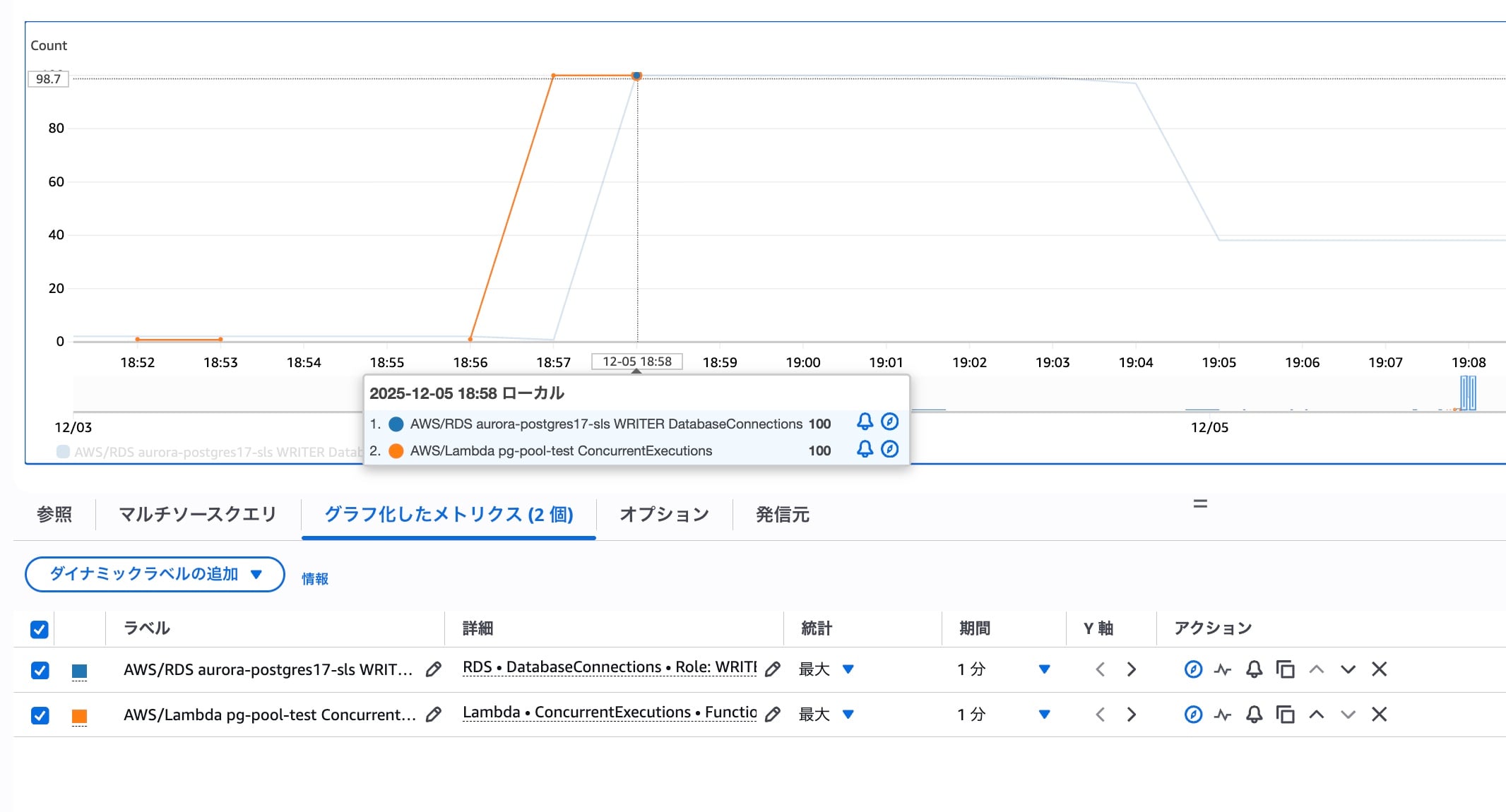
You can see that both Lambda concurrency and DB connections reached a maximum of 100. Although a connection pool is created inside the Lambda execution environment using PgBouncer, the pool cannot be shared across multiple requests, so the Lambda concurrency and the number of DB connections are equal. This cannot be called effective use of the connection pool; it merely adds unnecessary overhead.
Lambda Managed Instances
Next, I deployed the test code in a configuration using Lambda Managed Instances and ran the same ab command as before. The execution results are as follows.
This is ApacheBench, Version 2.3 <$Revision: 1923142 $>
Copyright 1996 Adam Twiss, Zeus Technology Ltd, http://www.zeustech.net/
Licensed to The Apache Software Foundation, http://www.apache.org/

Benchmarking <API GWのID>.execute-api.us-east-1.amazonaws.com (be patient)
Completed 100 requests
Completed 200 requests
Completed 300 requests
Completed 400 requests
Completed 500 requests
Completed 600 requests
Completed 700 requests
Completed 800 requests
Completed 900 requests
Completed 1000 requests
Finished 1000 requests


Server Software:
Server Hostname:        <API GWのID>.execute-api.us-east-1.amazonaws.com
Server Port:            443
SSL/TLS Protocol:       TLSv1.3,TLS_AES_128_GCM_SHA256,2048,128
Server Temp Key:        X25519 253 bits
TLS Server Name:        <API GWのID>.execute-api.us-east-1.amazonaws.com

Document Path:          /
Document Length:        20 bytes

Concurrency Level:      100
Time taken for tests:   55.676 seconds
Complete requests:      1000
Failed requests:        46
   (Connect: 0, Receive: 0, Length: 46, Exceptions: 0)
Non-2xx responses:      46
Total transferred:      191966 bytes
HTML transferred:       20598 bytes
Requests per second:    17.96 [#/sec] (mean)
Time per request:       5567.555 [ms] (mean)
Time per request:       55.676 [ms] (mean, across all concurrent requests)
Transfer rate:          3.37 [Kbytes/sec] received

Connection Times (ms)
              min  mean[+/-sd] median   max
Connect:        2    7  10.9      4      60
Processing:    30 4817 1047.2   5037    5206
Waiting:       30 4816 1047.4   5036    5206
Total:         77 4824 1040.5   5041    5229

Percentage of the requests served within a certain time (ms)
  50%   5041
  66%   5046
  75%   5051
  80%   5056
  90%   5080
  95%   5139
  98%   5170
  99%   5202
 100%   5229 (longest request)
The metrics during the test run were as follows.
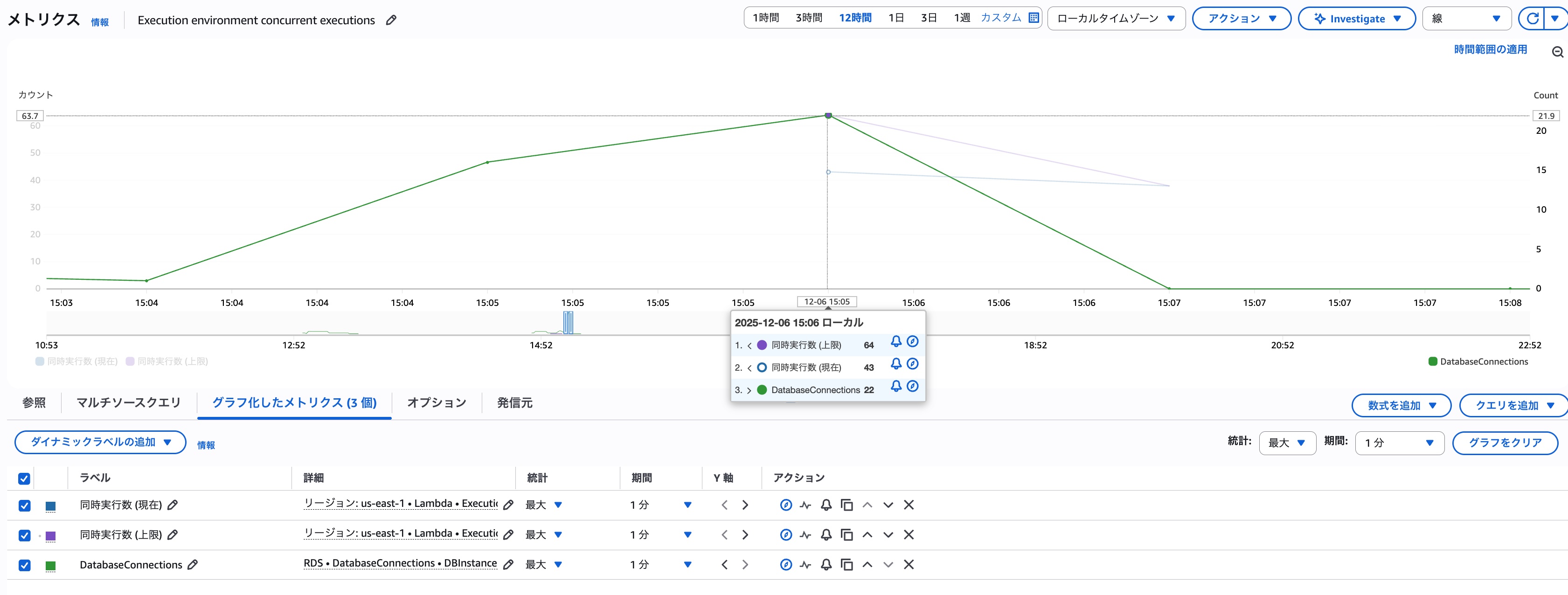
Since I used the default values for the capacity provider settings, the maximum concurrency per Lambda execution environment is 64. Therefore, the metric ExecutionEnvironmentConcurrencyLimit is 64, and ExecutionEnvironmentConcurrency also plateaued at 64 accordingly. ※I realized afterwards that I should have adjusted it to 100 to match the conditions.
The maximum number of DB connections was kept to 22, about one-third of Lambda's concurrency, showing that DB connections were shared much more efficiently than with the regular Lambda execution environment.
As expected, with Lambda Managed Instances, we found that placing a connection pool inside the Lambda execution environment using PgBouncer or similar lets you handle DB connections efficiently!
※Since the only query executed this time was select now(), I expected the number of DB connections to be somewhat lower, but the result this time was a maximum of 22.
Summary
I tested how, when using Lambda Managed Instances, the way of thinking about connection pooling also differs from regular Lambda. The fact that multiple requests are processed in the same Lambda execution environment means that processes started by a Lambda Extension can also be shared across multiple requests.
Taking advantage of this characteristic, I wonder if it would enable various advanced uses of Extensions beyond connection pooling. Exploring the possibilities seems quite interesting.
References
- [Video Released] Will RDS Proxy Change the Future? #devio2020 | DevelopersIO
- PgBouncer - lightweight connection pooler for PostgreSQL
- aws-samples/aws-lambda-extensions: A collection of sample extensions to help you get started with AWS Lambda Extensions
- Using the Lambda Extensions API to create extensions - AWS Lambda
