
I'll run the Agentic Browsing category in Lighthouse via chrome-devtools-mcp to see what's inside, since it was added to Chrome's Lighthouse.

This page has been translated by machine translation. View original
Hey there! I'm Yuji Nishimura from the Operations Division!
Chrome for Developers published A developer toolkit to make your website agent-ready on June 22, 2026, and a new "Agentic Browsing" category has been added to Lighthouse. This category measures how accessible your site is to AI agents, and lets you check things like ARIA structure, llms.txt, and WebMCP support all at once. This time, I ran it locally using the lighthouse_audit tool from chrome-devtools-mcp to see what gets checked.
What Changed This Time
- Target: The developer toolkit introduced in the Chrome for Developers article A developer toolkit to make your website agent-ready (published June 22, 2026)
- Key changes:
- An Agentic Browsing category has been added to Lighthouse (the official documentation lists Chrome 150 or later as a requirement)
- Validation for WebMCP-enabled sites has been incorporated
- This category can also be run via the lighthouse_audit tool in Chrome DevTools for agents
- A
webmcpskill providing WebMCP implementation guidance for coding agents has been included in Modern Web Guidance
- Official links:
The toolkit consists of the following four elements.
| Element | Role | What You Need |
|---|---|---|
| Lighthouse Agentic Browsing category | Audits whether your site is readable by AI agents | Official documentation lists Chrome 150 or later as a requirement |
| WebMCP integration | Declaratively exposes site operations to agents | Chrome 149 or later + WebMCP Origin Trial registration |
webmcp skill (bundled with Modern Web Guidance) |
Guidance for delegating WebMCP implementation to coding agents | Claude Code, Cursor, Gemini CLI, etc. |
| Chrome DevTools for agents | Operate lighthouse_audit and screencasts from agents |
chrome-devtools-mcp |
Let's Try It Out
Environment Used for Testing
- macOS (Darwin 24.6.0)
- Google Chrome 149.0.7827.199 (Stable)
chrome-devtools-mcp(latest version)- Registered as an MCP server in Claude Code
For setup instructions, please refer to the previous article Enabling AI Agents to Inspect Browser Contents with the Chrome DevTools MCP Server.
Running lighthouse_audit
I call the lighthouse_audit tool from chrome-devtools-mcp via Claude Code. As a neutral public page for testing, I used the official blog post A developer toolkit to make your website agent-ready. Here's an example prompt to send to Claude Code:
Run a Lighthouse audit on this page
https://developer.chrome.com/blog/agent-ready-toolkit
The returned summary was as follows:
URL: https://developer.chrome.com/blog/agent-ready-toolkit
### Category Scores
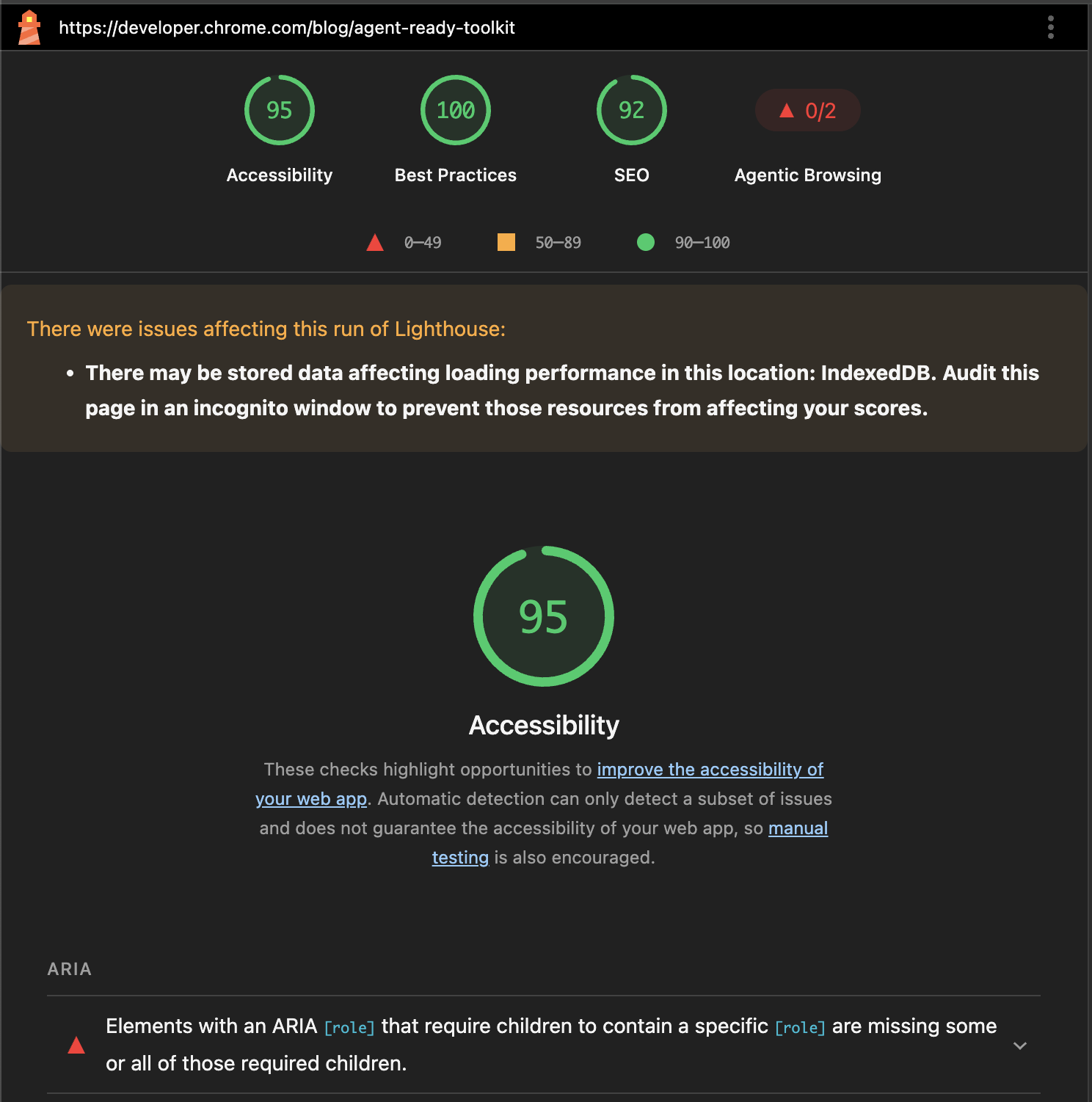
- Accessibility: 95
- Best Practices: 100
- SEO: 92
- Agentic Browsing: 43
### Audit Summary
Passed: 55
Failed: 5
In addition to the existing Accessibility / Best Practices / SEO scores, Agentic Browsing: 43 was returned. While the official documentation lists Chrome 150 or later as a requirement, the category itself was returned in this environment (Stable Chrome 149 + latest chrome-devtools-mcp) as well (outside the officially supported range).
Contents of the Agentic Browsing Category
lighthouse_audit also returns the paths to the report JSON and HTML after execution. Extracting categories["agentic-browsing"].auditRefs from the JSON revealed 6 audits making up the category (IDs are the values from the original JSON).
| Audit ID (original JSON) | Group | Weight | Result This Time | Official Documentation |
|---|---|---|---|---|
agent-accessibility-tree |
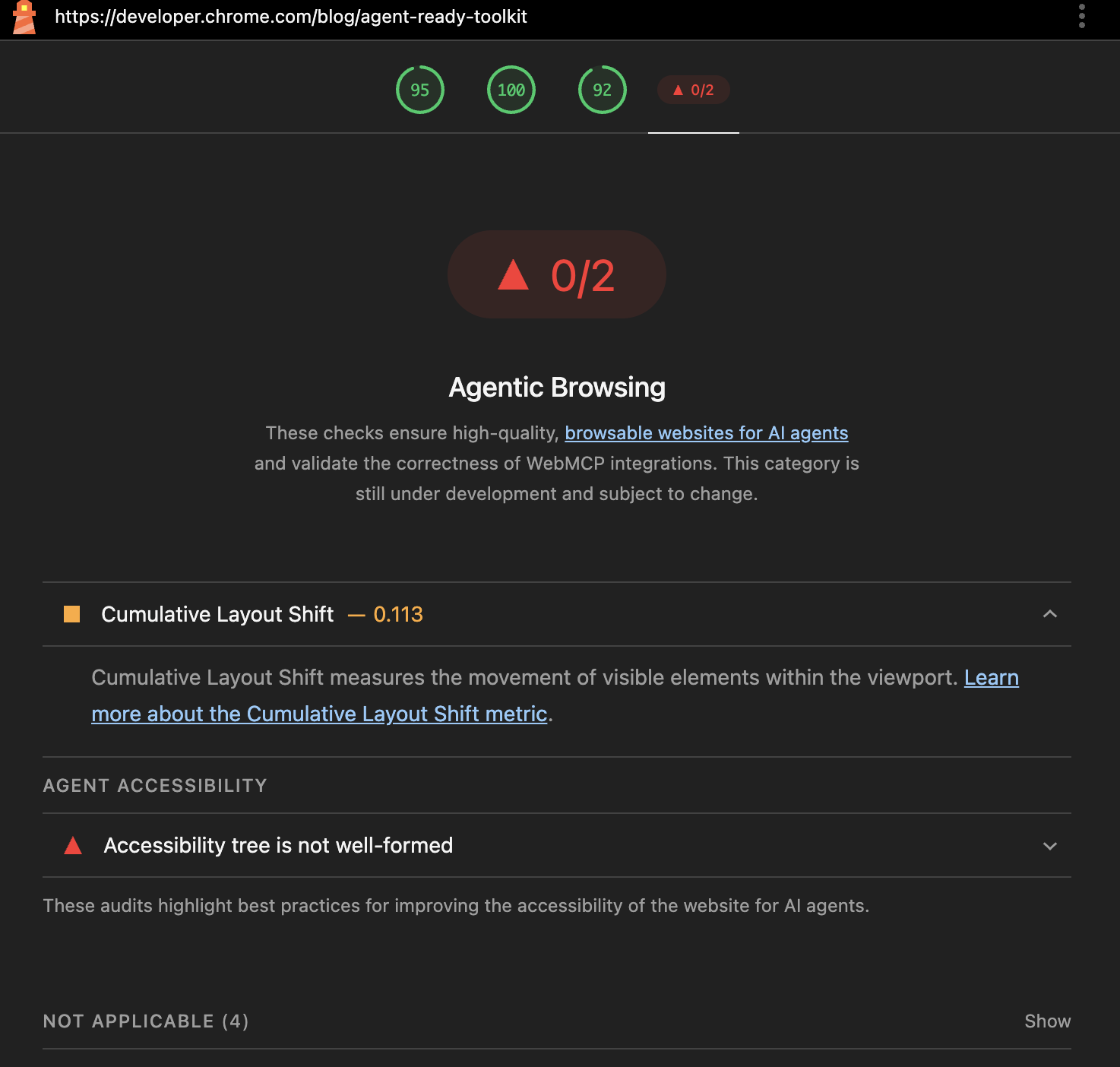
agent-accessibility | 1 | fail (score 0) | Accessibility for agents |
cumulative-layout-shift |
- (acronym: CLS) | 1 | pass (score 0.86, displayValue 0.113) | Cumulative Layout Shift |
webmcp-form-coverage |
webmcp | 0 | notApplicable | Forms missing declarative WebMCP |
webmcp-registered-tools |
webmcp | 0 | notApplicable | Registered WebMCP tools |
webmcp-schema-validity |
webmcp | 0 | notApplicable | Lighthouse agentic browsing scoring |
llms-txt |
agent-accessibility | 0 | notApplicable | llms.txt audit |
Only two items have a weight of 1: agent-accessibility-tree and cumulative-layout-shift. The remaining 4 items have a weight of 0 and were notApplicable this time. The category score of 43 observed locally matches the simple average of the two weight-1 items: (0 + 0.86) / 2 = 0.43. Since the official scoring explanation explicitly states that "the category is not a weighted average of 0–100," I'll limit this to simply noting that the observed value matched the simple average.
The same breakdown can be confirmed on the report HTML side as well.
Details of the Failed Audit
The fail details for agent-accessibility-tree from the report JSON were as follows:
Certain ARIA roles must contain particular children<devsite-dropdown-list role="listbox">does not have the expected child element roles
Elements marked as presentational should be consistently ignored- Headings like
<h2 id="audit_improve_and_debug_your_agent-ready_website" role="presentation">haverole="presentation"applied, creating a contradiction in how they're treated in the accessibility tree
- Headings like
The official documentation describes this as an audit that checks whether the accessibility tree is correctly structured. It's positioned as evaluating how reliably an agent can navigate the page structure.
Conditions Under Which WebMCP-Related Items and llms.txt Become notApplicable
The basis for the 4 items that became notApplicable is as follows:
- The 3 WebMCP-related items (
webmcp-form-coverage/webmcp-registered-tools/webmcp-schema-validity) become out of scope for evaluation when the WebMCP API is not being called on the page side, or when WebMCP is not enabled on the browser side. The--categoryExperimentalWebmcpoption in thechrome-devtools-mcphelp states "Requires Chrome 149+ with the following flags:--enable-features=WebMCP,DevToolsWebMCPSupport," and the flag names are taken from there - For
llms-txt, according to the official explanation, it becomesnotApplicablewhenllms.txtdoes not exist (404) at the root domain
ARIA and CLS are evaluated on any site, while WebMCP-related items and llms.txt are only evaluated when support is in place.
Analysis of Test Results
- What was confirmed: In this environment, I was able to retrieve the full breakdown of the Agentic Browsing category via
lighthouse_auditinchrome-devtools-mcp, and could trace the weight and result of each audit from the JSON report - Cross-referencing with official information: The 6 audits returned this time correspond to the 3 groups listed on the official scoring page (WebMCP integration / accessibility for agents / stability and discoverability) as follows:
- WebMCP integration:
webmcp-form-coverage/webmcp-registered-tools/webmcp-schema-validity - Accessibility for agents:
agent-accessibility-tree/llms-txt - Stability and discoverability:
cumulative-layout-shift
- WebMCP integration:
- Operational notes: The official documentation explicitly states that "this category is under development and subject to change." Rather than tracking the category score itself as a fixed metric, it seems more practical to track the specific fail content of
agent-accessibility-tree(specific elements and ARIA roles) over time
Summary
The Agentic Browsing category in Lighthouse can be retrieved with its full breakdown simply by calling lighthouse_audit in chrome-devtools-mcp. The two items that affect the score are agent-accessibility-tree (ARIA consistency) and cumulative-layout-shift, while WebMCP-related items and llms.txt are only scored when support is in place. Running it on a site you're involved with will help you see which ARIA elements to tackle first, and can also serve as a baseline for comparison when you later join the WebMCP Origin Trial.
I hope this is helpful to someone.
Reference links:
- A developer toolkit to make your website agent-ready — Chrome for Developers
- Lighthouse agentic browsing scoring — Chrome for Developers
- Accessibility for agents — Chrome for Developers
- Forms missing declarative WebMCP — Chrome for Developers
- Registered WebMCP tools — Chrome for Developers
- llms.txt audit — Chrome for Developers
- Automate Lighthouse audits with AI agents — Chrome for Developers
- Join the WebMCP origin trial — Chrome for Developers
- ChromeDevTools/chrome-devtools-mcp — GitHub
- Chrome DevTools MCPサーバーでAIエージェントからブラウザの中身を確認できるようにする — DevelopersIO
