This page has been translated by machine translation. View original
Introduction
When incorporating LLM output into applications, there are many situations where leaving it as "free-form text" is inconvenient. Requests such as wanting JSON returned, wanting a specific format followed, or wanting just the answer without unnecessary preamble — various methods currently exist to address these needs.
However, these methods differ greatly in reliability depending on "which layer the output is being controlled at." The strength of the guarantee is completely different between simply writing "return it in JSON" in a prompt versus constraining token generation at the grammar level during decoding.
This article classifies LLM output control and extraction methods into 4 layers and organizes the differences in their mechanisms, code examples, and reliability.
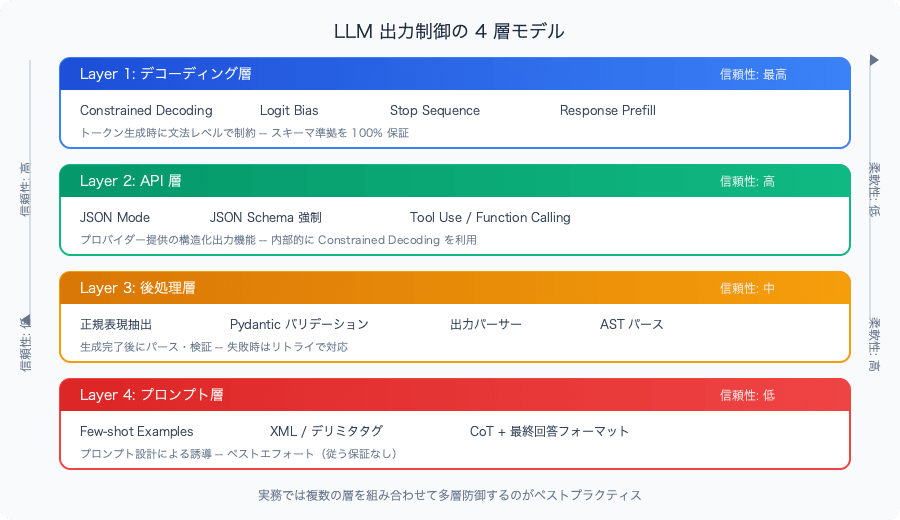
Overview of the 4-Layer Model
We classify output control methods into 4 layers in order of earliest intervention timing (= strongest guarantee).
Few-shot Examples, XML tags, Chain-of-Thought + final answer format
Lower layers are easier to use, but carry the risk of the model ignoring instructions. Higher layers are more robust, but flexibility and provider dependency increase.
In practice, combining multiple layers is common. For example, the pattern of "obtaining structured output with Tool Use (Layer 2), validating with Pydantic (Layer 3), and retrying on failure" is frequently seen.
Layer 1: Decoding Layer — Constraints During Token Generation
This is the most powerful control method. Each time the model generates a token, it restricts what tokens can be generated next. Since "syntactically invalid output cannot be generated in the first place," reliability is highest.
Constrained Decoding
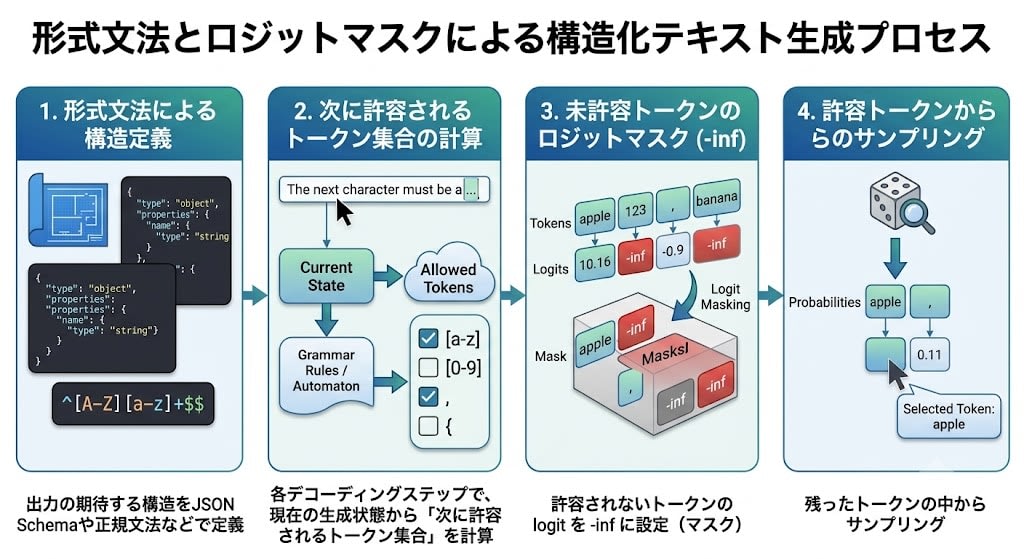
A method that constrains token generation using formal grammars (CFG or regular expressions). At each step, only tokens permitted by the grammar are masked, setting the generation probability of invalid tokens to zero.
How it works:
Define the expected structure of the output using a formal grammar (JSON Schema, regular grammar, etc.)
At each decoding step, calculate the "set of tokens allowed next" from the current generation state
By specifying this grammar, the model can only generate output like {"name": "John", "age": 30}. Invalid output such as {"name": 123} or {name: John} cannot occur in principle.
Python (Outlines library) example:
import outlinesmodel = outlines.models.transformers("mistralai/Mistral-7B-v0.1")# Define output structure with JSON Schemaschema = { "type": "object", "properties": { "name": {"type": "string"}, "age": {"type": "integer"}, "city": {"type": "string"} }, "required": ["name", "age", "city"]}generator = outlines.generate.json(model, schema)result = generator("Extract: John is 30, lives in Tokyo")# Always returns a schema-compliant dict
Characteristics:
100% guarantee of schema compliance
Suitable for local models (Outlines, llama.cpp, vLLM, etc.)
API providers also use this mechanism internally (OpenAI's strict: true, etc.)
Inference speed may decrease with complex grammars
Logit Bias
A method that directly manipulates the generation probability of specific tokens. While not as systematic as Constrained Decoding, it allows simple control of token generation via the API.
from openai import OpenAIclient = OpenAI()response = client.chat.completions.create( model="gpt-4o", messages=[{"role": "user", "content": "Choose one number from 1 to 10"}], logit_bias={ "16": 100, # Significantly boost the token ID for "7" })
Use cases:
Suppressing specific tokens (e.g., special characters, unwanted languages)
Restricting choices in classification tasks
However, token IDs depend on the model/tokenizer, so portability is low
Stop Sequence
A method that cuts off output at the point where a specified string is generated. Controls the "termination" of output.
from openai import OpenAIclient = OpenAI()response = client.chat.completions.create( model="gpt-4o", messages=[{"role": "user", "content": "Describe Tokyo's weather in one sentence"}], stop=["\n", "。"] # Stop at newline or Japanese period)# Yields a concise single-sentence answer
Use cases:
Preventing verbose output
Retrieving "just one block" from delimiter-based structured output
Limiting output to function units with \n\n during code generation
Response Prefill
A method that pre-fills the beginning of the assistant's response. Claude supports this feature.
import anthropicclient = anthropic.Anthropic()response = client.messages.create( model="claude-sonnet-4-20250514", max_tokens=1024, messages=[ {"role": "user", "content": "Return Tokyo weather information as JSON"}, {"role": "assistant", "content": "{"} # Force the start of JSON ])# Since the model generates continuing from "{", output beginning with JSON is obtained
Response Prefill does not constrain the decoding itself, but by fixing the initial state of the output, it makes it easier for the model to follow a specific format.
Layer 2: API Layer — Structured Output Features Provided by Providers
These are structured output features provided by each API provider. Many internally use Constrained Decoding, so reliability is high, but the API design differs by provider.
JSON Mode
A mode that guarantees "the output is valid JSON." It does not guarantee compliance with a schema.
# OpenAIresponse = client.chat.completions.create( model="gpt-4o", messages=[{"role": "user", "content": "Return Tokyo weather information as JSON"}], response_format={"type": "json_object"})# Valid JSON is guaranteed, but keys and types are not guaranteed
JSON Schema Enforcement
In addition to JSON Mode, this guarantees that the output complies with the specified schema.
# Gemini — Define structure with responseSchemafrom google import genaifrom google.genai import typesclient = genai.Client()response = client.models.generate_content( model="gemini-2.5-flash", contents="Extract: John is 30, lives in Tokyo", config=types.GenerateContentConfig( response_mime_type="application/json", response_schema={ "type": "object", "properties": { "name": {"type": "string"}, "age": {"type": "integer"}, "city": {"type": "string"} }, "required": ["name", "age", "city"] } ))
Tool Use / Function Calling
A method that has the model output structured data in the form of "calling a tool (function)." While originally a feature for agents, it is also widely used as a means to obtain schema-compliant structured output.
# Claude — Force schema-compliant output with Tool Useimport anthropicclient = anthropic.Anthropic()response = client.messages.create( model="claude-sonnet-4-20250514", max_tokens=1024, messages=[{"role": "user", "content": "Extract: John is 30, lives in Tokyo"}], tools=[{ "name": "extract_person", "description": "Extract person information", "input_schema": { "type": "object", "properties": { "name": {"type": "string"}, "age": {"type": "integer"}, "city": {"type": "string"} }, "required": ["name", "age", "city"] } }], tool_choice={"type": "tool", "name": "extract_person"})tool_block = next(b for b in response.content if b.type == "tool_use")result = tool_block.input # {"name": "John", "age": 30, "city": "Tokyo"}
Layer 3: Post-processing Layer — Parsing and Validation After Generation
Methods that perform parsing and validation after the model's output has been generated. Used in environments where Layers 1 and 2 are unavailable, or as additional safety measures.
Extraction Using Regular Expressions
The simplest post-processing approach. Extracts necessary information from free-form text using pattern matching.
import reimport jsonraw_output = """Let's think about it. John is 30 years old and lives in Tokyo.{"name": "John", "age": 30, "city": "Tokyo"}The above is the extraction result."""# Extract JSON inside a code blockmatch = re.search(r"```json\s*(.*?)\s*```", raw_output, re.DOTALL)if match: data = json.loads(match.group(1))
Notes:
Extraction fails if the model does not output in the expected format
Not suitable for extracting complex structures
Works at a "roughly functional" level; additional validation is needed in production environments
Validation with Pydantic (Instructor Pattern)
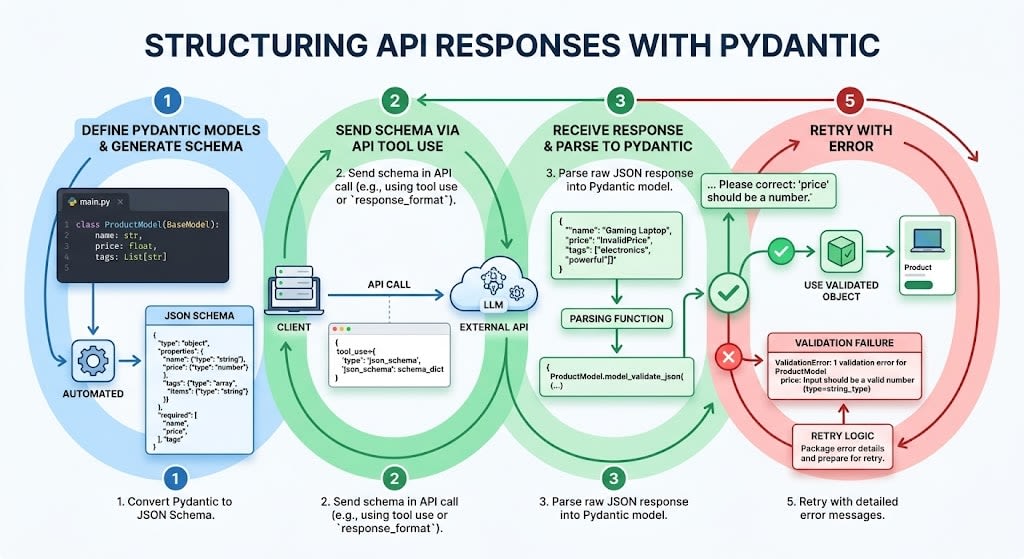
The Instructor library allows you to obtain LLM output with validation simply by defining a Pydantic model. Automatic retry on validation failure is also built in.
import instructorfrom openai import OpenAIfrom pydantic import BaseModel, Fieldclient = instructor.from_openai(OpenAI())class Person(BaseModel): name: str age: int = Field(ge=0, le=150) city: strperson = client.chat.completions.create( model="gpt-4o", response_model=Person, messages=[{"role": "user", "content": "Extract: John is 30, lives in Tokyo"}])# person.name == "John", person.age == 30, person.city == "Tokyo"# Automatically retries if type or validation rules are violated
How Instructor works:
Automatically generates JSON Schema from the Pydantic model
Sends the schema using the API's structured output features (Tool Use or response_format)
Parses the response into the Pydantic model
On validation failure, retries with an error message
In other words, Instructor is a library that bridges Layer 2 (API layer) and Layer 3 (post-processing layer).
Output Parsers (LangChain Style)
LangChain's OutputParser provides a mechanism to insert format instructions into prompts and parse the output.
from langchain.output_parsers import PydanticOutputParserfrom pydantic import BaseModelclass Person(BaseModel): name: str age: int city: strparser = PydanticOutputParser(pydantic_object=Person)# parser.get_format_instructions() generates the format instructions inserted into the prompt# parser.parse(output) parses the output
AST / Code Parsing
For code generation tasks, the output can be parsed into an AST (Abstract Syntax Tree) to verify syntactic validity.
import astgenerated_code = """def greet(name): return f"Hello, {name}!""""try: tree = ast.parse(generated_code) # Syntactically valid Python codeexcept SyntaxError as e: # Syntax error → attempt retry or correction print(f"Syntax error: {e}")
Layer 4: Prompt Layer — Soft Constraints
This is the most convenient but least reliable layer. It is a "request" to the model, with no guarantee of compliance. However, it is effective when combined with other layers.
Few-shot Examples
Guides the model's output by showing concrete examples of the expected format.
Please answer in the following format:Input: Alice is 25, lives in OsakaOutput: {"name": "Alice", "age": 25, "city": "Osaka"}Input: Bob is 40, lives in KyotoOutput: {"name": "Bob", "age": 40, "city": "Kyoto"}Input: Carol is 35, lives in NagoyaOutput:
Few-shot is the most intuitive method for making the model understand "what format to use." When used together with Layer 2 structured output, it makes it easier for the model to interpret the intent of the schema more accurately.
XML / Delimiter Tags
Makes the output explicitly mark section boundaries, making extraction in post-processing easier.
Please structure your answer with the following XML tags:<analysis>Analysis content here</analysis><answer>Final answer here</answer><confidence>high/medium/low</confidence>
import reoutput = """<analysis>Extracting person information from the input text. The name is John, age is 30, city is Tokyo.</analysis><answer>{"name": "John", "age": 30, "city": "Tokyo"}</answer><confidence>high</confidence>"""answer = re.search(r"<answer>(.*?)</answer>", output, re.DOTALL).group(1)
Claude is particularly well-suited for XML tags, and their use is recommended in the documentation.
Chain-of-Thought + Final Answer Format
A pattern that separates "reasoning process" from "final answer." Allows the model to reason freely while structuring only the final output.
Think step by step, then answer at the end in the following format:FINAL_ANSWER: <answer>Question: What is 128 × 47?
Rather than using them alone, multi-layer defense by combining multiple layers is the best practice in production.
Pattern 1: API Layer + Post-processing Layer (Most Common)
import instructorfrom openai import OpenAIfrom pydantic import BaseModelclient = instructor.from_openai(OpenAI())class Person(BaseModel): name: str age: int city: str# Layer 2: API structured output# Layer 3: Pydantic validation + automatic retryperson = client.chat.completions.create( model="gpt-4o", response_model=Person, max_retries=3, messages=[{"role": "user", "content": "Extract: John is 30, lives in Tokyo"}])
Pattern 2: Prompt Layer + API Layer + Post-processing Layer
import anthropicimport jsonfrom pydantic import BaseModel, ValidationErrorclient = anthropic.Anthropic()class Person(BaseModel): name: str age: int city: str# Layer 4: Convey format intent with Few-shot# Layer 2: Enforce schema compliance with Tool Useresponse = client.messages.create( model="claude-sonnet-4-20250514", max_tokens=1024, system="This is a task to extract person information. Make sure to fill in all fields.", messages=[{"role": "user", "content": "Extract: John is 30, lives in Tokyo"}], tools=[{ "name": "extract_person", "description": "Extract person info. Example: {\"name\": \"Alice\", \"age\": 25, \"city\": \"Osaka\"}", "input_schema": Person.model_json_schema() }], tool_choice={"type": "tool", "name": "extract_person"})# Layer 3: Additional validation with Pydantictool_block = next(b for b in response.content if b.type == "tool_use")try: person = Person.model_validate(tool_block.input)except ValidationError as e: # Fallback processing on validation failure print(f"Validation failed: {e}")
Summary
LLM output control methods can be classified into 4 layers: Decoding → API → Post-processing → Prompt
Higher layers have greater reliability, but flexibility and portability decrease
Combining multiple layers is the standard in practice — API structured output + Pydantic validation + retry is the most common pattern
Relying solely on the prompt layer should be avoided in production environments — a prompt saying "return it in JSON" alone is insufficient
For API differences between providers (handling of Required/Optional, Nullable dialects), also refer to the structured output comparison article