I Built a Mechanism to Route Security Service Notifications by Account in an AWS Multi-Account Environment

This page has been translated by machine translation. View original
Hello! This is Yoshida from the Cloud Business Division.
Previously, I wrote an article summarizing the configuration of security services in a multi-account environment.
That article introduced a configuration that aggregates the findings from Security Hub CSPM, GuardDuty, IAM Access Analyzer, and Inspector into Security Hub CSPM in the Audit account.
This time, I will build a mechanism that sorts the aggregated findings by account and sends notifications.
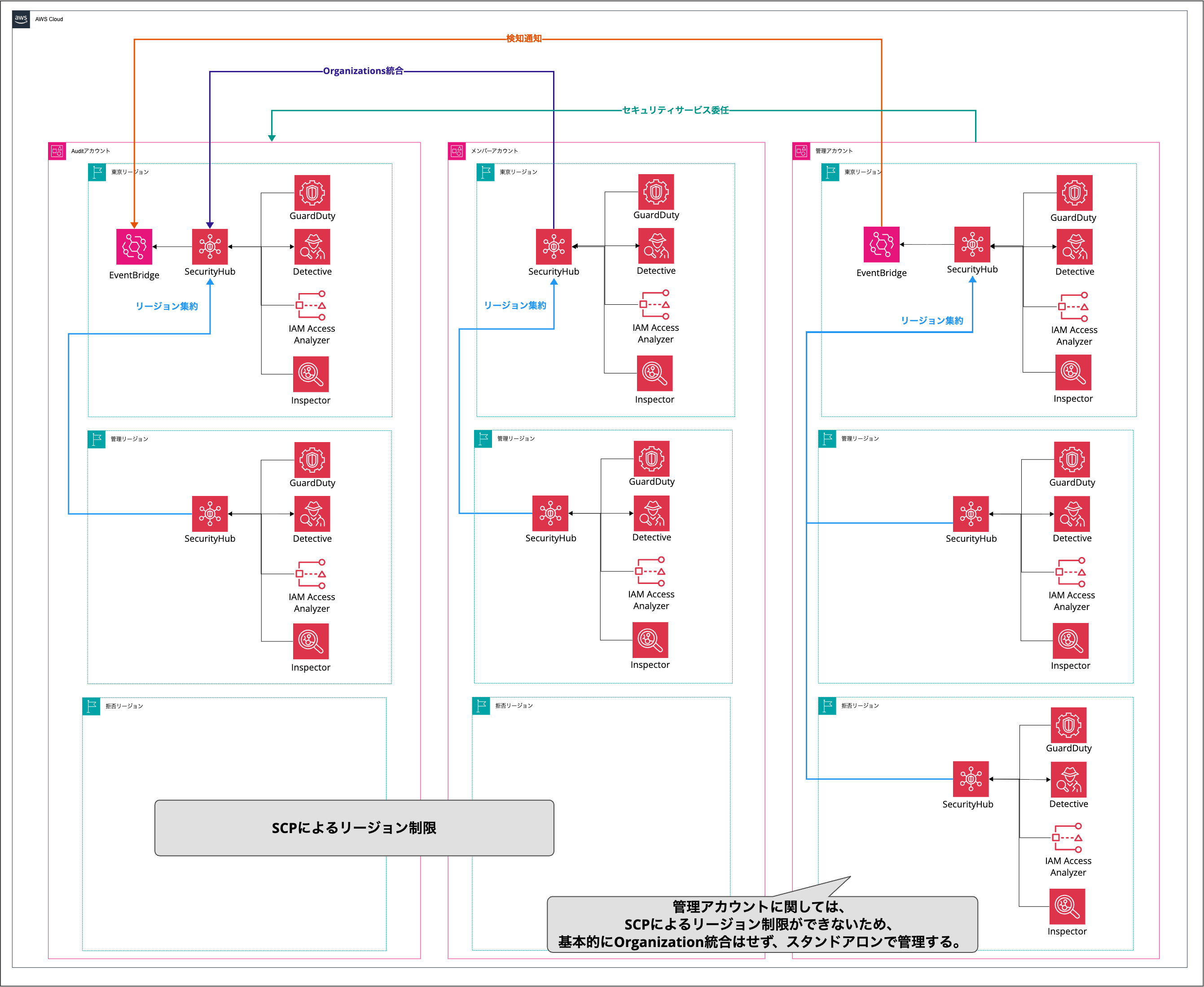
Image source: AWSのマルチアカウント環境におけるセキュリティサービスの構成をまとめてみた | DevelopersIO
What We Want to Do
We want to sort security service findings by the account they originated from and notify the person in charge.
The overall picture of the notification platform we will build this time is as follows.
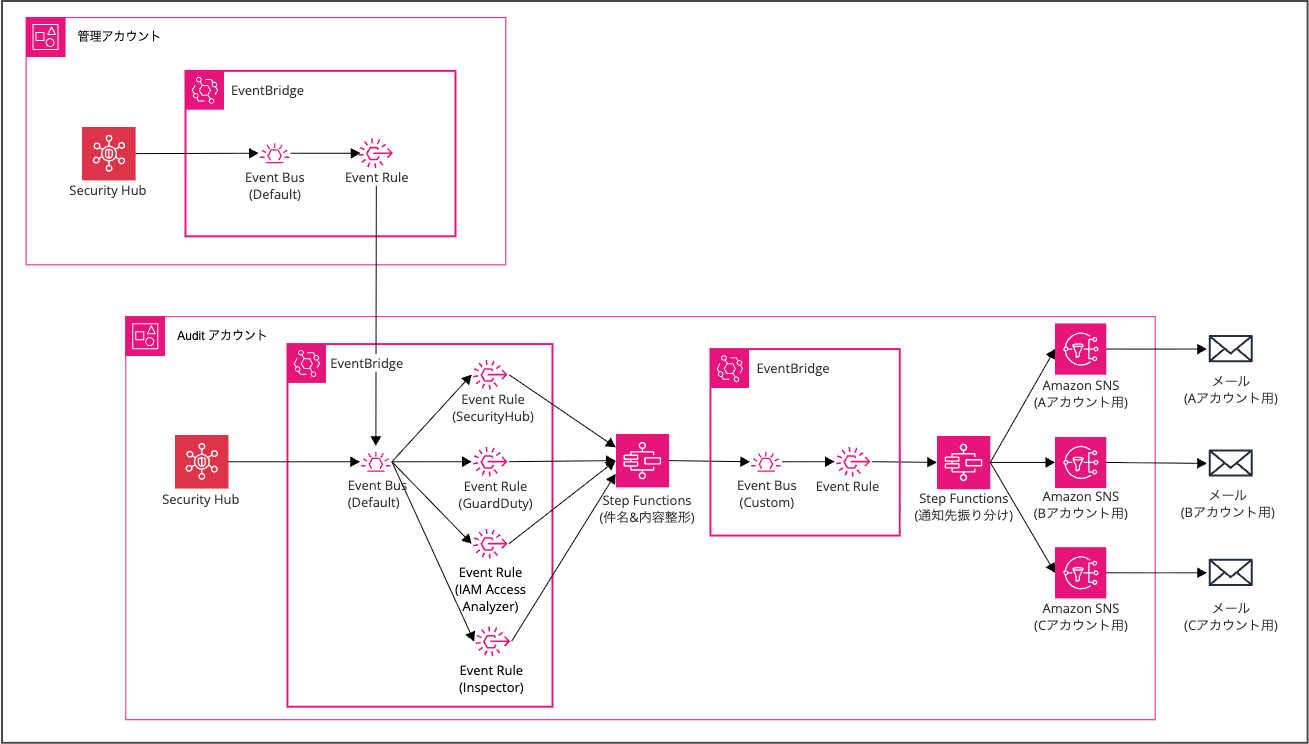
The processing flow is as follows.
- Forward Security Hub CSPM findings from the management account to the EventBridge default event bus in the Audit account using EventBridge
- Filter by service with EventBridge rules in the Audit account
- Format the notification text with Step Functions (formatting process) and forward it to an EventBridge custom event bus
- Start Step Functions (dispatch process) from the custom event bus
- Dispatch to the corresponding SNS topic based on the account ID
The formatting process and the dispatch process are separated into two Step Functions state machines.
This allows you to change the notification text format and add notification destinations independently.
This formatting and dispatch process is a mechanism similar to the configuration for centrally managing CloudWatch Alarms in a multi-account environment that I wrote about previously.
Notification Targets
The findings notified in this configuration are as follows.
| Service | Notification Target | Filter Conditions |
|---|---|---|
| Security Hub CSPM | Control violations | MEDIUM/HIGH/CRITICAL, FAILED/WARNING/NOT_AVAILABLE |
| GuardDuty | Threat detection | MEDIUM/HIGH/CRITICAL |
| IAM Access Analyzer | External access detection | All findings (access from outside the organization) |
| Inspector | Vulnerability detection | MEDIUM/HIGH/CRITICAL |
For Security Hub CSPM, only control violations of the security standard (AWS Foundational Security Best Practices) are targeted.
Notification Text Format
Here is the format of the notification text generated by Step Functions (formatting process).
The notification text is formatted using the States.Format function to generate the subject and body.
Security Hub CSPM
Subject
緊急度: {Severity.Label} Security Hubセキュリティアラート Account: {AwsAccountId}
Body
Security Hubで設定の問題が検知されました。

検知内容: {Title}
リソース種類: {Resources[0].Type}
リソースID: {Resources[0].Id}
詳細: {Description}
リージョン: {Region}
推奨事項URL: {ProductFields.RecommendationUrl}
Sample
件名: 緊急度: MEDIUM Security Hubセキュリティアラート Account: 123456789012

Security Hubで設定の問題が検知されました。

検知内容: S3.8 S3 Block Public Access setting should be enabled at the bucket level
リソース種類: AwsS3Bucket
リソースID: arn:aws:s3:::example-bucket
詳細: This control checks whether Amazon S3 buckets have bucket-level public access blocks applied.
リージョン: ap-northeast-1
推奨事項URL: https://docs.aws.amazon.com/console/securityhub/S3.8/remediation
GuardDuty
Subject
緊急度: {Severity.Label} GuardDutyセキュリティアラート Account: {AwsAccountId}
Body
以下の脅威を検知しました。

検出タイプ: {Types[0]}
詳細: {Description}
リージョン: {Region}
推奨事項URL: https://docs.aws.amazon.com/ja_jp/guardduty/latest/ug/guardduty_finding-types-active.html
Sample
件名: 緊急度: HIGH GuardDutyセキュリティアラート Account: 123456789012

以下の脅威を検知しました。

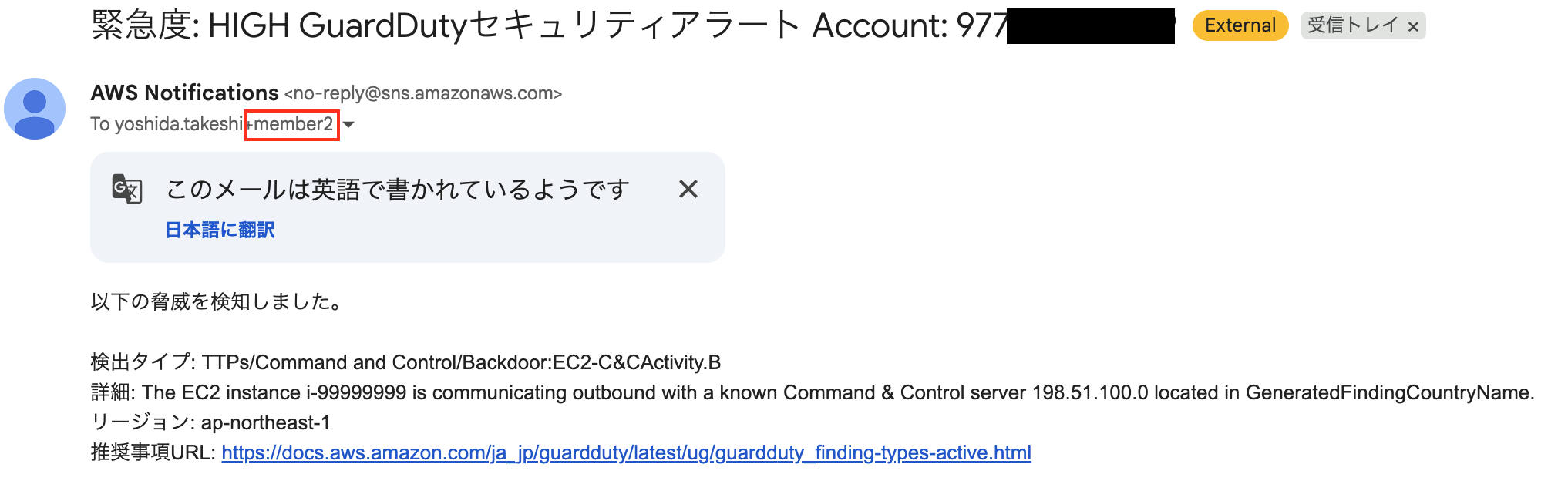
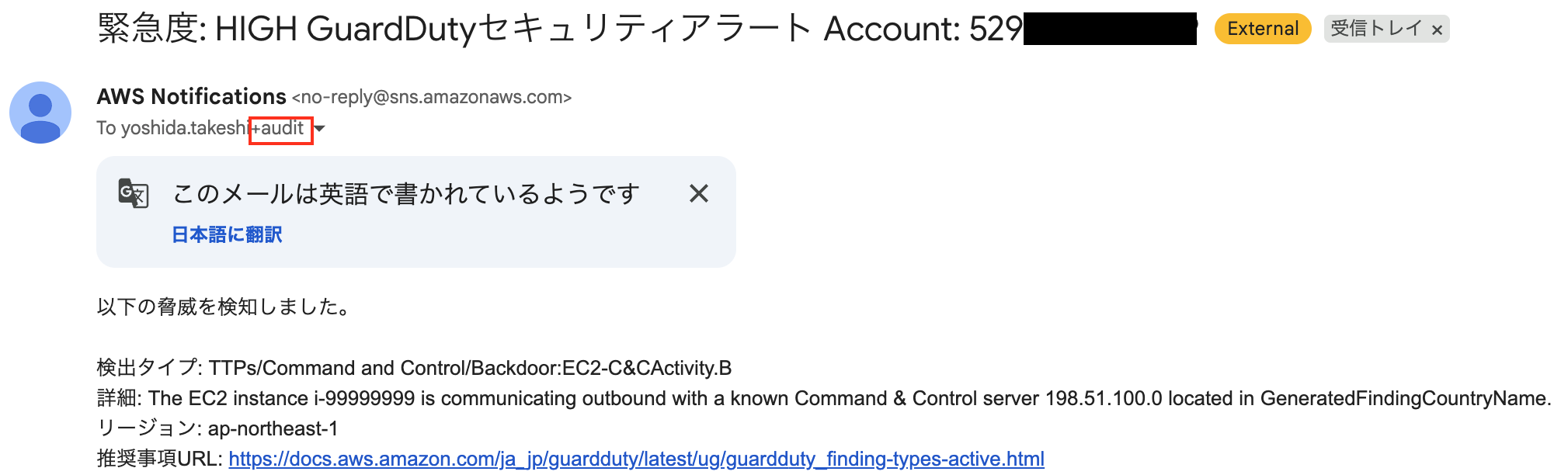
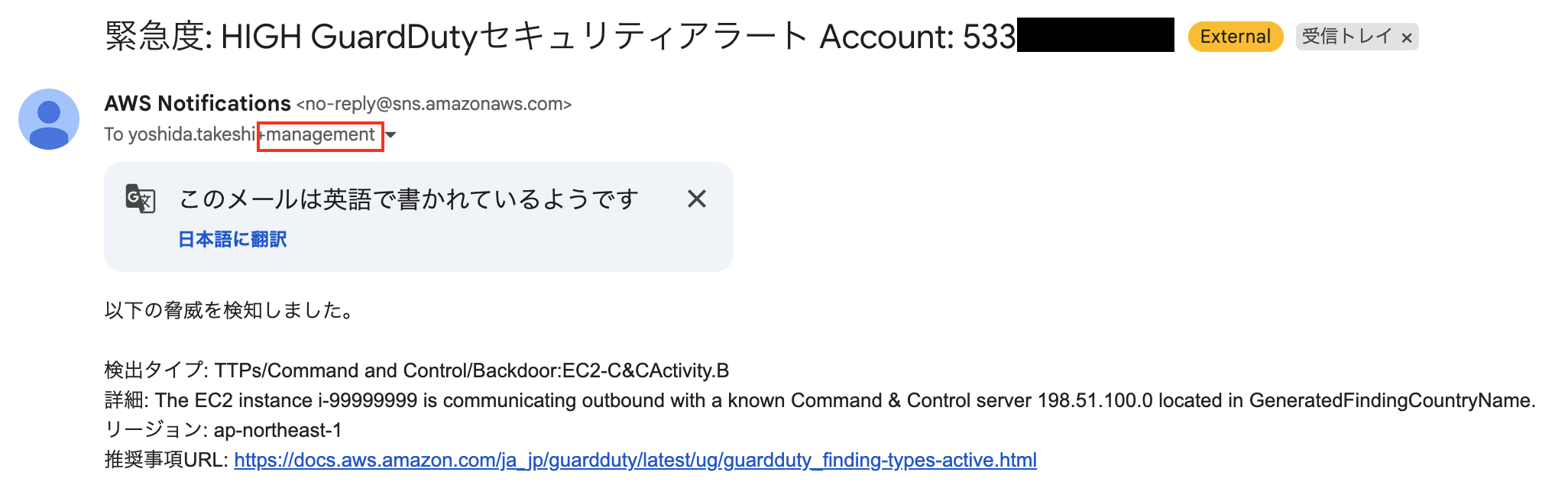
検出タイプ: TTPs/Command and Control/Backdoor:EC2-C&CActivity.B
詳細: EC2 instance i-0abc123def456 is communicating with a known command and control server.
リージョン: ap-northeast-1
推奨事項URL: https://docs.aws.amazon.com/ja_jp/guardduty/latest/ug/guardduty_finding-types-active.html
IAM Access Analyzer
Subject
IAM Access Analyzerセキュリティアラート Account: {AwsAccountId}
Body
以下リソースが外部共有されています。

リソース種類: {Resources[0].Type}
リソース名: {Resources[0].Id}
リージョン: {Region}
詳細: {Description}
Sample
件名: IAM Access Analyzerセキュリティアラート Account: 123456789012

以下リソースが外部共有されています。

リソース種類: AWS::S3::Bucket
リソース名: arn:aws:s3:::example-public-bucket
リージョン: ap-northeast-1
詳細: The S3 bucket policy grants public access to the bucket.
Inspector
Subject
緊急度: {Severity.Label} Inspectorセキュリティアラート Account: {AwsAccountId}
Body
脆弱性が検出されました。

タイトル: {Title}
リソースタイプ: {Resources[0].Type}
リソースID: {Resources[0].Id}
初回検出日時: {FirstObservedAt}
最終検出日時: {LastObservedAt}
リージョン: {Resources[0].Region}
Sample
件名: 緊急度: HIGH Inspectorセキュリティアラート Account: 123456789012

脆弱性が検出されました。

タイトル: CVE-2023-12345 - Example Package Remote Code Execution
リソースタイプ: AwsEc2Instance
リソースID: arn:aws:ec2:ap-northeast-1:123456789012:instance/i-0abc123def456
初回検出日時: 2024-01-15T10:30:00Z
最終検出日時: 2024-01-20T14:00:00Z
リージョン: ap-northeast-1
To customize the notification text, modify the Step Functions state machine definition.
Build Steps (Audit Account)
We will build using the AWS CLI in CloudShell. Resources are created in the reverse order of the processing flow. This is because if the target resources are not prepared first, they cannot be referenced when configuring rules and state machines.
Setting Variables
First, set the variables according to your environment.
# Auditアカウント(自アカウント)
AUDIT_ACCOUNT_ID="123456789012"

# 管理アカウント
MGMT_ACCOUNT_ID="111122223333"

# メンバーアカウント
MEMBER1_ACCOUNT_ID="444455556666"
MEMBER2_ACCOUNT_ID="777788889999"

# リージョン
REGION="ap-northeast-1"
Creating SNS Topics
Create the SNS topics that serve as dispatch destinations. This time, we prepare topics for four accounts (the management account, the Audit account, and two member accounts) plus a default notification destination.
# デフォルト通知先(未登録アカウント用)
aws sns create-topic --name security-alert-default --region ${REGION}

# 管理アカウント用
aws sns create-topic --name security-alert-management --region ${REGION}

# Auditアカウント用
aws sns create-topic --name security-alert-audit --region ${REGION}

# メンバーアカウント1用
aws sns create-topic --name security-alert-member1 --region ${REGION}

# メンバーアカウント2用
aws sns create-topic --name security-alert-member2 --region ${REGION}
Add subscriptions.
A confirmation email will arrive, so click the link to approve it. Add subscriptions to the other topics in the same way.
Creating Step Functions (Dispatch Process)
Create a state machine that dispatches formatted events to SNS topics based on the account ID.
First, create an IAM role.
{
  "Version": "2012-10-17",
  "Statement": [
    {
      "Effect": "Allow",
      "Principal": {
        "Service": "states.amazonaws.com"
      },
      "Action": "sts:AssumeRole"
    }
  ]
}
aws iam create-role \
  --role-name security-alert-sfn-dispatcher-role \
  --assume-role-policy-document file://sfn-trust-policy.json
Grant permission to publish to the SNS topics. Replace <AuditアカウントID> according to your environment.
{
  "Version": "2012-10-17",
  "Statement": [
    {
      "Effect": "Allow",
      "Action": "sns:Publish",
      "Resource": [
        "arn:aws:sns:ap-northeast-1:<AuditアカウントID>:security-alert-default",
        "arn:aws:sns:ap-northeast-1:<AuditアカウントID>:security-alert-management",
        "arn:aws:sns:ap-northeast-1:<AuditアカウントID>:security-alert-audit",
        "arn:aws:sns:ap-northeast-1:<AuditアカウントID>:security-alert-member1",
        "arn:aws:sns:ap-northeast-1:<AuditアカウントID>:security-alert-member2"
      ]
    }
  ]
}
aws iam put-role-policy \
  --role-name security-alert-sfn-dispatcher-role \
  --policy-name security-alert-sfn-dispatcher-policy \
  --policy-document file://sfn-dispatcher-policy.json
Create the state machine. A Choice state evaluates the account ID and publishes to the matching SNS topic.
If no account matches, it notifies the default topic.
Replace <管理アカウントID>, <AuditアカウントID>, <メンバーアカウント1ID>, and <メンバーアカウント2ID> according to your environment.
{
  "Comment": "Security Alert Dispatcher State Machine",
  "StartAt": "DetermineNotificationTarget",
  "States": {
    "DetermineNotificationTarget": {
      "Type": "Choice",
      "Choices": [
        {
          "Variable": "$.detail.AccountId",
          "StringEquals": "<管理アカウントID>",
          "Comment": "Management Account",
          "Next": "NotifyManagement"
        },
        {
          "Variable": "$.detail.AccountId",
          "StringEquals": "<AuditアカウントID>",
          "Comment": "Audit Account",
          "Next": "NotifyAudit"
        },
        {
          "Variable": "$.detail.AccountId",
          "StringEquals": "<メンバーアカウント1ID>",
          "Comment": "Member Account 1",
          "Next": "NotifyMember1"
        },
        {
          "Variable": "$.detail.AccountId",
          "StringEquals": "<メンバーアカウント2ID>",
          "Comment": "Member Account 2",
          "Next": "NotifyMember2"
        }
      ],
      "Default": "NotifyDefault"
    },
    "NotifyManagement": {
      "Type": "Task",
      "Resource": "arn:aws:states:::sns:publish",
      "Parameters": {
        "TopicArn": "arn:aws:sns:ap-northeast-1:<AuditアカウントID>:security-alert-management",
        "Subject.$": "$.detail.Subject",
        "Message.$": "$.detail.Message"
      },
      "End": true
    },
    "NotifyAudit": {
      "Type": "Task",
      "Resource": "arn:aws:states:::sns:publish",
      "Parameters": {
        "TopicArn": "arn:aws:sns:ap-northeast-1:<AuditアカウントID>:security-alert-audit",
        "Subject.$": "$.detail.Subject",
        "Message.$": "$.detail.Message"
      },
      "End": true
    },
    "NotifyMember1": {
      "Type": "Task",
      "Resource": "arn:aws:states:::sns:publish",
      "Parameters": {
        "TopicArn": "arn:aws:sns:ap-northeast-1:<AuditアカウントID>:security-alert-member1",
        "Subject.$": "$.detail.Subject",
        "Message.$": "$.detail.Message"
      },
      "End": true
    },
    "NotifyMember2": {
      "Type": "Task",
      "Resource": "arn:aws:states:::sns:publish",
      "Parameters": {
        "TopicArn": "arn:aws:sns:ap-northeast-1:<AuditアカウントID>:security-alert-member2",
        "Subject.$": "$.detail.Subject",
        "Message.$": "$.detail.Message"
      },
      "End": true
    },
    "NotifyDefault": {
      "Type": "Task",
      "Resource": "arn:aws:states:::sns:publish",
      "Parameters": {
        "TopicArn": "arn:aws:sns:ap-northeast-1:<AuditアカウントID>:security-alert-default",
        "Subject.$": "$.detail.Subject",
        "Message.$": "$.detail.Message"
      },
      "End": true
    }
  }
}
aws stepfunctions create-state-machine \
  --name security-alert-dispatcher \
  --definition file://dispatcher-state-machine.json \
  --role-arn "arn:aws:iam::${AUDIT_ACCOUNT_ID}:role/security-alert-sfn-dispatcher-role" \
  --region ${REGION}
Creating the Custom Event Bus and EventBridge Rule
Create a custom event bus that receives formatted events.
aws events create-event-bus \
  --name security-alert-custom-bus \
  --region ${REGION}
Create an EventBridge rule that invokes the dispatch Step Functions from the custom event bus. First, create an IAM role.
{
  "Version": "2012-10-17",
  "Statement": [
    {
      "Effect": "Allow",
      "Principal": {
        "Service": "events.amazonaws.com"
      },
      "Action": "sts:AssumeRole"
    }
  ]
}
aws iam create-role \
  --role-name security-alert-eb-to-dispatcher-role \
  --assume-role-policy-document file://eventbridge-trust-policy.json
{
  "Version": "2012-10-17",
  "Statement": [
    {
      "Effect": "Allow",
      "Action": "states:StartExecution",
      "Resource": "arn:aws:states:ap-northeast-1:<AuditアカウントID>:stateMachine:security-alert-dispatcher"
    }
  ]
}
aws iam put-role-policy \
  --role-name security-alert-eb-to-dispatcher-role \
  --policy-name security-alert-eb-to-dispatcher-policy \
  --policy-document file://eb-to-sfn-dispatcher-policy.json
Create the rule. The pattern is set to receive events put by the formatting process.
{
  "source": ["custom.securityalert.stepfunctions"],
  "detail-type": ["Shaped Security Findings"]
}
aws events put-rule \
  --name security-alert-custom-to-dispatcher \
  --event-bus-name security-alert-custom-bus \
  --event-pattern file://event-pattern-custom-bus.json \
  --state ENABLED \
  --region ${REGION}
Set the target.
aws events put-targets \
  --rule security-alert-custom-to-dispatcher \
  --event-bus-name security-alert-custom-bus \
  --targets "[{
    \"Id\": \"DispatcherTarget\",
    \"Arn\": \"arn:aws:states:${REGION}:${AUDIT_ACCOUNT_ID}:stateMachine:security-alert-dispatcher\",
    \"RoleArn\": \"arn:aws:iam::${AUDIT_ACCOUNT_ID}:role/security-alert-eb-to-dispatcher-role\"
  }]" \
  --region ${REGION}
Creating Step Functions (Formatting Process)
Create a state machine that formats the findings from each security service into notification text.
Create an IAM role. Reuse the sfn-trust-policy.json trust policy created earlier.
aws iam create-role \
  --role-name security-alert-sfn-formatter-role \
  --assume-role-policy-document file://sfn-trust-policy.json
Grant PutEvents permission to the custom event bus.
{
  "Version": "2012-10-17",
  "Statement": [
    {
      "Effect": "Allow",
      "Action": "events:PutEvents",
      "Resource": "arn:aws:events:ap-northeast-1:<AuditアカウントID>:event-bus/security-alert-custom-bus"
    }
  ]
}
aws iam put-role-policy \
  --role-name security-alert-sfn-formatter-role \
  --policy-name security-alert-sfn-formatter-policy \
  --policy-document file://sfn-formatter-policy.json
Create the state machine.
A Choice state evaluates ProductName and formats the notification text for each service.
For Security Hub, whether it is a control violation is determined by the presence of StandardsArn.
{
  "Comment": "Security Alert Shaping State Machine",
  "StartAt": "ChoiceService",
  "States": {
    "ChoiceService": {
      "Type": "Choice",
      "Choices": [
        {
          "And": [
            {
              "Variable": "$.detail.findings[0].ProductName",
              "StringEquals": "Security Hub"
            },
            {
              "Variable": "$.detail.findings[0].ProductFields.StandardsArn",
              "IsPresent": true
            }
          ],
          "Next": "SecurityHubShaping"
        },
        {
          "Variable": "$.detail.findings[0].ProductName",
          "StringEquals": "GuardDuty",
          "Next": "GuardDutyShaping"
        },
        {
          "Variable": "$.detail.findings[0].ProductName",
          "StringEquals": "IAM Access Analyzer",
          "Next": "AccessAnalyzerShaping"
        },
        {
          "Variable": "$.detail.findings[0].ProductName",
          "StringEquals": "Inspector",
          "Next": "InspectorShaping"
        }
      ],
      "Default": "Fail"
    },
    "SecurityHubShaping": {
      "Type": "Pass",
      "Parameters": {
        "Subject.$": "States.Format('緊急度: {} Security Hubセキュリティアラート Account: {}', $.detail.findings[0].Severity.Label, $.detail.findings[0].AwsAccountId)",
        "Message.$": "States.Format('Security Hubで設定の問題が検知されました。\n\n検知内容: {}\nリソース種類: {}\nリソースID: {}\n詳細: {}\nリージョン: {}\n推奨事項URL: {}', $.detail.findings[0].Title, $.detail.findings[0].Resources[0].Type, $.detail.findings[0].Resources[0].Id, $.detail.findings[0].Description, $.detail.findings[0].Region, $.detail.findings[0].ProductFields.RecommendationUrl)",
        "AccountId.$": "$.detail.findings[0].AwsAccountId"
      },
      "Next": "PutToCustomBus"
    },
    "GuardDutyShaping": {
      "Type": "Pass",
      "Parameters": {
        "Subject.$": "States.Format('緊急度: {} GuardDutyセキュリティアラート Account: {}', $.detail.findings[0].Severity.Label, $.detail.findings[0].AwsAccountId)",
        "Message.$": "States.Format('以下の脅威を検知しました。\n\n検出タイプ: {}\n詳細: {}\nリージョン: {}\n推奨事項URL: https://docs.aws.amazon.com/ja_jp/guardduty/latest/ug/guardduty_finding-types-active.html', $.detail.findings[0].Types[0], $.detail.findings[0].Description, $.detail.findings[0].Region)",
        "AccountId.$": "$.detail.findings[0].AwsAccountId"
      },
      "Next": "PutToCustomBus"
    },
    "AccessAnalyzerShaping": {
      "Type": "Pass",
      "Parameters": {
        "Subject.$": "States.Format('IAM Access Analyzerセキュリティアラート Account: {}', $.detail.findings[0].AwsAccountId)",
        "Message.$": "States.Format('以下リソースが外部共有されています。\n\nリソース種類: {}\nリソース名: {}\nリージョン: {}\n詳細: {}', $.detail.findings[0].Resources[0].Type, $.detail.findings[0].Resources[0].Id, $.detail.findings[0].Region, $.detail.findings[0].Description)",
        "AccountId.$": "$.detail.findings[0].AwsAccountId"
      },
      "Next": "PutToCustomBus"
    },
    "InspectorShaping": {
      "Type": "Pass",
      "Parameters": {
        "Subject.$": "States.Format('緊急度: {} Inspectorセキュリティアラート Account: {}', $.detail.findings[0].Severity.Label, $.detail.findings[0].AwsAccountId)",
        "Message.$": "States.Format('脆弱性が検出されました。\n\nタイトル: {}\nリソースタイプ: {}\nリソースID: {}\n初回検出日時: {}\n最終検出日時: {}\nリージョン: {}', $.detail.findings[0].Title, $.detail.findings[0].Resources[0].Type, $.detail.findings[0].Resources[0].Id, $.detail.findings[0].FirstObservedAt, $.detail.findings[0].LastObservedAt, $.detail.findings[0].Resources[0].Region)",
        "AccountId.$": "$.detail.findings[0].AwsAccountId"
      },
      "Next": "PutToCustomBus"
    },
    "PutToCustomBus": {
      "Type": "Task",
      "Resource": "arn:aws:states:::events:putEvents",
      "Parameters": {
        "Entries": [
          {
            "Detail": {
              "Subject.$": "$.Subject",
              "Message.$": "$.Message",
              "AccountId.$": "$.AccountId"
            },
            "DetailType": "Shaped Security Findings",
            "EventBusName": "security-alert-custom-bus",
            "Source": "custom.securityalert.stepfunctions"
          }
        ]
      },
      "End": true
    },
    "Fail": {
      "Type": "Fail",
      "Error": "UnknownSource",
      "Cause": "Unknown event source"
    }
  }
}
aws stepfunctions create-state-machine \
  --name security-alert-formatter \
  --definition file://formatter-state-machine.json \
  --role-arn "arn:aws:iam::${AUDIT_ACCOUNT_ID}:role/security-alert-sfn-formatter-role" \
  --region ${REGION}
Creating EventBridge Rules (Default Bus → Formatting SFN)
Create rules that filter the findings from each security service and forward them to the formatting state machine.
Create an IAM role. This role is shared by the four rules.
Reuse the eventbridge-trust-policy.json trust policy created earlier.
aws iam create-role \
  --role-name security-alert-eb-to-formatter-role \
  --assume-role-policy-document file://eventbridge-trust-policy.json
{
  "Version": "2012-10-17",
  "Statement": [
    {
      "Effect": "Allow",
      "Action": "states:StartExecution",
      "Resource": "arn:aws:states:ap-northeast-1:<AuditアカウントID>:stateMachine:security-alert-formatter"
    }
  ]
}
aws iam put-role-policy \
  --role-name security-alert-eb-to-formatter-role \
  --policy-name security-alert-eb-to-formatter-policy \
  --policy-document file://eb-to-sfn-formatter-policy.json
Rule for Security Hub CSPM
Security Hub control violations are the notification target.
The security standard is specified with ProductFields.StandardsArn.
{
  "detail-type": ["Security Hub Findings - Imported"],
  "source": ["aws.securityhub"],
  "detail": {
    "findings": {
      "Compliance": {
        "Status": ["FAILED", "WARNING", "NOT_AVAILABLE"]
      },
      "RecordState": ["ACTIVE"],
      "ProductFields": {
        "StandardsArn": ["arn:aws:securityhub:::standards/aws-foundational-security-best-practices/v/1.0.0"]
      },
      "Workflow": {
        "Status": ["NEW"]
      },
      "Severity": {
        "Label": ["MEDIUM", "HIGH", "CRITICAL"]
      }
    }
  }
}
aws events put-rule \
  --name security-alert-securityhub \
  --event-pattern file://event-pattern-securityhub.json \
  --state ENABLED \
  --region ${REGION}
aws events put-targets \
  --rule security-alert-securityhub \
  --targets "[{
    \"Id\": \"FormatterTarget\",
    \"Arn\": \"arn:aws:states:${REGION}:${AUDIT_ACCOUNT_ID}:stateMachine:security-alert-formatter\",
    \"RoleArn\": \"arn:aws:iam::${AUDIT_ACCOUNT_ID}:role/security-alert-eb-to-formatter-role\"
  }]" \
  --region ${REGION}
Rule for GuardDuty
{
  "detail-type": ["Security Hub Findings - Imported"],
  "source": ["aws.securityhub"],
  "detail": {
    "findings": {
      "ProductName": ["GuardDuty"],
      "RecordState": ["ACTIVE"],
      "Workflow": {
        "Status": ["NEW"]
      },
      "Severity": {
        "Label": ["MEDIUM", "HIGH", "CRITICAL"]
      }
    }
  }
}
aws events put-rule \
  --name security-alert-guardduty \
  --event-pattern file://event-pattern-guardduty.json \
  --state ENABLED \
  --region ${REGION}
aws events put-targets \
  --rule security-alert-guardduty \
  --targets "[{
    \"Id\": \"FormatterTarget\",
    \"Arn\": \"arn:aws:states:${REGION}:${AUDIT_ACCOUNT_ID}:stateMachine:security-alert-formatter\",
    \"RoleArn\": \"arn:aws:iam::${AUDIT_ACCOUNT_ID}:role/security-alert-eb-to-formatter-role\"
  }]" \
  --region ${REGION}
Rule for IAM Access Analyzer
{
  "detail-type": ["Security Hub Findings - Imported"],
  "source": ["aws.securityhub"],
  "detail": {
    "findings": {
      "ProductName": ["IAM Access Analyzer"],
      "RecordState": ["ACTIVE"],
      "Workflow": {
        "Status": ["NEW"]
      }
    }
  }
}
aws events put-rule \
  --name security-alert-accessanalyzer \
  --event-pattern file://event-pattern-accessanalyzer.json \
  --state ENABLED \
  --region ${REGION}
aws events put-targets \
  --rule security-alert-accessanalyzer \
  --targets "[{
    \"Id\": \"FormatterTarget\",
    \"Arn\": \"arn:aws:states:${REGION}:${AUDIT_ACCOUNT_ID}:stateMachine:security-alert-formatter\",
    \"RoleArn\": \"arn:aws:iam::${AUDIT_ACCOUNT_ID}:role/security-alert-eb-to-formatter-role\"
  }]" \
  --region ${REGION}
Rule for Inspector
{
  "detail-type": ["Security Hub Findings - Imported"],
  "source": ["aws.securityhub"],
  "detail": {
    "findings": {
      "ProductName": ["Inspector"],
      "RecordState": ["ACTIVE"],
      "Workflow": {
        "Status": ["NEW"]
      },
      "Severity": {
        "Label": ["MEDIUM", "HIGH", "CRITICAL"]
      }
    }
  }
}
aws events put-rule \
  --name security-alert-inspector \
  --event-pattern file://event-pattern-inspector.json \
  --state ENABLED \
  --region ${REGION}
aws events put-targets \
  --rule security-alert-inspector \
  --targets "[{
    \"Id\": \"FormatterTarget\",
    \"Arn\": \"arn:aws:states:${REGION}:${AUDIT_ACCOUNT_ID}:stateMachine:security-alert-formatter\",
    \"RoleArn\": \"arn:aws:iam::${AUDIT_ACCOUNT_ID}:role/security-alert-eb-to-formatter-role\"
  }]" \
  --region ${REGION}
Configuring the Resource Policy for the Default Event Bus
Allow event reception from the management account.
aws events put-permission \
  --event-bus-name default \
  --action events:PutEvents \
  --principal ${MGMT_ACCOUNT_ID} \
  --statement-id AllowManagementAccountPutEvents \
  --region ${REGION}
Build Steps (Management Account)
Create an EventBridge rule that forwards the management account's Security Hub findings to the Audit account.
Setting Variables
# 管理アカウント(自アカウント)
MGMT_ACCOUNT_ID="111122223333"

# Auditアカウント
AUDIT_ACCOUNT_ID="123456789012"

# リージョン
REGION="ap-northeast-1"
Creating the EventBridge Rule
Create an IAM role.
The trust policy is the same as the eventbridge-trust-policy.json created in the Audit account.
{
  "Version": "2012-10-17",
  "Statement": [
    {
      "Effect": "Allow",
      "Principal": {
        "Service": "events.amazonaws.com"
      },
      "Action": "sts:AssumeRole"
    }
  ]
}
aws iam create-role \
  --role-name security-alert-eb-to-audit-role \
  --assume-role-policy-document file://eventbridge-trust-policy.json
Grant the events:PutEvents permission to the event bus in the Audit account.
{
  "Version": "2012-10-17",
  "Statement": [
    {
      "Effect": "Allow",
      "Action": "events:PutEvents",
      "Resource": "arn:aws:events:ap-northeast-1:<AuditアカウントID>:event-bus/default"
    }
  ]
}
aws iam put-role-policy \
  --role-name security-alert-eb-to-audit-role \
  --policy-name security-alert-eb-to-audit-policy \
  --policy-document file://eb-to-audit-policy.json
Create the rule.
All Security Hub findings are forwarded to the Audit account.
{
  "source": ["aws.securityhub"],
  "detail-type": ["Security Hub Findings - Imported"]
}
aws events put-rule \
  --name security-alert-to-audit \
  --event-pattern file://event-pattern-management-to-audit.json \
  --state ENABLED \
  --region ${REGION}
Set the target.
aws events put-targets \
  --rule security-alert-to-audit \
  --targets "[{
    \"Id\": \"AuditEventBusTarget\",
    \"Arn\": \"arn:aws:events:${REGION}:${AUDIT_ACCOUNT_ID}:event-bus/default\",
    \"RoleArn\": \"arn:aws:iam::${MGMT_ACCOUNT_ID}:role/security-alert-eb-to-audit-role\"
  }]" \
  --region ${REGION}
Verification
Now, let's verify the behavior using GuardDuty sample findings.
Because the EventBridge rules in this setup filter for MEDIUM or higher severity, we create a sample finding with HIGH severity.
Run the following command in CloudShell in each account to generate a sample finding.
aws guardduty create-sample-findings \
  --detector-id $(aws guardduty list-detectors --query 'DetectorIds[0]' --output text --region ap-northeast-1) \
  --finding-types "Backdoor:EC2/C&CActivity.B" \
  --region ap-northeast-1
Notification emails arrived successfully at the email addresses specified for each of the four accounts!
Member Account 1
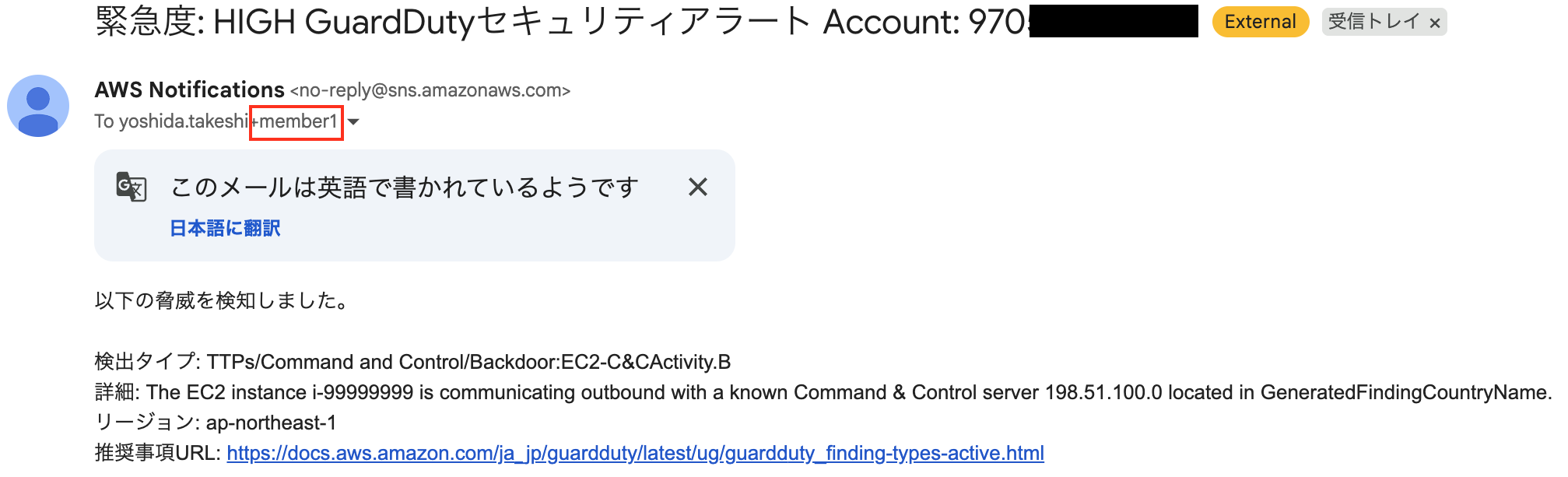
Member Account 2
Audit Account
Management Account
Conclusion
We built a mechanism that sorts security service notifications by account in a multi-account environment.
I hope this is helpful to someone.
That was Yoshida from the Cloud Business Division!

