
I made my own mechanism for SNATing to a specific private IP address, for when someone asks me to restrict the source IP address

This page has been translated by machine translation. View original
"We were told that only 1 IP address can be registered as the source IP address for a closed network connection"
Hello, I'm Nonpi (@non____97).
Have you ever been told by a connection destination that "only 1 IP address can be registered as the source IP address for a closed network connection"? I have.
Connection destinations may present the following constraints:
- The source IP address must not change dynamically
- Only one source IP address can be registered
For the first constraint, "the source IP address must not change dynamically," it's fine if multiple instances simply have fixed IP addresses, but it becomes extremely difficult if the source resources need to be Auto Scaled. I personally never want to deal with that again.
The second constraint, "only one source IP address can be registered," is painful when configuring a Multi-AZ setup.
If Single-AZ is acceptable, you can use a Private NAT Gateway to SNAT traffic from multiple EC2 instances to a single IP address.
On the other hand, Multi-AZ is not straightforward. With Multi-AZ, you need to split into multiple subnets. When you want to set up an Active/Standby HA cluster in Multi-AZ, it spans subnets, so in the event of an AZ failure, the IP address will change.
Since ENIs are tied to subnets, you cannot attach an ENI to a failover resource in a different subnet during a failure.
When there is a constraint of "closed network connection," attaching and detaching EIPs is also not an option, because EIPs are public IPv4 addresses.
Currently, Regional NAT Gateway does not support SNAT to private IPv4 addresses.
So, I tried building my own mechanism to SNAT to a specific private IP address.
Test Environment
The test environment is as follows.
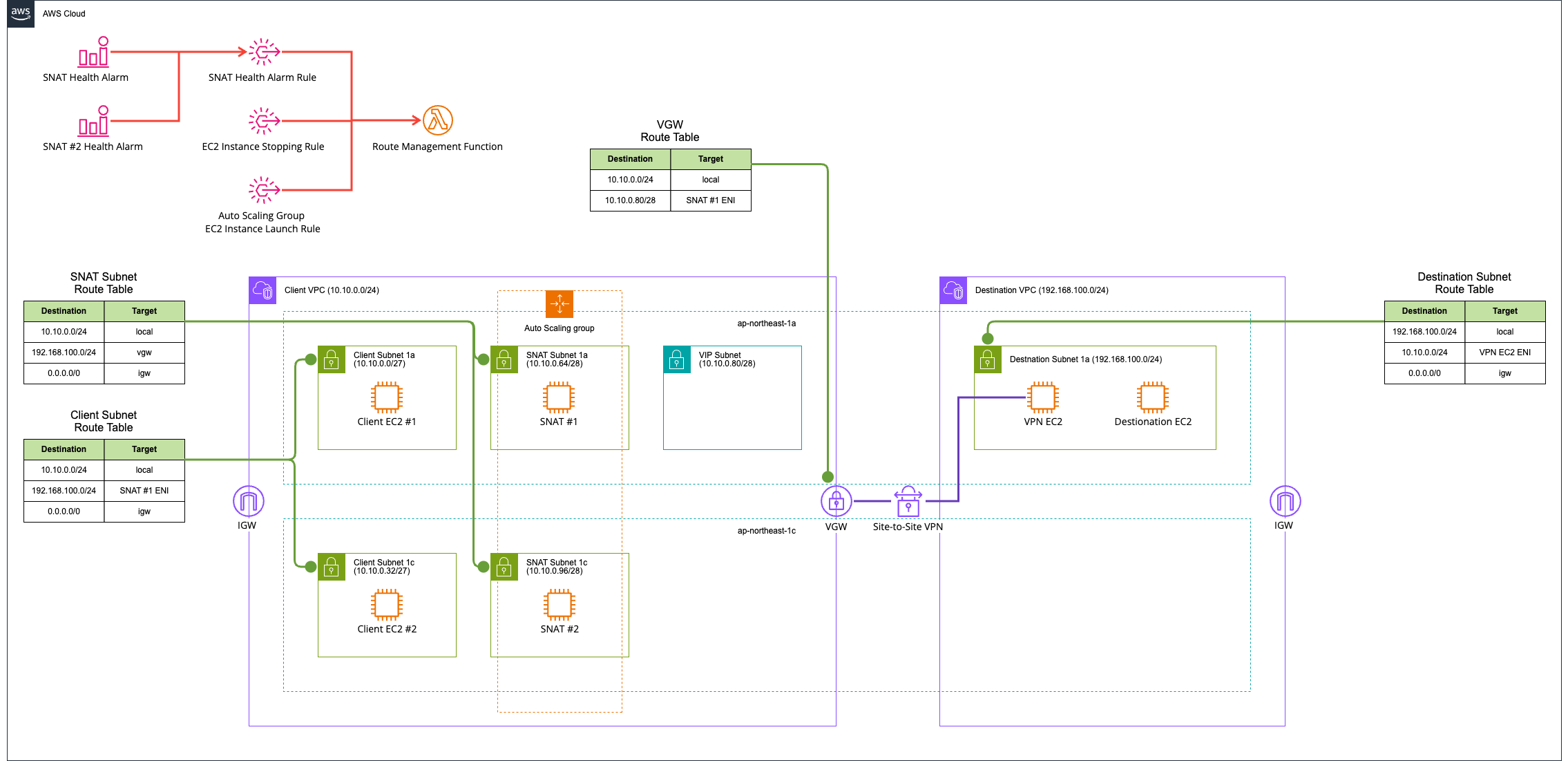
In short, SNAT instances are deployed in Multi-AZ. The mechanism will be described later.
All resources are deployed with AWS CDK. The code used is stored in the following GitHub repository.
Key Points
Let me explain the key points.
Each point is illustrated as follows.
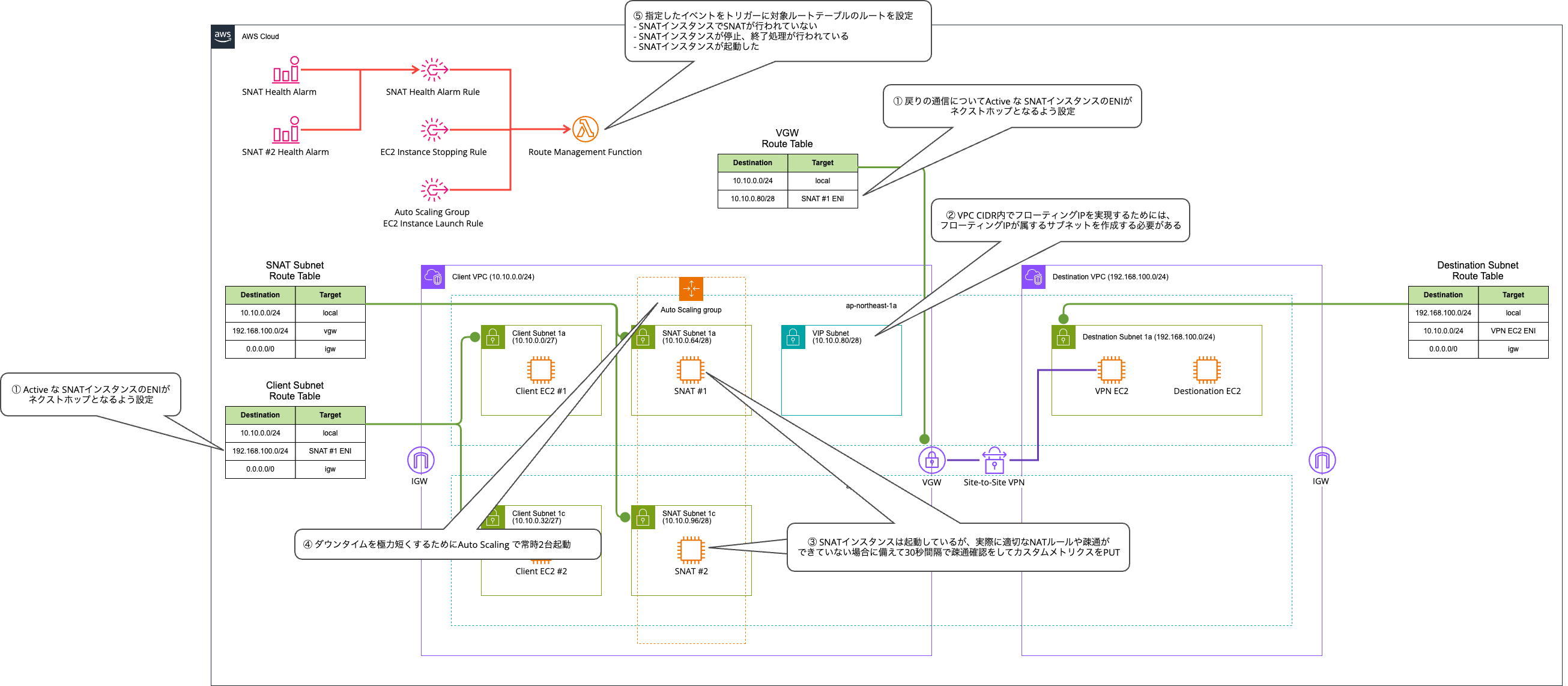
① Configure the Active SNAT instance's ENI as the next hop for return traffic
When performing SNAT, it's easy to focus only on routing from the client to the SNAT instance, but you also need to be aware of the return traffic.
In this case, since we're connecting using Site-to-Site VPN and VGW, it is controlled by the VGW edge route table.
Here, we configure routing to the Active SNAT instance's ENI.
② To implement a floating IP within the VPC CIDR, a subnet to which the floating IP belongs must be created
To implement a floating IP within the VPC CIDR, a subnet to which the floating IP belongs must be created.
With a VPC CIDR of 10.10.0.0/24 and a floating IP address of 10.10.0.116/32, if you try to update the route table to specify the SNAT instance's ENI as the target for 10.10.0.116/32:
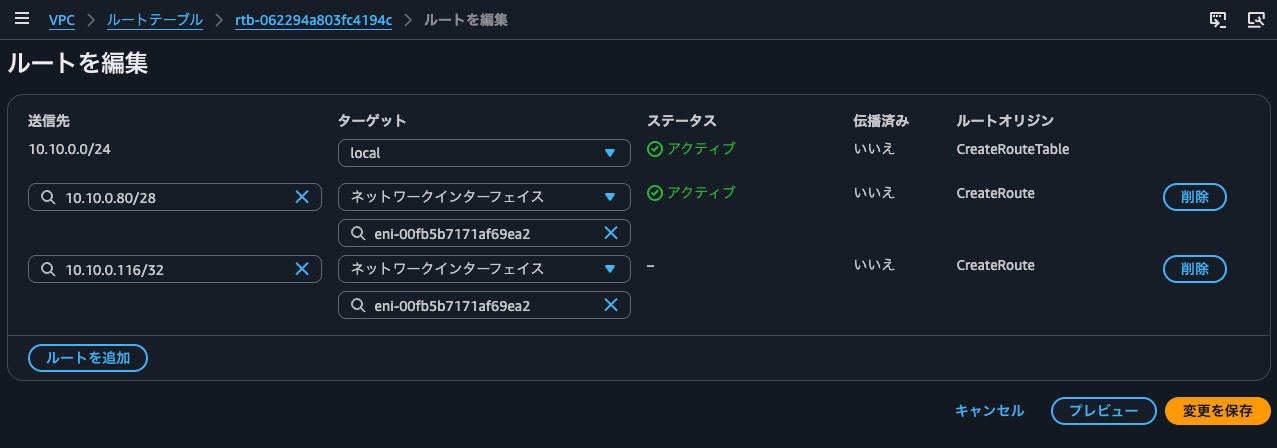
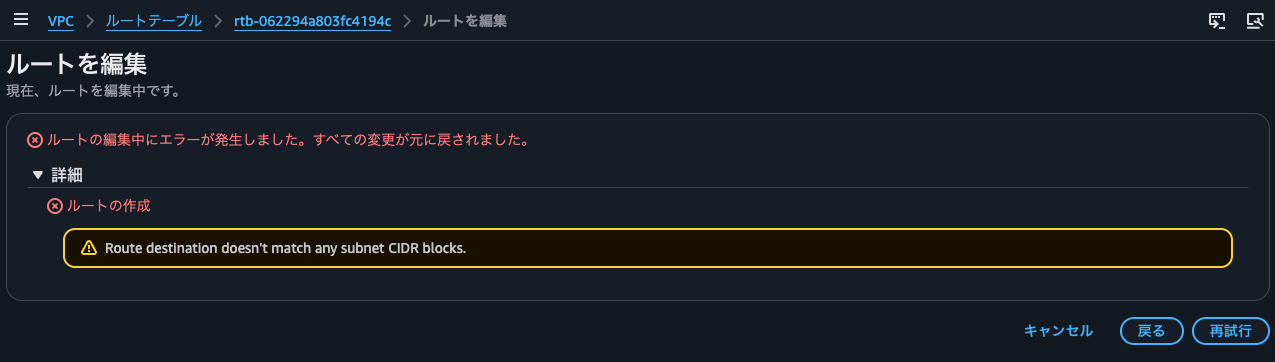
The result was Route destination doesn't match any subnet CIDR blocks. In short, it errors out because it doesn't belong to any subnet's CIDR.
So what prefix should we use for the route to add in the route table?
With a VPC CIDR of 10.10.0.0/24 and a floating IP address of 10.10.0.85/32, with a subnet having a CIDR block of 10.10.0.80/28, if you try to update the route table to specify the SNAT instance's ENI as the target for 10.10.0.85/32:
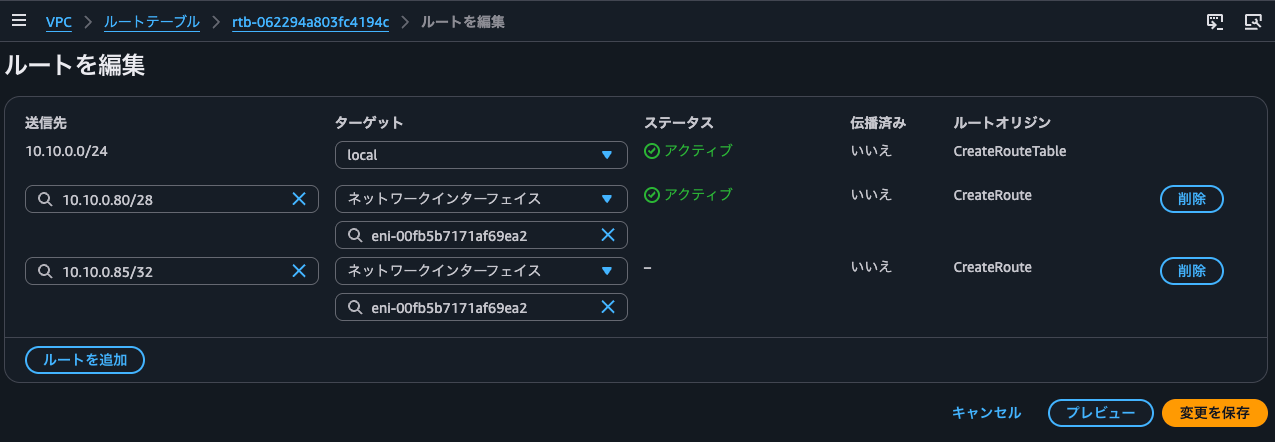
Yes, this also resulted in Route destination doesn't match any subnet CIDR blocks.
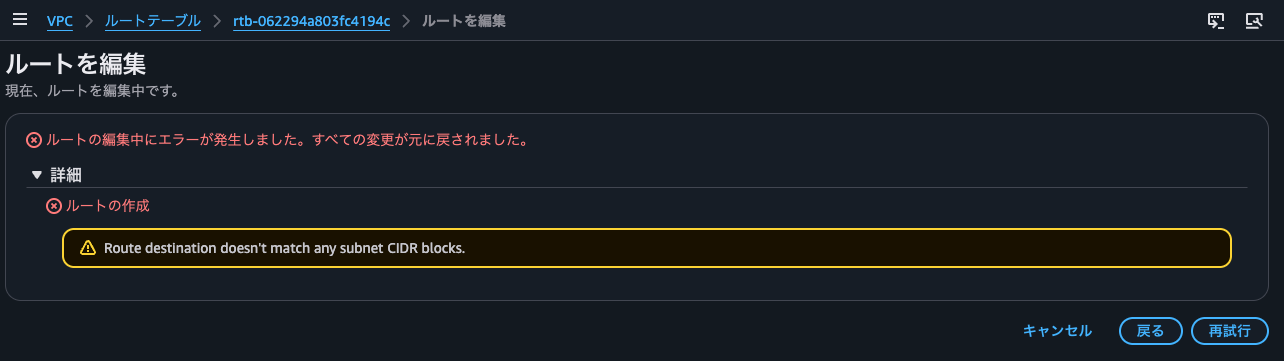
In other words, to implement a floating IP within the VPC CIDR, the following are required:
- Create a subnet to which the floating IP belongs
- In the route table, add a route that says "route to the SNAT ENI" for traffic destined to "the subnet CIDR to which the floating IP address belongs"
Note that if the floating IP is outside the VPC, you need to redirect traffic using TGW. For details, please refer to the following articles.
③ To minimize downtime, perform connectivity checks every 30 seconds and PUT custom metrics in case the SNAT instance is running but NAT rules or connectivity are not functioning properly
If the SNAT instance is running but there are no SNAT rules, or if there is no network connectivity, we would still want to trigger a failover.
To handle such cases, the following health check script is executed every 30 seconds via a systemd-timer.
$ sudo cat /usr/local/bin/snat-healthcheck.sh
#!/bin/bash
set -uo pipefail
# Inspect from multiple perspectives whether the SNAT instance is correctly functioning as a
# "forwarding path with fixed source", and publish the result as 1 (healthy) / 0 (unhealthy)
# to CloudWatch metrics. A systemd timer runs this at regular intervals, and per-AZ alarms
# monitor this metric. This detects failures specific to the forwarding path
# (IP forwarding disabled / SNAT rule missing / upstream unreachable) that cannot be detected
# by shallow health checks such as EC2 status checks.
# Issues like conntrack exhaustion (load/capacity problems) are out of scope: switching to the
# standby will cause the same load to recur, so failover won't fix it
# (capacity should be handled by adjusting instance size / nf_conntrack_max).

# Get own AZ (IMDSv2). Used for the Az= dimension in the final publish, to separate values per AZ and make alarms per AZ.
TOKEN="$(curl -sS -X PUT 'http://169.254.169.254/latest/api/token' -H 'X-aws-ec2-metadata-token-ttl-seconds: 60')"
AZ="$(curl -sS -H "X-aws-ec2-metadata-token: ${TOKEN}" http://169.254.169.254/latest/meta-data/placement/availability-zone)"

# 3 checks. All are instance-specific failures (only one breaks at a time), so failover fixes them.
# If even one fails, set healthy to 0.
healthy=1
# (1) Is IP forwarding enabled? Required for SNAT since it performs forwarding. If disabled, nothing can be forwarded.
[ "$(cat /proc/sys/net/ipv4/ip_forward)" = "1" ] || healthy=0
# (2) Does the SNAT (POSTROUTING) rule that rewrites the source to a fixed IP exist? If gone, the source won't be fixed.
iptables -t nat -S POSTROUTING | grep -q -- "--to-source 10.10.0.85" || healthy=0
# (3) Reachability to upstream (VPN router). Confirms end-to-end that the VPN tunnel and SNAT subnet → VGW → VPN path is working.
ping -c 1 -W 2 "192.168.100.5" >/dev/null 2>&1 || healthy=0

# Publish the inspection result as a high-resolution metric (storage-resolution 1).
# Since it's high-resolution, 30-second alarms can be used, and combined with the short publish interval,
# anomalies can be detected within about 1 minute. If the instance stops or terminates and can no longer publish,
# the alarm's "missing data = breaching" setting will treat it as an anomaly.
aws cloudwatch put-metric-data \
  --region "ap-northeast-1" \
  --namespace "FixedEgress" \
  --metric-name "SnatPathHealthy" \
  --unit Count \
  --value "${healthy}" \
  --storage-resolution 1 \
  --dimensions Az="${AZ}"
CloudWatch alarms that monitor the PUT custom metrics are created per AZ. These CloudWatch alarms also treat the absence of custom metrics as an alarm state, so even if the custom metric PUT itself cannot be performed normally, it will be judged as abnormal and failover can occur.
④ Keep 2 instances running at all times with Auto Scaling to minimize downtime
It is possible to reduce costs by using Auto Scaling to maintain a single-instance configuration at all times.
However, if EC2 instances only start launching according to Auto Scaling after a failure is detected, the downtime will be extended.
In this case, to minimize downtime, we accept the cost and keep 2 instances running at all times.
⑤ Configure routes in target route tables triggered by specified events
Routes in the target route tables are switched triggered by specified events.
The target route tables are the following two:
- The route table of the subnet where the client belongs
- The VGW edge route table
The following is a summary of the events that trigger route switching and what specific cases are being handled:
| # | Trigger Event (EventBridge) | Situation Detected (specific example) | Route Action | Notes / Additional Processing |
|---|---|---|---|---|
| 1 | EC2 Instance Launch Successful(aws.autoscaling, filtered by ASG name) |
SNAT instance has started (initial deployment, or new instance launched due to replacement or recovery) |
Create route on first run. Point to active AZ, maintain current active otherwise (no switch) | Point tentatively to preferred AZ immediately after launch without waiting for healthy judgment, to prevent missing initial route. Handles initial route and failure recovery |
| 2 | EC2 Instance State-change Notification(state = stopping / shutting-down) |
SNAT instance has started stopping or terminating (manual stop, ASG replacement, direct termination without going through stopping) |
Stopped or terminated instance disappears from describe-instances, immediately failover to standby AZ | Switch quickly without waiting for alarm missing data confirmation (1-2 min). Events for all instances arrive, so processing ends quickly for non-own ASGs. Only subscribe to originating states |
| 3 | CloudWatch Alarm State Change(detailed health check alarms ×2) |
Running but forwarding path is broken (ip_forward disabled / SNAT rule missing / upstream unreachable), metric missing, or alarm recovery (OK transition) |
Failover from abnormal AZ to standby AZ | When healthy counterpart AZ exists, mark abnormal instance as Unhealthy via SetInstanceHealth for replacement (no replacement if both systems are in alarm state) |
Route switching is performed by a Lambda function.
The processing performed is as follows:
Operation Verification
Normal Operation
Let's actually verify the operation.
The floating IP is 10.10.0.85.
After deployment, let's try accessing the target EC2 instance from both the ap-northeast-1a and ap-northeast-1c client EC2 instances.
$ hostname -i
10.10.0.16

$ curl 192.168.100.20
ok: source=10.10.0.85
$ hostname -i
10.10.0.45

$ curl 192.168.100.20
ok: source=10.10.0.85
$ cat /usr/local/bin/echo-server.py
from http.server import BaseHTTPRequestHandler, HTTPServer

class Handler(BaseHTTPRequestHandler):
    def do_GET(self):
        src = self.client_address[0]
        # Access log: log which source IP it came from to journal (after SNAT it's 10.10.0.85)
        print(f"access source={src} \"{self.requestline}\"", flush=True)
        body = f"ok: source={src}\n".encode()
        self.send_response(200)
        self.send_header("Content-Type", "text/plain")
        self.send_header("Content-Length", str(len(body)))
        self.end_headers()
        self.wfile.write(body)

    def log_message(self, *args):
        pass

HTTPServer(("0.0.0.0", 80), Handler).serve_forever()

$ sudo journalctl -u echo-server
Jun 24 07:16:14 ip-192-168-100-20.ap-northeast-1.compute.internal systemd[1]: Started echo-server.service - Echo source IP HTTP server.
Jun 24 07:42:48 ip-192-168-100-20.ap-northeast-1.compute.internal python3[3253]: access source=10.10.0.85 "GET / HTTP/1.1"
Jun 24 07:43:17 ip-192-168-100-20.ap-northeast-1.compute.internal python3[3253]: access source=10.10.0.85 "GET / HTTP/1.1"
As intended, we can see that traffic is being SNATted to 10.10.0.85.
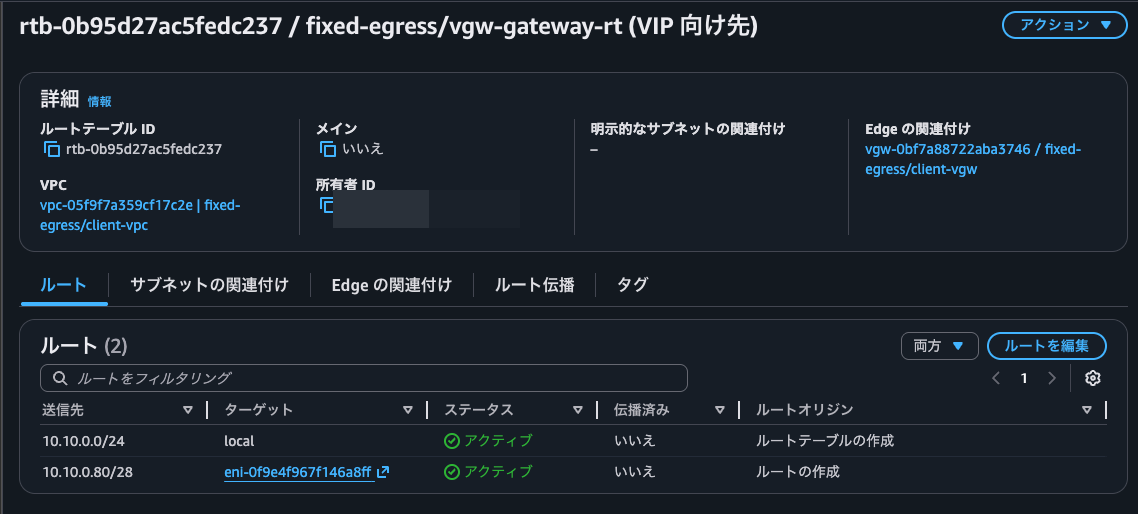
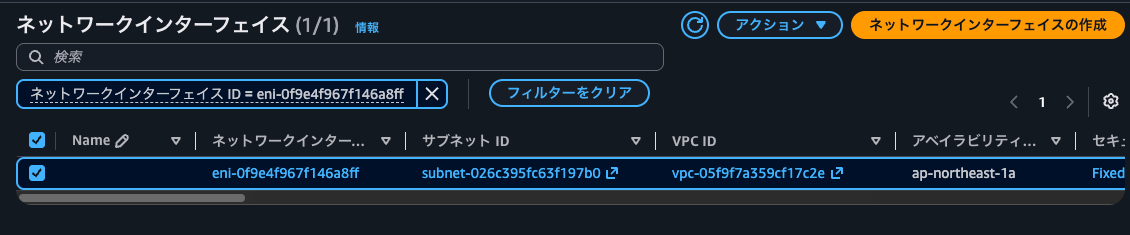
By the way, we are currently using the ap-northeast-1a SNAT instance.
When the SNAT Instance Stops
Now let's verify the behavior when the currently Active SNAT instance stops.
We stop the EC2 instance from the management console. During this time, we continuously ping the target EC2 instance.
$ ping 192.168.100.20
PING 192.168.100.20 (192.168.100.20) 56(84) bytes of data.
64 bytes from 192.168.100.20: icmp_seq=1 ttl=125 time=1.30 ms
64 bytes from 192.168.100.20: icmp_seq=2 ttl=125 time=1.36 ms
64 bytes from 192.168.100.20: icmp_seq=3 ttl=125 time=1.26 ms
64 bytes from 192.168.100.20: icmp_seq=4 ttl=125 time=1.22 ms
64 bytes from 192.168.100.20: icmp_seq=5 ttl=125 time=1.27 ms
.
.
(omitted)
.
.
64 bytes from 192.168.100.20: icmp_seq=15 ttl=125 time=31.0 ms
64 bytes from 192.168.100.20: icmp_seq=16 ttl=125 time=1.79 ms
64 bytes from 192.168.100.20: icmp_seq=17 ttl=125 time=1.34 ms
64 bytes from 192.168.100.20: icmp_seq=18 ttl=125 time=1.50 ms
64 bytes from 192.168.100.20: icmp_seq=22 ttl=125 time=4.77 ms
64 bytes from 192.168.100.20: icmp_seq=23 ttl=125 time=4.43 ms
64 bytes from 192.168.100.20: icmp_seq=24 ttl=125 time=4.40 ms
64 bytes from 192.168.100.20: icmp_seq=25 ttl=125 time=4.72 ms
64 bytes from 192.168.100.20: icmp_seq=26 ttl=125 time=4.43 ms
64 bytes from 192.168.100.20: icmp_seq=27 ttl=125 time=4.54 ms
64 bytes from 192.168.100.20: icmp_seq=28 ttl=125 time=4.88 ms
64 bytes from 192.168.100.20: icmp_seq=29 ttl=125 time=4.81 ms
$ hostname -i
10.10.0.45

$ ping 192.168.100.20
PING 192.168.100.20 (192.168.100.20) 56(84) bytes of data.
64 bytes from 192.168.100.20: icmp_seq=1 ttl=125 time=2.91 ms
64 bytes from 192.168.100.20: icmp_seq=2 ttl=125 time=2.66 ms
64 bytes from 192.168.100.20: icmp_seq=3 ttl=125 time=2.94 ms
64 bytes from 192.168.100.20: icmp_seq=4 ttl=125 time=2.69 ms
64 bytes from 192.168.100.20: icmp_seq=5 ttl=125 time=2.69 ms
64 bytes from 192.168.100.20: icmp_seq=6 ttl=125 time=2.86 ms
64 bytes from 192.168.100.20: icmp_seq=7 ttl=125 time=2.90 ms
64 bytes from 192.168.100.20: icmp_seq=8 ttl=125 time=2.96 ms
.
.
(omitted)
.
.
64 bytes from 192.168.100.20: icmp_seq=22 ttl=125 time=2.78 ms
64 bytes from 192.168.100.20: icmp_seq=23 ttl=125 time=2.83 ms
64 bytes from 192.168.100.20: icmp_seq=24 ttl=125 time=2.67 ms
64 bytes from 192.168.100.20: icmp_seq=27 ttl=125 time=2.86 ms
64 bytes from 192.168.100.20: icmp_seq=28 ttl=125 time=2.73 ms
64 bytes from 192.168.100.20: icmp_seq=29 ttl=125 time=2.97 ms
64 bytes from 192.168.100.20: icmp_seq=30 ttl=125 time=2.68 ms
Yes, after the SNAT instance stopped and communication was interrupted, connectivity was restored about 2-3 seconds later. For pings from the ap-northeast-1a EC2 instance, since it becomes cross-AZ communication, latency increased slightly.
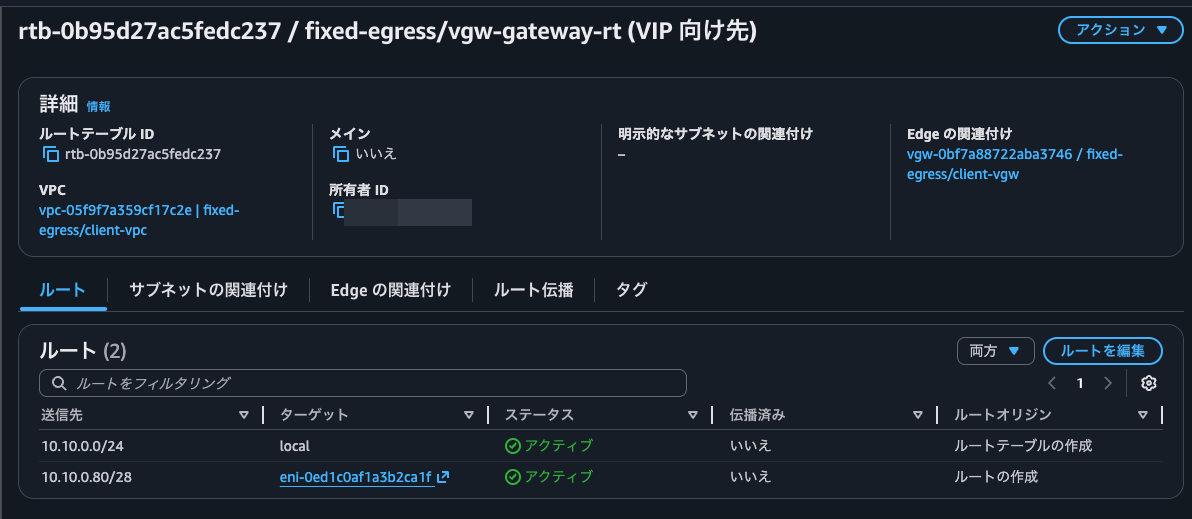
Checking the route table, we can see that routing is now going to the ap-northeast-1c SNAT instance's ENI.

Let's also access via curl.
$ hostname -i
10.10.0.16

$ curl 192.168.100.20
ok: source=10.10.0.85
$ hostname -i
10.10.0.45

$ curl 192.168.100.20
ok: source=10.10.0.85
Yes, we can see that the target EC2 instance still receives communication from the SNAT destination IP address 10.10.0.85 unchanged.
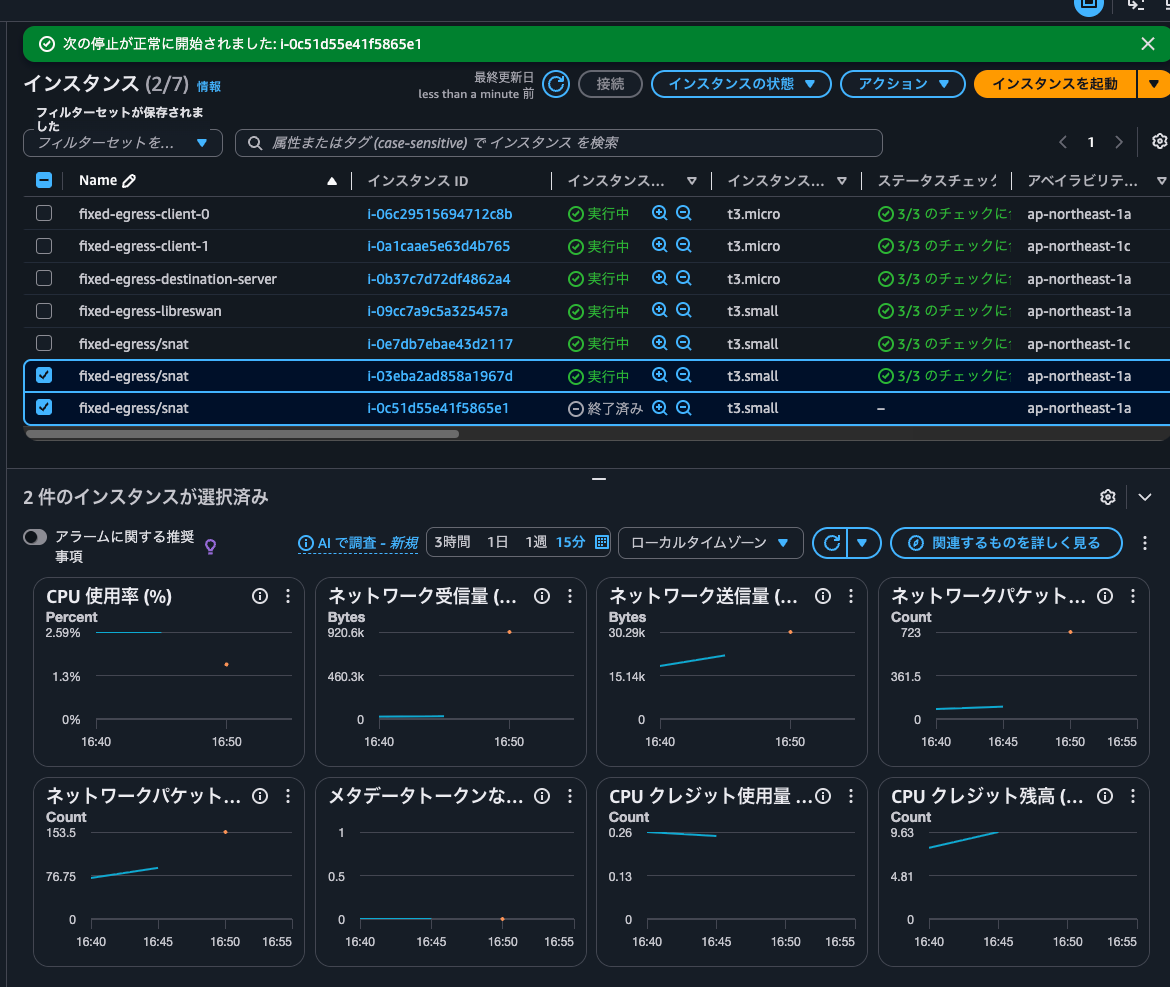
After a while, the ap-northeast-1a EC2 instance was launched by Auto Scaling.
For reference, the Lambda function output the following logs:
{
    "timestamp": "2026-06-24T07:50:03Z",
    "level": "INFO",
    "message": "Found credentials in environment variables.",
    "logger": "botocore.credentials",
    "requestId": ""
}

{
    "timestamp": "2026-06-24T07:50:03Z",
    "level": "INFO",
    "message": "trigger",
    "logger": "root",
    "requestId": "52ee1237-1297-4d28-a7f9-28e765bac356",
    "detailType": "EC2 Instance State-change Notification"
}

{
    "timestamp": "2026-06-24T07:50:04Z",
    "level": "INFO",
    "message": "eni discovered",
    "logger": "root",
    "requestId": "52ee1237-1297-4d28-a7f9-28e765bac356",
    "eniByAz": {
        "ap-northeast-1c": "eni-0ed1c0af1a3b2ca1f"
    }
}

{
    "timestamp": "2026-06-24T07:50:04Z",
    "level": "INFO",
    "message": "active az decided",
    "logger": "root",
    "requestId": "52ee1237-1297-4d28-a7f9-28e765bac356",
    "activeAz": "ap-northeast-1c",
    "healthy": {
        "ap-northeast-1a": true,
        "ap-northeast-1c": true
    }
}

{
    "timestamp": "2026-06-24T07:50:06Z",
    "level": "INFO",
    "message": "routes synced",
    "logger": "root",
    "requestId": "52ee1237-1297-4d28-a7f9-28e765bac356",
    "target": "eni-0ed1c0af1a3b2ca1f",
    "activeAz": "ap-northeast-1c",
    "prevGatewayEni": "eni-0f9e4f967f146a8ff"
}

{
    "timestamp": "2026-06-24T07:51:48Z",
    "level": "INFO",
    "message": "trigger",
    "logger": "root",
    "requestId": "d2c2c2e2-a302-4d7b-bfc4-15120889df9e",
    "detailType": "EC2 Instance State-change Notification"
}

{
    "timestamp": "2026-06-24T07:51:48Z",
    "level": "INFO",
    "message": "eni discovered",
    "logger": "root",
    "requestId": "d2c2c2e2-a302-4d7b-bfc4-15120889df9e",
    "eniByAz": {
        "ap-northeast-1c": "eni-0ed1c0af1a3b2ca1f"
    }
}

{
    "timestamp": "2026-06-24T07:51:48Z",
    "level": "INFO",
    "message": "active az decided",
    "logger": "root",
    "requestId": "d2c2c2e2-a302-4d7b-bfc4-15120889df9e",
    "currentAz": "ap-northeast-1c",
    "activeAz": "ap-northeast-1c",
    "healthy": {
        "ap-northeast-1a": true,
        "ap-northeast-1c": true
    }
}

{
    "timestamp": "2026-06-24T07:51:49Z",
    "level": "INFO",
    "message": "routes synced",
    "logger": "root",
    "requestId": "d2c2c2e2-a302-4d7b-bfc4-15120889df9e",
    "target": "eni-0ed1c0af1a3b2ca1f",
    "activeAz": "ap-northeast-1c",
    "prevGatewayEni": "eni-0ed1c0af1a3b2ca1f"
}

{
    "timestamp": "2026-06-24T07:51:53Z",
    "level": "INFO",
    "message": "trigger",
    "logger": "root",
    "requestId": "3ffd1b2c-78ca-4b1b-8c5f-0f6b9deffc40",
    "detailType": "EC2 Instance Launch Successful"
}

{
    "timestamp": "2026-06-24T07:51:53Z",
    "level": "INFO",
    "message": "eni discovered",
    "logger": "root",
    "requestId": "3ffd1b2c-78ca-4b1b-8c5f-0f6b9deffc40",
    "eniByAz": {
        "ap-northeast-1a": "eni-0867e700a5e931690",
        "ap-northeast-1c": "eni-0ed1c0af1a3b2ca1f"
    }
}

{
    "timestamp": "2026-06-24T07:51:53Z",
    "level": "INFO",
    "message": "active az decided",
    "logger": "root",
    "requestId": "3ffd1b2c-78ca-4b1b-8c5f-0f6b9deffc40",
    "currentAz": "ap-northeast-1c",
    "activeAz": "ap-northeast-1c",
    "healthy": {
        "ap-northeast-1a": true,
        "ap-northeast-1c": true
    }
}

{
    "timestamp": "2026-06-24T07:51:54Z",
    "level": "INFO",
    "message": "routes synced",
    "logger": "root",
    "requestId": "3ffd1b2c-78ca-4b1b-8c5f-0f6b9deffc40",
    "target": "eni-0ed1c0af1a3b2ca1f",
    "activeAz": "ap-northeast-1c",
    "prevGatewayEni": "eni-0ed1c0af1a3b2ca1f"
}

{
    "timestamp": "2026-06-24T07:52:11Z",
    "level": "INFO",
    "message": "trigger",
    "logger": "root",
    "requestId": "d41c660d-a70d-4f3d-9fe1-097fd319a0a0",
    "detailType": "CloudWatch Alarm State Change"
}

{
    "timestamp": "2026-06-24T07:52:11Z",
    "level": "INFO",
    "message": "eni discovered",
    "logger": "root",
    "requestId": "d41c660d-a70d-4f3d-9fe1-097fd319a0a0",
    "eniByAz": {
        "ap-northeast-1a": "eni-0867e700a5e931690",
        "ap-northeast-1c": "eni-0ed1c0af1a3b2ca1f"
    }
}

{
    "timestamp": "2026-06-24T07:52:11Z",
    "level": "INFO",
    "message": "active az decided",
    "logger": "root",
    "requestId": "d41c660d-a70d-4f3d-9fe1-097fd319a0a0",
    "currentAz": "ap-northeast-1c",
    "activeAz": "ap-northeast-1c",
    "healthy": {
        "ap-northeast-1a": false,
        "ap-northeast-1c": true
    }
}

{
    "timestamp": "2026-06-24T07:52:12Z",
    "level": "INFO",
    "message": "routes synced",
    "logger": "root",
    "requestId": "d41c660d-a70d-4f3d-9fe1-097fd319a0a0",
    "target": "eni-0ed1c0af1a3b2ca1f",
    "activeAz": "ap-northeast-1c",
    "prevGatewayEni": "eni-0ed1c0af1a3b2ca1f"
}

{
    "timestamp": "2026-06-24T07:52:12Z",
    "level": "INFO",
    "message": "skip replace (within cooldown)",
    "logger": "root",
    "requestId": "d41c660d-a70d-4f3d-9fe1-097fd319a0a0",
    "az": "ap-northeast-1a",
    "instanceId": "i-03eba2ad858a1967d"
}

{
    "timestamp": "2026-06-24T07:52:41Z",
    "level": "INFO",
    "message": "trigger",
    "logger": "root",
    "requestId": "71dae08d-c7a0-439a-a513-d6dabcf9d62c",
    "detailType": "CloudWatch Alarm State Change"
}

{
    "timestamp": "2026-06-24T07:52:41Z",
    "level": "INFO",
    "message": "eni discovered",
    "logger": "root",
    "requestId": "71dae08d-c7a0-439a-a513-d6dabcf9d62c",
    "eniByAz": {
        "ap-northeast-1a": "eni-0867e700a5e931690",
        "ap-northeast-1c": "eni-0ed1c0af1a3b2ca1f"
    }
}

{
    "timestamp": "2026-06-24T07:52:41Z",
    "level": "INFO",
    "message": "active az decided",
    "logger": "root",
    "requestId": "71dae08d-c7a0-439a-a513-d6dabcf9d62c",
    "currentAz": "ap-northeast-1c",
    "activeAz": "ap-northeast-1c",
    "healthy": {
        "ap-northeast-1a": true,
        "ap-northeast-1c": true
    }
}

{
    "timestamp": "2026-06-24T07:52:42Z",
    "level": "INFO",
    "message": "routes synced",
    "logger": "root",
    "requestId": "71dae08d-c7a0-439a-a513-d6dabcf9d62c",
    "target": "eni-0ed1c0af1a3b2ca1f",
    "activeAz": "ap-northeast-1c",
    "prevGatewayEni": "eni-0ed1c0af1a3b2ca1f"
}
When Deleting the SNAT Entry from iptables on a SNAT Instance
Now, let's try a scenario where the SNAT instance is alive but routing has become unavailable for some reason.
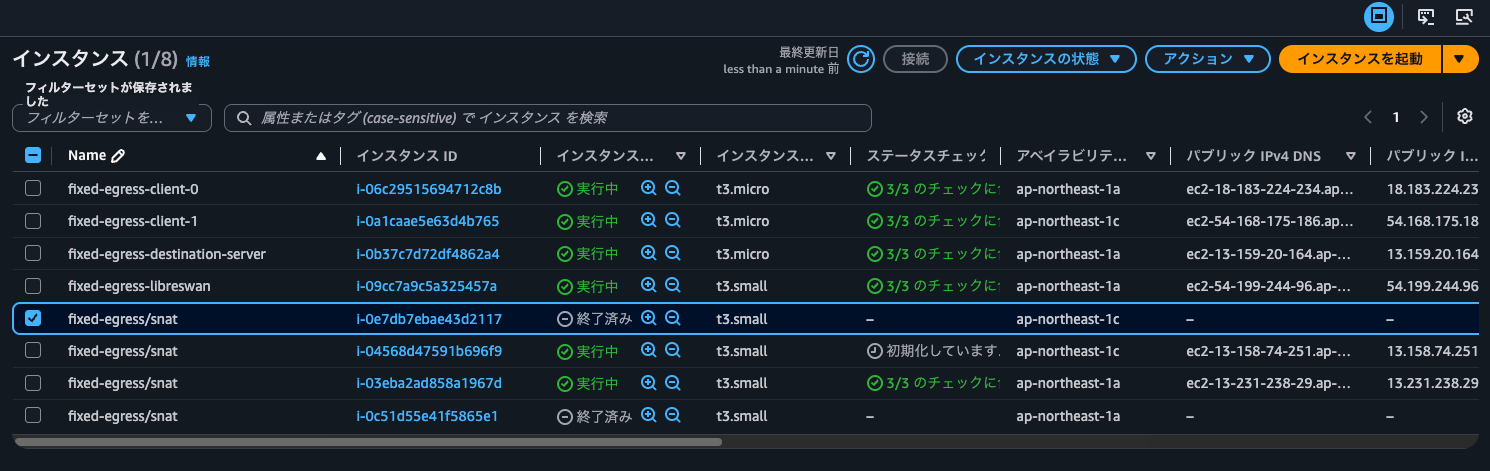
We will delete the iptables SNAT entry on the currently Active SNAT instance in ap-northeast-1c.
$ sudo grep 192.168.100.20 /proc/net/nf_conntrack
ipv4     2 icmp     1 29 src=10.10.0.16 dst=192.168.100.20 type=8 code=0 id=3 src=192.168.100.20 dst=10.10.0.85 type=0 code=0 id=3 mark=0 secctx=system_u:object_r:unlabeled_t:s0 zone=0 use=2
ipv4     2 icmp     1 29 src=10.10.0.45 dst=192.168.100.20 type=8 code=0 id=4 src=192.168.100.20 dst=10.10.0.85 type=0 code=0 id=4 mark=0 secctx=system_u:object_r:unlabeled_t:s0 zone=0 use=2

$ sudo iptables -t nat -S POSTROUTING
-P POSTROUTING ACCEPT
-A POSTROUTING -s 10.10.0.0/27 -d 192.168.100.0/24 -j SNAT --to-source 10.10.0.85
-A POSTROUTING -s 10.10.0.32/27 -d 192.168.100.0/24 -j SNAT --to-source 10.10.0.85

$ sudo iptables -t nat -F POSTROUTING
$ sudo iptables -t nat -S POSTROUTING
-P POSTROUTING ACCEPT
We were running ping in the background, and connectivity was lost at this timing.
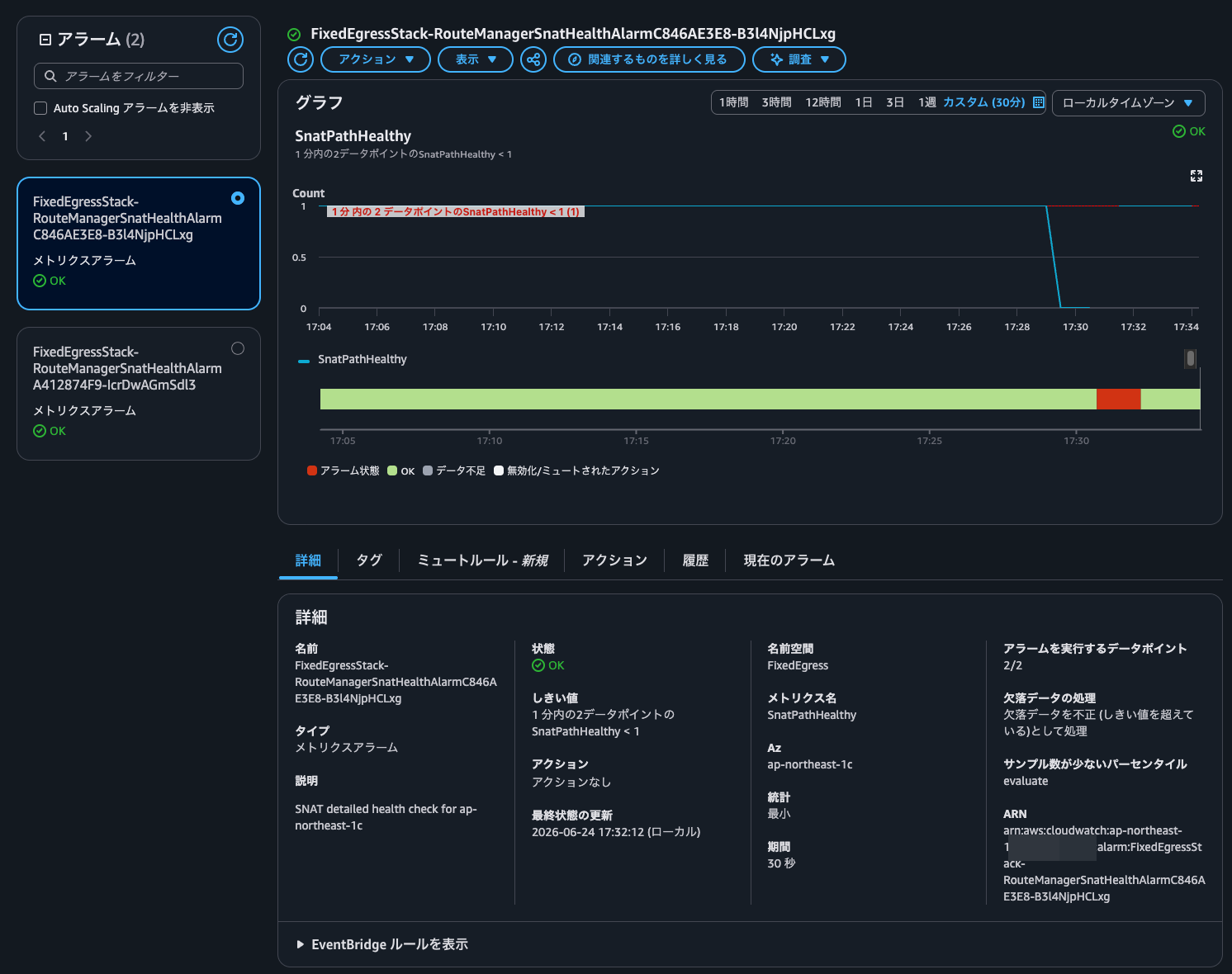
After a while, the CloudWatch alarm entered the alarm state, and the route tables for the subnets where the clients reside as well as the VGW route table were updated to point to the Standby ENI = the ENI of the SNAT instance in ap-northeast-1a.
$ hostname -i
10.10.0.16

$ ping 192.168.100.20
PING 192.168.100.20 (192.168.100.20) 56(84) bytes of data.
64 bytes from 192.168.100.20: icmp_seq=1 ttl=125 time=4.52 ms
64 bytes from 192.168.100.20: icmp_seq=2 ttl=125 time=4.27 ms
64 bytes from 192.168.100.20: icmp_seq=3 ttl=125 time=4.28 ms
64 bytes from 192.168.100.20: icmp_seq=4 ttl=125 time=4.28 ms
64 bytes from 192.168.100.20: icmp_seq=5 ttl=125 time=4.25 ms
.
.
(omitted)
.
.
64 bytes from 192.168.100.20: icmp_seq=381 ttl=125 time=4.20 ms
64 bytes from 192.168.100.20: icmp_seq=382 ttl=125 time=4.35 ms
64 bytes from 192.168.100.20: icmp_seq=383 ttl=125 time=4.17 ms
64 bytes from 192.168.100.20: icmp_seq=384 ttl=125 time=4.26 ms
64 bytes from 192.168.100.20: icmp_seq=385 ttl=125 time=4.13 ms


64 bytes from 192.168.100.20: icmp_seq=448 ttl=125 time=1.44 ms
64 bytes from 192.168.100.20: icmp_seq=449 ttl=125 time=1.37 ms
64 bytes from 192.168.100.20: icmp_seq=450 ttl=125 time=1.38 ms
64 bytes from 192.168.100.20: icmp_seq=451 ttl=125 time=1.30 ms
64 bytes from 192.168.100.20: icmp_seq=452 ttl=125 time=1.31 ms
64 bytes from 192.168.100.20: icmp_seq=453 ttl=125 time=1.29 ms
64 bytes from 192.168.100.20: icmp_seq=454 ttl=125 time=1.53 ms
$ hostname -i
10.10.0.45

$ ping 192.168.100.20
PING 192.168.100.20 (192.168.100.20) 56(84) bytes of data.
64 bytes from 192.168.100.20: icmp_seq=1 ttl=125 time=2.82 ms
64 bytes from 192.168.100.20: icmp_seq=2 ttl=125 time=2.73 ms
64 bytes from 192.168.100.20: icmp_seq=3 ttl=125 time=2.73 ms
64 bytes from 192.168.100.20: icmp_seq=4 ttl=125 time=2.73 ms
64 bytes from 192.168.100.20: icmp_seq=5 ttl=125 time=2.82 ms
64 bytes from 192.168.100.20: icmp_seq=6 ttl=125 time=2.76 ms
.
.
(omitted)
.
.
64 bytes from 192.168.100.20: icmp_seq=87 ttl=125 time=3.11 ms
64 bytes from 192.168.100.20: icmp_seq=88 ttl=125 time=2.89 ms
64 bytes from 192.168.100.20: icmp_seq=89 ttl=125 time=2.85 ms
64 bytes from 192.168.100.20: icmp_seq=90 ttl=125 time=2.81 ms
64 bytes from 192.168.100.20: icmp_seq=91 ttl=125 time=2.85 ms
64 bytes from 192.168.100.20: icmp_seq=92 ttl=125 time=2.79 ms
64 bytes from 192.168.100.20: icmp_seq=93 ttl=125 time=2.78 ms


64 bytes from 192.168.100.20: icmp_seq=156 ttl=125 time=2.87 ms
64 bytes from 192.168.100.20: icmp_seq=157 ttl=125 time=3.02 ms
64 bytes from 192.168.100.20: icmp_seq=158 ttl=125 time=2.96 ms
64 bytes from 192.168.100.20: icmp_seq=159 ttl=125 time=2.87 ms
64 bytes from 192.168.100.20: icmp_seq=160 ttl=125 time=2.89 ms
64 bytes from 192.168.100.20: icmp_seq=161 ttl=125 time=3.04 ms
64 bytes from 192.168.100.20: icmp_seq=162 ttl=125 time=3.00 ms
64 bytes from 192.168.100.20: icmp_seq=163 ttl=125 time=2.92 ms
64 bytes from 192.168.100.20: icmp_seq=164 ttl=125 time=4.41 ms
64 bytes from 192.168.100.20: icmp_seq=165 ttl=125 time=3.04 ms
64 bytes from 192.168.100.20: icmp_seq=166 ttl=125 time=3.20 ms
64 bytes from 192.168.100.20: icmp_seq=167 ttl=125 time=2.86 ms
64 bytes from 192.168.100.20: icmp_seq=168 ttl=125 time=6.38 ms
Success.
When You Want to SNAT to a Single Private IP Address
I built a custom mechanism to SNAT to a specific private IP address, for cases where you need to restrict the source IP address.
Please use this as a reference if you want to SNAT to a single private IP address.
Personally, I'm hoping that Regional Private NAT Gateway will be GA'd soon.
I hope this article is helpful to someone.
That's all fromnonPi (@non____97), Consulting Division, Cloud Business Unit!
