
Implementation example of DB query functionality using natural language with LLMs

This page has been translated by machine translation. View original
Introduction
Hello, I'm Igarashi from the Zenn team.
At Zenn, we often use SQL queries to reference data from our database for daily operational tasks (such as investigating inquiries and analyzing data). For non-routine tasks, we used to write SQL queries manually, but I wondered if we could delegate this task to AI instead of having humans write SQL. So we implemented a feature that allows us to query the database using natural language through our custom admin interface. (Ideally, in the future, AI agents would autonomously solve tasks, but this is just the first step.)
Initially, we verified that this idea could be realized using an MCP server compatible with databases. However, since the ecosystem for risk assessment of MCP servers is not yet mature, we considered the risk too high for production use if malicious code were to be injected into the MCP. Therefore, we explored methods to enable natural language queries without using MCP.
During our investigation, we found that Claude Code could generate SQL in response to requests without using MCP. This is because our project is built with Ruby on Rails, and the DB schema is defined in a file called schema.rb. We discovered that Claude Code could generate appropriate SQL by mainly reading this file. This demonstrates that by feeding database schema information to an LLM, it can generate SQL.
Implementation
For implementation, we used the Gemini SDK that was already being used in our project. We compared Gemini 2.5 Flash (with Thinking) and Gemini 2.5 Pro, but found both to have similar accuracy and speed. Since usage frequency would be low, we chose Gemini 2.5 Pro without considering cost factors.
Gemini SDK configuration. We set the response_schema to get results in JSON format.
VertexAiApi::Gemini.new(
    model: "gemini-2.5-pro",
    temperature: 0,
    thinking_budget: -1, # Enable dynamic thinking
    max_output_tokens: 2048,
    fallback_models: ["gemini-2.5-flash"],
    json: true,
    response_schema: response_schema
)
The response_schema was defined as follows for ease of use in the admin interface:
  def response_schema
    {
      type: "object",
      properties: {
        sql_query: {
          type: "string",
          description: "Generated SQL SELECT query"
        },
        explanation: {
          type: "string",
          description: "Human-readable explanation of what the query does"
        },
        confidence: {
          type: "integer",
          minimum: 0,
          maximum: 100,
          description: "Confidence level of the generated SQL (0-100)"
        },
        warnings: {
          type: "array",
          items: { type: "string" },
          description: "Warnings or limitations related to the query"
        }
      },
      required: ["sql_query", "explanation", "confidence"],
      additionalProperties: false
    }
  end
The prompt was defined as follows:
You are a PostgreSQL expert who generates safe and accurate SELECT queries from natural language.

Important safety rules:
- Generate only SELECT statements
- Never use INSERT, UPDATE, DELETE, DROP, CREATE, ALTER, TRUNCATE
- Don't access system tables (pg_*, information_schema)
- Limit results to maximum 1000 rows
- Use proper JOIN syntax when joining tables
- Always use parameterized queries when possible

Database schema:
#{format_schema_context(schema_context)}

User query: "#{query}"

Please generate a PostgreSQL SELECT query that answers this question. Include:
1. SQL query (SELECT only)
2. Clear explanation of what the query does
3. Confidence level (0-100)
4. Warnings or limitations

Respond in the specified JSON format.
While the prompt includes safety rules (not executing anything other than SELECT), we enhance security by connecting to the database in read-only mode when executing SQL.
The "Database schema" contains the DB schema information, and "User query" contains the natural language request from the user.
The database schema is retrieved from ActiveRecord as follows:
class SchemaContextGenerator
  # Using ActiveRecord introspection to dynamically generate database schema context
  # This provides a complete overview of all tables and their relationships
  # for use in natural language to SQL conversion

  def self.generate_context
    {
      tables: generate_tables_info,
      relationships: generate_relationships,
    }
  end

  def self.generate_tables_info
    ActiveRecord::Base.connection.tables.filter_map do |table_name|
      # Skip Rails internal tables and system tables
      next if skip_table?(table_name)

      columns = ActiveRecord::Base.connection.columns(table_name)

      {
        name: table_name,
        columns: columns.filter_map { |col| format_column(col) },
      }
    end
  end

  def self.generate_relationships
    relationships = {}

    ActiveRecord::Base.connection.tables.each do |table_name|
      next if skip_table?(table_name)

      foreign_keys = ActiveRecord::Base.connection.foreign_keys(table_name)
      relationships[table_name] = foreign_keys.map do |fk|
        {
          column: fk.column,
          references_table: fk.to_table,
          references_column: fk.primary_key,
          name: fk.name
        }
      end
    end

    relationships
  end

  def self.skip_table?(table_name)
    # Skip Rails internal tables and system tables
    internal_tables = %w[
      schema_migrations
      ar_internal_metadata
    ]

    internal_tables.include?(table_name)
  end

  def self.format_column(column)
    # Skip sensitive columns that shouldn't be exposed in queries
    sensitive_columns = %w[
      encrypted_password
    ]

    return nil if sensitive_columns.any? { |sensitive| column.name.include?(sensitive) }

    {
      name: column.name,
      type: column.type.to_s,
      null: column.null,
      default: column.default,
      comment: column.comment
    }
  end
end
The database schema is converted from a Hash to the following format before being passed to the LLM:
Table: articles
  Columns:
    id: integer
    user_id: integer
    slug: string
    title: string (nullable)
    ...

Table: ...
  Columns:
    ...

RELATIONSHIPS:
  articles.user_id -> users.id
  ...
Admin Interface
Let me demonstrate how it works.
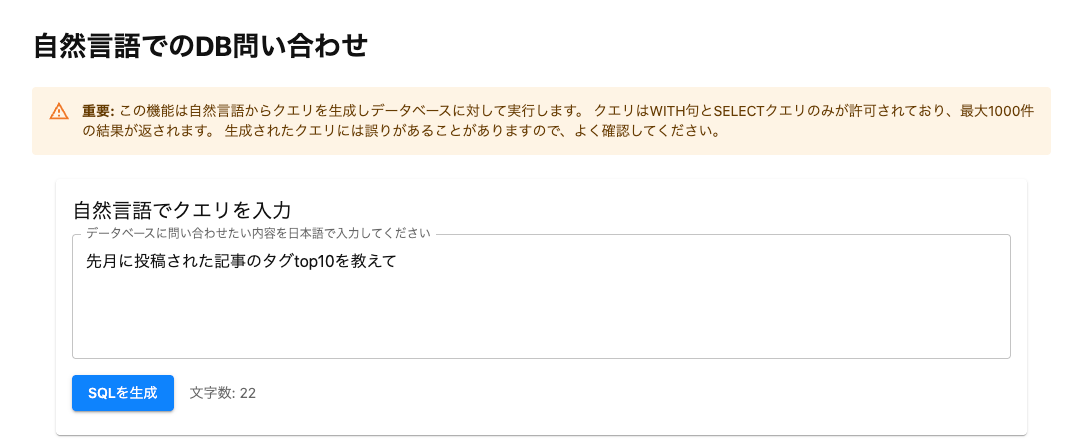
First, we input in natural language what information we want to retrieve from the database.
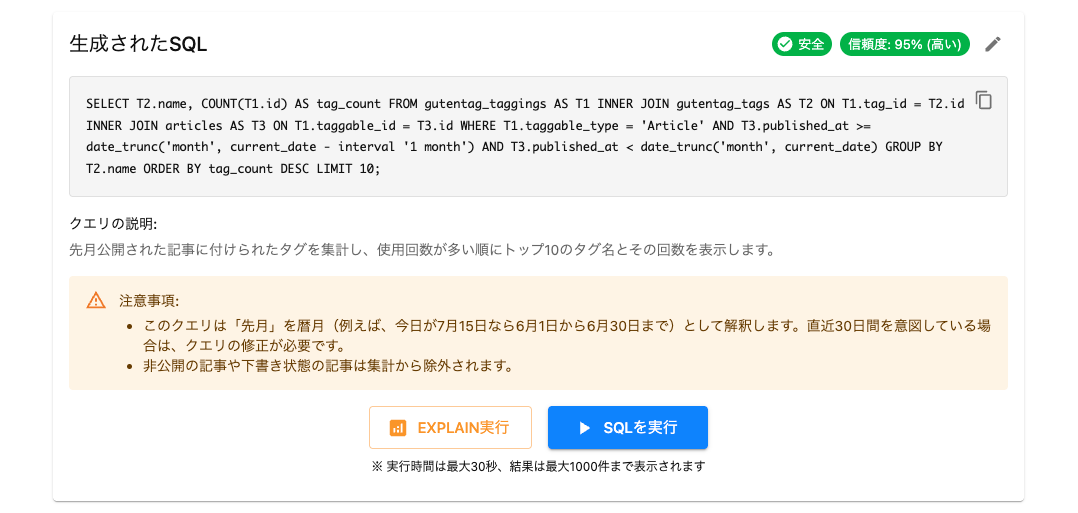
When we execute "Generate SQL", the generated SQL is displayed below. The SQL can be edited if needed. In the generated SQL, filtering by post period and proper table JOINs for polymorphic relationships are appropriately expressed.
Before executing "Run SQL", we require "Run EXPLAIN" as a mandatory step. This is to prevent accidentally executing high-load queries, and currently requires human verification.
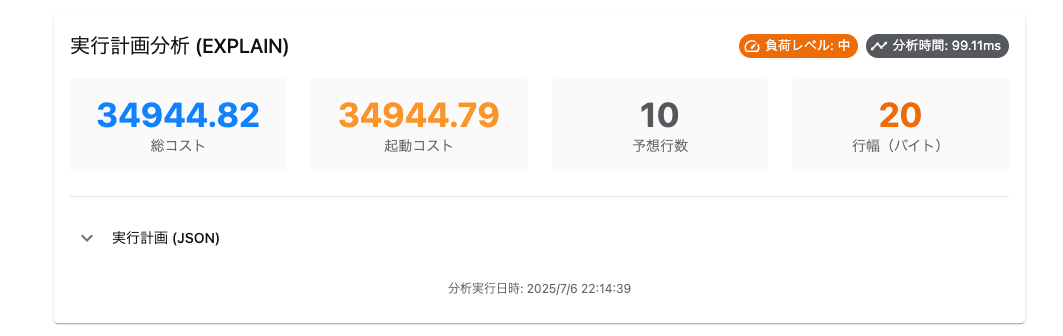
The EXPLAIN results are displayed. If there are no issues, we proceed with "Run SQL".
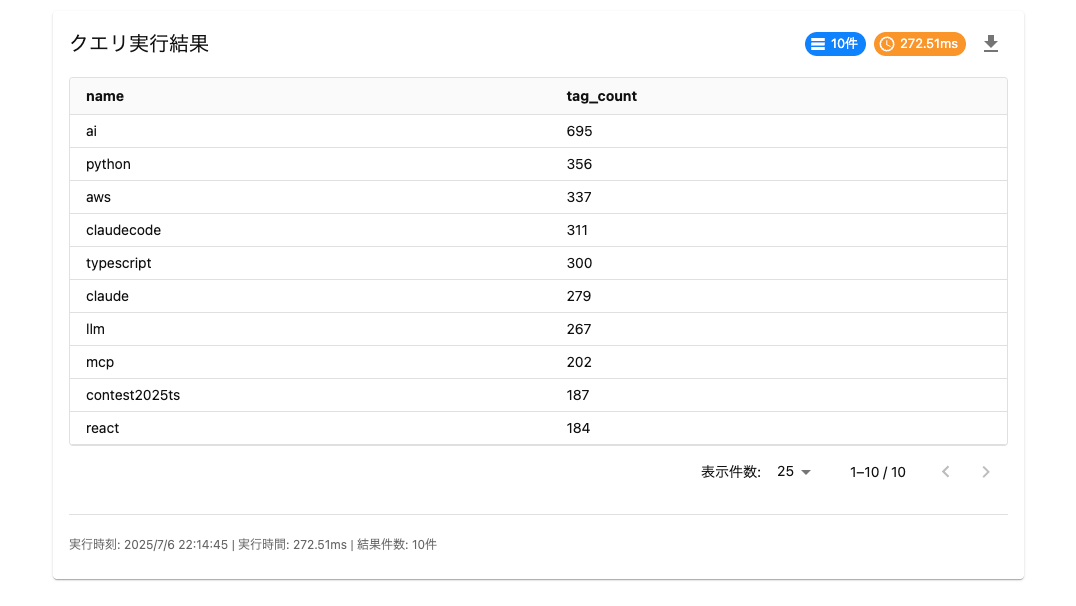
The results are displayed and can be downloaded as CSV.
Conclusion
I've introduced a feature that allows database queries using natural language. Since implementing this, I hardly ever have to write SQL queries myself anymore. I hope this was helpful.