I tried creating a smartphone battle toggle puzzle with Next.js × Supabase Realtime

This page has been translated by machine translation. View original
Introduction
Supabase Realtime is a feature that enables real-time data exchange between clients using WebSockets. While it's commonly used in chat applications, how does it perform in scenarios requiring precise synchronization, such as games?
In this article, I'll create a real-time competitive toggle puzzle game for smartphones using Supabase Realtime's Broadcast and Presence features. After deploying to Vercel and testing on actual smartphones, I found that for games where state changes are event-based, it's possible to create a competitive experience with virtually no perceptible latency.
What I Built
An 8×8 grid battle game where two players tap cells simultaneously. This is not turn-based - players compete for cells in real time. When you tap a cell, that cell and the cells above, below, left, and right change color. At the end of the 20-second time limit, the player with more cells in their color wins.
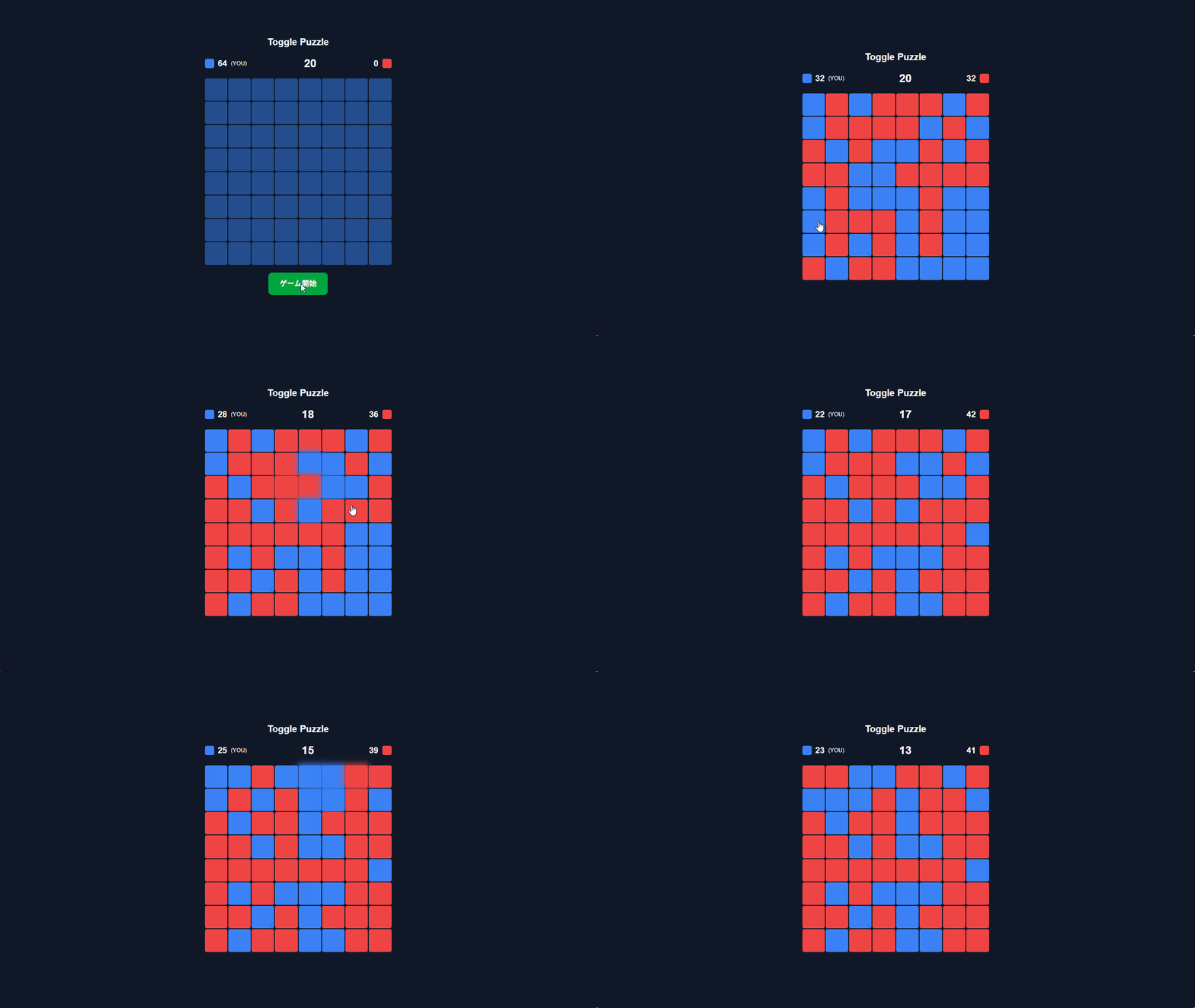
Unlike simple territory capture games, your taps don't always work in your favor. The color-flipping rule means sometimes you might help your opponent. Seeing your opponent's moves in real time creates an interesting dynamic of deciding whether to counter their moves.
The technology stack is Next.js, Supabase Realtime, and Vercel. I chose Next.js for its strong integration with Vercel, making deployment straightforward.
Target Audience
- People interested in Supabase Realtime but haven't tried it yet
- Those looking for real-time communication use cases beyond chat applications
- Developers familiar with Next.js and Vercel development
Testing Environment
- Next.js 16.2.3
- @supabase/supabase-js 2.103.1
- Vercel — Application hosting platform (Functions default region: US East
iad1) - Supabase (Project region: ap-northeast-2 Seoul) — WebSocket connection endpoint for Realtime
- Clients: Two smartphones in Japan
Reference Articles
- Supabase Realtime - Broadcast
- Supabase Realtime - Presence
- Realtime: Multiplayer Edition
- Vercel CLI Overview
Setting Up a Supabase Project
Creating a Project and Getting API Keys
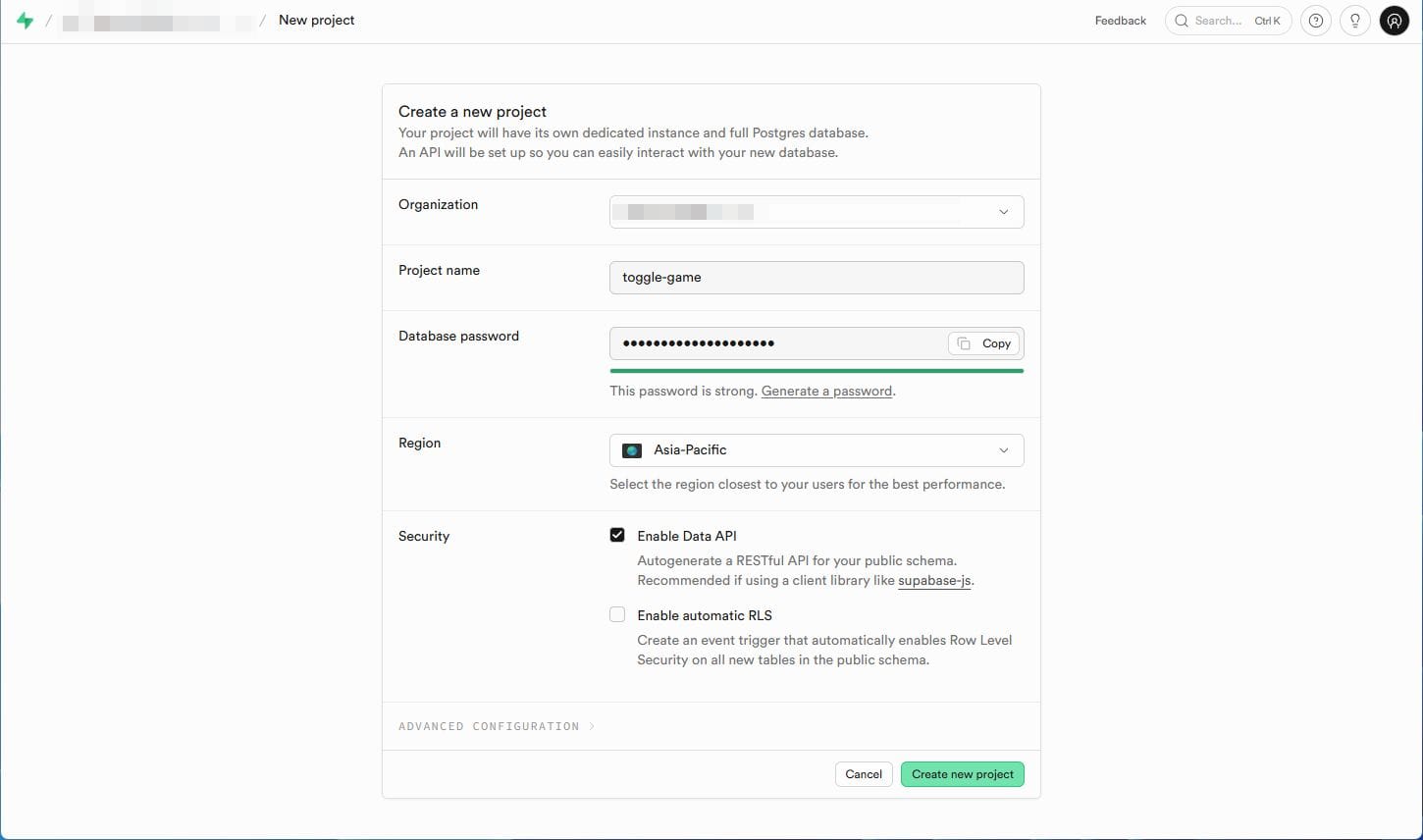
Create a new project from the Supabase dashboard.
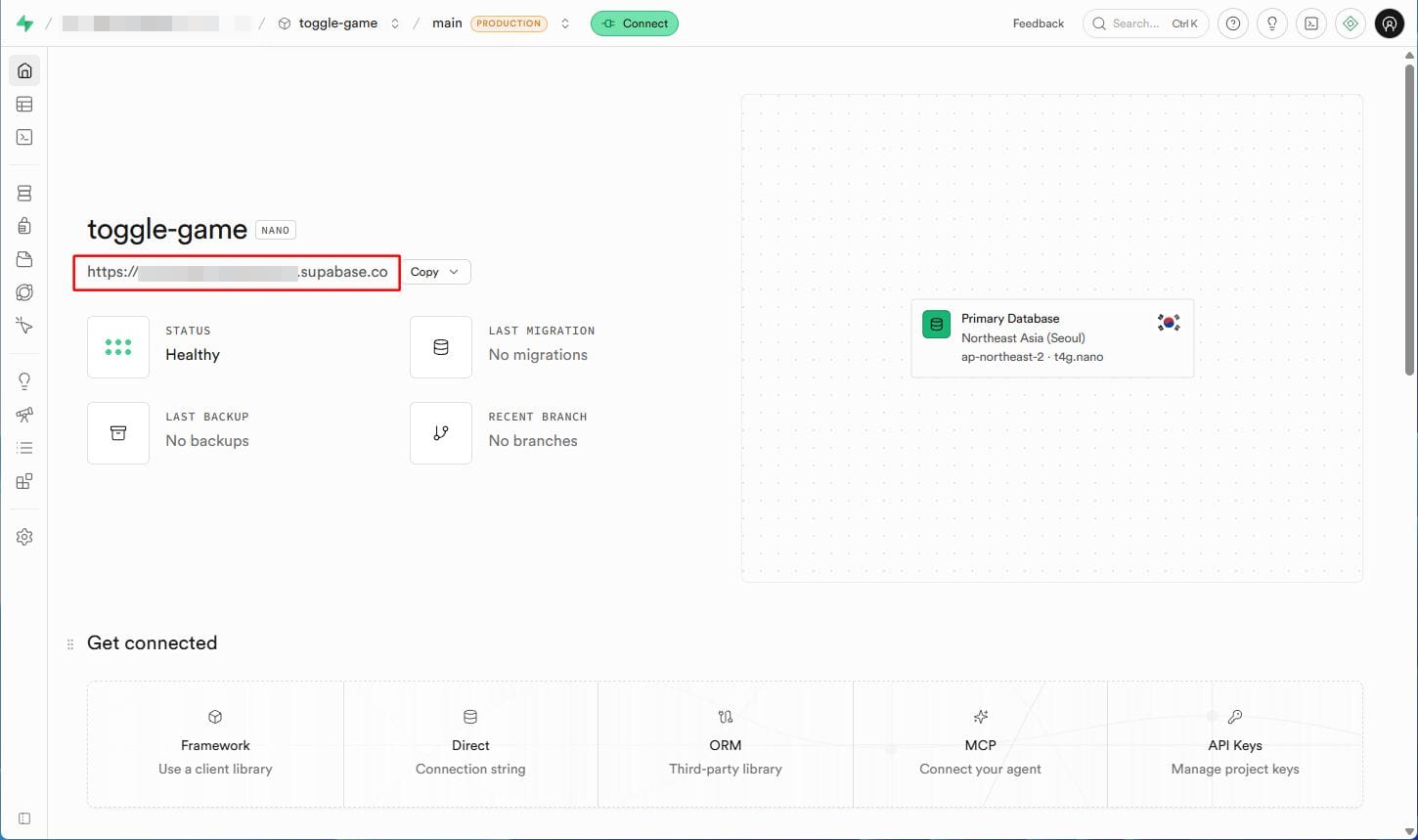
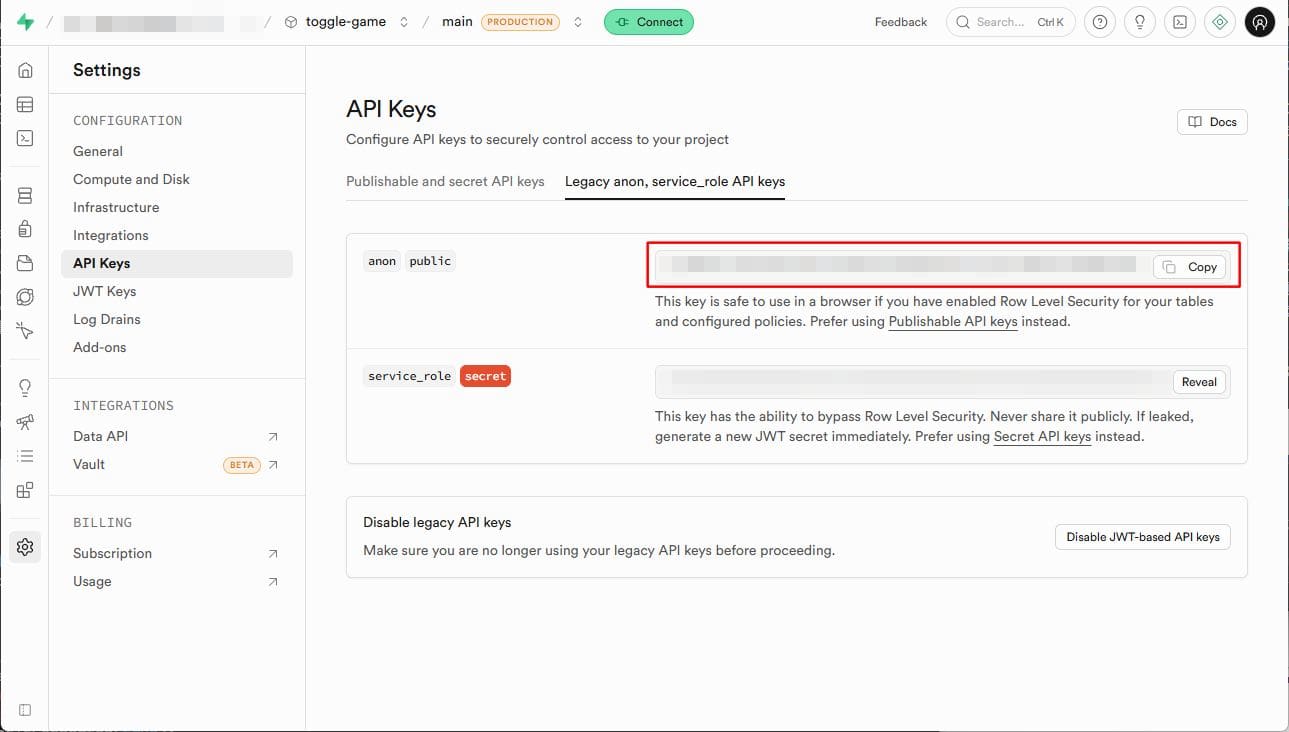
After creation, note these two values:
- Project URL: A URL in the format
https://xxxxx.supabase.co - anon key: A public key used from clients. Though exposed in the browser, it should be used with permission controls like RLS (Row Level Security)
Realtime Setup
Since we're using a public channel approach, no additional table creation is needed to use Broadcast and Presence. This is because Broadcast directly connects clients via WebSocket without going through the database.
However, for production use cases where you want to restrict participants, you'll need to set up private channels and Realtime Authorization.
Two Features of Supabase Realtime
I used two features for this project:
-
Broadcast
A feature that sends messages to all clients in a channel. It's low-latency because it doesn't go through the database. In this project, I use it to send and receive player tap events and board data. -
Presence
A feature that tracks in real-time who is participating in a channel. It can manage users' online/offline status. In this project, I use it for matchmaking - detecting when two players have joined a room to start the game.
Synchronization Design
The most challenging aspect of real-time competitive games is ensuring both devices have the same board state. The chosen approach significantly impacts the gaming experience.
Why I Chose to Send Only Operation Events
There are two main approaches to synchronizing the board: sending the entire board state each time, or sending only the event of "which cell was tapped".
I chose to send only operation events. Sending the entire board (64 cells of data) every frame would consume more bandwidth and cause latency. In contrast, a tap event requires only a single coordinate's worth of data.
// Send tap event via Broadcast
channelRef.current?.send({
  type: "broadcast",
  event: "game",
  payload: { type: "tap", index },
});
// Apply received tap event to local board (always calculate from the latest board)
channel.on("broadcast", { event: "game" }, ({ payload }) => {
  if (payload.type === "tap") {
    gameState.applyRemoteTap(payload.index);
  }
});
The receiving side calculates using the latest board state stored in a ref, not through React state. This prevents issues where multiple taps received in quick succession might be calculated based on outdated board states.
However, this approach has a weakness: If both players tap almost simultaneously, the order in which events arrive could differ between clients, potentially causing board state discrepancies.
Using Host/Guest Model to Ensure Consistency
Leaving board discrepancies unaddressed would make the game unplayable. To solve this, I implemented a host/guest model.
The player who creates the room becomes the host. Every 5 seconds, the host broadcasts their entire board state, overwriting the guest's board. Normal tap synchronization uses lightweight event-based communication, with periodic full board corrections - a hybrid design.
// Host: Sync entire board every 5 seconds
syncIntervalRef.current = setInterval(() => {
  channelRef.current?.send({
    type: "broadcast",
    event: "game",
    payload: { type: "sync", board: gameStateRef.current.board },
  });
}, 5000);
The 5-second interval was chosen to balance minimizing bandwidth usage while keeping perceptible discrepancies within acceptable limits. Additionally, at game end, the host broadcasts the final board and result, which the guest displays. This prevents disagreements about the outcome even if boards were slightly out of sync just before the end.
Using Presence for Matchmaking
I used Presence for matchmaking. This eliminates the need for a dedicated matchmaking server - everything is handled through Supabase channel features.
Players share a URL containing the room ID, and the game starts when two people join the channel.
const channel = supabase.channel(`room:${roomId}`, {
  config: { presence: { key: crypto.randomUUID() } },
});

channel.on("presence", { event: "sync" }, () => {
  const count = Object.keys(channel.presenceState()).length;
  if (count >= 2) {
    // Two players are present
  }
});

await channel.subscribe();
await channel.track({});
The presenceState() method returns the number of participants in the channel. Calling track({}) notifies other clients of your presence. Random matchmaking was outside the scope of this project, so I limited it to URL sharing.
Deploying to Vercel
Deployment Process
Deploy using the Vercel CLI.
npm i -g vercel
vercel          # Link project and initial deployment
vercel --prod   # Deploy to production
Environment Variable Setup
Set Supabase connection information as Vercel environment variables. Variables with the NEXT_PUBLIC_ prefix are embedded in browser bundles. While the Supabase anon key is meant to be exposed to clients, it should be used with RLS as mentioned earlier.
vercel env add NEXT_PUBLIC_SUPABASE_URL production
vercel env add NEXT_PUBLIC_SUPABASE_KEY production
After adding environment variables, you need to redeploy.
vercel --prod
Checking Deployment Status
Check deployment status with vercel ls.
vercel ls
If issues arise in production, check runtime logs with vercel logs.
vercel logs --deployment <deployment-url>
Impressions After Playing
I opened the Vercel-deployed app on smartphones and played against a colleague. In conclusion, in this test, there was virtually no perceptible lag.
During gameplay, communication goes directly from the browser to Supabase Realtime's WebSocket server, bypassing Vercel Functions. So the latency depends on the path between the browser and Supabase. As noted in the testing environment, Supabase's Seoul region is relatively advantageous for connections from Japan. Even considering that factor, opponents' actions appeared to reflect in real time.
Interestingly, even without perfectly synchronized real-time updates, the experience remains smooth. Just by looking at your screen, you can't verify exactly when and which cell your opponent tapped. Since received tap events are immediately reflected on the local board, it feels like synchronization happens without lag. You could say the game design effectively hides latency.
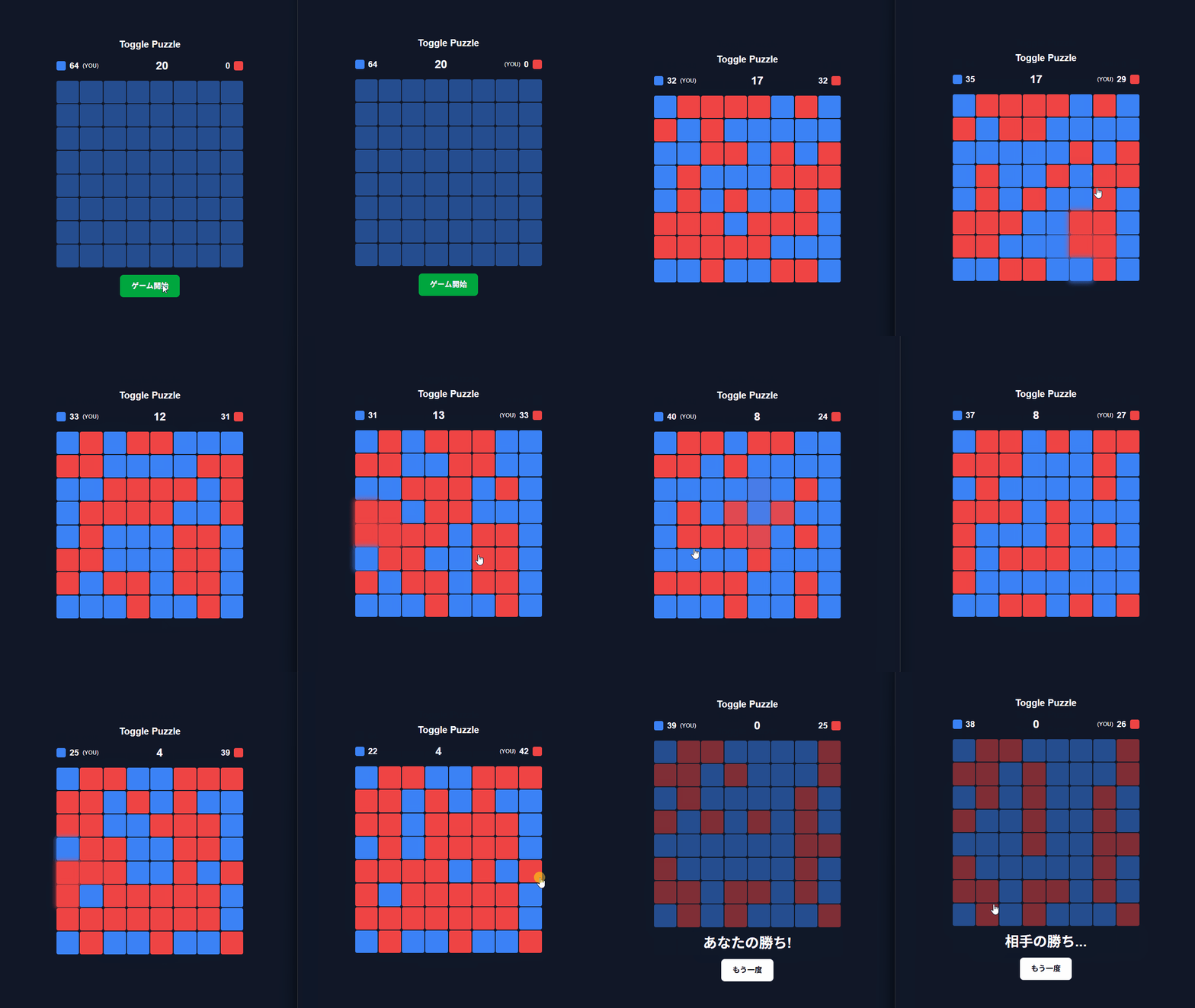
There may actually be synchronization differences between boards, but during smartphone play when you can't see each other's screens, it doesn't matter.
My colleague commented: "Seeing where your opponent taps in real time makes for interesting strategy decisions about whether to counter their moves."
Supabase Realtime would likely be challenging for games requiring frame-by-frame synchronization like fighting or shooting games. However, for games like this toggle puzzle where "state changes are event-based," Broadcast provides a sufficiently engaging competitive experience.
Production Considerations
This demo makes some simplifications. If adapting for production use, note the following:
If a browser is suddenly closed without calling unsubscribe, connections may remain on the Supabase side. During our testing, we actually experienced this - residual connections accumulated, eventually causing new connections to time out with TIMED_OUT errors. Restarting the Supabase project resolved the issue, but in production, you should explicitly disconnect channels in the beforeunload event.
Also, as mentioned earlier, we're using public channels, so anyone knowing the room ID can join. To prevent unauthorized participation or interference, implement private channels and Realtime Authorization.
Conclusion
I created a smartphone-based real-time competitive toggle puzzle using Supabase Realtime's Broadcast and Presence features, deployed it to Vercel, and tested with actual devices. Broadcast provides low-latency communication without going through the database, and combining operation event synchronization with a host/guest model achieved both lightweight communication and board consistency. Beyond chat applications, Supabase Realtime works well for casual competitive games like this one.
Appendix: Sample Code
lib/supabase.ts
import { createClient } from "@supabase/supabase-js";

const supabaseUrl = process.env.NEXT_PUBLIC_SUPABASE_URL!;
const supabaseKey = process.env.NEXT_PUBLIC_SUPABASE_KEY!;

export const supabase = createClient(supabaseUrl, supabaseKey);
lib/game-logic.ts
export const GRID_SIZE = 8;
export const TOTAL_CELLS = GRID_SIZE * GRID_SIZE;
export const GAME_DURATION_SEC = 20;
export const COOLDOWN_MS = 200;
export const SYNC_INTERVAL_MS = 5000;

export type PlayerColor = "A" | "B";
export type Board = PlayerColor[];

export function createEmptyBoard(): Board {
  return new Array(TOTAL_CELLS).fill("A");
}

export function createRandomBoard(): Board {
  const board: Board = new Array(TOTAL_CELLS);
  const indices = Array.from({ length: TOTAL_CELLS }, (_, i) => i);

  for (let i = indices.length - 1; i > 0; i--) {
    const j = Math.floor(Math.random() * (i + 1));
    [indices[i], indices[j]] = [indices[j], indices[i]];
  }

  for (let i = 0; i < TOTAL_CELLS; i++) {
    board[indices[i]] = i < TOTAL_CELLS / 2 ? "A" : "B";
  }

  return board;
}

function toIndex(row: number, col: number): number {
  return row * GRID_SIZE + col;
}

export function toRowCol(index: number): [number, number] {
  return [Math.floor(index / GRID_SIZE), index % GRID_SIZE];
}

function getToggleTargets(index: number): number[] {
  const [row, col] = toRowCol(index);
  const targets = [index];

  if (row > 0) targets.push(toIndex(row - 1, col));
  if (row < GRID_SIZE - 1) targets.push(toIndex(row + 1, col));
  if (col > 0) targets.push(toIndex(row, col - 1));
  if (col < GRID_SIZE - 1) targets.push(toIndex(row, col + 1));

  return targets;
}

function flipColor(color: PlayerColor): PlayerColor {
  return color === "A" ? "B" : "A";
}

export function applyToggle(board: Board, index: number): Board {
  const newBoard = [...board];
  const targets = getToggleTargets(index);

  for (const t of targets) {
    newBoard[t] = flipColor(newBoard[t]);
  }

  return newBoard;
}

export function countColors(board: Board): { A: number; B: number } {
  let a = 0;
  let b = 0;

  for (const cell of board) {
    if (cell === "A") a++;
    else b++;
  }

  return { A: a, B: b };
}

export type GameResult = "A" | "B" | "draw";

export function judgeWinner(board: Board): GameResult {
  const { A, B } = countColors(board);
  if (A > B) return "A";
  if (B > A) return "B";
  return "draw";
}
hooks/useGameState.ts
"use client";

import { useState, useCallback, useRef, useEffect } from "react";
import {
  type Board,
  type PlayerColor,
  type GameResult,
  createEmptyBoard,
  applyToggle,
  countColors,
  judgeWinner,
  GAME_DURATION_SEC,
  COOLDOWN_MS,
} from "@/lib/game-logic";

export type GamePhase = "waiting" | "playing" | "finished";

type OnTapCallback = (index: number) => void;

export function useGameState(onTap?: OnTapCallback) {
  const [board, setBoardState] = useState<Board>(() => createEmptyBoard());
  const [phase, setPhase] = useState<GamePhase>("waiting");
  const [myColor, setMyColor] = useState<PlayerColor>("A");
  const [timeLeft, setTimeLeft] = useState(GAME_DURATION_SEC);
  const [result, setResult] = useState<GameResult | null>(null);

  const lastTapTime = useRef(0);
  const timerRef = useRef<ReturnType<typeof setInterval> | null>(null);
  const endTimeRef = useRef(0);
  const boardRef = useRef(board);
  boardRef.current = board;

  const { A: countA, B: countB } = countColors(board);

  const stopTimer = useCallback(() => {
    if (timerRef.current) {
      clearInterval(timerRef.current);
      timerRef.current = null;
    }
  }, []);

  const finishGame = useCallback(() => {
    stopTimer();
    setPhase("finished");
    setResult(judgeWinner(boardRef.current));
  }, [stopTimer]);

  const startGame = useCallback(
    (initialBoard: Board, color: PlayerColor) => {
      setBoardState(initialBoard);
      boardRef.current = initialBoard;
      setMyColor(color);
      setPhase("playing");
      setResult(null);
      setTimeLeft(GAME_DURATION_SEC);
      endTimeRef.current = Date.now() + GAME_DURATION_SEC * 1000;

      stopTimer();
      timerRef.current = setInterval(() => {
        const remaining = Math.max(
          0,
          (endTimeRef.current - Date.now()) / 1000
        );
        setTimeLeft(remaining);
        if (remaining <= 0) finishGame();
      }, 100);
    },
    [stopTimer, finishGame]
  );

  const handleCellTap = useCallback(
    (index: number) => {
      if (phase !== "playing") return;
      const now = Date.now();
      if (now - lastTapTime.current < COOLDOWN_MS) return;
      lastTapTime.current = now;

      const newBoard = applyToggle(boardRef.current, index);
      setBoardState(newBoard);
      boardRef.current = newBoard;
      onTap?.(index);
    },
    [phase, onTap]
  );

  const setBoard = useCallback((newBoard: Board) => {
    setBoardState(newBoard);
    boardRef.current = newBoard;
  }, []);

  const resetGame = useCallback(() => {
    stopTimer();
    setPhase("waiting");
    setResult(null);
    setTimeLeft(GAME_DURATION_SEC);
    setBoardState(createEmptyBoard());
  }, [stopTimer]);

  useEffect(() => {
    return () => stopTimer();
  }, [stopTimer]);

  const applyRemoteTap = useCallback((index: number) => {
    const newBoard = applyToggle(boardRef.current, index);
    setBoardState(newBoard);
    boardRef.current = newBoard;
  }, []);

  const finishWithResult = useCallback(
    (remoteResult: GameResult) => {
      stopTimer();
      setPhase("finished");
      setResult(remoteResult);
    },
    [stopTimer]
  );

  return {
    board, phase, myColor, timeLeft,
    countA, countB, result,
    handleCellTap, applyRemoteTap, startGame,
    resetGame, setBoard, finishWithResult, finishGame,
  };
}
hooks/useOnlineGame.ts
"use client";

import { useState, useEffect, useCallback, useRef } from "react";
import { supabase } from "@/lib/supabase";
import {
  type Board,
  type PlayerColor,
  type GameResult,
  judgeWinner,
  SYNC_INTERVAL_MS,
} from "@/lib/game-logic";
import type { useGameState } from "@/hooks/useGameState";

type GameStateHandle = ReturnType<typeof useGameState>;

type BroadcastPayload =
  | { type: "tap"; index: number }
  | { type: "start"; board: Board; myColorForGuest: PlayerColor }
  | { type: "sync"; board: Board }
  | { type: "result"; winner: GameResult; board: Board };

export function useOnlineGame(roomId: string, gameState: GameStateHandle) {
  const [isConnected, setIsConnected] = useState(false);
  const [opponentJoined, setOpponentJoined] = useState(false);
  const [isHost, setIsHost] = useState(false);

  const channelRef = useRef<ReturnType<typeof supabase.channel> | null>(null);
  const syncIntervalRef = useRef<ReturnType<typeof setInterval> | null>(null);
  const gameStateRef = useRef(gameState);
  const isHostRef = useRef(false);
  gameStateRef.current = gameState;

  const broadcastTap = useCallback((index: number) => {
    channelRef.current?.send({
      type: "broadcast",
      event: "game",
      payload: { type: "tap", index } satisfies BroadcastPayload,
    });
  }, []);

  useEffect(() => {
    const channel = supabase.channel(`room:${roomId}`, {
      config: { presence: { key: crypto.randomUUID() } },
    });
    channelRef.current = channel;

    channel
      .on("presence", { event: "sync" }, () => {
        const state = channel.presenceState();
        const count = Object.keys(state).length;
        setOpponentJoined(count >= 2);
        if (count === 1) {
          isHostRef.current = true;
          setIsHost(true);
        }
      })
      .on("broadcast", { event: "game" }, ({ payload }) => {
        const msg = payload as BroadcastPayload;
        const gs = gameStateRef.current;
        switch (msg.type) {
          case "tap":
            gs.applyRemoteTap(msg.index);
            break;
          case "start":
            gs.startGame(msg.board, msg.myColorForGuest);
            break;
          case "sync":
            if (!isHostRef.current) gs.setBoard(msg.board);
            break;
          case "result":
            if (!isHostRef.current) {
              gs.setBoard(msg.board);
              gs.finishWithResult(msg.winner);
            }
            break;
        }
      })
      .subscribe(async (status) => {
        if (status === "SUBSCRIBED") {
          await channel.track({});
          setIsConnected(true);
        }
      });

    return () => {
      if (syncIntervalRef.current) clearInterval(syncIntervalRef.current);
      supabase.removeChannel(channel);
    };
  }, [roomId]);

  useEffect(() => {
    if (!isHost || gameState.phase !== "playing") {
      if (syncIntervalRef.current) {
        clearInterval(syncIntervalRef.current);
        syncIntervalRef.current = null;
      }
      return;
    }
    syncIntervalRef.current = setInterval(() => {
      channelRef.current?.send({
        type: "broadcast",
        event: "game",
        payload: {
          type: "sync",
          board: gameStateRef.current.board,
        } satisfies BroadcastPayload,
      });
    }, SYNC_INTERVAL_MS);

    return () => {
      if (syncIntervalRef.current) {
        clearInterval(syncIntervalRef.current);
        syncIntervalRef.current = null;
      }
    };
  }, [isHost, gameState.phase]);

  // Host: broadcast final result when game finishes
  useEffect(() => {
    if (!isHost || gameState.phase !== "finished") return;

    const board = gameStateRef.current.board;
    channelRef.current?.send({
      type: "broadcast",
      event: "game",
      payload: {
        type: "result",
        winner: judgeWinner(board),
        board,
      } satisfies BroadcastPayload,
    });
  }, [isHost, gameState.phase]);

  const broadcastStart = useCallback(
    (board: Board, myColor: PlayerColor) => {
      channelRef.current?.send({
        type: "broadcast",
        event: "game",
        payload: {
          type: "start",
          board,
          myColorForGuest: myColor === "A" ? "B" : "A",
        } satisfies BroadcastPayload,
      });
    },
    []
  );

  return { isConnected, opponentJoined, isHost, broadcastTap, broadcastStart };
}