NocoBase 2.x introduced 5 major features and keeping up with rapid releases

This page has been translated by machine translation. View original
Introduction
This is Sugiura. This is the second installment in the NocoBase series.
In the previous article, I covered the basics of NocoBase, including the separation of data models and UI, the plugin architecture, and self-hosting. If you're wondering "What is NocoBase?", I recommend reading Part 1 first.
Version 2.0 was released in February 2026, and it has progressed to 2.2 within six months. It's no longer a brand-new release. This article organizes the major features introduced in 2.x. Topics covered include version history, how to read the official documentation, and the five major topics the official team is highlighting. I came to NocoBase starting from the 2.x series and have been using it in production. I've written this to help newcomers understand what can be done with NocoBase 2.x.
NocoBase 2.x Version Status
The first thing newcomers should know is which version is currently stable.
- 2.0 beta: Announced January 2026
- 2.0 Official Release: February 2026 (Official announcement)
- 2.1 Official Release: June 2026 (Official announcement)
- 2.2 Official Release: August 2026 (Official announcement)
- Current Stable: 2.2 series (latest at time of writing is v2.2.5)
- In Development: Beta for 2.3 series and alpha for 3.0 series are listed on GitHub Releases (no official blog announcement for 3.0 yet)
[Added 2026-09-04] Since September 2nd, the alpha versions are being released as 2.4 series rather than 3.0 series (starting from v2.4.0-alpha.1). The plugin configuration is the same as the final v3.0.0-alpha.13, with only the version number changed. No explanation has been provided from the official team.
That works out to progressing from 2.0 to 2.2 in half a year. In the recent 2.2 release, an independent /v/ frontend entry point and a new mobile version were added, and the file access mechanism was also overhauled (Official announcement). Since the five major topics covered in this article are mainly things introduced between 2.0 and 2.1, please refer to the official release notes for details on 2.2.
As you can see on GitHub Releases, the release pace is quite fast. Patch releases come every few days, and minor versions increment within months. The latest state changes at considerable speed, so it's recommended to decide early on your version pinning and upgrade policies (discussed later). There's no need to track every alpha or beta number — if you're just getting started, choosing the stable version is fine.
How to Read the Official Documentation
The official documentation is available in multiple languages, and knowing the URL structure will help you navigate without confusion.
| URL | Content |
|---|---|
| docs.nocobase.com | English version (the reference documentation) |
| docs.nocobase.com/ja/ | Japanese version (add /ja to the beginning of the same path) |
It's good news for Japanese-speaking newcomers that the Japanese version covers 2.x content. However, the Japanese version appears to be AI-translated, and you may occasionally find descriptions that don't match actual behavior or that read unnaturally in Japanese. If something seems off, cross-referencing with the English version is the safest approach. I recommend using the Japanese version for a quick overview and the English version when accuracy is critical.
Other official information channels include:
- Official Blog — Release announcements and feature introductions
- GitHub Releases — Primary source for changelogs
- Forum — Community Q&A (primarily in English)
- dev.to / Medium — Tutorial series and more
Note that web searches will surface many articles and information from the 1.x era. Since the UI and documentation structure have changed between 1.x and 2.x, always check which series the information you're referencing belongs to.
Major Topics to Know in 2.x
From here, I'll introduce five topics that the official team is highlighting as major features of 2.x. The order is based on what I think newcomers are most likely to care about. All screenshots in this article were taken from OSS version v2.2.5 running locally via Docker.
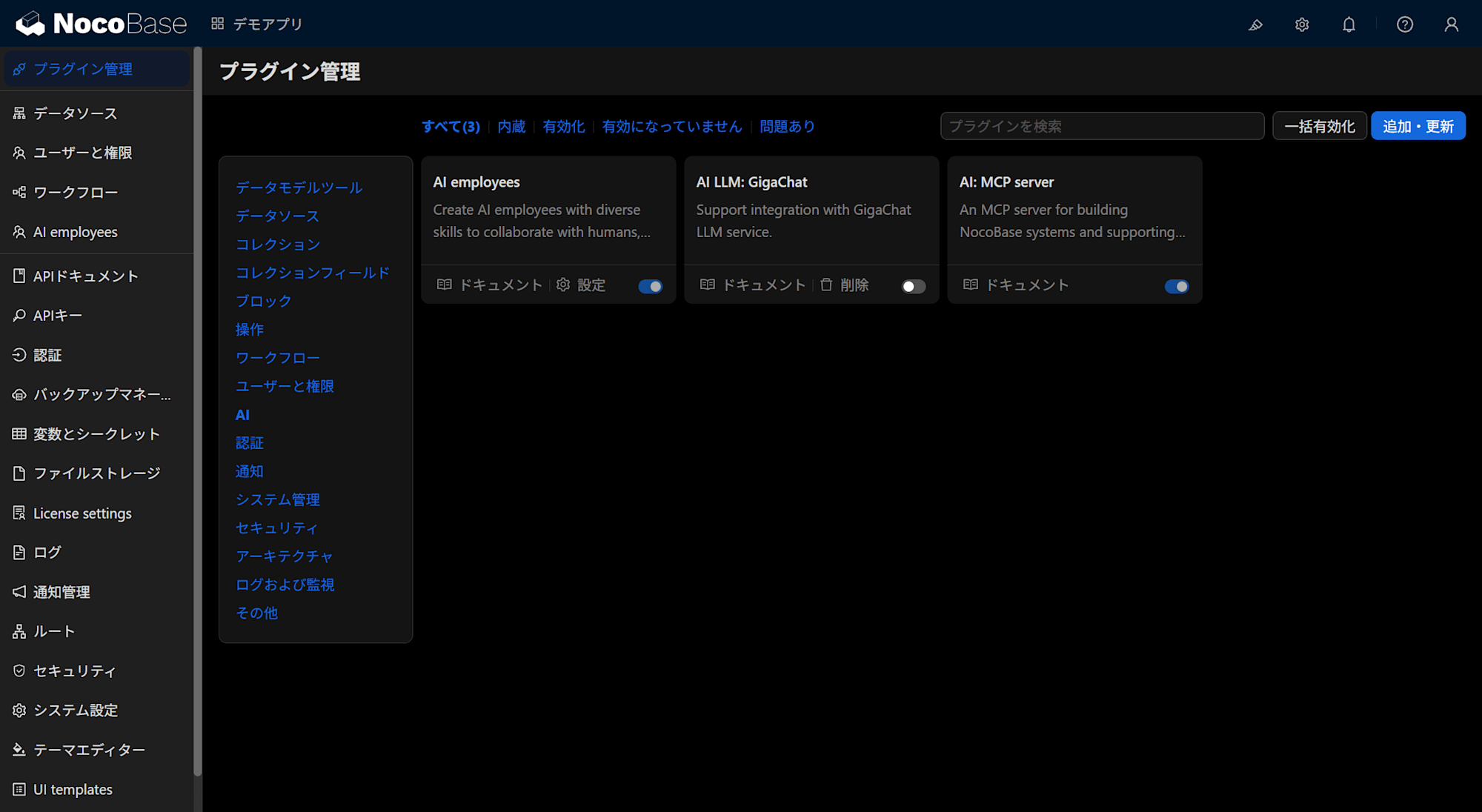
Note that among these five, Multi-App and Approval Workflows are paid edition features, while the remaining three are also available in the free Community Edition. When you actually launch the OSS version and look at the plugin management screen, you'll find that AI Employees (plugin-ai) and the MCP Server (plugin-mcp-server) are enabled by default.
AI Features (AI Employees and the AI Ecosystem)
The first thing the official team highlights as a centerpiece of 2.0 is the AI features (NocoBase 2.0: Meet Your AI Employees).
I haven't used 1.x, so I rely on official information for comparison with the earlier version, but the design with AI at its core is something that started with 2.0.
AI Employees are agent features built into the business system. The official team describes them not as mere "chatbots" but as "digital colleagues" that understand context within business screens and can directly execute operations. They recognize the current page, blocks, and selected data, then call on skills to perform tasks such as querying, analyzing, entering data, and configuring settings.
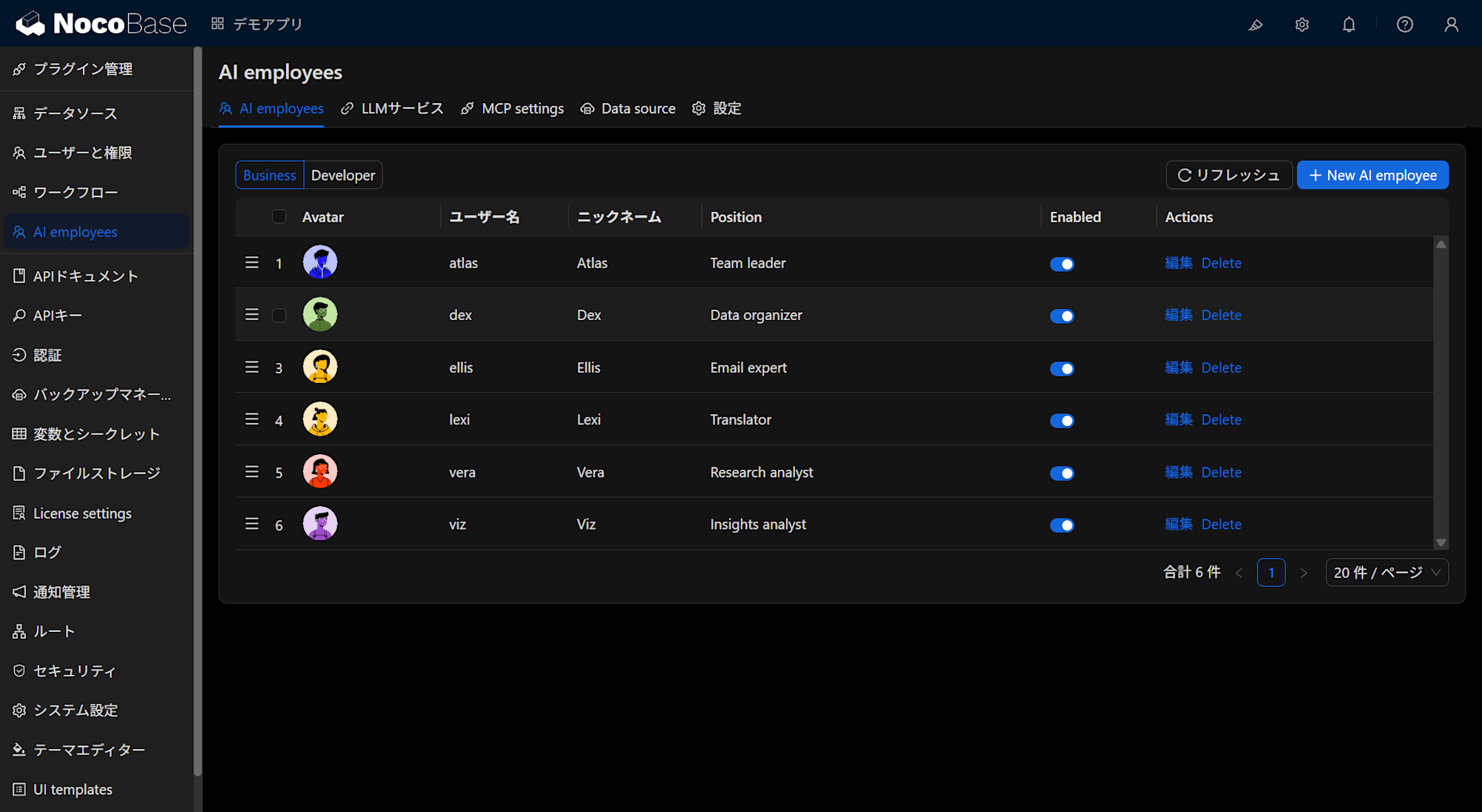
Pre-defined AI Employees are provided for specific roles, such as "Atlas: Team Leader," "Viz: Insights Analyst," and "Lexi: Translation Assistant," and you can also define new ones yourself. Configuration combines a role (character settings), the skills (tools) that AI can use, and permissions (Ask / Allow) for whether human confirmation is required before executing skills.
When I launched the OSS version and checked, the list was divided into "Business" and "Developer" sections, with 6 employees pre-registered under Business and 2 under Developer.
The edition required is Community Edition or above, meaning it's available even in the free OSS version (based on official documentation labels as of July 2026). However, to actually use it, you need to separately configure an LLM service (registering a provider and model), and model usage costs are your own responsibility.
Another thing worth noting is the AI ecosystem developing outside the core product.
- Official Skills Repository — Packages domain knowledge about NocoBase data modeling, permission settings, etc. for AI agents (such as CLI agents like Claude Code)
- Official documentation for integration with AI agent CLIs — The official documentation covers configurations for operating NocoBase from Claude Code
- MCP Server support — An official plugin that allows AI agents to operate NocoBase data is now bundled by default in 2.1 and later. Authentication uses API keys, and what can be done follows the permissions of the role tied to the key, enabling controls such as providing a read-only key
I think the fact that the official team is steering toward "building business applications together with AI agents" is a significant consideration for people starting with NocoBase in 2026. This area is evolving rapidly and still has parts under development, so I plan to write more details after actually testing it in a later installment of this series.
Multi-App / Multi-Space (Multiple Application Management)
This is a set of features that allows multiple independent applications to run within a single NocoBase instance (Documentation).
- Multi-App: Creates independent sub-applications within an instance. In "Shared Memory Multi-App" mode, multiple applications can coexist within a single process group
- Multi-Environment Hybrid Deployment: Connects multiple NocoBase nodes to build a configuration with a control plane and multiple runtimes
- Multi-Space: Creates logically independent data spaces within a single application (useful for multi-tenant use cases)
Note that both Multi-App and Multi-Space are paid edition features (Enterprise Edition or above) (based on official documentation labels as of July 2026). The point made in Part 1 about "checking which edition includes the features you need" applies here as well.
This is a design that didn't exist in 1.x, and it expands the scaling options for organizational use, such as "running independent applications for each department in parallel" or "splitting and managing business domains." If you're considering NocoBase as a foundation for a business system, it's worth knowing upfront that the question of how to divide applications by unit is a design consideration that exists from the start.
UI Templates / Popup Templates
The mechanism for reusing screen components has been enhanced (Documentation).
Block-level templates existed in 1.x, but in 2.x, entire popups (including tabs, blocks, and actions) can be templated and reused from other pages. Two operations are provided: "Convert current popup to template" which converts an existing popup into a template, and "Duplicate current popup as template" which creates a template by duplicating it.
In business systems, you tend to create similar screens like "application forms" and "detail confirmation screens" in many places, so sharing them as popup templates means you only need to make changes in one place. This is also available in Community Edition or above.
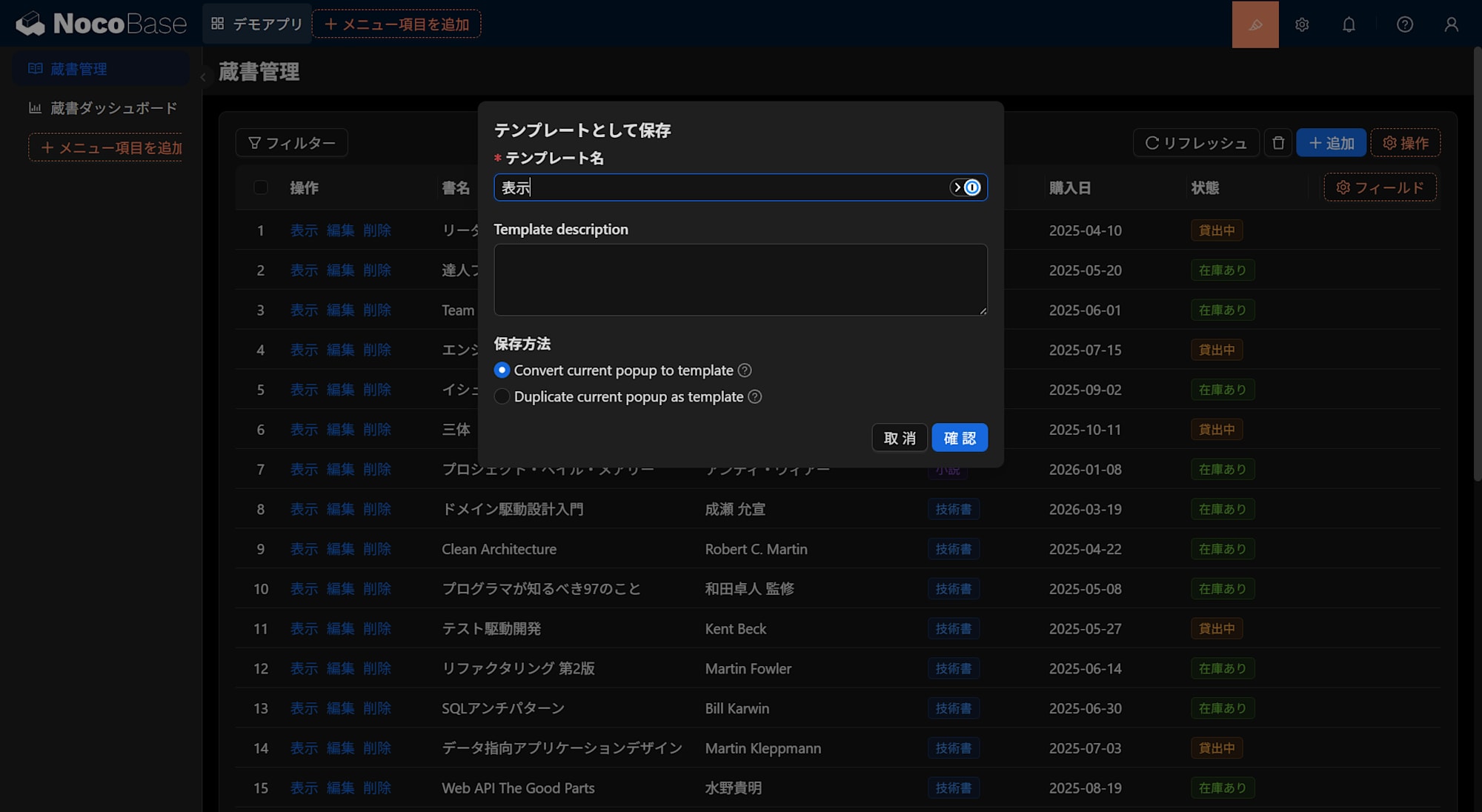
Note that the same two save options are also available for block-level templating, with operation names differentiated by whether they say block or popup. What was added in 2.x is the popup side.
ECharts-Based Data Visualization
The data visualization plugin is now based on Apache ECharts (Documentation).
- Configuration supports three modes: "Visual Settings Mode," "SQL Mode," and "JSON Mode"
- Supports chart events (highlighting on click, screen navigation, drill-down, etc.)
- Can work with page-level filter blocks to filter multiple charts together
While you can build with just the GUI, the SQL mode and JSON mode (for writing ECharts configuration directly) leave room for engineers to fine-tune. The positioning is that it's now easier to complete business dashboards entirely within NocoBase. This is also available in Community Edition or above.
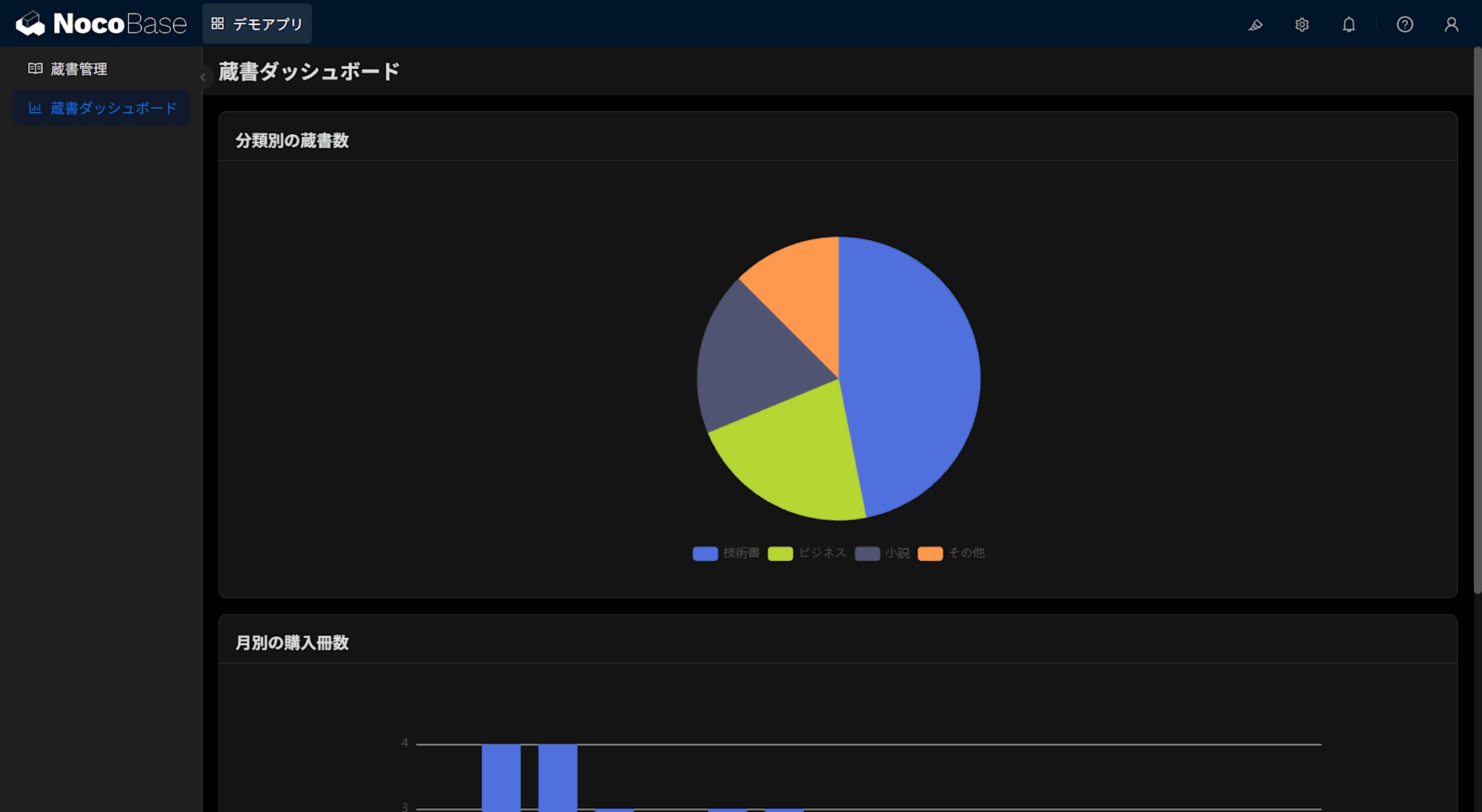
As a test, I put together a pie chart and bar chart using sample book collection data. Both used SQL mode, with aggregation done simply by writing GROUP BY.
Approval Workflows v2 (New Approval Flow Layout)
The UI for the approval workflow feature has been revamped to a block-based approach (mentioned in the 2.0 release announcement). The layout of approval request screens and CC nodes for sharing information with relevant parties has also been updated.
Approval flow configurations created in 1.x will continue to work, but those migrating from 1.x should note that switching to the new 2.0 layout is irreversible — there's no going back. Conversely, for people starting with 2.x, there's only the new layout to learn, so this is one less thing to worry about.
One important caveat: the Approval feature is a paid edition feature (Professional or above) (Official pricing page, as of July 2026). It cannot be used with the free Community Edition alone, so if you're considering NocoBase specifically for approval workflows, check the edition scope first.
Other minor improvements include the addition of two editing modes for subtables — Inline Edit and Popup Edit — and ongoing UX enhancements to data editing.
Dealing with 1.x Information and Fast Release Cycles
Here's a summary of points that proved useful when keeping up with 2.x information.
Distinguish between 1.x and 2.x information. Search results, blog posts, and forum answers frequently include content from the 1.x era. Developing a habit of checking "which series is this about?" — by looking at the UI in screenshots or the paths of referenced documentation — will prevent confusion.
Prepare for the fast release cycle. With patches coming every few days, a "always upgrade to the latest" approach isn't realistic. I recommend pinning to a version and deciding in advance on upgrade timing and verification procedures.
That said, you can't leave a pinned version unattended indefinitely. Patches sometimes include security fixes. NocoBase has released fixes for vulnerabilities rated Critical (CVSS 10.0). You can check GitHub's Security Advisories to see if the version you're using is affected, so I recommend deciding that security fixes will be tracked separately from your normal upgrade plan.
New feature information tends to appear in the English documentation first. As also mentioned in Part 1, when checking version differences or features right after release in particular, going to the English documentation and GitHub Releases as primary sources is the reliable approach. Pay special attention to release information when you're encountering a bug in your current version and waiting for a fix.
Basic precautions from Part 1, such as the commitment required for self-hosting, the line between OSS and commercial, and the state of Japanese-language information, are summarized in Part 1. Operational topics such as SSO integration in practice and standard monitoring and backup operations will be verified and written up as the series progresses.
Plans for Upcoming Installments
I plan to write the next two installments in this order (though the order and content may change):
- Part 3 (tentative): Starting NocoBase 2.x locally with Docker Compose
- Part 4 (tentative): Building your first business application — from defining a collection to placing it on a screen
In Part 1, I wrote that NocoBase is a tool for building business systems through incremental steps: "create a table → place it on a screen → add operations and permissions → add automation." I intend to follow that order hands-on.
Summary
- NocoBase 2.x continues to evolve in three directions: "AI," "Scale (Multi-App)," and "UX (templates, visualization, approval UI)"
- Releases have been progressing at a fast pace from 2.0 (February 2026) through the 2.2 series, so it's worth deciding early on how to identify the version series of information you find and what version-pinning policy to adopt
- Staying current with changes is manageable by keeping the official documentation (English as the reference, Japanese as a supplement) and GitHub Releases as your primary sources
Japanese-language 2.x content is still sparse. I'll be sharing my operations and learning process through this series. If you have feedback or requests, please let me know in the comments.