
Tried running Pi sub-agents per sandbox with NVIDIA OpenShell 0.1.0 series

This page has been translated by machine translation. View original
Introduction
Hello, I'm Morishige from Classmethod's Manufacturing Business Technology Department.
I've been continuing work to package the development environment I put together with Pi coding agent and NVIDIA NeMo Switchyard into a form that can be distributed to a team. The current form bundles Pi and Switchyard's router into a single container image and runs it in NVIDIA OpenShell's sandbox. In this article, I'll call this image the Pi sandbox image. I chose OpenShell because I wanted the runtime side to handle keys and communication boundaries.
In the process, when I reread the 0.1.0 series docs, the way components were divided had changed quite a bit from the 0.0.x days. In addition to gateway, workspace, provider, policy, and template, SDKs for TypeScript, Python, and Go are now available.
Once the components are in place, the next thing you want to think about is "dynamically creating sandboxes from the outside, giving instructions, and destroying them." Pi doesn't have a sub-agent mechanism like Claude Code by default. The official example's extension compensates by spawning a child pi as a local process. Replacing that spawn target with OpenShell's sandbox gives you a configuration of one sandbox per sub-agent.
This is also a follow-up to what I previewed in the summary of the above article (as of 2026-08-17) as "the configuration running on OpenShell."
In this article, I'll decode the component hierarchy and authentication mechanisms of OpenShell 0.1.0 series using the Pi sandbox image as a subject. I'll then write a Pi extension that calls the TypeScript SDK and introduce the results of running 3 sub-agents in parallel across 3 sandboxes. I hope this resonates with people who have read the OpenShell docs and found it hard to grasp the relationship between gateway, sandbox, and provider.
What Changed in OpenShell 0.1.0 Series
Here's a table summarizing the changes that people who read the 0.0.x articles might stumble on, based on the upgrade guide and my own hands-on experience.
| Item | 0.0.x | 0.1.0 series |
|---|---|---|
| upgrade | overwrite install | in-place not supported. Delete and reinstall for local, recreate all sandboxes |
| gateway configuration | gateway.env |
gateway.toml with schema v2 (compute_driver and [openshell.drivers.<name>]) |
| provider profile | claude and gh were built-in |
built-in removed. Import claude-code or github first, then provider create |
| inference route | managed route via inference.local |
removed. Attach a provider and call the native endpoint directly |
sandbox create --from |
could build from Dockerfile | image reference only. Build and push must be done beforehand |
| provider specification | inferred from trailing command | explicitly specified with --provider |
| policy schema | ignored unknown fields | rejects unknown fields and tls: terminate. Endpoint mode is a typed enum |
The biggest change is the removal of inference.local. The route that "distributes one provider to all sandboxes" is gone, and the new approach is to select and attach a provider per sandbox. This was actually a convenient change for today's configuration where we carve out one sandbox per sub-agent.
Understanding the Components in a Hierarchy
Since the docs have separate pages for each component and the nesting relationships were hard to see, I redrew the hierarchy of everything I touched onto a single diagram.
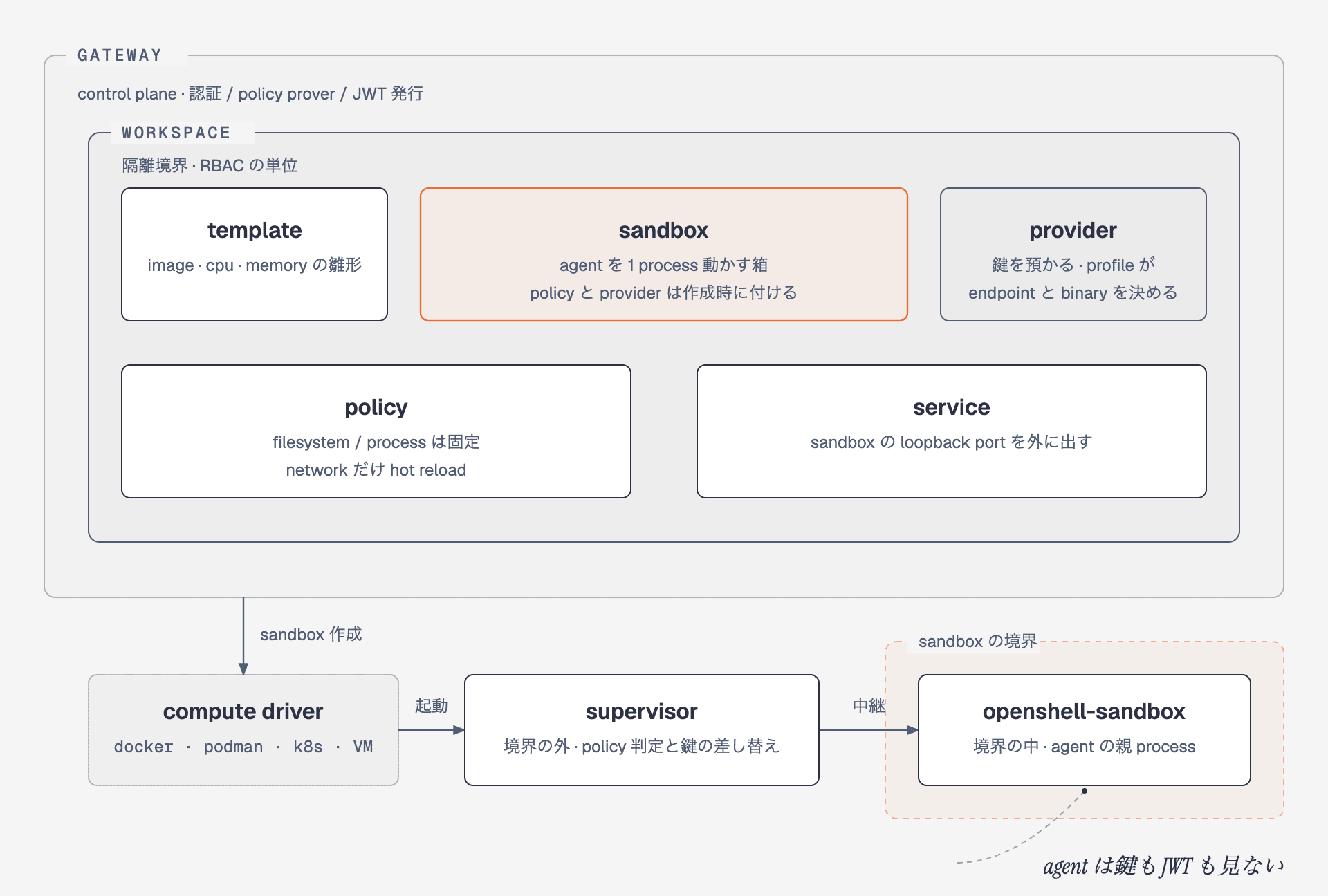
Gateway is the control plane. Workspace is the unit of isolation and RBAC; sandbox, template, provider, policy, and service are created within it. The execution layer runs in order: compute driver → supervisor → openshell-sandbox, with only one agent process running at the innermost level.
The same structure in table form looks like this. The "Can it be changed after creation?" column becomes relevant in later sections.
| Concept | Role | Creation unit | Can it be changed after creation? | Main CLI |
|---|---|---|---|---|
| gateway | control plane. Handles authentication, sandbox state, policy validation, JWT issuance | 1 instance (or k8s) | configuration via gateway.toml |
openshell gateway add / select / info |
| workspace | isolation and RBAC boundary. All resources below are workspace-scoped | admin creates | adding and removing members | openshell workspace create / member add |
| template | blueprint for image, cpu, memory, env | per workspace | recreate | openshell sandbox template create |
| sandbox | a box that runs one agent process. Policy and provider are attached at creation | per execution | only network policy and provider | openshell sandbox create / exec / delete |
| provider | entity that holds keys. Profile determines endpoint and binary | per key | key updates, attach and detach | openshell provider create / update |
| policy | filesystem, process, and network boundaries | per sandbox | only the network section supports hot reload | openshell policy update / set / get |
| service | exposes a sandbox's loopback port to the outside via gateway | per port | add and remove | openshell service expose / list |
There's only one key point to grasp: the agent itself does not evaluate policies or hold keys or JWTs. The only path to the outside is a single supervisor, which checks against policy before passing through and replaces keys. The concept I called the "two-layer harness of agent layer and runtime layer" in my previous article on sandboxing Codex still applies as-is.
The verification steps in the above article (as of 2026-06-20) are mostly the same for the 0.1.0 series, but the commands have changed as shown in the previous table, so please substitute accordingly.
Reading Authentication as 3 Lines
What I found most confusing was authentication. The docs list four methods side by side — mTLS, OIDC, Edge JWT, and Plaintext — and the supervisor JWT discussion is on a separate page. When organized, there are only 3 lines.
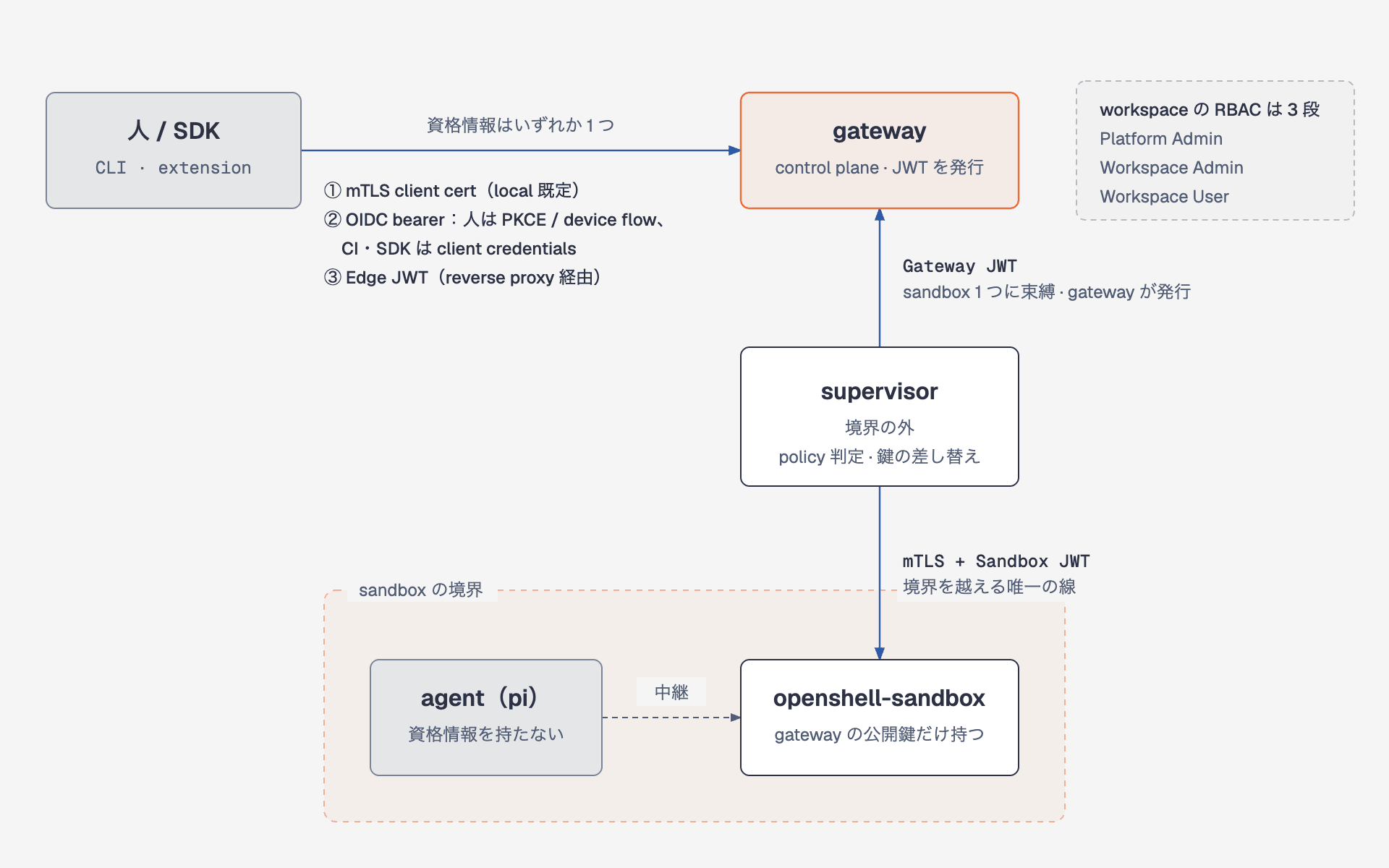
Three lines: one from humans and SDKs to gateway, one from supervisor to gateway, and one from supervisor to sandbox. The agent does not have a fourth line.
Users only choose the first line, and all four methods are about this line.
| Method | Who uses it | What it carries | Did I try it? |
|---|---|---|---|
| mTLS | default for Docker, Podman, and local VM | CA, client cert, key under ~/.config/openshell/gateways/<name>/mtls/ |
Yes (both CLI and SDK) |
| OIDC | humans (PKCE or device flow), CI and SDKs (client credentials) | IdP bearer token. Roles claim separates admin and user, scopes restrict methods | No (no IdP available locally) |
| Edge JWT | gateway behind a reverse proxy | token issued by proxy, websocket tunnel | No |
| Plaintext | for validation via port-forward | none | No |
My local gateway uses mTLS. openshell status reports Status and Authentication separately, so you can distinguish "the gateway received it but the token has expired."
$ openshell whoami
  Subject: openshell-client
  Provider: mtls
  Roles: openshell-user

$ openshell status
  Status: Connected
  Authentication: Authenticated (mTLS transport)
The remaining 2 lines are held by the runtime. The supervisor returns to the gateway with a Gateway JWT bound to a single sandbox, and enters the openshell-sandbox inside with mTLS and a Sandbox JWT.
Authorization is per workspace with three levels: Platform Admin, Workspace Admin, and Workspace User. A local gateway without OIDC treats the user as Platform Admin, so my local setup has one person using the default workspace.
Provider Holds Keys and Replaces Placeholders
The core of how providers work — "only placeholders go into the sandbox; the real key is substituted by the supervisor" — is the same as what I covered in the NemoHermes article.
The difference from the above article (as of 2026-06-17) is that built-in profiles are gone, so you import a YAML file before creating a provider. Here's how keys travel:
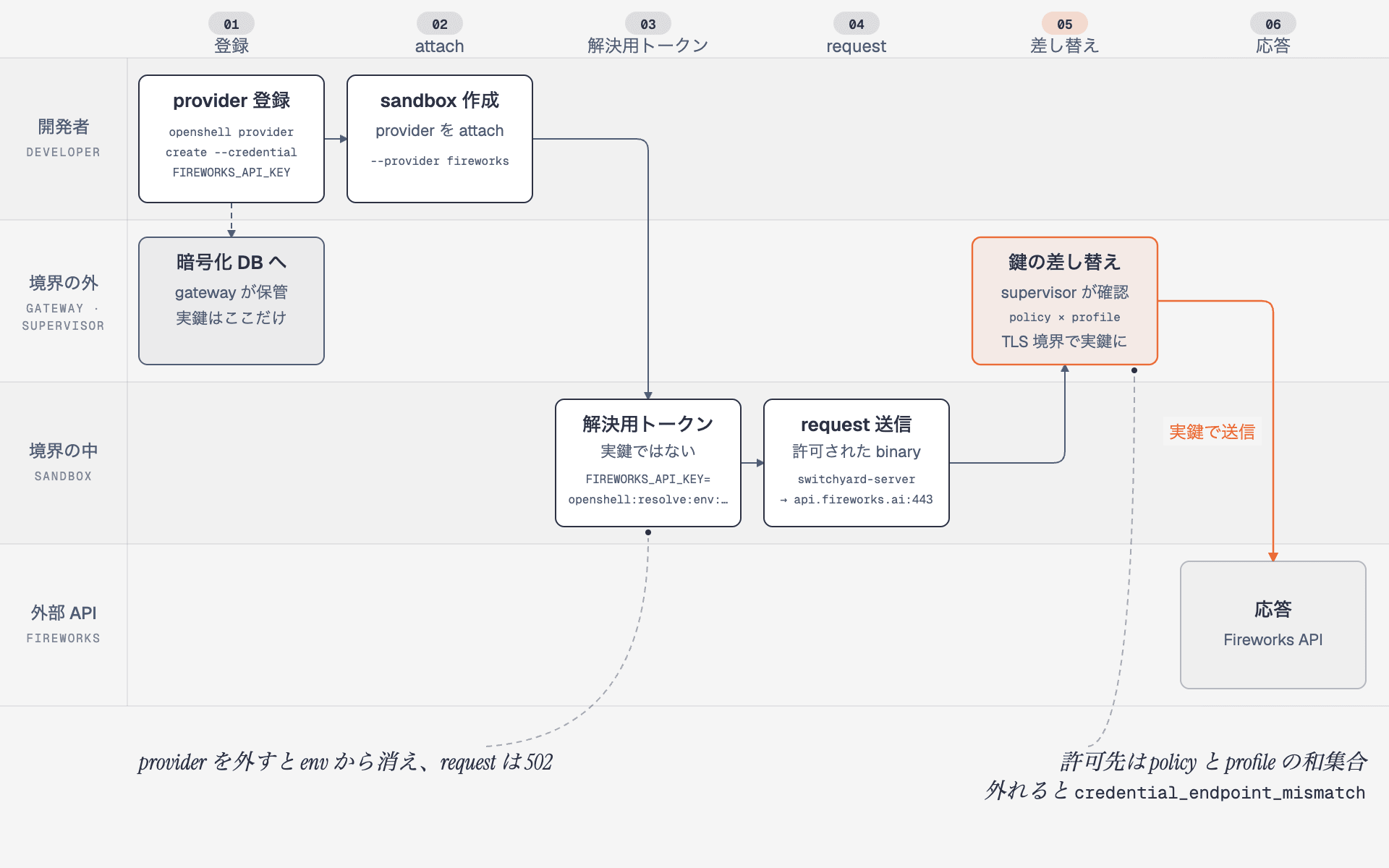
The key exists as a real value only inside the gateway and supervisor. What goes into the sandbox's environment variable is a resolution token; substitution only occurs for endpoints permitted by the profile.
Here's the Fireworks profile attached to the Pi sandbox image. Since only switchyard-server is listed under binaries, even if pi or curl inside the sandbox reads the same environment variable, they cannot reach Fireworks. The official tutorial "Run Pi with OpenRouter" profile has the same shape; the only difference is whether binaries is node or switchyard-server.
id: fireworks
credentials:
  - name: api_key
    env_vars: [FIREWORKS_API_KEY]
    auth_style: bearer
    header_name: authorization
endpoints:
  - host: api.fireworks.ai
    port: 443
    protocol: rest
    access: read-write
    enforcement: enforce
binaries:
  - path: /usr/local/bin/switchyard-server
When you inspect the environment variable inside the sandbox, the value starts with openshell:resolve:env: — a resolution token. If you put it directly in the Authorization header, the supervisor substitutes the real key. If you decide "this isn't the real key" and overwrite it, you'll get a 401. The rule is: don't touch the env value. Providers can be attached and detached from a running sandbox; after detaching, new processes no longer see the environment variable and inference returns 502, and after reattaching it took 2.2 seconds before responses came back. The effective policy is the union of the rules synthesized by the provider and the sandbox's own policy, so to restrict destinations, narrow both.
Policy Is Divided into Sections You Can and Cannot Change at Runtime
The policy YAML has four sections — filesystem_policy, landlock, process, and network_policies — and only network can be changed while the sandbox is running.
| Section | How to change | When it takes effect | Example |
|---|---|---|---|
| filesystem, landlock, process | recreate the sandbox | fixed at creation time | /sandbox and /tmp are read_write, /usr is read_only |
| network (rules you write yourself) | openshell policy update --add-endpoint … --wait or policy set |
reloads in a few seconds; versions persist in policy list |
allow curl to example.com |
| network (rules synthesized by provider) | sandbox provider attach / detach --wait |
reloads in a few seconds | _provider_fireworks |
When you curl to a host with no rule, the connection fails immediately, and the sandbox log shows DENIED for both DNS and TCP.
$ openshell sandbox exec -n sy0 -- curl -sS -m 5 https://example.com
curl: (7) Failed to connect to example.com port 443 after 1 ms: Couldn't connect to server

$ openshell logs sy0 --since 2m --source sandbox
NET:REFUSE [MED] DENIED example.com [reason:policy_dns_ineligible]
NET:OPEN   [MED] DENIED /usr/bin/curl(0) -> example.com:443 [reason:transparent_tcp_policy_denied]
Use --dry-run to preview the resulting YAML before applying it with --wait. Locally it took 3.0 seconds for version 2 to become loaded, after which the same curl returned 200. When viewing logs, the trick is not to filter with --level warn, because policy events are mixed in with INFO and MED.
openshell policy update sy0 --rule-name demo-example --binary /usr/bin/curl \
  --add-endpoint example.com:443:read-only:rest:enforce --dry-run
openshell policy update sy0 --rule-name demo-example --binary /usr/bin/curl \
  --add-endpoint example.com:443:read-only:rest:enforce --wait
# ✓ Policy version 2 submitted (hash: 13303a499750)
# ✓ Policy version 2 loaded (active version: 2)
The mechanism that lets sub-agents submit rule addition requests is the policy advisor. Enable agent_policy_proposals_enabled in the gateway or sandbox configuration, and an API at http://policy.local appears inside the sandbox. The agent can read recent denials and propose rules restricting destination, binary, and method. Proposals are inspected by the policy prover before being queued as pending, and the policy doesn't change until a person runs openshell rule approve. Locally, I submitted a rule for example.com's read-only access from inside a sandbox that had blocked curl, viewed the pending item on the host side, approved it, and about 6 seconds later version 2 was loaded and the same curl returned 200. When proposing the cloud metadata address 169.254.169.254, the prover attaches one finding, so it gets routed to a human's eyes even in auto-approval mode. The workflow of "sub-agent requests the destination it needs, and a human approves it" can be built with this API and three CLIs.
$ openshell rule get adv --status pending
  Chunk: 8db57246-5083-43a0-acc5-17746372e4b3
  Status: pending
  Rule: example-com-readonly
  Prover: prover: no new findings
  Endpoints: example.com:443 [L7 rest, access=read-only]

$ openshell rule approve adv --chunk-id 8db57246-5083-43a0-acc5-17746372e4b3
OK Chunk approved. Policy version: 2, hash: eef57c38497a
Sending Instructions to Sandbox Sub-Agents from a Pi Extension
Now we get to the main topic. Pi's official subagent extension reads agent definitions from agents/*.md, spawns a child pi --mode json -p --no-session locally, and returns the JSON events from stdout back to the parent. The openshell-subagent I built replaces that single spawn call with an OpenShell SDK call.
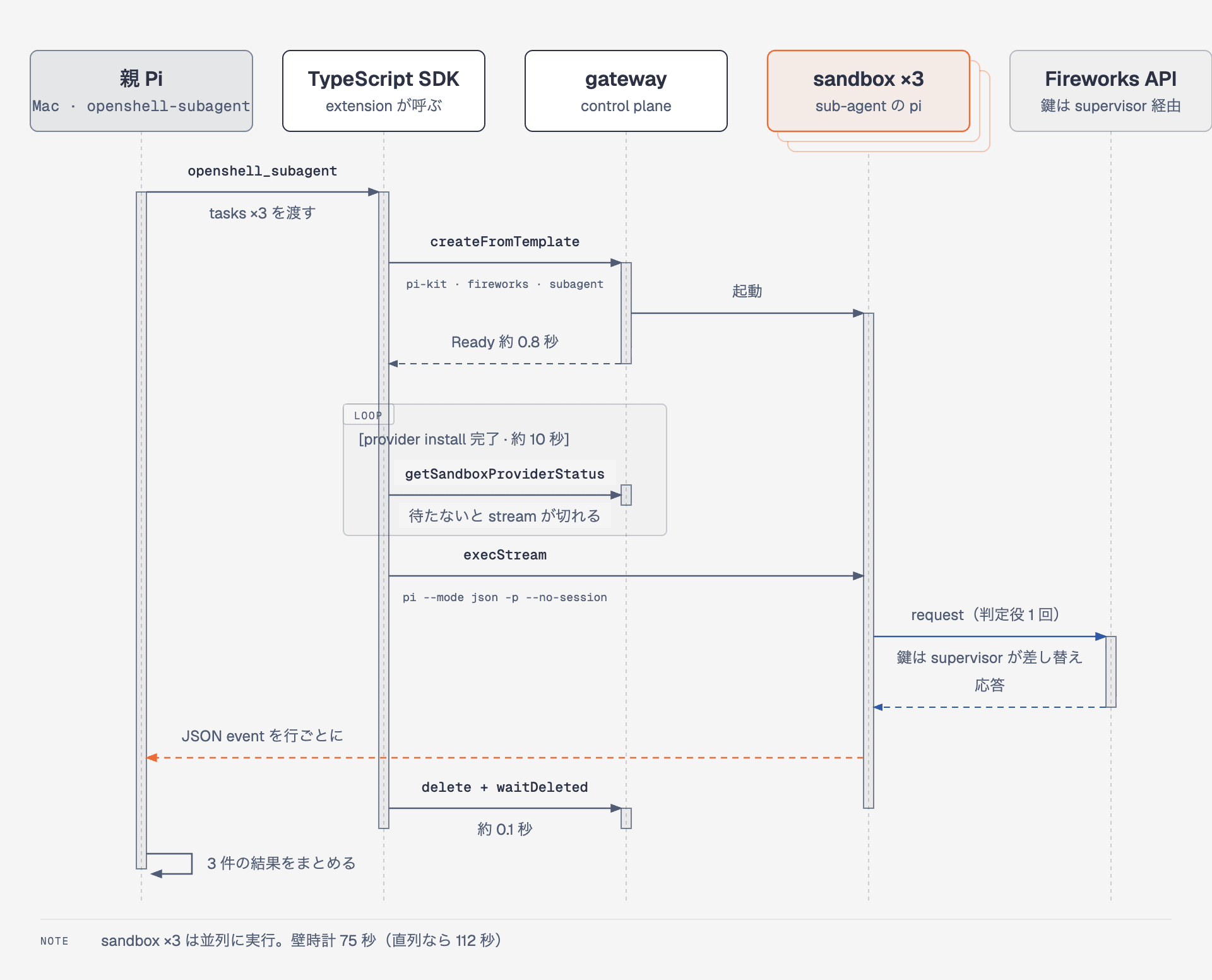
The parent Pi runs on the local Mac; sub-agents run inside sandboxes. Since the sub-agents' supervisors substitute the keys, neither the parent nor the sub-agents hold the real keys.
There are five differences from the official example:
| Aspect | Official example (local spawn) | openshell-subagent (sandbox) |
|---|---|---|
| Where the child runs | process on the same machine as the parent | sandbox created from a template. createFromTemplate → waitReady → wait for provider |
| Credentials | inherited from parent's environment variables | provider resolution token. Parent only holds gateway mTLS |
| Working directory | parent's cwd | /sandbox inside the sandbox. Parent files aren't visible, so include all materials in the request |
| Receiving output | stdout pipe | parse stdout of execStream line by line as JSON (same parsing code as the example) |
| Interruption and cleanup | SIGTERM |
stop exec with AbortSignal, always call delete and waitDeleted |
The SDK reads the mTLS bundle that the CLI uses directly. The docs only show an OIDC example, but the type definitions include caCert, clientCert, and clientKey, which work for entering a local gateway.
const client = await OpenShellClient.connect({
  gateway: "https://localhost:17670",
  caCert: readFileSync(`${mtls}/ca.crt`),
  clientCert: readFileSync(`${mtls}/tls.crt`),
  clientKey: readFileSync(`${mtls}/tls.key`),
});

const created = await client.sandbox.createFromTemplate({
  name: "sa-worker-3jpsci",
  workloadTemplate: "pi-kit",
  providers: ["fireworks"],
  labels: { role: "subagent", agent: "worker", parent: parentSessionId },
  command: ["sleep", "infinity"],
});
await client.sandbox.waitReady(created.name, 180);
await waitProvidersReady(client, created.name, ["fireworks"]); // described later

for await (const event of client.sandbox.execStream(created.name, [
  "/opt/kit/launch", "--mode", "json", "-p", "--no-session", "--model", "switchyard/auto",
  "--append-system-prompt", agent.systemPrompt, `Task: ${task}`,
])) {
  // parse stdout line by line as JSON and collect message_end events (same as the official example)
}
await client.sandbox.delete(created.name);
The parent Pi was started on my local Mac with --no-extensions -e, and I asked it in a single sentence to "delegate 3 tasks to workers in parallel and summarize the key points in one line each." The tool was called once, and here are the results:
| sub-agent | Request | Ready | Provider wait | pi execution | Deletion | Total | Evaluator calls | Session ID |
|---|---|---|---|---|---|---|---|---|
| sa-worker-3jpsci | 3-line summary | 0.81 s | 9.8 s | 8.9 s | 0.08 s | 19.6 s | 1 | 1 |
| sa-worker-0fm9xw | median function implementation | 0.79 s | 9.8 s | 24.7 s | 0.07 s | 35.4 s | 1 | 1 |
| sa-worker-8vkncw | explanation of 5-word hierarchy | 0.79 s | 9.8 s | 46.1 s | 0.07 s | 56.8 s | 1 | 1 |
All 3 sandboxes became Ready in 0.8 seconds, and deletion took 0.1 seconds. The parent's single tool call took 75.1 seconds, which is shorter than the 111.8 seconds you'd get running all 3 serially. Each sub-agent made exactly 1 evaluator call, had 1 session ID, all 3 environment variable keys remained as resolution tokens throughout, and no sandboxes remained after execution.
This may sound like everything went smoothly, but on the first two attempts, 1–2 of the 3 workers failed with upstream transport error. The cause was in the sandbox log:
NET:OPEN [MED] DENIED api.fireworks.ai:443 [reason:L7 tunnel closed before inspection
  because policy changed: policy generation is stale [captured_generation:1 current_generation:2]]
After the sandbox becomes Ready, the provider install arrives a few seconds later and bumps the policy generation. A stream to Fireworks opened during that window gets closed because the generation is stale. Since waitReady only watches the sandbox phase, I added a function that uses the SDK's raw.getSandboxProviderStatus to wait until the state becomes READY. That's the "provider wait 9.8 s" in the table, and after adding it all 3 workers pass consistently.
The extension is published on GitHub under the MIT license. If you have the sandbox image and provider, you only need to specify the template name and provider name via environment variables to get the same setup running. A skill summarizing delegation decisions, how to write agent definitions, pre-run checks, and how to read failures — written for the parent Pi — is included in the same package. Deep diagnosis of the gateway and providers is left to the skill that NVIDIA distributes in the OpenShell repo.
Thinking about operating sub-agents per sandbox
The main reason I want to use the sub-agent = sandbox approach is to change permissions and models per use case. Since all the components that determine permissions are attached per sandbox, they can be changed per agent definition. In extensions, the frontmatter providers and template only apply to that agent's sandbox, while model and tools switch on the Pi side.
| Use case | provider (keys and destination) | policy and image (binary and host) | model | tools |
|---|---|---|---|---|
| Web search | Only the search API provider | Only search API from the search script binary | Cheaper weak side | bash, read |
| PR review | github entrusted with a read-only fine-grained PAT |
Only GitHub from gh and git |
Strong side since comprehension is required | read, grep, bash |
| Code modification | Inference API provider | Inference API only. No access to GitHub | auto left to the judge |
All |
The web search agent cannot access GitHub, and the PR review agent cannot access the search API. This boundary is determined by providers and policies, not by agent definitions, so it cannot be crossed even if the prompt breaks down. I have not yet done actual measurements running this table's breakdown, so this remains an explanation as a design.
In large codebases, the first thing you run into is passing code around. OpenShell has no mount equivalent to Docker's -v; what it has is --upload, sandbox upload and download, and driver settings that administrators opt into. The ways to pass code to sub-agents are narrowed down to 4.
| Approach | Suitable use case | Trade-off |
|---|---|---|
git clone inside the sandbox, push results as a branch |
Modifications, PR creation | Each sub-agent requires a clone. Requires a GitHub provider and PAT |
--upload at creation, download for results |
Small repos, one-time requests | 3 parallel runs means 3 transfers. Even with .gitignore respected, large repos take seconds |
| Keep per-use-case sandboxes running, reuse with stop and start | Repeated work on large repos | Loses the lightness of create-and-destroy. Clone only on first run, follow up with git pull |
| Have a scout read and return only a summary, parent handles modifications | Investigation, review | No code round-trip. Only text is returned |
For large repos, combine rows 1 and 3. Prepare per-use-case sandboxes per project in advance with a clone ready. Pass only a branch name and request text from the parent, and the parent reads the pushed branch or PR as the result. The extension also includes this persistent approach: writing sandbox: proj-review in an agent definition uses that sandbox without creating it, starts it if stopped before executing, and does not destroy it afterward. Reusing a Ready sandbox takes 0.04 seconds, about 10 seconds shorter than the create-and-destroy approach. Starting from stopped requires another ~10 seconds of provider install wait, so it's faster to leave frequently used sandboxes running.
Pi has no permission popup in the main body, and sub-agents run non-interactively, so confirmation UI does not apply. What can stop them is the sandbox policy and provider — that is, the network and key side.
With that in mind, it's natural to divide Pi into 2 types. The everyday Pi stays on the host with only a confirmation extension and no OpenShell credentials. The project Pi starts as a container acting as an orchestrator, holding credentials that only reach that project's workspace. The boundary is drawn not by Pi but by the workspace side, with providers, keys, templates, persistent sandboxes, policies, and members separated per workspace. This RBAC takes effect at a gateway configured with OIDC; with a local gateway it's "manageable separately" at most.
The reason the same Pi can be used for both is that Pi is made of just a small core and packages. It has no permission model or sub-agents in the main body, adds extensions and skills as packages, and runs non-interactively with -p. So with just differences in environment variables and packages, it can serve as a confirmation-enabled companion on the host and as a credentials-restricted orchestrator in a container.
Placing this in a development workflow looks like this:
- Create per-use-case sandboxes per project in advance. Attach only the search API provider to the investigation sandbox, the inference API and a push-capable GitHub provider to the modification sandbox, and a read-only PAT GitHub provider to the review sandbox; clone the repo into the modification and review sandboxes on first run.
- Start the project Pi as a container and pass the issue content. The everyday Pi stays as-is.
- The parent delegates investigation to a scout. The scout runs in the search sandbox and returns results as text.
- The parent delegates modification to a worker. The worker cuts a branch in the modification sandbox's repo, makes changes, runs tests, and pushes. Only the branch name and summary are returned to the parent; files do not make a round-trip.
- The parent delegates review to a reviewer. The reviewer reads
gh pr diffin the review sandbox and returns feedback as text. It cannot push. - A human reviews the PR and merges. Sandboxes are kept without deleting, only stopped during idle periods.
O'Reilly's Agentic Mesh (Eric Broda and Davis Broda, 2026) describes an agent ecosystem with registry, marketplace, trust, and human-in-the-loop. What OpenShell has is the runtime boundary and key management that form the foundation of trust in that picture. There is no registry or discovery; in this case, *.md agent definition files and template names serve that role.
Summary
The components of OpenShell 0.1.0 become easier to understand when viewed hierarchically. The gateway holds workspaces, within which templates, sandboxes, providers, policies, and services are arranged. There are 3 key operational points. For authentication, users choose only 1 entry into the gateway; keys are held by providers and only resolution tokens enter sandboxes. Policies operate at runtime only in the network section.
Using a Pi extension built with the TypeScript SDK to call these components, I was able to run 3 sub-agents in parallel across 3 sandboxes. Ready in 0.8 seconds, deletion in 0.1 seconds, all 3 keys remaining as resolution tokens. Not knowing that provider installation arrives after Ready and dropping 1 to 2 runs as a result was probably the biggest learning experience.
I have not tested the OIDC gateway since I don't have an IdP on hand. The dev build changes daily, so please read the commands as applicable to the version at time of writing.
Next, I'd like to try separating workspaces per project with an OIDC-configured gateway and passing only Workspace User credentials to the orchestrator Pi.
Reference Links
- NVIDIA OpenShell Documentation
- Upgrade to OpenShell 0.1.0
- Gateway Authentication
- Manage Workspaces
- Inference and Providers
- Manage Policies
- Policy Advisor
- Sandbox Templates
- TypeScript SDK
- Run Pi with OpenRouter — Official steps for running Pi with an OpenAI-compatible provider
- NVIDIA/OpenShell — Apache-2.0
- Pi coding agent subagent example
- himorishige/pi-openshell-subagent — The extension from this article (MIT)
- Agentic Mesh: The GenAI-Powered Autonomous Agent Ecosystem (Eric Broda and Davis Broda, O'Reilly, 2026)
- Setting up a development environment by connecting the Pi coding agent to Switchyard (2026-08-17)
- Running NVIDIA OpenShell with Codex confined inside (2026-06-20, 0.0.63)
- Having NemoHermes read a private repository PR without passing a GitHub token (2026-06-17)

