![[Update] The maximum account quota for AWS Organizations can now be checked in AWS Service Quotas](https://images.ctfassets.net/ct0aopd36mqt/wp-thumbnail-2eddd7f989fa67416ea2d27b4223cc32/8f5b157eb82ee11cc288225119e0c290/aws-organizations?w=3840&fm=webp)
[Update] The maximum account quota for AWS Organizations can now be checked in AWS Service Quotas

This page has been translated by machine translation. View original
Introduction
Hello everyone, this is Akaike.
When operating multiple accounts with AWS Organizations, have you ever wondered, "How many accounts can we actually create in this Organization?"
I have.
Until now, when trying to find out the exact value of this maximum account count quota, there were situations where you needed to contact AWS Support or the AWS account team.
This time, an update has been announced that resolves this frustration, so I'd like to introduce it.
Update Details
On August 3, 2026, the following update was announced.
By using the AWS Service Quotas console or the GetServiceQuota API from the management account, you can now check the maximum account count quota and utilization without relying on AWS Support or the account team.
After this update, the following information can be viewed together in the management console.
- Applied quota value (or the raised value if it has been increased)
- AWS default quota value
- Current utilization
- Quota adjustability
Also, since AWS Organizations is a global service hosted in us-east-1, both quota viewing and increase requests must be made from us-east-1 and from the management account.
Additional Notes on the Quota
This quota itself has existed for some time, and it appears that retrieval via CLI or API was also possible before.
However, on AWS re:Post, you can find questions from people who were having trouble retrieving the maximum account count quota using list-service-quotas.
Since I did not directly confirm the behavior before the update, this is speculation, but it seems that such issues may have led to situations where people had no choice but to rely on opening support cases or checking with the account team.
With this update, it seems that the use case the poster wanted — "checking programmatically and sending a notification when a threshold is reached" — has become easier to implement.
Trying It Out
I actually tried it in my own environment.
Operations in the Management Console
When I accessed the Service Quotas console with the management account, went to the AWS Organizations service, and opened the "Maximum number of accounts" quota, the following screen appeared.
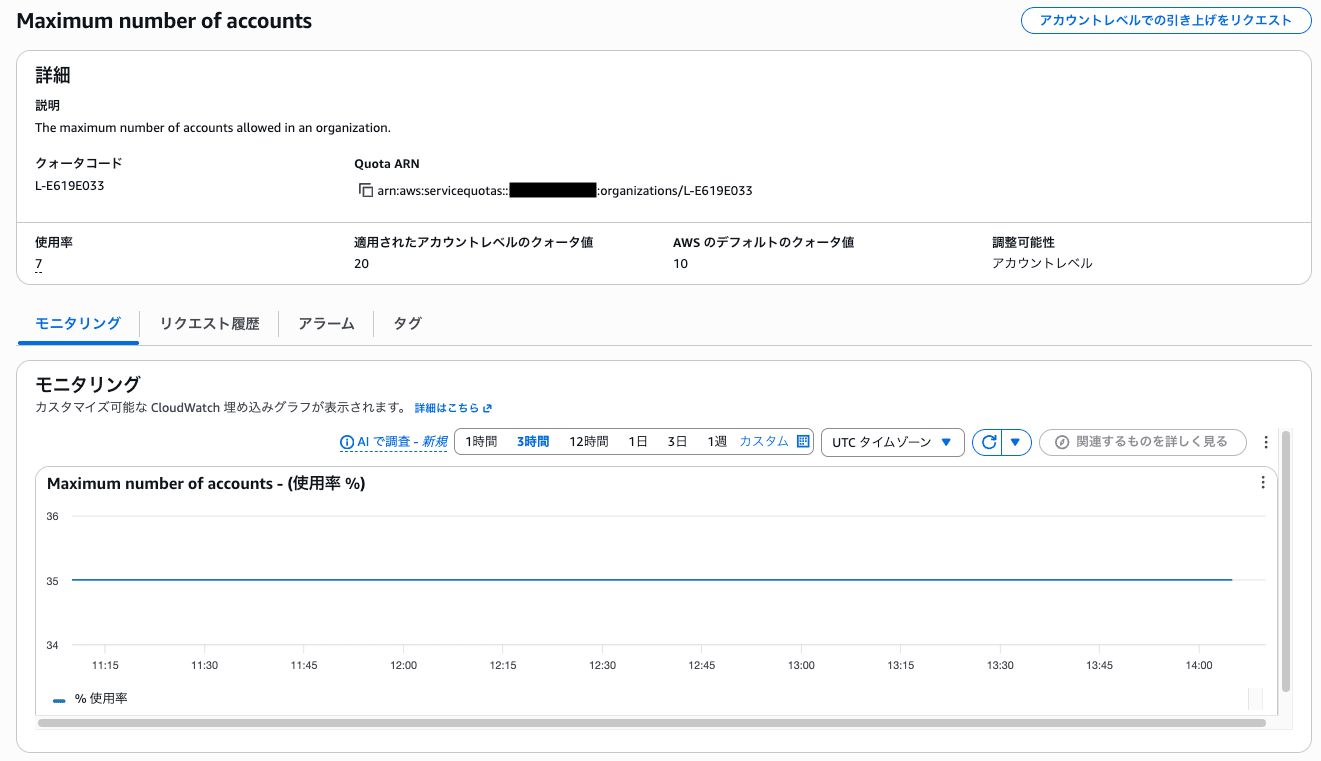
The screen displays the following information.
This is an assumption, but based on the content of the update article, the newly added items among these are considered to be "Applied account-level quota value" and "Utilization."
- Quota code: L-E619E033
- Quota ARN: arn:aws:servicequotas::<Account ID>:organizations/L-E619E033
- Applied account-level quota value: 20
- AWS default quota value: 10
- Adjustability: Account level
- Utilization: 7
In the Monitoring tab, you can also check the trend of this utilization (%) through an embedded CloudWatch graph.
In this way, you can see at a glance from the screen that while the default value is 10, this Organization has already been raised to 20.
Operations with AWS CLI
Not only through the console, but the same information can also be retrieved using the AWS CLI.
First, use list-service-quotas to check all quotas related to AWS Organizations.
aws service-quotas list-service-quotas \
  --service-code organizations \
  --region us-east-1
Excerpting part of the output, the "Maximum number of accounts" quota is properly returned as Value: 20.0 and Adjustable: true.
{
    "ServiceCode": "organizations",
    "ServiceName": "AWS Organizations",
    "QuotaArn": "arn:aws:servicequotas::XXXXXXXXXXXX:organizations/L-E619E033",
    "QuotaCode": "L-E619E033",
    "QuotaName": "Maximum number of accounts",
    "Value": 20.0,
    "Unit": "None",
    "Adjustable": true,
    "GlobalQuota": true,
    "QuotaAppliedAtLevel": "ACCOUNT",
    "Description": "The maximum number of accounts allowed in an organization."
}
Also, if you know the quota code, you can retrieve only the target quota using get-service-quota.
aws service-quotas get-service-quota \
  --service-code organizations \
  --quota-code L-E619E033 \
  --region us-east-1
This also returns the same content as list-service-quotas, and the issue reported on AWS re:Post of "an empty array being returned" did not occur.
{
    "Quota": {
        "ServiceCode": "organizations",
        "ServiceName": "AWS Organizations",
        "QuotaArn": "arn:aws:servicequotas::XXXXXXXXXXXX:organizations/L-E619E033",
        "QuotaCode": "L-E619E033",
        "QuotaName": "Maximum number of accounts",
        "Value": 20.0,
        "Unit": "None",
        "Adjustable": true,
        "GlobalQuota": true,
        "UsageMetric": {
            "MetricNamespace": "AWS/Usage",
            "MetricName": "ResourceCount",
            "MetricDimensions": {
                "Class": "None",
                "Resource": "AccountCount",
                "Service": "Organizations",
                "Type": "Resource"
            },
            "MetricStatisticRecommendation": "Maximum"
        },
        "Period": {
            "PeriodValue": 5,
            "PeriodUnit": "MINUTE"
        },
        "QuotaAppliedAtLevel": "ACCOUNT",
        "Description": "The maximum number of accounts allowed in an organization."
    }
}
Side Note: If You Want to Be Notified When Approaching a Threshold
What this update enables is, after all, just the ability to "view it in the management console."
In actual operations, there are likely many use cases where you want to be automatically notified when utilization exceeds a certain threshold.
In such cases, it is recommended to combine this with the AWS Service Quotas "Automatic Management" feature.
By enabling this feature, notifications will be sent to email, the AWS Console Mobile Application, or chat channels (Teams/Slack, etc.) when quota utilization reaches 80% or 95%.
For details on how to configure this and notification timing, please refer to the articles below.
Conclusion
That was an introduction to the update that makes it possible to check the maximum account count quota for AWS Organizations in AWS Service Quotas.
It's a welcome improvement that information which previously required contacting AWS Support or the AWS account team can now be checked in one place from the management account.
By keeping track of quota utilization in advance, you can avoid the panic of hitting the limit just when you're trying to add more accounts.
I hope this helps make your AWS Organizations operations run a little more smoothly.

