I tried building inter-service integration using the Outbox pattern with Debezium + Amazon MSK

This page has been translated by machine translation. View original
When linking between microservices on AWS, there are various patterns such as using Kinesis, EventBridge, or Kafka.
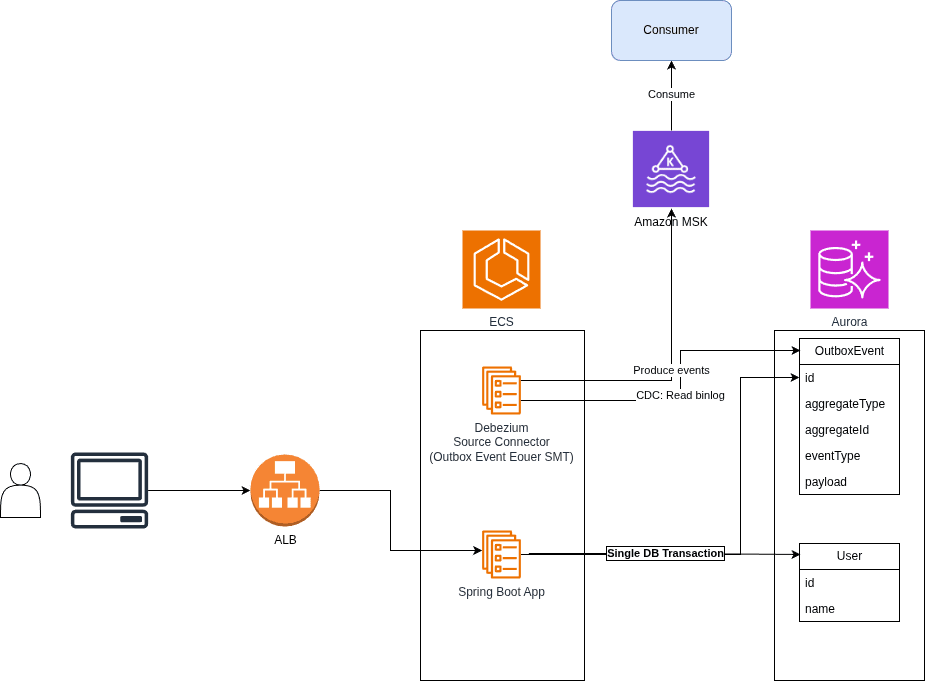
This time, as part of an investigation, I'll try adopting the Outbox Pattern as an implementation method for inter-service communication using Spring Boot + JPA, and sending events to Amazon MSK (Managed Streaming for Apache Kafka) in CloudEvents 1.0 format using Debezium.
- Technology stack configuration
- App: Spring Boot(Kotlin) + JPA
- DB: Aurora MySQL
- Connector: Debezium
- Queue: Amazon MSK (Managed Streaming for Apache Kafka)
- Event Schema: CloudEvents 1.0
Sample Code
I've placed sample code on GitHub, so please refer to it if you're interested. Please note that since this is for demo purposes only, sensitive information such as passwords is written in plain text.
Application (Outbox Pattern)
When linking between microservices, processing that "updates the DB and also publishes events" becomes necessary. At this point, since you're writing to two different systems — the DB and the message broker — the so-called dual write problem occurs, where one side succeeds and the other fails. If the application crashes after updating the DB but before sending the event, the event is lost; if done in reverse order, an event for data that doesn't exist in the DB will be sent.
In the Outbox Pattern, an outbox_events table is prepared, and events are written to the outbox_events table within the same DB transaction as the business data update. Since the DB update and the event recording are performed in the same transaction, the event is only recorded when the DB update succeeds, and if a rollback occurs, the event write is also rolled back. This ensures consistency between the DB state and the events that are published.
Sending the events written to the outbox_events table to the actual broker is the job of a separate process from the application. Generally, either a batch process running on a schedule (polling) or a CDC (Change Data Capture) tool that monitors the DB's change log is used. In this case, we delegate that to Debezium, which will be described later.
- Implementation example with Spring Boot(Kotlin) + JPA
@Service
class UserService(
    private val userRepository: UserRepository,
    private val outboxEventRepository: OutboxEventRepository,
    private val objectMapper: ObjectMapper,
) {
    fun listUsers(): List<User> {
        return userRepository.findAll()
    }

    @Transactional
    fun register(name: String): User {
        val user = userRepository.save(User(name = name))
        saveOutboxEvent("USER_REGISTERED", user)
        return user
    }

    @Transactional
    fun update(id: Long, name: String): User {
        val user = userRepository.findById(id)
            .orElseThrow { NoSuchElementException("User not found: id=$id") }
        user.name = name
        user.updatedAt = Instant.now()
        saveOutboxEvent("USER_UPDATED", user)
        return user
    }

    @Transactional
    fun delete(id: Long) {
        val user = userRepository.findById(id)
            .orElseThrow { NoSuchElementException("User not found: id=$id") }
        userRepository.delete(user)
        saveOutboxEvent("USER_DELETED", user)
    }

    // Each time a User is registered, updated, or deleted, write the event to the outbox_events table
    private fun saveOutboxEvent(type: String, user: User) {
        val data = objectMapper.writeValueAsBytes(
            mapOf(
                "id" to user.id,
                "name" to user.name,
            )
        )
        // Use the same UUID for both the outbox_events primary key and the CloudEvents id
        val eventId = UUID.randomUUID().toString()
        // Use the CloudEvents SDK for Java for the event payload
        // https://cloudevents.github.io/sdk-java/spring.html
        val cloudEvent = CloudEventBuilder.v1()
            .withId(eventId)
            .withSource(URI.create("/users"))
            .withType(type)
            .withSubject(user.id.toString())
            .withTime(OffsetDateTime.now(ZoneOffset.UTC))
            .withDataContentType("application/json")
            .withData(data)
            .build()
        outboxEventRepository.save(
            OutboxEvent(
                id = eventId,
                aggregateType = "USER",
                aggregateId = user.id.toString(),
                type = type,
                payload = jsonFormat.serialize(cloudEvent).toString(Charsets.UTF_8),
            )
        )
    }

    companion object {
        private val jsonFormat = JsonFormat()
    }
}
The key point is that the application does not send messages directly to Kafka. The application only writes to its own DB, and delegates the sending to Kafka to a separate process (Debezium in this case) that operates asynchronously. Therefore, no Kafka client configuration or send retry implementation is needed on the application side, allowing it to focus on the DB update processing.
The entity corresponding to the outbox_events table is as follows.
@Entity
@Table(name = "outbox_events")
class OutboxEvent(
    @Id
    @Column(columnDefinition = "char(36)")
    var id: String = UUID.randomUUID().toString(),

    @Column(name = "aggregatetype", nullable = false)
    var aggregateType: String,

    @Column(name = "aggregateid", nullable = false)
    var aggregateId: String,

    @Column(name = "type", nullable = false)
    var type: String,

    @Column(nullable = false, columnDefinition = "json")
    var payload: String,

    @Column(nullable = false)
    var createdAt: Instant = Instant.now(),
)
In the AWS environment, the App runs as an ECS service. The App's ECS task connects to Aurora MySQL to handle user registration, updates, and deletions.
resource "aws_ecs_task_definition" "app" {
  family                   = "${var.name}-app"
  requires_compatibilities = ["FARGATE"]
  network_mode             = "awsvpc"
  cpu                      = 512
  memory                   = 1024
  execution_role_arn       = aws_iam_role.task_execution.arn

  container_definitions = jsonencode([
    {
      name         = "app"
      image        = "${aws_ecr_repository.app.repository_url}:${var.app_image_tag}"
      essential    = true
      portMappings = [{ containerPort = 8080 }]
      environment = [
        { name = "SPRING_DATASOURCE_URL", value = "jdbc:mysql://${aws_rds_cluster.aurora.endpoint}:3306/${var.db_name}" },
        { name = "SPRING_DATASOURCE_USERNAME", value = var.db_username },
        { name = "SPRING_DATASOURCE_PASSWORD", value = var.db_password },
        { name = "SPRING_KAFKA_BOOTSTRAP_SERVERS", value = aws_msk_cluster.main.bootstrap_brokers },
      ]
      logConfiguration = {
        logDriver = "awslogs"
        options = {
          awslogs-group         = aws_cloudwatch_log_group.app.name
          awslogs-region        = var.region
          awslogs-stream-prefix = "app"
        }
      }
    }
  ])
}
Amazon Aurora MySQL
I have no particular preference for the RDBMS, but I used Amazon Aurora MySQL, which I'm familiar with. Debezium can capture DB changes by monitoring MySQL's binlog (binary log).
- Amazon Aurora MySQL setup
resource "aws_db_subnet_group" "aurora" {
  name       = "${var.name}-aurora"
  subnet_ids = aws_subnet.private[*].id
}

resource "aws_rds_cluster_parameter_group" "aurora" {
  name   = "${var.name}-aurora"
  family = "aurora-mysql8.0"

  # Row-based binlog is required by Debezium
  parameter {
    name         = "binlog_format"
    value        = "ROW"
    apply_method = "pending-reboot"
  }

  parameter {
    name         = "binlog_row_image"
    value        = "FULL"
    apply_method = "immediate"
  }
}

resource "aws_rds_cluster" "aurora" {
  cluster_identifier              = "${var.name}-aurora"
  engine                          = "aurora-mysql"
  database_name                   = var.db_name
  master_username                 = var.db_username
  master_password                 = var.db_password
  db_subnet_group_name            = aws_db_subnet_group.aurora.name
  vpc_security_group_ids          = [aws_security_group.aurora.id]
  db_cluster_parameter_group_name = aws_rds_cluster_parameter_group.aurora.name
  skip_final_snapshot             = true

  serverlessv2_scaling_configuration {
    min_capacity = 0.5
    max_capacity = 2
  }
}

resource "aws_rds_cluster_instance" "aurora" {
  identifier         = "${var.name}-aurora-1"
  cluster_identifier = aws_rds_cluster.aurora.id
  engine             = aws_rds_cluster.aurora.engine
  instance_class     = "db.serverless"
}
The key point is that the binary log format (binlog_format) is set to row-based (ROW) in the cluster parameter group. Since Aurora has the binlog effectively disabled by default (binlog_format = OFF), changing this to ROW enables binlog output for the first time, allowing Debezium to perform CDC. binlog_row_image is set to FULL. This causes the full column values of each record to be written to the row-based binlog. For UPDATEs, both before and after row data is recorded; for INSERTs, the after data; and for DELETEs, the before data — enabling Debezium to generate complete change events. Although FULL is the default for Aurora MySQL, we explicitly verify the setting just to be safe.
One Aurora-specific concern is the binlog retention period. Aurora MySQL deletes binlogs as quickly as possible by default, so if the binlog disappears while Debezium (the connector) is stopped, it won't be able to resume reading from where it left off upon recovery. Set the retention period explicitly using the following stored procedure.
CALL mysql.rds_set_configuration('binlog retention hours', 24);
Another concern is the read position during failover. Debezium's MySQL connector manages the read position using binlog file names and positions by default, but since these are instance-specific, the connector may lose track of its position if the Writer changes during a failover. In production, you can enable GTID (Global Transaction Identifier) by setting gtid_mode and enforce_gtid_consistency to ON in the cluster parameter group, allowing the read position to be managed using transaction IDs that are unique across instances. Note that GTID enablement and failover verification are omitted in this demo environment, which uses a single instance.
The definition of the outbox_events table references the Basic Outbox Table specification that Debezium's Outbox Event Router assumes by default.
Column        |          Type          | Modifiers
--------------+------------------------+-----------
id            | uuid                   | not null
aggregatetype | character varying(255) | not null
aggregateid   | character varying(255) | not null
type          | character varying(255) | not null
payload       | jsonb                  |
Note that since the above is a PostgreSQL example from the documentation, types like uuid and jsonb cannot be used as-is in MySQL. In this case, the following table is generated from the entity defined earlier.
create table outbox_events
(
    id            char(36)     not null primary key,
    aggregateid   varchar(255) not null,
    aggregatetype varchar(255) not null,
    type          varchar(255) not null,
    payload       json         not null,
    created_at    datetime(6)  not null
);
Debezium
Debezium is a CDC (Change Data Capture) tool that captures DB changes and sends them to Kafka. By using Debezium, you can send events to Kafka triggered by DB updates. Since Debezium operates as a Kafka Connect plugin (Source Connector), using it requires standing up a Kafka Connect worker and registering a connector.
In the AWS environment, Debezium also runs as an ECS service. It is launched as a Fargate task using the official Debezium Docker image (quay.io/debezium/connect). Since Kafka Connect saves its own configuration, offsets, and status to Kafka topics (connect_configs / connect_offsets / connect_statuses), these topic names are specified as environment variables. These topics serve as a datastore for persisting Kafka Connect infrastructure metadata, so even if a Debezium task crashes and a new one starts, it can resume processing by inheriting the connector configuration and offsets.
resource "aws_ecs_task_definition" "connect" {
  family                   = "${var.name}-connect"
  requires_compatibilities = ["FARGATE"]
  network_mode             = "awsvpc"
  cpu                      = 1024
  memory                   = 2048
  execution_role_arn       = aws_iam_role.task_execution.arn

  container_definitions = jsonencode([
    {
      name         = "connect"
      image        = "quay.io/debezium/connect:3.6.0.Final"
      essential    = true
      portMappings = [{ containerPort = 8083 }]
      environment = [
        { name = "BOOTSTRAP_SERVERS", value = aws_msk_cluster.main.bootstrap_brokers },
        { name = "GROUP_ID", value = "outbox-connect" },
        { name = "CONFIG_STORAGE_TOPIC", value = "connect_configs" },
        { name = "OFFSET_STORAGE_TOPIC", value = "connect_offsets" },
        { name = "STATUS_STORAGE_TOPIC", value = "connect_statuses" },
      ]
      logConfiguration = {
        logDriver = "awslogs"
        options = {
          awslogs-group         = aws_cloudwatch_log_group.connect.name
          awslogs-region        = var.region
          awslogs-stream-prefix = "connect"
        }
      }
    }
  ])
}
With Debezium, in addition to simply using it as CDC to capture DB changes, you can easily implement the Outbox Pattern using a feature called the Outbox Event Router.
The Outbox Event Router is implemented as a SMT (Single Message Transformation) for Kafka Connect. SMT is a mechanism that transforms messages one at a time just before the Connector writes captured records to Kafka. Normally, change events captured by Debezium are in a proprietary envelope format containing the before/after row data (before / after), but the Outbox Event Router SMT extracts INSERTs to the outbox_events table and performs the following transformations before sending to Kafka:
- Uses the contents of the
payloadcolumn directly as the message value - Constructs the destination topic name from the value of the
aggregatetypecolumn - Uses the value of the
aggregateidcolumn as the message key - Adds arbitrary columns to headers or the envelope
In other words, the transformation logic from Outbox table records to event messages can be achieved through configuration alone, without any coding. Incidentally, since the SMT ignores DELETEs from the outbox_events table by default, periodically deleting records to prevent table bloat will not cause those deletions to flow as extra events (the deletions themselves do appear in the binlog, so they do add to the processing load on the Connect side).
As initial setup after task startup, register the Debezium connector. The connector can be created via the Kafka Connect REST API (POST /connectors). Note that for this demo, DB usernames and passwords are written in plain text, but Kafka Connect has a Config Provider mechanism to resolve configuration values from external sources, so in production you should use that to retrieve secrets from Secrets Manager or similar.
{
  "name": "outbox-connector",
  "config": {
    "connector.class": "io.debezium.connector.mysql.MySqlConnector",
    "tasks.max": "1",
    "database.hostname": "REPLACED_BY_AURORA_ENDPOINT",
    "database.port": "3306",
    "database.user": "root",
    "database.password": "password",
    "database.server.id": "184054",
    "topic.prefix": "outbox-app",
    "database.include.list": "test",
    "table.include.list": "test.outbox_events",
    "schema.history.internal.kafka.bootstrap.servers": "REPLACED_BY_MSK_BROKERS",
    "schema.history.internal.kafka.topic": "schema-changes.outbox",
    "key.converter": "org.apache.kafka.connect.storage.StringConverter",
    "value.converter": "org.apache.kafka.connect.json.JsonConverter",
    "value.converter.schemas.enable": "false",
    "transforms": "outbox,cloudEventsContentType",
    "transforms.outbox.type": "io.debezium.transforms.outbox.EventRouter",
    "transforms.outbox.table.fields.additional.placement": "type:header:eventType",
    "transforms.outbox.table.expand.json.payload": "true",
    "transforms.cloudEventsContentType.type": "org.apache.kafka.connect.transforms.InsertHeader",
    "transforms.cloudEventsContentType.header": "content-type",
    "transforms.cloudEventsContentType.value.literal": "application/cloudevents+json"
  }
}
- SMT configuration
In this case, two SMTs are applied: outbox (Outbox Event Router) and cloudEventsContentType (InsertHeader). The transforms.outbox.* settings configure the Outbox Event Router SMT, with each role as follows:
| Setting | Role |
|---|---|
transforms |
Aliases for the SMTs to apply. When specifying multiple, write them comma-separated, and transformations are applied in the order listed |
transforms.outbox.type |
The SMT class name. For the Outbox Event Router, specify io.debezium.transforms.outbox.EventRouter |
transforms.outbox.table.fields.additional.placement |
Specification of additional columns to include. Here, the value of the type column is added as an eventType header, so consumers can filter by event type without parsing the payload |
transforms.outbox.table.expand.json.payload |
Expands the JSON string in the payload column as a JSON object rather than an escaped string when sending |
Since the table column names in this case follow Debezium's default values (aggregatetype / aggregateid / payload), configuration for routing and keys is omitted. The default behavior is as follows:
- The value of the
aggregatetypecolumn (route.by.field) is expanded into the topic name templateoutbox.event.${routedByValue}(route.topic.replacement), so in this case it routes to theoutbox.event.USERtopic - The
aggregateidcolumn (table.field.event.key) becomes the message key, so events for users with the sameaggregateidare written to the same partition - The
payloadcolumn (table.field.event.payload) becomes the message value
If column names differ from the default values, these settings can be used to override the mapping.
The other SMT, transforms.cloudEventsContentType.*, configures the Kafka Connect built-in InsertHeader SMT, which adds a content-type: application/cloudevents+json header to all messages. As described later, since the message value in this case contains CloudEvents-format JSON as-is (equivalent to structured mode), this makes that explicit via the header.
- Schema history topic (MySQL connector-specific configuration)
Among the settings, there are the following items that are not directly related to the Outbox:
  "schema.history.internal.kafka.bootstrap.servers": "REPLACED_BY_MSK_BROKERS",
  "schema.history.internal.kafka.topic": "schema-changes.outbox",
This is the database schema history configuration specific to the MySQL connector. Row events recorded in MySQL's binlog do not include the table definition (column names and types) at that point in time. Therefore, Debezium internally manages the "table schema at each point in time" by parsing DDL statements in the binlog, and persists this history to a dedicated Kafka topic. When the connector restarts, it reads back the schema history from this topic to restore the state needed to correctly interpret the continuation of the binlog.
This topic is for internal use by the connector only and is not intended for application subscriptions.
Amazon MSK (Managed Streaming for Apache Kafka)
Amazon MSK is a managed Kafka service provided by AWS. Since AWS handles operational aspects such as Kafka cluster setup and scaling, the operational burden of running Kafka can be reduced.
- Amazon MSK setup
resource "aws_msk_configuration" "main" {
  name           = "${var.name}-msk"
  kafka_versions = ["3.9.x"]

  # Debezium and Kafka Connect create topics on demand
  server_properties = <<-PROPERTIES
    auto.create.topics.enable=true
    default.replication.factor=3
    min.insync.replicas=2
  PROPERTIES
}

resource "aws_msk_cluster" "main" {
  cluster_name           = "${var.name}-msk"
  kafka_version          = "3.9.x"
  number_of_broker_nodes = 3

  broker_node_group_info {
    instance_type   = "kafka.t3.small"
    client_subnets  = aws_subnet.private[*].id
    security_groups = [aws_security_group.msk.id]
    storage_info {
      ebs_storage_info {
        volume_size = 20
      }
    }
  }

  configuration_info {
    arn      = aws_msk_configuration.main.arn
    revision = aws_msk_configuration.main.latest_revision
  }

  # Plaintext inside the VPC to keep app / connect config simple (demo only)
  encryption_info {
    encryption_in_transit {
      client_broker = "PLAINTEXT"
      in_cluster    = true
    }
  }
}
The key point is auto.create.topics.enable=true. This setting causes Kafka to automatically create a topic when a write is attempted to a non-existent topic. Since MSK defaults to false, without enabling this, Debezium's Outbox Event Router would fail with a "topic does not exist" error the first time it tries to write an event to a topic. This setting is necessary since there is no mechanism to pre-create topics in this configuration.
Note that automatically created topics are created with the broker's default settings (such as num.partitions=1 for the number of partitions). If you want to control the partition count or retention for production use, it is better to explicitly create topics in advance rather than relying on automatic creation.
Ordering Guarantees and Delivery Guarantees
Ordering is guaranteed within a partition
Kafka only guarantees message ordering within a topic partition. Messages with the same key are written to the same partition (with the default partitioner), so they can be received in the order they were sent, on a per-key basis. The Outbox Event Router uses the column specified in table.field.event.key (the default aggregateid in this case) as the key, so events for the same user are always written to the same partition, and consumers can receive them in the correct order "on a per-user basis." Conversely, events between different users may span partitions since they have different keys, so ordering is not guaranteed. By using the aggregate ID as the key in this way, "per-aggregate ordering guarantees" can be ensured.
Delivery guarantee is at-least-once
The end-to-end delivery guarantee of this configuration is at-least-once. Debezium (Kafka Connect) periodically commits the binlog read position (offset) to Kafka, but depending on the timing of a crash or restart, events processed before a commit may be sent again after recovery. In other words, consumers need to be designed with the assumption that events will not be lost, but may be delivered more than once.
Therefore, the basic approach is to make consumer-side processing idempotent. For example, you might implement deduplication by recording the id of processed events and skipping duplicates. There are also approaches such as using EOS (exactly.once.source.support) to make writes to Kafka exactly-once, but unless the consumer can atomically perform "processing" and "offset commit," duplicates can still occur end-to-end. Ultimately, the conclusion is that building the consumer side to be idempotent is the practical solution.
CloudEvents 1.0
CloudEvents is a standard specification for event data defined by CNCF. It unifies how metadata such as event ID, source, and type are represented, making it easier to integrate events between different services.
In the earlier implementation example of the Outbox pattern, we stored events in CloudEvents 1.0 format in the payload column of the outbox_events table. The receiving service parses the messages received from Kafka as CloudEvents and processes them. Below is an example implementation of the receiving side using Spring Kafka.
@Service
class KafkaEventService {
...
    @KafkaListener(topics = ["outbox.event.USER"], groupId = "consumer-group-id")
    fun onMessage(record: ConsumerRecord<String, String>, @Header("eventType", required = false) eventType: String?) {
        // Use the eventType header to log the event type
        log.info("Received event: {}", eventType)
        val event = try {
            // Parse using JsonFormat from CloudEvents SDK for Java
            jsonFormat.deserialize(record.value().toByteArray())
        } catch (e: Exception) {
            log.warn("Skipping non-CloudEvent message at offset {}: {}", record.offset(), e.message)
            return
        }
        broadcast(event)
    }
}
The actual event received on the Consumer side will be in the following format.
{
  "specversion": "1.0",
  "id": "f1bfa6e0-173c-4a31-b3e0-66439bd90468",
  "source": "/users",
  "type": "USER_REGISTERED",
  "datacontenttype": "application/json",
  "subject": "4",
  "time": "2026-07-30T08:45:35.263905545Z",
  "data": {
    "id": 4,
    "name": "Seiichi Arai"
  }
}
Since we are storing the entire event in the payload column of the outbox table this time, it is equivalent to Kafka Protocol Binding - structured mode. This places the entire event (metadata + data) as a single JSON in the message value, so the content-type becomes application/cloudevents+json.
SDKs are provided for each language, and in Java, the CloudEvents SDK for Java allows you to easily generate and parse events in CloudEvents format.
Summary
So, what did you think?
This time, we adopted the Outbox pattern as an implementation method for inter-service integration using Spring Boot + JPA, and tried out a way to send events in CloudEvents 1.0 format to Amazon MSK (Managed Streaming for Apache Kafka) using Debezium. I think this is a fairly standard approach for event integration between microservices.
On the application side, all you need to do is "write the event to the outbox_events table within the same transaction" — there is no need to write any Kafka sending logic at all. Since issues such as message sending retries and inconsistencies between DB updates and message delivery can be delegated to Debezium, the application code can be kept very simple. The Outbox Event Router also takes care of topic routing and field expansion into headers just by writing the connector configuration (SMT), making it easier to implement than I had imagined.
On the other hand, in terms of infrastructure, in addition to the MSK brokers, you need to keep an ECS task for Kafka Connect (Debezium) running at all times, which makes it somewhat heavyweight to introduce into a system. Even in a small-scale setup like this one for verification purposes, it incurs a fair amount of running costs. While event volume is low, a simpler configuration that polls the outbox table and forwards to EventBridge or SNS/SQS might be sufficient. On the other hand, I felt this configuration becomes cost-effective when Kafka is already in operation or when high throughput is required due to large event volumes.
Also, while the Outbox pattern + Debezium takes care of "delivering events reliably," as mentioned above, the delivery guarantee is at-least-once, so handling duplicates (idempotency) remains the responsibility of the consumer side. It is important to keep in mind that "adding the Outbox pattern does not solve all consistency problems" — it needs to be considered together with the design of the receiving side.
I hope this is helpful to someone. Thank you for your time!