
I summarized the differences between PagerDuty Incident Custom Fields and Service Custom Fields

This page has been translated by machine translation. View original
Hello. This is Takayama.
Recently, I needed to store custom information in PagerDuty services and incidents, so I looked into the Custom Fields settings.
However, PagerDuty has two types of Custom Fields.
I was unsure about how to use the two Custom Fields differently, so I organized what I found.
In this blog, I will summarize the differences and use cases for Service Custom Fields and Incident Custom Fields.
Summary First
As one example, you can determine which to use based on distinctions like the following.
| Information to record | Better fit |
|---|---|
| Environment (production/staging), region, technical owner, criticality | Service |
| Service classification, Service Directory search, per-service reporting | Service |
| Response records that differ by type, such as Major / Security | Incident |
| Information that changes during incident response, per-incident decisions | Incident |
| Information that operators enter or change from the incident screen | Incident |
What Are Custom Fields
PagerDuty's Custom Fields is a feature for attaching custom information to services and incidents.
For example, you can attach attributes to a service such as "is it a production or staging environment" or "which team is the owner," and you can leave records on incidents such as "response type" or "scope of impact."
Custom Fields are divided into two types depending on what they are attached to.
Custom Fields on Incidents
Custom Fields attached to incidents.
- The target is incidents, and each incident holds one set of values
- Field definitions are made per Incident Type (with inheritance from the parent Type)
- Suited for information that changes during incident response and response records that differ by type
Custom Fields on Services
Custom Fields attached to services in the Service Directory. It appears to be a relatively new feature, with general availability (GA) starting in August 2025.
- The target is services, and each service holds one set of values
- Field definitions are applied commonly to all services within the account
- Suited for managing service metadata such as environment (production/staging), region, and technical owner
Comparison of Custom Fields
Below, I will compare the differences between Service Custom Fields and Incident Custom Fields.
Basics
| Aspect | Service Custom Fields | Incident Custom Fields |
|---|---|---|
| Target | Services (Service Directory) | Incidents |
| Unit of values | One set per service | One set per incident |
| Definition scope | Common to all services within the account | Per Incident Type (with inheritance) |
| Interoperability | Separate systems. No auto-sync or auto-display | Same |
Management and Viewing Locations in the UI
| Operation | Service Custom Fields | Incident Custom Fields |
|---|---|---|
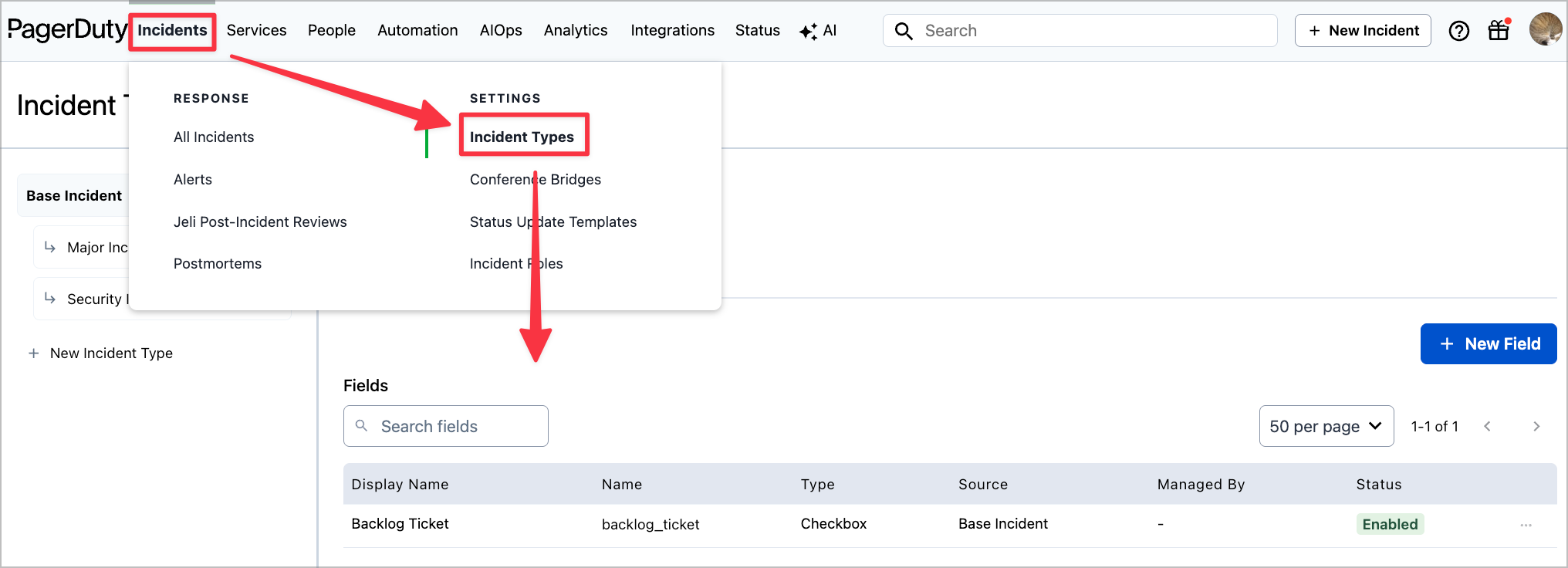
| Creating field definitions | "Services" → "Service Custom Fields" | "Incidents" → "Incident Types" → Target Type → "Fields" |
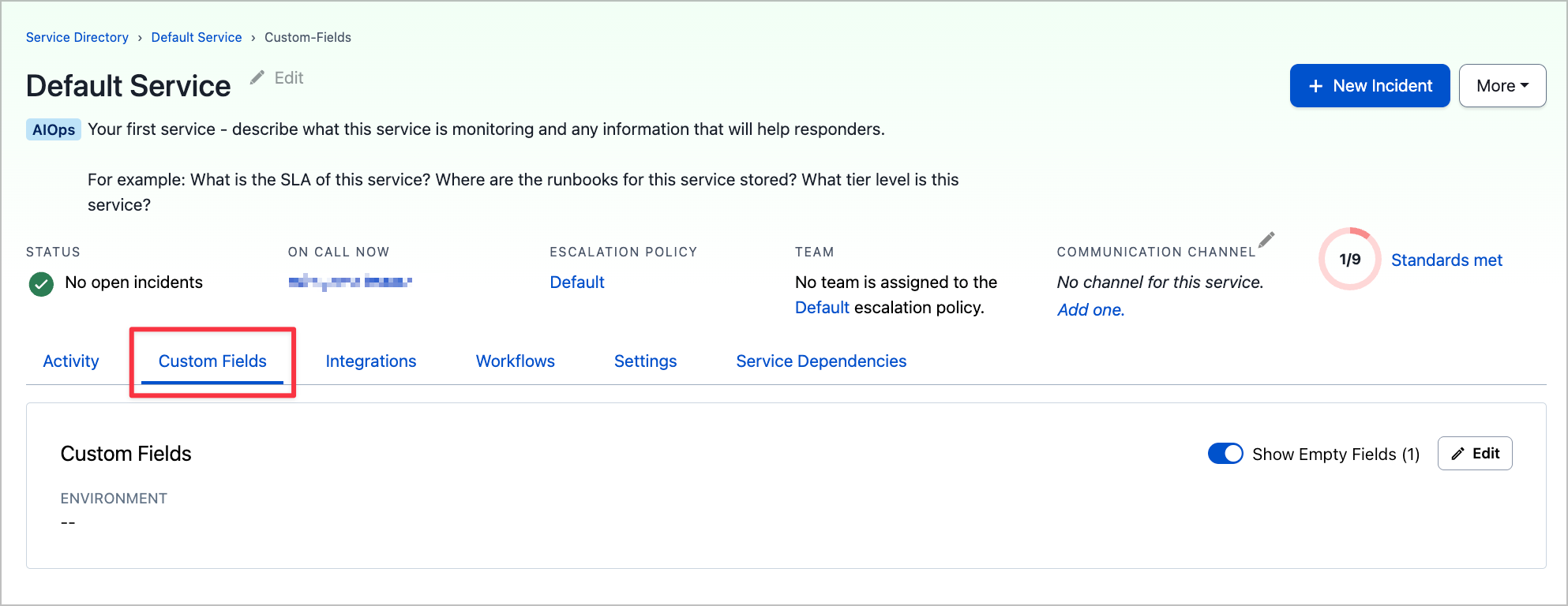
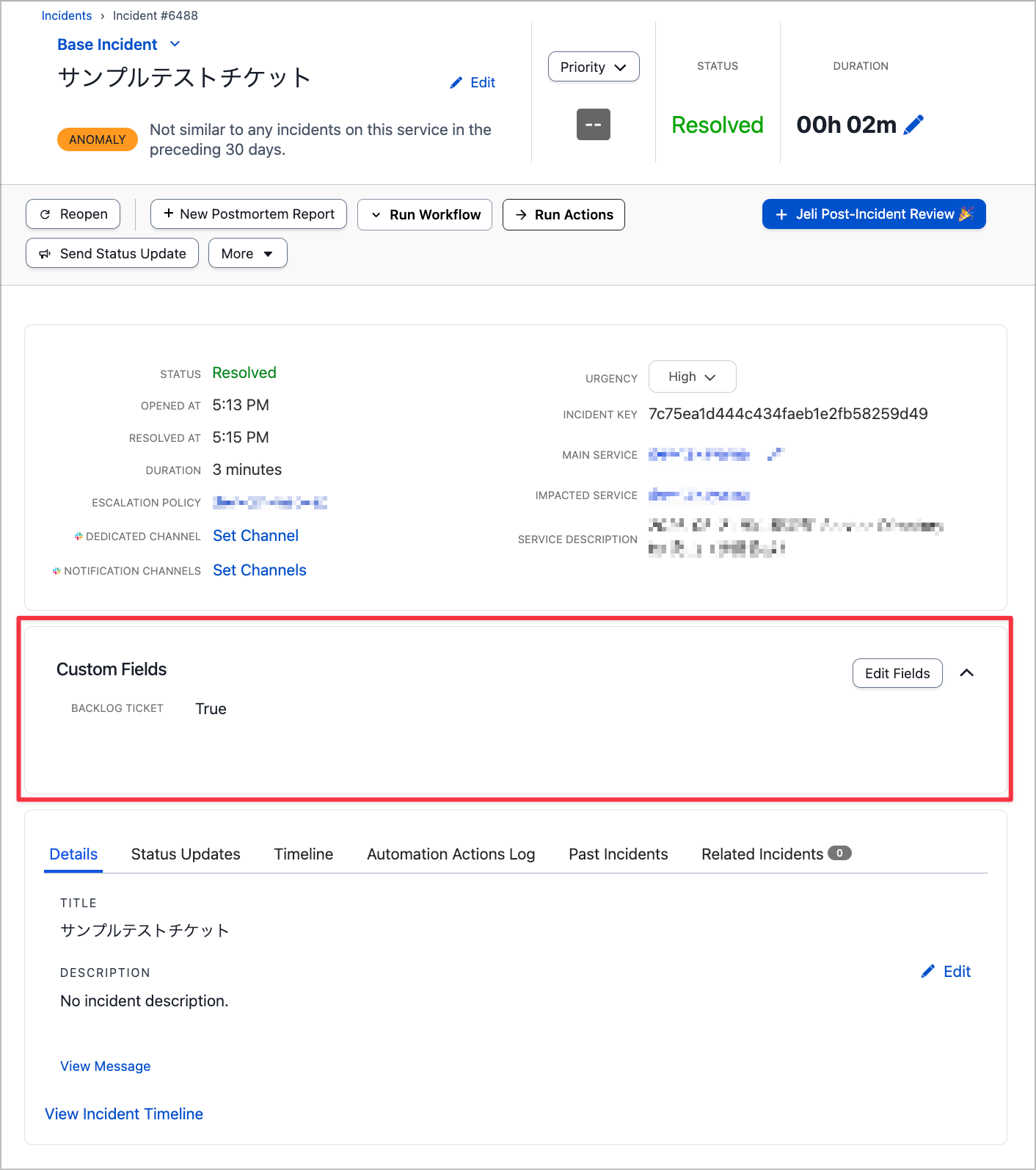
| Viewing and editing values | Service Directory service details → "Custom Fields" tab | Incident details → "Custom Fields" section → "Edit Fields" |
| List search | Service Directory search bar | Insights / Incident Activity, etc. |
Service Custom Fields
The base settings are configured from "Services" → "Service Custom Fields".

Once configured, fields can be entered for all Services.
Incident Custom Fields
The base settings are configured from "Incidents" → "Incident Types" → Target Type → "Fields".
Once configured, fields can be entered for all Incident Types as well.
Permissions
| Operation | Service Custom Fields | Incident Custom Fields |
|---|---|---|
| Creating, editing, deleting definitions | Account Owner / Global Admin | Account Owner / Admin |
| Viewing and editing values | Users with service view/edit permissions | Users with incident view/edit permissions |
Plans and Limits
Limits for Service Custom Fields.
| Plan | Enabled field limit |
|---|---|
| Business | 15 |
| Enterprise for Incident Management | 30 |
The combined total of enabled and disabled is up to 35, and disabled fields are not counted toward the enabled limit.
Limits for Incident Custom Fields.
| Plan | Base Incident Type | Account total |
|---|---|---|
| Business / Ops Cloud Essentials | 15 | 45 |
| Enterprise for Incident Management / Ops Cloud Plus・Ultimate | 100 | 130 |
The limit per Incident Type is a maximum of 15. Unlike the Service side, disabled fields also count toward the limit.
Field Types
The available types are mostly the same, but Paragraph is only supported on the Incident side.
| Type | Service | Incident |
|---|---|---|
| Text | ○ | ○ |
| Single Select | ○ | ○ |
| Multiple Select | ○ | ○ |
| Tag | ○ | ○ |
| URL | ○ | ○ |
| Checkbox | ○ | ○ |
| Datetime | ○ | ○ |
| Decimal | ○ | ○ |
| Integer | ○ | ○ |
| Paragraph | × | ○ |
Mobile App
| Service | Incident | |
|---|---|---|
| View | Not supported | ○ |
| Edit | Not supported | ○ |
Service Custom Fields are not supported in the mobile app. The official FAQ states that support is planned for the future.
Analytics / Reports
| Service | Incident | |
|---|---|---|
| Primary use | "Analytics" → "Insights" → Service Performance filter | Incident Activity report (add columns / filter) |
Automation and Integration
| Feature | Service | Incident |
|---|---|---|
| REST API | ○ | ○ |
| Terraform | pagerduty_service_custom_field, etc. |
pagerduty_incident_custom_field, etc. |
| Set values with Event Orchestration | × (Setting incident values is on the Incident side) | ○ |
| Incident Workflow conditions | Specifying groups of services with the same value, etc. | ○ (Business: Single Select only / Enterprise: all fields) |
| ServiceNow bidirectional sync | In development | ○ (Custom Field Mappings) |
| Update values via Slack / Teams | × | ○ |
| Webhook events | × | ○ (incident.custom_field_values.updated) |
As of now (July 2026), Incident Custom Fields appear to be more fully featured in terms of automation and external integrations.
Note that neither type supports selecting and displaying Custom Fields values in notifications such as email or SMS.
Operational Notes
Some Attributes Cannot Be Changed After Creation
Common to both, the following attributes cannot be changed after creation.
- Field Name (API reference name. Lowercase letters, numbers, and underscores only)
- Field Type (data type)
Naming conventions and data types need to be decided before creation.
Behavior of Disable and Delete
When Delete is executed, fields and values are permanently deleted from all services on the Service side, and from all Incident Types and existing incidents on the Incident side. Since they cannot be restored, it is safer to first use Disable to stop operations and observe before proceeding.
| Operation | Behavior |
|---|---|
| Disable | Becomes uneditable, but existing values remain displayed on detail screens |
| Delete | Fields and values are permanently deleted from all targets |
In Closing
I summarized the differences and use cases for PagerDuty's two types of Custom Fields (Service / Incident).
They have similar names and are easy to confuse, but they are separate features that differ in target, definition scope, limits, and integration capabilities.
I hope this article is helpful to someone.
That's all from Takayama (@nyan_kotaroo).