The Story of Building a Server-Side Authentication Proxy with Playwright for Corporate SSO Without an API

This page has been translated by machine translation. View original
Introduction
While developing a web app that integrates with an in-house AI service, I hit a wall with authentication. The service requires login via the company's IdP (Identity Provider) through SSO, but no API is provided to obtain tokens programmatically. The only way to log in is through the browser UI.
"If you can only log in through a browser, just run a browser on the server side" — with that idea, I built a system that uses Playwright as a server-side authentication proxy.
Prerequisites & Environment
- SvelteKit (Node.js adapter)
- Playwright
- Enterprise IdP (SSO + TOTP MFA)
- TypeScript
Why Playwright
In typical authentication integrations, you use OAuth 2.0 or SAML API flows. However, in this case:
- The service does not expose authentication endpoints for programmatic use
- Direct IdP API usage is restricted by organizational policy
- Login via browser UI is the only official flow
This kind of situation is not uncommon in internal tool development — cases where you need to integrate with an in-house service that has no official SDK.
Implementation Approach
Overall Flow
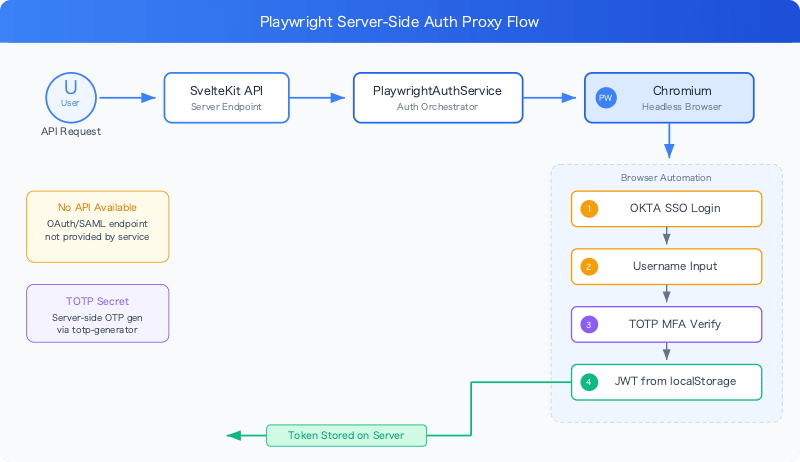
Implementing PlaywrightAuthService
As a service class, I separated browser lifecycle management from the login flow.
import { chromium, type Browser, type BrowserContext } from "playwright";
import { TOTP } from "totp-generator";

export class PlaywrightAuthService {
  private static credentials: LoginCredentials | null = null;
  private browser: Browser | null = null;
  private context: BrowserContext | null = null;

  async initialize() {
    if (!this.browser) {
      this.browser = await chromium.launch({
        headless: false,
        args: ["--no-sandbox", "--disable-setuid-sandbox"]
      });
      this.context = await this.browser.newContext({ locale: "en-US" });
    }
  }
The key point is that initialize() makes the browser instance reusable. Since launching a browser every time incurs significant overhead, existing instances are reused when available.
Automating the Login Flow
Using Playwright's locator features to interact with the IdP's login screen.
async login(credentials: LoginCredentials): Promise<AuthResult> {
  await this.initialize();
  const page = await this.context!.newPage();

  try {
    await page.goto(GPT_SERVICE_URL);

    // Click the SSO login button
    await page.getByRole("button", { name: "Login with SSO" }).click();

    // Enter username
    await page.getByLabel("Username").fill(credentials.username);
    await page.getByRole("button", { name: "Next" }).click();

    // Handle TOTP MFA
    if (credentials.totpSecret) {
      await page.getByRole("link", { name: "Select to enter a code" }).click();

      const otpInput = await page.getByRole("textbox", {
        name: "Enter verification code"
      });
      const mfaOtp = (await TOTP.generate(credentials.totpSecret)).otp;

      await otpInput.fill(mfaOtp);
      await page.getByRole("button", { name: "Verify" }).click();
    }

    // Wait for login to complete
    await page.waitForURL(
      (url) => url.toString().includes("/chats") || url.toString().includes("/dashboard"),
      { timeout: 60000 }
    );
The key point is handling TOTP MFA. Using the totp-generator library, a one-time password is generated server-side from the TOTP secret. Users don't need to open an authenticator app on their phone.
Extracting the JWT from the Browser's localStorage
After login, the browser's storageState() API is used to retrieve the token from localStorage.
    // Extract token from browser storage
    const storage = await page.context().storageState();
    const tokenStorage = storage.origins
      .find((origin) => origin.origin === GPT_SERVICE_URL)
      ?.localStorage.find((storage) => storage.name === "idp-token-storage");

    if (!tokenStorage?.value) {
      throw new AuthError("Failed to extract token from browser storage", "LOGIN_FAILED");
    }

    const tokenData = JSON.parse(tokenStorage.value);
    const jwt = tokenData.idToken;

    tokenStore.setToken("default", jwt.idToken);

    return {
      accessToken: jwt.idToken,
      userInfo: jwt.claims || {}
    };
storageState() is an API provided by Playwright that retrieves the contents of cookies, localStorage, and sessionStorage all at once. Here, it searches for the IdP's token storage saved in localStorage and extracts the JWT.
Credential Management via Static Methods
The auth service should be used statelessly, but credentials need to be retained throughout the application lifecycle. I took the approach of managing credentials with a static field and creating a new instance each time authentication is performed.
  static async authenticateAI(): Promise<JWTTokens> {
    if (!this.credentials) {
      throw new AuthError("No credentials available. Please login first.", "NO_CREDENTIALS");
    }

    const authService = new PlaywrightAuthService();
    const result = await authService.login(this.credentials);

    // Parse JWT to get expiration
    const tokenParts = result.accessToken.split(".");
    const payload = JSON.parse(atob(tokenParts[1]));

    return {
      idToken: result.accessToken,
      expiresAt: payload.exp || Math.floor(Date.now() / 1000) + 3600
    };
  }
Things to Watch Out for in Production
Browser Resource Management
Since Chromium is launched on the server side, memory consumption requires attention. Use the cleanup() method to reliably release resources.
  async cleanup() {
    try {
      await this.context?.close();
      await this.browser?.close();
    } catch (error) {
      console.error("Error during cleanup:", error);
    } finally {
      this.context = null;
      this.browser = null;
    }
  }
Vulnerability to Login UI Changes
Locators (getByRole, getByLabel) depend on UI text. If the IdP's login screen is updated, things may break. Using semantic locators (role-based) makes the code resilient to CSS class changes, but vulnerable to label text changes.
Countermeasures:
- Enrich error handling when login fails
- Regularly run E2E tests to verify the login flow is working correctly
- Save screenshots when errors occur to make investigation easier
On Headless Mode
During development, headless: false lets you visually confirm browser behavior, but switch to headless: true in production. However, some SSO providers may detect and block headless browsers. In that case, try headless: "new" (Chromium's new headless mode).
Summary
By using Playwright as a server-side authentication proxy, it became possible to obtain tokens programmatically even with enterprise SSO where no API is provided.
Scenarios where this approach is effective:
- In-house services have no OAuth/API keys for programmatic use
- Browser UI is the only login method
- TOTP MFA is required
Risks of this approach:
- May break when the login UI changes
- Requires a browser (Chromium) on the server, resulting in high resource consumption
- Must verify that browser automation is not prohibited by the service's or IdP's terms of use
If the "right API" doesn't exist, running a browser is perfectly legitimate engineering. That said, I think this should be treated as a pattern to use only as a "bridge until an official API is provided."