
Testing pnpm 12.11 Rust toolchain management: from rust-toolchain.toml to cargo, pnx, and global installation

This page has been translated by machine translation. View original
Hi there! I'm Nishimura Yuji from the Operations Division!
In pnpm 12.11, pnpm itself became able to fetch and manage the Rust toolchain.
Configurations that handle both JavaScript and Rust in the same repository include napi-rs, which writes Node.js native addons in Rust, and wasm-related packages. Until now, the Rust toolchain was managed separately with rustup, the official Rust installer and version manager, while JavaScript dependencies were handled by pnpm. Starting with 12.11, fetching the Rust toolchain can also be done with pnpm install.
This article summarizes the results of running pnpm 12.11.1 in an environment without rustup or cargo, and testing toolchain fetching, offline builds, one-time execution with pnx, and global installation.
Changes in This Release
- Target version / Date: According to the official release notes (2026-10-09), Rust toolchain management was added in 12.11.0, and
pnx --package=rust@<channel>was added in 12.11.1 on the same day - Key changes:
- When
cargo.enabledis activated,pnpm installfetches the toolchain specified inrust-toolchain.toml pnpm runandpnpm execaddcargoandrustcfrom the fetched toolchain to PATHpnpm add rust@<channel>pins the toolchain inrust-toolchain.toml, andpnpm add -g rust@<channel>installs it globally- In 12.11.1,
pnx, which fetches a package temporarily and runs just one command, can launch tools from a different Rust release by specifying--package=rust@<channel>
- When
- Official links: pnpm 12.11.0 release notes / pnpm 12.11.1 release notes / cargo integration documentation
Test Environment
- A disposable Docker container (Ubuntu 24.04.5 LTS, aarch64)
- Node.js v24.21.0
- pnpm 12.11.1 (installed to the working directory with
npm install --prefix) rustup,cargo,rustc, and a C linker (cc) were not installed
Fetching the Rust Toolchain with pnpm install
Enabling and the Project Used
Rust toolchain management is a feature that operates under cargo.enabled, and it is enabled in pnpm-workspace.yaml. The storeDir is specified to keep the store within the working directory for the disposable container test environment, and is not normally required.
storeDir: /work/store
cargo:
  enabled: true
According to the documentation, pnpm reads rust-toolchain.toml (or the legacy rust-toolchain file) the same way rustup does. Each Cargo manifest uses the closest toolchain file found in the same directory or a parent directory within the repository. The fields that can be handled are as follows. Cases where pnpm does not handle something and leaves it to rustup are summarized later in "Division of Responsibilities with rustup."
channel: version (1.95.0or1.95),stable,beta,nightly, or date-specified nightlyprofile:minimal(rustcandcargo, standard library) ordefault(addsrustfmtandclippy)components/targets: additional components and standard libraries for other targets
I first tested with the following rust-toolchain.toml without specifying targets.
[toolchain]
channel = "1.95.0"
profile = "minimal"
On the Rust side, it's a program that simply prints a string using one crate. I left [dependencies] in Cargo.toml empty and added it later with pnpm add crate:itoa.
[package]
name = "demo"
version = "0.1.0"
edition = "2021"

[dependencies]
fn main() { let mut b = itoa::Buffer::new(); println!("hello from {}", b.format(2026)); }
In package.json, I wrote scripts to call cargo from pnpm run.
{ "name": "demo", "private": true, "scripts": { "build": "cargo build", "ver": "cargo --version && rustc --version" } }
Fetching the Toolchain
When I first ran pnpm add crate:itoa (adding a crate is described later), it displayed Installing Rust 1.95.0 (aarch64-unknown-linux-gnu) during the process, and completed including the toolchain fetch in 48.6 seconds. The subsequent pnpm install returned Already up to date in 116ms, and no re-download occurred.
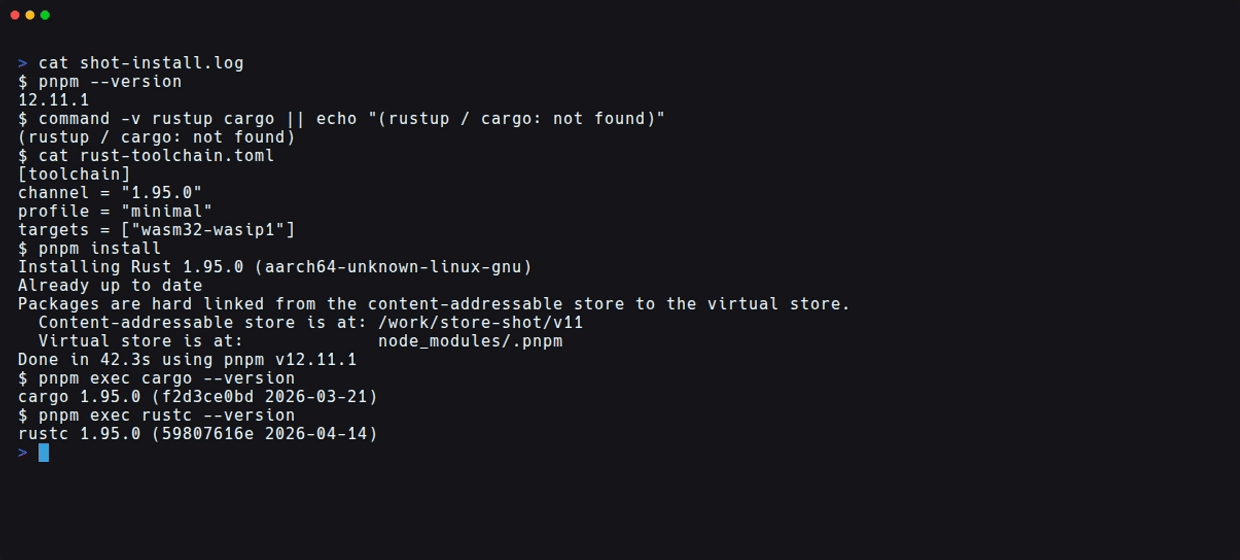
This screenshot shows the output saved to a file from running pnpm install (42.3 seconds) from a separate empty store, using the rust-toolchain.toml with targets added as described later.
The fetched toolchain is stored under rust in the store, and .pnpm/rust in the project was a symbolic link pointing there.
.pnpm/rust -> ../../store/v11/rust/1.95.0-aarch64-unknown-linux-gnu-d9ba01ca22a2e217
According to the documentation, pnpm verifies the release manifest with Rust's release signing key and checks each download against the hash listed in the manifest. Moving channels like stable are checked once a day, and when offline or unreachable, the latest release available in the store is used. Pinning a version skips this check.
cargo and rustc Are Added to PATH
According to the documentation, pnpm run, pnpm exec, and the cargo commands that pnpm runs during installation all use the linked toolchain. In my environment as well, with no cargo on PATH, both pnpm exec cargo --version and pnpm run ver returned cargo 1.95.0 (f2d3ce0bd 2026-03-21). Running command -v cargo inside pnpm exec showed bin/cargo inside the store.
$ pnpm exec sh -c 'command -v cargo'
/work/store/v11/rust/1.95.0-aarch64-unknown-linux-gnu-d9ba01ca22a2e217/bin/cargo
Crate Vendoring and Offline Builds
Next, I'll verify whether actual builds work with the fetched toolchain. The mechanism for managing crates with pnpm is an existing feature of cargo integration (v12.4.0~) and is not a new feature in 12.11. In 12.11.0, the generation of .pnpm/crates/config.toml and the optional [[include]] entry mentioned later were also changed.
What Was Added by pnpm add crate:itoa
Running pnpm add crate:itoa wrote itoa = "1.0.18" into [dependencies] in Cargo.toml, and added the following content to .cargo/config.toml.
# >>> pnpm-managed cargo sources >>>
[[include]]
path = "../.pnpm/crates/config.toml"
optional = true
# <<< pnpm-managed cargo sources <<<
The included .pnpm/crates/config.toml contained settings that replace crates.io with a directory source at .pnpm/crates/crates-io.
[source.crates-io]
replace-with = "pnpm-crates-io"

[source.pnpm-crates-io]
directory = "crates/crates-io"
According to the documentation, pnpm itself does not compile anything, and the [[include]] above is read by Cargo 1.95 and later. For a fresh clone without .pnpm, Cargo skips this include and fetches from the registry as usual. Crates from Git sources are vendored to .pnpm/crates/git. Crate information is recorded only in Cargo.lock, and in my environment, pnpm-lock.yaml had no entry for itoa.
Building Without a Network
In a container with the network disabled, I first ran pnpm run build (which runs cargo build) targeting the host (aarch64-unknown-linux-gnu). It progressed as far as compiling itoa, but failed with error: linker `cc` not found. This was because the test environment has no C linker installed.
So I decided to verify using wasm32-wasip1, which does not use cc for linking, and added targets to rust-toolchain.toml.
[toolchain]
channel = "1.95.0"
profile = "minimal"
targets = ["wasm32-wasip1"]
Running pnpm install in this state triggered Installing Rust 1.95.0 again (41.7 seconds). A new directory was created in the store for the same 1.95.0 (1.95.0-aarch64-unknown-linux-gnu-46aff0e70cf46ac2), and the .pnpm/rust symlink was updated to point there. Changing targets does not add the target to the existing toolchain; instead, it adds a new toolchain entry to the store.
Before adding targets, the store was 513MB with one toolchain and one crate. When estimating store capacity, keep in mind that a new toolchain is added for each combination of targets and components.
I also updated the build script for wasm32-wasip1.
{ "name": "demo", "private": true, "scripts": { "build": "cargo build --target wasm32-wasip1", "ver": "cargo --version && rustc --version" } }
The resulting Wasm is run with Node.js's WASI.
import { readFile } from 'node:fs/promises';
import { WASI } from 'node:wasi';
const wasi = new WASI({ version: 'preview1' });
const { instance } = await WebAssembly.instantiate(await readFile(process.argv[2]), wasi.getImportObject());
wasi.start(instance);
pnpm run build
node --no-warnings run-wasi.mjs target/wasm32-wasip1/debug/demo.wasm
Even with index.crates.io name resolution unavailable, itoa was compiled, and running the Wasm displayed hello from 2026.
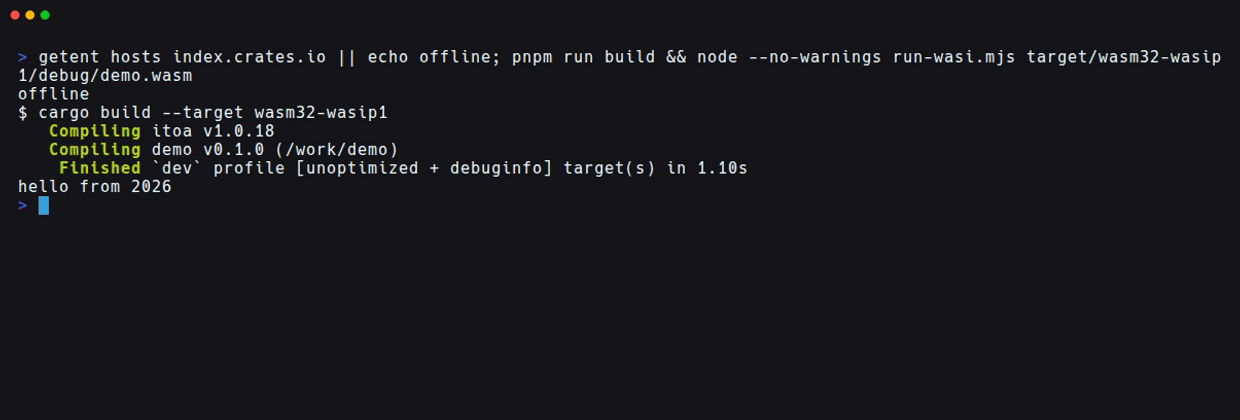
Pinning, One-Time Execution, and Global Installation of Toolchains
Pinning a Toolchain to a Project
Running pnpm add rust@<channel> inside a project pins the toolchain in the applicable rust-toolchain.toml. Here rust refers to the Rust toolchain, not an npm package of that name.
pnpm add rust@1.95
Running this displayed Pinned Rust 1.95 in /work/demo/rust-toolchain.toml, and the only change was one line where channel = "1.95.0" became channel = "1.95". package.json was unchanged.
Running a Single Command with a Different Release (12.11.1)
pnx --package=rust@<channel> <tool>, added in 12.11.1, launches a tool from that Rust release. I tested with the same date-specific nightly as in the release notes example.
$ pnx --package=rust@nightly-2026-01-01 cargo --version
Installing Rust nightly-2026-01-01 (aarch64-unknown-linux-gnu)
cargo 1.94.0-nightly (b54051b15 2025-12-30)
Done in 53.5s using pnpm v12.11.1
Running rustc --version for the same nightly afterward used the saved one and returned in 97ms. After execution, pnpm exec rustc --version in the project still showed 1.95.0, and rust-toolchain.toml was unchanged.
According to the release notes, it installs that release with the components and targets from rust-toolchain.toml, plus the targets for each --target argument. In my environment as well, the installed nightly included the standard library for wasm32-wasip1. This allows trying nightly and other releases just once without changing the regular toolchain.
Installing Globally
pnpm add -g rust@<channel> installs the toolchain globally. This time I set PNPM_HOME, added $PNPM_HOME/bin to PATH, and then ran it (the store is pointed to a directory within the working folder via the pnpm_config_store_dir environment variable).
export PNPM_HOME=/work/pnpm-home
export PATH=$PNPM_HOME/bin:$PNPM_HOME:$PATH
pnpm add -g rust@1.94.0
It displayed Installed Rust 1.94.0 globally, and cargo, rustc, rustfmt, clippy-driver, and others were placed in $PNPM_HOME/bin.
$ cd /tmp && cargo --version
cargo 1.94.0 (85eff7c80 2026-01-15)
$ cd /work/demo && cargo --version
cargo 1.95.0 (f2d3ce0bd 2026-03-21)
Outside the project, the plain cargo uses the global 1.94.0, and inside the project with rust-toolchain.toml, it uses 1.95.0 — switching automatically by location. pnpm ls -g also showed rust@1.94.0.
Division of Responsibilities with rustup
Based on the documentation and my test results, the division between pnpm and rustup can be summarized as follows.
| Aspect | Handled by pnpm | Handled by rustup |
|---|---|---|
| Toolchain file | Those specifying channel, profile (minimal / default), components, and targets |
path specification, no channel, toolchains registered with rustup toolchain link, other profiles like complete, machines for which Rust does not publish a toolchain |
Switching plain cargo and rustc |
Install a global toolchain with pnpm add -g rust@<channel> (confirmed this time) |
On machines with rustup, pnpm shim add rust reportedly achieves the same without a global toolchain |
pnpm shim is a subcommand that manages shims for commands that invoke the version pinned by the current project. pnpm shim add rust is a feature for rustup environments. I did not verify its behavior this time, as I did not prepare a rustup environment for comparison.
pnpm shim add rust
Disabling Only Toolchain Management
The documentation states the following.
runtimeOnFailset toerror,warn, orignoreturns this off and leaves the toolchain to rustup.Source: Cargo dependencies | pnpm
Setting runtimeOnFail to error, warn, or ignore reportedly disables pnpm's toolchain management and leaves the toolchain to rustup. I only tested ignore myself.
Running pnpm install in a new project with runtimeOnFail: ignore set did not display Installing Rust, and pnpm install failed at the run cargo metadata for manifest discovery stage.
Error:   × run cargo metadata for manifest discovery
  ╰─▶ No such file or directory (os error 2)
If you want to fetch the toolchain from a mirror, you can configure tools.rust.mirror (not verified).
How to Handle This in Practice
- Worth trying: When you are managing JavaScript/TypeScript and Rust in a single pnpm workspace and want to consolidate Rust toolchain setup into
pnpm install. Even in environments without rustup,pnpm installalone was enough to makecargoavailable. - Fine to wait and see:
cargo.enabledis experimental and disabled by default. Before rolling it out to CI or a shared repository all at once, it's a good idea to verify the behavior in a temporary project first. - Things to decide as a team: The channel pinning policy in
rust-toolchain.toml, whether to use rustup alongside pnpm, how to provide the linker required for native builds, and how to handle CI caching that depends on.pnpm/cratesand the store.
What Was Not Verified
pnpm shim add rust(a feature for rustup environments; no rustup environment was prepared for comparison)runtimeOnFailbehavior witherrorandwarn, and rustup taking over the toolchain after settingignore- Cases where signature and hash verification fails, and the behavior of once-a-day checks for moving channels and offline situations
tools.rust.mirror, Git source crates, and building from a clone without.pnpm- Target addition via the
--targetargument ofpnx - Behavior on macOS / Windows / x86_64, and coexistence with an existing rustup environment
- Re-verification with pnpm 12.11.2 / 12.12.0 (this verification used 12.11.1)
Summary
I tested pnpm 12.11.1 in an environment without rustup or cargo. Under cargo.enabled, pnpm install fetched the toolchain from rust-toolchain.toml, and cargo and rustc were available from pnpm run and pnpm exec.
Combined with crate vendoring, a wasm32-wasip1 build succeeded even without a network. A linker for native builds must be provided separately, and changing targets adds a new toolchain entry to the store.
With pnx --package=rust@<channel> in 12.11.1, I was able to use nightly for just one command without changing the project's toolchain. After installing globally with pnpm add -g rust@<channel>, the plain cargo automatically switched to the global toolchain outside the project and to the rust-toolchain.toml toolchain inside the project.
As for the division of responsibilities with rustup, pnpm handles ordinary toolchain files that specify channel and other fields, while path specifications and linked toolchains are left to rustup. It seems worth trying as an option for managing the toolchain with pnpm in repositories that mix JavaScript and Rust.
I hope this is helpful to someone.
Reference links: