
Exclude specific packages from build cache reuse in pnpm

This page has been translated by machine translation. View original
Hey there! I'm Nishimura Yuji from the Operations Division!
For packages that depend on system shared libraries, there are cases where you don't want to reuse build results even if the package version is the same. Using sideEffectsCache.exclude, added in pnpm 12.14.0, you can exclude only specified packages from build result cache reuse.
Specifying Package Names to Exclude
In pnpm 12.14.0 and later, add the following configuration to pnpm-workspace.yaml in the root of your project. cache-demo-addon is the name of the sample package used in the second half. When actually using this, specify the names of the dependency packages you want to exclude.
sideEffectsCache:
  exclude:
    - cache-demo-addon
With just this specification, reading and writing of side-effects caches for other packages remains in its default enabled state. Installation after configuration proceeds as normal.
pnpm install
Target packages will neither restore build results from local or remote side-effects caches, nor save to them. This is not a setting that disables caching of the downloaded package itself. Also, build script execution permission is separately required. Rebuilding with an existing node_modules in place is not verified in this article. Below, we compare by deleting node_modules.
Comparing by Reinstalling the Same Dependencies
Verified on Ubuntu 24.04.5 / Linux arm64, Node.js 24.21.0, pnpm 12.14.0. Instead of compiling a native module, we use a postinstall that writes an environment variable's value to a file, to see whether the build was re-executed.
1. Prepare a Package That Leaves Build Results
In an environment where pnpm 12.14.0 and Node.js are available, create a new sample directory.
mkdir pnpm-cache-demo
cd pnpm-cache-demo
mkdir package
cd package
Save the following 2 files inside package.
{"name":"cache-demo-addon","version":"1.0.0","scripts":{"postinstall":"node build.cjs"}}
const fs = require('node:fs');
fs.writeFileSync('built.txt', process.env.BUILD_MARKER || 'unset');
Pack the package into a tarball and return to the sample root.
pnpm pack --pack-destination ..
cd ..
2. Reinstall with Cache Enabled
Save the following 2 files in the root. For the build permission, specify the key representing this file: dependency.
{"name":"cache-demo-app","version":"1.0.0","private":true,"dependencies":{"cache-demo-addon":"file:cache-demo-addon-1.0.0.tgz"}}
storeDir: .pnpm-store
updateNotifier: false
enableGlobalVirtualStore: false
permissions:
  cache-demo-addon@file:cache-demo-addon-1.0.0.tgz:
    build: true
In this example, we use a store dedicated to the sample and disable the global virtual store to align comparison conditions. The rm -rf node_modules below is the operation to reinstall the dependencies within this new sample.
BUILD_MARKER=first pnpm install
cat node_modules/cache-demo-addon/built.txt
rm -rf node_modules
BUILD_MARKER=second pnpm install --frozen-lockfile
cat node_modules/cache-demo-addon/built.txt
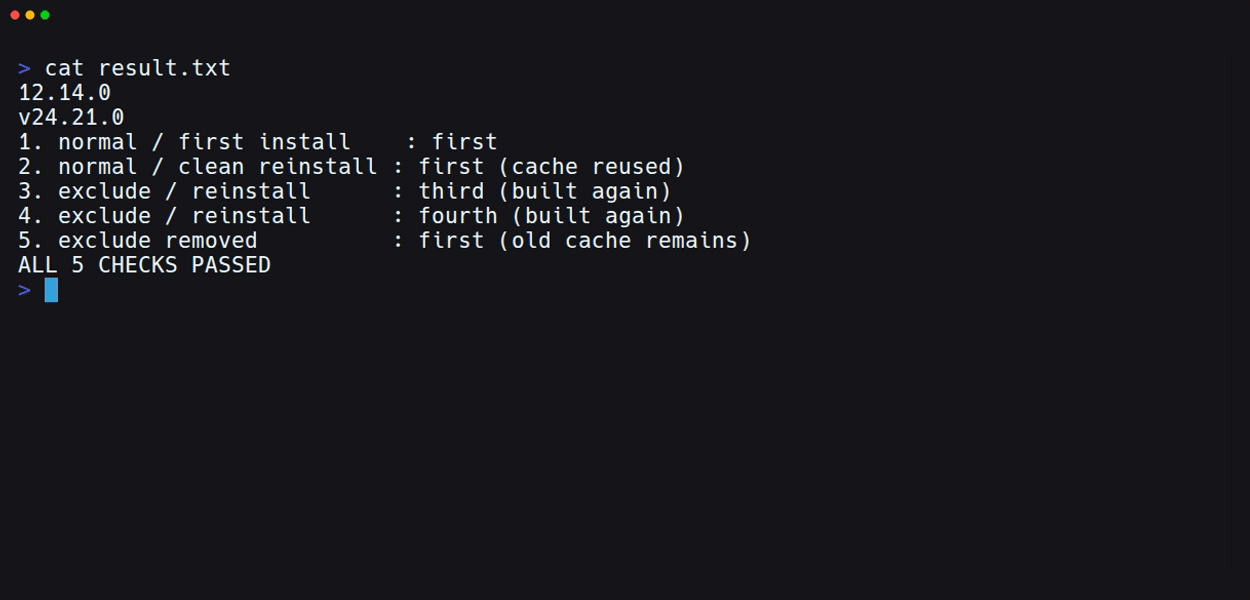
Both resulted in first. Even though the environment variable was changed to second on the second run, the first build result was restored from the cache.
3. Add the Exclusion Setting and Reinstall
Add the sideEffectsCache block from the beginning to the end of the pnpm-workspace.yaml from earlier. Leave the existing build permission in place.
rm -rf node_modules
BUILD_MARKER=third pnpm install --frozen-lockfile
cat node_modules/cache-demo-addon/built.txt
rm -rf node_modules
BUILD_MARKER=fourth pnpm install --frozen-lockfile
cat node_modules/cache-demo-addon/built.txt
This time the results were third and fourth respectively. Using the same tarball, postinstall was executed for each installation.
The following image shows the comparison results recorded in a file and displayed in the terminal. The last line is an additional verification done by removing the exclusion setting and reinstalling once more.
Old Cache Is Reused When Exclusion Is Removed
Delete the sideEffectsCache block, leave the build permissions and other settings in place, and reinstall once more.
rm -rf node_modules
BUILD_MARKER=fifth pnpm install --frozen-lockfile
cat node_modules/cache-demo-addon/built.txt
The result returned to first. Not third or fourth created during exclusion — the cache from before the exclusion remained.
This setting is for skipping cache reads and writes, not an operation that deletes existing build caches. This distinction needs to be kept in mind when restoring excluded targets.
The official documentation also describes specifying @scope/* in addition to names, as well as specifying an exact matching version. Here we focused solely on the behavior of local tarball dependencies specified by name only. Remote cache, cross-project sharing with global virtual store, actual native modules, and behavior on macOS and Windows are not included in the verification scope.
Summary
By writing a package name in pnpm's sideEffectsCache.exclude, we were able to exclude that dependency from build result cache reuse. This is a setting to use for packages where conditions not included in the cache key — such as shared libraries — affect the build result. Its role differs from deleting existing caches or granting build script execution permission.
Reference Links: