
Replacing VPN with Pomerium Zero Trust Proxy and SSH Multi-hop Tunnels — Implementation in Node.js

This page has been translated by machine translation. View original
Introduction
Many teams use VPNs to access production environments on Kubernetes. However, VPNs have a fundamental problem: "once connected, you can do anything."
I needed to access a production server protected by a zero trust network from a Node.js automation script. The architecture uses a two-stage configuration: connecting to a jump server via Pomerium (a zero trust proxy), then forwarding from there to the production server. I implemented in TypeScript a mechanism to automatically establish the tunnel when the script starts.
What is Zero Trust
VPN follows a "castle and moat" model. Once inside the moat (VPN connected), you can freely roam within the castle. VPN trusts the connection, but does not verify individual requests.

Zero trust overturns this assumption. Regardless of network location, it verifies every access every time. It eliminates the implicit trust of "being on the internal network means you're safe," and for each access it checks "who," "from which device," "to which resource," and "when."
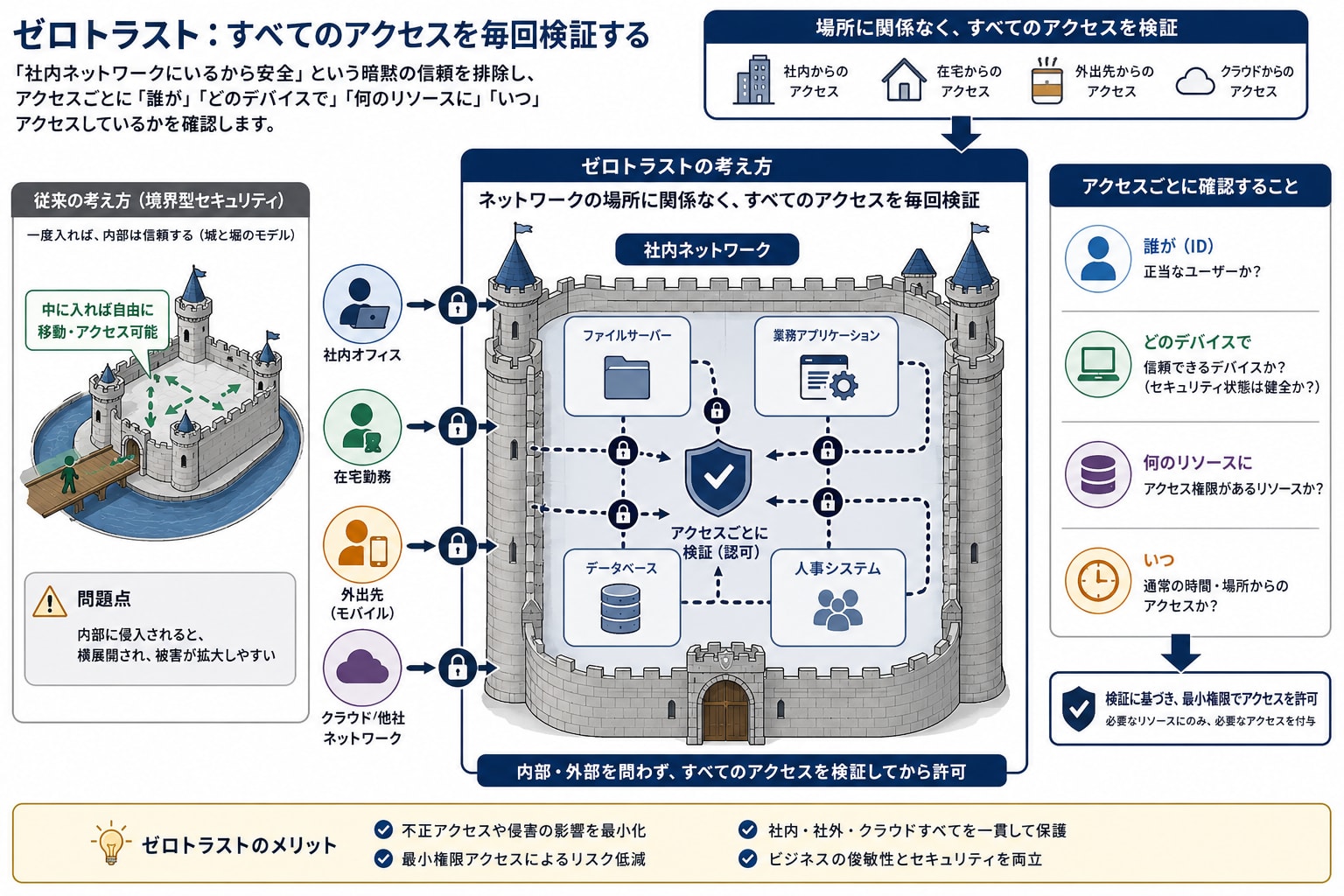
Google's "BeyondCorp" is the origin of this concept. Google completely eliminated VPN and placed even internal wikis behind an identity-aware proxy.
Why VPN Alone Is Not Enough
The biggest risk of VPN is lateral movement. If a developer's laptop is compromised, an attacker can access the entire production network via VPN. With zero trust, an attacker can only access the specific resources that the compromised session was authorized for.
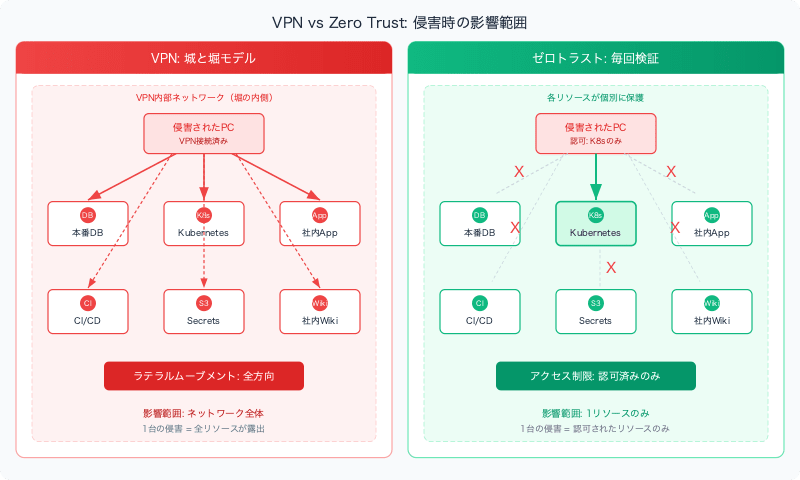
VPN vs Pomerium + SSH
| Item | VPN | Pomerium + SSH |
|---|---|---|
| Scope of trust | Entire network | Specific hosts/ports only |
| Authentication unit | Per device | Per session |
| Access scope | Unrestricted after connection | Strictly controlled by policy |
| MFA | Initial connection only | Every session |
| Audit logs | Limited | Per request with identity linked |
| Impact of compromise | Entire network exposed | Authorized resources only |
Why Okta MFA Alone Is Not Enough
Okta MFA and Pomerium solve different problems. They are not redundant—they are complementary.
Okta MFA = Authentication. It proves "who you are." However, Okta does not control which network resources you can access after authentication.
Pomerium = Authorization + Network-level control. For authenticated users, it enforces:
- Routing only traffic to approved destinations (specific hosts/ports)
- Creating per-session audit trails
- Applying additional policies such as device posture, time of day, and IP
- Access control as a network gateway (without Pomerium, traffic cannot reach the server)
Using an airport analogy: Okta is the passport check (identity verification), and Pomerium is the boarding pass (you can only board a specific seat on a specific flight). Having a passport alone doesn't let you board any plane.

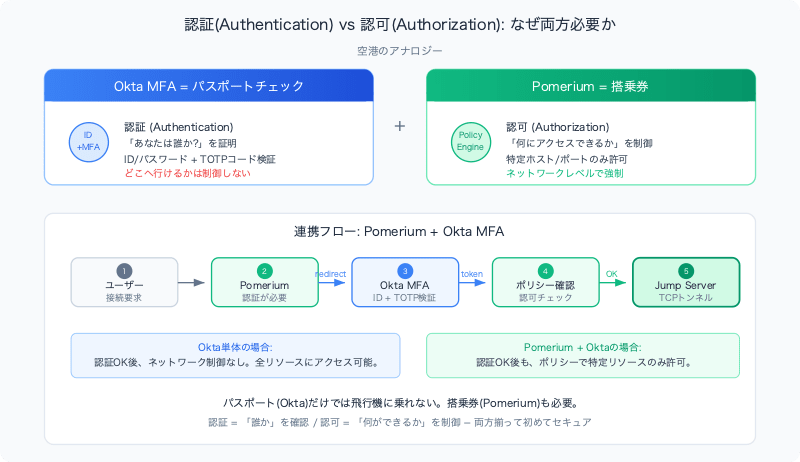
In this article's flow, these two work together:
Pomerium (network access control)
  → Triggers Okta login (identity verification + MFA)
    → Pomerium obtains ID token
      → Pomerium checks authorization policy
        → Allows only TCP tunnel to specific jump server
Practical Adoption Approach
Many organizations start with a hybrid configuration of VPN and zero trust:
| Approach | Best suited for |
|---|---|
| VPN only | Small teams, low compliance requirements |
| VPN + Zero trust on critical paths | Mid-transition, or compliance requirements only for production |
| Full zero trust (no VPN) | High security maturity, regulated industries |
This article's architecture takes the middle approach. Pomerium protects production Kubernetes access, while other internal resources are accessed via VPN. However, from a zero trust perspective, the VPN layer itself creates a path for lateral movement. A hybrid configuration is a realistic starting point, but it's important to recognize that the VPN layer represents a convenience trade-off rather than a security guarantee.
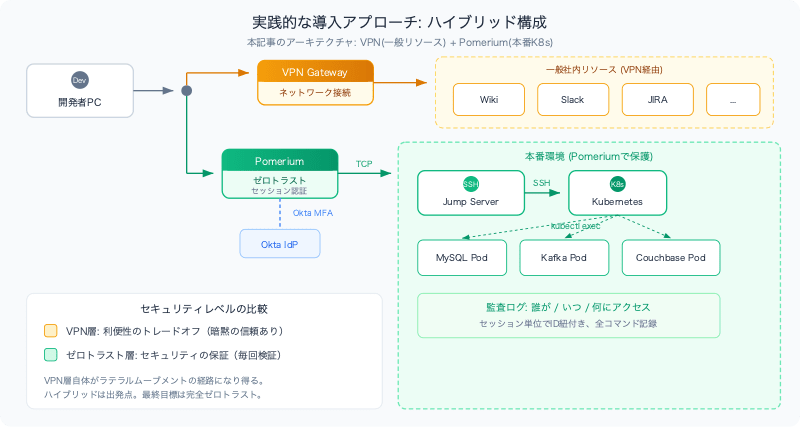
Overall Architecture
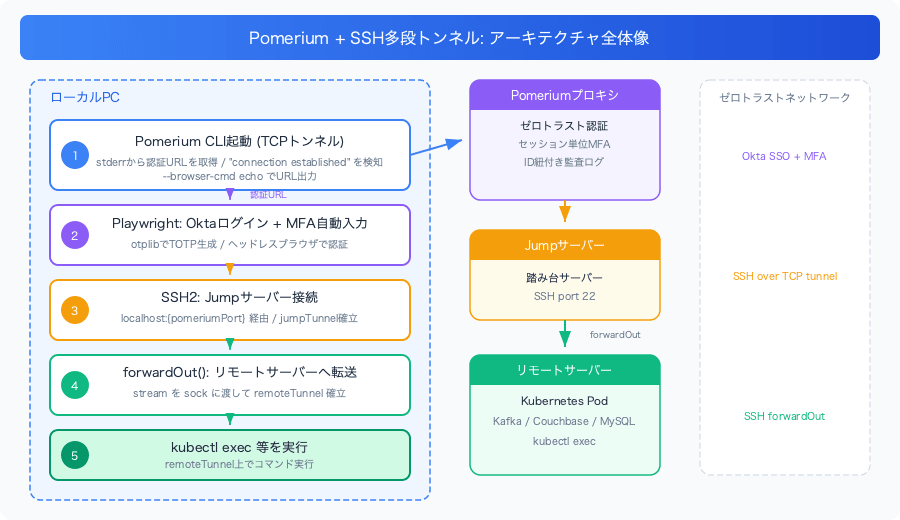
Step 1: Managing the Pomerium Process
pomerium-cli is an external binary. It is launched from Node.js using child_process.spawn.
The challenge is how to detect when the connection has been established. Pomerium does not expose connection state as a public API. The only clue is its output to stderr.
class Pomerium {
  private isConnected = false;
  private pomeriumProcess: ChildProcess | null = null;
  private startPromise: Promise<void> | null = null; // ongoing startup process

  public async start(): Promise<void> {
    // If a startup is in progress, return the same Promise and wait
    if (this.startPromise) {
      return this.startPromise;
    }

    if (this.isConnected) {
      return Promise.resolve();
    }

    this.startPromise = (async () => {
      try {
        await this.initPomeriumProcess();
        this.isConnected = true;
      } catch (error) {
        this.isConnected = false;
        throw error;
      } finally {
        this.startPromise = null; // clear after completion
      }
    })();

    return this.startPromise;
  }
Holding startPromise is a Promise lock pattern. Even if multiple processes call start() simultaneously, the Pomerium process will not be launched multiple times.
Detecting Connection Establishment from stderr
private initPomeriumProcess(): Promise<void> {
  return new Promise((resolve, reject) => {
    // On macOS, the Gatekeeper quarantine attribute must be removed
    if (os.platform() === "darwin") {
      execSync(`chmod +x "${this.POMERIUM_CLI_PATH}"`);
      execSync(`xattr -d com.apple.quarantine "${this.POMERIUM_CLI_PATH}"`);
    }

    this.pomeriumProcess = spawn(this.POMERIUM_CLI_PATH, [
      "tcp",
      this.POMERIUM_TARGET_HOST,
      "--browser-cmd", "echo",  // Output auth URL to stdout without opening a browser
      "--listen", `:${this.POMERIUM_LISTEN_PORT}`,
    ]);

    let connectionEstablished = false;

    this.pomeriumProcess.stderr?.on("data", (chunk) => {
      const message = chunk.toString();

      if (message.includes("listening on")) {
        // Started listening on port → connection not yet established
        this.testConnection(); // connectivity check (side effect only)
      }

      if (message.includes("connection established")) {
        if (!connectionEstablished) {
          connectionEstablished = true;
          resolve(); // ← only here do we resolve the Promise
        }
      }

      if (message.includes("connection closed")) {
        // If connection drops, restart (in practice, re-spawn with same args; omitted here)
        this.pomeriumProcess = spawn(/* ...omitted... */);
      }

      if (message.includes("https")) {
        // When the Okta login URL appears, handle it with browser automation
        const match = message.match(/https?:\/\/[^\s]+/g);
        if (match?.[0]) Playwright.handleOktaLogin(match[0]);
      }
    });

    // Time out if connection is not established within 60 seconds
    const timeout = setTimeout(() => {
      if (!connectionEstablished) {
        this.pomeriumProcess?.kill();
        reject(new Error("Pomerium connection timed out."));
      }
    }, 60000);

    this.pomeriumProcess.once("close", () => clearTimeout(timeout));
    this.pomeriumProcess.once("error", () => clearTimeout(timeout));
  });
}
Key points:
"listening on"and"connection established"are separate events. Starting to listen ≠ connection established. The Promise is resolved only after receiving the latter.- The
connectionEstablishedflag preventsresolve()from being called twice (stderr data can arrive in multiple chunks). - After a timeout, the process is killed to avoid leaving zombie processes.
--browser-cmd echosuppresses Pomerium from opening a browser, causing it to output the URL to stdout instead. That URL is then processed by Playwright to automate Okta authentication.
Step 2: Automating Okta MFA
The obtained authentication URL is opened with Playwright, automating everything from entering the ID/password to entering the MFA code.
private async handleOktaLogin(url: string): Promise<void> {
  const browser = await chromium.launch({ headless: true });
  const context = await browser.newContext({ locale: "en-US" });
  const page = await context.newPage();

  try {
    await page.goto(url, { timeout: 60000 });

    // Enter ID/password
    await page.getByLabel("Username").fill(process.env.OKTA_USERNAME!);
    await page.getByLabel("Password").fill(process.env.OKTA_PASSWORD!);
    await page.getByRole("button", { name: "Sign In" }).click();

    // Enter MFA code (generate TOTP with otplib)
    await page.getByLabel("Enter code").waitFor({ state: "visible", timeout: 10000 });
    const otpCode = totp.generate(process.env.OKTA_MFA_SECRET!);
    await page.getByLabel("Enter code").fill(otpCode);
    await page.getByRole("button", { name: "Verify" }).click();

    await page.waitForFunction(
      () => document.title.includes("Authenticated"),
      null,
      { timeout: 10000 }
    );
  } catch (error) {
    await page.screenshot({ path: path.join(os.tmpdir(), "okta_error.png") });
    throw error;
  } finally {
    await browser.close();
  }
}
Screenshots are saved on failure. This is helpful for debugging, as the flow can break due to changes in Okta's UI or MFA configuration.
Step 3: Establishing the Multi-Hop SSH Tunnel
Connect to the jump server via Pomerium, then establish a forwarding tunnel from there to the remote server.
class Remote {
  private jumpTunnel?: Client;
  private remoteTunnel?: Client;

  private async connectJumpServer(): Promise<void> {
    await Pomerium.start(); // Steps 1-2 are executed automatically

    return new Promise((resolve, reject) => {
      const jumpTunnel = new Client();
      jumpTunnel
        .on("ready", () => {
          this.jumpTunnel = jumpTunnel;

          jumpTunnel.on("error", () => this.handleJumpTunnelDisconnection());
          jumpTunnel.on("close", () => this.handleJumpTunnelDisconnection());

          resolve();
        })
        .on("error", reject)
        .connect({
          host: "127.0.0.1",
          port: this.pomeriumPort(),   // switch between prod/stg by env
          username: credentials.SSH_USERNAME,
          password: credentials.JUMP_SERVER_PASSWORD,
          readyTimeout: 60000,
        });
    });
  }

  public async forwardToRemote(): Promise<void> {
    if (!this.jumpTunnel) await this.initJumpTunnel();

    return new Promise((resolve, reject) => {
      this.jumpTunnel!.forwardOut(
        "127.0.0.1", 8000,
        this.remoteHost(), 22,
        (err, stream) => {
          if (err) reject(err);

          const remoteTunnel = new Client();
          remoteTunnel
            .on("ready", () => {
              this.remoteTunnel = remoteTunnel;

              remoteTunnel.on("error", () => this.handleRemoteTunnelDisconnection());
              remoteTunnel.on("close", () => this.handleRemoteTunnelDisconnection());

              resolve();
            })
            .on("error", reject)
            .connect({
              sock: stream,           // ← use jumpTunnel's stream as a socket
              username: credentials.SSH_USERNAME,
              password: credentials.REMOTE_PASSWORD,
              readyTimeout: 60000,
            });
        }
      );
    });
  }
The multi-hop tunnel is achieved by passing the stream returned by forwardOut() as the sock for the next SSH connection.
Step 4: Executing Remote Commands
Once the tunnel is established, arbitrary commands can be executed on the remote server.
  public async execRemote(cmd: string, debug: boolean = false): Promise<string> {
    if (!this.remoteTunnel) await this.initRemoteTunnel();

    return new Promise((resolve, reject) => {
      this.remoteTunnel!.exec(cmd, (err, stream) => {
        if (err) reject(err);

        let data = "";
        stream.on("data", (chunk: Buffer) => (data += chunk.toString()));
        stream.on("end", () => resolve(data));
      });
    });
  }
Using this execRemote, I run kubectl exec commands to directly access Kafka, Couchbase, MySQL, and other services inside Pods.
Automatic Reconnection on Disconnection
When a disconnection is detected, the corresponding tunnel is reset to undefined, and it reconnects via lazy initialization at the time of the next command execution.
  private handleJumpTunnelDisconnection() {
    console.warn("Attempting to re-establish JumpTunnel...");
    this.jumpTunnel = undefined;
    this.initJumpTunnel().catch((err) => {
      console.error(`Failed to re-establish JumpTunnel: ${err}`);
    });
  }

  private handleRemoteTunnelDisconnection() {
    console.warn("Attempting to re-establish RemoteTunnel...");
    this.remoteTunnel = undefined;
    this.initRemoteTunnel().catch((err) => {
      console.error(`Failed to re-establish RemoteTunnel: ${err}`);
    });
  }
Overall Lazy Initialization Flow
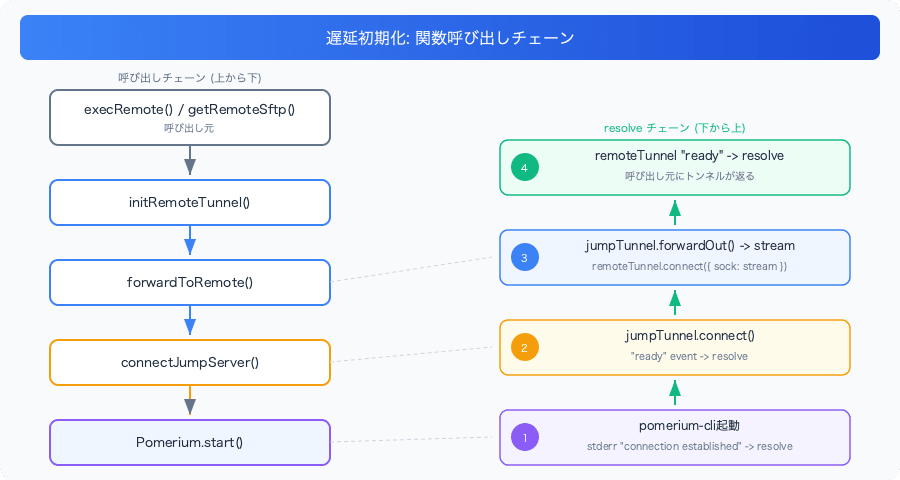
Summary
I achieved zero trust Kubernetes access without a VPN using Pomerium + multi-hop SSH tunneling.
Use stderr for state detection: When no API exists for an external binary, observe the process output to understand its state. Distinguish between "listening on" and "connection established", and resolve the Promise only upon receiving the latter.
Prevent duplicate launches with a Promise lock: Use startPromise: Promise<void> | null to manage whether a startup is in progress. Even if multiple callers request a connection simultaneously, only one process will be launched.
Multi-hop SSH with sock: stream: Pass the stream returned by ssh2's forwardOut to connect({ sock: stream }) to achieve a connection via a jump server.
Connect only when needed with lazy initialization: Dependent connections (Pomerium → jump server → production server) are established in sequence on first access.
Management is more complex compared to VPN, but the benefits include per-session identity authentication and limited access scope. It is particularly effective in situations where you need to track "who accessed what, when" for production environments.