
When you don't want to use SNS or the cloud. I built a system to securely transfer long API keys via QR codes.

This page has been translated by machine translation. View original
Introduction
"How do I send this long API key or lengthy configuration text to another device...?"
During development and operations, you may encounter situations like this. Using SNS or chat tools like Slack or LINE would be easy, but you want to avoid them from a security standpoint since history remains on third-party servers. On the other hand, going through the trouble of creating a text file, uploading it to cloud storage, configuring permissions, and generating a sharing link is far too cumbersome.
In this article, I'll introduce a system I built for safely and easily transferring "text you don't want to send over a network, but that's impossible to type manually" using only a screen and a smartphone camera (QR code).
Requirements and Constraints
The goal is to transfer text under the following conditions.
- SNS/chat tools: Not allowed (security concerns such as history remaining and information leakage)
- Cloud storage / shared drives: Not allowed (too much overhead for uploads and permission management)
Condition: Transfer long API keys and highly confidential text to another environment without going through an external network and without manual input errors.
First Approach: Just Use QR Codes for Now
The initial idea was simple. Convert text to a QR code and scan it with a smartphone.
// Initial naive implementation
const input = fs.readFileSync("qr_target.txt", "utf8");
const chunks: string[] = [];
for (let i = 0; i < input.length; i += 1000) {
  chunks.push(input.slice(i, i + 1000));
}
// Generate QR codes from chunks...
Three Reasons It Failed
1. iOS QR scanner tried to open it as a URL
When the code contained ://, the scanner judged it as a URL and tried to open Safari. The text was not copied.
2. All spaces disappeared
The QR scanner normalized whitespace, turning function test() { return x; } into functiontest(){returnx;}. It became unusable as code.
3. URLs got garbled
https://api.example.com in the code became https%3A%2F%2Fapi.example.com after scanning.
Result: The scanned text was completely unusable.
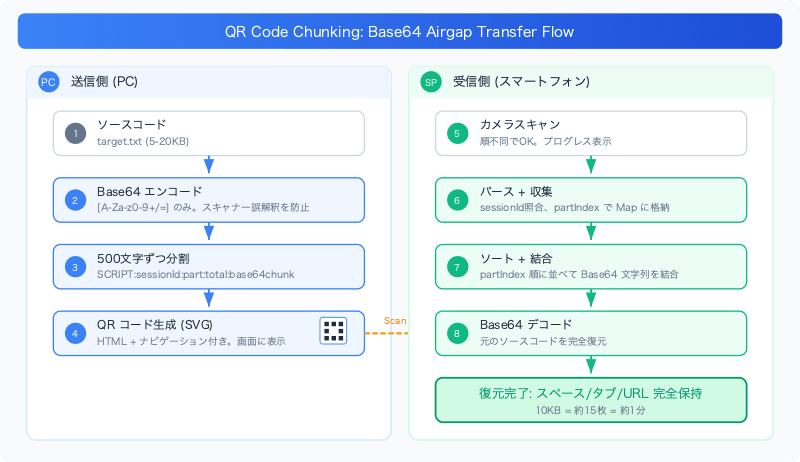
Breakthrough: Base64 Encoding
Insight: The problem wasn't the QR code itself, but the scanner "trying to interpret" the text. If we put it in a format that can't be interpreted, the scanner should return it as plain text without any issues.
Base64 output consists only of [A-Za-z0-9+/=]. It contains no ://, no spaces, and no special characters. The scanner determines "this is not a URL" and "this is text," returning it as a plain string.
Results:
- Spaces and tabs: fully preserved
- URLs: correctly restored after decoding
- Works with any QR scanner (iOS built-in, Google Lens, etc.)
The discovery was that Base64 encoding functions not for "security purposes" but as "obfuscation to prevent over-interpretation by scanners."
QR Code Capacity Limits
The maximum data capacity of a QR code varies by version (size) and error correction level, but the practical upper limits are as follows.
| Error Correction Level | Max Characters (alphanumeric) |
|---|---|
| L (7%) | ~4,296 characters |
| M (15%) | ~3,391 characters |
| Q (25%) | ~2,420 characters |
| H (30%) | ~1,852 characters |
Theoretically more than 4,000 characters fit, but keeping it to around 500–600 characters is practical when considering scan reliability. QR codes that are too dense will fail to scan depending on camera focus and lighting conditions.
Framing Protocol Design
Evolution of the Format
The initially too-simple format:
SCRIPT:part:base64data
Problems: No way to know how many there are, must scan in order, and QR codes from different sessions can be mixed up.
Final format:
SCRIPT:{sessionId}:{partIndex}:{totalParts}:{base64Chunk}
Real example (split into 3):
SCRIPT:a3f9k2:0:3:SGVsbG9Xb3JsZA==
SCRIPT:a3f9k2:1:3:YWJjZGVmZ2g=
SCRIPT:a3f9k2:2:3:eHl6MTIz
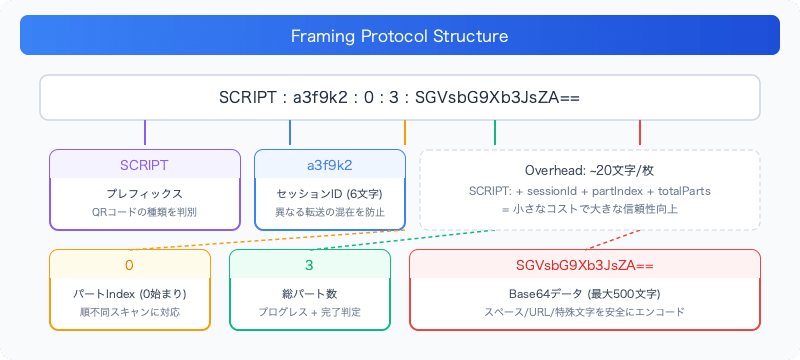
Role of Each Field
| Field | Description |
|---|---|
SCRIPT |
Prefix. Used by the receiver to identify the type of QR code |
sessionId |
Session identifier (6 characters, timestamp-based). Prevents mixing of different transfers |
partIndex |
Part index (0-based). Supports out-of-order scanning |
totalParts |
Total number of parts. Used for progress display and completion detection |
base64Chunk |
Fragment of Base64-encoded data |
A small overhead (about 20 characters per code) significantly improved the overall reliability of the system.
Implementation
Chunk Splitting and QR Code Generation
import QRCode from "qrcode";

public async genQrcode(): Promise<void> {
  const MAX_QR_CHARS = 500;
  const input = fs.readFileSync("input/target.txt", "utf8");

  // Generate session ID (timestamp-based)
  const sessionId = Date.now().toString(36).substring(2, 8);

  // Base64-encode the entire input
  const base64Input = Buffer.from(input, "utf8").toString("base64");

  // Split the Base64 string into chunks
  const base64Chunks: string[] = [];
  for (let i = 0; i < base64Input.length; i += MAX_QR_CHARS) {
    base64Chunks.push(base64Input.slice(i, i + MAX_QR_CHARS));
  }

  // Generate chunks with metadata
  const totalParts = base64Chunks.length;
  const chunks: string[] = [];
  for (let i = 0; i < totalParts; i++) {
    chunks.push(
      `SCRIPT:${sessionId}:${i}:${totalParts}:${base64Chunks[i]}`
    );
  }

  // Output to HTML file
  await this.generateHtml(chunks, sessionId, totalParts, input.length);
}
MAX_QR_CHARS = 500 is set so that even with the metadata portion (SCRIPT:abc123:0:10: ≈ about 25 characters), it stays under 600 characters.
QR Code Generation and HTML Output
Generate SVG-format QR codes from each chunk and embed them in HTML with navigation.
for (const [i, chunk] of chunks.entries()) {
  const qrSvg = await QRCode.toString(chunk, {
    type: "svg",
    errorCorrectionLevel: "M",  // Medium error correction
    margin: 2,
    width: 250,
  });

  // Add to HTML in card format
  appendToHtml(`
    <div class="qr-card">
      <h2>Part ${i} of ${totalParts - 1}</h2>
      <div class="qr-code">${qrSvg}</div>
      <div class="chunk-info">
        Session: ${sessionId} | ${chunk.length} characters
      </div>
    </div>
  `);
}
HTML Navigation
The generated HTML allows switching between QR codes with arrow keys.
let currentIndex = 0;
const totalCards = ${totalParts};

function showCard(index) {
  const cards = document.querySelectorAll('.qr-card');
  cards.forEach((card, i) => {
    card.classList.toggle('active', i === index);
  });
}

document.addEventListener('keydown', (e) => {
  if (e.key === 'ArrowLeft' && currentIndex > 0) {
    currentIndex--;
    showCard(currentIndex);
  }
  if (e.key === 'ArrowRight' && currentIndex < totalCards - 1) {
    currentIndex++;
    showCard(currentIndex);
  }
});
Since it can be operated with both buttons and the keyboard, it improves operator efficiency.
Reconstruction on the Receiving Side
On the receiving side, reconstruction is done as follows.
// Store received chunks
const receivedChunks = new Map<number, string>();
let expectedTotal = 0;

function onQrScanned(data: string) {
  // Parse SCRIPT:sessionId:part:total:base64chunk
  const parts = data.split(":", 5);
  if (parts[0] !== "SCRIPT") return;

  const partIndex = parseInt(parts[2]);
  const total = parseInt(parts[3]);
  const base64Chunk = parts[4];

  expectedTotal = total;
  receivedChunks.set(partIndex, base64Chunk);

  // Reconstruct when all parts are received
  if (receivedChunks.size === expectedTotal) {
    const sorted = Array.from(receivedChunks.entries())
      .sort(([a], [b]) => a - b)
      .map(([_, chunk]) => chunk)
      .join("");

    const original = Buffer.from(sorted, "base64").toString("utf8");
    console.log("Reconstructed:", original);
  }
}
Scan order doesn't matter. Since we sort by partIndex before joining, correct reconstruction is achieved regardless of scan order.
Design Decisions
Chunk size of 500 characters: Initially implemented with 1000 characters per QR code, but high-density QR codes sometimes required 5–10 scan attempts. Changing to 500 characters increases the number of codes, but since each one can be reliably scanned in one attempt, the total time required is shorter.
Error correction level M (Medium): Using level H (High) would allow reading even if the QR code is dirty, but it reduces data capacity and makes the QR code too dense, which actually makes it harder to scan. Since it's displayed on a screen, the risk of dirt is low, and M is sufficient.
| Level | Correction Capability | Data Capacity | Recommended Use |
|---|---|---|---|
| L | 7% | Maximum | Screen display (no dirt) |
| M | 15% | Medium | General use |
| Q | 25% | Small | Printed materials |
| H | 30% | Minimum | Harsh environments |
SVG format: Compared to PNG format, it can be embedded directly in HTML, eliminating the need to manage external files.
Actual Transfer Performance
- Small document (~2KB): About 3 codes / about 10 seconds
- Medium document (~10KB): About 15 codes / about 1 minute
- Large document (~50KB): About 75 codes / about 5 minutes (your hand gets tired)
- Best zone: 5–20KB (8–25 codes) is comfortable
Perceived speed is determined not by "number of codes" but by "fewer retries."
Summary
| Issue | Initial Approach | Final Solution |
|---|---|---|
| Spaces disappear | Plain text QR | Base64 encoding |
| URLs get garbled | Remove :// |
Base64 encoding |
| Manual pasting is cumbersome | Paste into text area | Camera scan + automated processing |
| No verification | Visual confirmation | Session ID + metadata |
| Dense QR hard to scan | 1000 characters/code | 500 characters/code + error correction M |
Base64 isn't just for "security." It's also effective as "obfuscation" to prevent scanners and parsers from over-interpreting content.
Small metadata overhead is worth it. Just adding 20 characters of sessionID:part:total makes it possible to know "which session," "which number," and "how many total," significantly improving the reliability of the overall system.
When constraints are strong, thinking about "how to operate within those constraints" can sometimes lead to surprisingly simple solutions.