
Diving Deep into React Hook Form's form.watch() — What I Learned Implementing Auto-Search Functionality

This page has been translated by machine translation. View original
Introduction
While implementing an auto-search feature triggered by filter changes on a search screen, I had the opportunity to deeply investigate the behavior of form.watch().
"How does form.watch() work?" "Can it detect values changed with setValue()?" "How is it different from Next.js Server Actions?" — These questions kept coming up, so I'm organizing what I found.
form.watch() Has Two Modes
React Hook Form's (hereafter RHF) form.watch() has two modes whose impact on re-rendering differs significantly depending on how they are used.
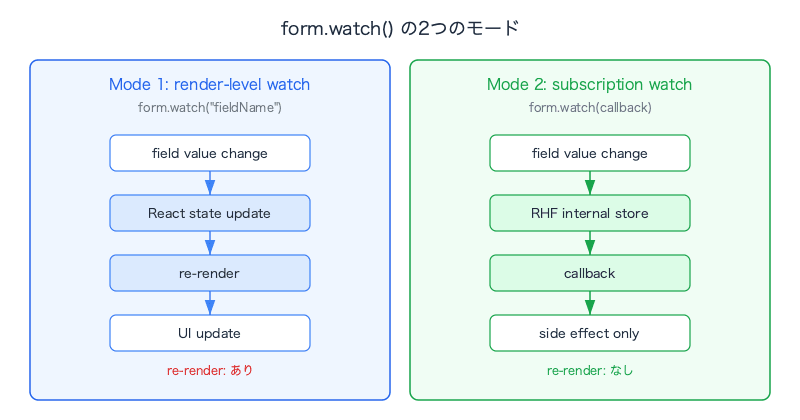
Mode 1: render-level watch (with re-rendering)
const value = form.watch("fieldName");
This is the pattern of calling it directly in the component body. It returns the current value of the field and re-renders the component every time the value changes.
A typical use case is conditionally rendering UI based on a field's value (e.g., "display a text input when field A is 'other'").
// Example: Show a free-text input when category is "Other"
const category = form.watch("category");

return (
  <>
    <CategorySelect />
    {category === "other" && <Input {...form.register("customCategory")} />}
  </>
);
It's convenient, but since the component tree re-renders every time the value changes, you need to be mindful of the performance impact.
Mode 2: subscription-based watch (without re-rendering)
useEffect(() => {
  const subscription = form.watch((values, { name, type }) => {
    // Execute side effects inside the callback
  });
  return () => subscription.unsubscribe();
}, [form]);
As a note on the dependency array [form]: the return value of useForm() is a stable reference and is not recreated. It is explicitly included to satisfy ESLint's react-hooks/exhaustive-deps rule.
This is the pattern of passing a callback inside useEffect. It listens for form value changes, but no React re-rendering occurs at all. It is a pure event listener against RHF's internal store.
I adopted this approach for the auto-search feature. Since all that's needed is to debounce the search execution when a filter changes, re-rendering the UI is unnecessary.
Why the Difference in Re-rendering
This relates to RHF's design philosophy. RHF manages form state using internal refs, not React state. This prevents React from re-rendering on every keystroke in a field.
- Mode 1 "pulls" the form value into React's rendering cycle, causing re-renders
- Mode 2 is a callback registration against RHF's internal store and operates outside React's rendering cycle
The type Field: Identifying the "Source" of a Change
The subscription-based watch callback receives name and type information.
form.watch((_values, { name, type }) => {
  console.log(name); // Name of the changed field (e.g., "filter.language")
  console.log(type); // Source of the change
});
The value of type differs depending on how the form value was changed.
| How it was changed | type |
name |
|---|---|---|
| User interaction in the UI (input, checkbox click, etc.) | "change" |
Field name |
form.setValue("field", value) |
undefined |
Field name |
form.reset() |
undefined |
undefined |
Note: This
typebehavior is consistent across RHF v7 in general. Even if you pass options like{ shouldDirty: true }tosetValue,typeremainsundefined.
This difference directly shaped the implementation approach for auto-search.
First Approach: type Filter + Explicit Calls
The first approach implemented was to filter by type === "change" and capture only user interactions with watch.
// Detect only user interactions with watch
useEffect(() => {
  const subscription = form.watch((_values, { type }) => {
    if (type !== "change") return;
    searchDebounce(() => onSubmitRaw(), SEARCH_DEBOUNCE_MS);
  });
  return () => subscription.unsubscribe();
}, [form, searchDebounce, onSubmitRaw]);
The problem was that programmatic changes via setValue() or reset() were not detected by watch as type === "change". As a result, explicit searchDebounce calls had to be added to each handler.
// Keyphrase change — must be called explicitly because setValue doesn't pass the type filter in watch
const onChangeKeyphrase = useCallback((keyphrase: string) => {
  form.setValue("keyphrase", keyphrase);
  searchDebounce(() => onSubmitRaw(), SEARCH_DEBOUNCE_MS); // explicit
}, [...]);

// Filter clear — same for reset
const onClickFilterClear = useCallback(() => {
  form.reset();
  searchDebounce(() => onSubmitRaw(), SEARCH_DEBOUNCE_MS); // explicit
}, [...]);

// Model selection — same because of setValue
const onSelectModel = useCallback((model) => {
  form.setValue("filter.modelCode", model.code);
  searchDebounce(() => onSubmitRaw(), SEARCH_DEBOUNCE_MS); // explicit
}, [...]);
It worked, but the search trigger paths were split in two.
- The watch subscription (user interactions)
- Explicit
searchDebouncecalls in each handler (programmatic changes)
Improvement: Remove the type Filter and Consolidate into a Single Path
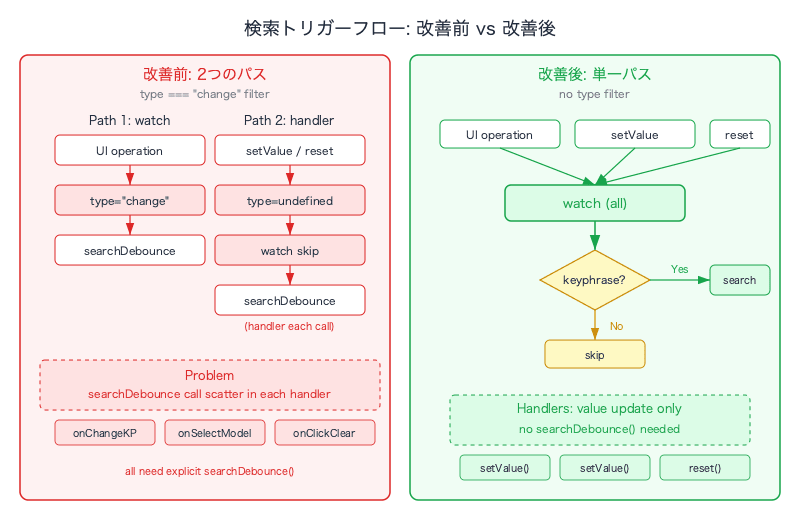
By removing the type filter, watch detects all changes (user interactions, setValue, and reset). This eliminates the need to write explicit searchDebounce calls in each handler.
useEffect(() => {
  const subscription = form.watch(() => {
    if (!form.getValues("keyphrase")) return; // Don't search if there's no keyphrase
    searchDebounce(() => onSubmitRaw(), SEARCH_DEBOUNCE_MS);
  });
  return () => subscription.unsubscribe();
}, [form, searchDebounce, onSubmitRaw]);
Each handler can focus solely on its own responsibility (updating values).
const onChangeKeyphrase = useCallback((keyphrase: string) => {
  form.setValue("keyphrase", keyphrase);
  // No need to call searchDebounce — watch will detect it
}, [form]);

const onClickFilterClear = useCallback(() => {
  form.reset();
  // watch will detect it
}, [form]);

const onSelectModel = useCallback((model) => {
  form.setValue("filter.modelCode", model.code);
  // watch will detect it
}, [form]);
A single watch covers everything. The keyphrase existence check acts as a guard, also preventing unnecessary searches when there is no keyword to search for.
| Source of change | Flow |
|---|---|
| User clicks a checkbox | watch fires → check keyphrase → searchDebounce |
onChangeKeyphrase calls setValue |
watch fires → check keyphrase → searchDebounce |
onSelectModel calls setValue |
watch fires → check keyphrase → searchDebounce |
onClickFilterClear calls reset |
watch fires → check keyphrase (skip if empty) |
Prerequisites for form.watch()
For form.watch() to detect all field changes, fields must be registered with the RHF form instance. There are two ways to register them.
register() — For Uncontrolled Components
<input {...form.register("filter.modelCode")} />
register() returns props such as ref, onChange, and onBlur, directly connecting the DOM element to RHF.
Controller — For Controlled Components
For components like MUI or custom components that cannot directly receive a ref, use Controller (or FormField).
<FormField
  control={form.control}
  name="filter.language"
  render={({ field }) => (
    <Select onValueChange={field.onChange} value={field.value}>
      {/* ... */}
    </Select>
  )}
/>
Fields that are not registered are invisible to watch. Changes to fields managed by their own useState or <input> elements not connected to the form will not be detected.
React Hook Form vs Next.js Server Actions
While researching RHF's form.watch(), I found myself about to confuse it with Next.js Server Actions, so I'll clarify the differences.
| React Hook Form | Next.js Server Actions | |
|---|---|---|
| Where it runs | Client (browser) | Server |
| Form state | JS object (in the browser) | Sent to the server as FormData |
| Validation | Client-side (+ optionally server-side) | Server-side |
watch() |
Monitors field changes in real time | The concept doesn't exist (no live state) |
| Mental model | SPA form management | Traditional HTML form submission |
Next.js's useFormState / useActionState + action={serverAction} is a flow where a form is submitted, the server processes it, and returns a result. There is no mechanism for monitoring field changes in real time on the client side.
RHF and Server Actions can be used together. A configuration where RHF handles client-side UX (validation, watch, conditional UI) and calls a Server Action on submission is perfectly valid. However, watch() is purely a client-side RHF feature.
Summary
| Concept | Key Point |
|---|---|
| render-level watch | form.watch("field") — With re-rendering. Useful for conditional UI |
| subscription watch | form.watch(callback) — Without re-rendering. Ideal for side effects |
type field |
User interactions are "change", setValue/reset are undefined |
| Simplified design | Remove the type filter, detect all changes with a single watch. Control with a guard condition |
| Prerequisites | Only fields connected to the form via register() or Controller can be detected |
| vs Server Actions | RHF is client-side form management, Server Actions are server-side processing. Completely separate concepts |
Through the feature of auto-searching on filter changes, I gained a deep understanding of how form.watch() behaves. In particular, the approach of removing the type filter and consolidating into a single path not only improves code readability but also offers the extensibility benefit of automatically including newly added fields in the detection scope.