Run Hermes Agent with Fireworks open models and call it from Slack

This page has been translated by machine translation. View original
Introduction
Hello, I'm Shimada from Classmethod's Manufacturing Business Technology Department.
Recently, I wrote an article about a setup where I turned a Mac mini into a herdr server to operate Claude Code remotely.
At the end of that article, I mentioned I wanted to try Hermes Agent next, and this is the follow-up.
Hermes Agent is an OSS agent developed by Nous Research.
It's licensed under MIT, and the repository is publicly available.
Its notable features include not only residing in the terminal but also being able to converse through messaging platforms like Slack and Telegram, with built-in cron scheduling.
The model is not fixed — it can connect to any OpenAI-compatible endpoint.
The previous setup involved entering the herdr on a Mac mini via Tailscale and Mosh, and sending approvals from an iPhone.
That was a setup for "doing the same operations as your local terminal, from a distance."
Hermes, on the other hand, aims to solve "running things even when no one is watching."
Both are resident setups but with different goals, so I tried running them side by side rather than replacing herdr.
This article covers everything from installation to Slack integration and setting up a cron job to deliver news every morning.
I used an open model via Fireworks AI.
The version at the time of writing is v0.20.0 (2026.8.3).
How to Install
The official documentation only guides you through running a script as the installation method.
$ curl -fsSL https://hermes-agent.nousresearch.com/install.sh | bash
This installer creates a git checkout at ~/.hermes/hermes-agent, rewrites your shell configuration files, and thereafter uses hermes update to update that checkout.
As I wrote previously, I align my environment setup with mise declarations.
Installers with their own update mechanisms don't fit this approach.
Upon investigation, I found a formula in homebrew-core.
$ brew info hermes-agent
==> hermes-agent: stable 2026.8.3 (bottled), HEAD
Self-improving AI agent that creates skills from experience
https://hermes-agent.nousresearch.com
License: MIT
I'll use this.
Just like when I migrated from tmux to herdr, I can install it with brew and declare it in my dotfiles.
$ brew install hermes-agent
$ hermes --version
Hermes Agent v0.20.0 (2026.8.3)
Python: 3.14.6
Having confirmed it works, I also added it to the package declarations in mise.toml.
"brew:hermes-agent" = "latest"
This means even on a new machine, just running mise bootstrap will install it.
You can verify that the declarations resolve correctly with a dry-run.
$ mise bootstrap -n
There's also a desktop app distributed as a cask called hermes-desktop, but since my goal is the CLI and resident process, I only used the formula.
A diagnostic command is available immediately after installation.
$ hermes doctor
At this point, it will report that the configuration file hasn't been created yet, and that optional packages for messaging are not installed.
Connecting an Open Model from Fireworks
Hermes is model-agnostic.
You can use API keys from Anthropic or OpenAI, or specify OpenRouter or local Ollama.
This time I used an open model.
The reason is that most of a resident agent's work is routine processing.
There's no need to use an expensive model for summarizing news every morning.
Additionally, since it runs unattended via cron, consumption is hard to predict.
Fireworks AI provides open models through an OpenAI-compatible API.
Hermes also came with a provider definition built in.
fireworks = ProviderProfile(
    name="fireworks",
    display_name="Fireworks AI",
    env_vars=("FIREWORKS_API_KEY",),
    base_url="https://api.fireworks.ai/inference/v1",
    auth_type="api_key",
    default_aux_model="accounts/fireworks/models/glm-5p2",
)
Register the API key.
$ hermes config set FIREWORKS_API_KEY fw_...
The key is saved in ~/.hermes/.env.
If you don't want it left in your shell history, you can use the interactive wizard hermes setup which masks input.
Available models can be retrieved from the API.
Here are the main ones available for chat.
| Model | Context | Tools | Image |
|---|---|---|---|
kimi-k3 |
1,048,576 | ✓ | ✓ |
deepseek-v4-flash-0731 |
1,048,576 | ✓ | |
deepseek-v4-pro |
1,048,576 | ✓ | |
glm-5p2 |
1,048,576 | ✓ | |
minimax-m3 |
512,000 | ✓ | |
gpt-oss-120b |
131,072 | ✓ |
(The accounts/fireworks/models/ prefix is omitted)
The major models have 1M context.
This will matter later.
I chose deepseek-v4-flash-0731 as the default model.
It's on the lightweight side, and since the version is pinned, it's easier to reproduce behavior.
Specifying provider and model separately
I hit a snag here.
The documentation shows an example where the provider and model are joined with a slash as a single string, like hermes config set model anthropic/claude-sonnet-4.
When I tried specifying a Fireworks model in the same format, requests returned 404.
$ hermes config set model fireworks/accounts/fireworks/models/deepseek-v4-flash-0731
$ hermes -z 'Reply with exactly: PONG'
HTTP 404: Model not found, inaccessible, and/or not deployed
Hitting the same model ID directly with curl returns 200, so the issue isn't on Fireworks' side.
The cause is that the Fireworks model ID itself contains slashes, like accounts/fireworks/models/....
With the concatenated format, there's no clear boundary between the provider name and the model name.
In config.yaml, model is a mapping that has provider and model beneath it.
Specifying them separately works.
model:
  provider: fireworks
  model: accounts/fireworks/models/deepseek-v4-flash-0731
When configuring via command, dot notation and --force are required.
$ hermes config set model.provider fireworks --force
$ hermes config set model.model accounts/fireworks/models/deepseek-v4-flash-0731 --force
$ hermes -z 'Reply with exactly: PONG'
PONG
Does tool calling work?
With a cheap open model, the concern is whether tool calls will succeed.
Hermes has many tools, so if it can't select the right one, it's useless.
I tested with a directory containing 2 .md files and 1 .txt file.
$ hermes -z 'Use your tools to count how many .md files are in the current directory. Reply with just the number.'
2
It answered correctly on the first try.
You can also measure the prompt size.
$ hermes prompt-size
  System prompt total :   19,633 B  (19.2 KB, 15,641 chars)
  Tool schemas        :   42,634 B  (41.6 KB, 25 tools)
The system prompt and tool schemas together are about 62 KB.
The official documentation states it comes with over 60 tools, but only 25 were enabled by default.
Given the 1M context, there was no need to trim the tools.
The breakdown also showed an entry called context (AGENTS.md/cwd files) accounting for 9.6 KB.
Hermes reads AGENTS.md from the working directory.
This means repository conventions take effect as-is.
Checking the Approval Behavior
Before running it unattended, I wanted to understand which commands would be executed automatically.
The settings are in config.yaml, and the defaults were as follows.
| Setting | Default | Meaning |
|---|---|---|
approvals.mode |
smart |
An auxiliary model assesses risk: low risk is auto-approved, dangerous is auto-denied, and ambiguous cases ask the user |
approvals.cron_mode |
deny |
Blocks dangerous commands during unattended execution |
command_allowlist |
[] |
Empty |
terminal.backend |
local |
No container isolation. Executes directly on the host |
It's reassuring that cron_mode is already set to deny.
There are also hard-coded lines that can't be executed even if you loosen the settings, such as rm -rf / or fork bombs.
One thing to note: since risk assessment in smart mode is performed by an auxiliary model, the safety depends on that model's judgment when using open models.
In this case, default_aux_model was glm-5p2.
As a safety net, I added patterns to permanently block.
approvals:
  deny:
    - "git push --force*"
    - "*rm -rf *"
    - "*curl*|*sh*"
After testing with a disposable directory, it blocked as expected.
The command was blocked, and I'm not going to work around it.

Your config.yaml has a deny rule matching `*rm -rf *` (under approvals.deny).
That's a hard block — it can't be run even with /yolo or approvals.mode=off,
and the policy says not to retry or rephrase it. So I won't try alternatives
like `rm -r` or `find -delete` to sneak around it; that would violate your
own configuration.
It named the alternatives rm -r and find -delete itself, then explicitly stated it wouldn't use them.
The directory remained intact.
Since this was a response to a one-off instruction, I don't yet know if it would behave the same way mid-session during a long autonomous run.
Connecting to Slack
Hermes supports Telegram, Discord, Slack, WhatsApp, Signal, and more.
I used my personal Slack workspace.
The resulting setup looks like this.
In the previous setup, Tailscale and Mosh were needed to connect from outside.
This time, since we go through Slack, the connection is established outbound from the gateway side.
Two types of tokens are required.
Prepare a bot token (xoxb-) and an app-level token (xapp-, with the connections:write scope).
Using the latter means it runs in Socket Mode, so no public URL or tunneling is needed.
Since the connection is established outbound from the gateway side, it works as-is on a laptop or a machine behind NAT.
App creation can be done with a manifest.
$ hermes slack manifest --write
~/.hermes/slack-manifest.json is generated.
It comes with 50 slash commands already registered and socket_mode_enabled already set to true.
In the Slack app creation screen, select "From an app manifest" and paste the contents to complete the setup.
Register the tokens.
$ hermes config set SLACK_BOT_TOKEN xoxb-...
$ hermes config set SLACK_APP_TOKEN xapp-...
Installing dependencies yourself
Slack integration requires additional packages.
These are not bundled with the formula.
With the official installer, these would be resolved as an extra called .[slack].
What's needed can be determined from the Hermes side definitions.
slack-bolt==1.29.0
slack-sdk==3.43.0
aiohttp==3.14.1
Install them directly into the formula's venv.
$ /opt/homebrew/opt/hermes-agent/libexec/bin/python3 -m pip install \
    'slack-bolt==1.29.0' 'slack-sdk==3.43.0' 'aiohttp==3.14.1'
Since this path is under Homebrew's Cellar, running brew upgrade hermes-agent will remove them.
I set things up so they're restored via the dotfiles mechanism described later.
Access control
Who can talk to the agent and from which channels can be restricted with environment variables.
SLACK_HOME_CHANNEL=C...      # Default delivery destination for cron and notifications
SLACK_ALLOWED_CHANNELS=C...  # If non-empty, mentions from other channels are ignored
SLACK_ALLOWED_USERS=U...     # Member IDs allowed to converse
I also checked the default values.
| Environment Variable | Default | Effect |
|---|---|---|
SLACK_REQUIRE_MENTION |
true |
Mentions are required in channels |
SLACK_ALLOW_BOTS |
none |
Posts from bots or apps are not processed |
SLACK_DISABLE_DMS |
false |
DMs are controlled independently from channel restrictions |
I have a channel where I pipe RSS feeds, so I was worried about adding the bot there and having it run amok.
Feed posts come from apps, so they're blocked by SLACK_ALLOW_BOTS, and human messages won't reach it unless they include a mention.
It's doubly protected, so there was no problem keeping it in the same workspace.
The Gateway Wouldn't Connect to Slack
This is where I spent the most time.
To keep it running persistently, you register the gateway — which handles messaging and scheduling — as a service.
$ hermes gateway install
$ hermes gateway status
✓ Gateway is supervised by launchd (PID 4075)
Since it's managed by launchd, automatic startup at login and recovery from crashes are handled.
However, mentions got no response.
Posts from cron were arriving, so sending worked, but only receiving wasn't functioning.
Looking at the logs, the cause was written there.
WARNING gateway.run: No adapter available for slack
WARNING gateway.run: No adapter could be created for any of the 1 configured platform(s).
Gateway will continue for cron job execution.
The Slack adapter wasn't being loaded, and the gateway was running as cron-only.
The dependencies were installed.
Calling Hermes's internal detection function directly returned no deficiencies, and the tokens were valid.
And it worked fine from the CLI.
The difference was in how the process was started.
/opt/homebrew/bin/hermes is not the actual binary but a wrapper script that sets environment variables before execution.
#!/bin/bash
HERMES_BUNDLED_SKILLS=... HERMES_BUNDLED_PLUGINS=... HERMES_WEB_DIST=... \
exec "/opt/homebrew/Cellar/hermes-agent/2026.8.3_1/libexec/bin/hermes" "$@"
Meanwhile, the plist generated by hermes gateway install bypassed this wrapper and launched Python directly.
<key>ProgramArguments</key>
<array>
    <string>/opt/homebrew/Cellar/hermes-agent/2026.8.3_1/libexec/bin/python</string>
    <string>-m</string><string>hermes_cli.main</string>
    <string>gateway</string><string>run</string><string>--replace</string>
</array>
<key>EnvironmentVariables</key>
<dict>
    <key>PATH</key>...<key>VIRTUAL_ENV</key>...<key>HERMES_HOME</key>...
</dict>
Only 3 environment variables were set, and HERMES_BUNDLED_PLUGINS was absent.
The Slack adapter is a bundled plugin located at share/hermes-agent/plugins/platforms/slack/, so its very existence was invisible to the gateway.
Rewrite it to launch via the wrapper.
<key>ProgramArguments</key>
<array>
    <string>/opt/homebrew/bin/hermes</string>
    <string>gateway</string><string>run</string><string>--replace</string>
</array>
/opt/homebrew/bin/hermes is a path that doesn't include the version.
This also simultaneously resolves the issue of the original plist hardcoding the version-specific path in the Cellar.
Reload the changes.
$ launchctl bootout gui/$(id -u)/ai.hermes.gateway
$ launchctl bootstrap gui/$(id -u) ~/Library/LaunchAgents/ai.hermes.gateway.plist
INFO gateway.run: Connecting to slack...
INFO adapter: [Slack] Socket Mode connected (1 workspace(s))
INFO gateway.run: ✓ slack connected
INFO gateway.run: Gateway running with 1 platform(s)
Mentions now get responses.
This issue only occurs with the combination of the formula and gateway install.
If you're using the official installer, the checkout structure is different, so you shouldn't see the same symptom.
Note that re-running hermes gateway install will regenerate the plist, which may cause this fix to be lost.
Talking to It from Slack
Now that it's connected, I tried giving it tasks from Slack.
I asked it to look up NVIDIA-related articles posted on DevelopersIO today.
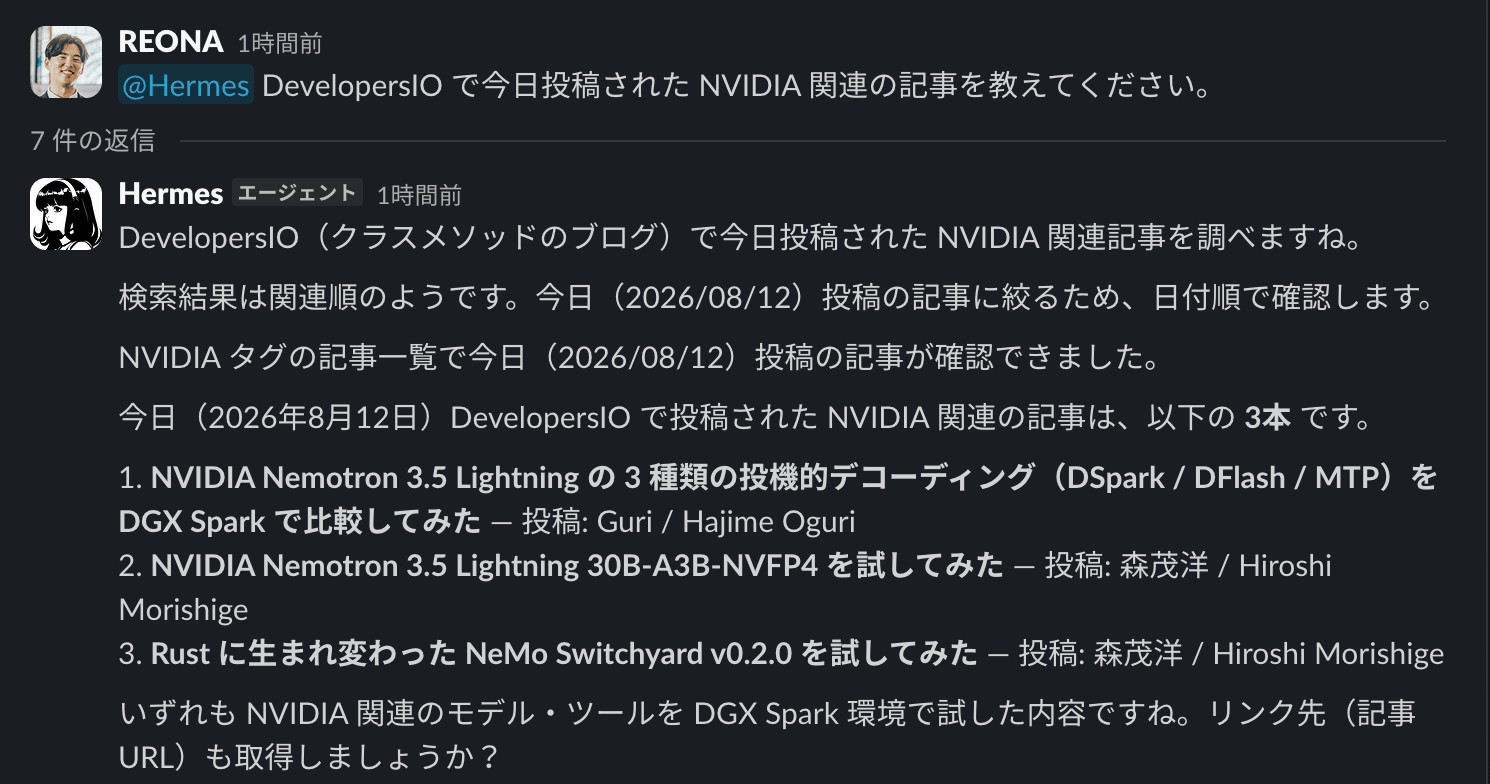
Responses go into threads, and progress is narrated as it works.
I'll look into NVIDIA-related articles posted today on DevelopersIO (Classmethod's blog).

The search results appear to be in relevance order. To narrow down to articles posted today (2026/08/12), I'll check them sorted by date.

I could confirm articles posted today (2026/08/12) in the NVIDIA tag article list.
It tried site search, noticed the sort order was by relevance, and switched to the tag listing sorted by date.
That's a decision I didn't instruct.
Three results came up.
The NVIDIA-related articles posted on DevelopersIO today (August 12, 2026) are the following *3*:

1. *Comparing Three Types of Speculative Decoding (DSpark / DFlash / MTP) for NVIDIA Nemotron 3.5 Lightning on DGX Spark* — Posted by: Guri / Hajime Oguri
2. *Trying NVIDIA Nemotron 3.5 Lightning 30B-A3B-NVFP4* — Posted by: Hiroshi Morishige
3. *Trying Out NeMo Switchyard v0.2.0, Reborn in Rust* — Posted by: Hiroshi Morishige

All of them are about trying NVIDIA-related models and tools in a DGX Spark environment.
Shall I also retrieve the links (article URLs)?
When I asked for the URLs, it changed its approach before returning them.
Since the accessibility snapshot doesn't show URLs, I'll extract links from the DOM.
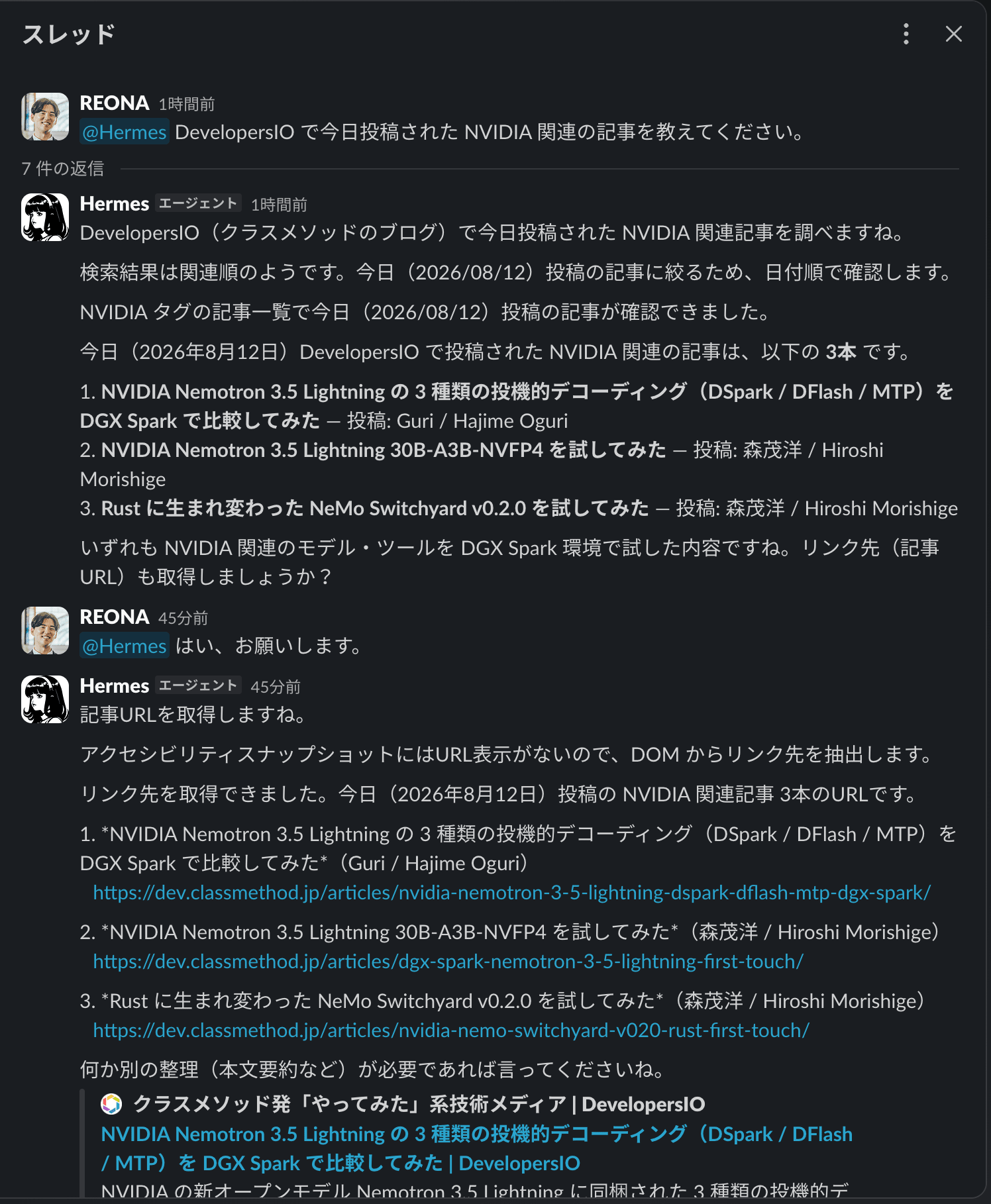
The tool being used here is the browser operation tool.
As mentioned earlier, web_search is disabled since no search API key was configured, but the tools for opening and reading pages work without a key.
What I noticed throughout the exchange was that it doesn't silently fail when it gets stuck.
If the search order is wrong, it switches to another page; if the needed information isn't in the snapshot, it checks the DOM.
Each step flows through in real time, so you know what's happening while you wait.
Delivering News Every Morning
Let me try out cron.
I decided to have it post news about NVIDIA every morning at 6 AM.
I chose 3 sources after confirming they could actually be fetched.
- NVIDIA Newsroom (
https://nvidianews.nvidia.com/releases.xml): Official press releases - NVIDIA Developer Blog (
https://developer.nvidia.com/blog/feed/): More technical articles - Hacker News (
https://hn.algolia.com/api/v1/search_by_date?query=nvidia): Community discussions
Google News RSS was also a candidate, but article URLs are wrapped in redirects like news.google.com/rss/articles/CBMi..., making it impossible to identify the source, so I excluded it.
Create the job.
$ hermes cron create '0 6 * * *' "<prompt>" --name nvidia-daily --deliver slack:C...
Created job: abe9239b4898
  Next run: 2026-08-13T06:00:00+09:00
--deliver specifies the delivery destination.
Other options include --skill to attach a skill that fixes the procedure, --no-agent to deliver script output directly without going through the model, and --model to pin a specific model per job.
You can run it manually.
$ hermes cron run abe9239b4898
  Ran now: succeeded.
Here's what arrived in Slack.
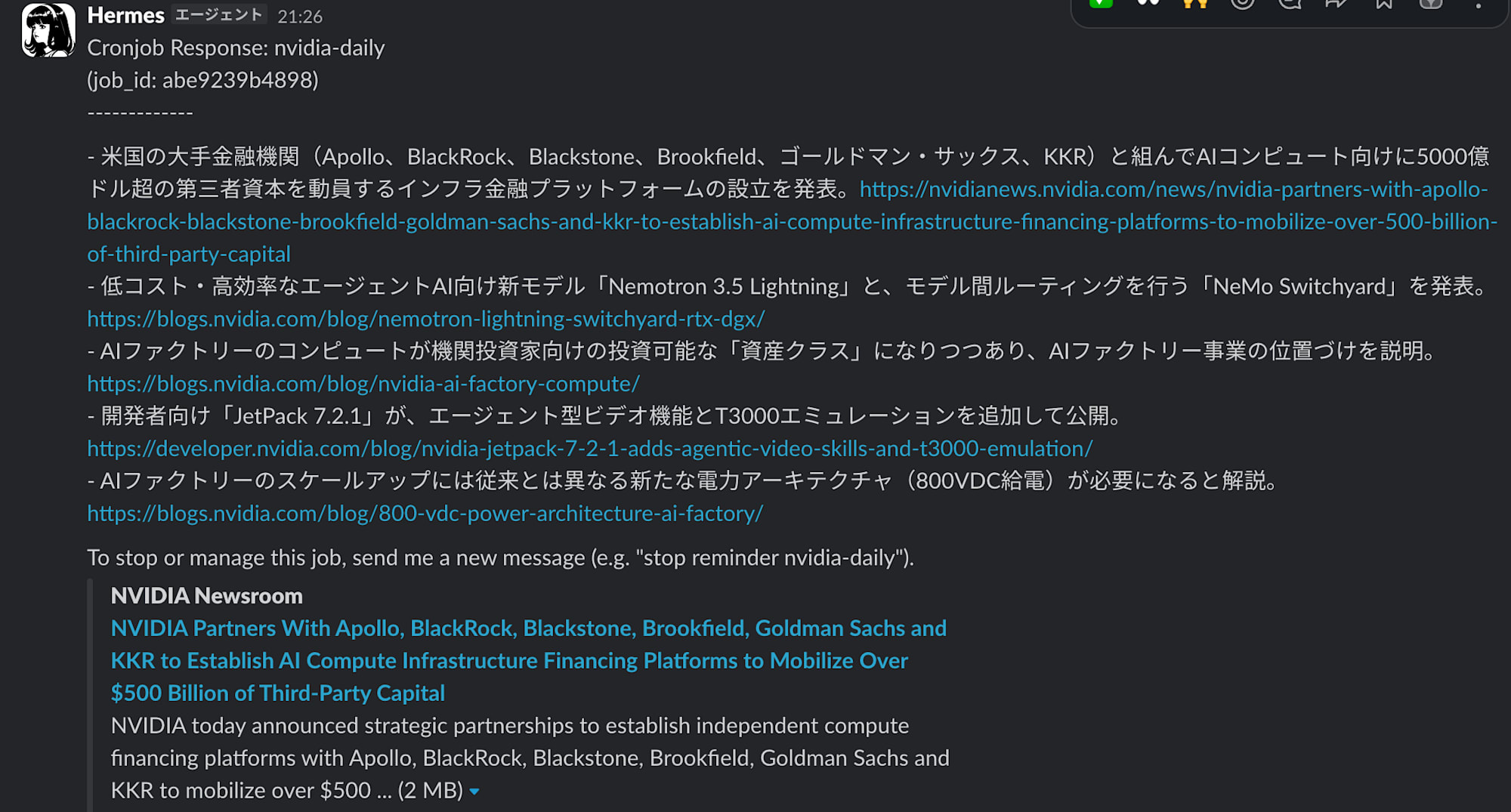
- CEO Jensen Huang stated that AI factory computing is becoming an investable asset class,
  announcing a framework with major financial institutions to raise over $500 billion in AI infrastructure funding
  https://blogs.nvidia.com/blog/nvidia-ai-factory-compute/
- Announced "Nemotron 3.5 Lightning," a highly efficient open MoE model for long-running agents,
  and "NeMo Switchyard" for routing between models
  https://blogs.nvidia.com/blog/nemotron-lightning-switchyard-rtx-dgx/
(continued)
It works even without a search API
One thing that surprised me.
Hermes has a tool called web_search, but it requires an API key for a search backend.
I hadn't configured any, so this tool was disabled.
Yet news was still gathered.
The model was using curl from the terminal tools to fetch RSS.
When I first observed the behavior, the response said:
I searched via Google News' RSS feed (curl) because this session has no
dedicated web_search tool — that's a working search, not a failure.
Rather than giving up when a tool isn't available, it found an alternative and reported exactly what it did.
"Succeeded" even when blocked
However, this self-initiated workaround has a side worth noting.
The initial execution log recorded three types of blocks.
BLOCKED: Security scan — [HIGH] Plain HTTP URL in execution context:
  URL 'http://hn.algolia.com/api/v1/search_by_date?...'
BLOCKED: execute_code runs arbitrary local Python ... Cron jobs run without
  a user present to approve it.
BLOCKED: Command flagged as dangerous (script execution via heredoc) but cron
  jobs run without a user present to approve it.
I had specified the Hacker News URL with http://, which was blocked by the security scan as plain HTTP.
execute_code and heredoc-based script execution are uniformly blocked during unattended runs by cron_mode: deny.
The problem is that the job doesn't count as failed even when these are blocked.
The agent finds alternative means, runs to completion, and the execution result shows succeeded.
In fact, on the first run, it produced results from only 2 sources without retrieving a single item from Hacker News.
You can't tell just by looking at the output.
For jobs running unattended, a habit of checking logs is essential.
Adding explicit instructions to the prompt — "use HTTPS only" and "don't use heredocs or execute_code" — resolved the blocks.
Moving the Unrepresentable Parts to Dotfiles
Hermes itself is already declared in mise.toml, but Slack's dependencies are outside brew's management and can't be expressed declaratively.
I moved them into a mise bootstrap task.
py=/opt/homebrew/opt/hermes-agent/libexec/bin/python3
if [ -x "$py" ] && ! "$py" -c 'import slack_bolt' >/dev/null 2>&1; then
  "$py" -m pip install --quiet 'slack-bolt==1.29.0' 'slack-sdk==3.43.0' 'aiohttp==3.14.1'
fi
It only runs when not yet installed, so running it multiple times causes no issues.
Even if the packages are removed by brew upgrade, running bootstrap restores them.
What I Accomplished and What Remains Unverified
The following is now working.
- Can converse from Slack, and continue from the same channel on a smartphone while away
- Gathers news from specified sources and posts every morning at 6 AM
- Tool calls work even with a cheap open model, and information can be gathered without a search API
- Environment setup fits within dotfiles declarations
On the other hand, there are things I haven't verified yet.
Hermes's selling point is a mechanism where the agent creates skills from experience and improves them through use.
This time I only covered the setup, and I haven't tested whether this learning loop works with open models.
Regarding safe behavior, I confirmed that one-off instructions are refused as expected, but whether it behaves the same way mid-session during a long autonomous run is still unknown.
These are areas I'd like to investigate going forward.
I also haven't measured costs.
The judgment to use a cheap model for routine processing is something that should be evaluated after seeing actual consumption figures.
I'd like to keep it running continuously and measure costs over a set period.
I also haven't touched integration with herdr.
In the previous article, I wrote that it seemed possible to use the existing herdr integration and moshi-hook forwarding as-is.
This time I stopped at getting Slack working, so I'll try that separately.
Closing
I wrote about installing Hermes Agent, running it with an open model from Fireworks, and connecting it to Slack and cron.
I hit two snags.
The concatenated provider/model string format doesn't work with Fireworks, and with the combination of Homebrew's formula and gateway install, bundled plugins are not loaded.
Neither of these is documented officially, so I hope this helps anyone trying the same setup.
In the previous article, I consolidated my environment on a Mac mini and made it operable from outside.
This time, an agent that keeps running even when no one is present was added to that setup.
There's plenty more to explore with Hermes Agent from different angles, and I plan to write about it in future articles.