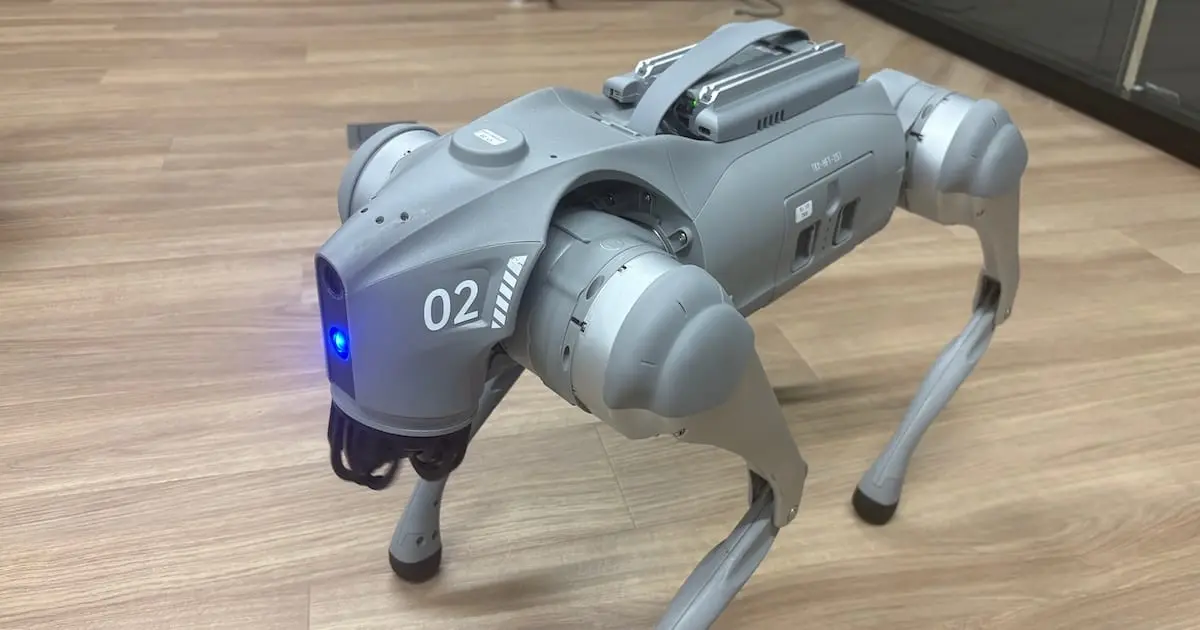
Robot Visual Inspection Agent Utilizing Unitree Go2 and G1: Continuously Analyzing Real Camera Footage from Go2 with a Local VLM

This page has been translated by machine translation. View original
Introduction
This week, I connected the Robot Visual Inspection Agent PoC built last week from manually captured images to the actual Unitree Go2 front camera.
At last week's stage, using images captured from a low angle with an iPhone, the following pipeline was working.
Local image
  ↓
Analysis by Qwen2.5-VL
  ↓
Structured JSON output
  ↓
InspectionResult schema validation
  ↓
Markdown report generation
This week, I extended the configuration to periodically capture still images from the Go2 front camera and continuously analyze them with a resident Qwen process.
Go2 front camera
  ↓
Capture still image every few seconds
  ↓
Save as JPEG to watched folder
  ↓
Resident process with Qwen loaded only once
  ↓
Continuously analyze new images
  ↓
Generate JSON / Markdown reports
The current implementation does not feed video files or live video streams directly into the VLM.
This is periodic-capture-based continuous inspection, where still images are captured from the Go2 camera at fixed intervals.
Therefore, in this article I will use the expression "continuous analysis of periodically captured camera images" rather than "real-time video analysis."
What Was Accomplished This Week
This week, I mainly worked on the following tasks.
- Confirmed network connectivity between Go2 and the inference environment
- Investigated the ROS 2 environment and camera device on Go2
- Set up the Unitree SDK2 Python / CycloneDDS environment
- Captured actual images from the Go2 front camera
- Analyzed actual Go2 images with
qwen_local - Implemented a resident watch runner that loads Qwen only once
- Implemented a loop to capture images from the Go2 camera at fixed intervals
- Implemented a mechanism to analyze only when a new image is saved
- Measured processing time per frame
- Implemented an optional speech queue
- Enhanced JSON repair and alias normalization
- Evaluated risk level judgment with actual images
- Analyzed false positives caused by copying prompt example text
- Analyzed incorrect risk conversion caused by post-processing
- Investigated how to use the Go2's built-in speaker
- Organized the policy of separating VLM observation from Python-based risk judgment
Capturing Images from the Go2 Front Camera
The Go2 front camera could not be accessed from /dev/video0 like a typical USB camera.
Also, since ROS 2 commands were not functioning correctly in the environment I checked this time, I adopted the method of capturing images via Unitree SDK2 Python / DDS.
Image capture uses the official camera capture sample included in Unitree SDK2 Python.
The execution image is as follows.
python example/go2/front_camera/capture_image.py <NETWORK_INTERFACE>
The captured images had the following format.
format:
  JPEG

resolution:
  1920 x 1080

size:
  approximately 224KB
I had expected approximately 1280×720 beforehand, but the images actually captured were 1920×1080.
Analyzing Actual Go2 Images with Qwen
I fed the captured Go2 images into the local Qwen2.5-VL-3B-Instruct.
The execution image on the application side is as follows.
python app/cli.py \
  --image samples/real_tests/go2_front_001.jpg \
  --robot Go2 \
  --location "office test area" \
  --image-source dds \
  --camera-source go2_front_camera \
  --vlm qwen_local
During inference, images are downscaled to the following size to reduce processing time.
1920 x 1080
  ↓
768 x 432
Part of the raw output was as follows.
{
  "scene": "office",
  "quality": "clear",
  "objects": [
    "black door",
    "glass wall",
    "stacked boxes",
    "monitor",
    "cable on floor"
  ],
  "hazard": "cable",
  "riskLevel": "medium",
  "action": "Ask an operator to confirm or secure the cable.",
  "confidenceScore": 0
}
Ultimately, I was able to generate a normalized JSON and Markdown report.
Go2 front camera
  ↓
Unitree SDK2 Python / DDS
  ↓
JPEG image
  ↓
Qwen2.5-VL
  ↓
JSON repair / normalization
  ↓
InspectionResult
  ↓
JSON / Markdown report
I was deeply moved that the pipeline I built myself worked end-to-end from actual robot camera images.
From Single-Image Processing to Periodic-Capture-Based Continuous Inspection
In the previous CLI, Qwen was loaded every time a single image was analyzed.
Process start
  ↓
Qwen load: approximately 40–50 seconds
  ↓
Analyze one image
  ↓
Exit
With this configuration, even if camera images are captured every 10 seconds, model loading is required each time.
So I added app/watch_run.py.
Process start
  ↓
Load Qwen only once
  ↓
Watch image folder
  ↓
Analyze new image
  ↓
Watch again
  ↓
Continue until Ctrl+C
Currently, the roles are divided across three processes.
Terminal A:
  Load Qwen only once
  Analyze newly saved images
  Save JSON / Markdown

Terminal B:
  Watch speech request JSON
  Print or speak risk level

Terminal C:
  Periodically save still images from Go2 front camera
The main commands are as follows.
# Analysis process
python app/watch_run.py \
  --image-dir samples/go2_periodic_eval \
  --robot Go2 \
  --location "office test area" \
  --image-source dds \
  --camera-source go2_front_camera \
  --vlm qwen_local \
  --poll-interval 1 \
  --summary-file watch_summary.json \
  --skip-existing
# Periodic camera image capture
python robot_io/go2_capture_loop.py \
  --iface <NETWORK_INTERFACE> \
  --out-dir samples/go2_periodic_eval \
  --interval 10 \
  --count 12
Currently I am using three terminals, prioritizing ease of debugging.
In the future, I would like to use tmux or a supervisor script to enable startup with a single command.
Measuring Processing Time
I added processing to watch_run.py to record the processing time per image.
{
  "image": "samples/go2_periodic_eval/go2_front_xxx.jpg",
  "status": "success",
  "risk_level": "medium",
  "path_blocked": false,
  "processing_time_sec": 5.24
}
The actual measured results were as follows.
Qwen cold start:
  approximately 40–50 seconds

Image processing after model load:
  approximately 4–7 seconds
The heavy processing is the initial model load rather than each image analysis.
By keeping Qwen resident, it was possible to process images at 10-second intervals without generating significant backlog at this point.
For 5-second intervals, processing time exceeds 5 seconds for some images, so backlog may occur.
Optional Risk Level Notification
I also added a mechanism to notify messages like the following based on the VLM analysis results.
Risk level, low.
Risk level, medium.
Risk level, high.
To separate the analysis process from audio output, a speech queue is used.
watch_run.py
  ↓
speech request JSON
  ↓
speech_watch.py
  ↓
print or audio output
Currently, operation has been confirmed with the print backend.
[SPEAK] Risk level, medium.
I also investigated multiple methods for the Go2's built-in speaker, but was unable to establish a way to play arbitrary audio programmatically in the current environment.
Next week, a new external speaker is expected to be provided.
If an external speaker is available, it can be implemented with the following simple configuration.
speech request JSON
  ↓
speech_watch.py
  ↓
local TTS
  ↓
external speaker
For example, the following command can be executed from the speech watcher.
espeak-ng "Risk level, medium."
Since the audio output implementation is expected to be simplified by the external speaker, I decided to continue the audio feature next week.
Stabilizing JSON Output
While continuously analyzing Go2 camera images, there were cases where Qwen's JSON output became unstable.
The formatting issues I identified are as follows.
single quotes
Python True / False
comments
trailing comma
Markdown code fence
nested scene / image / path
object detection format including bbox_2d
So currently, parsing is performed in the following order.
strict JSON parse
  ↓
minor JSON repair
  ↓
Python boolean / None conversion
  ↓
ast.literal_eval
  ↓
alias normalization
  ↓
nested structure repair
The generation settings were also simplified.
generated_ids = model.generate(
    **inputs,
    max_new_tokens=384,
    do_sample=False
)
repetition_penalty and no_repeat_ngram_size were removed because they could break the repetitive structures required in JSON.
In the latest evaluation, JSON parsing succeeded for all 12 images.
JSON parse success:
  12 / 12
Evaluating Risk Judgment
While JSON formatting stabilized, challenges remain with risk judgment.
Over-Sensitivity to Cables
With the initial rules, there was a tendency to assign medium whenever a cable was visible in the image.
However, the following types of cables are not necessarily dangerous.
Cables far away
Cables along the wall
Cables beside furniture
Cables not entering the direction of travel
So the prompt was changed to take distance and position relative to the path into consideration.
Everything Becoming High
When specific expressions were added to the prompt to mark close-range objects as high, Qwen sometimes copied those expressions regardless of the image.
large box blocking lower-center path
person very close in center path
For example, there were cases where boxes or people not actually detected were output as obstacles.
This is a problem similar to prompt example leakage, where specific examples in the prompt leak into the output.
Therefore, I removed the specific example sentences and changed to the following rules.
- Output only objects visible in the current image
- Do not treat objects not in
detected_objectsas obstacles - Remove person-related hazards when
human_presence=false - Do not copy expressions from the prompt
- Only consider
highcandidates when an object and a close-range expression are included in the same item
False Positives from Post-Processing
I also found a problem where raw output of low became high after normalization.
Previous post-processing combined the following fields and performed keyword search.
detected_objects
obstacles
potential_hazards
recommended_action
summary_ja
For example, the default recommended action is as follows.
No immediate action is required.
The word immediate within this was being incorrectly used as a keyword representing close proximity.
Currently, the information used for risk judgment is limited to the following.
Primary evidence:
  obstacles
  potential_hazards

Secondary evidence:
  detected_objects containing close-range expressions in the same string

Do not use:
  recommended_action
  summary_ja
  speech text
Recommended actions and summaries are information generated from risk judgments.
Using them again as the basis for risk judgment creates circular logic.
Latest Evaluation Results
In the latest evaluation, 12 Go2 camera images were processed.
JSON parse success:
  12 / 12

normalized risk:
  low: 10
  medium: 2
  high: 0

processing time:
  average: approximately 5.24 seconds
  minimum: approximately 4.47 seconds
  maximum: approximately 6.46 seconds
The "almost everything becomes high" problem that occurred previously has been resolved.
Also, when there was explicit path information as shown below, it was possible to normalize to medium.
boxes blocking the path
cables crossing the path
boxes in the way
clutter obstructing the path
On the other hand, even when a person or box was present nearby, high could not be determined when the VLM output consisted only of common nouns.
{
  "detected_objects": ["boxes", "person"],
  "obstacles": ["boxes"],
  "potential_hazards": ["person"]
}
From this information alone, the following distinctions cannot be made.
A person far away
A person right in front

Boxes along the wall
Boxes directly in front of the robot
This is the biggest challenge in the current risk judgment.
Next Design Policy
Going forward, rather than having the VLM directly decide the final risk level, the policy is to have it handle the role of structuring observation information from the image.
I am considering a configuration where risk judgment is computed deterministically in Python.
VLM:
  Observes scene and objects
  Structures position, distance, and path status

Python Policy:
  Determines risk level from observation information

LLM:
  Explains final results for humans
  Provides supplementary judgment for ambiguous cases
I would like to add the following fields to the observation schema.
{
  "forward_path_status": "partially_obstructed",
  "closest_forward_object": "boxes",
  "closest_forward_object_position": "center",
  "closest_forward_object_proximity": "near",
  "closest_forward_object_size": "large",
  "cable_crosses_forward_path": false
}
On the Python side, risk can be determined with rules like the following.
if forward_path_status == "blocked":
    risk_level = "high"
    path_blocked = True

elif (
    closest_forward_object_position == "center"
    and closest_forward_object_proximity == "very_near"
):
    risk_level = "high"
    path_blocked = True

elif forward_path_status in {
    "caution",
    "partially_obstructed"
}:
    risk_level = "medium"
    path_blocked = False

elif cable_crosses_forward_path:
    risk_level = "medium"
    path_blocked = False

else:
    risk_level = "low"
    path_blocked = False
Using LLM for every final risk judgment is also conceivable, but VLM processing alone currently takes approximately 4–7 seconds per image.
Adding further LLM processing may cause backlog even with 10-second interval periodic capture.
Also, leaving safety judgment entirely to an LLM may result in output variation even with the same input.
Therefore, at this point I believe the following hybrid configuration is most appropriate.
Normal cases:
  Judgment by Python Policy

Ambiguous cases:
  Supplementary confirmation by LLM

Human-facing explanation:
  Generated by LLM or Report Generator
Also Wanting to Use Temporal Information
Currently, each image captured at fixed intervals is analyzed independently.
However, even for the same scene, results may vary as follows.
image 1:
  low

image 2:
  medium

image 3:
  low
In the future, I would also like to add temporal smoothing using approximately the last 3 results.
low
medium
low

→ final risk: low
For high risk, to err on the side of safety while suppressing false positives, a method of confirming only when detected consecutively is also conceivable.
high
high
high

→ confirmed high risk
Even with periodic-capture-based inspection, using recent history rather than judging from a single image alone may help stabilize results.
Next Steps
The following are planned to be worked on next.
- Change the VLM output to a schema centered on observation information such as object position, distance, apparent size, and path status
- Deterministically determine risk level with Python Policy based on VLM observation results
- Compare before / after using the same evaluation images, and also consider smoothing using the results of the last few images
- Consolidate the current 3-process configuration with tmux or supervisor to simplify the startup method
- Connect the external speaker scheduled to arrive next week and implement risk level audio notification
- After confirming the accuracy and stability of visual inspection, gradually consider safe movement integration using VLA
For movement integration, I will not use a configuration that generates walking commands directly from VLM.
Instead, I will use a configuration mediated by a safety policy and predefined movement skills, as follows.
Observation by VLM
  ↓
Python Safety Policy
  ↓
Human approval or confirmation of safety conditions
  ↓
Predefined movement skills
  ↓
Robot movement
I plan to first verify in simulation or a limited environment where safety is ensured, and proceed step by step with emergency stop and human override in place.
Summary
I was able to connect the local-image-based PoC created last week to the actual Unitree Go2 front camera.
Furthermore, I extended the configuration from single-image processing to one that captures Go2 camera images at fixed intervals and continuously analyzes them.
The main accomplishments this week are as follows.
Capturing actual Go2 camera images
Analyzing actual device images with Qwen
Making Qwen resident
Continuous analysis of periodically captured images
JSON / Markdown report generation
Processing time measurement per image
Optional speech queue
Enhanced JSON repair
Real-image evaluation of risk level policy
On the other hand, using the actual camera also revealed challenges that were not apparent with local images alone.
In particular, when VLM is made responsible for all of object detection, distance estimation, path judgment, and risk assessment, results change significantly with prompt modifications.
The major learning from this verification is as follows.
"By directing VLM toward the role of extracting observation information from images and separating the final risk judgment as a deterministic Python Policy, stability, explainability, and evaluability can be improved."
Also, when handling periodically captured images, temporal consistency is important, not just judging each image independently.
Next week, I will separate the observation schema and risk policy and proceed with before / after comparisons using the same evaluation images.
In addition, I plan to work on risk level audio notification using the external speaker scheduled to arrive next week, simplifying the startup method of the 3-process configuration, and design for safe movement integration.