
I tried Sakana Fugu (GA) with a subscription plan

This page has been translated by machine translation. View original
Introduction
Hello, I'm Morishige from Classmethod's Manufacturing Business Technology Department.
Sakana AI released new LLM products Fugu and Fugu Ultra on June 22, 2026 as GA. Since a subscription plan also launched on the same day, I signed up for the Standard plan at $20/month that same day and tried it out. It turned out to be a more interesting model mechanism than I expected, so I'm summarizing my first impressions here as an introductory overview.
In a nutshell, Fugu is "multi-agent orchestration packed into a single model." It dynamically routes under the hood between major models like OpenAI's GPT 5.5, Anthropic's Claude Opus 4.8, and Google's Gemini 3.1 Pro, providing them as a single API.
This is a different approach from something like the NVIDIA LLM Router, which "selects one model externally as a router." Fugu itself is a trained coordinator LLM.
As an introductory article written on the day of the GA release, this post covers: (1) an overview of Fugu, (2) my impressions from signing up for the Standard plan and hitting the API with an OpenAI-compatible client, and (3) looking at the differences between Fugu and Fugu Ultra on actual hardware.
What Is Sakana Fugu?
Fugu is based on two papers that Sakana AI submitted to ICLR 2026. One is TRINITY (an evolutionary LLM coordinator), and the other is Conductor (a method for teaching agent coordination in natural language through reinforcement learning).
https://arxiv.org/abs/2512.04695
https://arxiv.org/abs/2512.04388
In terms of implementation, a single coordinator LLM of approximately 7B has learned through reinforcement learning "when, which frontier model, what, and how many times to delegate to," and sometimes recursively calls itself to deepen reasoning. For an overall picture of what's inside, the architecture diagram at the beginning of the official Sakana release article (Sakana Fugu: One Model to Command Them All) is easy to understand, so I recommend referring to it alongside this article to get a clearer image of the structure.
The agent pool reportedly includes frontier models such as GPT 5.5, Claude Opus 4.8, and Gemini 3.1 Pro, but Sakana itself explicitly states that only Anthropic's Fable 5 and Mythos Preview are not included in the agent pool due to export control restrictions. This could also be read as a structure that turns geopolitical risk into a tool for avoiding single-vendor dependency.
Note that the model size of Fugu itself (7B) is not explicitly stated on Sakana AI's official GA page; this information was picked up by a technical media article. I referenced the Krasa.ai explanation article as the source.
Differences Between Fugu and Fugu Ultra
Fugu comes as a pair of two models: the lightweight side is called fugu, and the higher-end is called fugu-ultra-20260615. The lightweight fugu was called fugu-mini during the beta period and is oriented toward latency, suited for everyday queries, code reviews, and chatbots. On the other hand, fugu-ultra is a mode that makes full use of the agent pool, and the official documentation touts it as suited for tasks requiring a 272K token context and lengthy reasoning (paper reproduction, Kaggle competitions, cybersecurity assessment, literature surveys, etc.).
The subscription plans have three tiers: Standard $20 / Pro $100 / Max $200, and both fugu and fugu-ultra are available in any plan. The difference between plans is the usage volume, with Pro at 10x Standard and Max at 20x Standard. Since the official documentation doesn't quantify how many requests Standard can handle, you'll have to get a feel for it empirically.
For pay-as-you-go, fugu-ultra is standard at $5 input / $30 output (per 1M tokens), switching to $10 input / $45 output when context exceeds 272K. The fugu side does not have individual billing; instead, it appears to be "billed at the top model single rate, without accumulation even when multiple agents are called."
By the way, there's a campaign where registering by the end of July 2026 gets you the second month free, so I chose Standard this time. Being able to explore for 2 months for $20 felt like just the right temperature for an initial evaluation.
One thing to keep in mind is that the distinction between fugu and fugu-ultra is designed so that the client side explicitly specifies with the model parameter. Sakana doesn't automatically determine "let's call fugu for this light question" or "let's route this heavy code to fugu-ultra" — it's the caller's responsibility to decide which one to call. As we'll see later, there is dynamic routing between multiple frontier models within fugu-ultra (orchestration), but that's a separate layer.
Note that the model catalog distributed for Codex CLI (~/.codex/fugu.json, described later) has both fugu and fugu-ultra registered, with context_window: 1000000 and input modality ["text", "image"] written for each. The fact that a 1M token context and image input are supported was a discovery not explicitly stated on the official LP.
How Is It Different from OpenRouter Fusion or NVIDIA LLM Router?
The direction of "intelligently using multiple models" has spawned three different solutions over the past year. Here's a rough breakdown for first-time readers of the differences between Fugu and those approaches.
| Mechanism | Call Pattern | Where the "Intelligence" Lies | Billing Unit |
|---|---|---|---|
| NVIDIA LLM Router | 1 request → classifier selects 1 model and sends to it | Lightweight classifier (MLP / BERT-based, trainable) | Unit price of the 1 selected model |
| OpenRouter Fusion | 1 request → same question to multiple models in parallel → integration | Parallel calls + aggregator | All parallel call models |
| Sakana Fugu | 1 request → 7B coordinator dynamically routes + self-recursion | The trained orchestrator LLM itself | Top model unit price (no accumulation, according to official) |
NVIDIA LLM Router is a lightweight router that only predicts which single model to route to using a classifier; Fusion is a Mixture of Agents system that sends the same question to N models and consolidates at the end; and Fugu has a 7B coordinator LLM itself dynamically deciding "when, what, how many times, to whom to delegate, and sometimes whether to recursively route back to itself."
Trying It Out
After logging in at console.sakana.ai, selecting Standard on the plan selection screen, and registering credit card information, the get-started page displays the API key and base URL.
- base URL:
https://api.sakana.ai/v1 - Standard model id:
fugu - Ultra model id:
fugu-ultra-20260615 - Authentication: OpenAI compatible,
Authorization: Bearer <api_key>header
For the API key, I followed my usual convention in my local environment and added it to .envrc as SAKANA_API_KEY.
export SAKANA_API_KEY="sk-..."
One thing to know in advance is that the service is currently unavailable from EU / EEA. Sakana officially states they are working on GDPR compliance, so users in the EU will need to wait until that's complete. Regarding the use of responses for training data, the default is ON, and users can opt out from the console.
Hitting fugu and fugu-ultra with the OpenAI Compatible API
Since it's an OpenAI-compatible API, you can call it directly with the openai Python SDK. Just swap the base_url in one line.
from openai import OpenAI

client = OpenAI(
    base_url="https://api.sakana.ai/v1",
    api_key=os.environ["SAKANA_API_KEY"],
)
resp = client.chat.completions.create(
    model="fugu",  # or "fugu-ultra-20260615"
    messages=[{"role": "user", "content": "..."}],
)
I sent the same prompt to both fugu and fugu-ultra-20260615 and compared the response content, usage, and latency. The prompts were two types: a "light question" and "light reasoning."
| model | prompt | latency (s) | total_tokens | orch_in | orch_out |
|---|---|---|---|---|---|
| fugu | light question | 7.68 | 309 | 0 | 0 |
| fugu_ultra | light question | 108.44 | 14,607 | 5,889 | 6,555 |
| fugu | light reasoning | 8.21 | 339 | 0 | 0 |
| fugu_ultra | light reasoning | 10.98 | 1,670 | 1,260 | 0 |
Glancing at the table, I noticed three things.
First, the usage field has been extended from OpenAI-compatible to a proprietary format. An orchestration_output_tokens field has been added inside completion_tokens_details, and orchestration_input_tokens and orchestration_input_cached_tokens fields have been added inside prompt_tokens_details, making it visible how many tokens of orchestration Fugu ran behind the scenes.
Second, fugu alone does almost no orchestration. All orchestration-related fields are 0, with fugu answering on its own. On the other hand, fugu_ultra ran approximately 5,889 + 6,555 = about 12,444 tokens of orchestration even for a light question, and it took 108 seconds to return the "light question" response. Ultra is literally a mode that makes full use of the agent pool.
Third, fugu_ultra returned the following kind of self-introduction when responding to the light question:
I am a worker agent of the Fugu orchestration system. Fugu is a multi-AI collaborative reasoning system.
In the TRINITY paper, three roles are proposed: Thinker / Worker / Verifier, and you can read this as the Worker role seeping into the response. Personally, I found it quite interesting that the role structure of the implementation shows up in responses, as it makes the connection between the paper and the GA product visible.
For the "light reasoning" case, both fugu and fugu_ultra returned equivalent answers like 3.5 each. 2 mandarins each, 1 apple each, cut the remaining 1 apple in half to share, and here Ultra's orchestration_output_tokens was also 0. For light reasoning, even Ultra answers on its own, so latency stays around 11 seconds.
Having It Write a Little Code on a Sakana-appropriate Topic
Evolutionary optimization is another pillar of Sakana AI's research, so as a contextually fitting topic, I asked it to "write a short Python program that evolves the string HELLO FUGU using a genetic algorithm."
The code fugu returned was something like this — an orthodox implementation with uniform crossover and elitism.
import random
import string

TARGET = "HELLO FUGU"
POPULATION_SIZE = 50
GENERATIONS = 100
MUTATION_RATE = 0.05
CHARS = string.ascii_uppercase + " "

def fitness(individual):
    return sum(a == b for a, b in zip(individual, TARGET))

def tournament_selection(population, k=3):
    return max(random.sample(population, k), key=fitness)

def crossover(parent1, parent2):
    return "".join(random.choice((a, b)) for a, b in zip(parent1, parent2))

def mutate(individual):
    return "".join(
        random.choice(CHARS) if random.random() < MUTATION_RATE else c
        for c in individual
    )
(Only part of the full code is shown due to space constraints. It's a straightforward structure: tournament_selection to select parents, crossover for uniform crossover, and mutate for mutation.)
fugu_ultra, on the other hand, had nearly the same structure but with the crossover changed to single-point crossover, and one additional post-processing message for when the target isn't reached. The quality of the output is essentially the same. The issue isn't there — it's in the usage values.
| model | latency (s) | total_tokens | orch_in | orch_out |
|---|---|---|---|---|
| fugu | 55.24 | 2,141 | 0 | 0 |
| fugu_ultra | 269.06 | 28,950 | 8,636 | 17,768 |
fugu_ultra ran 26,404 tokens of orchestration behind the scenes (8.8x the output itself), took 269 seconds — about 4.5 minutes — and returned code roughly equivalent to what fugu alone produced in 55 seconds.
For light code generation, fugu is sufficient; fugu-ultra should be saved for truly heavy problems.
In terms of latency variability, just within the scope of verification in this article, fugu_ultra ranged widely: 108 seconds for a light question, 11 seconds for light reasoning, and 269 seconds for code generation. This is also the flip side of it dynamically deciding "how deeply to run" internally — if you throw a light task at Ultra, you may find the response slower than expected.
Overall Usage Picture from the Console
After completing the API verification so far (2 light questions, 2 light reasoning tasks, 2 code generation tasks), I checked the usage screen in the Sakana console.
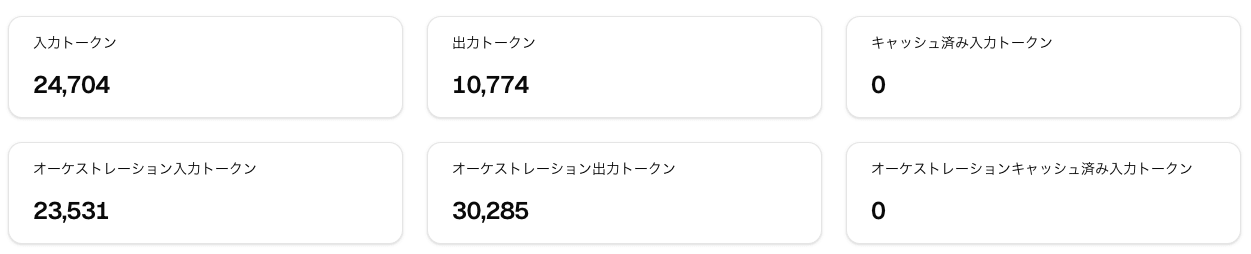
Compared to the regular input 24,704 + output 10,774 = approximately 35,000 tokens, the orchestration side came to input 23,531 + output 30,285 = approximately 54,000 tokens — more than the surface-side amount. As a proportion, 60% of the total 89,000 tokens was from what ran behind the scenes. The fugu_ultra code generation single request (26,404 background tokens) had a big effect, and the sense of "this much runs behind the scenes" when calling Ultra is consistent with the individual response figures we've seen so far.
Let me also check the subscription usage quota.
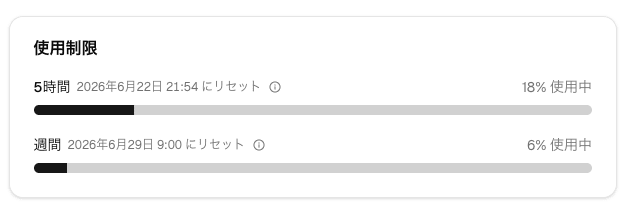
The 5-hour quota is at 18% and the weekly quota at 6%. Since the scale of this verification session was just 6 API requests (fugu 3 requests + fugu-ultra 3 requests) and 1 codex-fugu exec call, there seems to be plenty of room for "just trying it out" with the Standard plan. On the other hand, given the sense that a single fugu_ultra code generation call takes over 10% of the 5-hour quota, if you want to incorporate Ultra into a business loop, Pro (10x Standard) or higher would be the practical solution. Standard seems best understood as being for "getting familiar as an individual" or "handling light queries with fugu."
Installing codex-fugu and Confirming Startup
Fugu also has an official CLI, with installation instructions available in the SakanaAI/fugu repository.
curl -fsSL https://sakana.ai/fugu/install | bash
codex-fugu
When I read the code to see what would be downloaded, the true nature of codex-fugu turned out to be a 392-line bash wrapper for launching OpenAI's Codex CLI with the -p fugu profile. Sakana isn't building a proprietary CLI — it's layered on top of Codex CLI via profile switching.
The central line is this:
exec "$real" -p fugu ${CODEX_ARGS[@]+"${CODEX_ARGS[@]}"}
The installer scripts/install.sh does the following:
- Detects an existing Codex CLI and pins it to a specific version (0.141.0 in this case)
- Appends a
[model_providers.sakana]section to~/.codex/config.toml - Saves
SAKANA_API_KEYwith 0600 permissions to~/.codex/.env - Places Fugu-specific profile settings in
~/.codex/fugu.config.toml - Installs the
~/.local/bin/codex-fugulauncher
Peeking at ~/.codex/fugu.config.toml revealed a minimal configuration at just the right level of simplicity.
model = "fugu"
model_reasoning_effort = "high"
model_provider = "sakana"
model_catalog_json = "/Users/morishige/.codex/fugu.json"
model = "fugu" is the default. Since ~/.codex/fugu.json, referenced by model_catalog_json, has both fugu and fugu-ultra registered, it appears to be designed with the expectation that you'd switch to Ultra using the /model slash command in the Codex TUI or by overriding the model with the -c option at startup. This too is explicit specification on the client side.
And here is the provider definition inserted on the ~/.codex/config.toml side:
[model_providers.sakana]
name = "Sakana API"
base_url = "https://api.sakana.ai/v1"
env_key = "SAKANA_API_KEY"
wire_api = "responses"
stream_idle_timeout_ms = 7200000
stream_max_retries = 5
request_max_retries = 4
Two things stood out. First, wire_api = "responses", meaning it's configured to use the Responses API rather than Chat Completions. And second, stream_idle_timeout_ms = 7200000, meaning stream idle waiting is allowed for up to 2 hours. You can tell it's designed with Fugu Ultra's long-duration orchestration in mind.
In my environment, I had Codex 0.140.0 running, so at first bundle deployment was refused due to a version mismatch. Sakana has a design that strictly pins Codex to a specific version, and if there's a mismatch, it doesn't proceed automatically but asks for confirmation. Since OpenAI's Codex side updates frequently, it's a helpful design from a compatibility standpoint that there's a mechanism to align with the version Fugu has verified against. On my end, I ran npm install -g @openai/codex@0.141.0 to upgrade and re-ran it, and the bundle deployment went through successfully.
After startup, codex-fugu --status showed the following:
codex-fugu status
  CODEX_HOME        : /Users/name/.codex
  CODEX_INSTALL_DIR : /Users/name/.local/bin
  real codex        : /Users/name/.bun/bin/codex
  installed version : 0.141.0
  bundle            : configs
  deployed_target   : 0.141.0
  deployed_format   : modern
  repo_dir          : /Users/name/.fugu
  branch            : main
  install_ref       : ed1535c4f14e715635bc0fcfb4dcf1e0683164b1
  install_method    : npm
  last update check : never
With this, you can run one-shot execution with codex-fugu exec "...", or launch the Codex interactive TUI with just codex-fugu. Existing settings like ~/.codex/AGENTS.md are carried over as-is, so if you're already using Codex regularly, just switching the profile to Fugu should let you get started in a familiar environment.
Connecting Sakana Fugu from CCR
This is a supplement at the end of the article, but I also tried connecting to Fugu from Claude Code Router (CCR). Just adding a sakana entry to the Providers array in ~/.claude-code-router/config.json lets you call it from an Anthropic-compatible client.
{
  "name": "sakana",
  "api_base_url": "https://api.sakana.ai/v1/chat/completions",
  "api_key": "sk-...",
  "models": ["fugu", "fugu-ultra-20260615"]
}
After ccr restart, hitting the Anthropic-compatible endpoint with curl returns a response.
curl -sS -X POST http://localhost:3456/v1/messages \
  -H 'content-type: application/json' \
  -d '{
    "model": "sakana,fugu",
    "max_tokens": 200,
    "messages": [{"role":"user","content":"Please introduce Sakana AI's Fugu in about 50 characters."}]
  }'
{
  "id": "chatcmpl-...",
  "model": "fugu",
  "content": [{ "type": "text", "text": "Fugu is an AI agent developed by Sakana AI that balances speed and quality." }],
  "stop_reason": "end_turn",
  "usage": { "input_tokens": 65, "output_tokens": 185 }
}
The CCR side log also shows sakana provider registered, returning 200 OK in 4.8 seconds. I'll save more complex verification like calling Fugu from Claude Code via CCR for a future article.
Things I'm Curious About Right Now
Here are some points that I'm curious about after exploring this far, as of the first impression.
One is the quality of the design where the "behind the scenes" is visible in usage. By returning the orchestration portion in separate columns with the custom fields orchestration_input_tokens and orchestration_output_tokens, you can see the difference between the total you're being billed for and the amount that was running behind the scenes. On the other hand, since "which model was called how many times" doesn't appear, this is a different granularity of openness from the transparency of the internal routing itself.
Second is the unpredictability of latency. Just in this verification, fugu_ultra ranged from 11 seconds to 269 seconds, and the CLI's design value of stream_idle_timeout_ms = 7200000 (2 hours) makes it clear that even longer runs are anticipated internally. If you throw things at it with a chat-use-case mindset, you'll likely be surprised, so it seems best to separate Ultra for batch-use / deeply thoughtful tasks.
Third is that the Standard plan's "quota" is hard to visualize until you check the console. As mentioned earlier, the verification session in this article (6 API requests + 1 codex-fugu run) used 18% of the 5-hour quota and 6% of the weekly quota. If you plan to call fugu_ultra regularly in a business loop, Pro or higher is the practical solution; Standard is best understood as being for "getting familiar as an individual" or "light use centered on fugu." The pay-as-you-go unit prices (Fugu Ultra: $5 input, $30 output / 1M token) are also good to keep in mind as a reference for combined use.
And fourth is that the service is unavailable from EU / EEA, and by default responses are used for training data. The latter can be opted out of from the console, so it's wise to switch that off before serious use.
Conclusion
This was a first-look introduction, written and explored on the day of the GA release. I think the appeal of Fugu lies not in "bundling multiple models" but in the fact that "the bundling mechanism itself was trained as a single LLM through reinforcement learning." From the proprietary extensions in usage, the wire-side design choice of wire_api = "responses", and the energy-efficient implementation of layering on top of Codex CLI via profiles, I sensed that Sakana has a quality of "focusing on what they want to do and not building anything unnecessary."
Since the second-month-free campaign runs until the end of July, now is a good time to try it out if you've been curious about Fugu.
Reference Links
- Sakana Fugu — Multi-agent System as A Model
- Sakana Fugu: One Model to Command Them All (release article)
- Sakana Console / Pricing
- SakanaAI/fugu — GitHub
- TRINITY: An Evolved LLM Coordinator (arXiv)
- Learning to Orchestrate Agents in Natural Language with the Conductor (arXiv)
- Tried Building an LLM Usage Environment by Purpose with NVIDIA LLM Router (Basics Edition)
- Tried Retraining NVIDIA LLM Router to Match My Own Persona (Training Edition)

