[Update] I Tried Migrating AWS Security Hub CSPM Central Configuration to AWS Organizations Declarative Policies

This page has been translated by machine translation. View original
Introduction
In a recent update, you can now manage organization-wide AWS Security Hub CSPM settings with AWS Organizations declarative policies.
Until now, I had been managing Security Hub CSPM under Organizations with configuration policies in Central Configuration.
With this update, managing it with Organizations declarative policies is now recommended, and a migration tool that converts existing central configuration is provided as well.
Since migration is officially recommended, I tried migrating a test organization that uses central configuration.
This article covers everything from checking the state before migration to verifying it after migration.
The following article is a helpful reference for central configuration itself.
I previously wrote about managing GuardDuty enablement with Organizations declarative policies in this article.
Update Overview
Security Hub CSPM now supports AWS Organizations declarative policies (policy type SECURITYHUB_CSPM_POLICY).
When you attach a policy to the organization root, an OU, or an account, the following settings are applied to the accounts it is attached to.
- Regions in which to enable Security Hub CSPM
- Security standards to enable
- Controls to enable or disable, and custom parameters for controls
Declarative policies are policies for applying AWS service settings across an entire organization.
They used to be available only for EC2, but the supported services have grown, and the policy type is separate for each service.
Some have similar names, so be careful not to confuse them. This article covers the third one.
| Policy type | Target | What can be managed |
|---|---|---|
DECLARATIVE_POLICY_EC2 |
Amazon EC2, Amazon VPC, Amazon EBS | Account-level settings such as block public access for AMIs |
SECURITYHUB_POLICY |
The new Security Hub | Enablement and Regions of the new Security Hub |
SECURITYHUB_CSPM_POLICY |
Security Hub CSPM | Security Hub CSPM enablement, standards, and controls |
Hereafter, in this article, I will call a declarative policy of SECURITYHUB_CSPM_POLICY a "Security Hub CSPM policy."
Central configuration is now positioned as a legacy feature in the documentation, and Security Hub CSPM policies are recommended.
However, as of this writing, no retirement date for central configuration has been announced, and you can keep using central configuration as is until you migrate.
Supported Regions are the commercial Regions, the AWS GovCloud (US) Regions, and the China Regions.
What Changes Compared to Central Configuration
Compared with central configuration, it looks like this.
| Item | Central configuration | Security Hub CSPM policy |
|---|---|---|
| Where policies are stored | Configuration policies in Security Hub CSPM | Declarative policies in AWS Organizations |
| Accounts that can operate | Delegated administrator account | Management account. The delegated administrator account can also do so if a delegation policy is set |
| Home Region | Yes. Applied to the home Region and linked Regions | None. You write the Regions to enable in the policy |
| Per-Region settings | Cannot be separated | Standards and controls can be overridden per Region |
| Controls that evaluate global resources | Enabled only in the home Region | If you limit to one Region, you write it yourself with a per-Region override |
| Combined use | - | Cannot be used together with central configuration |
Manage with the Same Mechanism as Other Security Services
Amazon GuardDuty and Amazon Inspector can also have their organization-wide enablement managed with Organizations declarative policies.
Security Hub CSPM alone had been managed with a separate mechanism (central configuration), but now it can be managed with the same mechanism, declarative policies.
Settings Can Differ by Region
With central configuration, the same settings were applied to the home Region and linked Regions.
With Security Hub CSPM policies, you write the overall settings in default, and in a block named after a Region you can change settings for only that Region.
A Region for which you write a Region-name block does not inherit the contents of default.
For example, a control disabled in default will be enabled in that Region unless you also write it in the Region-name block.
Test Environment
There are three types of accounts that appear.
| Name | Role |
|---|---|
| Management account | The AWS Organizations management account |
| Delegated administrator account | The account designated as the Security Hub CSPM delegated administrator |
| Member account | Any other account in the organization besides the above two |
The organization has 7 accounts, including the management account.
The home Region for central configuration is Tokyo, and 16 linked Regions are specified.
Checking the State Before Migration
First, let's check the state of central configuration in the delegated administrator account.
> aws securityhub describe-organization-configuration

{
    "AutoEnable": false,
    "MemberAccountLimitReached": false,
    "AutoEnableStandards": "NONE",
    "OrganizationConfiguration": {
        "ConfigurationType": "CENTRAL",
        "Status": "ENABLED",
        "StatusMessage": "Central configuration has been enabled successfully."
    }
}
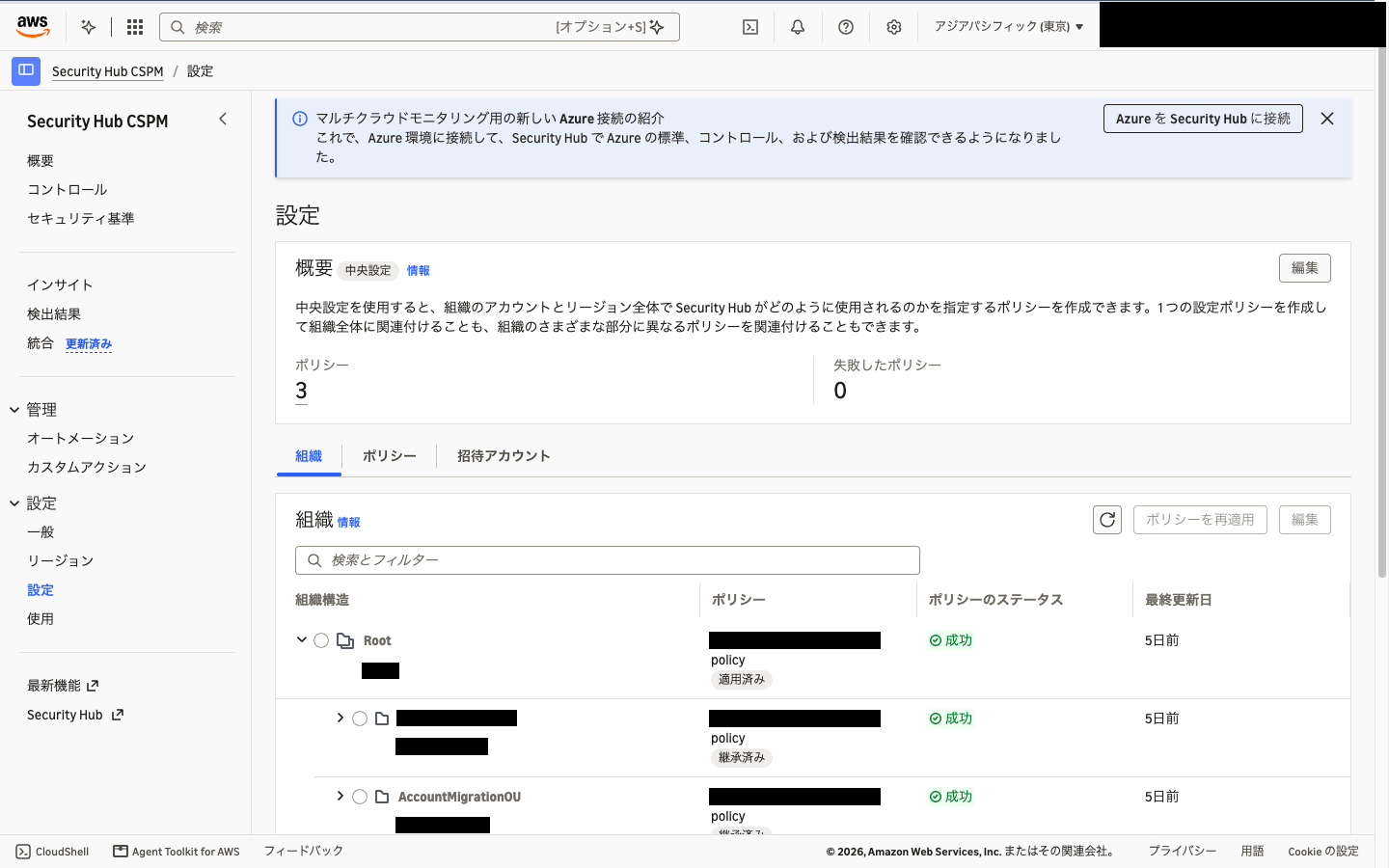
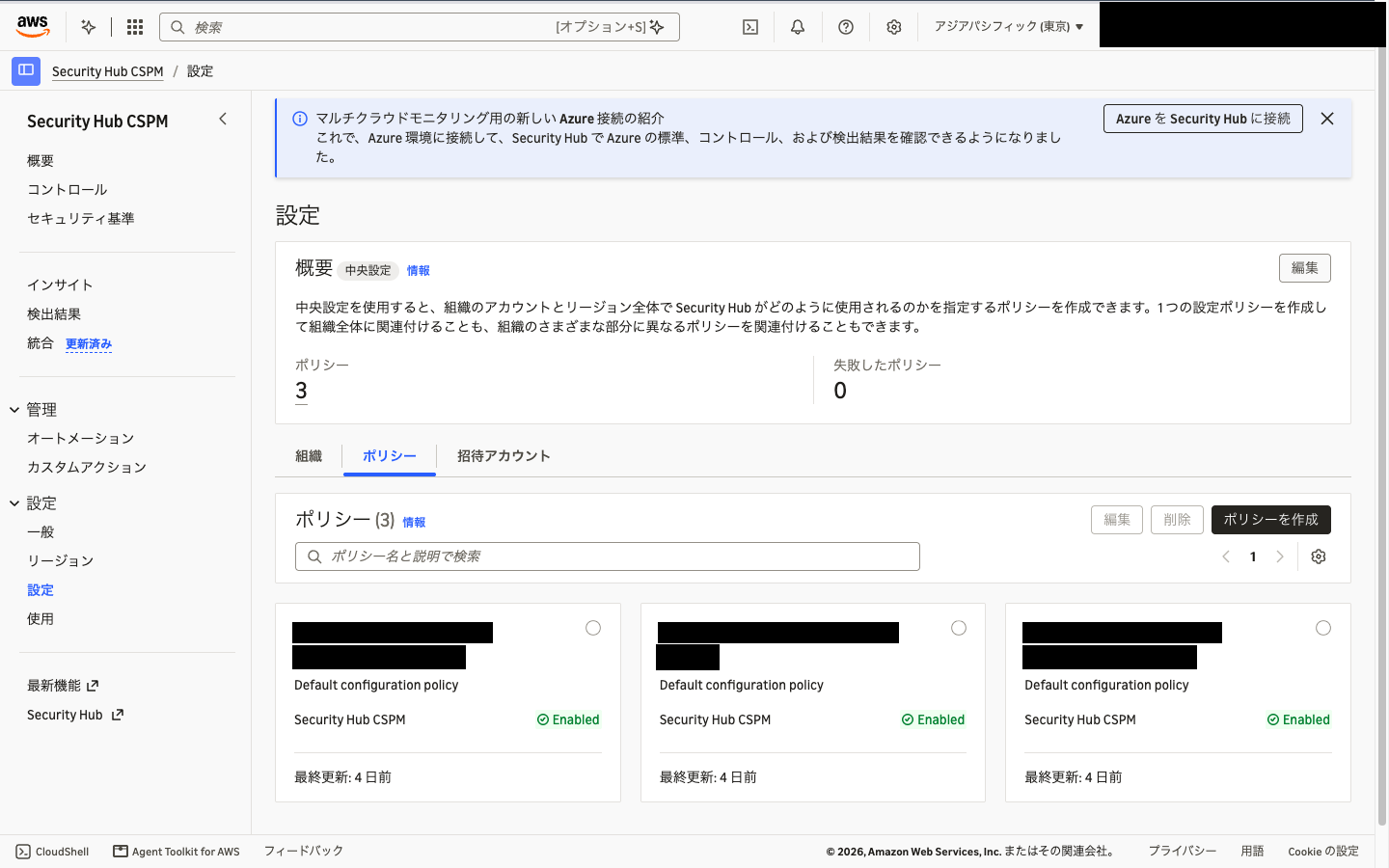
There were three configuration policies in use in this environment.
| Configuration policy | Applied to | Standard | Disabled controls |
|---|---|---|---|
| For root | Root | AWS Foundational Security Best Practices v1.0.0 | None |
| For development OU | Development OU | Same as above | 116 |
| For production OU | Production OU | Same as above | 67 |
You can also check this in "Settings" in the Security Hub CSPM console.
Let's also check the Organizations side in the management account.
There are no Security Hub CSPM policies yet.
> aws organizations list-policies --filter SECURITYHUB_CSPM_POLICY

{
    "Policies": []
}
In my local AWS CLI (2.38.3), SECURITYHUB_CSPM_POLICY did not appear among the choices in the help, but the command ran fine.
Opening the Migration Tool
The migration tool is not in the Security Hub CSPM console but in the new Security Hub console.
I first looked for it in "Settings" of the Security Hub CSPM console and couldn't find it, so be careful.
When you open "Settings" in the Security Hub console with the delegated administrator account, a banner saying "Import central configuration policies" is displayed.
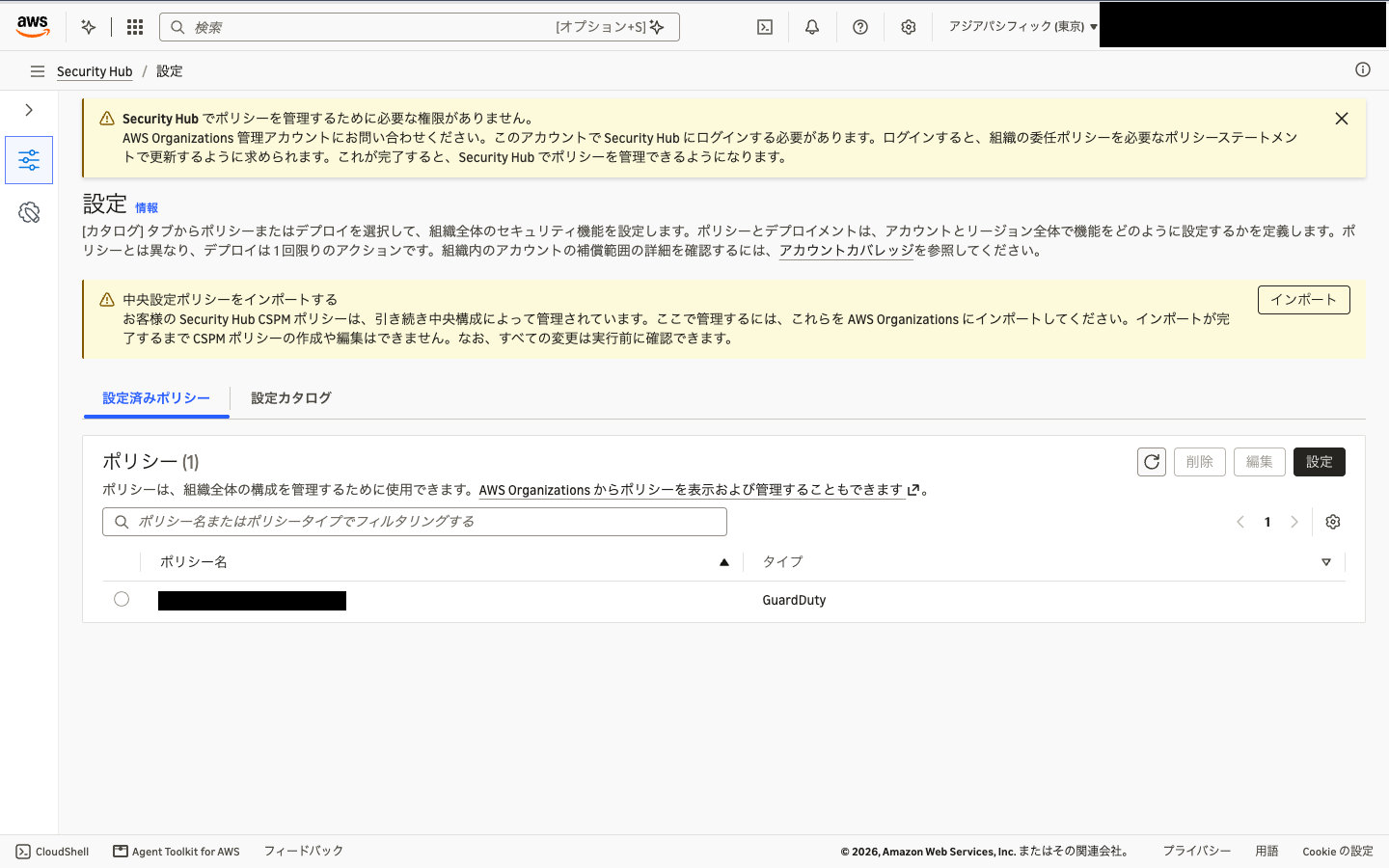
I haven't enabled Security Hub in the test environment, but this "Settings" page could still be opened.
Navigating from the navigation menu took me back to the introduction page, so I opened it directly by setting the end of the URL to #/configuration.
When you choose "Import" on the banner, a 3-step wizard starts.
Step 1, "Before you begin," shows the processing performed during import and the prerequisites.
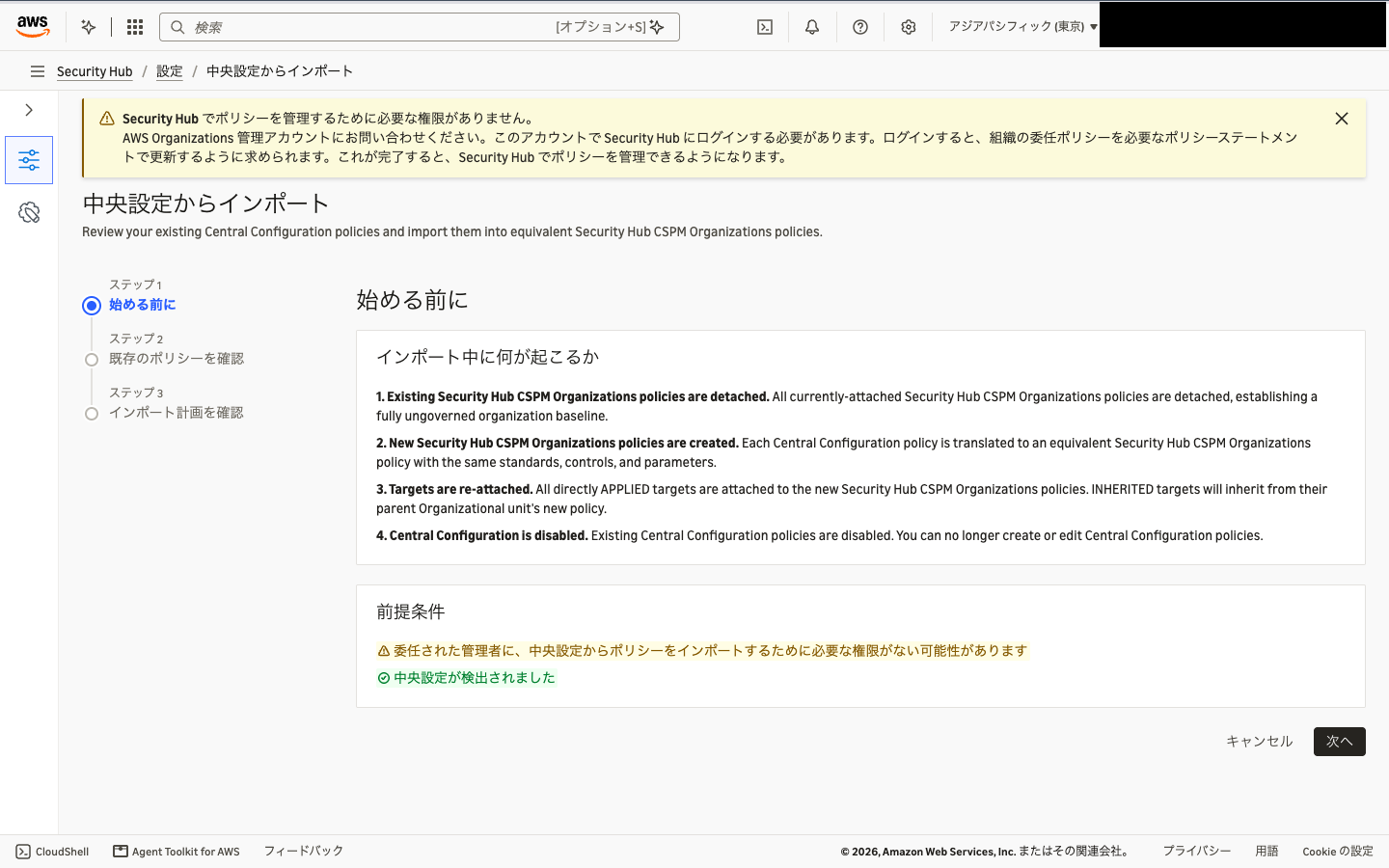
The following warning was displayed in the prerequisites.
The delegated administrator may not have the permissions required to import policies from central configuration
Updating the Delegation Policy
The migration tool creates and attaches Organizations declarative policies from the delegated administrator account.
For this work, being designated as the Security Hub CSPM delegated administrator is not enough; the Organizations delegation policy must allow operations on Security Hub CSPM policies.
This work is done in the management account.
When you open "General" in the new Security Hub console with the management account, the same warning and an "Update policy" button are displayed.
When you choose this button, Security Hub adds all the necessary permissions to the delegation policy.
However, with this method, permissions for policy types other than Security Hub CSPM are delegated as well.
This time I wanted to keep the delegation to a minimum, so I used the AWS CLI to add only the part for Security Hub CSPM policies.
{
  "Sid": "SecurityServicesDelegatingPolicyMutationActions",
  "Effect": "Allow",
  "Principal": {
    "AWS": "arn:aws:iam::<委任管理者アカウント ID>:root"
  },
  "Action": [
    "organizations:CreatePolicy",
    "organizations:UpdatePolicy",
    "organizations:DeletePolicy",
    "organizations:AttachPolicy",
    "organizations:DetachPolicy",
    "organizations:EnablePolicyType",
    "organizations:DisablePolicyType"
  ],
  "Resource": [
    "arn:aws:organizations::<管理アカウント ID>:policy/<組織 ID>/guardduty_policy/*",
    "arn:aws:organizations::<管理アカウント ID>:policy/<組織 ID>/securityhub_cspm_policy/*",
    "arn:aws:organizations::<管理アカウント ID>:root/<組織 ID>/*",
    "arn:aws:organizations::<管理アカウント ID>:account/<組織 ID>/*",
    "arn:aws:organizations::<管理アカウント ID>:ou/<組織 ID>/*"
  ],
  "Condition": {
    "StringEquals": {
      "aws:PrincipalOrgID": "<組織 ID>"
    }
  }
}
The policy ARN path worked with securityhub_cspm_policy, the policy type name in lowercase.
put-resource-policy replaces the entire delegation policy.
Retrieve the existing content with describe-resource-policy and pass the full text with your additions.
> aws organizations put-resource-policy --content file://delegation-policy.json
Running the Migration Tool
After updating the delegation policy, I reopened the migration tool, but the prerequisite warning did not go away.
The warning seems to check whether all the permissions added by "Update policy" in the console are in place.
Even with this delegation policy to which I added only the Security Hub CSPM policy part, I could choose "Next," and the import succeeded.
Let's proceed through the wizard.
Step 2, "Review existing policies," shows the target Regions and the configuration policies to be imported.
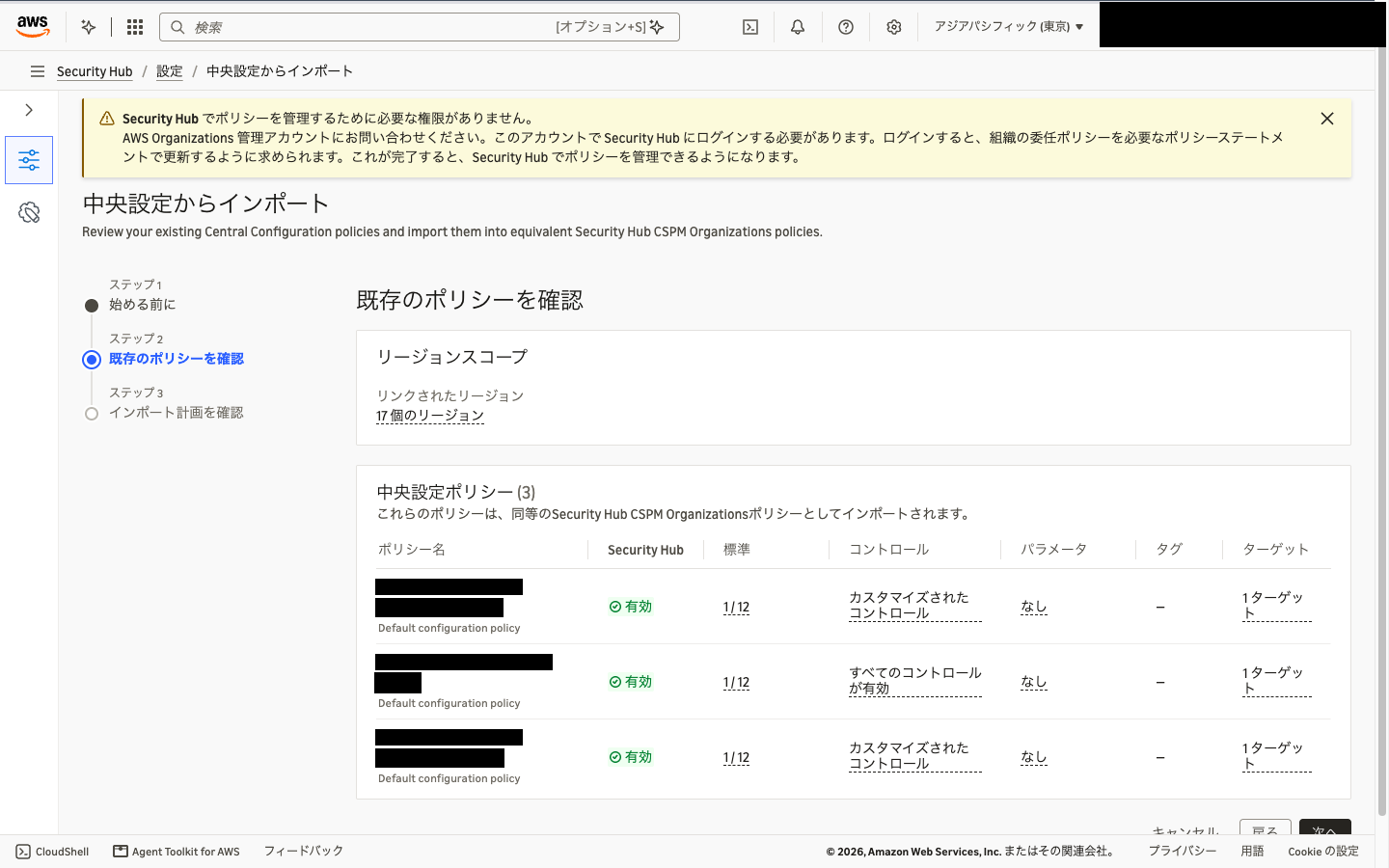
There are 17 Regions (the home Region plus 16 linked Regions) and 3 configuration policies, which match what I checked before migration.
Step 3, "Review import plan," shows the Security Hub CSPM policy that will be created for each configuration policy.
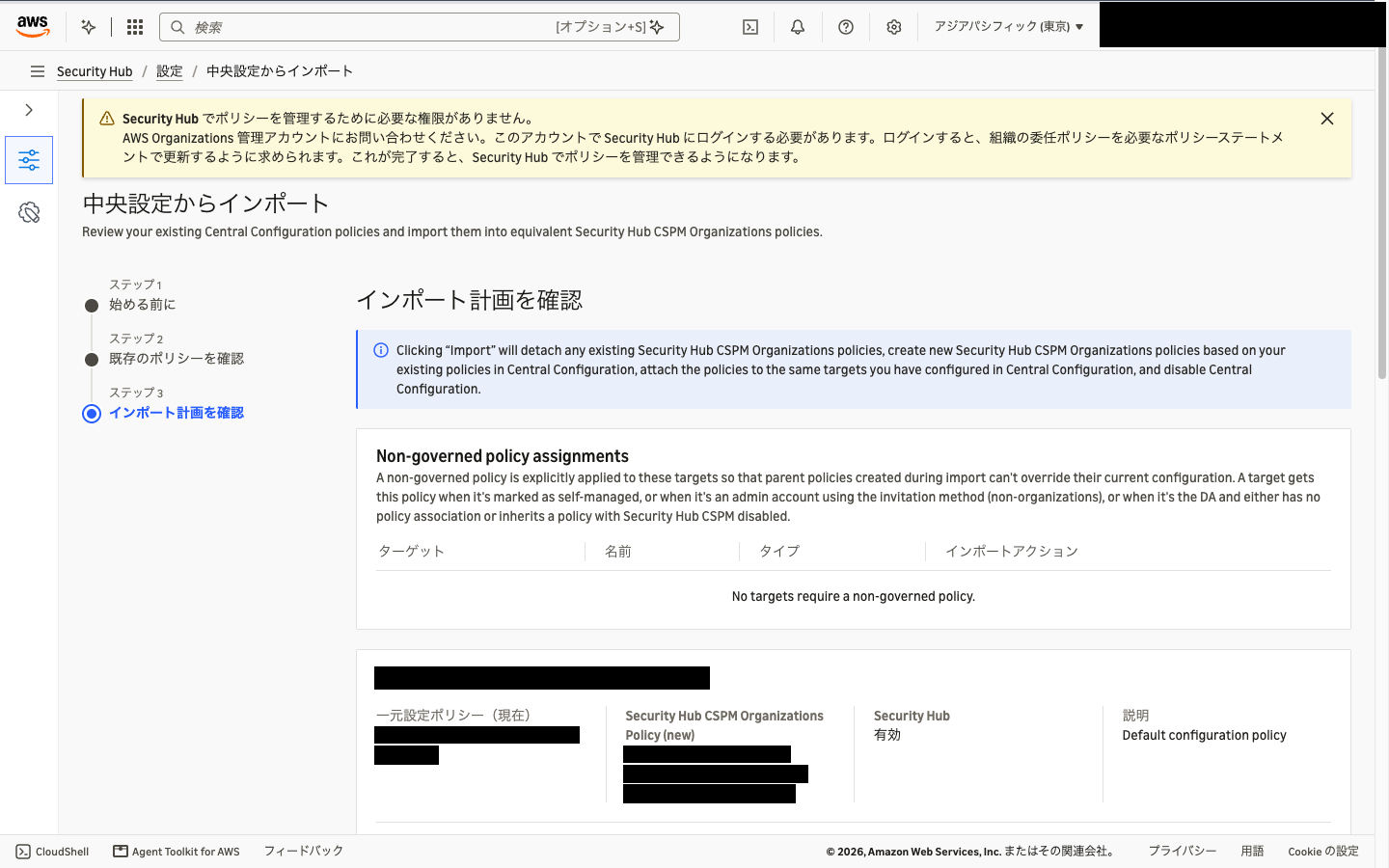
The name of a new policy is <configuration policy ID>_<original configuration policy name>.
"Non-governed policy assignments" at the top is a list of targets to which an empty policy that governs no Regions will be assigned.
Accounts that are self-managed, for example, are covered, but there were none in this case.
At the bottom of the page are the post-import state and a confirmation checkbox.
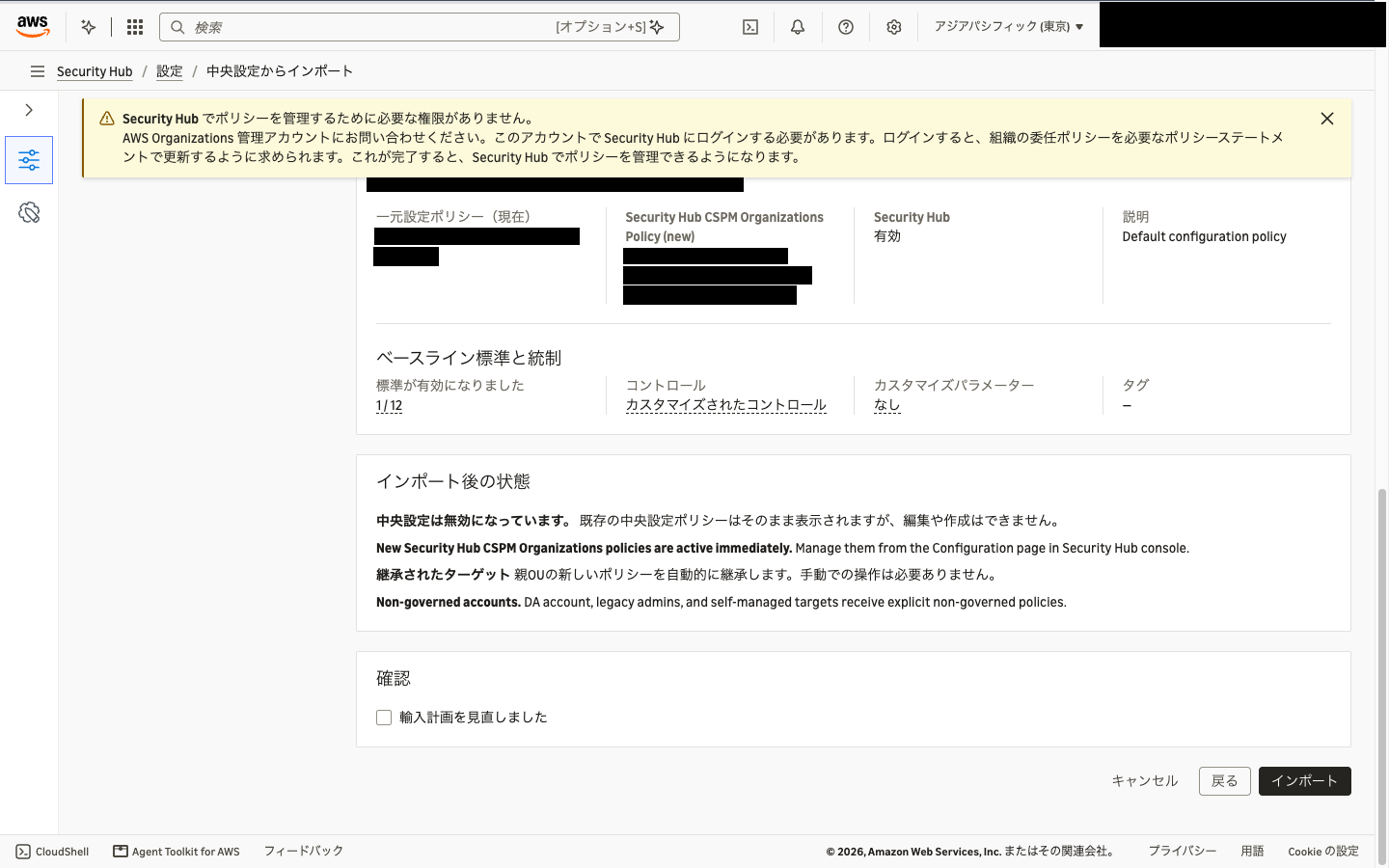
When you choose "Import," the following processing is performed.
- If any Security Hub CSPM policies are attached, detach them
- Create a Security Hub CSPM policy for each configuration policy
- Attach the new policy to the targets to which the configuration policy was directly applied
- Disable central configuration
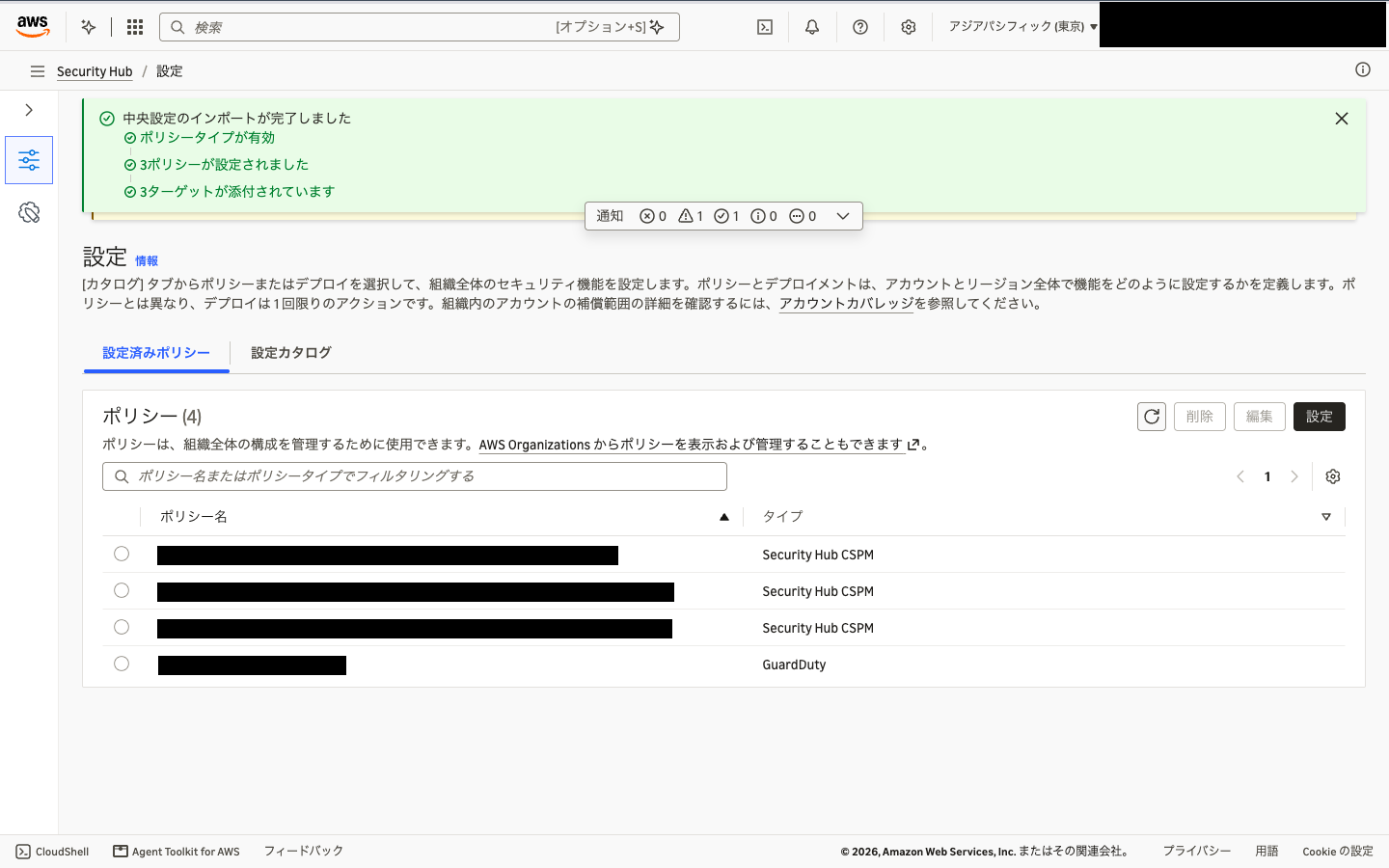
At this scale (3 configuration policies, 3 targets), it completed in under 10 seconds.
The migration tool also enables the policy type for you. It's easy to migrate, which is a relief.
Checking the State After Migration
Created Security Hub CSPM Policies
Let's check the created policies and where they are attached in the management account.
| Original configuration policy | Attached to | Applied to before migration |
|---|---|---|
| For root | Root | Root |
| For development OU | Development OU | Development OU |
| For production OU | Production OU | Production OU |
The contents of the policy for root are as follows.
@@operators_allowed_for_child_policies attached to each key is omitted.
{
  "securityhub_cspm": {
    "cspm_enablement": {
      "enable_in_regions": {
        "@@assign": [
          "ap-northeast-1",
          "ap-northeast-2",
          "(中略。ホームリージョンとリンクリージョンの計 17 個)",
          "us-west-2"
        ]
      },
      "disable_in_regions": {
        "@@assign": []
      }
    },
    "cspm_standards_controls": {
      "default": {
        "controls_configuration": {
          "default_control_association_status": {
            "@@assign": "ENABLED"
          },
          "disabled_controls": {
            "@@assign": [
              "Account.1",
              "IAM.1",
              "IAM.2",
              "IAM.3",
              "IAM.4",
              "IAM.5",
              "IAM.6",
              "IAM.7",
              "IAM.8",
              "IAM.21",
              "KMS.1",
              "KMS.2",
              "RDS.51"
            ]
          }
        },
        "enabled_standards": {
          "@@assign": [
            "aws-foundational-security-best-practices/v/1.0.0"
          ]
        }
      },
      "ap-northeast-1": {
        "controls_configuration": {
          "default_control_association_status": {
            "@@assign": "ENABLED"
          }
        },
        "enabled_standards": {
          "@@assign": [
            "aws-foundational-security-best-practices/v/1.0.0"
          ]
        }
      }
    }
  }
}
The configuration policy for root did not disable any controls, but the converted default contains 13 controls.
This is a conversion to carry over the handling of controls that evaluate global resources.
With central configuration, such controls were enabled only in the home Region, but Security Hub CSPM policies have no home Region.
So the migration tool rewrote them to be disabled in default and re-enabled in the home Region (ap-northeast-1) block.
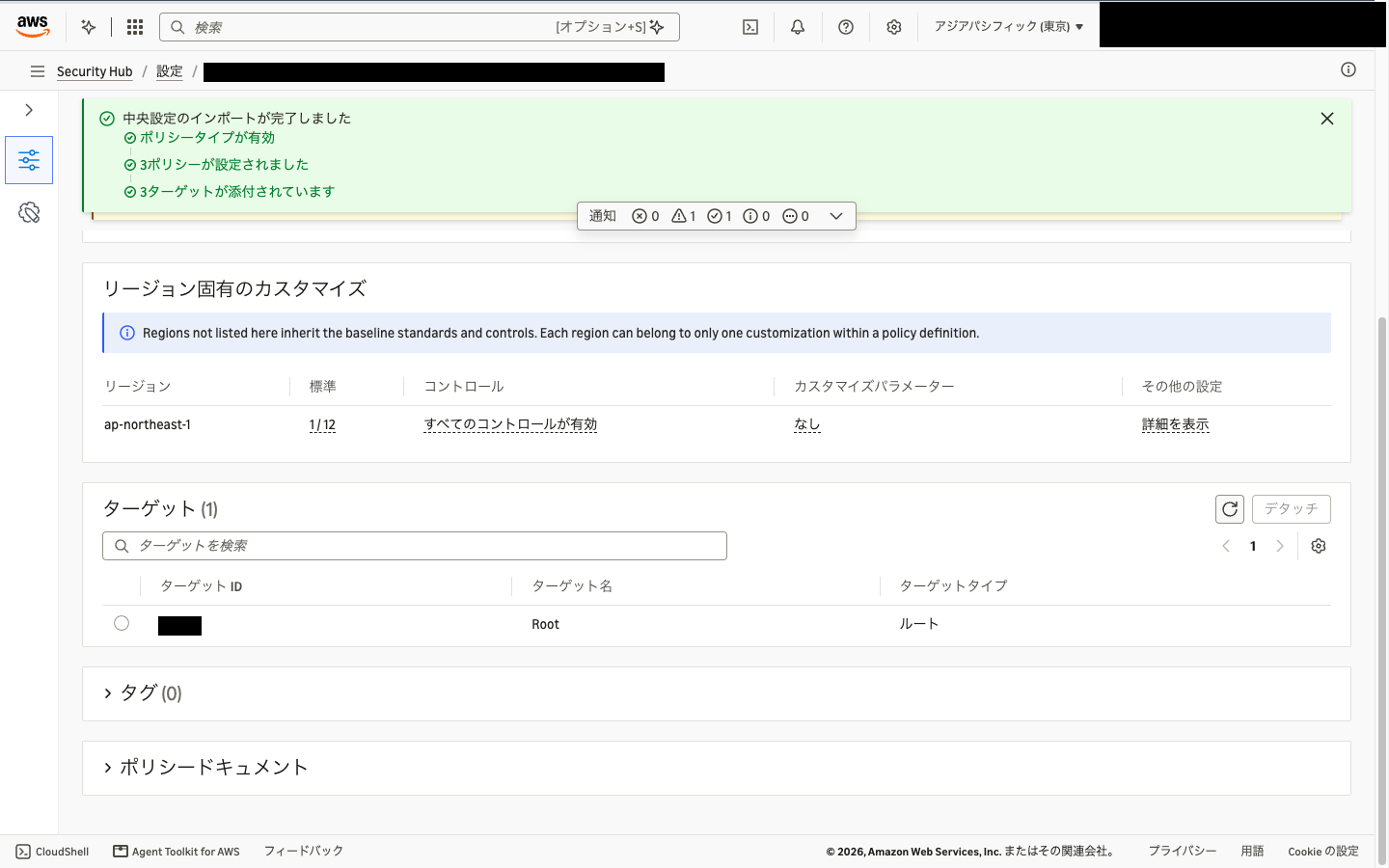
The policy for the development OU has the same shape, with 122 disabled controls in default and 116 in the ap-northeast-1 block.
The ap-northeast-1 side has the same count as the original configuration policy.
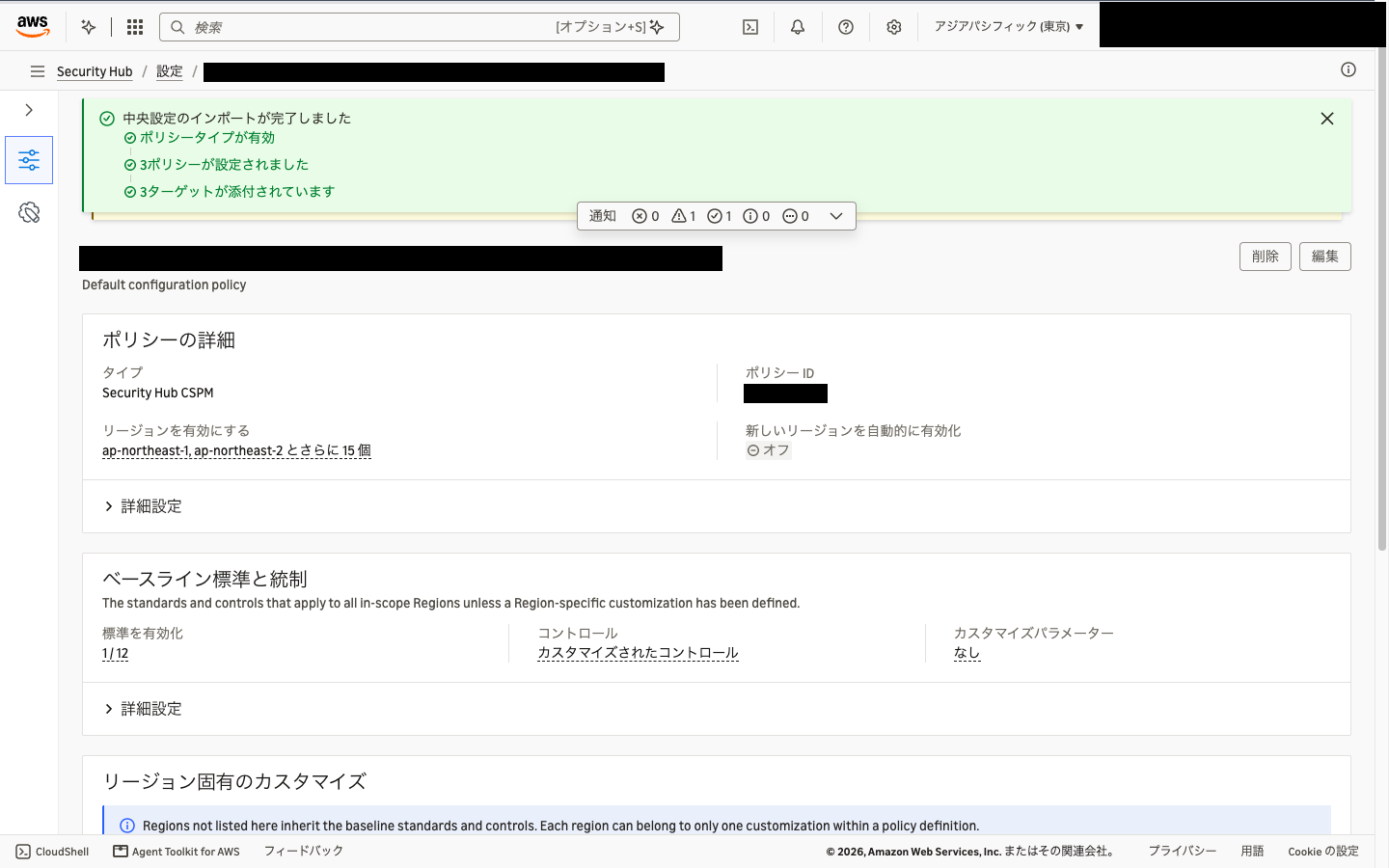
17 Regions are listed as the Regions to enable.
When I opened the policy details in the new Security Hub console, "Automatically enable new Regions" was off.
State of Central Configuration
Let's run the same command as before migration in the delegated administrator account.
> aws securityhub describe-organization-configuration

{
    "AutoEnable": false,
    "MemberAccountLimitReached": false,
    "AutoEnableStandards": "NONE",
    "OrganizationConfiguration": {
        "ConfigurationType": "CENTRAL",
        "Status": "DISABLED",
        "StatusMessage": "Central Configuration has been disabled by Security Hub CSPM Organizations Policies."
    }
}
Status is now DISABLED.
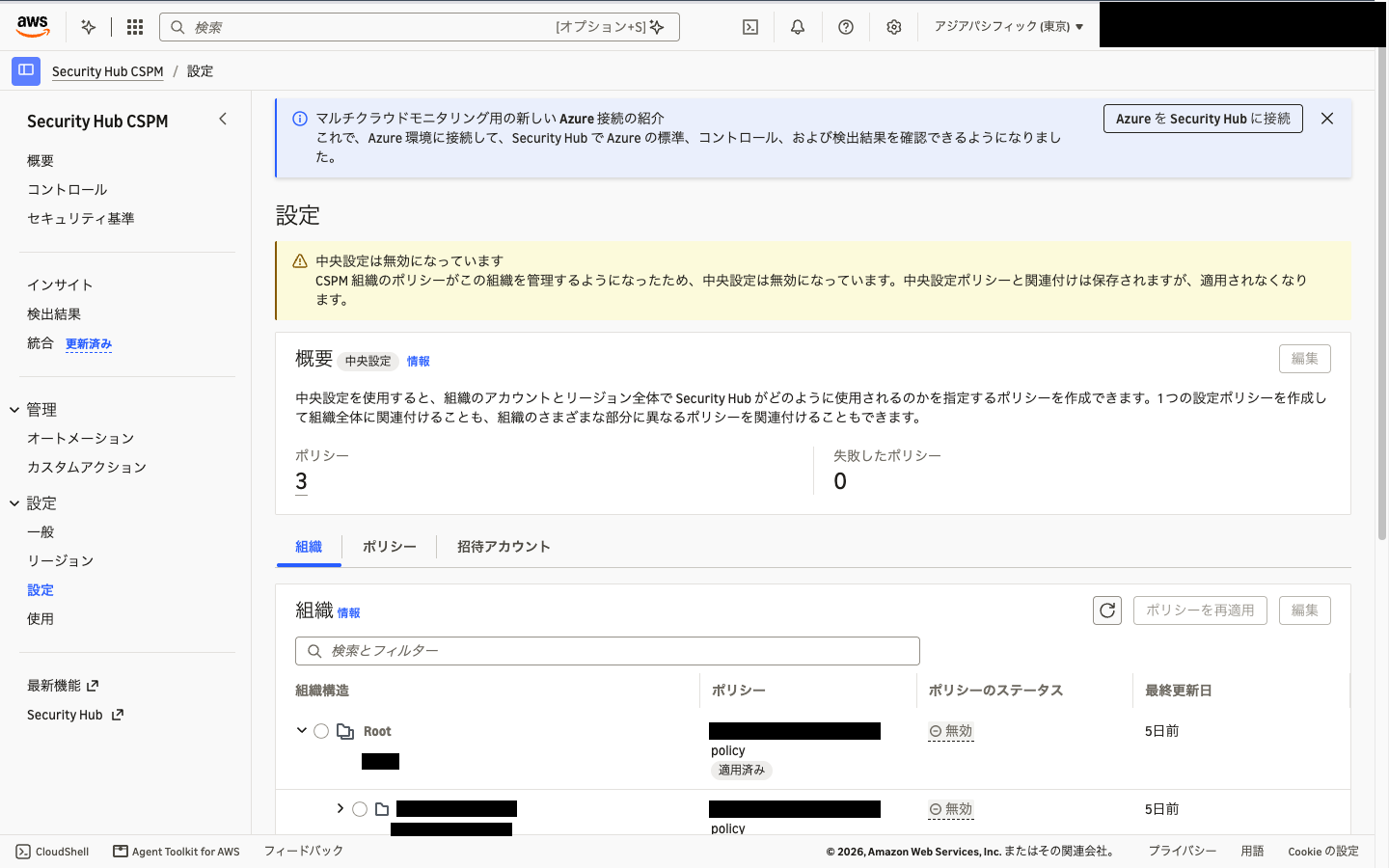
All 3 configuration policies remain, and all 16 associations have AssociationStatus set to DISABLED.
The "Settings" page of the Security Hub CSPM console also shows that central configuration has been disabled.
Effective Policy and Member Account State
Let's check the effective policy of a member account in the management account.
> aws organizations describe-effective-policy \
    --policy-type SECURITYHUB_CSPM_POLICY \
    --target-id <メンバーアカウント ID>
The same content as the policy for root was returned.
The same content is returned when specifying the delegated administrator account, so the delegated administrator account is also governed by the Security Hub CSPM policy.
The documentation states that a policy that governs no Regions is attached to the delegated administrator account, making it self-managed.
In this case, because the delegated administrator account had been inheriting the configuration policy for root before migration, it appears to have been treated the same as the other accounts.
Let's also look at the actual settings on the member account side.
| Item checked | Tokyo | N. Virginia |
|---|---|---|
| AWS Foundational Security Best Practices v1.0.0 | Enabled | Enabled |
| IAM.1 (evaluates global resources) | Enabled | Disabled |
| KMS.1 (evaluates global resources) | Enabled | Disabled |
| S3.1 | Enabled | Enabled |
As the policy specifies, controls that evaluate global resources are enabled only in Tokyo.
The delegated administrator account itself also had the same standards and controls state.
The 6 accounts associated with the delegated administrator account (including the management account) also remain fully enabled, as before migration.
Caveats
You Cannot Try It on Only Some Accounts
Central configuration and Security Hub CSPM policies cannot be used together.
Once a Security Hub CSPM policy starts governing even one account in the organization, central configuration is disabled for the entire organization.
For example, if you manually attach a policy to just one test account, central configuration stops at that point.
The remaining accounts that the policy does not reach become self-managed, keeping their current settings.
To migrate without breaking the existing central configuration, it seems best to use the migration tool rather than creating policies manually.
Reverting to Central Configuration
I haven't tried it this time, but the documentation also describes the steps to revert to central configuration.
- Detach the Security Hub CSPM policies from all targets in the organization
- Re-enable central configuration in the home Region of the delegated administrator account
Because the configuration policies and associations remain, re-enabling reapplies the previous associations.
If you want to move to Security Hub CSPM policies again after reverting, you need to run the migration tool again.
Summary
I tried migrating Security Hub CSPM central configuration to AWS Organizations declarative policies using the migration tool.
The migration tool carries over as is the targets the configuration policies were applied to and the handling of controls that evaluate global resources.
Central configuration won't become unusable right away, so there seems to be no need to rush the migration.
On the other hand, management becomes more flexible, for example by allowing settings to differ by Region.
The migration tool lets you migrate in just a few steps, so please try it when the timing is right.
This has been Jun Suzuki.
References
- AWS Security Hub CSPM now supports centralized configuration with AWS Organizations declarative policies
- Declarative policies and central configuration in Security Hub CSPM - AWS Security Hub
- Managing accounts with declarative policies in Security Hub CSPM - AWS Security Hub
- How declarative policies work in Security Hub CSPM - AWS Security Hub
- Security Hub CSPM policies - AWS Organizations
- Security Hub CSPM policy syntax and examples - AWS Organizations
- Investigating points of interest in Security Hub's Central Configuration
- [Update] Amazon GuardDuty enablement can now be centrally managed with AWS Organizations declarative policies