[Security Hub Remediation Steps] [BedrockAgentCore.5] Bedrock AgentCore custom browsers should not use public network mode

This page has been translated by machine translation. View original
Hello! This is Shimon from the Consulting Department.
This article describes how to migrate an Amazon Bedrock AgentCore custom browser detected by the AWS Security Hub control [BedrockAgentCore.5] from PUBLIC mode to VPC mode.
Target Control of This Article
[BedrockAgentCore.5] Bedrock AgentCore custom browsers should not use public network mode
[BedrockAgentCore.5] Bedrock AgentCore custom browsers should not use public network mode
Prerequisites
This article is intended for those who use the "AWS Foundational Security Best Practices standard" in AWS Security Hub.
For details about AWS Security Hub, please see these blog posts.
Description of the Target Control
This control checks whether an AgentCore custom browser is created in public network mode (PUBLIC).
If the network mode is VPC, this control passes.
AgentCore Browser is a managed browser execution environment that allows agents to browse websites and fill in forms.
Only custom browsers created by users are evaluated; the system browser provided by AWS (aws.browser.v1) is out of scope.
A browser in PUBLIC mode communicates directly with the internet from a network managed by AWS.
This traffic does not pass through your VPC, so you cannot restrict destinations with security groups or AWS Network Firewall, and it is not recorded in VPC flow logs.
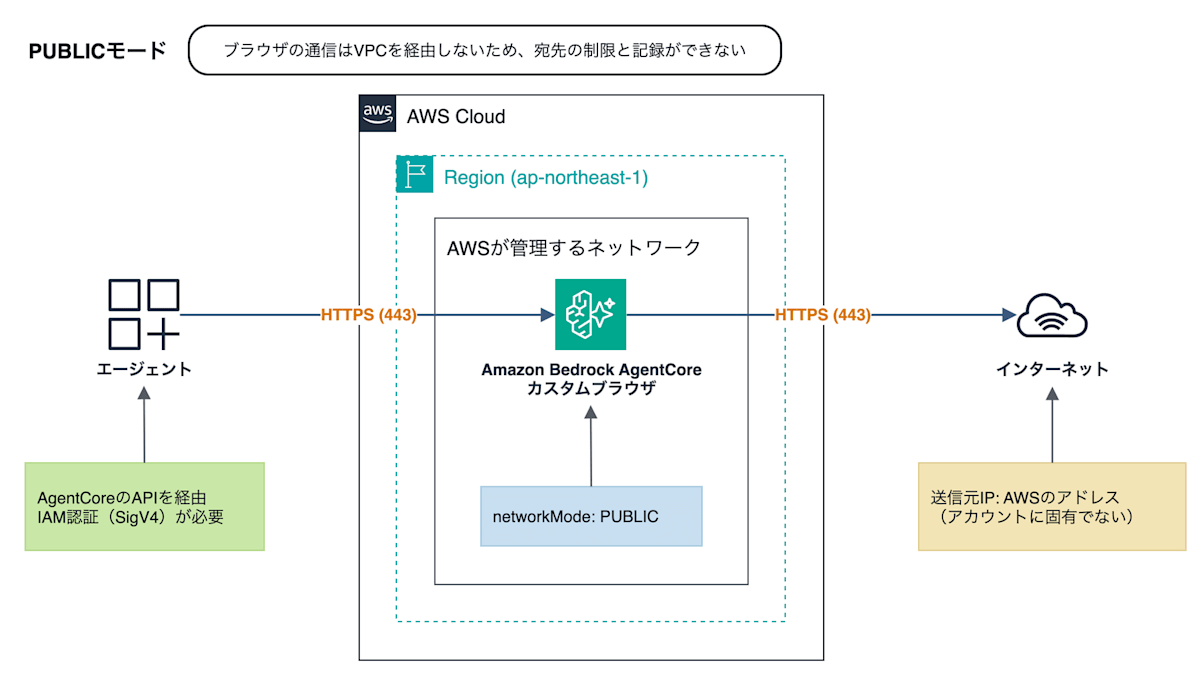
If an agent browses a web page containing a prompt injection, it may be induced to send internal data or credentials handled in the session to an arbitrary external site.
In PUBLIC mode, you can neither prevent this data leakage by restricting destinations nor trace it afterward through communication records.
The source IP address is an AWS address that is not unique to your account, so it cannot be used for allowlist registration at the destination either.
A browser in VPC mode communicates through the network interface (ENI) in the private subnet specified at creation.
You can restrict and record destinations with security groups, Network Firewall, and VPC flow logs, and the source IP address for internet-bound traffic becomes the Elastic IP of the NAT Gateway.
However, simply switching to VPC mode does not change the fact that the browser can communicate with any destination via the NAT Gateway.
The range of ports and destinations is restricted with the security group in step 3, and the domains to browse are restricted in "Additional Measures (Optional)".
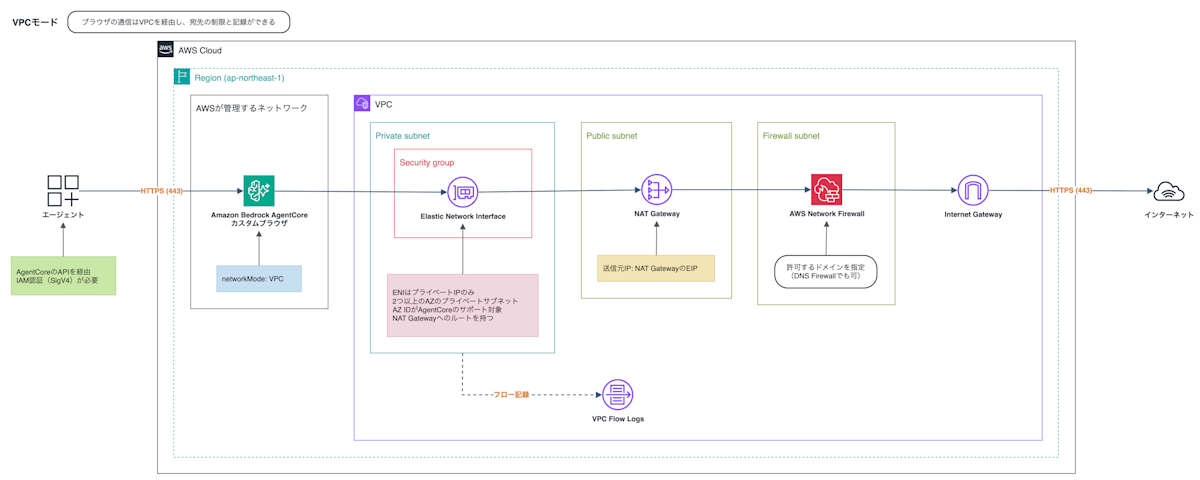
Note that connections from agents and users to the browser go through AgentCore APIs that require IAM authentication, regardless of the network mode.
The risk of PUBLIC mode lies in outbound traffic from the browser.
Remediation is required in both production and non-production environments.
Remediation Steps
1. Confirm with stakeholders
Custom browsers have no update operation equivalent to update-browser, so the network mode cannot be changed after creation.
You create a new VPC-mode custom browser, switch the references of agents and applications to it, and then delete the PUBLIC-mode custom browser.
Because the browser ID changes, confirm the following with stakeholders before starting work.
- Agents and applications that reference the target custom browser
- The person responsible for switching the browser ID (configuration changes and deployment) and the timing
- Websites the browser browses and resources in the VPC it accesses (used to identify the destinations to allow in security groups and, if introduced, Network Firewall, etc.)
- NAT Gateway charges (required when browsing websites on the internet in VPC mode)
2. Identify PUBLIC-mode custom browsers
In the Security Hub console, search for "BedrockAgentCore.5" under [Controls] and check the failing resources.
In the AgentCore console, select the custom browser from [Connectors] > [Browser] in the navigation pane, and check [Security] under [Tool details].
If it is in PUBLIC mode, "Public" is displayed.
With the AWS CLI, you can check it with networkConfiguration.networkMode of get-browser.
aws bedrock-agentcore-control get-browser \
  --browser-id <ブラウザID> \
  --query networkConfiguration
{
    "networkMode": "PUBLIC"
}
The result of list-browsers does not include the network mode, so to check all custom browsers in a Region at once, run the following.
for id in $(aws bedrock-agentcore-control list-browsers --type CUSTOM \
    --query 'browserSummaries[].browserId' --output text); do
  echo "$id $(aws bedrock-agentcore-control get-browser --browser-id $id \
    --query networkConfiguration.networkMode --output text)"
done
Also, to set the same values in the new custom browser, make a note of the following settings of the PUBLIC-mode custom browser.
- Output of
get-browser:executionRoleArn(IAM role),recording(whether session recording is enabled and the destination S3 bucket),browserSigning(web bot authentication) - Details page in the AgentCore console: [Browser management policy], [Root certificate authority], [Tool file system settings]
3. Prepare the prerequisites for VPC mode
Private subnets
For availability, prepare two or more private subnets in different Availability Zones.
A custom browser can only be created in subnets in Availability Zones supported by AgentCore.
The supported Availability Zone IDs are listed in "Supported Availability Zones" in the AgentCore Developer Guide.
Network interfaces that AgentCore creates in the VPC are assigned only private IP addresses, so even if you specify a public subnet, they cannot connect to the internet.
NAT Gateway
To browse websites on the internet, add a route to the NAT Gateway with 0.0.0.0/0 as the destination to the route table of the private subnets.
Security group
Do not set inbound rules for the security group associated with the browser.
For outbound rules, delete the "All traffic" allow rule that is added at creation, and allow only the traffic the browser needs.
- Websites on the internet: TCP 443, destination
0.0.0.0/0 - Resources in the VPC: specify the resource's security group as the destination, and only the necessary ports. Also allow inbound from the browser's security group in the resource-side security group
Security groups cannot specify destinations by domain, so restricting the domains to browse is done with Network Firewall or Route 53 Resolver DNS Firewall in "Additional Measures (Optional)".
4. Create a VPC-mode custom browser
The IAM user or role that creates the custom browser needs the iam:CreateServiceLinkedRole permission (included in BedrockAgentCoreFullAccess).
Open the AgentCore console and select [Connectors] > [Browser] in the navigation pane.
Select [Create] in the [Browser] list.
In [Tool name] under [Browser tool details], enter a name for the new custom browser.
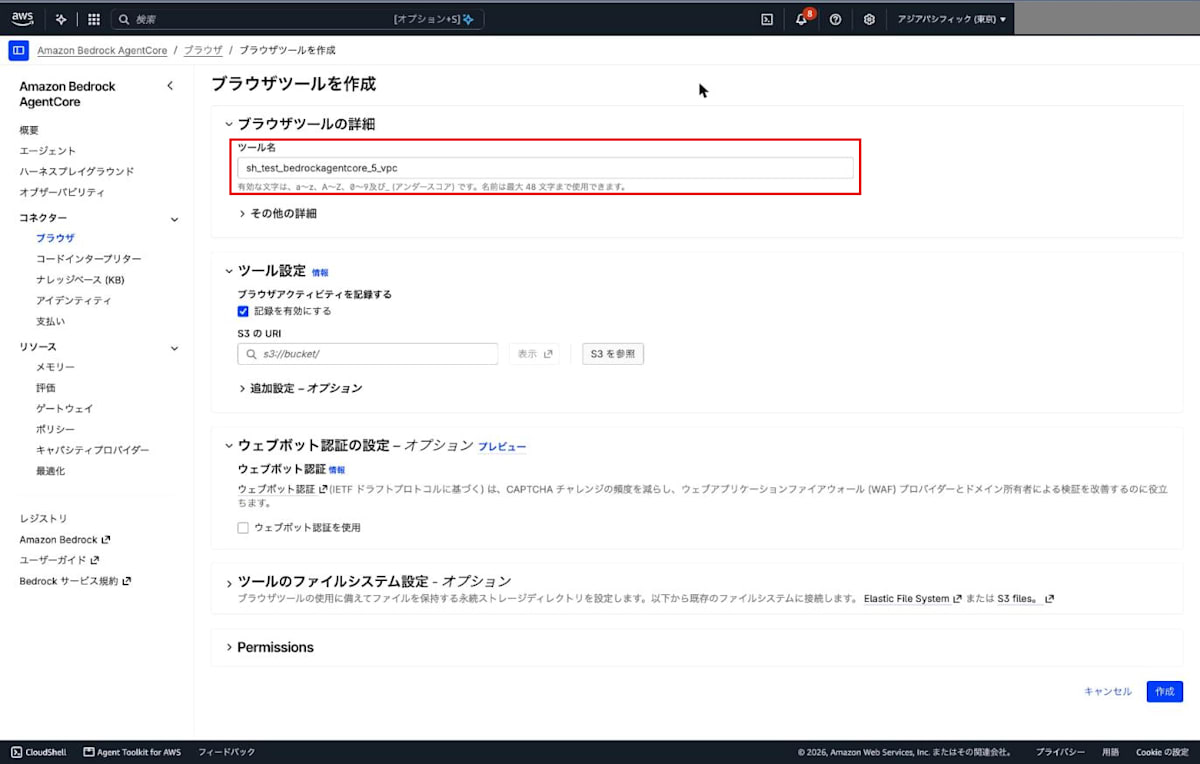
For [Record browser activity] in [Tool settings], [Enable recording] is checked by default.
If the existing custom browser uses recording, specify the destination S3 bucket you noted in step 2 in [S3 URI]. If it does not, uncheck it.
Expand [Additional settings] in [Tool settings].
The default value of [Security] is [Public], so select [VPC (Virtual Private Cloud)].
Specify the VPC, private subnets, and security group prepared in step 3 for [VPC ID], [Subnets], and [Security groups].
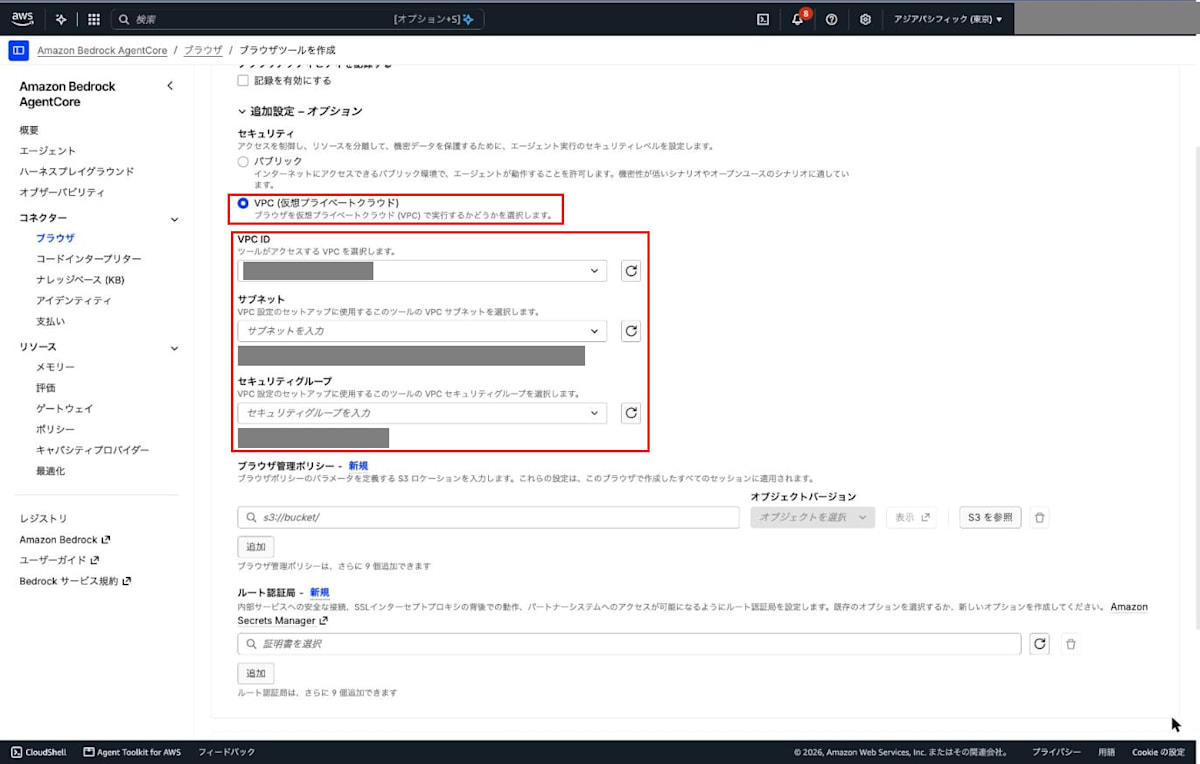
Configure the other settings ([Browser management policy], [Root certificate authority], [Web bot authentication], [Tool file system settings], and the IAM role under [Permissions]) to match the values you noted in step 2.
Select [Create].
On the details page after creation, confirm that [Security] is "VPC (Virtual Private Cloud)".
In VPC mode, it takes a few minutes for [Status] to change from "Creating" to "Ready".
The value of [Browser tool ID] will be used as the new reference in the next step.
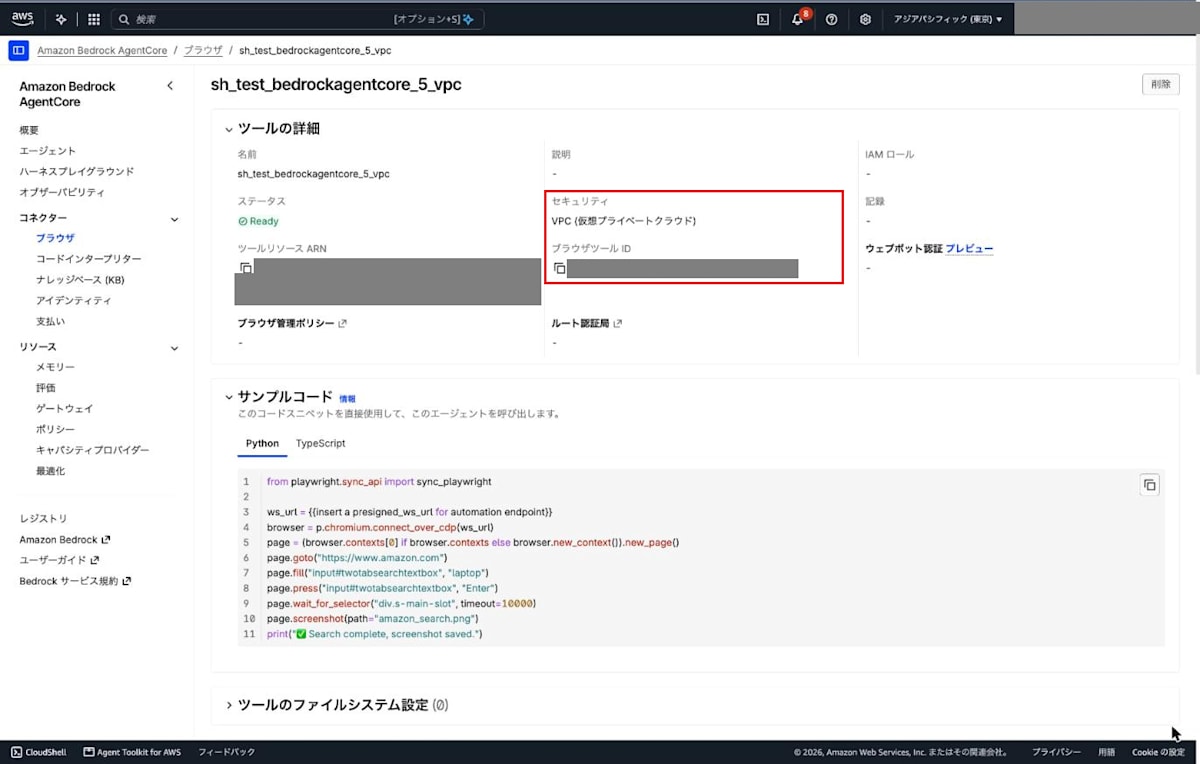
With the AWS CLI, create it as follows.
aws bedrock-agentcore-control create-browser \
  --name <ブラウザ名> \
  --network-configuration '{
    "networkMode": "VPC",
    "vpcConfig": {
      "subnets": ["<サブネットID1>", "<サブネットID2>"],
      "securityGroups": ["<セキュリティグループID>"]
    }
  }'
To configure session recording and the like, specify the values you noted in step 2 in --recording, --execution-role-arn, and --browser-signing.
If you use a browser management policy, root certificate authority, or tool file system settings, there are no corresponding options in create-browser, so create the browser in the console.
browserId in the output is the new browser ID.
With get-browser, confirm that status is READY and networkMode is VPC.
aws bedrock-agentcore-control get-browser \
  --browser-id <新しいブラウザID> \
  --query '{status:status,networkConfiguration:networkConfiguration}'
{
    "status": "READY",
    "networkConfiguration": {
        "networkMode": "VPC",
        "vpcConfig": {
            "securityGroups": [
                "sg-xxxxxxxxxxxxxxxxx"
            ],
            "subnets": [
                "subnet-xxxxxxxxxxxxxxxxx",
                "subnet-yyyyyyyyyyyyyyyyy"
            ]
        }
    }
}
5. Switch the browser ID
Change the browser ID that agents and applications specify when starting a browser session to the ID of the custom browser created in step 4.
In the API (StartBrowserSession), this is the value specified in browserIdentifier.
If the IAM policy of the agent's execution role or similar limits the target (Resource) of browser session operations to the ARN of the PUBLIC-mode browser, change it to the ARN of the new browser.
After switching, confirm that the agent can browse websites as expected.
If it accesses resources in the VPC, confirm that it can access those resources as well.
If it fails, check the route table of the private subnets, the outbound rules of the security group, and, if you have introduced Network Firewall or DNS Firewall, their rules.
6. Delete the PUBLIC-mode custom browser
Once the browser ID switch is complete, delete the PUBLIC-mode custom browser.
In the AgentCore console, select the target custom browser under [Connectors] > [Browser], and select [Delete].
With the AWS CLI, delete it as follows.
aws bedrock-agentcore-control delete-browser \
  --browser-id <PUBLICモードのブラウザID>
7. Verify the remediation
In the Security Hub console, confirm that the status of the BedrockAgentCore.5 control is "Passed".
Additional Measures (Optional)
Restricting and recording destinations
If the domains to be browsed for business purposes are determined, specify the allowed domains in Network Firewall and deny traffic to any other destinations.
DNS Firewall can also deny name resolution for domains that are not allowed, but it cannot prevent communication that specifies IP addresses directly.
To record traffic, also enable VPC flow logs for the private subnets or the VPC.
To record destination domain names, also enable Route 53 Resolver query logs.
Preventing the creation of PUBLIC-mode custom browsers
The creation of new PUBLIC-mode custom browsers can be prevented with IAM policies or SCPs (service control policies).
Use an SCP when applying to multiple accounts in AWS Organizations at once, and an IAM policy when applying to specific IAM users or roles.
This denies bedrock-agentcore:CreateBrowser when the condition keys bedrock-agentcore:subnets and bedrock-agentcore:securityGroups are absent.
{
  "Version": "2012-10-17",
  "Statement": [
    {
      "Sid": "DenyPublicAgentCoreBrowser",
      "Effect": "Deny",
      "Action": "bedrock-agentcore:CreateBrowser",
      "Resource": "*",
      "Condition": {
        "Null": {
          "bedrock-agentcore:subnets": "true",
          "bedrock-agentcore:securityGroups": "true"
        }
      }
    }
  ]
}
Conclusion
By migrating a custom browser to VPC mode, you can control and record the browser's outbound traffic in your own VPC.
Thank you for reading to the end! I hope this helps someone.
