![[Security Hub CSPM Remediation Steps] [EC2.182] Amazon EBS snapshots should not be publicly accessible.](https://images.ctfassets.net/ct0aopd36mqt/wp-refcat-img-cea52bc8a6ec5cad9021b38df4a08b9e/24c76ee7c1ae7aa7f9676a59c77f8702/aws-security-hub?w=3840&fm=webp)
[Security Hub CSPM Remediation Steps] [EC2.182] Amazon EBS snapshots should not be publicly accessible.

This page has been translated by machine translation. View original
Introduction
Hello, this is watabo from Annotation.
Recently, I've been busy working on Security Hub CSPM checks.
Now, a new control [EC2.182] Amazon EBS Snapshots should not be publicly accessible has been added to Security Hub CSPM.
This control has a name similar to the existing [EC2.1] Amazon EBS snapshots should not be publicly restorable, but the checks and remediation methods are different.
In this article, I will introduce the differences and how to remediate it.
Differences between EC2.1 and EC2.182
The differences between the two controls are as follows.
| Item | EC2.1 | EC2.182 |
|---|---|---|
| Title | EBS snapshots should not be publicly restorable | EBS Snapshots should not be publicly accessible |
| Severity | Critical | High |
| Check target | Sharing settings of individual snapshots | Block public access settings for the entire account |
| Resource type | AWS::::Account |
AWS::EC2::SnapshotBlockPublicAccess |
| Config Rule | ebs-snapshot-public-restorable-check |
ebs-snapshot-block-public-access |
| Remediation | Change each publicly shared snapshot to Private individually | Enable block public access at the account level |
While EC2.1 detects snapshots that are already publicly shared, EC2.182 checks whether a mechanism that prevents public sharing of snapshots is enabled across the entire account.
By satisfying EC2.182, you can prevent the risk of accidentally making snapshots public in the future.
Remediation
Here is the official guide.
Configuration in the Management Console
- Open the EC2 console
- In the left navigation pane, select "Dashboard / EC2 Dashboard"
- From the "Account attributes" section on the right, select "Data protection and security"
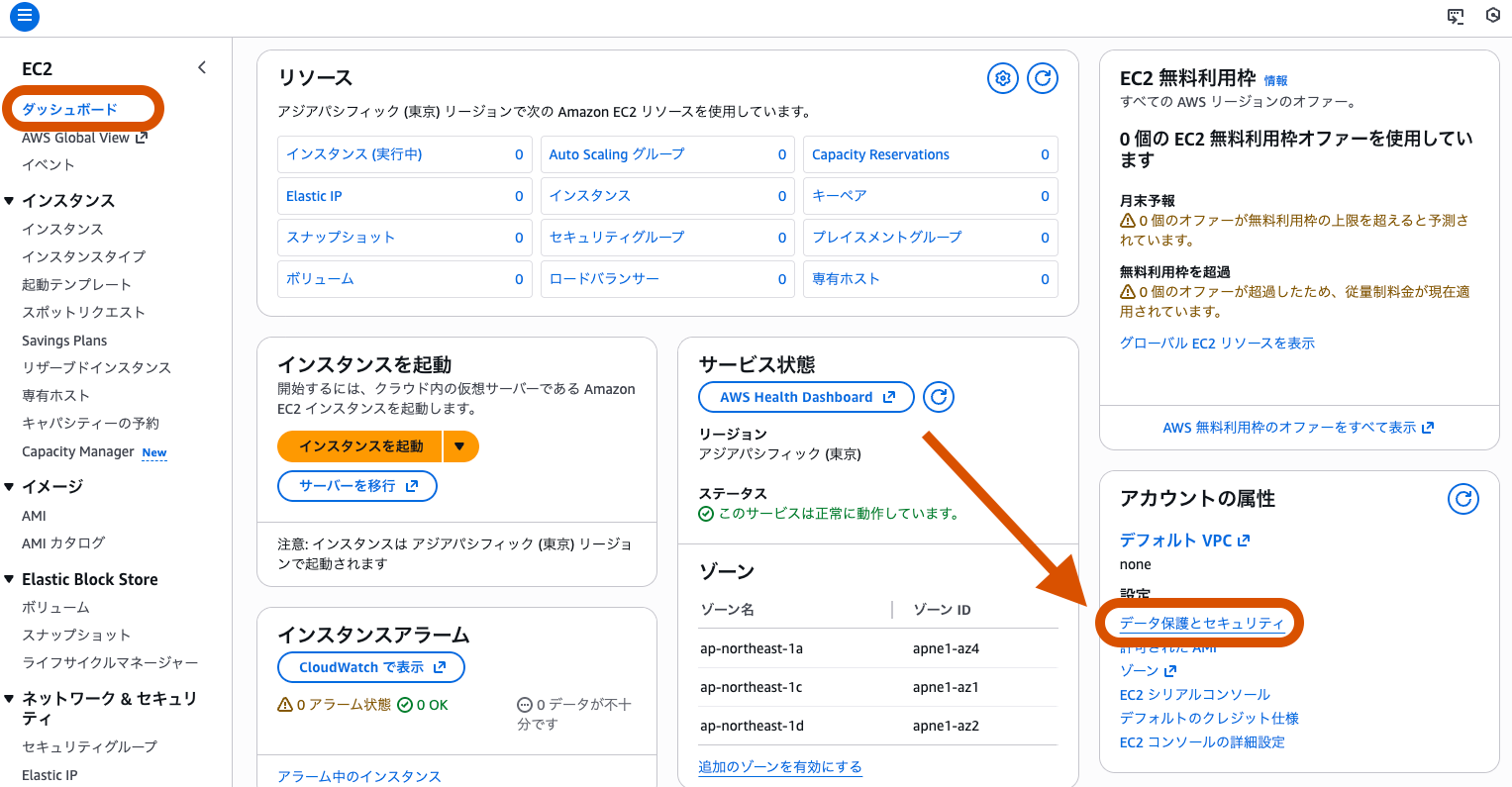
- In the "Block public access for EBS snapshots" section, click "Manage"
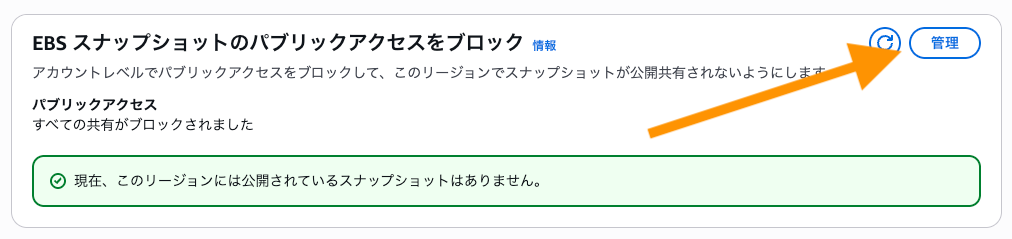
- Check "Block public access" and select Block all public sharing
- Click "Update"
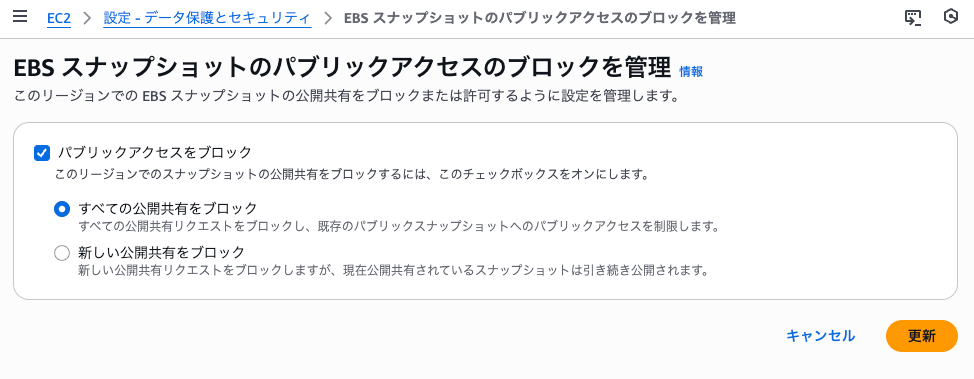
※ Block new public sharing does not satisfy the EC2.182 control.
That's all.
(The screenshot shows the case where "All sharing has been blocked" is selected)
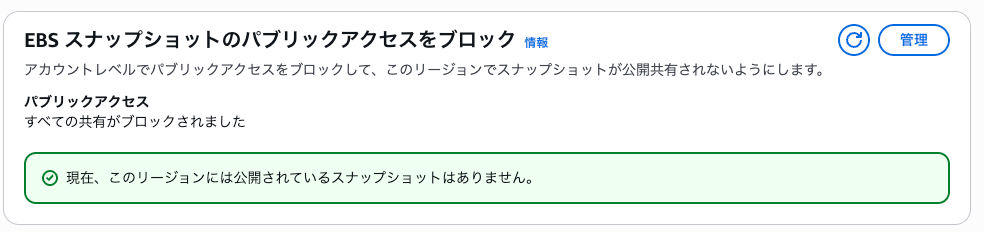
Please note that it may take some time for the EC2 setting to take effect and for it to be reflected in the Security Hub CSPM compliance status.
Configuration with the AWS CLI
Check the current setting state
aws ec2 get-snapshot-block-public-access-state --region ap-northeast-1
Example output (when not configured)
{
    "State": "unblocked",
    "ManagedBy": "account"
}
Enabling in a specific region
aws ec2 enable-snapshot-block-public-access \
    --state block-all-sharing \
    --region ap-northeast-1
Enabling in all regions at once
for region in $(aws ec2 describe-regions --region us-east-1 --query "Regions[*].[RegionName]" --output text); do
    aws ec2 enable-snapshot-block-public-access \
        --region $region \
        --state block-all-sharing
done
Verification after configuration
aws ec2 get-snapshot-block-public-access-state --region ap-northeast-1
Example output (after configuration)
{
    "State": "block-all-sharing",
    "ManagedBy": "account"
}
The API references are below.
Configuration with declarative policies (recommended for Organizations environments)
If you want to manage multiple accounts and multiple regions at once, using AWS Organizations declarative policies (Declarative Policies) is recommended.
By using declarative policies, you can enforce the block public access setting across the entire organization, saving the effort of configuring each account and region individually.
For detailed configuration instructions, please refer to the following article.
Is it OK to enable it in all accounts and all regions?
If there are publicly shared EBS snapshots, wouldn't executing the above lead to some kind of failure?
Some of you may be worried about this.
Whether publicly shared EBS snapshots exist can be confirmed by checking whether there are any controls that are failing or suppressed for EC2.1 in Security Hub CSPM.
In a multi-account environment, you can check the compliance status of all accounts from the Security Hub CSPM administrator account.
If there are no controls that are failing or suppressed for EC2.1 introduced at the beginning, you can consider that there are no publicly shared EBS snapshots.
If any exist, check with stakeholders whether the target snapshots need to be shared with other AWS accounts.

Notes
- Please note the following points when configuring using the Management Console / AWS CLI.
- The setting must be configured for each region
- If it is configured via a Declarative Policy, it cannot be changed directly from the account
- Local snapshots on AWS Outposts are not supported.
Conclusion
EC2.182 is a preventive control that prevents the public sharing of snapshots across the entire account. By addressing it together with EC2.1, you can achieve safer EBS operations.
If you haven't configured it yet, I recommend enabling it in all regions at this opportunity.
I hope this entry helps someone.
About Annotation, Inc.
Annotation, Inc. is a company within the Classmethod Group that specializes in operations. Specialized teams for support, operations, development and maintenance, corporate IT, and back office make full use of the latest IT technologies, high technical skills, and accumulated know-how to solve our customers' challenges. We are recruiting members for a variety of roles. If you are interested in the culture, systems, and ways of working that realize both "Operational Excellence" and "working and living as yourself," please check out the Annotation, Inc. recruitment site.
