Don't Let Browsers Interfere with Measurement and Advertising - Building a First-Party Measurement Environment Using Server-Side GTM and Usercentrics SST

This page has been translated by machine translation. View original
This is Konishi from the Berlin office.
Are your GA4 and Google Ads measurement tags working properly? Browser-side restrictions have been tightening year by year, and it's now become common to see cases where data isn't being captured even though tags are in place.
I'd heard for a while that server-side GTM (hereafter sGTM) could help improve this situation, but since I'd never actually tried it, I decided to give it a go.
Background and details on the challenges are summarized in the following article, so please check that out as well.
What is Server-Side GTM (sGTM)?
With standard GTM, the browser sends data directly to each platform's endpoints, such as google-analytics.com or facebook.com. Since the destination domains are known tracking domains, the communication can be blocked entirely by browsers or their extensions.
With sGTM, requests from the browser are first received by your own domain's server, and from there forwarded to GA4, Google Ads, Meta, and others. Rather than delivering directly to each destination individually, think of it as consolidating everything at your own distribution center first, then sending it out to each location.
However, the sGTM server environment typically needs to be set up yourself on Google Cloud Platform (GCP) or similar, which incurs infrastructure costs.
Relationship with User Consent
sGTM simply moves the data pathway to the server side — it does not handle consent management on its own. Under GDPR and the ePrivacy Directive, user consent must be obtained before sending measurement data, so a separate mechanism is needed to control that data for users who have not consented is not forwarded to GA4 and similar services.
That's where a CMP (Consent Management Platform) comes in. The CMP obtains consent on the browser side and passes those consent signals to sGTM, enabling the server container to determine whether to forward data to GA4 if consented, or to stop it if not.
What is Usercentrics SST?
Usercentrics SST is a managed service that provides a hosted execution environment for sGTM.
Since the company also offers Cookiebot, a CMP (Consent Management Platform), it provides end-to-end coverage of consent acquisition, collection, and tag delivery.
The Starter plan is free and allows up to 20,000 requests per month. No credit card registration is required. However, there is a limitation of only one custom domain.
Actually Setting It Up
Configuration
Here is the configuration I tested with.
- Test site:
sst-webapp.example.com(static HTML = site displaying the consent banner) - sGTM custom domain:
sst-server.example.com(data collection layer) - GTM Web container (
GTM-XXXXXXX) + GA4 (G-XXXXXXXXXX) - Usercentrics SST (Starter plan)
- Cookiebot CMP (consent banner)
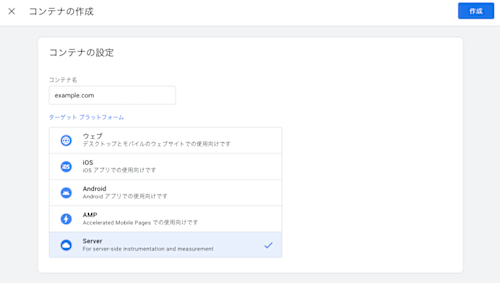
1. Creating the GTM Server Container
Create a new server container in the GTM admin console. Select "Manual setup" for provisioning.
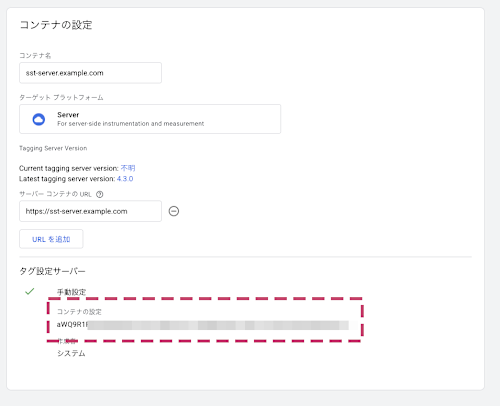
Setting the container to manual configuration will generate a configuration ID. Copy it as you'll need to enter it on the Usercentrics side later.
2. Creating the sGTM Hosting in Usercentrics SST
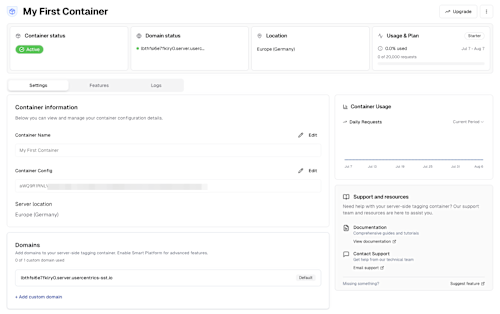
Create a Usercentrics account at https://sst.usercentrics.eu/ and create an sGTM container from the SST admin console.
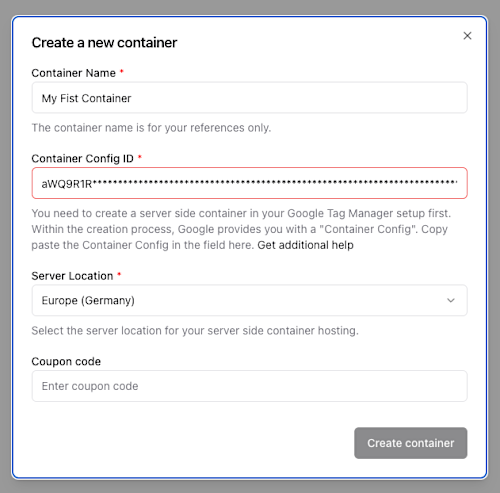
You're good to go once the status shows as active in the container management screen.
Custom Domain (DNS) Configuration
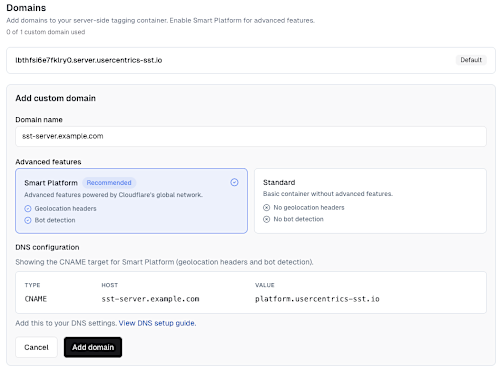
By default, sGTM is hosted on a domain like xxxxx.server.usercentrics-sst.io. While this can still be used as-is, browsers will treat it as a 3rd-party request, meaning you won't be able to take full advantage of sGTM's benefits.
Add a CNAME record to your DNS to point your own subdomain (in this case sst-server.example.com) to the sGTM server. This allows requests to be treated as coming from a first-party domain.
Configure the custom domain and add the specified CNAME on the DNS side as well.
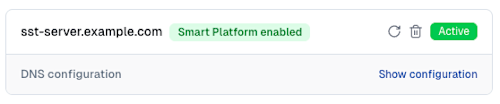
After completing the setup including DNS, it will become active after a short while.
3. Configuring the GTM Web Container
Create a new Web container in the GTM admin console. (Create this separately from the server container created earlier.)
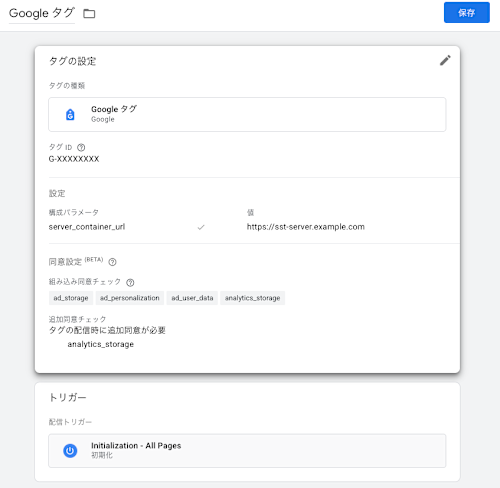
Add server_container_url to the configuration parameters of the GA4 tag (Google tag) in the Web container, and set the value to https://sst-server.example.com.
This causes GA4 measurement requests from the browser to be sent to your own domain's sGTM instead of Google's servers.
4. Configuring the GTM Server Container
Return to the GTM server container and configure it to forward the received data to GA4.
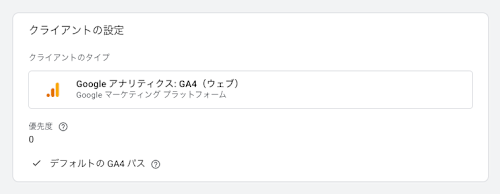
Client: Add a GA4 Client (to receive requests from the Web container)
Requests arriving at the server container are raw HTTP requests by default. The client's role is to parse these and convert them into event data that GTM can handle.
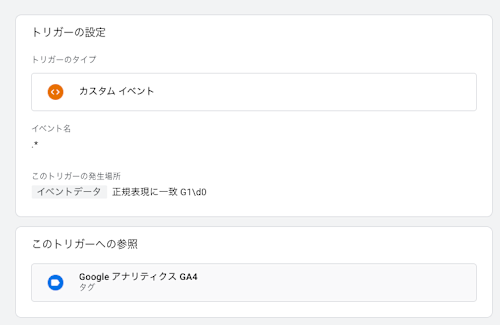
Tag: Create a Google Analytics: GA4 tag and configure the Measurement ID
On the server container side, you can use the x-ga-gcs variable to determine the user's consent status. Set up an exception trigger to prevent the GA4 tag from firing when the user has not consented.
5. Configuring Cookiebot CMP (Consent Banner)
Implement Cookiebot CMP on the test site to display a consent banner (shown below).
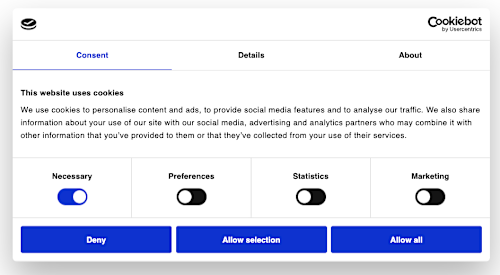
Since there are already many articles about Cookiebot, I'll skip the detailed steps here.
That completes the setup.
Verification
Checking the Requests
Let's access the test site sst-webapp.example.com and observe the behavior. The consent banner was displayed on the first visit.
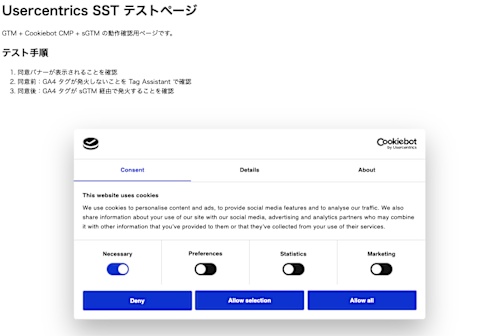
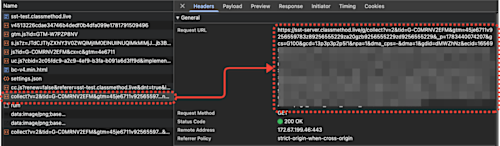
Opening the browser's DevTools (Network tab), you can confirm that the destination of GA4's collect requests is going through your own domain (sst-server.classmethod.live in this example) rather than Google's servers.
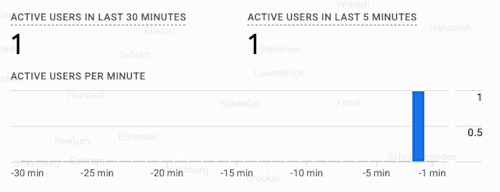
We were also able to confirm in GA4's real-time report that events were arriving correctly.
Regarding Requests Before Consent
You may notice that collect requests are being sent even before consenting in the CMP.
This is not a misconfiguration — it is the intended behavior of Google Consent Mode v2. Requests made before consent are assigned the parameter gcs=G100. G1 indicates that Consent Mode is enabled, and 00 indicates that both ad_storage and analytics_storage are denied (not consented).
In this state, no cookies are set and no personally identifiable data is included. Google uses this data only for modeling (statistical estimation) purposes.
Incidentally, once consent is given, this changes to gcs=G111 (granted = consented).
The Benefits of sGTM
Let me summarize the advantages of sGTM.
1. Bypassing Ad Blocker Blocking
The destination for client-side GA4 requests is google-analytics.com, which appears on virtually every filter list. When routed through sGTM, the destination changes to sst-server.example.com, making it harder to distinguish from requests to the site itself.
However, it is not foolproof. Filter lists such as AdGuard and EasyPrivacy have begun adding sGTM subdomain patterns to their detection targets.
2. Mitigating the Impact of ITP (Safari)
Safari's ITP expires first-party cookies set by JavaScript in as little as 7 days. With sGTM, cookies are set using the Set-Cookie header on the server side, which maintains their original expiration dates as first-party cookies and improves the accuracy of returning visitor identification.
However, since Safari 16.4, there is an IP-matching rule that limits server-set cookies to 7 days as well if the IP prefix of the sGTM server does not match that of the website server.
3. Server-Side PII Filtering
The sGTM server container has a Transformations feature that allows you to strip or hash PII such as IP addresses and email addresses before forwarding to GA4 or Meta.
With client-side tagging, data goes directly from the browser to each vendor, so once it's sent, you can't take it back. sGTM lets you place a gate before that point, which becomes effective for GDPR compliance.
Summary
Using Usercentrics SST, I built a first-party measurement environment with sGTM.
- The ease of getting started with sGTM in a fully managed manner
- Having CMP (consent banner) integration bundled in is a strength in environments where GDPR compliance is required
In environments running advertising, missing conversions means missing bid optimization data, so the losses compound the longer it's left unaddressed. If you're considering adopting sGTM, I think it's worth giving Usercentrics SST's Starter plan a try.
Reference Documents
- Usercentrics Server-Side Tagging Official
- Usercentrics SST Documentation
- Usercentrics: Strategies for Handling Consent in sGTM
- Ad blockers are now targeting server-side GTM subdomains by name
- Safari ITP - Everything You Need to Know | Stape
- Transformations In Server-side Google Tag Manager | Simo Ahava's blog