
Sharing the Same OpenSearch Serverless Collection Across Multiple Amazon Bedrock Knowledge Bases

This page has been translated by machine translation. View original
Introduction
When selecting Amazon OpenSearch Serverless (hereinafter OSS) as the vector store for Amazon Bedrock Knowledge Base (hereinafter KB), a fixed cost of $700+ per month per Collection is incurred.
OpenSearch Serverless minimum billing: 4 OCU (Indexing 2 OCU + Search 2 OCU) × approx. $0.24/hour ≒ $700+/month
If you only create one KB, there's not much you can do about it, but if you create a new Collection each time you add a second or third KB within the same project, the monthly cost of $700+ stacks up each time.
In fact, by sharing a single OSS Collection across multiple KBs, you can avoid the double or triple occurrence of fixed costs. In this article, I tried out the procedure for sharing a Collection when adding a new KB to an environment where an existing KB is already running.
Terminology (Most Important)
Let's first confirm the structure of OSS. If your understanding here is vague, you'll get confused in the later steps.
OpenSearch Serverless
└── Collection                         ← Billing unit / top-level resource
    ├── Index A (vector index)          ← For Knowledge Base A
    ├── Index B (vector index)          ← For Knowledge Base B
    └── Index C (vector index)          ← For Knowledge Base C
- Collection: The physical resource of OSS. Creating one incurs a fixed cost of $700+/month
- Index: A logical data store within a Collection. 1 Index is required per KB
- Each Bedrock KB is linked to 1 Index (not a Collection)
In other words, instead of "creating a Collection per KB," if you adopt a configuration of "creating one Collection and having a separate Index per KB," the fixed cost is limited to just one Collection.
Configuration Overview
Before (configuration where a new Collection is created each time a KB is added):
KB A → Collection A ($700+/month)
KB B → Collection B ($700+/month)  ← Additional cost incurred
KB C → Collection C ($700+/month)  ← Even more additional cost
After (configuration where the Collection is shared):
KB A ┐
KB B ┼→ Collection ($700+/month)
KB C ┘
Even as KBs increase, the fixed cost remains for just one Collection. Usage-based charges proportional to OCU usage per Index will increase slightly, but it's negligible compared to the double occurrence of fixed costs.
What I Tried
I implemented this for the case of adding a second KB to an environment where an existing KB is already running. The flow is as follows.
[1] Pre-check (gather information about the existing Collection)
   ↓
[2] Launch KB wizard → Get role ARN → Update Data Access Policy (2 tabs in parallel)
   ↓
[3] Create new Index in OpenSearch Dashboards (continued in tab 2)
   ↓
[4] Return to the wizard in tab 1 and complete KB creation
   ↓
[5] Data source sync + operation verification
Total time required was about 30 minutes (depending on the amount of data ingested).
Step 1: Gather Information About the Existing Collection
Collect information from the following 2 locations.
Information to Check in the OSS Console
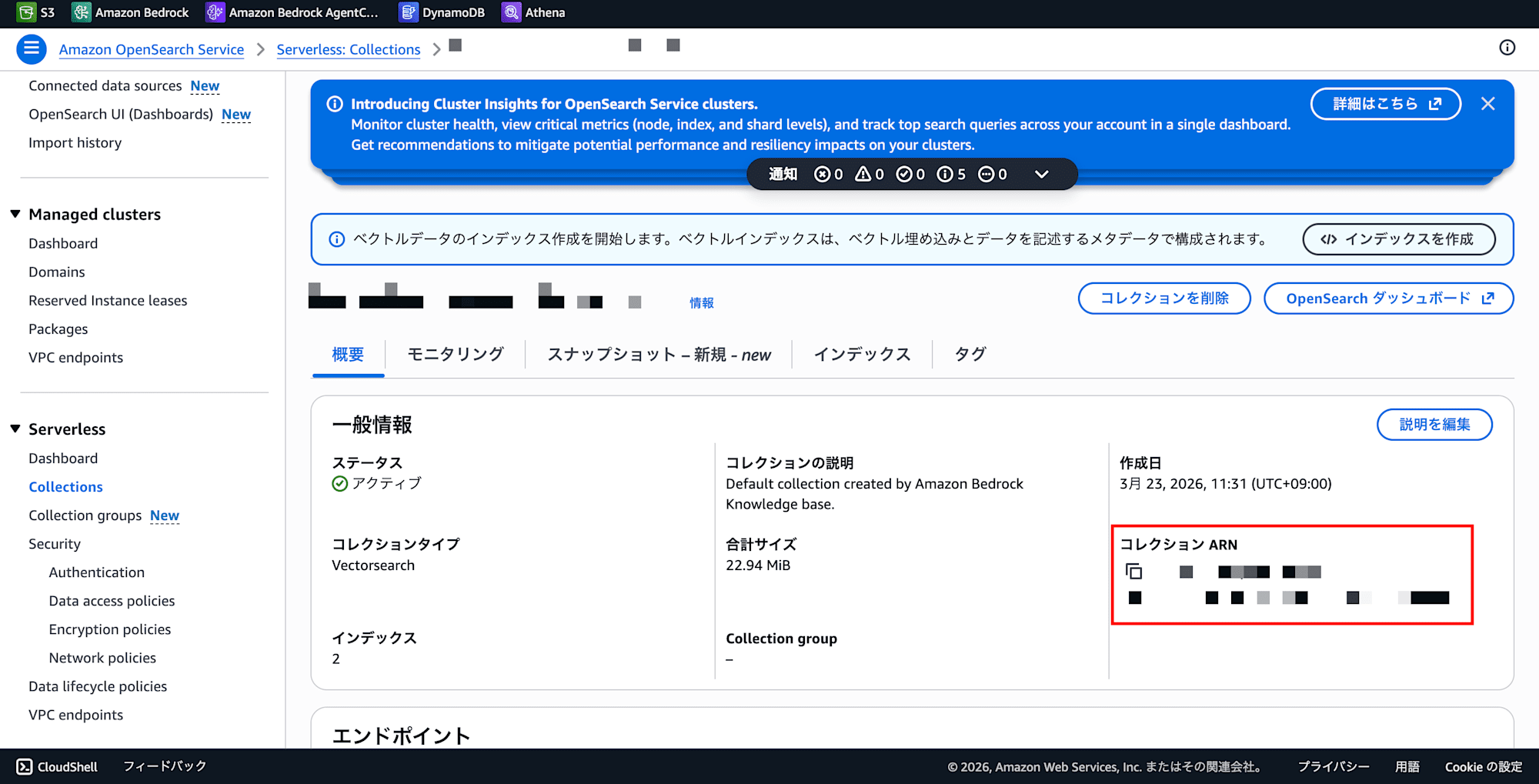
Collection ARN and Index name:
- OpenSearch Service console → Serverless → Collections
- Click on the target Collection → Copy the Collection ARN from the details screen
- Open the "Indexes" tab and note down the existing Index name (the new Index should have a different name)
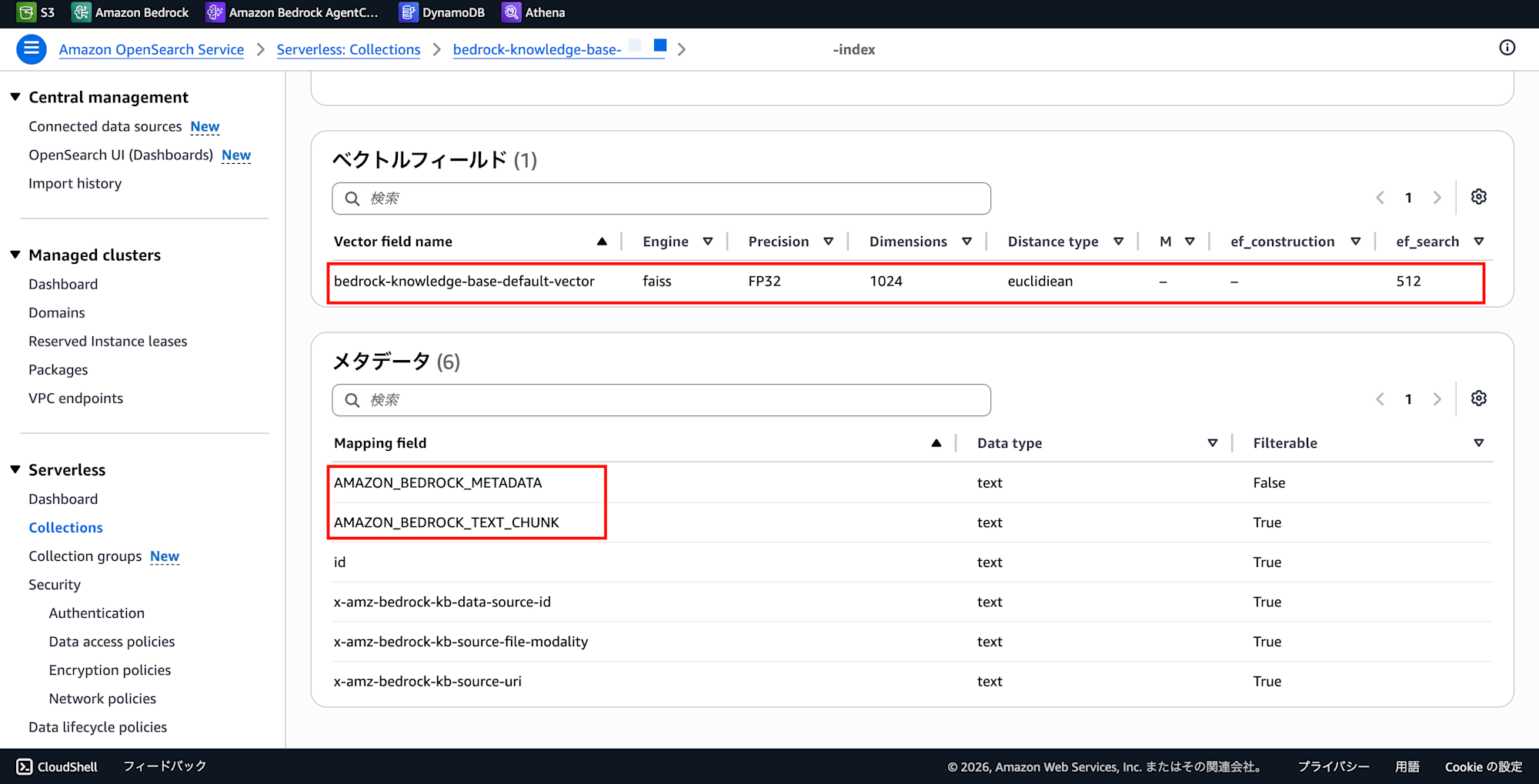
Field mappings:
- Click on the existing Index name in the "Indexes" tab
- The Index details screen displays the "Vector field" and "Metadata" sections
- Note the following (for Bedrock's default naming):
- Vector field:
bedrock-knowledge-base-default-vector(also check the dimension) - Text field:
AMAZON_BEDROCK_TEXT_CHUNK - Metadata field:
AMAZON_BEDROCK_METADATA
- Vector field:
Information to Check in the Bedrock Console
Embedding model:
- Bedrock console → Knowledge Bases → Click on the existing KB
- Check the embedding model in the "Configuration" tab (e.g., Titan Text Embeddings v2, dimension: 1024)
Since using the same field naming in the new KB allows you to reuse the procedure, it is recommended to align with the existing KB's settings.
Step 2: Get Role ARN and Update Data Access Policy
The OSS Data Access Policy defines "which IAM roles can access which Collections/Indexes with what permissions." The service role for the new KB you're creating also needs to be registered here, otherwise it cannot access the Index.
However, the service role for a Bedrock KB is automatically generated when the KB is created through the wizard, so the role ARN is unknown before creating the KB. It's a chicken-and-egg problem.
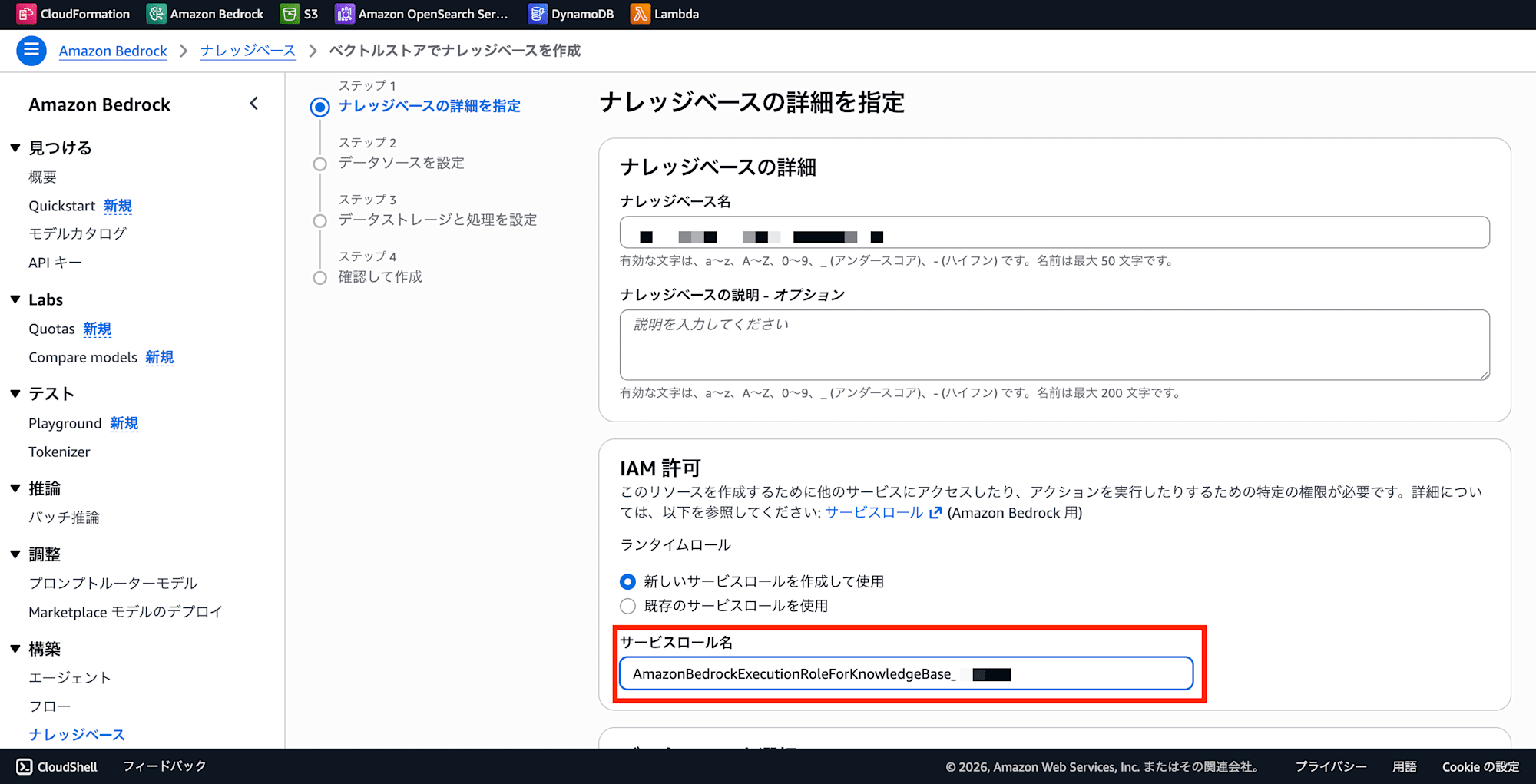
To solve this, there is a method of advancing the KB creation wizard partway to obtain the role ARN in advance. The wizard displays the name of the role to be created on the screen at Step 1 (KB name and IAM permissions) when you select "Create a new service role."
Work with 2 browser tabs side by side.
[Tab 1] Bedrock Console
- Knowledge Bases → Create "Knowledge base with vector store"
- In Step 1, select "Create a new service role" → Copy the displayed role name (
AmazonBedrockExecutionRoleForKnowledgeBase_xxxx) - Pause the wizard here (do not close the tab)
[Tab 2] OpenSearch Service Console
- Serverless → Data access policies → Select the policy linked to the existing Collection → Edit
- Add the role ARN copied from Tab 1 to the principal field and save
arn:aws:iam::{account-id}:role/service-role/AmazonBedrockExecutionRoleForKnowledgeBase_xxxx
Also, temporarily adding your own role (IAM user or working Admin role) will allow you to access OpenSearch Dashboards in the later Step 3.
arn:aws:iam::{account-id}:role/{your-role-name}
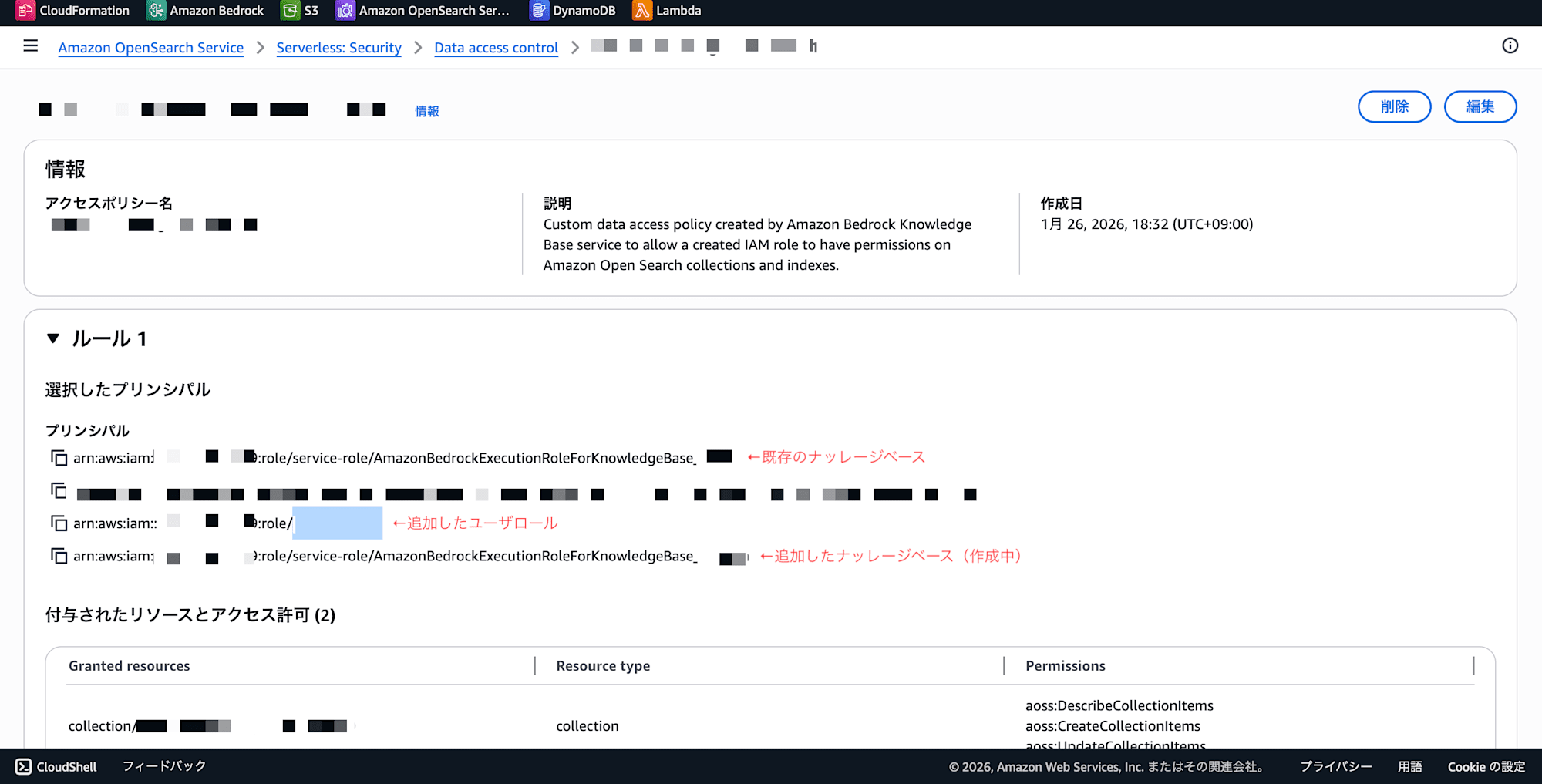
After completing the work, removing your own role from the policy aligns with the principle of least privilege.
Complete Step 3 (Index creation) in Tab 2 before returning to the wizard in Tab 1 to proceed with the remaining steps.
Step 3: Create New Index in OpenSearch Dashboards
[Work in Tab 2] While Tab 1 is paused in Step 2, continue creating the Index in Tab 2.
Bedrock's "Use existing vector store" option assumes the Index has been created in advance. Since Bedrock won't create the Index for you, you need to create it yourself.
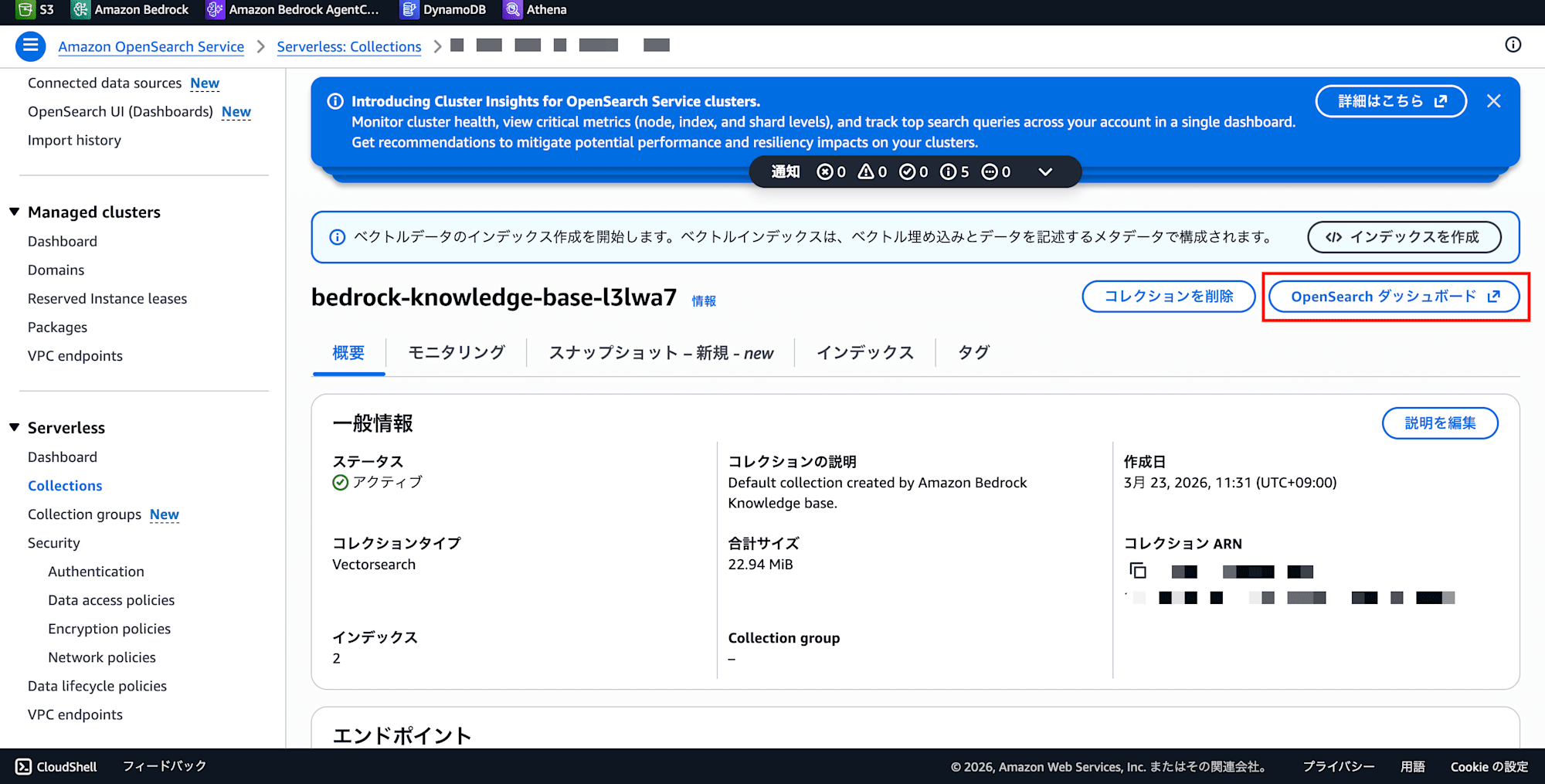
- In Tab 2 (OSS console), click on the target Collection → Click "OpenSearch Dashboards URL"
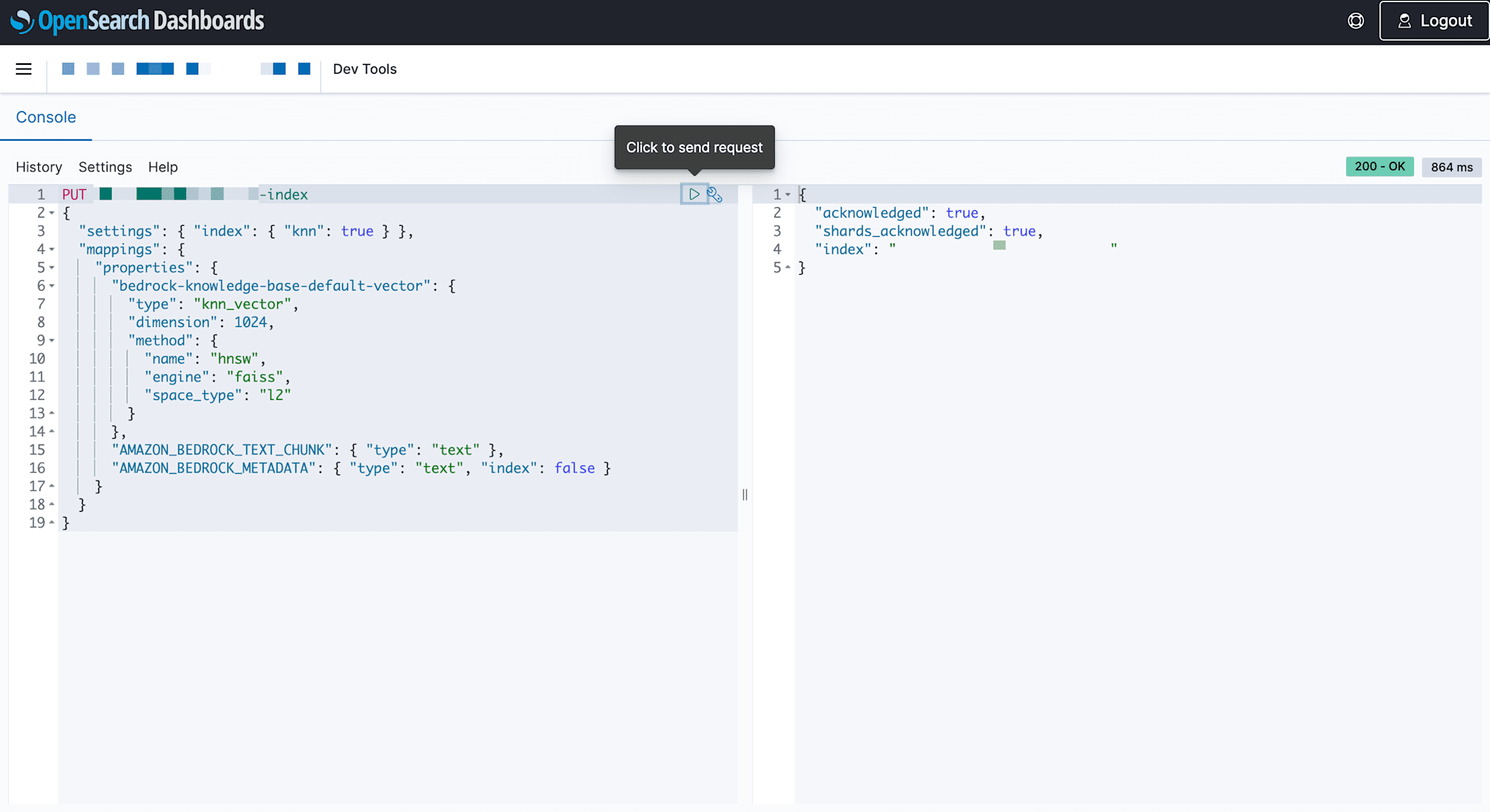
- Execute the following API request
PUT new-rag-index
{
  "settings": {
    "index": {
      "knn": true,
      "knn.algo_param.ef_search": 512
    }
  },
  "mappings": {
    "properties": {
      "bedrock-knowledge-base-default-vector": {
        "type": "knn_vector",
        "dimension": 1024,
        "method": {
          "name": "hnsw",
          "engine": "faiss",
          "space_type": "l2"
        }
      },
      "AMAZON_BEDROCK_TEXT_CHUNK": {
        "type": "text"
      },
      "AMAZON_BEDROCK_METADATA": {
        "type": "text",
        "index": false
      }
    }
  }
}
Key points:
dimension: 1024is the number of dimensions for Titan Text Embeddings v2. Change it according to the embedding model you use- Align field names with Bedrock's default naming (specify the same names when creating the KB later)
- The Index name must not duplicate an existing Index
On success, acknowledged: true is returned.
{
  "acknowledged": true,
  "shards_acknowledged": true,
  "index": "new-rag-index"
}
Step 4: Create Bedrock KB (Return to the Wizard in Tab 1)
[Return to Tab 1] Continue from the Bedrock KB creation wizard that was paused in Step 2. Since Step 1 (KB name and IAM permissions) is already complete, resume from Step 2.
- Step 2: Configure the data source (S3 bucket, etc.)
- Step 3: Embedding model and vector store
- Embedding model: Select the same one as the existing KB
- Vector store: "Use existing vector store"
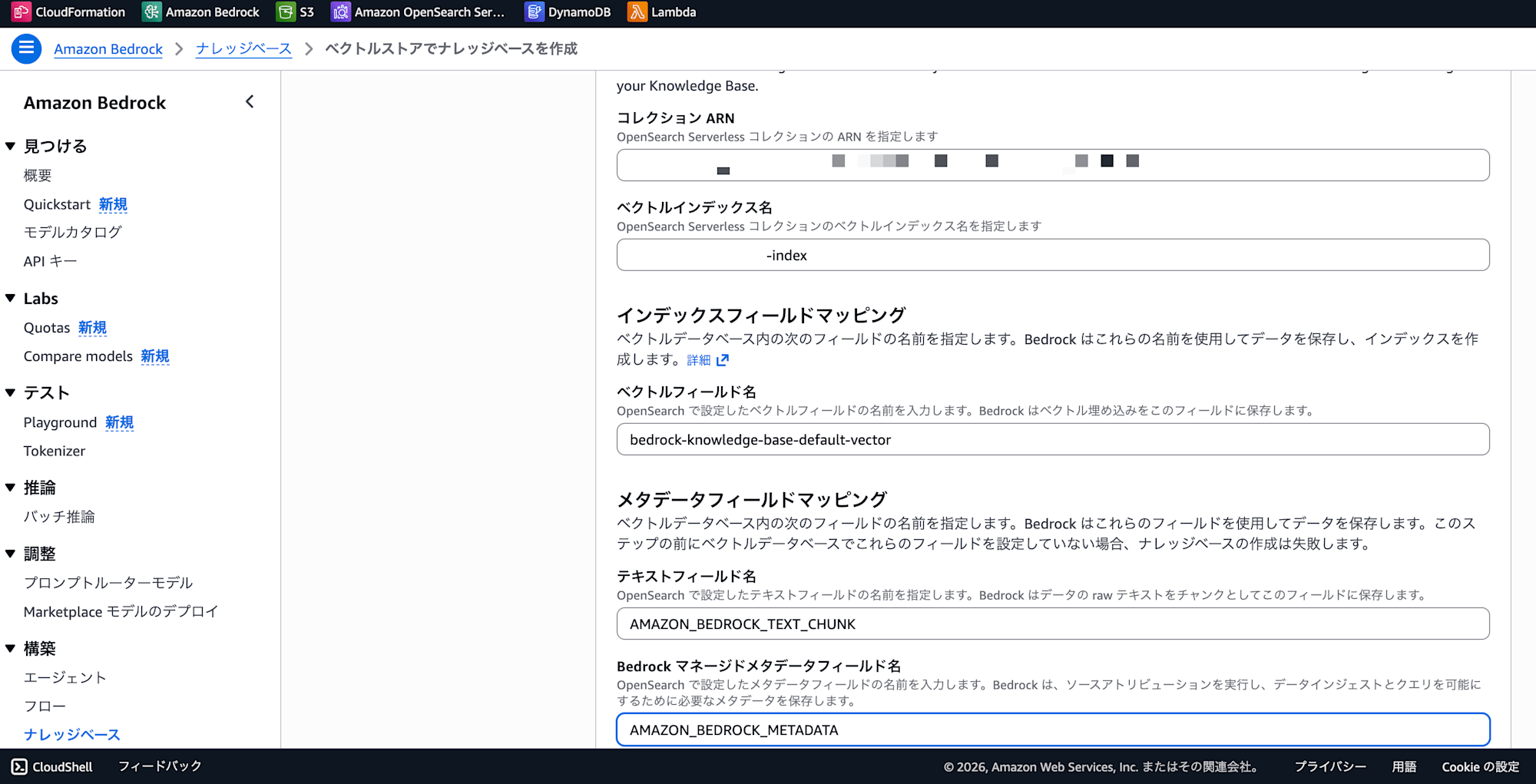
- Select OpenSearch Serverless and enter the following
- Collection ARN: The one noted in Step 1
- Vector index name:
new-rag-index(the name created in Step 3) - Vector field name:
bedrock-knowledge-base-default-vector - Text field name:
AMAZON_BEDROCK_TEXT_CHUNK - Metadata field name:
AMAZON_BEDROCK_METADATA
- Step 4: Review and create
Upon KB creation, Bedrock automatically generates a service role named AmazonBedrockExecutionRoleForKnowledgeBase_xxxx. Since it matches the ARN registered in the Data Access Policy in Step 2, the permission is automatically activated.
Step 5: Data Source Sync + Operation Verification
After creating the KB, run "Sync" from the data source tab. After the sync is complete, send a test query to verify that the new KB works as expected.
And what's important is checking the impact on the existing KB.
- Send a test query to the existing KB as well to confirm it still works
- Check that there are no extreme delays in response time
In the case I tested, both the new KB and the existing KB worked without any issues. Since data and search are completely isolated at the Index level, the search results from each will never be mixed.
What Was Confirmed Through Testing
Here are the points I was able to confirm by actually trying it out.
Data Is Completely Isolated at the Index Level
Data ingested into the new Index will not appear in search queries against the existing Index at all. For example, if the existing KB holds "management financial data" and the new KB holds "technical documents," each KB only queries its own Index, so the search results will never be mixed.
This is because the Bedrock KB search API is designed to only query the Index specified by vectorStoreConfiguration.opensearchServerlessConfiguration.vectorIndexName.
No Impact on the Performance or Data of the Existing KB
Even after adding a new Index, there was no perceptible degradation in the search performance of the existing Index. Since OSS auto-scales OCU (OpenSearch Compute Unit), resources are automatically provisioned even as more Indexes are added to a Collection.
However, as data volume and search frequency increase, OCU usage will also increase, causing the usage-based charges to rise slightly. Even so, it's negligible compared to the fixed monthly cost of $700+ for creating a new Collection.
The Option of a Wildcard Principal
In this case, I obtained the role ARN in advance using the 2-tab operation and registered the specific ARN, but for operations where KBs are added frequently, using a wildcard principal is also an option.
By adding the following to the principal in the Data Access Policy, all roles starting with AmazonBedrockExecutionRoleForKnowledgeBase_ are automatically permitted, eliminating the need to edit the Data Access Policy every time a new KB is added.
arn:aws:iam::{account-id}:role/service-role/AmazonBedrockExecutionRoleForKnowledgeBase_*
From a security perspective, "only allow specific role ARNs" is stricter. It's practical to use wildcards during development/testing phases and specific ARNs in production environments.
Pitfalls
Here are some notes on the issues I ran into when actually trying this out.
"Use Existing Vector Store" Does Not Create the Index
The Bedrock wizard offers two choices: "Quick create a new vector store" and "Use existing vector store," but the latter operates under the assumption that the Index already exists. Since Bedrock won't create the Index for you, if you skip Step 3 and proceed to Step 4, you'll get stuck with an "Index not found" error.
Cannot Access Dashboards
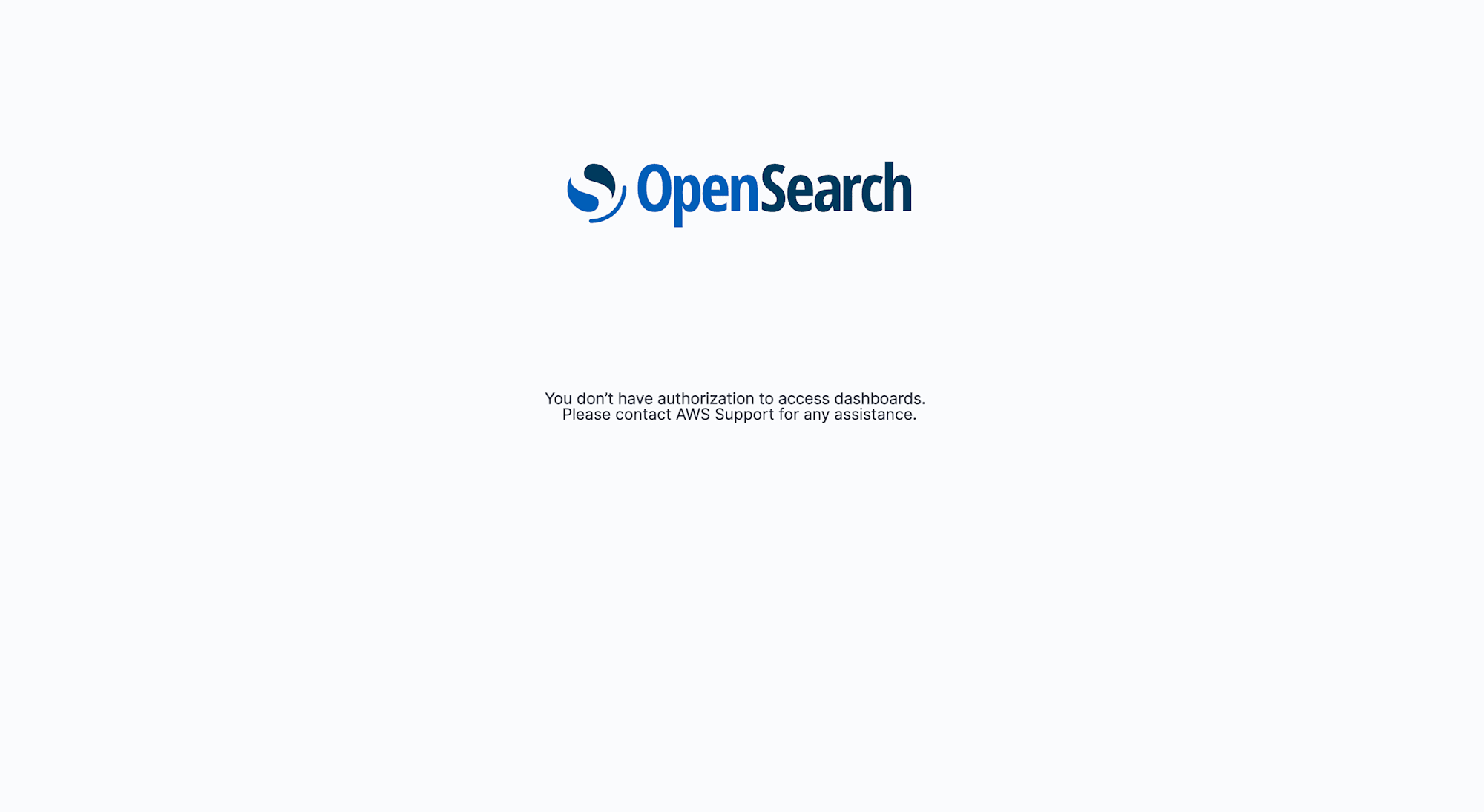
When first trying to access Dashboards, "You don't have authorization" may be displayed. This is because, under OSS's authorization model, only principals explicitly permitted in the Data Access Policy can access Dashboards.
Even if the IAM role you normally use has Admin permissions, OSS authorizes separately from IAM permissions via the Data Access Policy. This is resolved by adding your role to the principals in the Data Access Policy.
Field Mapping Mistakes
The vector field name, text field name, and metadata field name must exactly match between the mappings at Index creation time and the specifications at KB creation time. Even a single character difference will cause the sync to fail or vector search to return empty results.
Aligning with the same naming as the existing KB (Bedrock's defaults) is the easiest way to prevent mistakes.
Summary
I confirmed that by sharing a single OpenSearch Serverless Collection across multiple Bedrock KBs, it is possible to avoid the double occurrence of monthly fixed costs.
The key points are as follows.
- Separate KBs by Index, not by Collection to keep fixed costs down
- Operate the KB wizard in parallel across 2 tabs to obtain the role ARN in advance, register it in the Data Access Policy, and then complete the KB creation
- Pre-create the Index in OpenSearch Dashboards, then link it using Bedrock's "Use existing vector store" option
- Since data and search are isolated at the Index level, new KBs can be added without impacting existing KBs
This is an effective configuration for cases where "you want to add more Bedrock KBs but are concerned about costs." The benefits are especially significant when operating multiple KBs for multiple use cases in a phase of full-scale RAG operation.
I hope this is helpful.
