![I tried the new blocks of Slack Block Kit [Agent Edition]](https://images.ctfassets.net/ct0aopd36mqt/wp-thumbnail-b803788be81ed4dff8256a1a01d1f2c2/dbdb94b4897959aa969f4bcc4a9330db/slack-eyecatch.jpg?w=3840&fm=webp)
I tried the new blocks of Slack Block Kit [Agent Edition]

This page has been translated by machine translation. View original
Since 2026, new blocks have been continuously added to Slack's Block Kit. In this series, we will introduce these new blocks while actually trying them out.
- Part 1: Data Edition
- Part 2: General Display Edition
- Part 3: Agent Edition (this article)
- Part 4: Streaming Edition
- Part 5: Validation & CI Edition
In this third installment, we will introduce three agent-related blocks: task_card / plan / context_actions. These are a group of blocks that can display an agent's thought process, task progress, and feedback mechanisms for responses using Slack-native UI.
Overview of the 3 Blocks
| Block | Added | Purpose |
|---|---|---|
| task_card | February 11, 2026[1] | Display progress of a single task |
| plan | February 11, 2026[1:1] | Display a plan combining multiple tasks |
| context_actions | October 7, 2025[2] | Display feedback buttons, etc. for AI responses |
task_card and plan were added at the same time, and are blocks designed to bring the "Thinking..." display familiar from LLM tools to Slack apps as well.
These are designed to be updated incrementally in combination with the Streaming API, but that integration will be covered in Part 4, the Streaming Edition. In this article, we will first check how each block is displayed on its own.
Note that, as before, verification is done using Block Kit Builder.
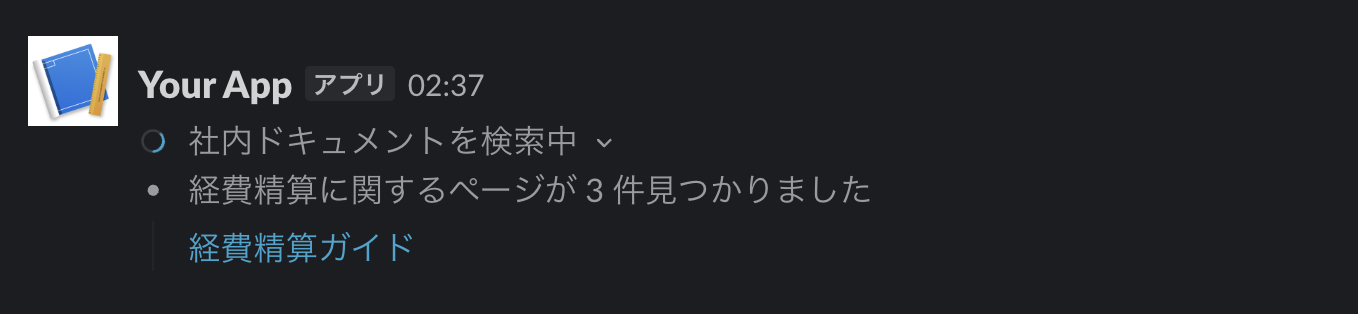
task_card block
This block displays a single task with a status indicator[3].
| Field | Description |
|---|---|
task_id |
Required. The task ID |
title |
Required. The task title. plain text format |
status |
Required. in_progress / complete / error |
details |
Task details. Single rich_text format |
output |
Task output. Single rich_text format |
sources |
Array of URL source elements used to generate the response. Displayed as clickable reference links |
icon |
Icon to associate with the task |
hide_title |
When set to true, title is hidden and details becomes the first element. title itself is still required in this case |
{
  "blocks": [
    {
      "type": "task_card",
      "task_id": "task_1",
      "title": "Searching internal documents",
      "status": "in_progress",
      "output": {
        "type": "rich_text",
        "elements": [
          {
            "type": "rich_text_section",
            "elements": [
              { "type": "text", "text": "Found 3 pages related to expense reimbursement" }
            ]
          }
        ]
      },
      "sources": [
        { "type": "url", "url": "https://example.com/wiki/keihi", "text": "Expense Reimbursement Guide" }
      ]
    }
  ]
}
plan block
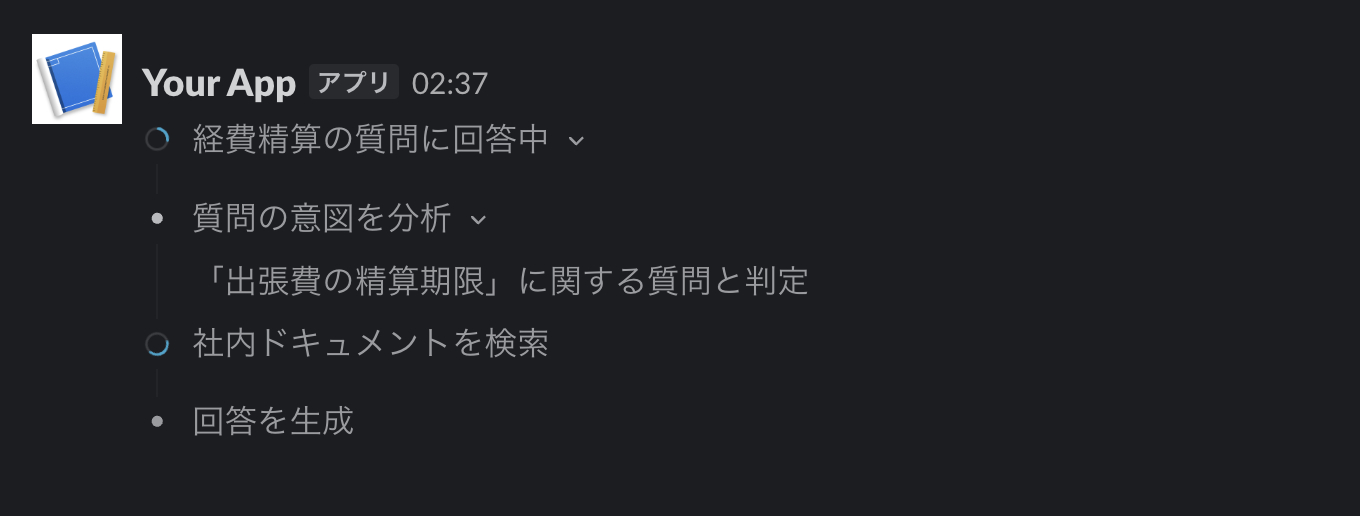
This block displays multiple tasks together as a single plan[4].
| Field | Description |
|---|---|
title |
Required. The plan title. plain text format |
tasks |
Required. An array of tasks, up to 50. Each element has the same structure as task_card but does not have a type. task_id must be unique within the plan |
This block handles the display of the thought process — showing what the agent is going to do and how far it has progressed.
{
  "blocks": [
    {
      "type": "plan",
      "title": "Answering expense reimbursement question",
      "tasks": [
        {
          "task_id": "step_1",
          "title": "Analyze the intent of the question",
          "status": "complete",
          "output": {
            "type": "rich_text",
            "elements": [
              {
                "type": "rich_text_section",
                "elements": [
                  { "type": "text", "text": "Determined to be a question about 'business trip expense reimbursement deadline'" }
                ]
              }
            ]
          }
        },
        {
          "task_id": "step_2",
          "title": "Search internal documents",
          "status": "in_progress"
        },
        {
          "task_id": "step_3",
          "title": "Generate response",
          "status": "pending"
        }
      ]
    }
  ]
}
context_actions block
This block displays small interactive elements such as feedback buttons at the end of an AI response[5].
| Field | Description |
|---|---|
elements |
Required. An array of feedback buttons elements and icon button elements. Maximum 5 |
block_id |
Can be used to identify the source of the action in the interaction payload |
There are only 2 types of elements that can be placed. feedback_buttons receives a rating for the response as a 👍 / 👎 pair, and icon_button provides a single action such as deletion.
{
  "blocks": [
    {
      "type": "context_actions",
      "elements": [
        {
          "type": "feedback_buttons",
          "action_id": "answer_feedback",
          "positive_button": {
            "text": { "type": "plain_text", "text": "👍" },
            "value": "positive_feedback"
          },
          "negative_button": {
            "text": { "type": "plain_text", "text": "👎" },
            "value": "negative_feedback"
          }
        }
      ]
    }
  ]
}

Unlike display-only blocks such as data_table introduced in Part 1, the elements here have an action_id. This means that user interactions are delivered to the app as block_actions payloads — making this an interactive block just like conventional buttons. Everything from collecting feedback to accumulating evaluation data can be implemented on the app side.
Summary
In this article, we introduced three agent-related blocks.
Until now, displaying agent progress in Slack basically required repeatedly editing and overwriting messages, but the introduction of the plan block makes for a much cleaner implementation.
On the other hand, the true value of these blocks lies in using them with the Streaming API to update tasks incrementally. The next installment, Part 4, will be the Streaming Edition, where we will try incremental block updates using streaming APIs including chat.startStream. Stay tuned!
https://docs.slack.dev/changelog/2026/02/11/task-cards-plan-blocks ↩︎ ↩︎
https://docs.slack.dev/changelog/2025/10/7/chat-streaming ↩︎
https://docs.slack.dev/reference/block-kit/blocks/task-card-block ↩︎
https://docs.slack.dev/reference/block-kit/blocks/plan-block ↩︎
https://docs.slack.dev/reference/block-kit/blocks/context-actions-block ↩︎
