I tried the new Slack API methods [Streaming Edition]

I tried the new Slack API methods [Streaming Edition]

# Slack Text Streaming API Guide ## Overview The Slack Text Streaming API provides three methods for sequentially updating blocks using the `chunks` parameter: `chat.startStream`, `chat.appendStream`, and `chat.stopStream`. --- ## API Methods ### 1. `chat.startStream` Initializes a new streaming session and returns a `stream_ts` (stream timestamp) used in subsequent calls. **Parameters:** | Parameter | Type | Required | Description | |-----------|------|----------|-------------| | `channel` | string | Yes | Target channel ID | | `assistant_color` | string | No | Color of the assistant indicator | | `title` | string | No | Title displayed above the stream | **Example Request:** ```json POST https://slack.com/api/chat.startStream { "channel": "C0123456789", "title": "AI Response" } ``` **Example Response:** ```json { "ok": true, "stream_ts": "1710000000.000100", "channel": "C0123456789" } ``` --- ### 2. `chat.appendStream` Appends content chunks to an existing stream. This is the core method for sending text incrementally. **Parameters:** | Parameter | Type | Required | Description | |-----------|------|----------|-------------| | `channel` | string | Yes | Target channel ID | | `stream_ts` | string | Yes | Stream timestamp from `startStream` | | `chunks` | array | Yes | Array of block objects to append | | `cursor_visibility` | string | No | `visible` or `hidden` | | `new_message_ts` | string | No | Thread timestamp if replying | **`chunks` Parameter Structure:** ```json { "chunks": [ { "type": "rich_text", "elements": [ { "type": "rich_text_section", "elements": [ { "type": "text", "text": "Hello, this is streamed text!" } ] } ] } ] } ``` **Example Request:** ```json POST https://slack.com/api/chat.appendStream { "channel": "C0123456789", "stream_ts": "1710000000.000100", "cursor_visibility": "visible", "chunks": [ { "type": "rich_text", "elements": [ { "type": "rich_text_section", "elements": [ { "type": "text", "text": "Generating response..." } ] } ] } ] } ``` **Example Response:** ```json { "ok": true, "stream_ts": "1710000000.000100" } ``` --- ### 3. `chat.stopStream` Finalizes the stream and marks it as complete. The cursor is hidden after this call. **Parameters:** | Parameter | Type | Required | Description | |-----------|------|----------|-------------| | `channel` | string | Yes | Target channel ID | | `stream_ts` | string | Yes | Stream timestamp to finalize | | `cursor_visibility` | string | No | Typically set to `hidden` | **Example Request:** ```json POST https://slack.com/api/chat.stopStream { "channel": "C0123456789", "stream_ts": "1710000000.000100", "cursor_visibility": "hidden" } ``` **Example Response:** ```json { "ok": true, "stream_ts": "1710000000.000100" } ``` --- ## End-to-End Implementation Example ### Python Implementation ```python import time import requests SLACK_TOKEN = "xoxb-your-bot-token" CHANNEL_ID = "C0123456789" headers = { "Authorization": f"Bearer {SLACK_TOKEN}", "Content-Type": "application/json" } def start_stream(channel: str, title: str = "") -> str: """Start a new stream and return stream_ts.""" payload = { "channel": channel, "title": title } response = requests.post( "https://slack.com/api/chat.startStream", headers=headers, json=payload ) data = response.json() if not data.get("ok"): raise Exception(f"Failed to start stream: {data.get('error')}") return data["stream_ts"] def append_stream(channel: str, stream_ts: str, text: str) -> None: """Append a text chunk to the stream.""" payload = { "channel": channel, "stream_ts": stream_ts, "cursor_visibility": "visible", "chunks": [ { "type": "rich_text", "elements": [ { "type": "rich_text_section", "elements": [ { "type": "text", "text": text } ] } ] } ] } response = requests.post( "https://slack.com/api/chat.appendStream", headers=headers, json=payload ) data = response.json() if not data.get("ok"): raise Exception(f"Failed to append stream: {data.get('error')}") def stop_stream(channel: str, stream_ts: str) -> None: """Finalize and close the stream.""" payload = { "channel": channel, "stream_ts": stream_ts, "cursor_visibility": "hidden" } response = requests.post( "https://slack.com/api/chat.stopStream", headers=headers, json=payload ) data = response.json() if not data.get("ok"): raise Exception(f"Failed to stop stream: {data.get('error')}") def stream_text_to_slack(channel: str, full_text: str, chunk_size: int = 10): """Stream text to Slack in chunks.""" # Step 1: Start the stream stream_ts = start_stream(channel, title="AI Response") print(f"Stream started: {stream_ts}") try: # Step 2: Append text in chunks words = full_text.split() buffer = "" for i, word in enumerate(words): buffer += word + " " # Send every `chunk_size` words if (i + 1) % chunk_size == 0: append_stream(channel, stream_ts, buffer) print(f"Appended: {buffer.strip()}") buffer = "" time.sleep(0.3) # Simulate streaming delay # Send any remaining text if buffer.strip(): append_stream(channel, stream_ts, buffer) print(f"Appended final chunk: {buffer.strip()}") finally: # Step 3: Stop the stream stop_stream(channel, stream_ts) print("Stream stopped.") # --- Run the example --- sample_text = ( "This is a demonstration of the Slack Text Streaming API. " "Text is sent incrementally in chunks, simulating a real-time " "AI response being generated token by token." ) stream_text_to_slack(CHANNEL_ID, sample_text, chunk_size=5) ``` --- ## Validation Example ### Testing Each API Method ```python import unittest from unittest.mock import patch, MagicMock class TestSlackStreamingAPI(unittest.TestCase): @patch("requests.post") def test_start_stream_success(self, mock_post): """Verify startStream returns a valid stream_ts.""" mock_response = MagicMock() mock_response.json.return_value = { "ok": True, "stream_ts": "1710000000.000100", "channel": "C0123456789" } mock_post.return_value = mock_response stream_ts = start_stream("C0123456789", title="Test Stream") self.assertEqual(stream_ts, "1710000000.000100") mock_post.assert_called_once() call_args = mock_post.call_args self.assertIn("chat.startStream", call_args[0][0]) print("✅ test_start_stream_success passed") @patch("requests.post") def test_append_stream_success(self, mock_post): """Verify appendStream sends chunks correctly.""" mock_response = MagicMock() mock_response.json.return_value = { "ok": True, "stream_ts": "1710000000.000100" } mock_post.return_value = mock_response append_stream("C0123456789", "1710000000.000100", "Hello World") call_kwargs = mock_post.call_args[1] payload = call_kwargs["json"] # Validate chunks structure self.assertIn("chunks", payload) self.assertEqual(len(payload["chunks"]), 1) chunk = payload["chunks"][0] self.assertEqual(chunk["type"], "rich_text") text_element = ( chunk["elements"][0]["elements"][0] ) self.assertEqual(text_element["text"], "Hello World") print("✅ test_append_stream_success passed") @patch("requests.post") def test_stop_stream_success(self, mock_post): """Verify stopStream finalizes the stream.""" mock_response = MagicMock() mock_response.json.return_value = { "ok": True, "stream_ts": "1710000000.000100" } mock_post.return_value = mock_response stop_stream("C0123456789", "1710000000.000100") call_kwargs = mock_post.call_args[1] payload = call_kwargs["json"] self.assertEqual(payload["cursor_visibility"], "hidden") self.assertIn("chat.stopStream", mock_post.call_args[0][0]) print("✅ test_stop_stream_success passed") @patch("requests.post") def test_start_stream_failure(self, mock_post): """Verify error handling when startStream fails.""" mock_response = MagicMock() mock_response.json.return_value = { "ok": False, "error": "channel_not_found" } mock_post.return_value = mock_response with self.assertRaises(Exception) as context: start_stream("INVALID_CHANNEL") self.assertIn("channel_not_found", str(context.exception)) print("✅ test_start_stream_failure passed") if __name__ == "__main__": unittest.main(verbosity=2) ``` **Expected Test Output:** ``` test_append_stream_success ... ✅ test_append_stream_success passed ok test_start_stream_failure ... ✅ test_start_stream_failure passed ok test_start_stream_success ... ✅ test_start_stream_success passed ok test_stop_stream_success ... ✅ test_stop_stream_success passed ok ---------------------------------------------------------------------- Ran 4 tests in 0.005s OK ``` --- ## Sequential Block Update Flow ``` Client Slack API | | |-- chat.startStream ------>| |<-- stream_ts -------------| | | |-- chat.appendStream ----->| chunk 1: "Generating..." |<-- ok --------------------| | | |-- chat.appendStream ----->| chunk 2: "Here is the answer..." |<-- ok --------------------| | | |-- chat.appendStream ----->| chunk 3: "...complete." |<-- ok --------------------| | | |-- chat.stopStream ------->| |<-- ok --------------------| | [Stream finalized, cursor hidden] ``` --- ## Important Notes | Consideration | Details | |---------------|---------| | **Rate Limits** | Avoid sending chunks too rapidly; add small delays between `appendStream` calls | | **Error Handling** | Always call `stopStream` in a `finally` block to prevent zombie streams | | **Token Scope** | Bot token must have `chat:write` scope | | **`chunks` Type** | Only `rich_text` block type is currently supported for streaming | | **Thread Support** | Use `new_message_ts` in `appendStream` to stream into a thread |
2026.09.01

This page has been translated by machine translation. View original

Since 2026, new blocks have been continuously added to Slack's Block Kit. In this series, we will introduce these new blocks and related APIs while actually trying them out.

  • Part 1: Data Edition

https://dev.classmethod.jp/articles/slack-block-kit-new-data-display-blocks/

  • Part 2: General Display Edition

https://dev.classmethod.jp/articles/slack-block-kit-new-general-display-blocks-guide/

  • Part 3: Agent Edition

https://dev.classmethod.jp/articles/slack-block-kit-agent-blocks-guide/

  • Part 4: Streaming Edition (this article)
  • Part 5: Validation & CI Edition

In this fourth installment, we introduce three methods of the text streaming API: chat.startStream / chat.appendStream / chat.stopStream. These are APIs for implementing the familiar LLM app experience of responses appearing gradually in Slack apps.

Previously, a streaming-like display could be achieved by repeatedly editing the same message with chat.update. However, this approach required preparing and resending the full text with each request, making it easy to hit rate limits when increasing the update frequency.

In contrast, the streaming API only requires sending the appended portion, and the rate limit for appendStream, which handles appending, is more lenient, making it increasingly easier to work with.

Incidentally, the mechanism for sequentially updating the plan block and task_card block introduced in Part 3 is also handled by this API.

Note that since this cannot be verified in the familiar Block Kit Builder, we will call the API directly using the slack api command of the Slack CLI for verification.
Please refer to the following article for details on this command.

https://dev.classmethod.jp/articles/slack-cli-slack-api/

Method Overview

Method Role Rate Limit
chat.startStream[1] Starts a streaming message Tier 2 (20+ per minute)
chat.appendStream[2] Appends to a message in progress Tier 4 (100+ per minute)
chat.stopStream[3] Ends streaming and finalizes the message Tier 2 (20+ per minute)

All three methods only require the chat:write scope. By passing the timestamp received in the start response to append and stop, you can append to and finalize a single message.

Key Parameters

chat.startStream

Item Description
channel Required. Channel, thread, or DM ID
markdown_text Standard Markdown format text. Maximum 12,000 characters
chunks Array of streaming chunks. Cannot be used together with markdown_text
thread_ts Thread to reply to. Omitting this in a regular channel results in an invalid_thread_ts error
recipient_user_id / recipient_team_id ID of the user and team receiving the stream. Required when streaming to a channel
task_display_mode How tasks are displayed. timeline (displays task cards individually alternating with text) or plan (displays grouped in a plan block). Default is timeline

An important point to note: streaming in regular channels is only possible as a thread reply.

Delivery as a regular non-reply post is only possible in channels with a special configuration where the entire channel becomes a single session. Additionally, when delivering to a channel, specifying recipient_user_id and recipient_team_id is required. This is a mechanism that allows Slack to understand who the streaming is directed to.

chat.appendStream

channel and ts are required, and content is passed via markdown_text or chunks. markdown_text is not a retransmission of the full text, but a method of sending only the appended portion.

chat.stopStream

Similarly, channel and ts are required, with content passed via markdown_text or chunks. In addition, the following unique items are available.

Item Description
blocks Array of blocks rendered at the end of the finalized message. Maximum 50, separate from the 50 via chunks
metadata Message metadata
session_status Status of the session to set after streaming ends. active / processing / suspended / closed

Streaming Text with markdown_text

Assuming a bot that answers expense reimbursement questions, let's call the three methods in sequence. First, the stream start process.

$ slack api chat.startStream --json '{
  "channel": "C0123456789",
  "thread_ts": "<timestamp of the message to use as the thread root>",
  "recipient_team_id": "T0123456789",
  "recipient_user_id": "U0123456789",
  "markdown_text": "Looking into it.\n\n"
}'

The ts in the response becomes the identifier for the streaming message. We specify this ts to append content.

$ slack api chat.appendStream --json '{
  "channel": "C0123456789",
  "ts": "<timestamp from the stream start response>",
  "markdown_text": "## Business Trip Expense Reimbursement Deadline\n\nPlease submit your claim **within one week of your return date**."
}'

Finally, we stop the stream. Let's pass the context_actions block introduced in Part 3 to blocks to add feedback buttons at the end of the finalized message.

$ slack api chat.stopStream --json '{
  "channel": "C0123456789",
  "ts": "<timestamp from the stream start response>",
  "blocks": [
    {
      "type": "context_actions",
      "elements": [
        {
          "type": "feedback_buttons",
          "action_id": "answer_feedback",
          "positive_button": {
            "text": { "type": "plain_text", "text": "👍" },
            "value": "positive_feedback"
          },
          "negative_button": {
            "text": { "type": "plain_text", "text": "👎" },
            "value": "negative_feedback"
          }
        }
      ]
    }
  ]
}'
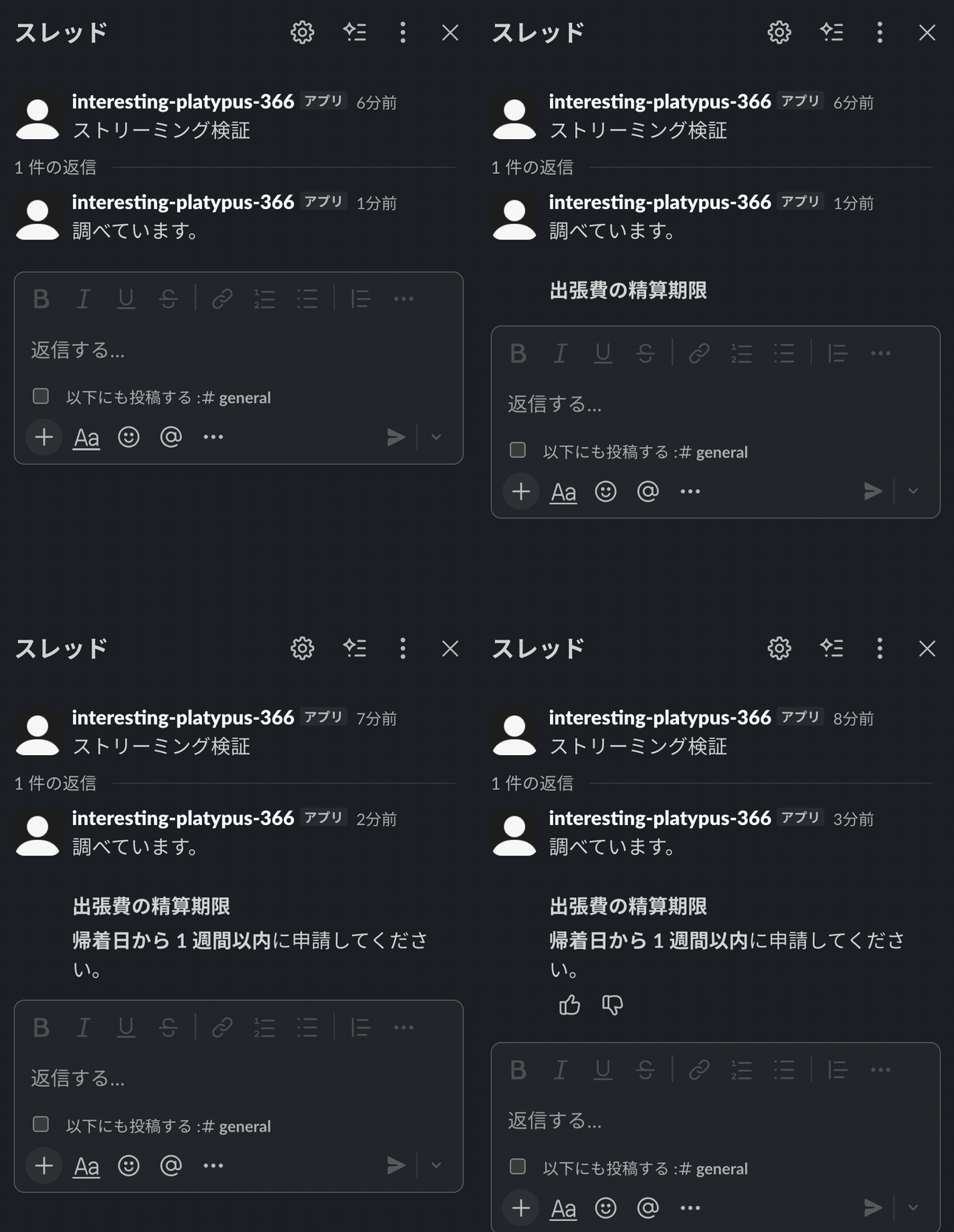
Streaming in action

Unlike overwriting and updating a message, you only need to send the appended portion, so you can simply send the LLM output as-is. It suddenly looks very much the part!

Streaming the Thought Process with chunks

Next, let's use the chunks parameter to sequentially update the plan block introduced in Part 3. There are four types of chunks.

Chunk Type Purpose
markdown_text Appending Markdown text
task_update Adding or updating tasks. Items with the same id are treated as updates
plan_update Updating the plan title
blocks Adding block arrays. Maximum 50 per array; excess items are discarded with a warning via the API

The structure of the task_update chunk is almost the same as the task_card block, but differs in that details and output are strings rather than rich_text. Also, there is a 256-character limit on the chunk size for task_update and plan_update.

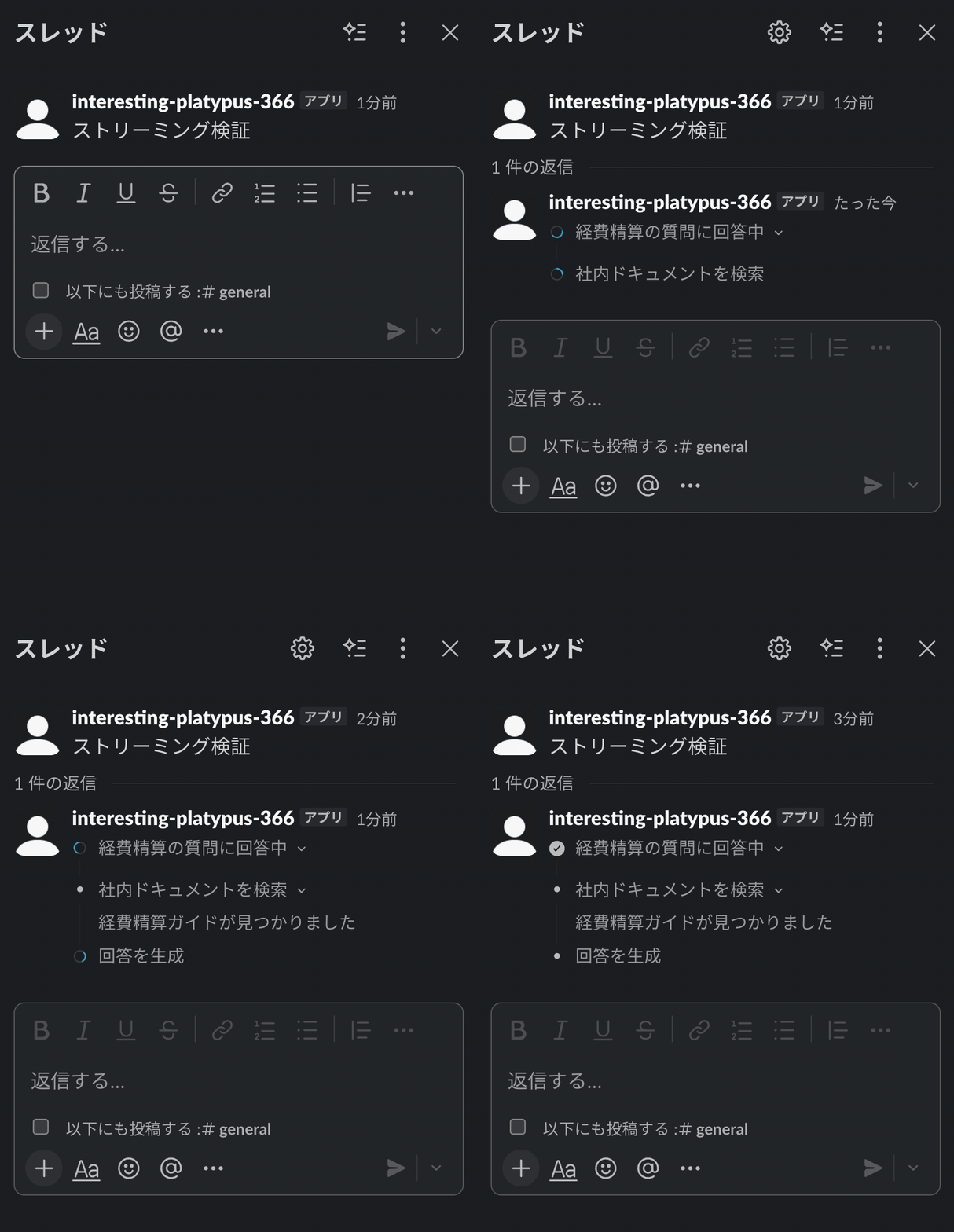
Specify plan for task_display_mode to start streaming, then send tasks one by one.

$ slack api chat.startStream --json '{
  "channel": "C0123456789",
  "thread_ts": "<timestamp of the message to use as the thread root>",
  "recipient_team_id": "T0123456789",
  "recipient_user_id": "U0123456789",
  "task_display_mode": "plan",
  "chunks": [
    { "type": "plan_update", "title": "Answering expense reimbursement question" },
    { "type": "task_update", "id": "step_1", "title": "Search internal documents", "status": "in_progress" }
  ]
}'

Task completion and the start of the next task are expressed through task_update on the same id. As before, specify the value from the start response for ts.

$ slack api chat.appendStream --json '{
  "channel": "C0123456789",
  "ts": "<timestamp from the stream start response>",
  "chunks": [
    { "type": "task_update", "id": "step_1", "title": "Search internal documents", "status": "complete", "output": "Found the expense reimbursement guide" },
    { "type": "task_update", "id": "step_2", "title": "Generate response", "status": "in_progress" }
  ]
}'

Task streaming with plan block

In Part 3, the plan block was presented as static JSON, but this is the more practical implementation.

Summary

In this article, we introduced the three methods of the text streaming API.

From sequential text display to plan block updates and feedback button placement, all of this can be achieved with a simple implementation, giving the impression that the display components for agents are becoming increasingly easy to use. If you have been using chat.update, why not take this opportunity to try out the new methods?

Next time is the final installment. Part 5 covers Validation & CI, where we will try payload validation using blocks.validate and integrating it into CI. Stay tuned!

脚注
  1. https://docs.slack.dev/reference/methods/chat.startStream ↩︎

  2. https://docs.slack.dev/reference/methods/chat.appendStream ↩︎

  3. https://docs.slack.dev/reference/methods/chat.stopStream ↩︎


AI白書2026 配布中

クラスメソッドが独自に行なったAI診断調査をもとに、企業のAI活用の現在地を調査レポートとしてまとめました。企業規模別の活用度傾向に加え、規模を超えてAI活用を進める企業に共通する取り組みまで、自社の現在地を捉えるためのヒントにぜひ。

AI白書2026

無料でダウンロードする

Share this article

DevelopersIO 2026