
I tried to see if masking policies and aggregation policies can be used together in Snowflake to mask PII while still allowing aggregation when using Snowflake CoCo

This page has been translated by machine translation. View original
This is Kawabata.
I verified masking when using agents with IS_AGENT_ACTIVATED, and
I verified the behavior of aggregation policies on their own in the respective articles.
When using both of these simultaneously, simply combining them causes aggregate functions to operate on masked values, resulting in no meaningful aggregation results being returned. Additionally, when dbt recreates tables (CREATE OR REPLACE), tags and aggregation policies directly assigned to the table disappear — an operational challenge.
In this article, I verified a configuration that resolves the combined-use problem through conditional masking using SYSTEM$GET_TAG_ON_CURRENT_TABLE and conditional aggregation policies, while safely operating via post-hooks in dbt Projects on Snowflake.
Background and Challenges
When AI agents (such as CoCo) access data, there are cases where you want to achieve the following two protections simultaneously.
- Mask PII when accessed via agents (masking policy +
IS_AGENT_ACTIVATEDverified in the previous article) - Show only aggregated results to agents, not individual records (aggregation policy verified in the last article)
However, simply applying both causes the following problems.
- Aggregate functions operate on masked values.
SUM(amount)andAVG(salary)are calculated against masked values (NULLor fixed strings), making the aggregation results meaningless. - dbt's standard materialization (
table) recreates tables withCREATE OR REPLACE, causing aggregation policies and tags directly assigned to the table to disappear.
The goal is to resolve these issues and create a fail-safe configuration.
Technical Approach
The solution combines the following three approaches.
- Tag-based masking + conditional branching via
SYSTEM$GET_TAG_ON_CURRENT_TABLE: Disable masking on tables where aggregation policies are applied, and protect data on the aggregation policy side. - Conditional aggregation policy: Non-agent execution contexts are unrestricted via
IS_AGENT_ACTIVATED, and only agents are subject to aggregation constraints. - dbt post-hook: Reapply tags and aggregation policies together after
CREATE OR REPLACE.
What is SYSTEM$GET_TAG_ON_CURRENT_TABLE?
SYSTEM$GET_TAG_ON_CURRENT_TABLE is a system function that can only be used within the condition expressions of masking policies and row access policies. It allows you to reference the value of a tag assigned to the current table.
-- Example of use within a masking policy condition expression
SYSTEM$GET_TAG_ON_CURRENT_TABLE('db.schema.tag_name')
In this article, we use it to conditionally disable masking on tables that have an exception tag indicating "aggregation policy applied," and apply masking on tables without that tag.
Conditional Aggregation Policy Design
We use IS_AGENT_ACTIVATED as a condition in the CASE expression of the aggregation policy, designing it so that non-agent execution contexts are unrestricted, and only agent sessions are subject to aggregation constraints.
CREATE AGGREGATION POLICY agent_only_agg_policy
  AS () RETURNS AGGREGATION_CONSTRAINT ->
  CASE
    WHEN SYS_CONTEXT('SNOWFLAKE$CURRENT', 'IS_AGENT_ACTIVATED')::BOOLEAN = TRUE
    THEN AGGREGATION_CONSTRAINT(MIN_GROUP_SIZE => 5)
    ELSE NO_AGGREGATION_CONSTRAINT()
  END;
This allows human users to view detailed data as usual, while only agents are subject to aggregation constraints.
Why post-hook is Recommended Over COPY TAGS
When recreating tables in dbt, it is possible to retain exception tags using COPY TAGS. However, in this configuration, the post-hook approach is recommended.
| Perspective | COPY TAGS | post-hook |
|---|---|---|
| Exception tag | Retained | Reapplied |
| Aggregation policy | Not retained (COPY POLICIES does not exist) |
Reapplied |
| Behavior on failure | fail-open (only masking is removed, no aggregation constraint) | fail-safe (reverts to masked state for target data type columns) |
| dbt-snowflake support | copy_tags config may be available depending on version, but aggregation policies are not covered |
Configurable with +post-hook |
Using COPY TAGS can result in a dangerous state where "the exception tag (masking disabled) survives but the aggregation policy is gone." With post-hook, both disappear together and the STRING / NUMBER type columns revert to their masked state, making it fail-safe.
Limitations
- Both tag-based masking policies and aggregation policies require Enterprise Edition or higher.
- The aggregate functions permitted by aggregation policies are limited to AVG / COUNT / COUNT(DISTINCT) / HLL / SUM.
MIN/MAX/MEDIAN/ window functions /GROUP BY ROLLUP·CUBE, etc. cannot be used. - If an agent generates a detail query such as
SELECT * LIMIT 10, it will result in an error due to the aggregation policy. Whether the agent can recover (by rewriting in aggregated form) requires real-world testing. - Aggregation policies return the actual values of
GROUP BYkey columns as-is. If PII is used as aGROUP BYkey, the actual values will be visible to the agent for groups withMIN_GROUP_SIZEor more. If you want to prevent PII columns from being used as GROUP BY keys, consider using view design or column-level masking in combination. - Only one masking policy per data type can be associated with a single tag. You need to prepare policies for each data type you use.
- It is recommended to specify the tag name referenced by
SYSTEM$GET_TAG_ON_CURRENT_TABLEas a fully qualified name (db.schema.tag) to avoid ambiguity in name resolution and differences in execution context.
Prerequisites
- Snowflake: This verification was performed on the Enterprise edition of a trial account.
- Required permissions: ACCOUNTADMIN role (for verification)
- dbt Projects on Snowflake: A usable environment (refer to the official documentation for setup instructions)
Preparation
Creating the Verification Database and Schema
Create the environment for verifying the combined use of masking policies and aggregation policies. Governance objects (tags and policies) are placed in the governance schema, and data tables are placed in the public schema.
Creating the verification database, schema, and table
USE ROLE ACCOUNTADMIN;

CREATE DATABASE IF NOT EXISTS masking_agg_test;
CREATE SCHEMA IF NOT EXISTS masking_agg_test.governance;
CREATE SCHEMA IF NOT EXISTS masking_agg_test.public;
Creating the Verification Table
Create a sales data table containing PII (customer name and email address) and a numeric value for aggregation (amount).
USE SCHEMA masking_agg_test.public;

CREATE OR REPLACE TABLE sales (
    sale_id INT COMMENT 'Sales ID',
    region VARCHAR COMMENT 'Region',
    product VARCHAR COMMENT 'Product name',
    amount NUMBER(10, 2) COMMENT 'Sales amount',
    customer_name VARCHAR COMMENT 'Customer name',
    email VARCHAR COMMENT 'Email address',
    sale_date DATE COMMENT 'Sale date'
);
-- Insert verification data (25 records)
-- By region: Tokyo 8, Osaka 7, Nagoya 5, Fukuoka 3, Sapporo 2
-- Fukuoka (3 records) and Sapporo (2 records) are intentionally small to confirm they end up in the remainder group with MIN_GROUP_SIZE=5
INSERT INTO sales VALUES
    (1, 'Tokyo', 'Laptop', 120000, '田中太郎', 'tanaka@example.com', '2026-06-01'),
    (2, 'Tokyo', 'Mouse', 3500, '佐藤花子', 'sato@example.com', '2026-06-02'),
    (3, 'Tokyo', 'Keyboard', 8000, '鈴木一郎', 'suzuki@example.com', '2026-06-03'),
    (4, 'Tokyo', 'Monitor', 45000, '高橋美咲', 'takahashi@example.com', '2026-06-04'),
    (5, 'Tokyo', 'Headset', 12000, '伊藤健太', 'ito@example.com', '2026-06-05'),
    (6, 'Tokyo', 'Laptop', 135000, '渡辺直美', 'watanabe@example.com', '2026-06-06'),
    (7, 'Tokyo', 'Tablet', 55000, '山本学', 'yamamoto@example.com', '2026-06-07'),
    (8, 'Tokyo', 'Mouse', 4200, '中村陽子', 'nakamura@example.com', '2026-06-08'),
    (9, 'Osaka', 'Laptop', 118000, '小林誠', 'kobayashi@example.com', '2026-06-09'),
    (10, 'Osaka', 'Keyboard', 7500, '加藤裕二', 'kato@example.com', '2026-06-10'),
    (11, 'Osaka', 'Monitor', 42000, '吉田真理', 'yoshida@example.com', '2026-06-11'),
    (12, 'Osaka', 'Headset', 15000, '松本大輔', 'matsumoto@example.com', '2026-06-12'),
    (13, 'Osaka', 'Tablet', 48000, '井上さくら', 'inoue@example.com', '2026-06-13'),
    (14, 'Osaka', 'Laptop', 125000, '木村拓也', 'kimura@example.com', '2026-06-14'),
    (15, 'Osaka', 'Mouse', 3800, '林美穂', 'hayashi@example.com', '2026-06-15'),
    (16, 'Nagoya', 'Laptop', 110000, '清水翔太', 'shimizu@example.com', '2026-06-16'),
    (17, 'Nagoya', 'Monitor', 38000, '斎藤恵', 'saito@example.com', '2026-06-17'),
    (18, 'Nagoya', 'Keyboard', 9200, '前田健一', 'maeda@example.com', '2026-06-18'),
    (19, 'Nagoya', 'Headset', 11000, '藤井優子', 'fujii@example.com', '2026-06-19'),
    (20, 'Nagoya', 'Tablet', 52000, '岡田龍一', 'okada@example.com', '2026-06-20'),
    (21, 'Fukuoka', 'Laptop', 128000, '石川由美', 'ishikawa@example.com', '2026-06-21'),
    (22, 'Fukuoka', 'Mouse', 4500, '三浦健二', 'miura@example.com', '2026-06-22'),
    (23, 'Fukuoka', 'Monitor', 41000, '西田あかり', 'nishida@example.com', '2026-06-23'),
    (24, 'Sapporo', 'Laptop', 115000, '上田浩司', 'ueda@example.com', '2026-06-24'),
    (25, 'Sapporo', 'Keyboard', 8500, '河野真由', 'kawano@example.com', '2026-06-25');
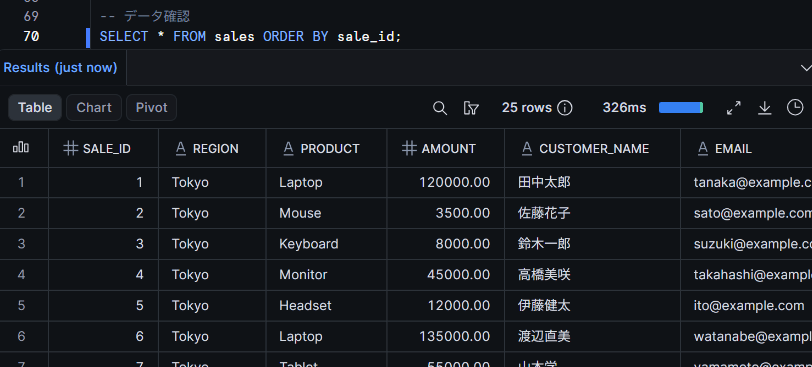
SELECT the table contents and confirm that 25 records are correctly inserted.
SELECT * FROM sales ORDER BY sale_id;
Creating Governance Objects
Create tags, masking policies, and aggregation policies in the governance schema.
Creating governance objects
First, create two tags.
USE SCHEMA masking_agg_test.governance;

-- Tag for applying masking at the database level
CREATE TAG IF NOT EXISTS agent_pii_mask
  COMMENT = 'Assigned at the database level to apply agent-oriented masking via tag inheritance';

-- Exception tag assigned to tables where aggregation policies are applied
CREATE TAG IF NOT EXISTS agg_policy_applied
  COMMENT = 'Assigned to tables with aggregation policies applied to disable masking';
Next, create masking policies that conditionally branch using SYSTEM$GET_TAG_ON_CURRENT_TABLE. Prepare two policies: one for STRING type and one for NUMBER type.
-- Masking policy for STRING type
CREATE OR REPLACE MASKING POLICY mask_string_for_agent
  AS (val STRING) RETURNS STRING ->
  CASE
    -- Do not mask on tables with aggregation policy applied (protected by the aggregation policy)
    WHEN SYSTEM$GET_TAG_ON_CURRENT_TABLE('masking_agg_test.governance.agg_policy_applied') IS NOT NULL
      THEN val
    -- Mask only in agent sessions
    WHEN SYS_CONTEXT('SNOWFLAKE$CURRENT', 'IS_AGENT_ACTIVATED')::BOOLEAN = TRUE
      THEN '***MASKED***'
    ELSE val
  END;
-- Masking policy for NUMBER type
CREATE OR REPLACE MASKING POLICY mask_number_for_agent
  AS (val NUMBER) RETURNS NUMBER ->
  CASE
    -- Do not mask on tables with aggregation policy applied (protected by the aggregation policy)
    WHEN SYSTEM$GET_TAG_ON_CURRENT_TABLE('masking_agg_test.governance.agg_policy_applied') IS NOT NULL
      THEN val
    -- Mask only in agent sessions
    WHEN SYS_CONTEXT('SNOWFLAKE$CURRENT', 'IS_AGENT_ACTIVATED')::BOOLEAN = TRUE
      THEN NULL
    ELSE val
  END;
Create the conditional aggregation policy. Non-agent execution contexts (human users, dbt, etc.) are unrestricted, and only agents are subject to aggregation constraints.
-- Conditional aggregation policy (aggregation enforcement for agents only)
CREATE OR REPLACE AGGREGATION POLICY agent_only_agg_policy
  AS () RETURNS AGGREGATION_CONSTRAINT ->
  CASE
    WHEN SYS_CONTEXT('SNOWFLAKE$CURRENT', 'IS_AGENT_ACTIVATED')::BOOLEAN = TRUE
    THEN AGGREGATION_CONSTRAINT(MIN_GROUP_SIZE => 5)
    ELSE NO_AGGREGATION_CONSTRAINT()
  END;
Applying Tag-Based Masking (Database Level)
Associate the masking policies with the tag and assign the tag at the database level. Through tag inheritance, masking is automatically applied to all columns of all tables under the database.
Applying tag-based masking
-- Associate masking policies per data type with the tag
ALTER TAG masking_agg_test.governance.agent_pii_mask
  SET MASKING POLICY masking_agg_test.governance.mask_string_for_agent;

ALTER TAG masking_agg_test.governance.agent_pii_mask
  SET MASKING POLICY masking_agg_test.governance.mask_number_for_agent;
-- Assign tag at the database level (inherited by all tables and columns underneath)
ALTER DATABASE masking_agg_test
  SET TAG masking_agg_test.governance.agent_pii_mask = 'on';
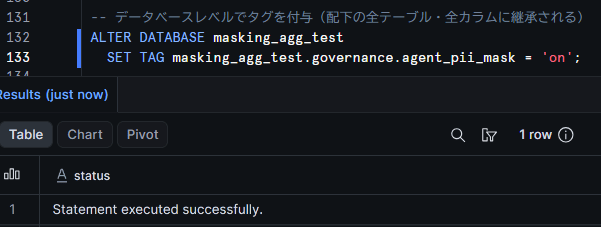
With this, for all tables under the masking_agg_test database, STRING type columns will be replaced with '***MASKED***' and NUMBER type columns will be replaced with NULL when accessed via agents.
Creating Verification Roles
Create verification roles and grant the necessary permissions.
Creating verification roles
USE ROLE ACCOUNTADMIN;

CREATE ROLE IF NOT EXISTS MASKING_AGG_TEST_ROLE;

GRANT USAGE ON DATABASE masking_agg_test TO ROLE MASKING_AGG_TEST_ROLE;
GRANT USAGE ON SCHEMA masking_agg_test.public TO ROLE MASKING_AGG_TEST_ROLE;
GRANT SELECT ON ALL TABLES IN SCHEMA masking_agg_test.public TO ROLE MASKING_AGG_TEST_ROLE;
-- Automatically grant SELECT permission to tables created by dbt as well
GRANT SELECT ON FUTURE TABLES IN SCHEMA masking_agg_test.public TO ROLE MASKING_AGG_TEST_ROLE;
GRANT USAGE ON WAREHOUSE <your_warehouse_name> TO ROLE MASKING_AGG_TEST_ROLE;

GRANT ROLE MASKING_AGG_TEST_ROLE TO USER <your_username>;
:::
Granting Permissions to the dbt Execution Role
The role that executes models in dbt Projects on Snowflake needs permissions to apply aggregation policies and tags in post-hooks. Since the dbt execution role owns the model tables, grant APPLY permissions for each object.
USE ROLE ACCOUNTADMIN;

-- Required to execute SET AGGREGATION POLICY in post-hook
GRANT APPLY ON AGGREGATION POLICY masking_agg_test.governance.agent_only_agg_policy
  TO ROLE <your_dbt_role>;

-- Required to execute SET TAG in post-hook
GRANT APPLY ON TAG masking_agg_test.governance.agg_policy_applied
  TO ROLE <your_dbt_role>;

-- Required to reference objects in the governance schema
GRANT USAGE ON DATABASE masking_agg_test TO ROLE <your_dbt_role>;
GRANT USAGE ON SCHEMA masking_agg_test.governance TO ROLE <your_dbt_role>;
GRANT USAGE ON SCHEMA masking_agg_test.public TO ROLE <your_dbt_role>;

-- Required for model creation
GRANT CREATE TABLE ON SCHEMA masking_agg_test.public TO ROLE <your_dbt_role>;
Trying It Out
Running Queries with Masking Only
First, confirm the masking behavior before applying the aggregation policy.
Regular SQL Query (Not Masked)
Switch to MASKING_AGG_TEST_ROLE and execute SQL directly from a Snowsight worksheet.
USE ROLE MASKING_AGG_TEST_ROLE;

SELECT sale_id, region, product, amount, customer_name, email
FROM masking_agg_test.public.sales
ORDER BY sale_id
LIMIT 5;
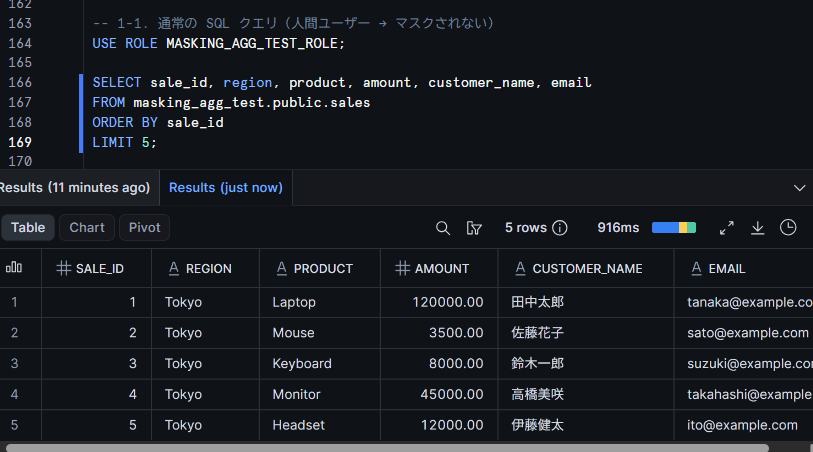
Confirm that all columns are displayed as raw data. Since this is not accessed via an agent, IS_AGENT_ACTIVATED returns FALSE, and the ELSE branch of the masking policy returns the original values.
Via Cortex Code (Snowsight) (Masked)
With the same MASKING_AGG_TEST_ROLE, query the same table from Cortex Code in Snowsight.
Confirm that the Cortex Code role setting is set to MASKING_AGG_TEST_ROLE.
Ask Cortex Code something like "Please retrieve 5 records from the masking_agg_test.public.sales table with sale ID, region, product name, amount, customer name, and email address."
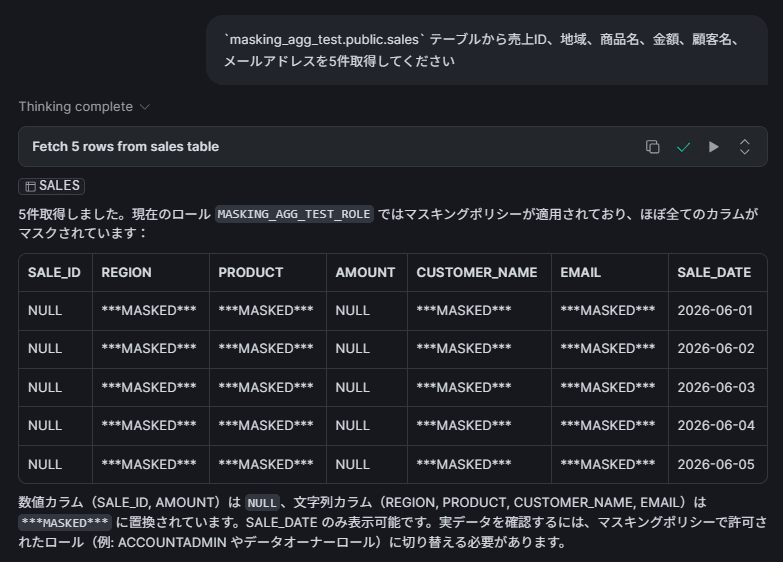
Confirm that STRING type columns (region, product, customer_name, email) display as ***MASKED*** and NUMBER type columns (sale_id, amount) display as NULL. In this state, all STRING / NUMBER type columns are masked, so even if an aggregation query is executed, no meaningful result will be returned.
Apply the Aggregation Policy and Exception Tag Together, Then Run an Aggregation Query via Agent
Switch to ACCOUNTADMIN and apply the aggregation policy and exception tag together to the sales table.
USE ROLE ACCOUNTADMIN;

-- Apply aggregation policy
ALTER TABLE masking_agg_test.public.sales
  SET AGGREGATION POLICY masking_agg_test.governance.agent_only_agg_policy;

-- Assign exception tag (referenced by conditional branching in the masking policy)
ALTER TABLE masking_agg_test.public.sales
  SET TAG masking_agg_test.governance.agg_policy_applied = 'true';
Regular SQL (Human User → Unrestricted)
First, confirm the behavior as a human user. Due to the conditional aggregation policy, human users have NO_AGGREGATION_CONSTRAINT() applied, so they can freely run both detail and aggregation queries.
USE ROLE MASKING_AGG_TEST_ROLE;

-- Detail query (no constraint for human users)
SELECT sale_id, region, product, amount, customer_name, email
FROM masking_agg_test.public.sales
ORDER BY sale_id
LIMIT 5;
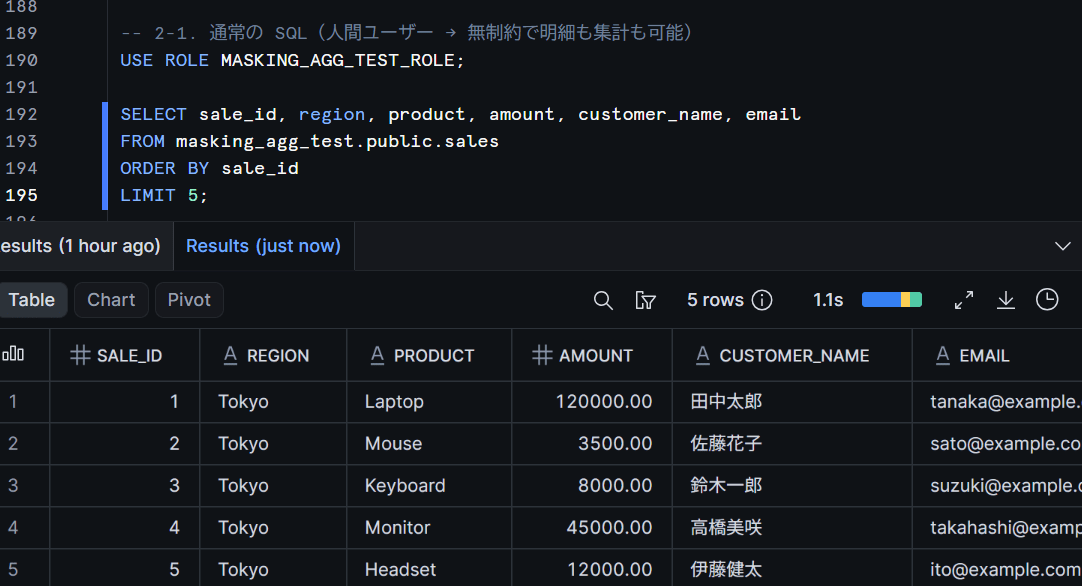
If all columns are displayed as raw data, there is no problem. Since the exception tag is assigned, masking is disabled, and the conditional aggregation policy means human users are not subject to aggregation constraints.
Cortex Code Aggregation Query (Masking Disabled + Aggregation Results Based on Actual Values)
Run an aggregation query from Cortex Code (Snowsight).
Ask Cortex Code something like "Please aggregate the number of sales and total amount by region from the masking_agg_test.public.sales table."
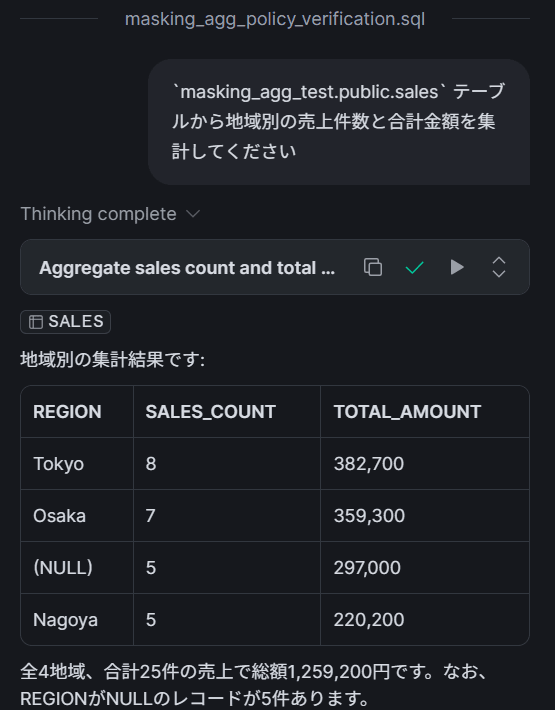
The following results indicate no problem.
- Tokyo (8 records), Osaka (7 records), Nagoya (5 records): Meeting
MIN_GROUP_SIZE=5or more, the region name and aggregated values are displayed as-is. - Fukuoka (3 records) and Sapporo (2 records): Below
MIN_GROUP_SIZE=5, so they are grouped into the remainder group (regionisNULL).
Since masking is disabled by the exception tag, meaningful aggregation results based on actual data are returned. The key point is that the total and count of amount, which was previously masked, are now correctly aggregated.
Cortex Code Detail Query (Error Due to Aggregation Policy)
Ask Cortex Code something like "Please display all records in the masking_agg_test.public.sales table."
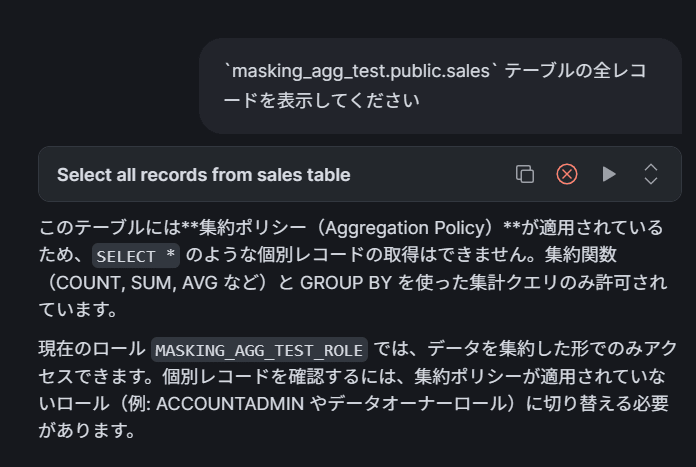
The aggregation policy causes queries without aggregate functions to result in an error. You can confirm that detailed data cannot be accessed via agents.
Create a Model in dbt Projects on Snowflake and Run Without post-hook
From here, we verify operations with dbt Projects on Snowflake. We create a dbt model with the same data as the sales table and confirm the behavior of tags and policies when the table is recreated via CREATE OR REPLACE.
Create the following model file in the dbt project.
-- models/sales_mart.sql
{{ config(
    materialized='table',
    database='masking_agg_test',
    schema='public'
) }}

SELECT
    sale_id,
    region,
    product,
    amount,
    customer_name,
    email,
    sale_date
FROM {{ source('public', 'sales') }}
Also create the source definition.
# models/sources.yml
version: 2

sources:
  - name: public
    database: masking_agg_test
    schema: public
    tables:
      - name: sales
Run dbt run without a post-hook.
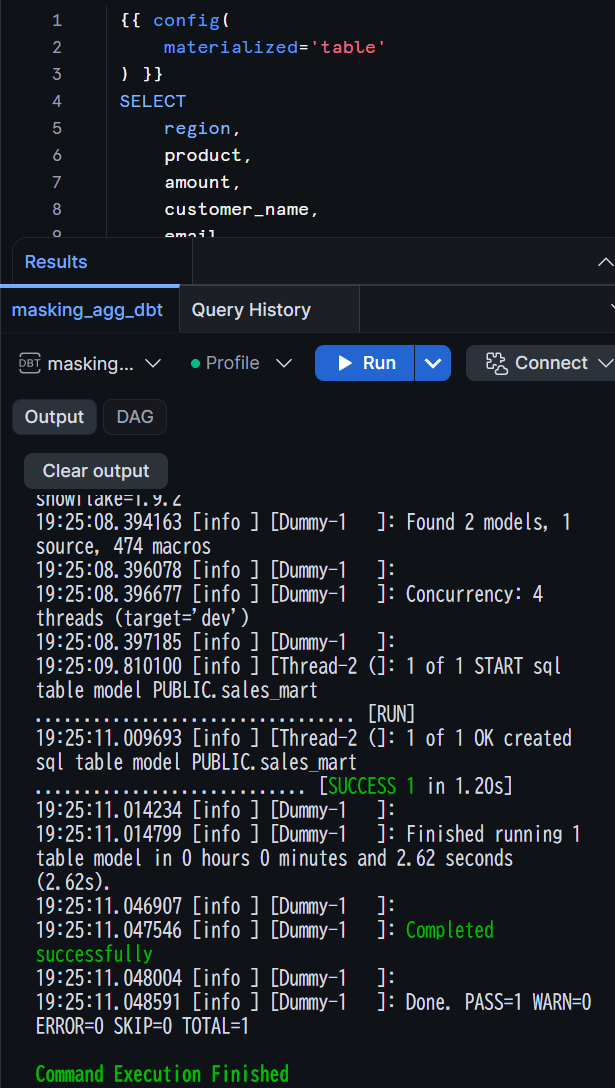
After dbt run succeeds, check the state of tags and aggregation policies on the sales_mart table.
USE ROLE ACCOUNTADMIN;

-- Check exception tag
SELECT SYSTEM$GET_TAG('masking_agg_test.governance.agg_policy_applied', 'masking_agg_test.public.sales_mart', 'TABLE');
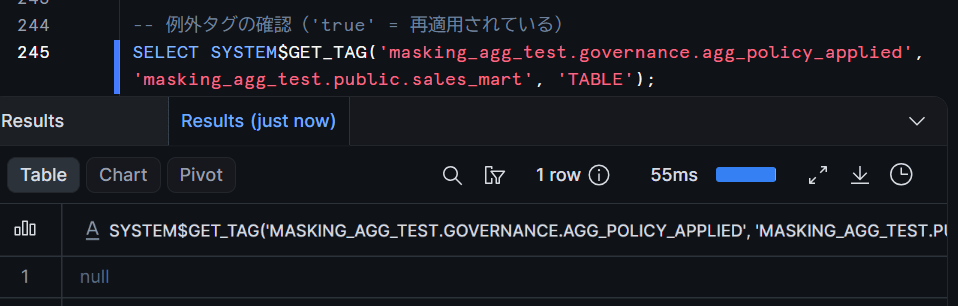
Confirm that the exception tag is NULL (not assigned). The table was recreated by CREATE OR REPLACE, causing the directly assigned tag to disappear.
-- Check aggregation policy
SELECT policy_name, policy_kind
FROM TABLE(
  masking_agg_test.information_schema.policy_references(
    ref_entity_name => 'masking_agg_test.public.sales_mart',
    ref_entity_domain => 'TABLE'
  )
)
WHERE policy_kind = 'AGGREGATION_POLICY';
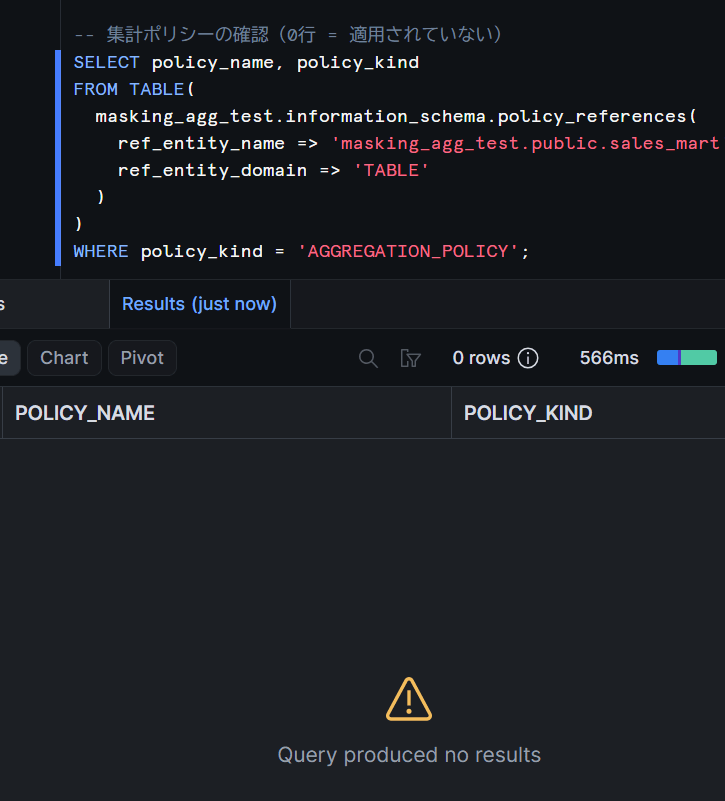
Confirm that the aggregation policy is also not applied (0 rows returned).
On the other hand, the database-level tag-based masking is maintained. Since tag inheritance is based on the database-side settings, recreated tables also automatically become masking targets as "newly added tables."
-- Check masking policy (applied via database-level tag inheritance)
SELECT policy_name, policy_kind
FROM TABLE(
  masking_agg_test.information_schema.policy_references(
    ref_entity_name => 'masking_agg_test.public.sales_mart',
    ref_entity_domain => 'TABLE'
  )
)
WHERE policy_kind = 'MASKING_POLICY';
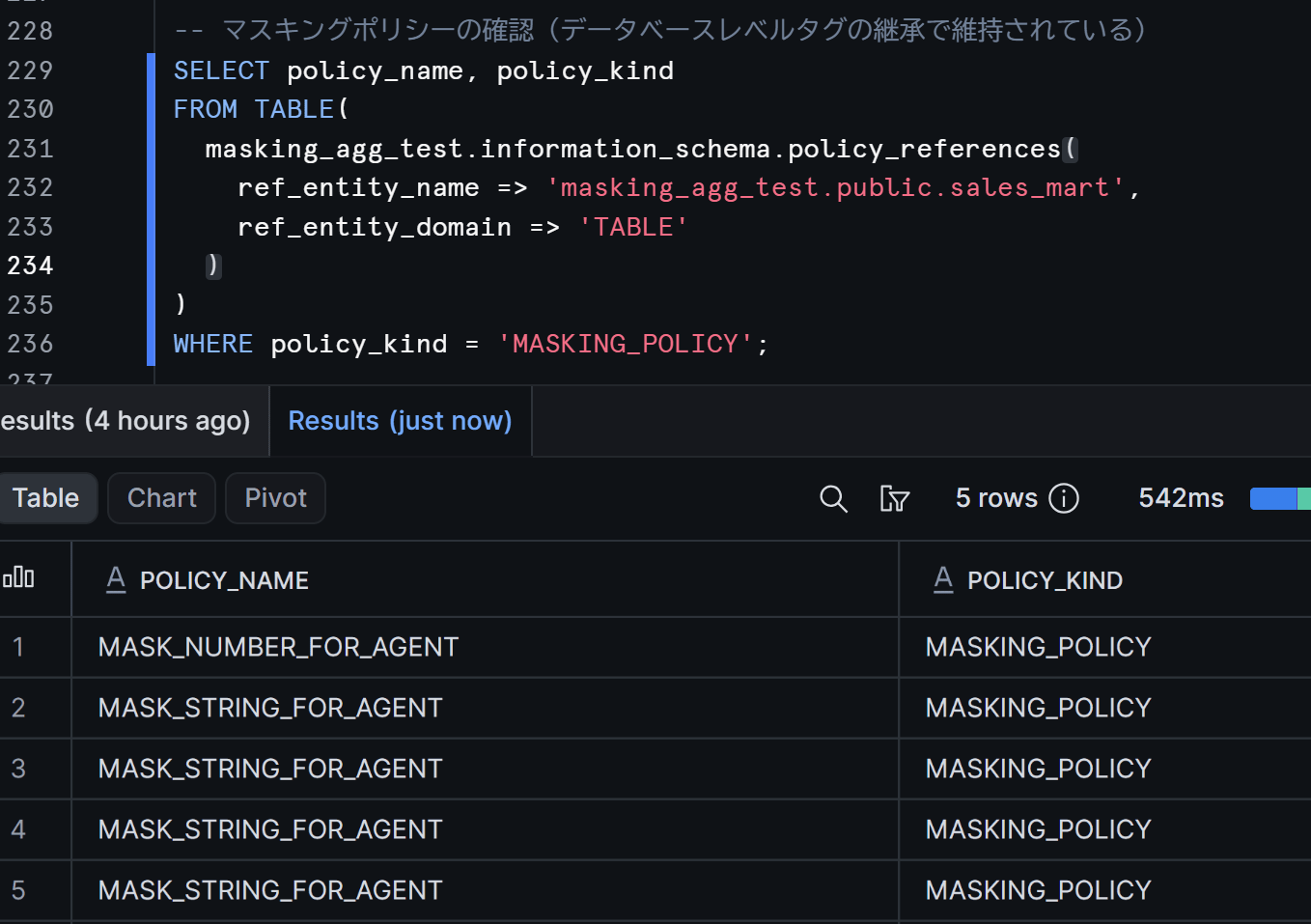
You can confirm that the masking policy is maintained. In other words, when dbt run is executed without a post-hook, the table reverts to a state where STRING / NUMBER type columns are masked and there are no aggregation constraints. From the agent's perspective, the target data type columns are masked, so the data is protected.
Configure post-hook and re-run dbt run
Add a post-hook to the model configuration to automatically re-apply the aggregation policy and exception tag after dbt run.
-- models/sales_mart.sql
{{ config(
    materialized='table',
    database='masking_agg_test',
    schema='public',
    post_hook=[
      "ALTER TABLE {{ this }} SET AGGREGATION POLICY masking_agg_test.governance.agent_only_agg_policy FORCE",
      "ALTER TABLE {{ this }} SET TAG masking_agg_test.governance.agg_policy_applied = 'true'"
    ]
) }}

SELECT
    sale_id,
    region,
    product,
    amount,
    customer_name,
    email,
    sale_date
FROM {{ source('public', 'sales') }}
Re-run dbt run.
After execution, re-verify the state of the tag and aggregation policy.
USE ROLE ACCOUNTADMIN;

-- Verify exception tag
SELECT SYSTEM$GET_TAG('masking_agg_test.governance.agg_policy_applied', 'masking_agg_test.public.sales_mart', 'TABLE');
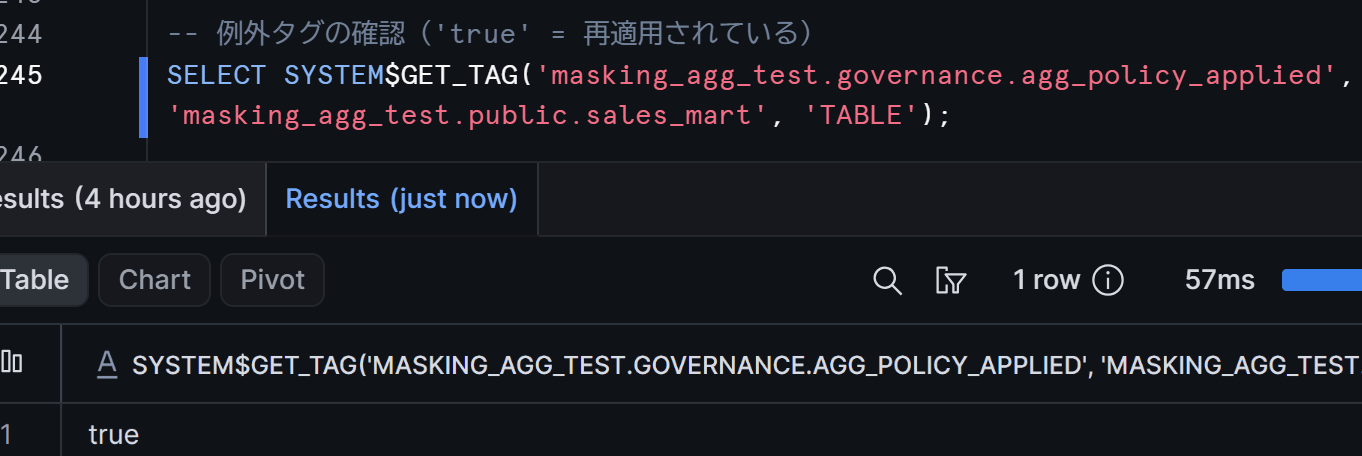
There is no issue if the exception tag returns 'true'.
-- Verify aggregation policy
SELECT policy_name, policy_kind
FROM TABLE(
  masking_agg_test.information_schema.policy_references(
    ref_entity_name => 'masking_agg_test.public.sales_mart',
    ref_entity_domain => 'TABLE'
  )
)
WHERE policy_kind = 'AGGREGATION_POLICY';
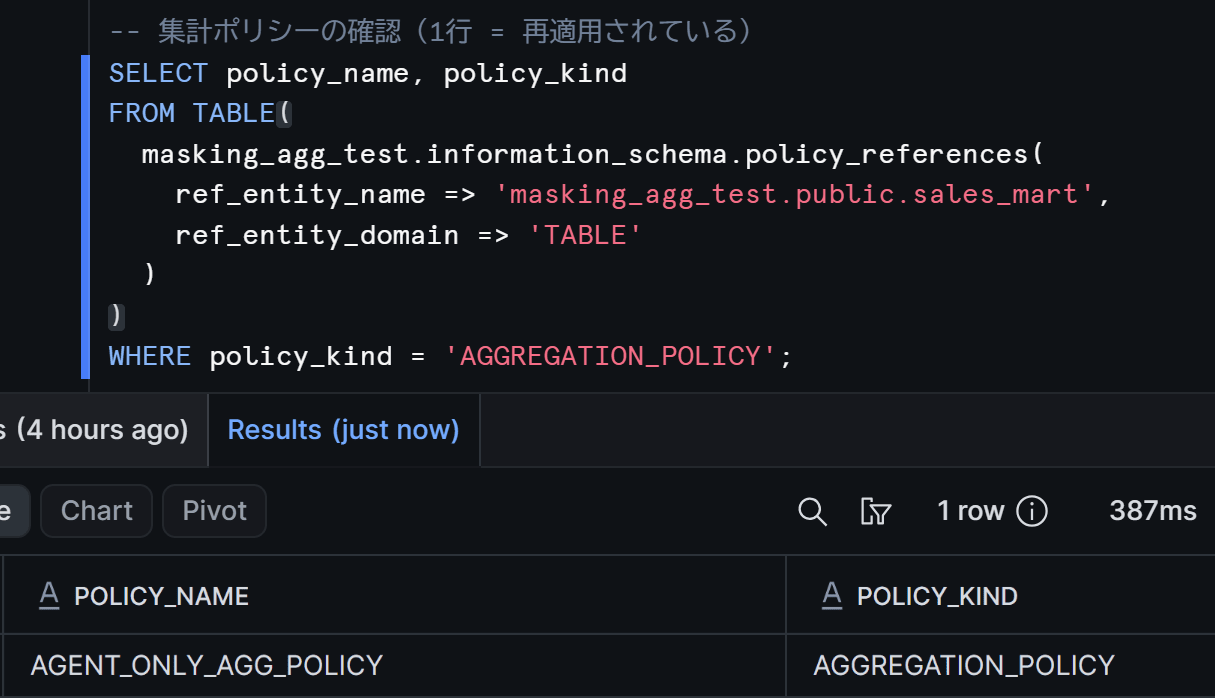
Confirm that the aggregation policy has also been re-applied.
Run an aggregation query against the sales_mart table in Cortex Code (Snowsight) and confirm that aggregated results based on actual values are returned as before.
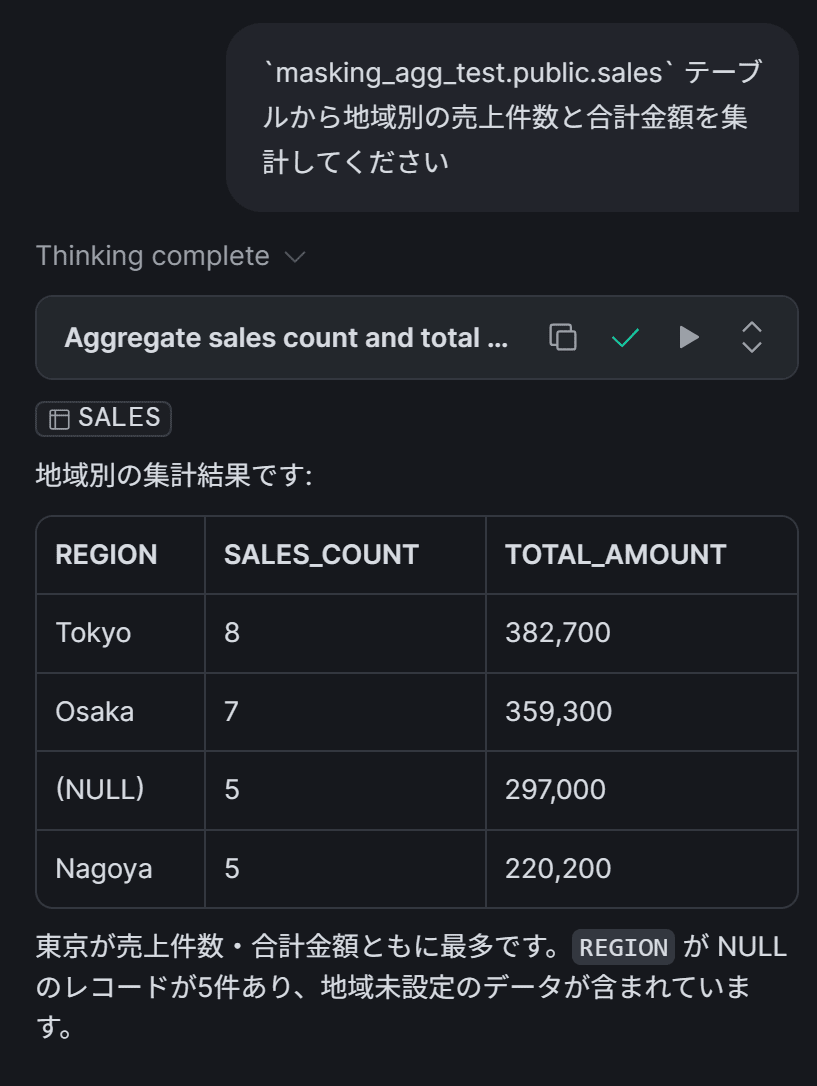
We confirmed that the post-hook re-applies both the aggregation policy and exception tag together on every dbt run, and that aggregation queries from the agent work correctly.
(Supplement) Behavior with incremental models and --full-refresh
With incremental materialization, the table is not recreated during a normal dbt run, so the tag and aggregation policy are preserved. However, specifying the --full-refresh option executes CREATE OR REPLACE, which causes the tag and policy to be removed, just as in the previous section.
If you configure a post-hook on incremental models as well, they will be automatically re-applied during --full-refresh. The post-hook also runs on normal executions, but SET TAG operates idempotently by overwriting the value, and SET AGGREGATION POLICY atomically replaces the existing policy via the FORCE parameter, so no error occurs on the second or subsequent runs.
Conclusion
We validated a combined configuration of masking policies and aggregation policies, and confirmed the operational approach with dbt Projects on Snowflake.
The key points are as follows:
- Conditional branching via
SYSTEM$GET_TAG_ON_CURRENT_TABLEremoves the mask on tables with an applied aggregation policy, avoiding the problem of aggregating masked values - Conditional aggregation policy via
IS_AGENT_ACTIVATEDallows non-agent execution contexts (human users, dbt, etc.) to access individual records, while enforcing aggregation exclusively for agents - Re-applying the aggregation policy and exception tag together via dbt post-hooks enables safe operation even after
CREATE OR REPLACE - If the post-hook is missing or fails, at minimum, STRING / NUMBER type columns revert to a masked state (fail-safe), preventing accidents in the direction of information leakage
I hope this article serves as a helpful reference!