
I thought about version management and CI/CD with GitHub Actions for Snowflake Cortex Agents

This page has been translated by machine translation. View original
Hello, I'm Kitagawa from the Data Business Division.
I recently started learning about Snowflake's Cortex Agents.
This time, I'll be examining the versioning aspects of Cortex Agents, particularly from the perspective of CI/CD using GitHub Actions.
The source code created here is published in the following repository.
Versioning in Cortex Agents
Cortex Agents support version management.
Versions can be checked from Snowsight under AI & ML > Agents by selecting the relevant Cortex Agent and clicking the clock icon in the upper right.
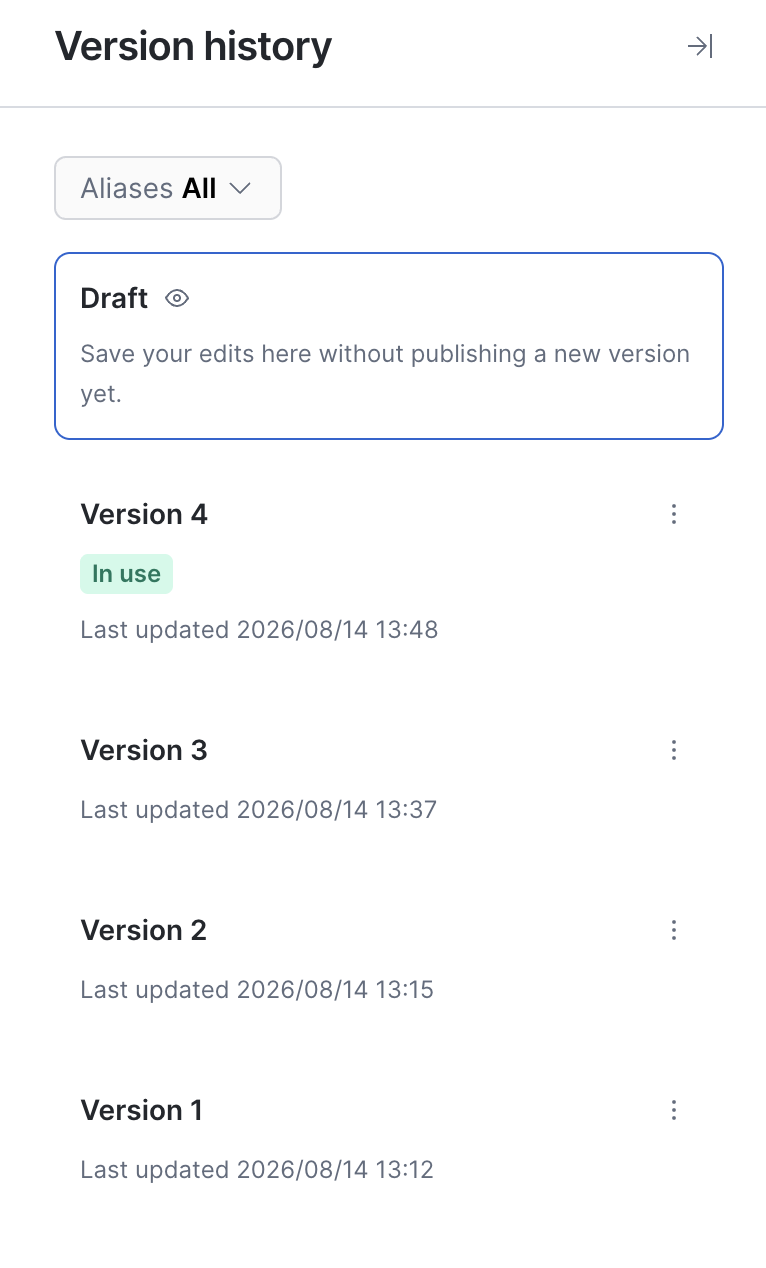
This Cortex Agent has versions 1 through 4, with one unpublished Draft version.
There are two main types of versions: live versions and named versions. Draft corresponds to a live version and is intended for development use. Once development is complete and it's ready for production, you commit the live version to create a new named version. Named versions can have aliases and comments attached to them.
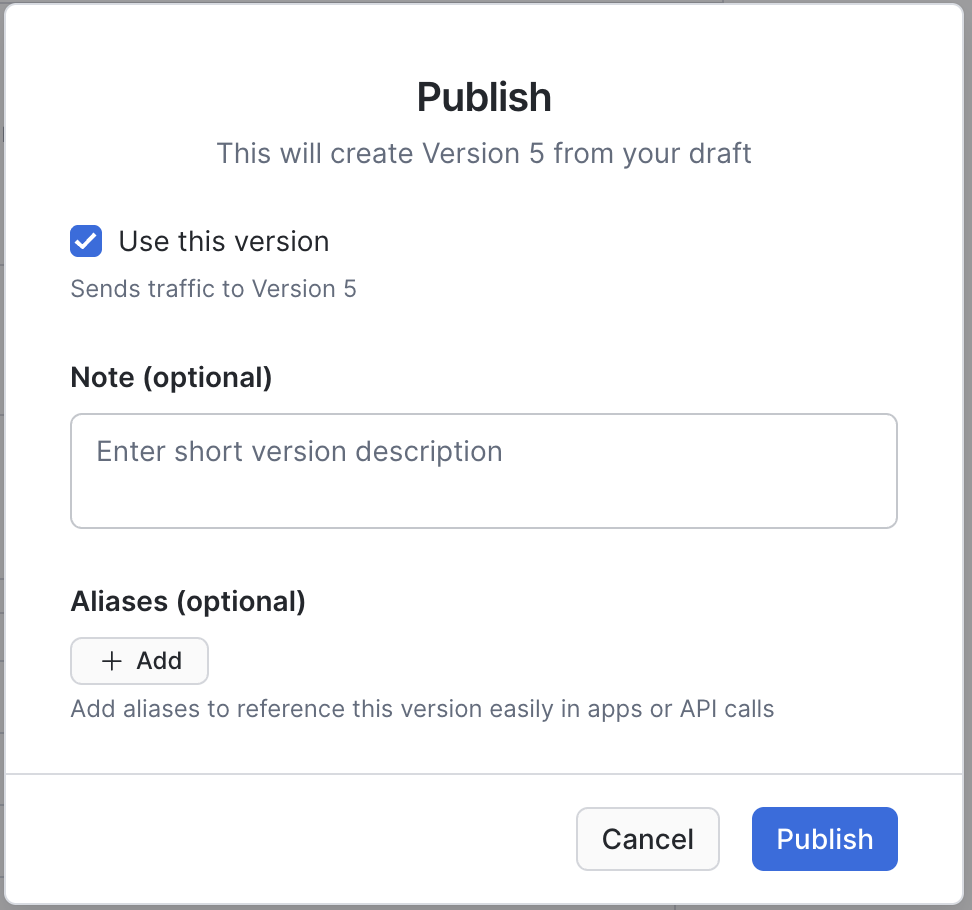
Named Versions
When a Cortex Agent is created, VERSION$1 is automatically committed, and subsequent commits increment as VERSION$2, VERSION$3, ..., VERSION$N. After committing, only aliases and comments can be edited — the Cortex Agent's own configuration cannot be changed. This enables stable version management.
To commit a live version, execute SQL like the following:
-- Commit the live version to create a named version
ALTER AGENT my_agent COMMIT
  COMMENT = 'Production release for Q1';
You can also create a named version directly from a stage.
-- Create a named version from a stage
ALTER AGENT my_agent ADD VERSION FROM @my_stage/agents/my_agent
  COMMENT = 'Imported from feature branch';
Aliases
Aliases can be used to help developers and programs easily identify specific versions. Common examples include production, staging, canary, and rollback. By assigning an alias, you can reference a specific version via the API or SQL without depending on version number identifiers.
To assign an alias, execute SQL like the following:
-- Assign an alias to a named version
ALTER AGENT my_agent
  MODIFY VERSION VERSION$3 SET ALIAS = production;
Aliases can be reassigned to different named versions even after being set, making them useful for rollbacks after production deployment.
The following identifiers are also available as version shortcuts:[1]
| Shortcut | Description |
|---|---|
| LIVE | The current live version (displayed as DRAFT in the UI) |
| FIRST | The first committed named version |
| LAST | The most recently committed named version |
| DEFAULT | The version set as the default for the agent |
In particular, DEFAULT is the version routed through Snowflake CoWork, so after deploying via GitHub Actions, it's a good idea to set that version as DEFAULT.[2]
To set a specific version as DEFAULT, execute SQL like the following:
-- Set the default version
ALTER AGENT my_agent
  SET DEFAULT_VERSION = 'VERSION$3';
Considering CI/CD with GitHub Actions
Based on the above, let's consider a CI/CD approach using GitHub Actions.
I set up the following CI/CD workflow for development through deployment of Cortex Agents using the versioning feature.
The assumed developer workflow is as follows:
- Create/edit the Cortex Agent in Snowsight
- Retrieve the agent_spec.yaml containing the configuration for the specified version using the
GETcommand - Push the retrieved agent_spec.yaml to GitHub
The GitHub Actions workflow was designed as follows:
- Copy the pushed agent_spec.yaml to a stage using
snow stage copy - Create a new version from the stage using
ADD VERSION - Assign the
productionalias to the created version usingMODIFY VERSION - Set the created version as DEFAULT using
SET DEFAULT_VERSION
The reason for relying on Snowsight for creating and editing Cortex Agents is that it currently offers a very good user experience. It allows for easy iteration between creation/editing and functional verification.
Also, when building Cortex Agents, you naturally end up using Semantic Views and similar features, so keeping all of that within Snowsight is another reason. Although still in Preview, it seems that Workspace now allows you to create Cortex Agents and Semantic Views, so considering future prospects, I think relying on Snowsight is a valid option.
The Cortex Agent deployed via GitHub Actions is intended to be created as a separate object from the development Cortex Agent. The concept is to create a development agent in a dev schema using Snowsight, while the production schema is deployed exclusively through GitHub Actions.
For simplicity, here we assume the development and production Cortex Agents reside in separate schemas within the same database. In practice, development and production Cortex Agents are often placed in separate databases or accounts, but the overall flow wouldn't change significantly. The flow is as shown in the following diagram.
Implementing CI/CD with GitHub Actions
Now let's implement what was designed in the previous section.
The working environment used here is as follows:
- macOS Tahoe version 26.6.2
- Snowflake CLI version: 3.20.0
Note that Cortex Agent creation, WIF setup, Role configuration, and similar steps are omitted here.
Retrieving agent_spec.yaml
First, push the agent_spec.yaml of a Cortex Agent I created to GitHub. I created a Cortex Agent named GENERAL_AGENT under KITAGAWA_TEST_DB.AGENT_DEV. I've made some modifications, so it's now at Version 2.
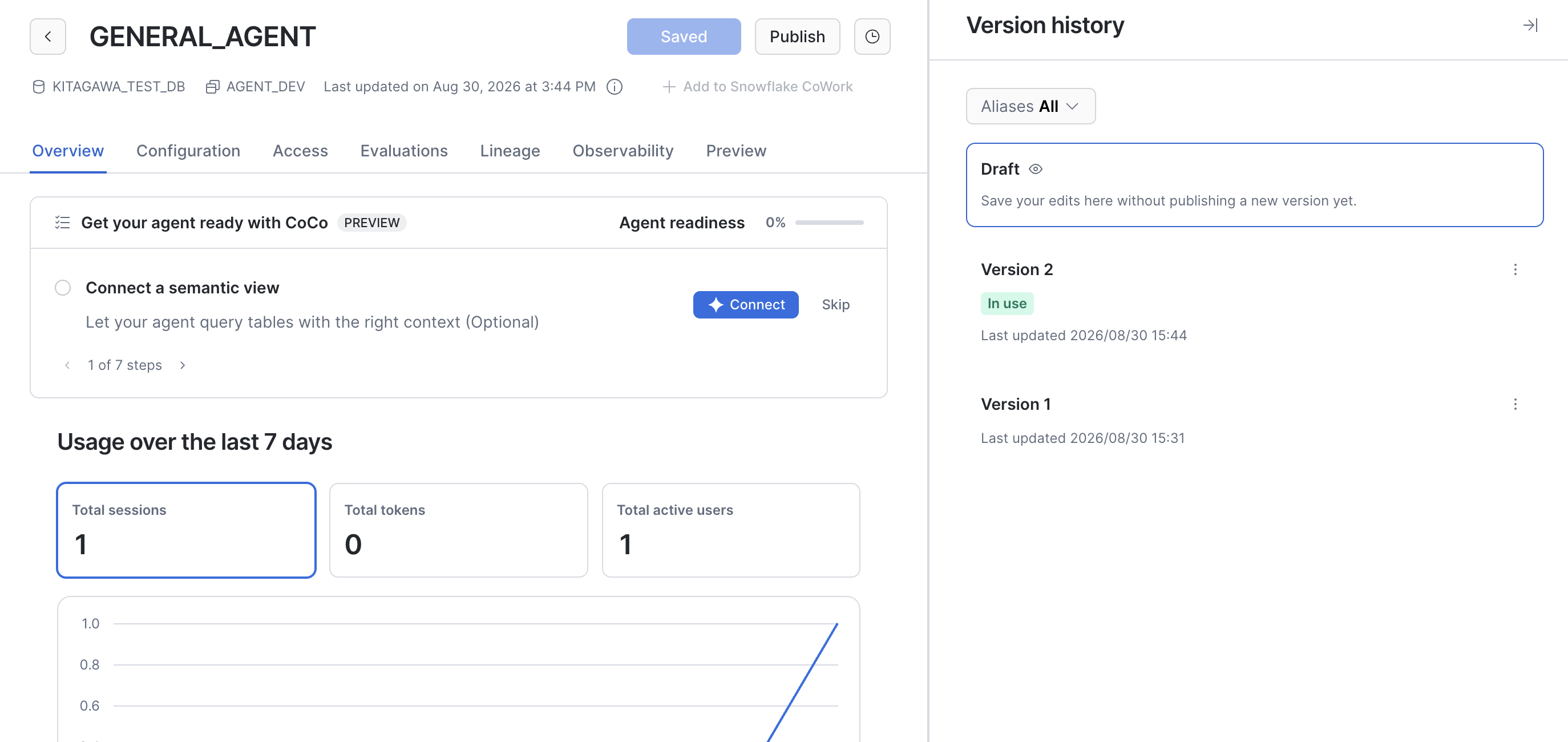
You can check the agent_spec.yaml directory path using SHOW VERSIONS. The spec_file_path retrieved by this SQL is passed to LIST to confirm the actual filename.
-- Retrieve the agent_spec.yaml directory path for the DEFAULT version
SHOW VERSIONS IN AGENT KITAGAWA_TEST_DB.AGENT_DEV.GENERAL_AGENT
->> SELECT "spec_file_path" FROM $1 WHERE "is_default" = 'true';

-- Confirm the filename
-- Pass the directory path retrieved from SHOW VERSIONS to LIST
LIST snow://agent/KITAGAWA_TEST_DB.AGENT_DEV.GENERAL_AGENT/versions/version$2/
->> SELECT "name" FROM $1;
Here, the name column contained the value /versions/version$2/agent_spec.yaml. Using this value, retrieve the file with GET.
This is executed from Snowflake CLI on the local client.
# GET from Snowflake CLI
snow sql -q "GET snow://agent/KITAGAWA_TEST_DB.AGENT_DEV.GENERAL_AGENT/versions/version\$2/agent_spec.yaml file:///tmp/;"
The file is downloaded to /tmp/, so move it to the appropriate directory in your repository.
mkdir -p ./cortex_agents/GENERAL_AGENT/
mv /tmp/agent_spec.yaml ./cortex_agents/GENERAL_AGENT/
GitHub Actions Configuration
Although rough around the edges, I created the following workflow.
It targets cortex_agents/<AGENT_NAME>/agent_spec.yaml in the repository and runs in parallel using a matrix for any files that have changed. The Cortex Agent name is derived from the directory name.
name: Deploy Cortex Agent

on:
  push:
    branches:
      - main
    paths:
      - "cortex_agents/*/agent_spec.yaml"
  workflow_dispatch:
    inputs:
      agent_name:
        description: "Deploy target agent name (cortex_agents/<AGENT_NAME>)"
        required: true

permissions:
  id-token: write
  contents: read

defaults:
  run:
    shell: bash

env:
  # Connection info
  SNOWFLAKE_ACCOUNT: ${{ secrets.SNOWFLAKE_ACCOUNT }}
  # Deployment target
  AGENT_DATABASE: KITAGAWA_TEST_DB
  AGENT_SCHEMA: AGENT_PROD
  STAGE_NAME: AGENT_SPECS

jobs:
  detect:
    runs-on: ubuntu-latest
    outputs:
      agents: ${{ steps.targets.outputs.agents }}
    steps:
      - uses: actions/checkout@v7
        with:
          fetch-depth: 0

      - name: Detect target agents
        id: targets
        env:
          INPUT_AGENT_NAME: ${{ inputs.agent_name }}
          BEFORE_SHA: ${{ github.event.before }}
        run: |
          if [ "${GITHUB_EVENT_NAME}" = "workflow_dispatch" ]; then
            agents=$(jq -cn --arg a "${INPUT_AGENT_NAME}" '[$a]')
          elif git cat-file -e "${BEFORE_SHA}" 2> /dev/null; then
            # Compare with the commit before push
            agents=$(git diff --name-only --diff-filter=d "${BEFORE_SHA}" HEAD -- 'cortex_agents/*/agent_spec.yaml' \
              | cut -d/ -f2 | sort -u | jq -Rnc '[inputs]')
          else
            # If no base for comparison, target all agents
            agents=$(git ls-files 'cortex_agents/*/agent_spec.yaml' \
              | cut -d/ -f2 | sort -u | jq -Rnc '[inputs]')
          fi
          echo "Target agents: ${agents}"
          echo "agents=${agents}" >> "$GITHUB_OUTPUT"

  deploy:
    needs: detect
    if: needs.detect.outputs.agents != '[]'
    runs-on: ubuntu-latest
    strategy:
      matrix:
        agent_name: ${{ fromJSON(needs.detect.outputs.agents) }}
    env:
      AGENT_NAME: ${{ matrix.agent_name }}
    steps:
      - uses: actions/checkout@v7

      - name: Install Snowflake CLI
        uses: snowflakedb/snowflake-actions@v3
        with:
          use-oidc: true

      - name: Copy agent spec file to stage
        run: |
          snow stage copy \
            "cortex_agents/${AGENT_NAME}/agent_spec.yaml" \
            "@${AGENT_DATABASE}.${AGENT_SCHEMA}.${STAGE_NAME}/${AGENT_NAME}/" \
            --overwrite \
            --temporary-connection

      - name: Check if agent exists
        id: check
        run: |
          count=$(snow sql --temporary-connection --format json -q "
            SHOW AGENTS LIKE '${AGENT_NAME}' IN SCHEMA ${AGENT_DATABASE}.${AGENT_SCHEMA};
          " | jq 'length')
          echo "exists=$([ "${count}" -gt 0 ] && echo true || echo false)" >> "$GITHUB_OUTPUT"

      # First deploy: create agent (VERSION$1 is automatically committed)
      - name: Create agent (first deploy)
        if: steps.check.outputs.exists == 'false'
        run: |
          {
            echo "CREATE AGENT ${AGENT_DATABASE}.${AGENT_SCHEMA}.${AGENT_NAME}"
            echo "  FROM SPECIFICATION"
            echo "\$\$"
            cat "cortex_agents/${AGENT_NAME}/agent_spec.yaml"
            echo "\$\$;"
          } > create_agent.sql
          snow sql --temporary-connection -f create_agent.sql

      # Second time onwards: add a new version from stage
      - name: Add version
        if: steps.check.outputs.exists == 'true'
        run: |
          # ADD VERSION fails if a live version remains, so COMMIT it first.
          live=$(snow sql --temporary-connection --format json -q "
            SHOW VERSIONS IN AGENT ${AGENT_DATABASE}.${AGENT_SCHEMA}.${AGENT_NAME};
          " | jq 'map(select(.name == null)) | length')
          if [ "${live}" -gt 0 ]; then
            snow sql --temporary-connection -q "
              ALTER AGENT ${AGENT_DATABASE}.${AGENT_SCHEMA}.${AGENT_NAME}
                COMMIT COMMENT = 'Auto-commit leftover live version';
            "
          fi

          snow sql --temporary-connection -q "
            ALTER AGENT ${AGENT_DATABASE}.${AGENT_SCHEMA}.${AGENT_NAME}
              ADD VERSION FROM @${AGENT_DATABASE}.${AGENT_SCHEMA}.${STAGE_NAME}/${AGENT_NAME}
              COMMENT = 'Deployed from GitHub Actions (${GITHUB_SHA})';
          "

      - name: Set alias and default
        run: |
          # Resolve the latest named version from SHOW VERSIONS
          version=$(snow sql --temporary-connection --format json -q "
            SHOW VERSIONS IN AGENT ${AGENT_DATABASE}.${AGENT_SCHEMA}.${AGENT_NAME};
          " | jq -r 'map(select(.name != null)) | max_by(.created_on) | .name')
          if [ -z "${version}" ] || [ "${version}" = "null" ]; then
            echo "::error::No named version found for ${AGENT_NAME}"
            exit 1
          fi
          echo "Latest version: ${version}"

          snow sql --temporary-connection -q "
            ALTER AGENT ${AGENT_DATABASE}.${AGENT_SCHEMA}.${AGENT_NAME}
              MODIFY VERSION ${version} SET ALIAS = production;

            ALTER AGENT ${AGENT_DATABASE}.${AGENT_SCHEMA}.${AGENT_NAME}
              SET DEFAULT_VERSION = '${version}';
          "
There's quite a bit of processing here, but the core is straightforward: copy to a stage using snow stage copy, create a new version from that stage using ADD VERSION, assign an alias using MODIFY VERSION, and set it as DEFAULT using SET DEFAULT_VERSION. The rest is supporting logic for that main flow.
Regarding the live version: it is automatically created when a Cortex Agent is created, and ADD VERSION will fail if it remains, so it is committed first using COMMIT.
Verification
Let's verify the GitHub Actions workflow.
With the workflow configured, perform the first push.
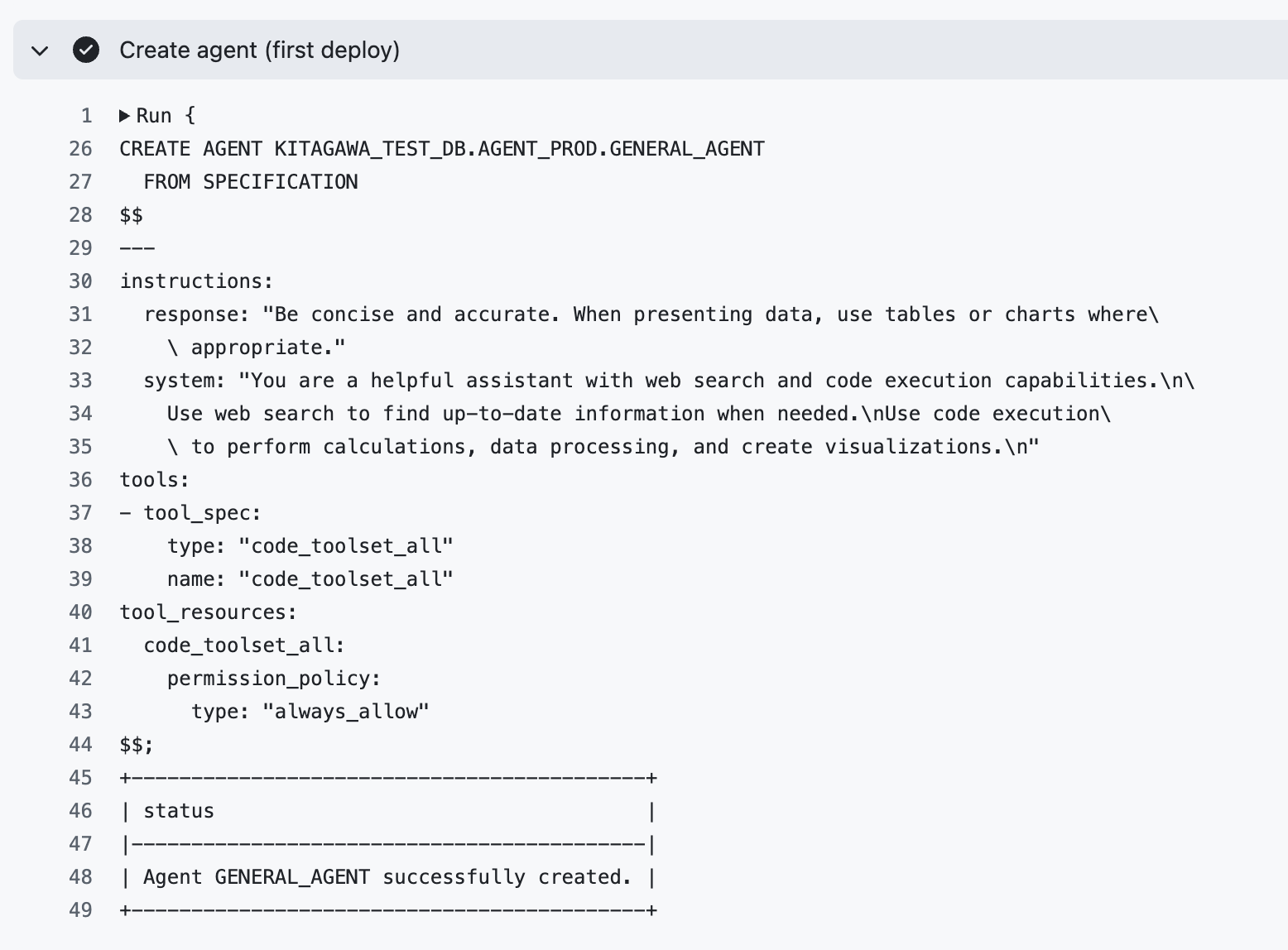
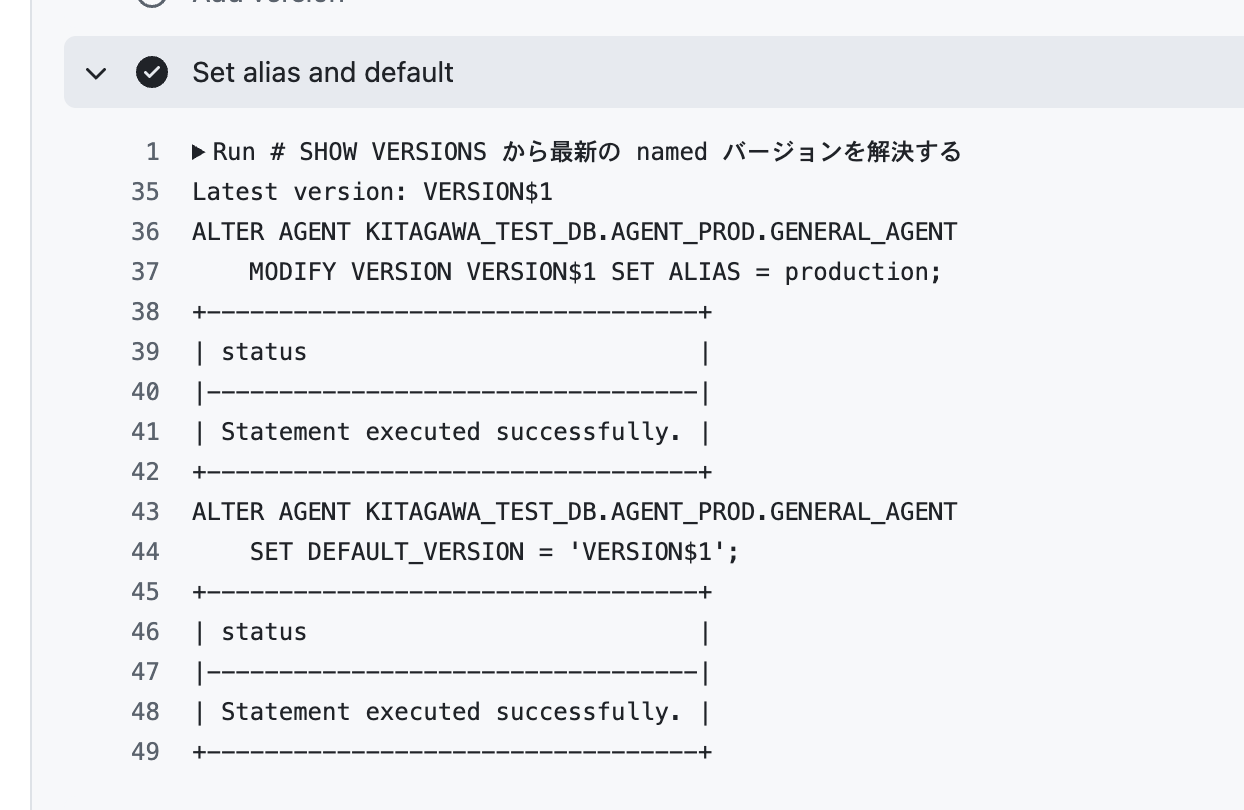
We can see that the Cortex Agent was created, an alias was assigned, and the DEFAULT was set.
Let's check the Cortex Agent from Snowsight.
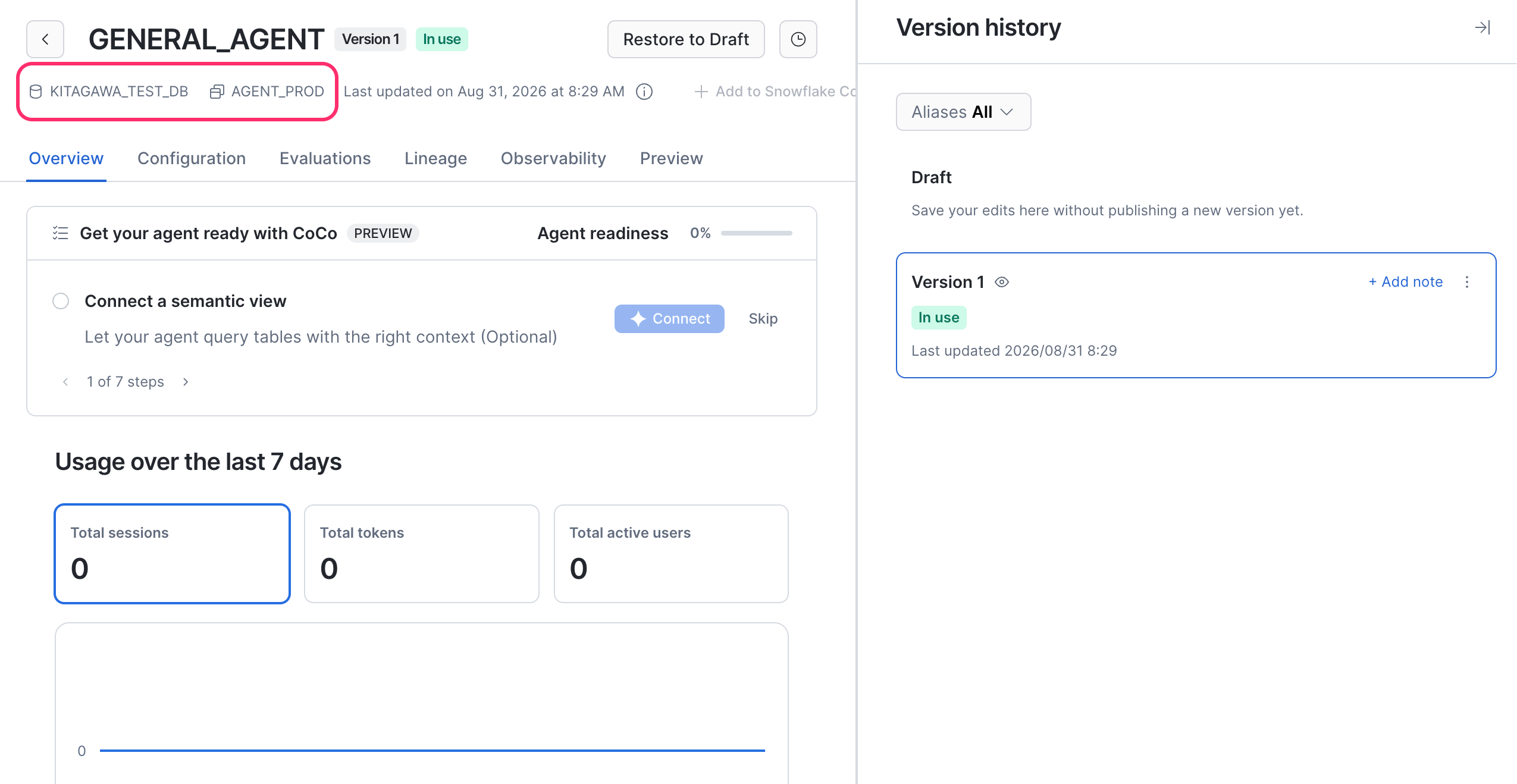
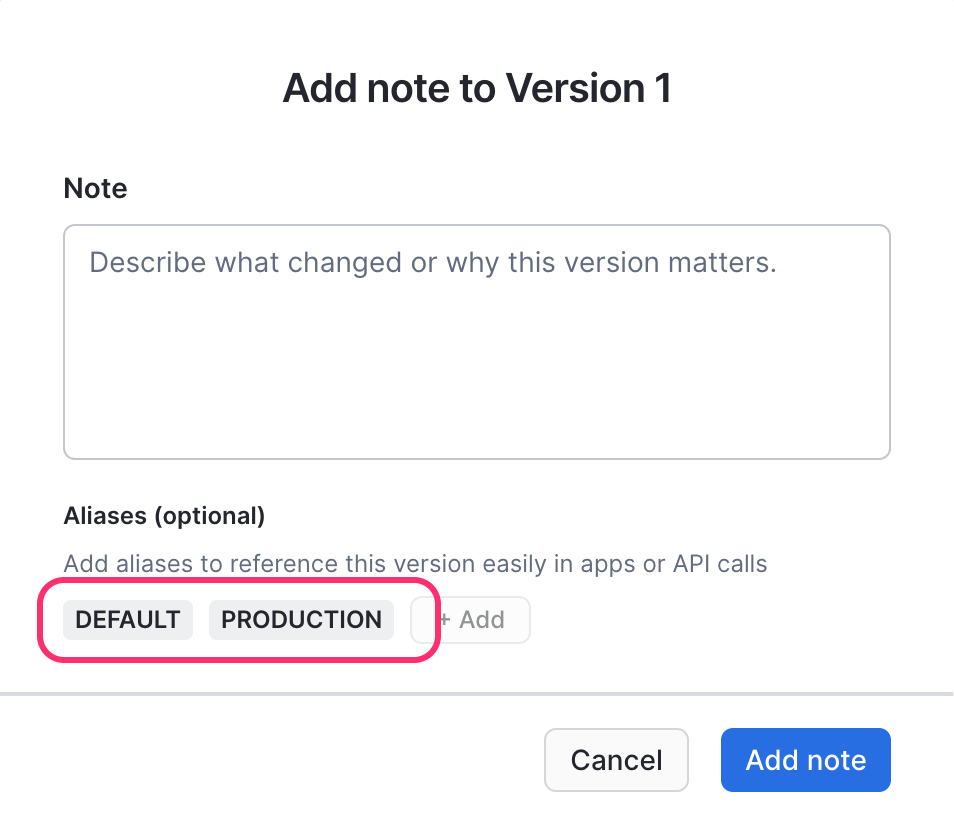
We can confirm that it was created in the production schema and that the production alias has been assigned.
Next, let's modify agent_spec.yaml and push again.
--- a/cortex_agents/GENERAL_AGENT/agent_spec.yaml
+++ b/cortex_agents/GENERAL_AGENT/agent_spec.yaml
@@ -12,4 +12,4 @@ tools:
 tool_resources:
   code_toolset_all:
     permission_policy:
-      type: "always_allow"
+      type: "always_ask"
git add .
git commit -m "Update GENERAL_AGENT agent_spec.yaml"
git push
This time, as intended, the Add version job and Set alias and default job were executed, and the version was updated.
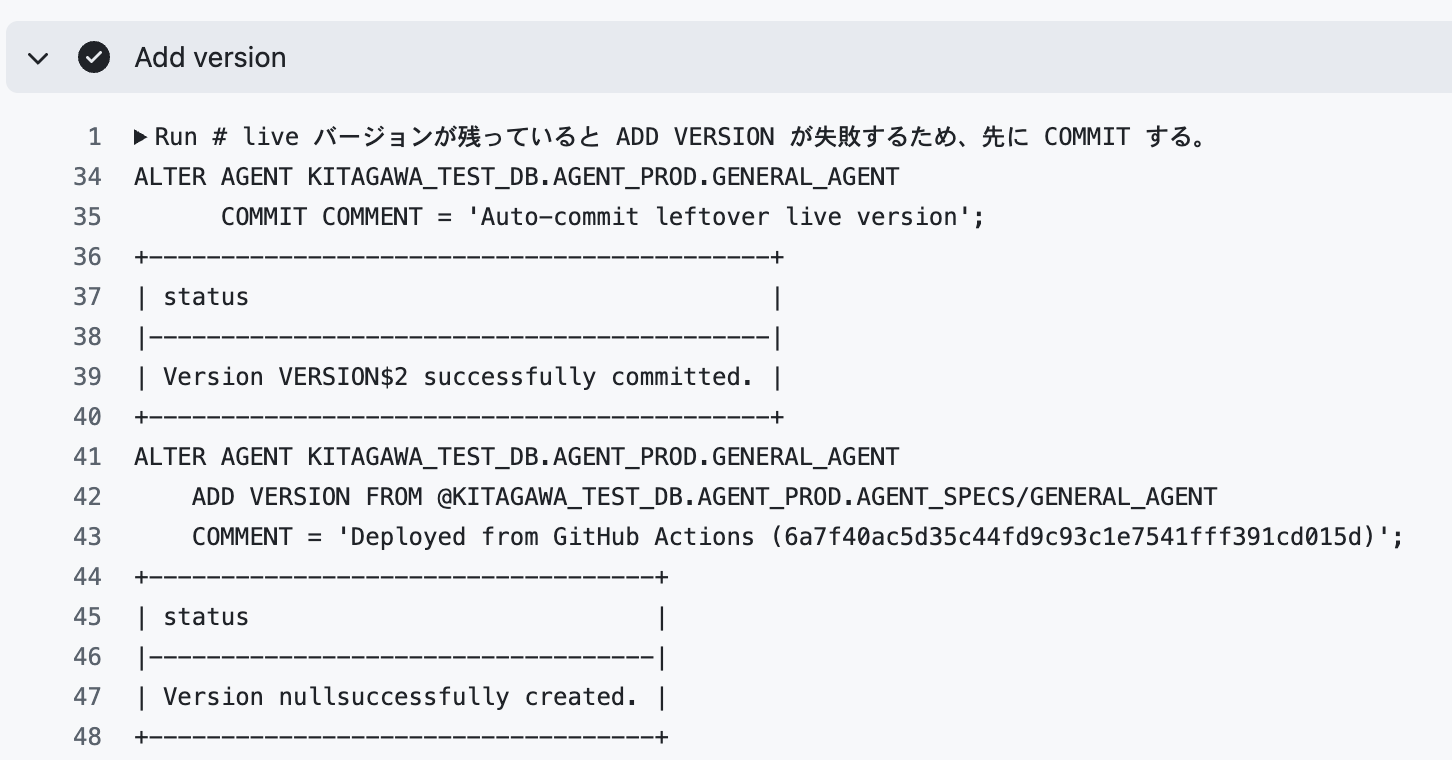
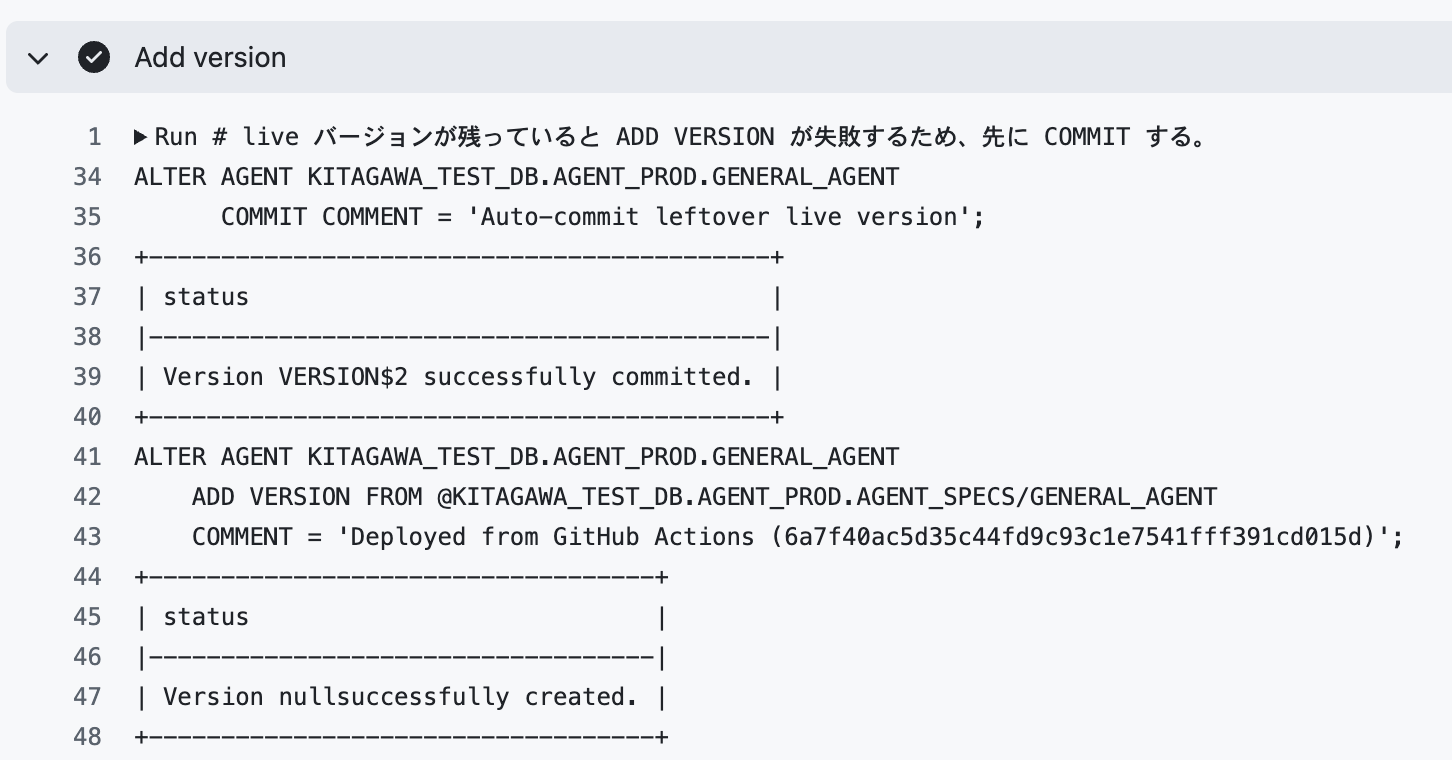
Let's also verify from Snowsight.
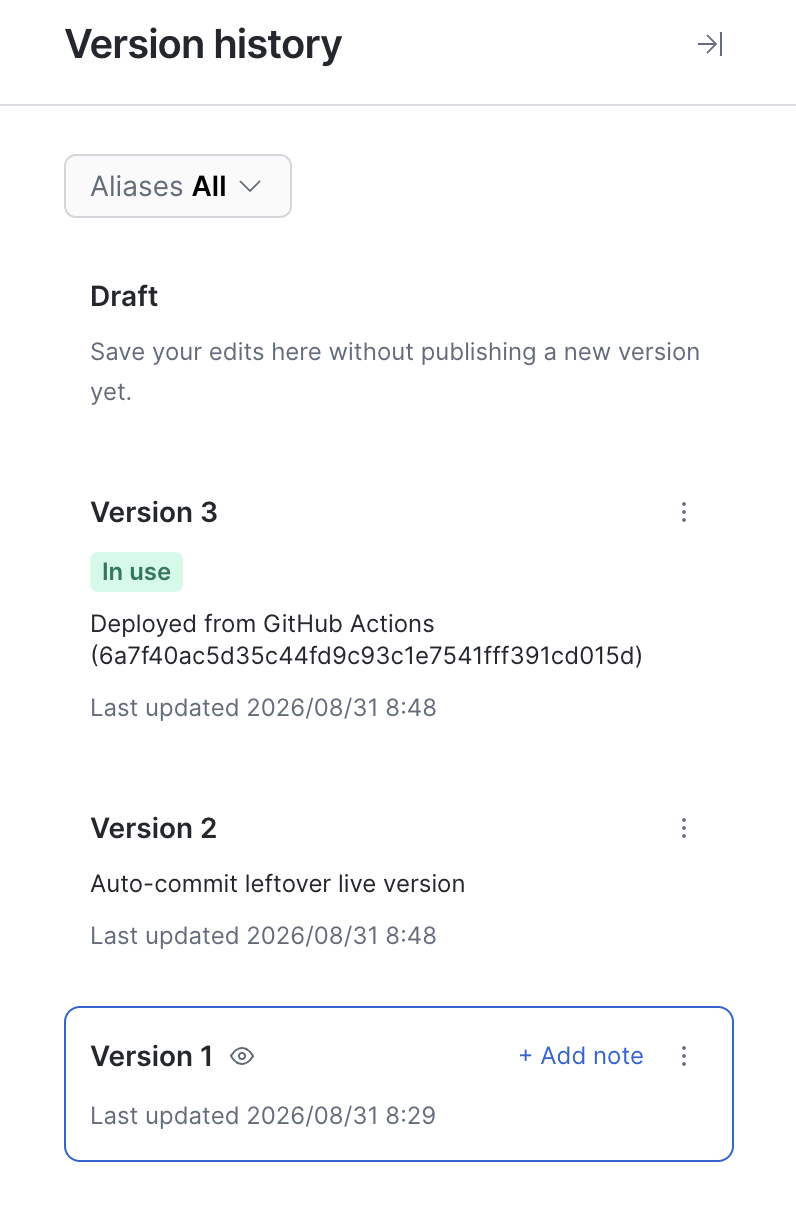
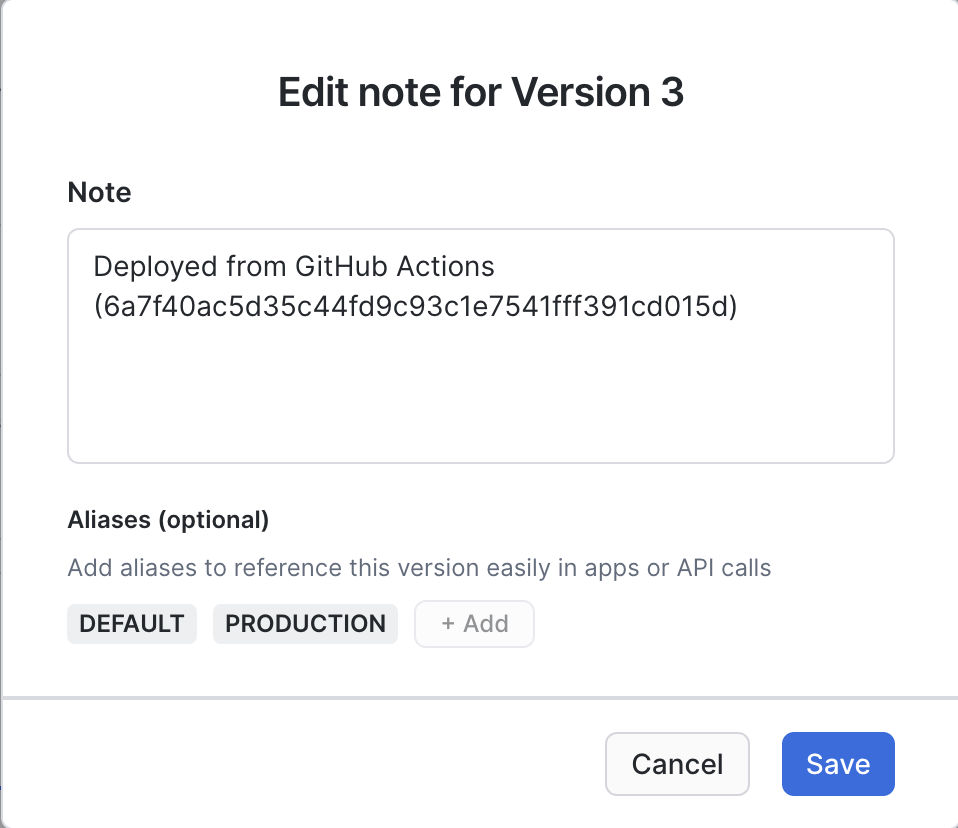
The version has advanced to 3, and we can confirm that the alias has been reassigned to this version.
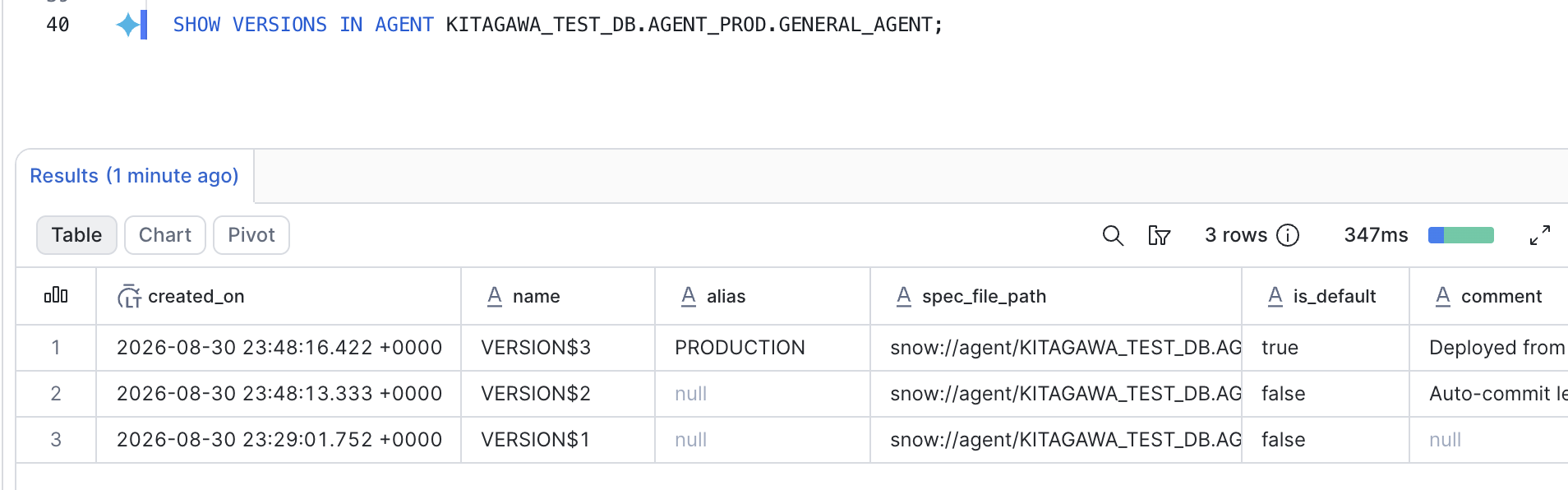
Let's also verify using SHOW VERSIONS.
SHOW VERSIONS IN AGENT KITAGAWA_TEST_DB.AGENT_PROD.GENERAL_AGENT;
Summary
I explored how to automate Cortex Agents version management and deployment using GitHub Actions. I believe we've achieved a setup where Snowsight's features can be actively utilized while the production environment — which affects users — can be operated under consistent rules.
By properly managing versions and aliases, immediate rollbacks in production are also possible.
There are still no clear best practices for operating Cortex Agents, but I hope this article serves as a useful reference.
See you in the next article.
References
https://docs.snowflake.com/en/user-guide/snowflake-cortex/cortex-agents-versioning#version-shortcuts ↩︎
I could not find documentation explicitly stating this, but it is inferred from the Cortex Agents API specifications and actual observed behavior. ↩︎