
I actually measured the processing time and cost of Snowflake External Tables, Tasks, and Snowpipe

This page has been translated by machine translation. View original
Introduction
I'm Kasama from the Data Business Division.
There are several patterns for using S3 data in Snowflake, so this time I'd like to compare and verify the processing time and cost for each approach.
Prerequisites
Intended Use Case
This article assumes a bronze layer in a bronze/silver/gold architecture (the raw data ingestion layer). Bronze tables are referenced by downstream dbt models in daily batches.
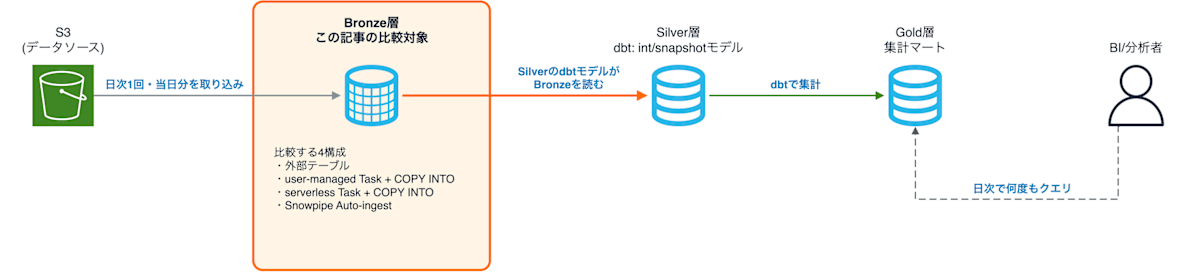
The number of times a bronze table is referenced per day is the sum of the number of downstream models and the number of tests written in the source. In this article, we calculate the monthly cost for cases where the reference count is 1, 5, or 20 times per day.
4 Configurations
| Configuration | How S3 Data is Handled | Compute Resources and Billing for Ingestion | Measured Tables |
|---|---|---|---|
| External Table | Not loaded into a Snowflake table. Reads S3 files on every reference | None | EXTERNAL_ORDERS_* |
| user-managed Task | COPY INTO in the Task loads S3 files into a Snowflake table | A warehouse created by the user. A minimum of 60 seconds is charged each time it starts | USER_MANAGED_ORDERS_* |
| serverless Task | COPY INTO in the Task loads S3 files into a Snowflake table | Compute resources provided by Snowflake. Charged per second for what is used | SERVERLESS_ORDERS_* |
| Snowpipe | Upon receiving an S3 event notification, Snowpipe loads data in the same manner | Compute resources provided by Snowflake. Charged by the amount of data ingested | SNOWPIPE_ORDERS_* |
Both Tasks execute the same COPY INTO. The difference is in billing: serverless Tasks do not have a 60-second minimum charge.
Implementation
The implementation code is stored on GitHub.
.
├── terraform/
│   ├── versions.tf
│   ├── providers.tf
│   ├── variables.tf
│   ├── s3.tf
│   ├── iam.tf
│   ├── database.tf
│   ├── stage.tf
│   ├── warehouse.tf
│   ├── table.tf
│   ├── task.tf
│   ├── pipe.tf
│   └── outputs.tf
├── scripts/
│   └── generate_data.py
└── sql/
    ├── 01_refresh_external.sql
    ├── 02_run_tasks.sql
    ├── 03_reset_snowpipe.sql
    ├── 04_reference.sql
    ├── 05_measure.sql
    └── check.sql
The environment is built with Terraform, and all Snowflake operations are performed via SQL files. Python is used only for generating test data.
Terraform
In iam.tf, we create an IAM role for Snowflake to read S3. The trust policy sets the IAM user ARN and External ID obtained from the Storage Integration's describe_output. Permissions are limited to read access under cost-bench/. The Storage Integration uses the IAM role ARN, and the IAM role uses the Storage Integration's values, so they reference each other. Therefore, the role ARN passed to the Storage Integration is constructed as a string from the account ID and role name in variables.tf. This approach allows AWS and Snowflake resources to be created in a single apply.
In stage.tf, we create the Storage Integration, the CSV file format, and the external stage. depends_on is specified so that the stage is created after the IAM role and policy are ready.
In s3.tf, we create the S3 bucket for test data and event notifications for Snowpipe. Notifications are sent per prefix cost-bench/snowpipe/<size>/ to the SQS queue of the Pipe for that size.
In warehouse.tf, we create 4 Gen2 XS Warehouses: one for reference and three for user-managed Tasks, one per size. The reason for separating user-managed Task Warehouses by size is to retrieve per-size billing separately from WAREHOUSE_METERING_HISTORY.
In table.tf, we create external tables and destination tables for ingestion. The external table type-converts columns 1–9 of the CSV (value:c1 through value:c9) into columns.
refresh_on_create = false is set because there is no data in S3 at creation time and the IAM role settings may not have been applied yet. The file list is loaded after placing test data using 01_refresh_external.sql.
In task.tf, we create user-managed Tasks and serverless Tasks. Both Tasks execute the same COPY INTO; the only difference is the compute resource specification. The user-managed Task specifies a Warehouse in warehouse, while the serverless Task specifies a range of compute resource sizes (XSMALL to SMALL).
FORCE = TRUE is added to COPY INTO. Since COPY INTO skips files that have already been ingested, this was specified to measure the same files three times. Tasks are executed manually using EXECUTE TASK in 02_run_tasks.sql.
In pipe.tf, we create Pipes with AUTO_INGEST enabled for each size. Each Pipe ingests files placed under snowpipe/<size>/ into SNOWPIPE_ORDERS_<size>.
versions.tf, providers.tf, variables.tf, database.tf, and outputs.tf only contain provider settings, variables, the database, and bucket name output, so explanations are omitted. State is stored locally in terraform.tfstate.
Python
generate_data.py creates 9-column CSV files and uploads them to S3. It writes until a file reaches approximately 200MB, uploads it, deletes the local file, and then creates the next one. The random seed is fixed per size, so the same data is generated no matter how many times it is run.
SQL
SQL files 01 through 04 are divided by measurement step. 02_run_tasks.sql TRUNCATEs the destination tables and then runs the 6 Tasks with EXECUTE TASK. 04_reference.sql disables the result cache and then reads 12 tables with CTAS.
05_measure.sql creates a result table from Snowflake history. First, it saves the database creation time as a variable BENCH_START as the start time for aggregation.
Warehouse billing history is stored per hour and remains by name even after the Warehouse is deleted. Therefore, to avoid mixing in past billing from Warehouses recreated with the same name, only history after this timestamp is aggregated.
Next, it aggregates reference seconds (REFERENCE_SEC), Task ingestion seconds (TASK_SEC), Snowpipe ingestion seconds (SNOWPIPE_SEC), and ingestion Credits (INGEST_CREDITS) into temporary tables, and joins them by configuration and size in RESULT. The last two SELECTs produce result tables and monthly cost tables from RESULT, so run the entire file in the same session.
PIPE_USAGE_HISTORY returns an empty Pipe name if the PIPE_NAME argument is not specified. Therefore, Snowpipe billing is retrieved by calling the function for each Pipe individually.
Deployment
The following commands are run from the 71_snowflake_ingestion_cost_bench directory.
1. Create the Environment
export AWS_PROFILE='<your-profile>'
export SNOWFLAKE_ORGANIZATION_NAME='<your-organization-name>'
export SNOWFLAKE_ACCOUNT_NAME='<your-account-name>'
export SNOWFLAKE_USER='<your-user>'
export SNOWFLAKE_AUTHENTICATOR='PROGRAMMATIC_ACCESS_TOKEN'
export SNOWFLAKE_TOKEN='<your-pat>'

terraform -chdir=terraform init
terraform -chdir=terraform apply
On the first apply, Pipe creation may fail because the Pipes are created before the IAM role settings are applied. In that case, wait about 30 seconds and apply again.
2. Create Test Data
Upload scripts/generate_data.py to AWS CloudShell and run it. Running it in CloudShell allows you to upload to S3 without using your local connection.
python3 generate_data.py --bucket <bucket_name>
<bucket_name> can be confirmed with terraform -chdir=terraform output bucket_name. Running this places CSVs of 3 sizes under s3://<bucket_name>/cost-bench/<size>/ as follows.
uploaded s3://<bucket_name>/cost-bench/10MB/orders_0000.csv (10,110,285 bytes)
10MB: 1 files, 10,110,285 bytes, 81,000 rows
uploaded s3://<bucket_name>/cost-bench/100MB/orders_0000.csv (100,029,855 bytes)
100MB: 1 files, 100,029,855 bytes, 795,000 rows
uploaded s3://<bucket_name>/cost-bench/1GB/orders_0000.csv (200,001,388 bytes)
uploaded s3://<bucket_name>/cost-bench/1GB/orders_0001.csv (200,102,463 bytes)
uploaded s3://<bucket_name>/cost-bench/1GB/orders_0002.csv (200,096,401 bytes)
uploaded s3://<bucket_name>/cost-bench/1GB/orders_0003.csv (200,104,362 bytes)
uploaded s3://<bucket_name>/cost-bench/1GB/orders_0004.csv (199,714,234 bytes)
1GB: 5 files, 1,000,018,848 bytes, 7,885,000 rows
Measurement
SQL files are executed in the Snowsight worksheet or with snow sql -f.
1. Load the File List into the External Table
Run sql/01_refresh_external.sql. The external table will only reference files loaded by this operation.
2. Run the Task 3 Times
Run sql/02_run_tasks.sql 3 times. Leave 2.5 minutes between each run so the user-managed Task's Warehouse auto-suspends before starting the next run. Task completion can be checked with sql/check.sql.
3. Ingest with Snowpipe 3 Times
Empty the destination with sql/03_reset_snowpipe.sql, then copy the test data to the Snowpipe folder within S3.
for SIZE in 10MB 100MB 1GB; do
  aws s3 cp --recursive \
    s3://<bucket_name>/cost-bench/${SIZE}/ \
    s3://<bucket_name>/cost-bench/snowpipe/${SIZE}/run1/
done
Upon receiving notification of the copied files, Snowpipe begins ingestion. When sql/check.sql shows that the row count matches the test data, repeat the same operation with folder names run2 and run3.
4. Run References 3 Times
Run sql/04_reference.sql 3 times. This SQL reads each of the 4 configuration tables once with the same CTAS (CREATE OR REPLACE TRANSIENT TABLE ... AS SELECT * FROM ...) as a dbt table model.
To prevent Warehouse startup time from being included in the first CTAS, the Warehouse is started before the CTAS.
5. Aggregate Results
Run sql/05_measure.sql. To redo the measurement, run from step 1 of deployment after terraform destroy.
Verification Results
Verification Conditions
Test data consists of 9-column uncompressed CSVs. Three sizes were prepared as the amount ingested into one table per day.
| Size | Number of Files | Per File | Row Count |
|---|---|---|---|
| 10MB | 1 | Approx. 10MB | 81,000 |
| 100MB | 1 | Approx. 100MB | 795,000 |
| 1GB | 5 | Approx. 200MB | 7,885,000 |
- Warehouse: All Gen2 XS,
AUTO_SUSPENDis 60 seconds - user-managed Task: Executed on a dedicated Warehouse per size
- serverless Task: Compute resource size range is XSMALL to SMALL
- Number of runs: Task execution, Snowpipe ingestion, and reference CTAS were each run 3 times per configuration and size combination, and the average is reported
Each item was derived from the following history.
| Item | How It Is Derived |
|---|---|
| Task ingestion seconds | From SCHEDULED_TIME to COMPLETED_TIME in TASK_HISTORY |
| Snowpipe ingestion seconds | From the time the last file was placed in S3 (last_modified in LIST) to the time ingestion of the last file completed (LAST_LOAD_TIME in COPY_HISTORY) |
| Reference seconds | TOTAL_ELAPSED_TIME in QUERY_HISTORY_BY_WAREHOUSE |
| Ingestion Credits | The sum of 3 runs from WAREHOUSE_METERING_HISTORY, SERVERLESS_TASK_HISTORY, and PIPE_USAGE_HISTORY, divided by 3 |
Snowpipe ingestion seconds also include the time for the notification to arrive from S3 to Snowpipe.
Credits are charged by the following mechanism for each configuration.
| Compute Resource | Configurations Used | Billing Mechanism |
|---|---|---|
| Warehouse | user-managed Task, Reference | Charged per second while running. A minimum of 60 seconds is charged for each start/resume. Gen2 XS is 1.35 credits/hour |
| serverless | serverless Task | The compute resource time used is calculated per second (fractions under 1 second are rounded up) and multiplied by a factor of 0.9. When running on XS, this is 0.9 credits/hour |
| Snowpipe | Snowpipe | The amount of data ingested is multiplied by 0.0037 credits per GB |
The unit price figures are listed in the Snowflake Service Consumption Table. Gen2 XS's 1.35 credits/hour is in Table 1(b), the serverless Task multiplier of 0.9 and Snowpipe's 0.0037 credits/GB are in Table 5.
Results by Configuration
Running the entire sql/05_measure.sql produces a SELECT second from the end that shows ingestion seconds, ingestion Credits, and reference seconds per configuration and size. Since external tables do not ingest, ingestion seconds will be null.
SELECT
    DECODE(
        CONFIG, 'EXTERNAL', '外部テーブル', 'USER_MANAGED', 'user-managed Task',
        'SERVERLESS', 'serverless Task', 'SNOWPIPE', 'Snowpipe'
    ) AS "構成",
    SIZE AS "サイズ",
    INGEST_SEC AS "取り込み秒",
    ROUND(INGEST_CREDITS, 6) AS "取り込みCredits",
    REFERENCE_SEC AS "参照秒"
FROM RESULT
ORDER BY DECODE(SIZE, '10MB', 1, '100MB', 2, 3), DECODE(CONFIG, 'EXTERNAL', 1, 'USER_MANAGED', 2, 'SERVERLESS', 3, 4);
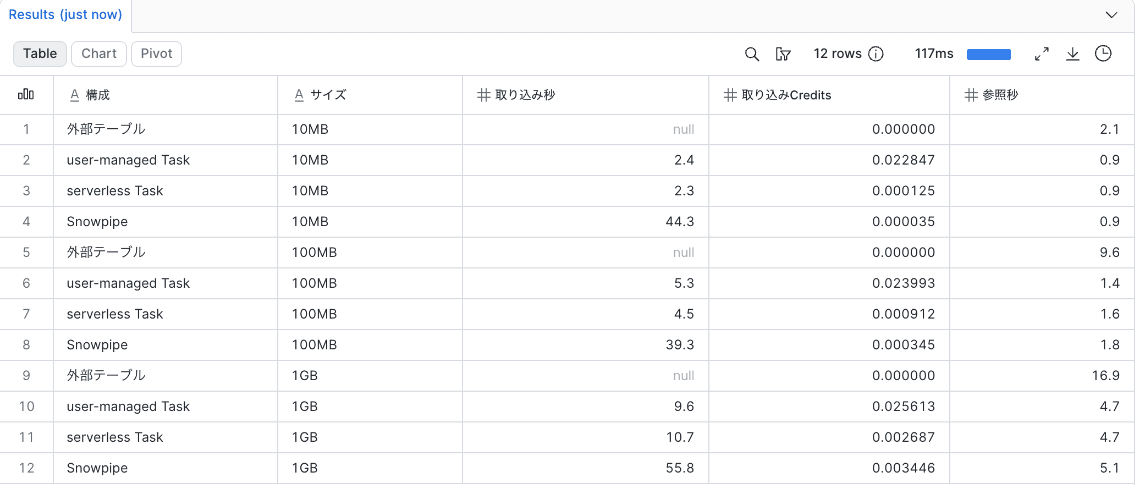
For external tables, the CTAS time was more than twice that of the 3 configurations loaded into Snowflake tables.
For user-managed Tasks, approximately 60–70 seconds worth of Credits are consumed regardless of the ingestion time (2–10 seconds). This is because the Warehouse remains running for 60 seconds after COPY INTO completes due to AUTO_SUSPEND, and billing continues during that time.
Snowpipe ingestion seconds were approximately 44 seconds even for 10MB. This is likely because a fixed amount of time is required from when the S3 notification arrives until ingestion begins, regardless of data volume.
Monthly Cost per Table
The monthly cost was calculated using the following formula.
Reference Credits  = Reference seconds × 1.35 ÷ 3600   (Converting Gen2 XS's 1.35 credits/hour to per-second)
Daily Credits      = Ingestion Credits + Reference Credits × Number of references
Monthly cost (JPY) = Daily Credits × 688 JPY × 30 days
- References are assumed to be executed on a Warehouse that is running for dbt batches. Therefore, reference costs are calculated based on the actual number of seconds elapsed.
- user-managed Task ingestion assumes a dedicated Warehouse is started for the Task. The actual measured values including the 60-second wait time are used as-is.
- 1 credit is converted from Enterprise Edition (AWS Tokyo) $4.30 at $1 = 160 JPY, which equals 688 JPY.
- Snowflake storage costs and Cloud Services fees are not included.
The last SELECT produces monthly costs (JPY) per configuration and size, broken down by number of references.
SELECT
    DECODE(
        CONFIG, 'EXTERNAL', '外部テーブル', 'USER_MANAGED', 'user-managed Task',
        'SERVERLESS', 'serverless Task', 'SNOWPIPE', 'Snowpipe'
    ) AS "構成",
    SIZE AS "サイズ",
    ROUND((INGEST_CREDITS + 1 * REFERENCE_SEC * 1.35 / 3600) * 688 * 30) AS "月額(参照1回/日)",
    ROUND((INGEST_CREDITS + 5 * REFERENCE_SEC * 1.35 / 3600) * 688 * 30) AS "月額(参照5回/日)",
    ROUND((INGEST_CREDITS + 20 * REFERENCE_SEC * 1.35 / 3600) * 688 * 30) AS "月額(参照20回/日)"
FROM RESULT
ORDER BY DECODE(SIZE, '10MB', 1, '100MB', 2, 3), DECODE(CONFIG, 'EXTERNAL', 1, 'USER_MANAGED', 2, 'SERVERLESS', 3, 4);
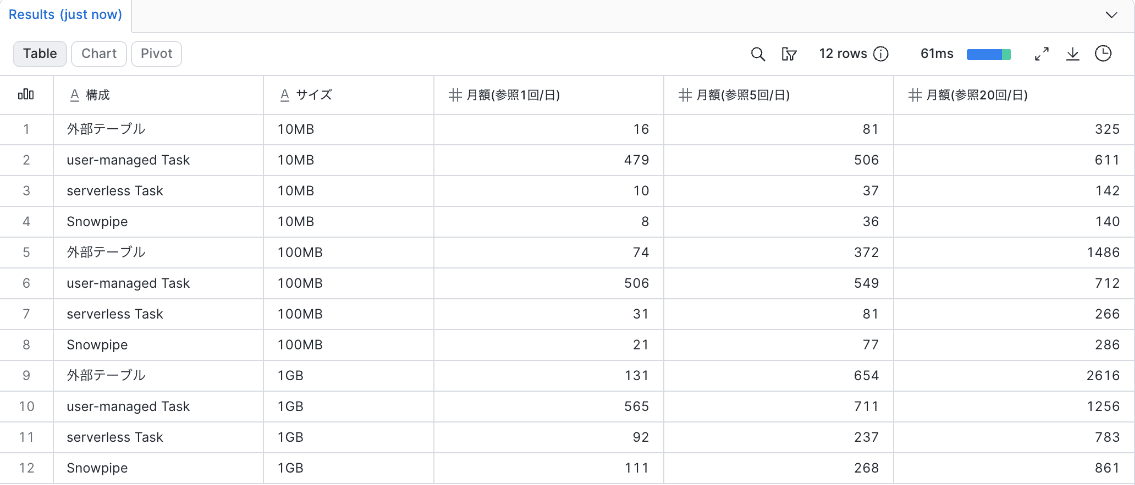
The difference in monthly cost between external tables and serverless Tasks grows larger as the number of references and data size increase. At 20 references/day, the monthly costs for external tables and serverless Tasks are 325 JPY vs. 142 JPY for 10MB, 1,486 JPY vs. 266 JPY for 100MB, and 2,616 JPY vs. 783 JPY for 1GB. The cause of the difference is the processing time per reference. Since all 4 configurations run references on the same Warehouse (Gen2 XS), reference costs are proportional to reference seconds. For 1GB, reference seconds are 16.9 seconds and 4.7 seconds, making the cost per reference approximately 4.36 JPY and 1.21 JPY respectively.
The difference between serverless Task and Snowpipe was within a few tens of JPY per month under all conditions. user-managed Tasks, under the assumption of starting a dedicated Warehouse, cost approximately 480 JPY or more per month for any size.
Conclusion
The characteristics of the 4 configurations are as follows. Monthly costs are per-table values, indicating the range for 10MB–1GB and 1–20 references/day.
| Configuration | Time for Ingestion | Reference (CTAS) Time 10MB / 100MB / 1GB | Monthly Cost | Data Copy to Snowflake | Source for Dynamic Table |
|---|---|---|---|---|---|
| External Table | No ingestion | 2.1 / 9.6 / 16.9 sec | 16–2,616 JPY | Not held | Not usable |
| user-managed Task | 2.4–9.6 sec | 0.9 / 1.4 / 4.7 sec | 479–1,256 JPY | Held | Usable |
| serverless Task | 2.3–10.7 sec | 0.9 / 1.6 / 4.7 sec | 10–783 JPY | Held | Usable |
| Snowpipe | 39.3–55.8 sec | 0.9 / 1.8 / 5.1 sec | 8–861 JPY | Held | Usable |
From this table, configurations are chosen as follows.
- When ingesting, choose serverless Task for ingestion at a fixed time, or Snowpipe if you want to use files as soon as they arrive.
- External tables did not result in the lowest cost under any condition. Choose this option when you do not want to hold a copy of the data in Snowflake and want to manage it solely in S3. Since the processing time per reference is more than twice that of other configurations, the monthly cost becomes higher than other configurations as the number of references and data size increase.
- user-managed Tasks are suitable when a Warehouse is always running for other processes and multiple Tasks can be executed concurrently on it. Since the Warehouse cost is already incurred, adding a Task barely increases the cost.
Dynamic Tables cannot use external tables as a source. If you use Dynamic Tables in the silver layer or beyond, choose a configuration that ingests data.
Closing
The results in this article are a simple verification using a single table and do not necessarily apply directly to all environments. The actual configuration to choose depends on the requirements and scale of your data platform, so please treat the results of this article as just one reference point rather than the sole basis for a decision. I hope this is helpful to someone.