
I tried setting up PostgreSQL CDC with Snowflake Openflow Gen 2 and changing configurations using configuration files

This page has been translated by machine translation. View original
Introduction
In the September 2026 update, the second generation (Gen 2) Deployment and Runtime of Snowflake Openflow became generally available.
At the same time, connector configuration has also become available as a public preview, accessible via SQL or the setup wizard.
This article covers the configuration of an Amazon RDS for PostgreSQL CDC connector on a Gen 2 Snowflake Deployment, along with some simple configuration changes.
Differences Between Gen 1 and Gen 2
A comparison of Gen 1 and Gen 2 is described below.
The main differences with Gen 2 are as follows. Since connector settings can be managed with configuration files, connector management can be integrated into CI/CD pipelines.
- Deployment/Runtime management
- Can be created and modified with SQL
- Because of the above, can be managed with RBAC as Snowflake objects
- Connector configuration method
- Setup wizard, or configuration file on a stage
- ※As of October 2026, there are 2 connectors that can be configured this way: PostgreSQL and MySQL / MariaDB. Both require a Gen 2 Runtime
- Setup wizard, or configuration file on a stage
- Where settings are stored
- Gen 1: Flow on canvas
- Gen 2:
config.jsonon a stage (saved as a version)
- How to change settings
- Gen 1: Edit on canvas
- Gen 2: Edit the
liveversion and create a new version withCOMMIT
Trying It Out
Prerequisites
The following environment is used.
- Snowflake: Commercial account
- Edition: Enterprise
- Cloud service: AWS
- Region: Tokyo (
AWS_AP_NORTHEAST_1) - Deployment type: Snowflake Deployment
- AWS side
- Amazon RDS for PostgreSQL (logical replication enabled)
For the configuration, the following article was referenced.
Snowflake Deployment runs on Snowpark Container Services (SPCS). Outbound PrivateLink is also supported, but this time we connect over the internet, referencing the above article.
Specifically, RDS is created in a private subnet, with an internet-facing NLB placed in front of it, and the NLB security group is configured to allow only Snowflake's egress IPs.
Preparation
To control network access to the NLB, check Snowflake's Egress IPs in advance. Since each range has an expiration date, the allow list must be updated before expiration in production environments.
SELECT SYSTEM$GET_SNOWFLAKE_EGRESS_IP_RANGES();
On the PostgreSQL side, verify logical replication, and create sample data, a replication user, and a Publication in advance.
The sample data was prepared with the following content.
Sample Data Creation SQL
CREATE TABLE public.customers (
  customer_id  integer PRIMARY KEY,
  name         text        NOT NULL,
  email        text        NOT NULL,
  created_at   timestamptz NOT NULL DEFAULT now()
);

CREATE TABLE public.orders (
  order_id     integer PRIMARY KEY,
  customer_id  integer       NOT NULL REFERENCES public.customers (customer_id),
  amount       numeric(10,2) NOT NULL,
  status       text          NOT NULL,
  ordered_at   timestamptz   NOT NULL DEFAULT now()
);

-- 10,000 customers (create sequential numbers with generate_series and insert in one INSERT)
INSERT INTO public.customers (customer_id, name, email, created_at)
SELECT g,
       'Customer ' || g,
       'user' || g || '@example.com',
       now() - random() * interval '365 days'
FROM generate_series(1, 10000) AS g;

-- 100,000 orders (customer ID is one of 1~10000, satisfying the foreign key constraint)
INSERT INTO public.orders (order_id, customer_id, amount, status, ordered_at)
SELECT g,
       1 + floor(random() * 10000)::int,
       round((random() * 50000)::numeric, 2),
       (ARRAY['paid', 'shipped', 'delivered', 'cancelled'])[1 + floor(random() * 4)::int],
       now() - random() * interval '365 days'
FROM generate_series(1, 100000) AS g;

SELECT COUNT(*) FROM public.customers;  -- 10000
SELECT COUNT(*) FROM public.orders;     -- 100000
SELECT status, COUNT(*) FROM public.orders GROUP BY status ORDER BY status;  -- roughly evenly divided into 4 types

 count
-------
 10000
(1 row)

 count
--------
 100000
(1 row)
Snowflake Side: Creating Management Objects
The role for managing Openflow, as well as the database and schema, were created with the following steps.
The database and schema created here serve as the area where the Runtime and connectors are stored. The data ingestion destination will be created later.
USE ROLE ACCOUNTADMIN;

CREATE ROLE IF NOT EXISTS yasuhara_openflow_admin;
GRANT ROLE yasuhara_openflow_admin TO ROLE ACCOUNTADMIN;

-- Grant account-level deployment creation privileges
GRANT CREATE OPENFLOW DEPLOYMENT ON ACCOUNT TO ROLE yasuhara_openflow_admin;
GRANT CREATE DATABASE ON ACCOUNT TO ROLE yasuhara_openflow_admin;
GRANT CREATE INTEGRATION ON ACCOUNT TO ROLE yasuhara_openflow_admin;
GRANT CREATE COMPUTE POOL ON ACCOUNT TO ROLE yasuhara_openflow_admin;

USE ROLE yasuhara_openflow_admin;

-- Create database schema for Openflow management
CREATE DATABASE yasuhara_openflow_db;
CREATE SCHEMA IF NOT EXISTS yasuhara_openflow_db.openflow_schema;
As another point to note, creating Runtimes and connectors within a schema requires CREATE OPENFLOW RUNTIME and CREATE OPENFLOW CONNECTOR privileges on that schema.
Next, create the role used when the connector accesses Snowflake, as well as network rules and external access integrations to allow external connections.
USE ROLE ACCOUNTADMIN;

CREATE ROLE IF NOT EXISTS yasuhara_openflow_execute_as_rl;
GRANT ROLE yasuhara_openflow_execute_as_rl TO ROLE yasuhara_openflow_admin;
GRANT USAGE ON DATABASE yasuhara_openflow_db TO ROLE yasuhara_openflow_execute_as_rl;
GRANT USAGE ON SCHEMA yasuhara_openflow_db.openflow_schema TO ROLE yasuhara_openflow_execute_as_rl;

USE DATABASE yasuhara_openflow_db;
USE SCHEMA openflow_schema;

-- The connection destination is the NLB DNS name and port
CREATE OR REPLACE NETWORK RULE openflow_my_runtime_network_rule
  MODE = EGRESS
  TYPE = HOST_PORT
  VALUE_LIST = ('<NLB DNS name>:5432');

CREATE OR REPLACE EXTERNAL ACCESS INTEGRATION yasuhara_openflow_my_runtime_eai
  ALLOWED_NETWORK_RULES = (yasuhara_openflow_db.openflow_schema.openflow_my_runtime_network_rule)
  ENABLED = TRUE;

GRANT USAGE ON INTEGRATION yasuhara_openflow_my_runtime_eai TO ROLE yasuhara_openflow_execute_as_rl;
Create the destination database, warehouse for MERGE, and a secret to store the PostgreSQL password.
※The destination schema is not created in advance, as it will be created by the connector.
CREATE DATABASE IF NOT EXISTS yasuhara_pg_openflow_dest;
CREATE WAREHOUSE IF NOT EXISTS yasuhara_openflow_wh WAREHOUSE_SIZE = XSMALL AUTO_SUSPEND = 60;

GRANT USAGE ON DATABASE yasuhara_pg_openflow_dest TO ROLE yasuhara_openflow_execute_as_rl;
GRANT CREATE SCHEMA ON DATABASE yasuhara_pg_openflow_dest TO ROLE yasuhara_openflow_execute_as_rl;
GRANT USAGE, OPERATE ON WAREHOUSE yasuhara_openflow_wh TO ROLE yasuhara_openflow_execute_as_rl;

-- Create secret
CREATE OR REPLACE SECRET yasuhara_openflow_db.openflow_schema.pg_password
  TYPE = GENERIC_STRING
  SECRET_STRING = '<openflow_repl password>';

-- Grant read permission on the secret
GRANT READ ON SECRET yasuhara_openflow_db.openflow_schema.pg_password TO ROLE yasuhara_openflow_execute_as_rl;
Creating Openflow Components
Create the Deployment, Runtime, and connector.
First, create the Deployment with SQL.
USE ROLE yasuhara_openflow_admin;

-- Create Deployment
CREATE OPENFLOW DEPLOYMENT yasuhara_snowflake_deployment
  DEPLOYMENT_TYPE = SNOWFLAKE
  DISPLAY_NAME = 'My gen 2 Snowflake Deployment';
+-------------------------------------------------------------------------+
| status                                                                  |
|-------------------------------------------------------------------------|
| Openflow Deployment YASUHARA_SNOWFLAKE_DEPLOYMENT successfully created. |
+-------------------------------------------------------------------------+
After creation, it can also be confirmed from the Openflow UI.

Set up a dedicated event table for monitoring on the Deployment.
CREATE EVENT TABLE IF NOT EXISTS yasuhara_openflow_db.openflow_schema.openflow_events;

ALTER OPENFLOW DEPLOYMENT yasuhara_snowflake_deployment
  SET EVENT_TABLE = 'yasuhara_openflow_db.openflow_schema.openflow_events';
Create the Runtime.
USE ROLE yasuhara_openflow_admin;
USE DATABASE yasuhara_openflow_db;
USE SCHEMA openflow_schema;

CREATE OPENFLOW RUNTIME my_runtime
  IN DEPLOYMENT yasuhara_snowflake_deployment
  NODE_TYPE = MEDIUM
  NODE_TYPE_TIER = 'M4'
  MIN_NODES = 1
  MAX_NODES = 1
  EXECUTE_AS_ROLE = yasuhara_openflow_execute_as_rl
  EXTERNAL_ACCESS_INTEGRATIONS = (yasuhara_openflow_my_runtime_eai)
  DISPLAY_NAME = 'My gen 2 Runtime';
+---------------------------------------------------+
| status                                            |
|---------------------------------------------------|
| Openflow Runtime MY_RUNTIME successfully created. |
+---------------------------------------------------+
This could also be confirmed in the UI after creation.

Next, create the connector. The initial connector creation was done via the GUI.
The official documentation also guides you to use the setup wizard for initial connector configuration.
First, install the connector to the Runtime from the "Connector library."
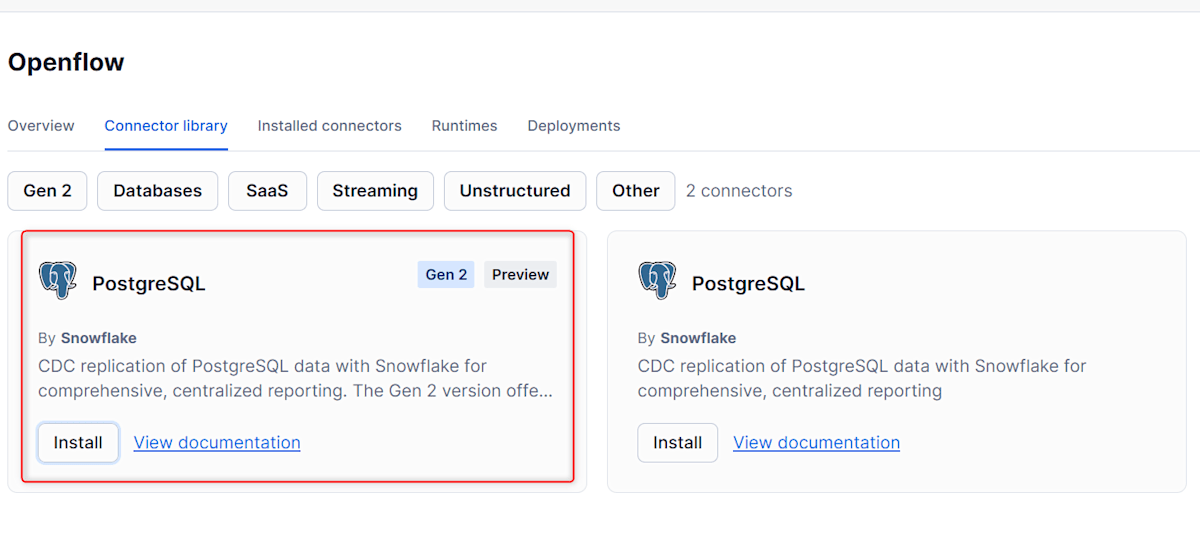
After installing the connector, the created connector also appears under "Installed Connector" on the Openflow screen.
Connector Setup Wizard
On the Openflow screen, click edit for the created connector.
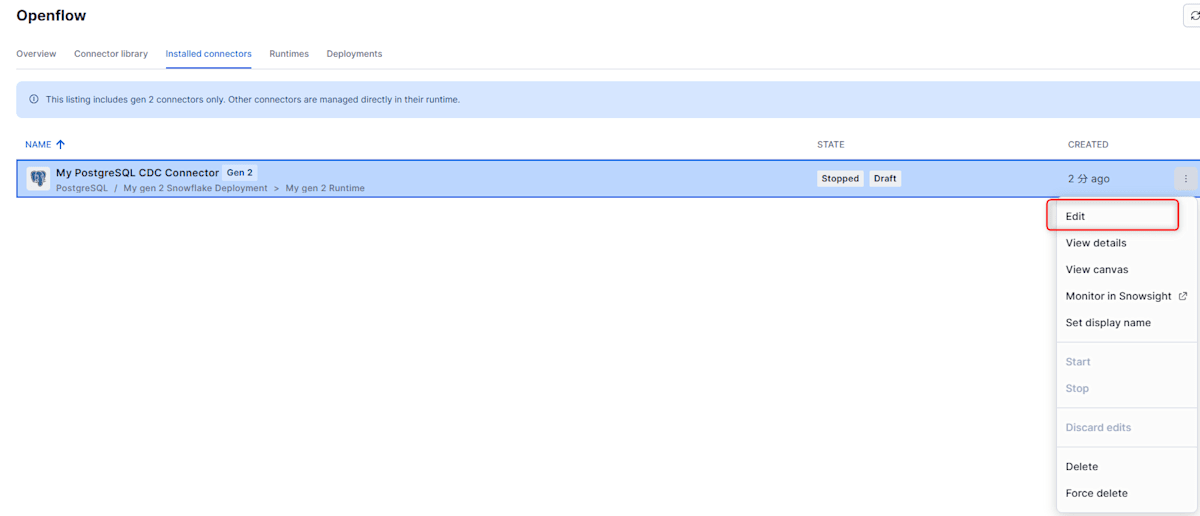
The setup wizard looked as shown below. First, enter the connection information.
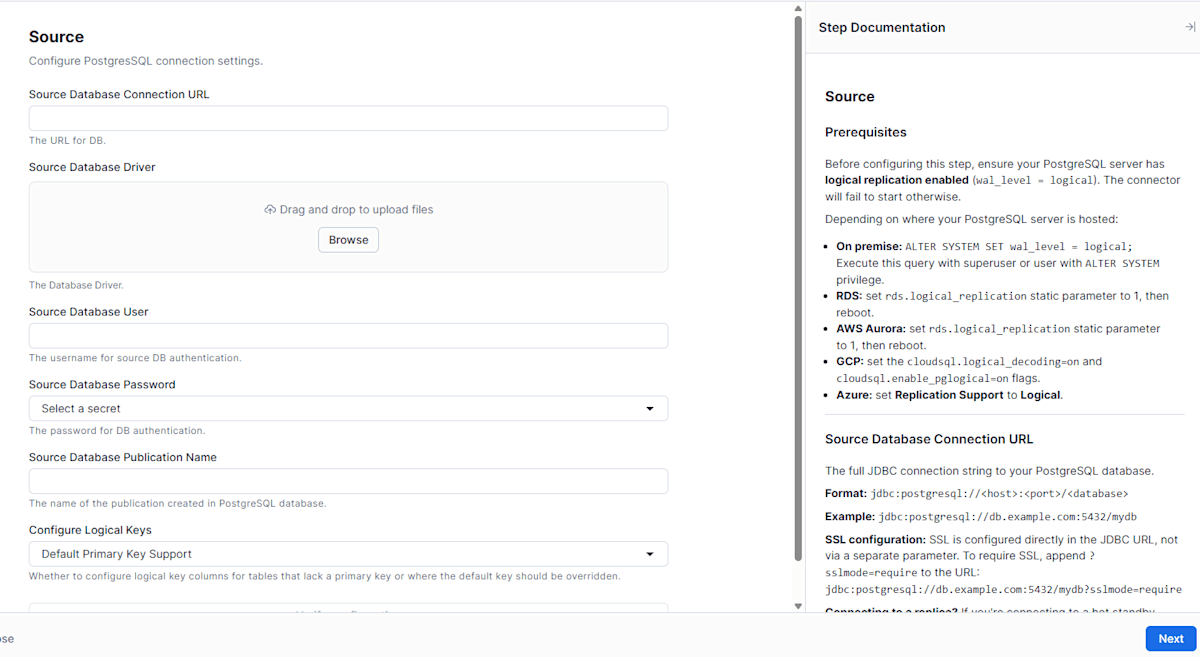
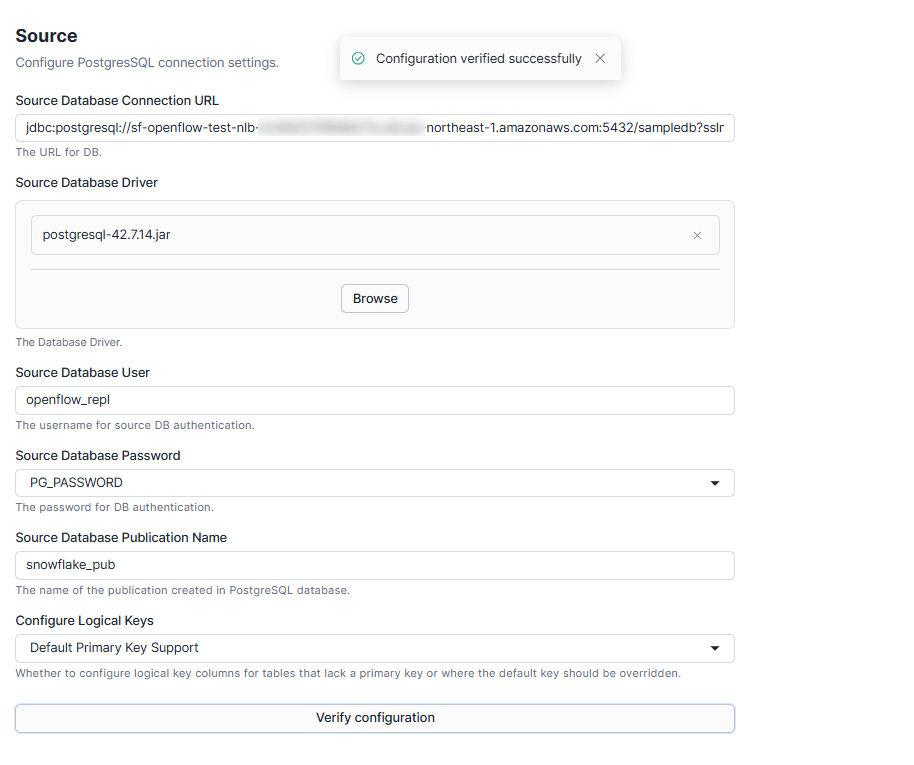
The main items and settings are as follows.
- Source Database Connection URL
jdbc:postgresql://<NLB DNS name>:5432/sampledb?sslmode=require
- Source Database Driver
- Upload the PostgreSQL JDBC driver (
postgresql-42.7.14.jar)
- Upload the PostgreSQL JDBC driver (
- Source Database User
openflow_repl
- Source Database Password
- Select the secret object
yasuhara_openflow_db.openflow_schema.pg_password
- Select the secret object
- Source Database Publication Name
snowflake_pub
- Configure Logical Keys
- Default Primary Key Support (default)
Note that the JDBC driver must be downloaded from the official PostgreSQL website and uploaded via the wizard.
After entering, run "Verify Configuration" and proceed if there are no issues.
Replication table schema
Select the schema and tables to replicate.
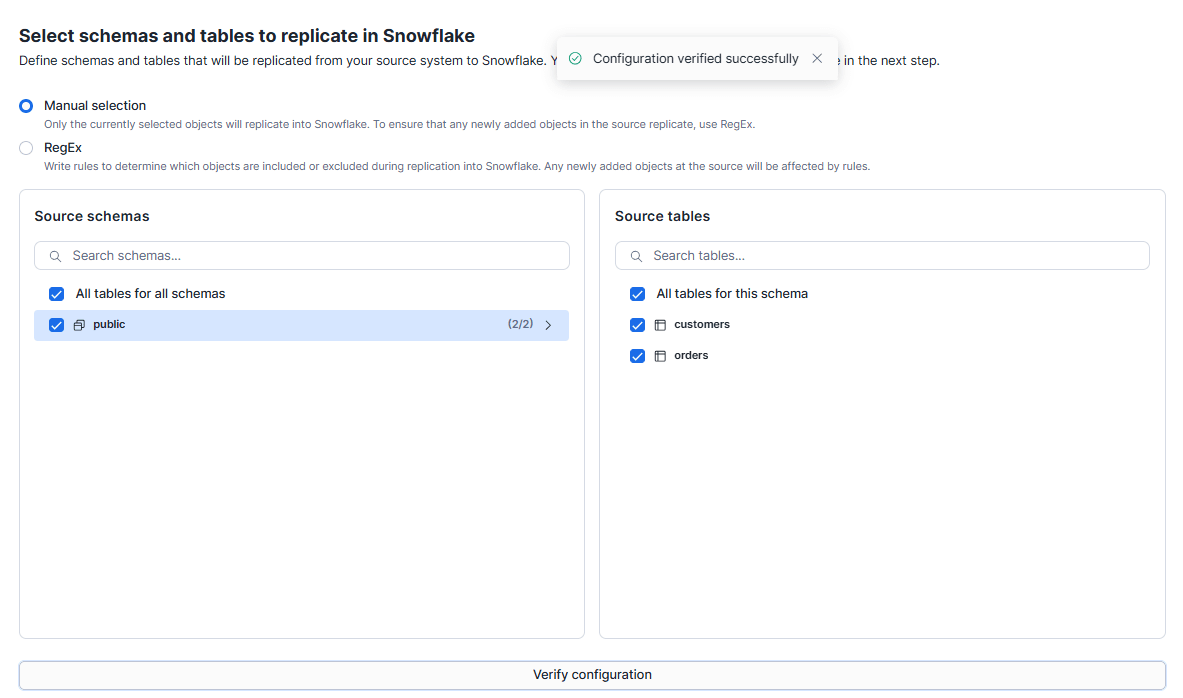
The target can be selected from the following two options.
- Manual selection
- Only the selected objects are targeted. Tables added to the source are not included
- RegEx
- The target is determined by a regular expression. The rule also applies to tables added to the source
This time, Manual selection was used to select public.customers and public.orders created as sample data.
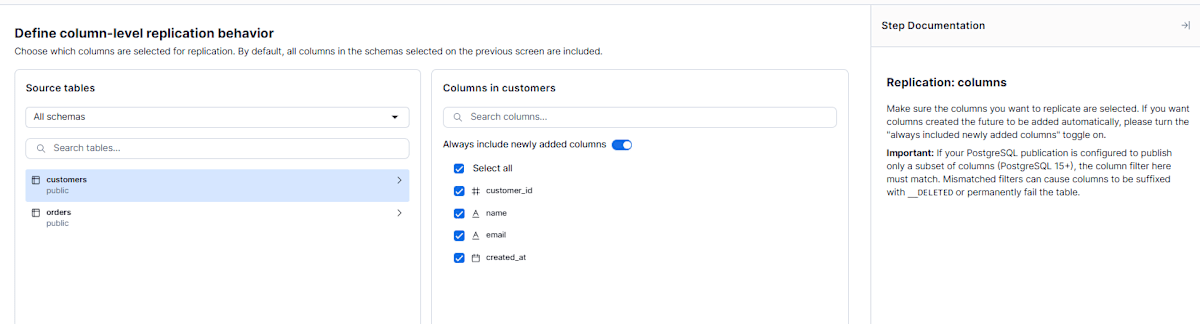
Replication columns
Determine the columns to replicate. By default, all columns of the selected tables are targeted. This time, since all columns are being ingested, we proceeded without any settings.
Destination details
Settings for the ingestion destination.
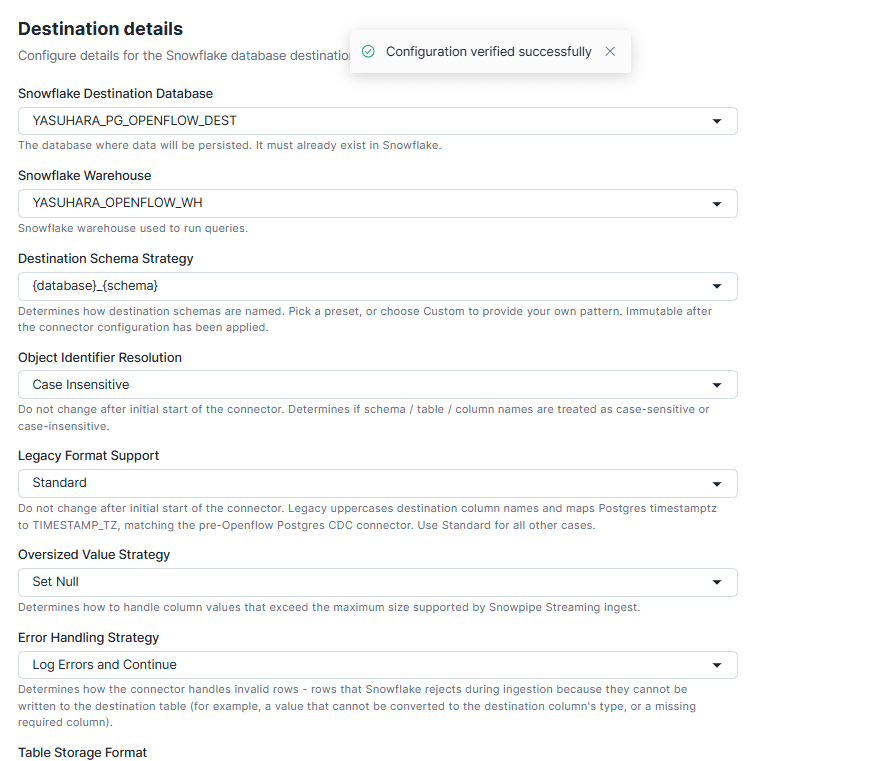
The settings were configured as follows.
| Item | Description | This configuration |
|---|---|---|
| Snowflake Destination Database | Destination DB for writing | yasuhara_pg_openflow_dest |
| Snowflake Warehouse | Warehouse for executing MERGE to the destination table | yasuhara_openflow_wh |
| Destination Schema Strategy | How to name the destination schema | {database}_{schema} |
| Object Identifier Resolution | How to handle upper/lowercase names | Case-insensitive (saved in all uppercase) |
| Legacy Format Support | Whether to match old connector column names/types | Standard |
| Oversized Value Strategy | How to handle values that are too large | Set Null (default) |
| Error Handling Strategy | How to handle rows that cannot be accepted | Log Errors and Continue (default) |
| Table Storage Format | Format of the destination table | Standard |
- Destination Schema Strategy, Object Identifier Resolution, and Table Storage Format cannot be changed after initial configuration. To change them, recreate the connector
- Since
{database}_{schema}was selected for the destination schema, it will beSAMPLEDB_PUBLIC
Tuning
Configure when CDC changes are reflected to the destination.
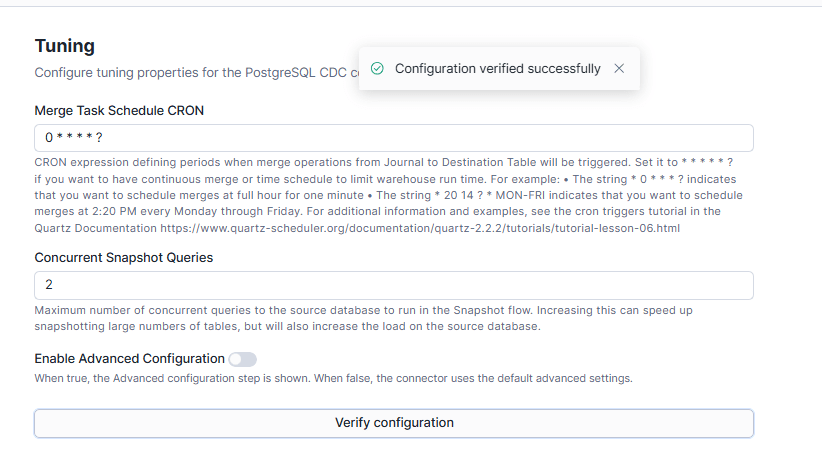
The settings were as follows.
- Merge Task Schedule CRON
- When to MERGE journal table changes to the destination table
- The warehouse runs during MERGE, so warehouse costs are incurred here
- This configuration:
0 * * * * ?(every 1 minute)
- Concurrent Snapshot Queries
- Maximum number of tables to snapshot in parallel during the initial snapshot
- This configuration: 2 (default)
Migration
Determine how to handle the initial snapshot and the replication slot used for CDC.
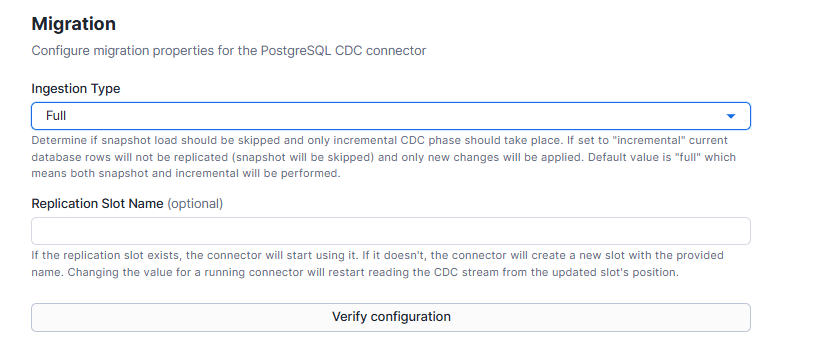
- Ingestion Type
full: Full snapshot followed by CDCincremental: Skip snapshot and only ingest incremental changes- This configuration:
full(default)
- Replication Slot Name
- Replication slot name used for CDC
- If left blank, the connector creates a new one
- This configuration: blank (default)
Finally, review the summary and click "Apply."
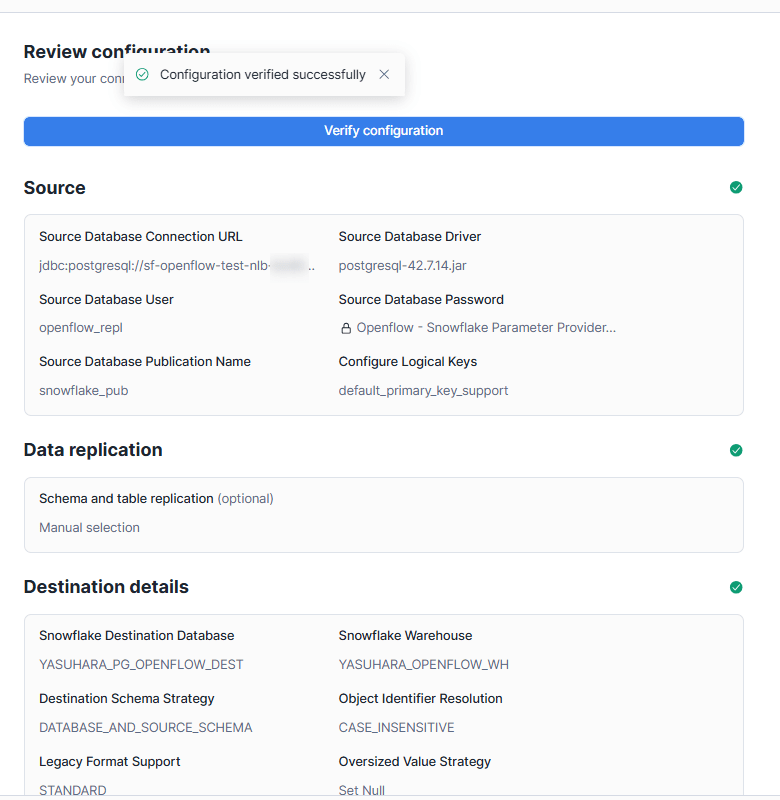
Execution
After applying, start the connector with "Start" as shown below.
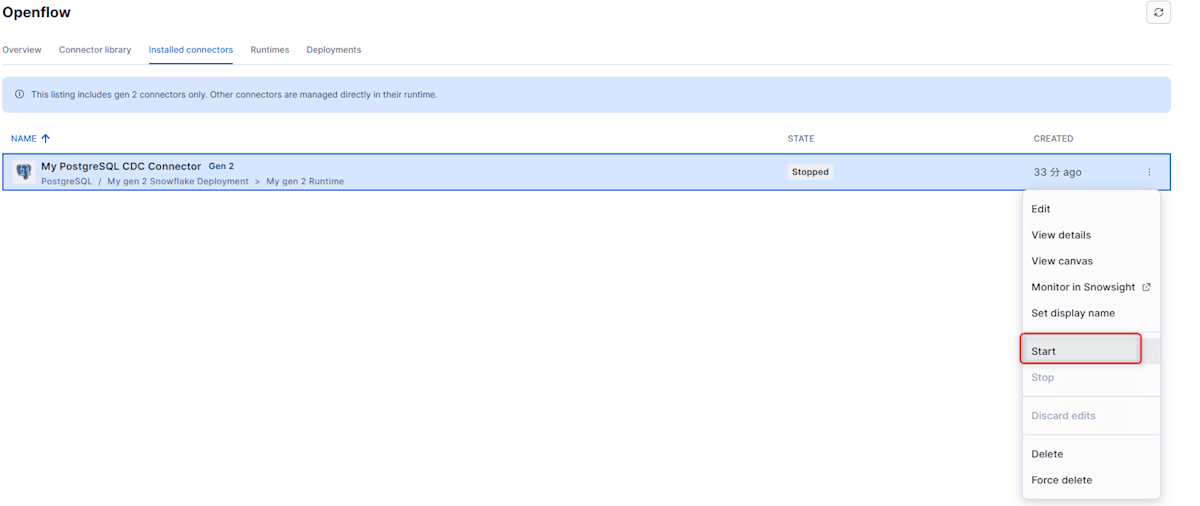
After a while, the data is ingested. Check the row count of the destination tables.
USE ROLE yasuhara_openflow_admin;
USE WAREHOUSE yasuhara_openflow_wh;

SELECT 'customers' AS table_name, COUNT(*) AS cnt FROM yasuhara_pg_openflow_dest.sampledb_public.customers
UNION ALL
SELECT 'orders', COUNT(*) FROM yasuhara_pg_openflow_dest.sampledb_public.orders;
+------------+--------+
| TABLE_NAME |    CNT |
|------------+--------|
| customers  |  10000 |
| orders     | 100000 |
+------------+--------+
The row counts matched the source PostgreSQL side.
Confirming That Changes Are Reflected
Execute INSERT, UPDATE, and DELETE on the PostgreSQL side and confirm that they are reflected in Snowflake.
-- INSERT
INSERT INTO public.customers (customer_id, name, email)
VALUES (10001, 'Customer 10001', 'user10001@example.com'),
       (10002, 'Customer 10002', 'user10002@example.com');
INSERT INTO public.orders (order_id, customer_id, amount, status)
VALUES (100001, 10001, 1234.50, 'pending'),
       (100002, 10002, 99.99,   'pending');

-- UPDATE
UPDATE public.orders    SET status = 'refunded' WHERE order_id = 102;
UPDATE public.orders    SET amount = 9999.00    WHERE order_id = 103;
UPDATE public.customers SET email = 'updated1@example.com' WHERE customer_id = 1;

-- DELETE
DELETE FROM public.orders WHERE order_id = 104;
Since the sync is configured every 1 minute, checking the Snowflake side immediately showed that INSERT and UPDATE were reflected as-is.
-- Confirm INSERT reflection
SELECT 'customers' AS table_name, COUNT(*) AS cnt FROM yasuhara_pg_openflow_dest.sampledb_public.customers
UNION ALL
SELECT 'orders', COUNT(*) FROM yasuhara_pg_openflow_dest.sampledb_public.orders;
+------------+--------+
| TABLE_NAME |    CNT |
|------------+--------|
| customers  |  10002 |
| orders     | 100002 |
+------------+--------+

-- Confirm UPDATE reflection
SELECT order_id, status, amount FROM yasuhara_pg_openflow_dest.sampledb_public.orders
WHERE order_id IN (102, 103, 104, 100001, 100002) ORDER BY order_id;
+----------+-----------+----------+
| ORDER_ID | STATUS    |   AMOUNT |
|----------+-----------+----------|
|      102 | refunded  | 14713.44 |
|      103 | delivered |  9999.00 |
|      104 | paid      | 10516.81 |
|   100001 | pending   |  1234.50 |
|   100002 | pending   |    99.99 |
+----------+-----------+----------+

SELECT customer_id, email FROM yasuhara_pg_openflow_dest.sampledb_public.customers
WHERE customer_id IN (1, 10001, 10002) ORDER BY customer_id;
+-------------+-----------------------+
| CUSTOMER_ID | EMAIL                 |
|-------------+-----------------------|
|           1 | updated1@example.com  |
|       10001 | user10001@example.com |
|       10002 | user10002@example.com |
+-------------+-----------------------+
DELETEs on the source side are reflected as logical deletes, where the row is not physically removed but the _SNOWFLAKE_DELETED column is set to TRUE.
SELECT order_id, status, amount, _snowflake_deleted, _snowflake_updated_at
FROM yasuhara_pg_openflow_dest.sampledb_public.orders
WHERE order_id = 104;
+----------+--------+----------+--------------------+-------------------------+
| ORDER_ID | STATUS |   AMOUNT | _SNOWFLAKE_DELETED | _SNOWFLAKE_UPDATED_AT   |
|----------+--------+----------+--------------------+-------------------------|
|      104 | paid   | 10516.81 | True               | 2026-10-11 02:01:00.368 |
+----------+--------+----------+--------------------+-------------------------+
Try Changing Connector Settings with a Configuration File
The initial setup was done with the setup wizard. Let's try editing this configuration (config.json) to make changes.
As an example, we'll change the MERGE execution interval (Merge Task Schedule CRON) from every 1 minute to every 5 minutes.
First, let's check the storage location and format of the configuration file (config.json).
- Storage location
- The version-specific directory of the stage associated with the connector (
snow://openflow_connector/<DB>.<schema>.<connector>/versions/<version>/config.json) - When you Apply in the wizard, the settings are saved as a committed version (
version$1), and theliveversion for editing becomes empty version$1containsconfig.jsonand the JDBC driver uploaded in the wizard (postgresql-42.7.14.jar)
- The version-specific directory of the stage associated with the connector (
- Format
- The
configurationarray containspropertiesfor each section (name, such asSource,Tuning, etc.) corresponding to the wizard screens - The way values are written is determined by
valueTypeSTRING_LITERAL:"value": "string"SECRET_REFERENCE:"fullyQualifiedSecretName": "DB.schema.secret_name"ASSET_REFERENCE:"assetIds": ["postgresql-42.7.14.jar"](the filename of the uploaded jar)
- Password values are not included in
config.json. Only the secret name is stored - Wizard item names and
config.jsonkeys may not match (e.g.,{database}_{schema}selected in the wizard is stored asDATABASE_AND_SOURCE_SCHEMAin theDestination Schema Strategyvalue)
- The
- Retrieval and update
- Retrieval is done with
GET, and updates withPUT
- Retrieval is done with
The Source section looked like this:
{
  "name": "Source",
  "properties": {
    "Source Database Connection URL": { "valueType": "STRING_LITERAL", "value": "jdbc:postgresql://<NLB DNS name>:5432/sampledb?sslmode=require" },
    "Source Database Driver": { "valueType": "ASSET_REFERENCE", "assetIds": ["postgresql-42.7.14.jar"] },
    "Source Database User": { "valueType": "STRING_LITERAL", "value": "openflow_repl" },
    "Source Database Password": { "valueType": "SECRET_REFERENCE", "fullyQualifiedSecretName": "YASUHARA_OPENFLOW_DB.OPENFLOW_SCHEMA.PG_PASSWORD" },
    "Source Database Publication Name": { "valueType": "STRING_LITERAL", "value": "snowflake_pub" }
  }
}
The official documentation describes the configuration change process as follows, so let's proceed accordingly.
- Create an editable
liveversion from the default version - Retrieve and edit
live'sconfig.json - Put the edited file back to
live COMMITto make it the new default version
Stop the Connector
Here, we stopped the connector before proceeding. In Gen2, connector management is also possible from SQL.
-- Stop the connector
ALTER OPENFLOW CONNECTOR yasuhara_openflow_db.openflow_schema.my_postgres_connector STOP;
-- Verify
SELECT SYSTEM$WAIT_FOR_STABLE_OPENFLOW_CONNECTORS(600, 'yasuhara_openflow_db.openflow_schema.my_postgres_connector');
+---------------------------------------------------------------------------------------------------------------+
| SYSTEM$WAIT_FOR_STABLE_OPENFLOW_CONNECTORS(600, 'YASUHARA_OPENFLOW_DB.OPENFLOW_SCHEMA.MY_POSTGRES_CONNECTOR') |
|---------------------------------------------------------------------------------------------------------------|
| OK                                                                                                            |
+---------------------------------------------------------------------------------------------------------------+
Gen 2's STOP, COMMIT, and START are executed asynchronously. The SYSTEM$WAIT_FOR_STABLE_OPENFLOW_CONNECTORS function waits until the state stabilizes and returns OK on success. It returns an error on timeout or failure.
Although not tested this time, it can also be used for automation such as CI/CD.
Creating and Retrieving the live Version
Committed versions (such as version$1) cannot be rewritten afterward, and to change settings you need to copy the current default and create an editable live version.
ALTER OPENFLOW CONNECTOR yasuhara_openflow_db.openflow_schema.my_postgres_connector ADD LIVE VERSION FROM LAST;
+------------------------------------+
| status                             |
|------------------------------------|
| Live version successfully created. |
+------------------------------------+
Retrieve the config.json of the created live version locally for editing.
snow sql -c <connection name> -q "GET 'snow://openflow_connector/yasuhara_openflow_db.openflow_schema.my_postgres_connector/versions/live/config.json' 'file://<local directory>/';"
Editing config.json
The current load frequency was set by Merge Task Schedule CRON under Tuning.
{
  "name": "Tuning",
  "properties": {
    "Concurrent Snapshot Queries": { "valueType": "STRING_LITERAL", "value": "2" },
    "Enable Advanced Configuration": { "valueType": "STRING_LITERAL", "value": "false" },
    "Merge Task Schedule CRON": { "valueType": "STRING_LITERAL", "value": "0 * * * * ?" }
  }
}
Change this value to 0 0/5 * * * ? (every 5 minutes starting from minute 0 of each hour) as follows.
{
  "name": "Tuning",
  "properties": {
    "Concurrent Snapshot Queries": { "valueType": "STRING_LITERAL", "value": "2" },
    "Enable Advanced Configuration": { "valueType": "STRING_LITERAL", "value": "false" },
    "Merge Task Schedule CRON": { "valueType": "STRING_LITERAL", "value": "0 0/5 * * * ?" }
  }
}
Putting Back to live and COMMIT
PUT the edited file to live.
snow sql -c <connection name> -q "PUT 'file://<local directory>/config.json' 'snow://openflow_connector/yasuhara_openflow_db.openflow_schema.my_postgres_connector/versions/live/' AUTO_COMPRESS = FALSE OVERWRITE = TRUE;"
After the PUT, use COMMIT to make live the new default version. When you COMMIT, live becomes the new default and live is deleted.
ALTER OPENFLOW CONNECTOR yasuhara_openflow_db.openflow_schema.my_postgres_connector COMMIT;
+--------------------------------------+
| status                               |
|--------------------------------------|
| Live version successfully committed. |
+--------------------------------------+

SELECT SYSTEM$WAIT_FOR_STABLE_OPENFLOW_CONNECTORS(600, 'yasuhara_openflow_db.openflow_schema.my_postgres_connector');
+---------------------------------------------------------------------------------------------------------------+
| SYSTEM$WAIT_FOR_STABLE_OPENFLOW_CONNECTORS(600, 'YASUHARA_OPENFLOW_DB.OPENFLOW_SCHEMA.MY_POSTGRES_CONNECTOR')
|
|---------------------------------------------------------------------------------------------------------------|
| OK                                                                                                            |
+---------------------------------------------------------------------------------------------------------------+
After COMMIT, VERSION$2 was added as a new version and became the default (is_default is true).
-- default is now version$2, and live is gone
SHOW VERSIONS IN OPENFLOW CONNECTOR yasuhara_openflow_db.openflow_schema.my_postgres_connector;
+-------------------------------+-----------+-------+----------------------------------------------------------------------------------------------------------+------------+---------+----------+---------+---------+---------------------+-----------------+
| created_on                    | name      | alias | location_uri                                                                                             | is_default | is_live | is_first | is_last | comment | source_location_uri | git_commit_hash |
|-------------------------------+-----------+-------+----------------------------------------------------------------------------------------------------------+------------+---------+----------+---------+---------+---------------------+-----------------|
| 2026-10-16 11:29:23.558 +0900 | VERSION$2 | NULL  | snow://openflow_connector/YASUHARA_OPENFLOW_DB.OPENFLOW_SCHEMA.MY_POSTGRES_CONNECTOR/versions/version$2/ | true       | false   | false    | true    | NULL    | NULL                | NULL            |
| 2026-10-11 10:25:12.999 +0900 | VERSION$1 | NULL  | snow://openflow_connector/YASUHARA_OPENFLOW_DB.OPENFLOW_SCHEMA.MY_POSTGRES_CONNECTOR/versions/version$1/ | false      | false   | true     | false   | NULL    | NULL                | NULL            |
+-------------------------------+-----------+-------+----------------------------------------------------------------------------------------------------------+------------+---------+----------+---------+---------+---------------------+-----------------+
Once confirmed, start the connector.
ALTER OPENFLOW CONNECTOR yasuhara_openflow_db.openflow_schema.my_postgres_connector START;
SELECT SYSTEM$WAIT_FOR_STABLE_OPENFLOW_CONNECTORS(600, 'yasuhara_openflow_db.openflow_schema.my_postgres_connector');
Verifying the Changes
In PostgreSQL, continuously update the amount of order 102 every minute.
UPDATE public.orders SET amount = amount + 1 WHERE order_id = 102;
\watch 60
After a while, checking the MERGE history on the warehouse side confirmed it was executing every 5 minutes.
-- Destination table: _SNOWFLAKE_UPDATED_AT also shows the same time as the MERGE start time
>SELECT order_id, amount, _SNOWFLAKE_UPDATED_AT
FROM YASUHARA_PG_OPENFLOW_DEST.SAMPLEDB_PUBLIC.ORDERS
WHERE order_id = 102;
+----------+----------+-------------------------+
| ORDER_ID |   AMOUNT | _SNOWFLAKE_UPDATED_AT   |
|----------+----------+-------------------------|
|      102 | 14717.44 | 2026-10-16 05:10:01.389 |
+----------+----------+-------------------------+

>SELECT order_id, amount, _SNOWFLAKE_UPDATED_AT
FROM YASUHARA_PG_OPENFLOW_DEST.SAMPLEDB_PUBLIC.ORDERS
WHERE order_id = 102;

+----------+----------+-------------------------+
| ORDER_ID |   AMOUNT | _SNOWFLAKE_UPDATED_AT   |
|----------+----------+-------------------------|
|      102 | 14722.44 | 2026-10-16 05:15:01.055 |
+----------+----------+-------------------------+

>SELECT order_id, amount, _SNOWFLAKE_UPDATED_AT
FROM YASUHARA_PG_OPENFLOW_DEST.SAMPLEDB_PUBLIC.ORDERS
WHERE order_id = 102;

+----------+----------+-------------------------+
| ORDER_ID |   AMOUNT | _SNOWFLAKE_UPDATED_AT   |
|----------+----------+-------------------------|
|      102 | 14727.44 | 2026-10-16 05:20:00.341 |
+----------+----------+-------------------------+

-- Merge execution history
> SELECT START_TIME, EXECUTION_STATUS, TOTAL_ELAPSED_TIME
FROM TABLE(snowflake.information_schema.query_history_by_warehouse(
  WAREHOUSE_NAME=>'YASUHARA_OPENFLOW_WH',
  END_TIME_RANGE_START=>DATEADD(minute,-30,CURRENT_TIMESTAMP()), RESULT_LIMIT=>500))
WHERE QUERY_TYPE='MERGE' ORDER BY START_TIME;
+-------------------------------+------------------+--------------------+
| START_TIME                    | EXECUTION_STATUS | TOTAL_ELAPSED_TIME |
|-------------------------------+------------------+--------------------|
| 2026-10-16 14:10:01.389 +0900 | SUCCESS          |               2927 |
| 2026-10-16 14:15:01.055 +0900 | SUCCESS          |               3655 |
| 2026-10-16 14:20:00.341 +0900 | SUCCESS          |               3217 |
+-------------------------------+------------------+--------------------+
Conclusion
We tested building PostgreSQL CDC on Gen 2's Snowflake Deployment using SQL and the setup wizard, and also changing settings by editing config.json. I would also like to try Git integration next time.
I hope this content serves as a helpful reference for someone.