Handling "Cumulative" and "Delta" Types Correctly in AI Streaming Responses — A Practical Guide to SSE Client Implementation

This page has been translated by machine translation. View original
Introduction
When I implemented a feature to display streaming responses from a generative AI in the browser, I encountered a problem where text was displayed twice.
Upon investigating the cause, I found that the SSE (Server-Sent Events) from the AI API I was using was cumulative — meaning each event contained "all text up to that point." Because I was handling it the same way as an API that sends only deltas, the entire text was being appended every time.
This article introduces how to correctly extract deltas from cumulative SSE responses, and how to implement SSE parsing in the browser.
Prerequisites / Environment
- TypeScript / SvelteKit
- Server-Sent Events (SSE)
- ReadableStream API (Fetch API)
Cumulative vs. Delta
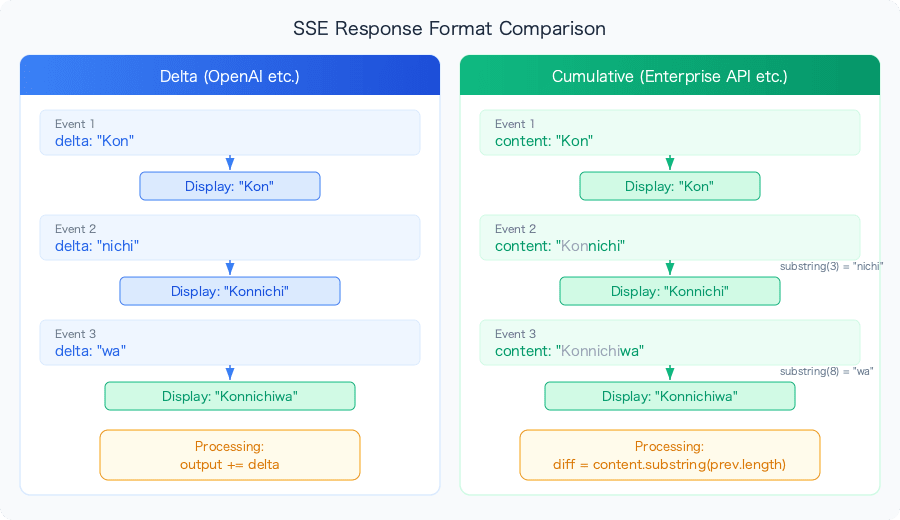
There are broadly two formats for AI API streaming.
Delta type — such as the OpenAI ChatCompletions API:
event: data
data: {"choices": [{"delta": {"content": "Hel"}}]}

event: data
data: {"choices": [{"delta": {"content": "lo"}}]}

event: data
data: {"choices": [{"delta": {"content": "!"}}]}
Each event contains only the newly generated portion. The client just needs to append whatever it receives.
Cumulative type — such as some enterprise AI APIs:
event: data
data: [{"type": "ai", "content": "Hel"}]

event: data
data: [{"type": "ai", "content": "Hello"}]

event: data
data: [{"type": "ai", "content": "Hello!"}]
Each event contains all the text generated so far. The client needs to calculate the delta from the previous event itself.
If you process a cumulative type as though it were a delta type:
Display result: Hel → HelHello → HelHelloHello!
Expected result: Hel → Hello → Hello!
Implementing Delta Extraction
Core Logic
let fullContent = "";

// Process SSE events
for (const message of parsedData) {
  if (message.type === "ai" && message.content) {
    const newContent = message.content;

    // Delta = current full text - full text up to last time
    const incrementalContent = newContent.substring(fullContent.length);

    // Update the full text
    fullContent = newContent;

    // Send only the delta to the UI
    if (incrementalContent) {
      onStream?.({
        content: incrementalContent,
        isIncremental: true
      });
    }
  }
}
substring(fullContent.length) is the key to delta extraction. In cumulative responses, the previous text is a prefix of the current text, so cutting from the length of the previous text onwards gives you the delta.
Processing the Entire SSE Stream
Here is the complete implementation for processing SSE in the browser.
static async generateResponse(
  prompt: string,
  name: string,
  instruction: string,
  webSearch: boolean,
  onStream?: StreamCallback
): Promise<GptResponse> {
  const response = await fetch("/api/gpt/generate", {
    method: "POST",
    headers: { "Content-Type": "application/json" },
    body: JSON.stringify({ prompt, name, instruction, webSearch })
  });

  if (!response.body) {
    throw new Error("No response body received");
  }

  const reader = response.body.getReader();
  const decoder = new TextDecoder();
  let fullContent = "";

  try {
    while (true) {
      const { value, done } = await reader.read();
      if (done) {
        onStream?.({ content: fullContent, done: true });
        break;
      }

      const chunk = decoder.decode(value);

      // Split the chunk into individual SSE events
      const events = chunk.split("\n\n").filter((event) => event.trim() !== "");

      for (const event of events) {
        const lines = event.split("\n");
        let eventType = "";
        let eventData = "";

        for (const line of lines) {
          if (line.startsWith("event: ")) {
            eventType = line.substring(7).trim();
          } else if (line.startsWith("data: ")) {
            eventData = line.substring(6).trim();
          }
        }

        // Skip metadata and end events
        if (eventType === "metadata" || eventType === "end") continue;

        if (eventType === "data" && eventData) {
          try {
            const parsedData = JSON.parse(eventData);

            if (Array.isArray(parsedData)) {
              for (const message of parsedData) {
                if (message.type === "ai" && message.content) {
                  const newContent = message.content;
                  const incrementalContent = newContent.substring(fullContent.length);
                  fullContent = newContent;

                  if (incrementalContent) {
                    onStream?.({ content: incrementalContent, isIncremental: true });
                  }
                }
              }
            }
          } catch (e) {
            console.error("Error parsing event data:", e);
          }
        }
      }
    }

    return { content: fullContent };
  } finally {
    reader.releaseLock();
  }
}
Why Use fetch + ReadableStream Instead of EventSource
The browser has an EventSource API, but I'm not using it here. The reasons:
| Item | EventSource | fetch + ReadableStream |
|---|---|---|
| HTTP method | GET only | Supports POST |
| Request body | Cannot send | Can send JSON, etc. |
| Custom headers | Not possible | Can set Authorization, etc. |
| Connection management | Auto-reconnect | Manual management |
Since requests to the AI API need to send a prompt via POST, EventSource cannot be used.
Pitfalls of SSE Parsing
The Chunk Boundary Problem
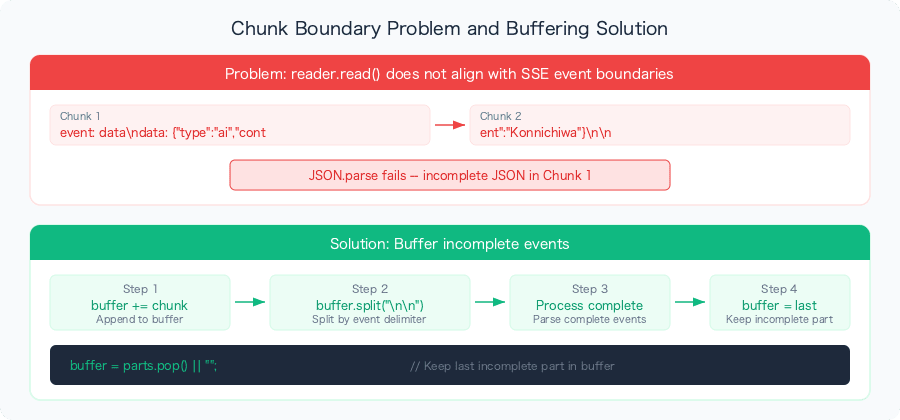
Chunks received via reader.read() are not guaranteed to align with SSE event boundaries.
// This can happen
Chunk 1: "event: data\ndata: {\"type\": \"ai\", \"cont"
Chunk 2: "ent\": \"Hello!\"}\n\n"
The implementation above splits events on \n\n, but if an event spans a chunk boundary, it will try to parse incomplete JSON and fall into the catch block. In this case, since the full text is resent with the next event (because it's cumulative), dropping one event won't cause a major display problem.
If a more robust implementation is needed, introduce buffering.
let buffer = "";

while (true) {
  const { value, done } = await reader.read();
  if (done) break;

  buffer += decoder.decode(value, { stream: true });

  // Process only complete events (those ending with \n\n)
  const parts = buffer.split("\n\n");
  buffer = parts.pop() || ""; // Leave the last incomplete part in the buffer

  for (const part of parts) {
    if (part.trim()) processEvent(part);
  }
}
Callback Design: Delta vs. Full Text
In the callback passed to the UI component, I'm using a flag to indicate not just the delta, but also "whether it is a delta."
interface GptResponse {
  content: string;
  error?: string;
  done?: boolean;
  isIncremental?: boolean; // true for delta, false for full text
}
On the UI side:
// If it's a delta, append the text
if (response.isIncremental) {
  output += response.content;
}

// If done, set the full text for final confirmation
if (response.done) {
  output = response.content;
}
By setting the full text again upon completion, even if a chunk is dropped along the way, the final display will be correct.
Server-Side: Proxying the SSE Response
In the SvelteKit API route, I'm returning the AI API's stream directly to the client.
export const POST: RequestHandler = async ({ request }) => {
  const { prompt, name, instruction, webSearch } = await request.json();

  const response = await aiClient.chat(name, instruction, prompt, !!webSearch);

  return new Response(response.data, {
    headers: {
      "Content-Type": "text/event-stream",
      "Cache-Control": "no-cache",
      "Connection": "keep-alive"
    }
  });
};
I'm passing the stream contents directly to Response without transforming them. By performing the cumulative-to-delta conversion on the client side, the server-side processing is kept simple.
Summary
When working with AI API streaming responses, first confirm whether the API is delta type or cumulative type.
| Checkpoint | Delta type | Cumulative type |
|---|---|---|
| Content of each event | New portion only | All text so far |
| Client processing | Append as-is | Calculate delta from previous |
| Impact of dropped chunks | Text is lost | Restored by next event |
| Examples | OpenAI API | Some enterprise APIs |
The core process for delta extraction is just one line:
const incrementalContent = newContent.substring(fullContent.length);
It's a simple operation, but if you don't notice it, you'll be plagued by the bug of "text being displayed twice."
