I tried implementing Claude Team, ChatGPT Business, and Gemini Enterprise Standard, so I looked at the settings from a governance perspective.

This page has been translated by machine translation. View original
Hello, I'm Maruto, a big fan of gadgets and home servers.
Before I knew it, August is almost at its halfway point, and time is passing incredibly fast.
The following is a preamble.
This article is the 15th entry in the "Summer Vacation Science Project Relay" written by Classmethod volunteers.
In this blog relay project, we hope to contribute new knowledge, ideas, and community development by going beyond the scope of "things we tried" and our usual areas of expertise, such as things we built, investigated, or researched.
This time, I'm reporting on multiple generative AI services that I think many people are curious about, which I've now implemented.
Introduction
When it comes to generative AI services, you could list as many as you want — ChatGPT, Claude, Gemini, Copilot, Kiro, Grok, DevRev, and more.
Among these, I'd like to focus on ChatGPT, which appeared in the earliest days, Gemini, used in everyday search engines, and Claude, which frequently appears in the news.
What I Subscribed To and What I'm Curious About
For personal use alone, a paid personal plan might suffice, but since this was a good opportunity, I wanted to roll it out to my family as well, so I subscribed to an organizational plan.
(I was actually curious enough to want to subscribe to the top-tier plan, but since it's not an amount I could personally contract and maintain, I went with a small-to-medium organization plan.)
What I implemented:
For personal use, you only need to consider which model is smarter, more suited to your needs, or more feature-rich, but when introducing it as a company (organization), you need to consider things like the following:
- How much functionality to unlock
- If connecting to external SaaS is possible, how much access and operation to allow
- Whether input data is used for model training
- Whether processing can be restricted when using agentic tools
In particular, a major consideration when making an implementation decision is how much the organization can govern the AI service.
Since the three services mentioned earlier are organizational plans, they all come with a certain level of common features such as user management and external service integration.
Looking at just that probably won't reveal much of a difference, so this time I'll introduce them from the perspective of governance that can be configured from the administrator side.
Actually Looking at the Settings Screens
Setting System Prompts for AI
As the first theme, let's look at whether it's possible to configure organizational rules for AI.
For example, suppose you want to simply apply rules in line with security policies and guidelines, such as an internal glossary, prohibited words, or prompts to exercise caution on certain topics.
Especially when rolling out to an organization, it's important to be able to easily align AI behavior by having the administrator configure settings rather than having each user set them individually.
For Claude Team
In Claude Team, the organization settings allow you to set a system prompt in the form of "Organization Instructions."
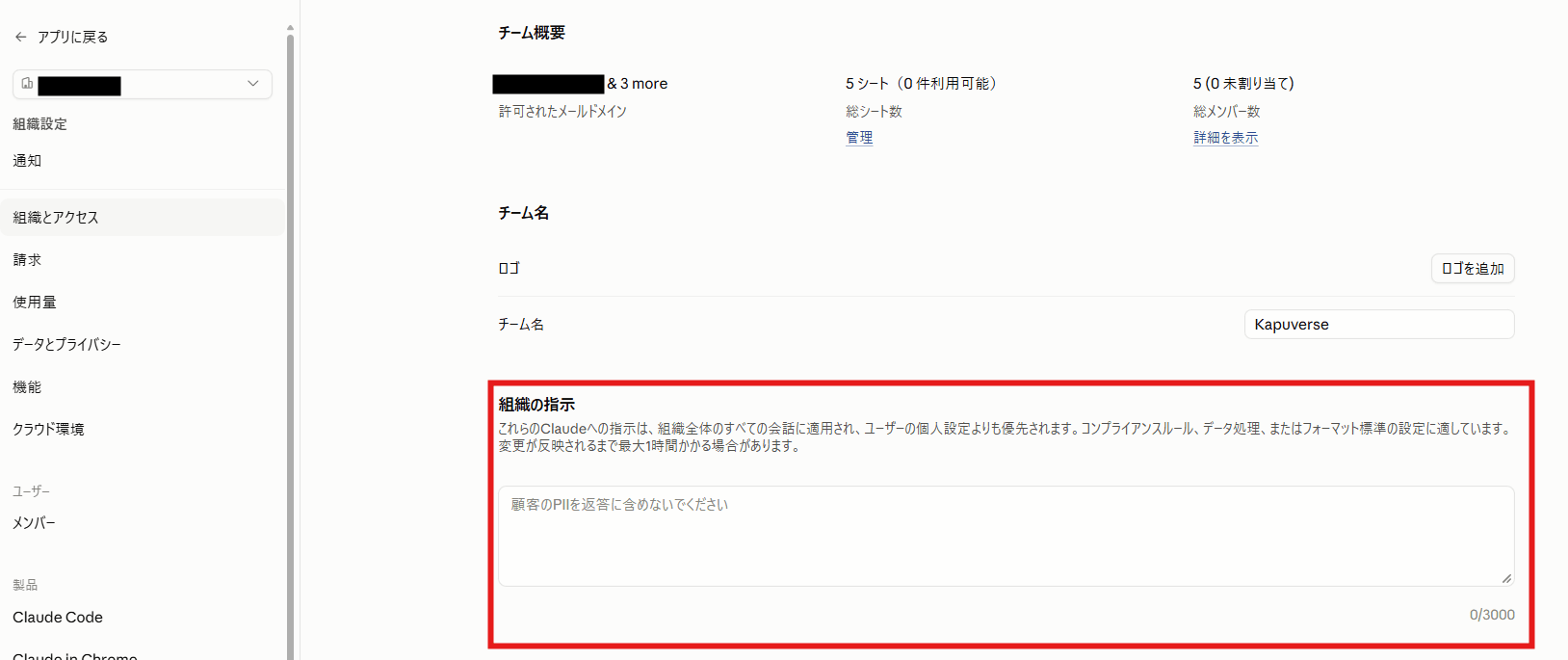
In particular, since it can be applied to all users and sessions, you can pass internal writing rules and compliance notes to Claude in advance.
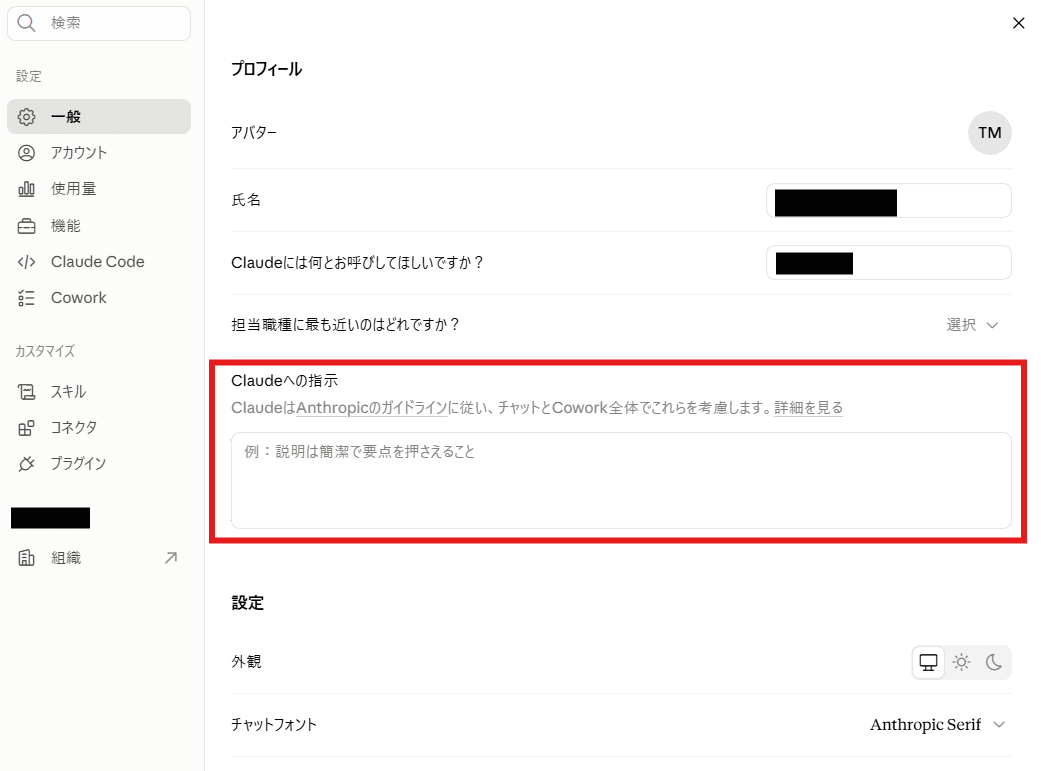
Also, users can set individual instructions, but if they conflict with the organization's instructions, the organization takes priority, which makes it a distinctive feature that you can simply set the rules you want Claude to follow as a company.
User-side settings screen
For ChatGPT Business
On the other hand, within the scope confirmed this time, ChatGPT Business did not have a feature equivalent to Claude Team's Organization Instructions — one that allows administrators to provide common instructions across all regular ChatGPT conversations.
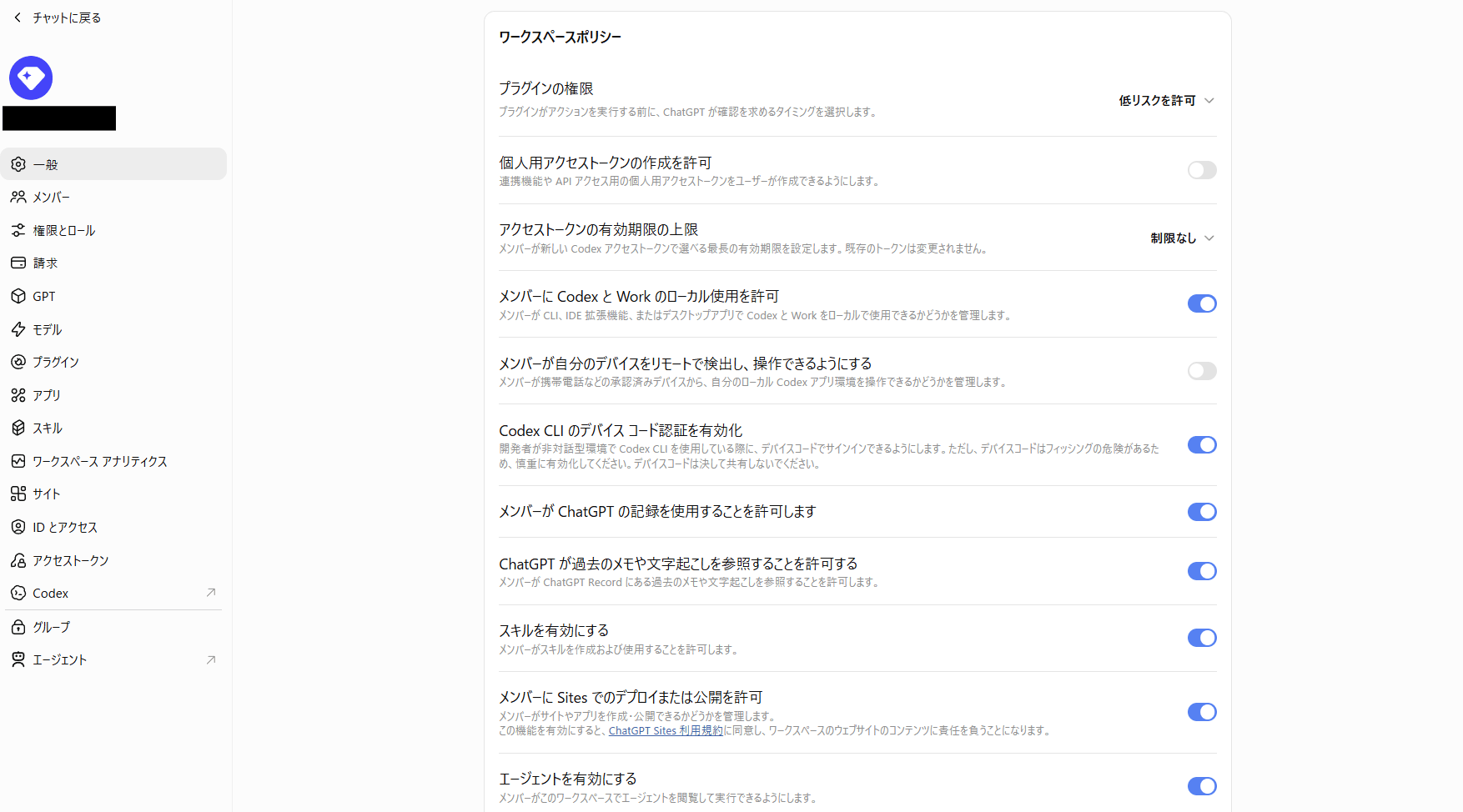
※I'm showing the general page as an example, but after checking other pages as well, there were no items for uniformly setting a system prompt.
Features and apps available at the workspace level can be managed, but in terms of giving the AI organization-wide common rules for its responses, the approach differs from Claude Team.
However, instructions (prompts) can be set in agents and the Codex described later, so it is possible to give certain rules by having the organization prepare a specific-purpose agent and having users use that agent.
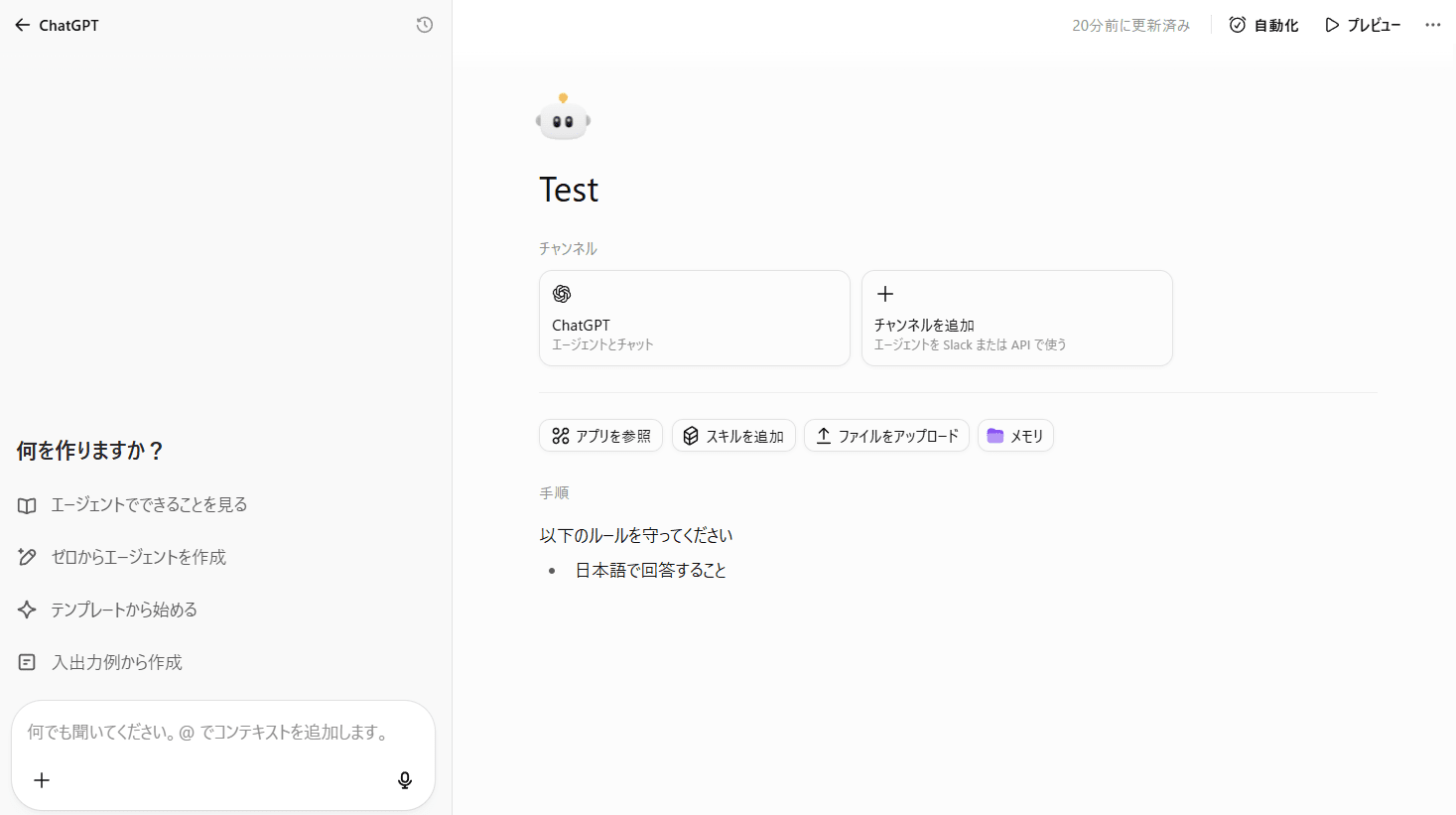
With ChatGPT Business, it could also be read that shared system prompts are agent-based.
For Gemini Enterprise Standard
Within the scope confirmed this time, Gemini Enterprise Standard also, similar to ChatGPT Business, did not have a mechanism for administrators to forcibly set organization-wide common instructions for regular chats.
As something close to this, there are Prompt Chips, where administrators can prepare prompts suited to various purposes in advance for users to select and use. However, this is meant to assist users in using prompts and does not apply common instructions to all conversations.
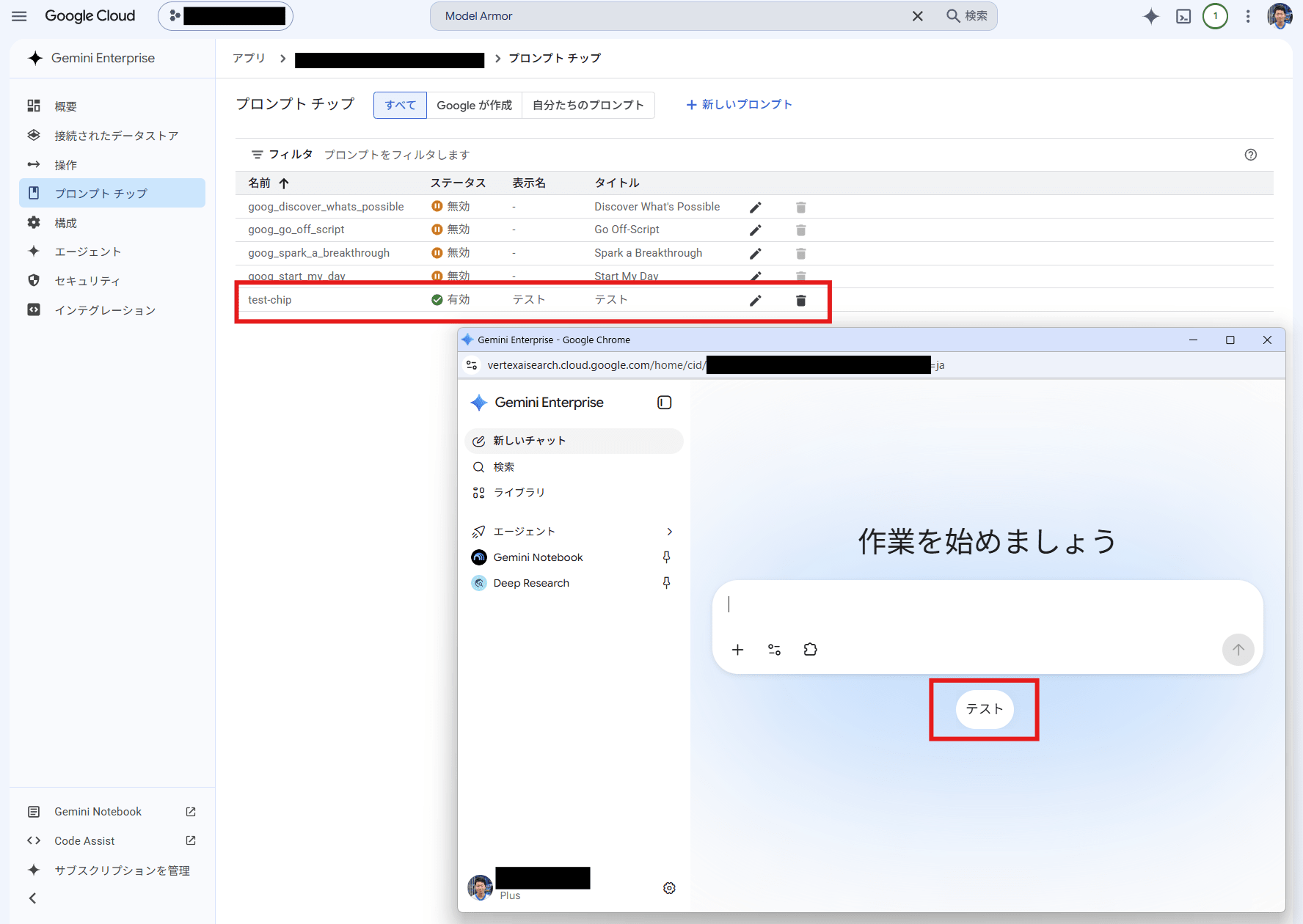
On the other hand, while slightly different from instructions to AI, Gemini Enterprise Standard provides protection for input and output through Model Armor. Using Model Armor, you can detect prompt injections, jailbreaks, harmful content such as hate speech, and interactions involving sensitive information, and block problematic prompts and responses.
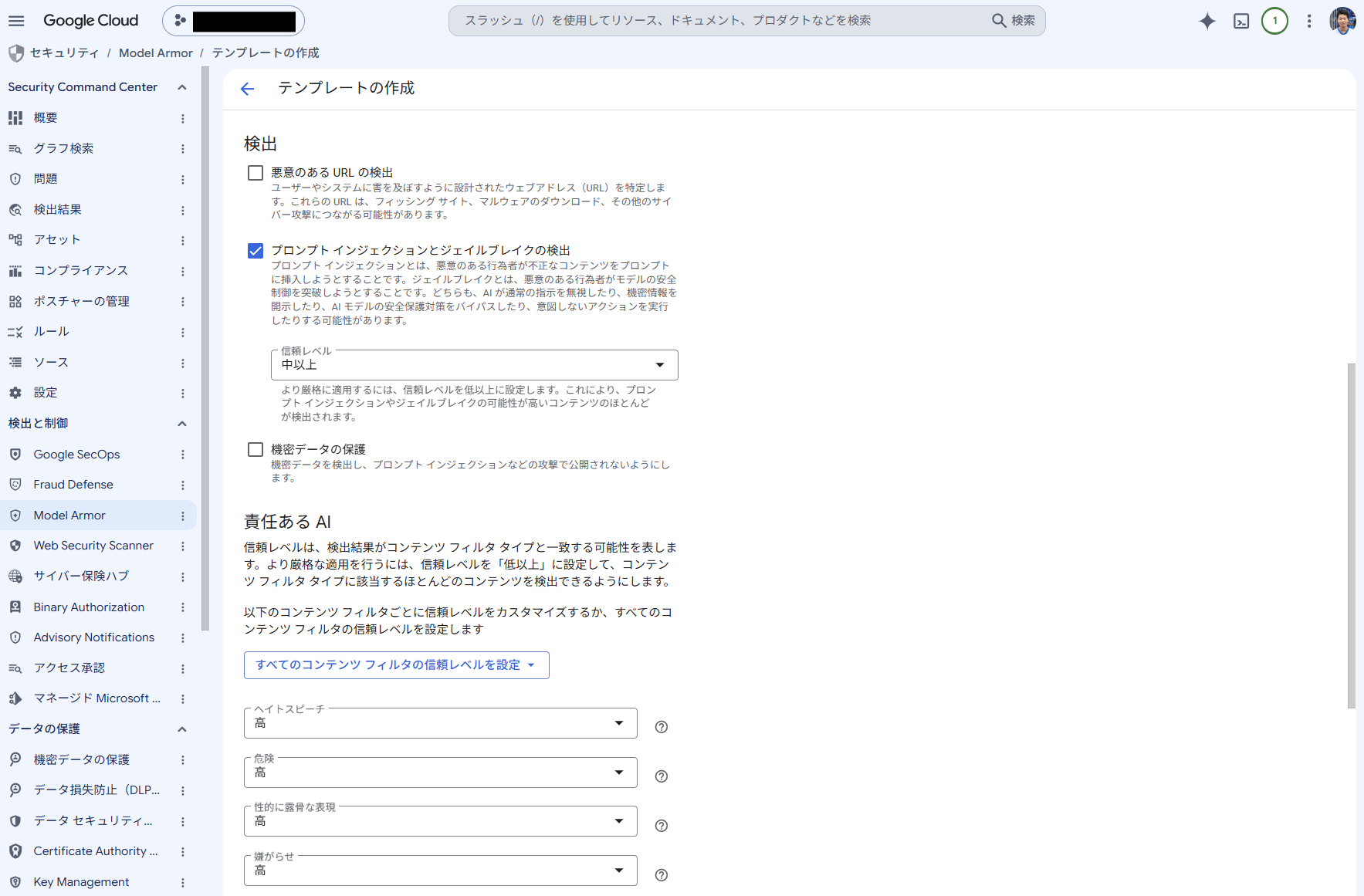
Therefore, rather than giving the AI organization-wide instructions, a governance mechanism is provided from the perspective of security — not allowing certain types of interactions.
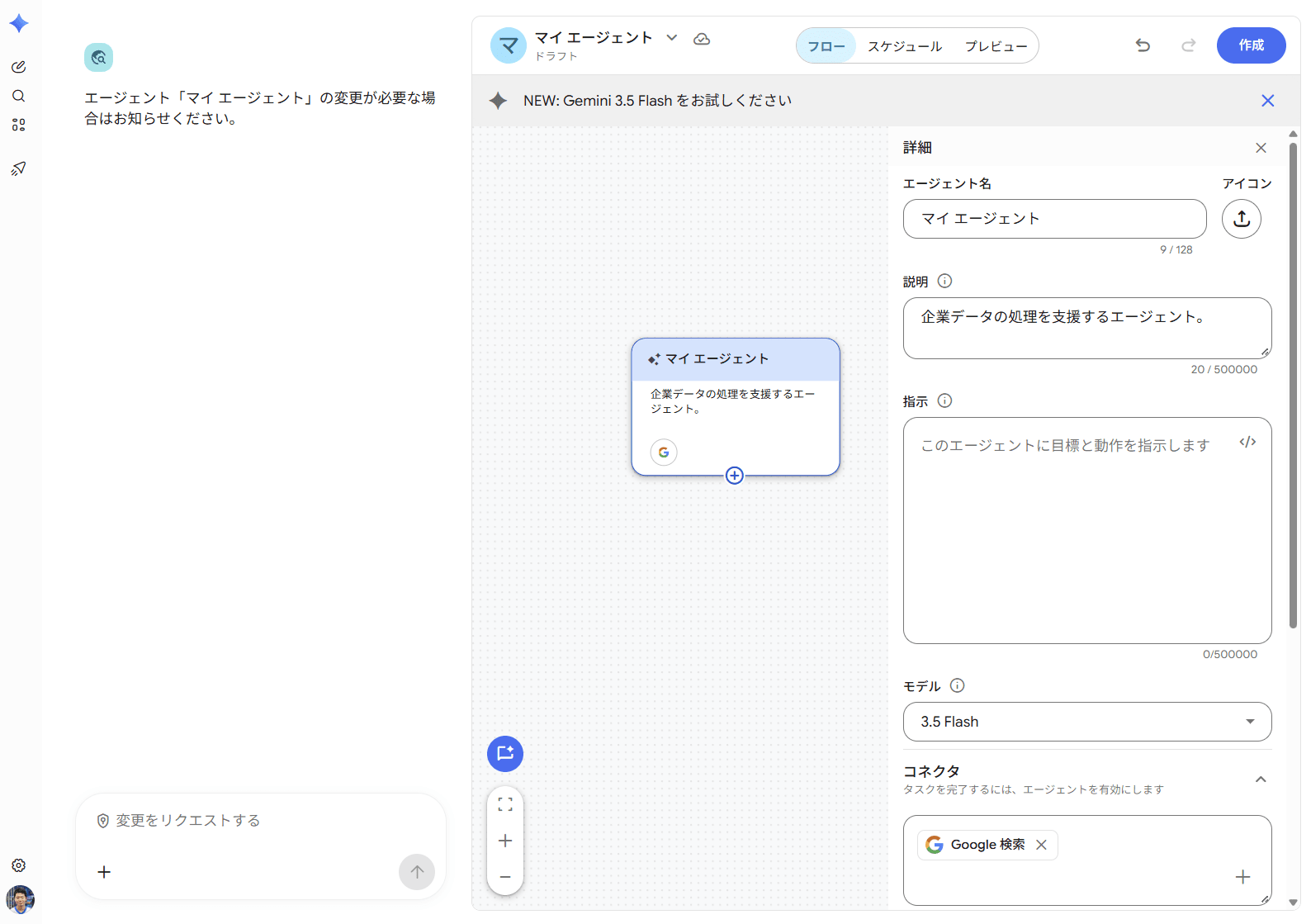
Note that Gemini Enterprise also has an agent mechanism similar to ChatGPT, so it is possible to insert instructions using that.
Restricting Connections to External Services
Next, let's check how much you can manage the connections to external services that users can access from AI.
Recent generative AI services have increasingly gone beyond simple chat, connecting to external services such as Google Drive, Slack, and GitHub (like connectors in Claude) to retrieve information, and even performing operations such as sending emails and creating tickets.
For personal use, it's fine for users to connect at their own discretion, but when deploying within an organization, you'll want to manage which services connections are allowed to, and what operations are permitted for connected services.
For Claude Team
In Claude Team, you can manage the connectors available within the organization from the organization settings.
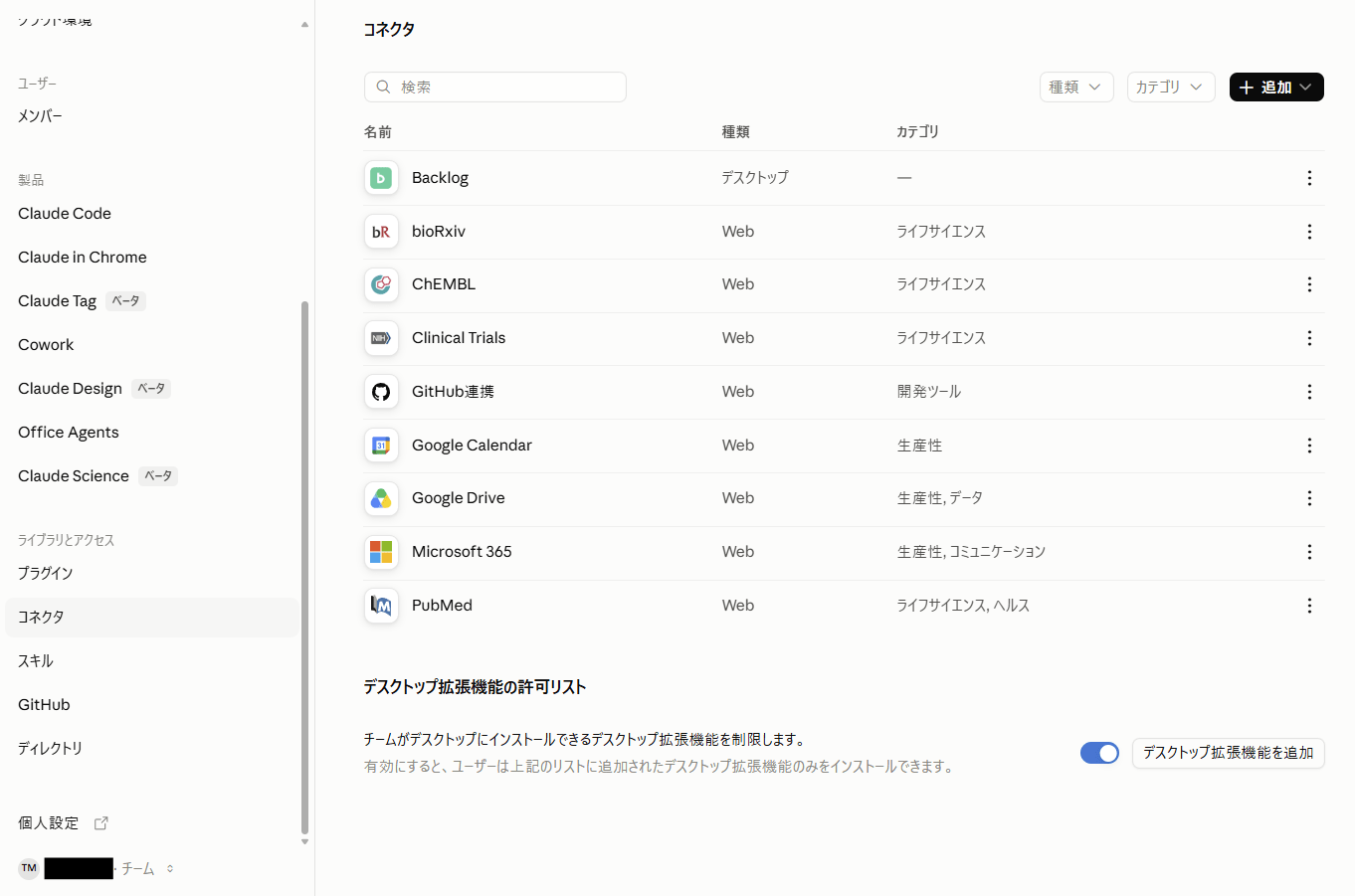
After an administrator adds a connector to the organization, each user authenticates their own account to use it. Therefore, for connectors in the directory (a marketplace-like section within Claude's organization settings), rather than users freely adding any connector they want, administrators can select which ones are approved for organizational use.
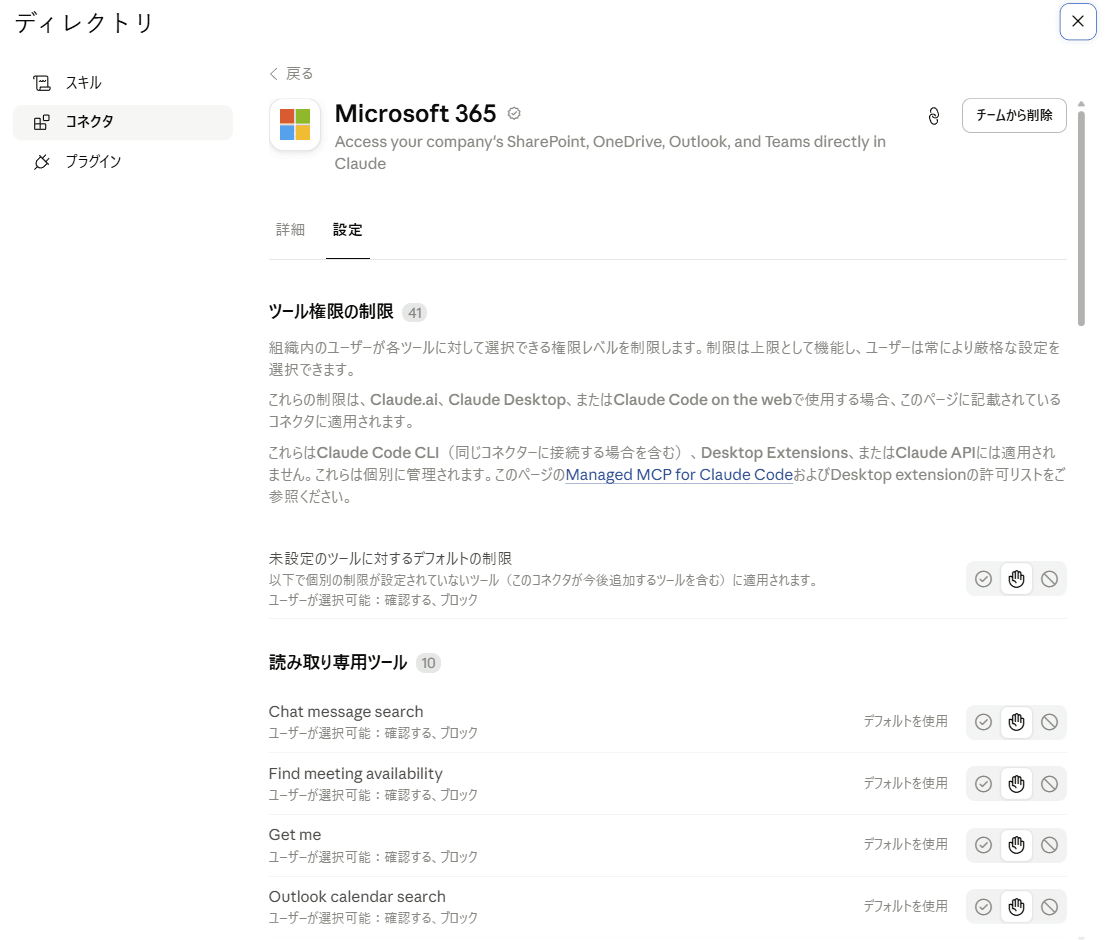
Additionally, depending on the connector, available operations can be controlled in the form of always allowing, requesting confirmation at runtime, or blocking.
For ChatGPT Business
In ChatGPT Business, settings for external connections are configured under the name "Apps."
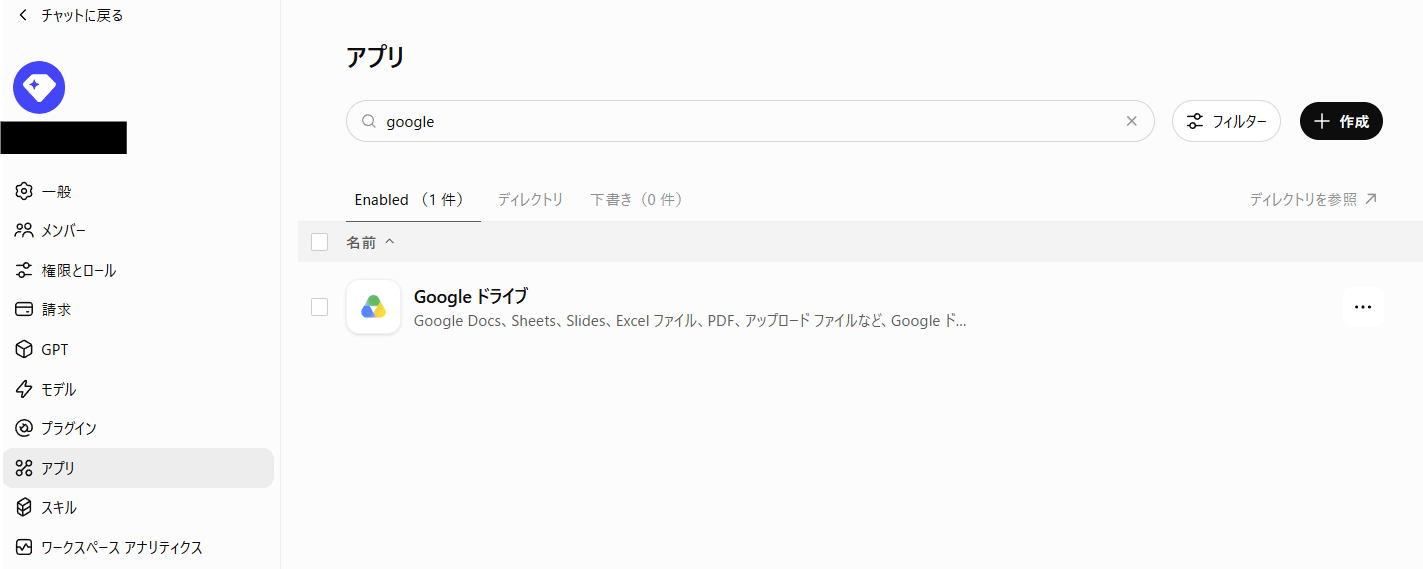
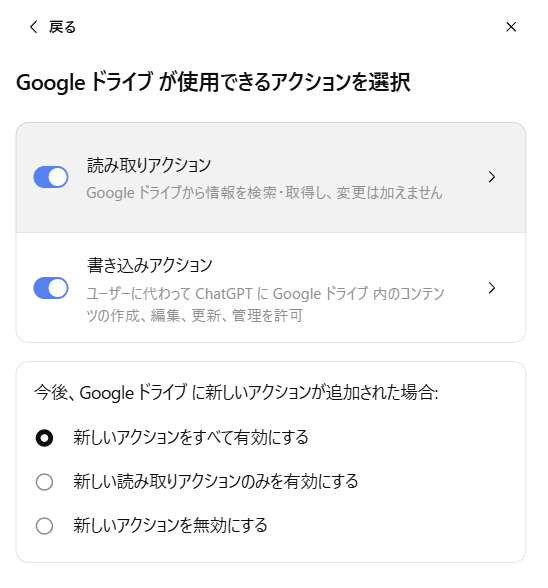
Not only can apps be enabled/disabled, but similar to Claude, available operations can be controlled in detail. (This may depend on the app's implementation.)
For Gemini Enterprise Standard
In Gemini Enterprise, connections to external SaaS and other services are made in units called data stores.
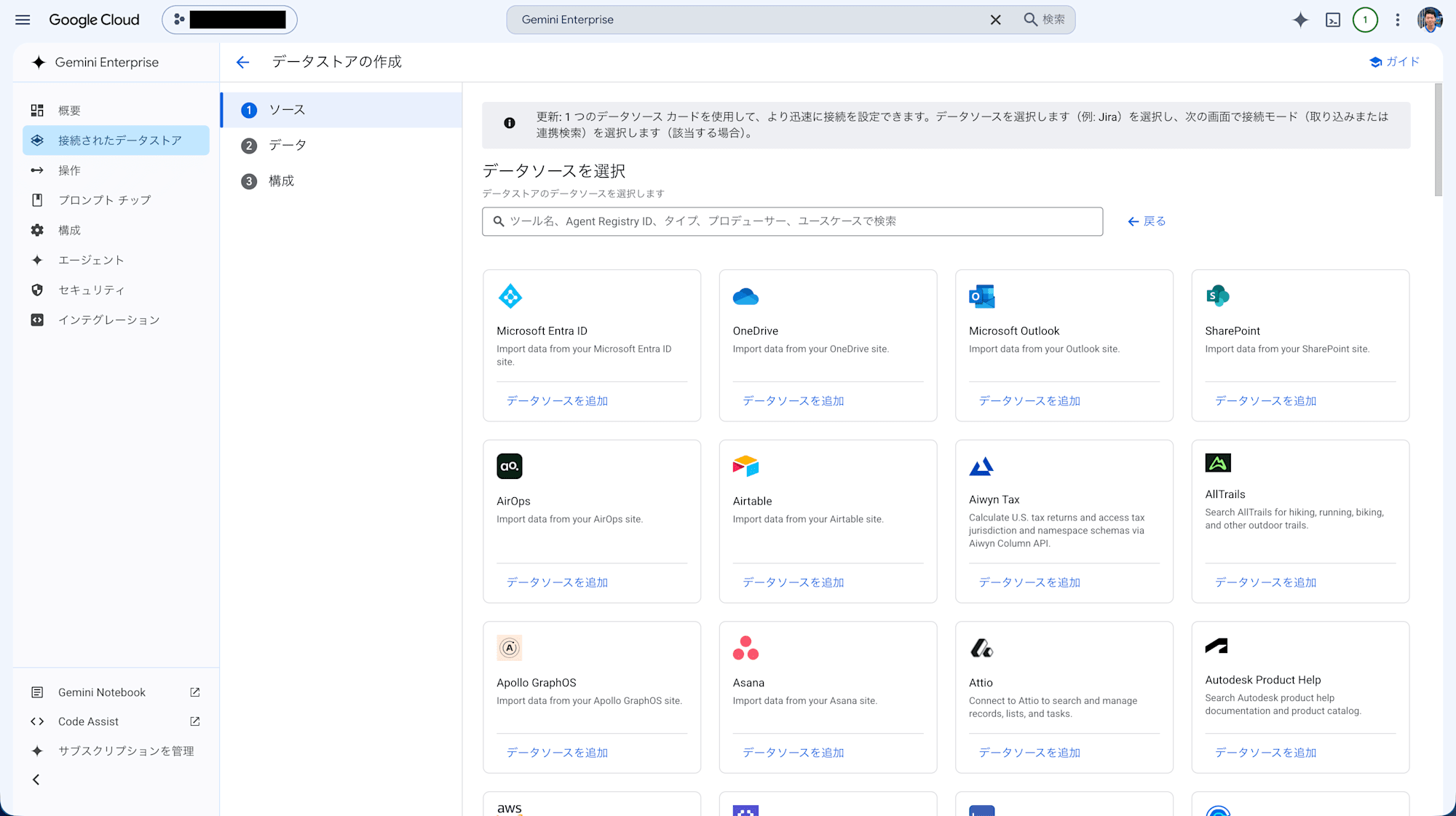
Also, since Gemini itself is a Google service, the integrations with Google and Google Cloud services had quite granular data store separations.
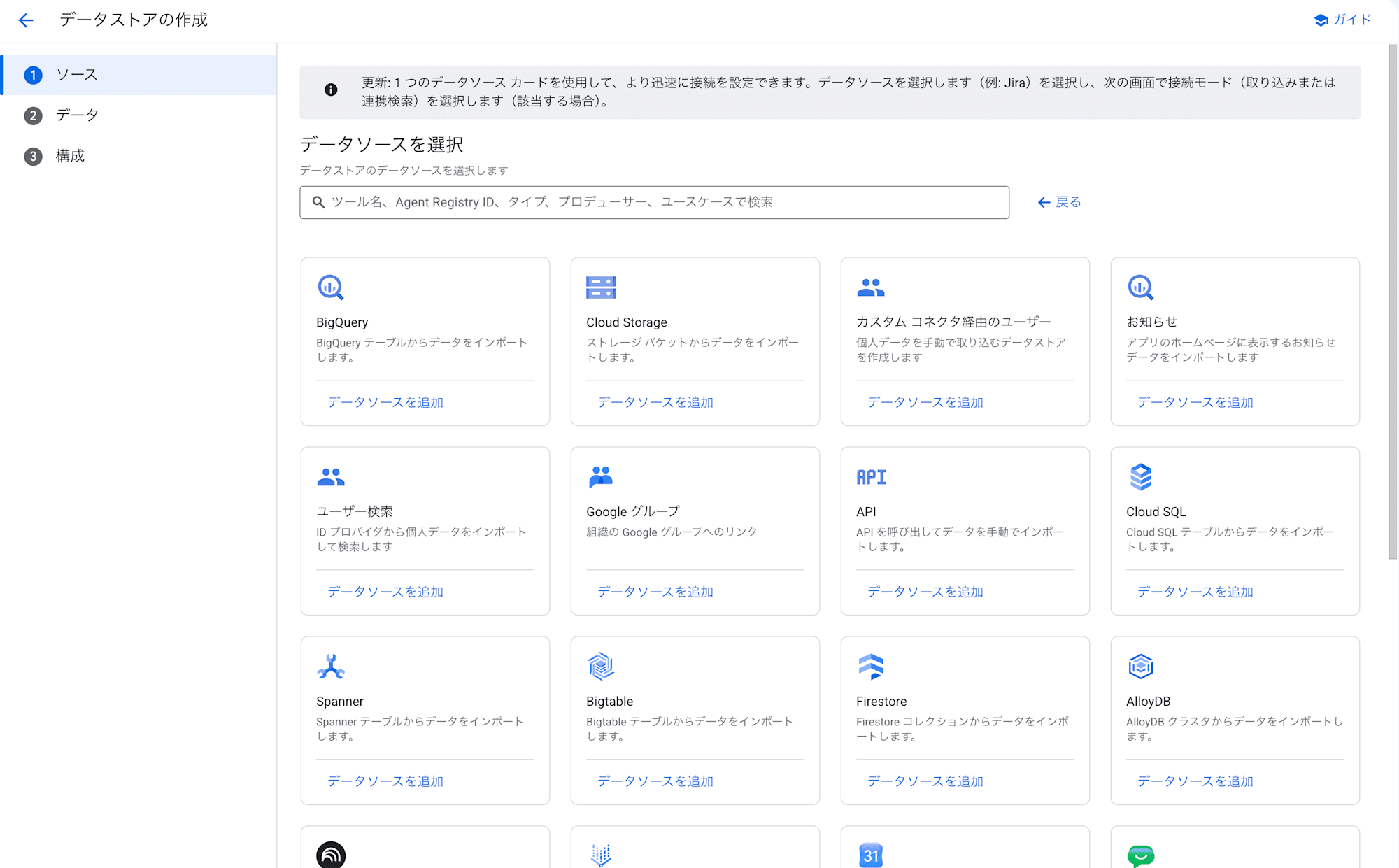
Therefore, if you're operating systems on Google Cloud, it seems convenient for doing operation-system-specific Q&A, such as having Gemini answer based on live data.
All three services allow management of connections to external services, but looking at the actual admin screens, some services allow management not just of simple enable/disable, but also of available operations.
Especially when allowing generative AI to write to external services, I thought it would be easier to manage operations from a governance perspective by checking not just the connection itself, but also which operations are permitted.
Controlling the Behavior of Coding Agents
Finally, let's check how much administrators can control the behavior of coding agents like Claude Code and Codex when used within an organization.
Coding agents don't just respond in chat — they may read and write local files, execute commands, and access networks.
Therefore, when deploying within an organization, you'll want governance not just over whether they can be used, but also over which files, directories, and command executions are allowed or denied.
For Claude Team
Claude has a service called Claude Code.
For organizational plans (Claude Team/Enterprise), there are managed settings that administrators can distribute, and control is possible by writing in JSON and distributing the file via organization settings or MDM.
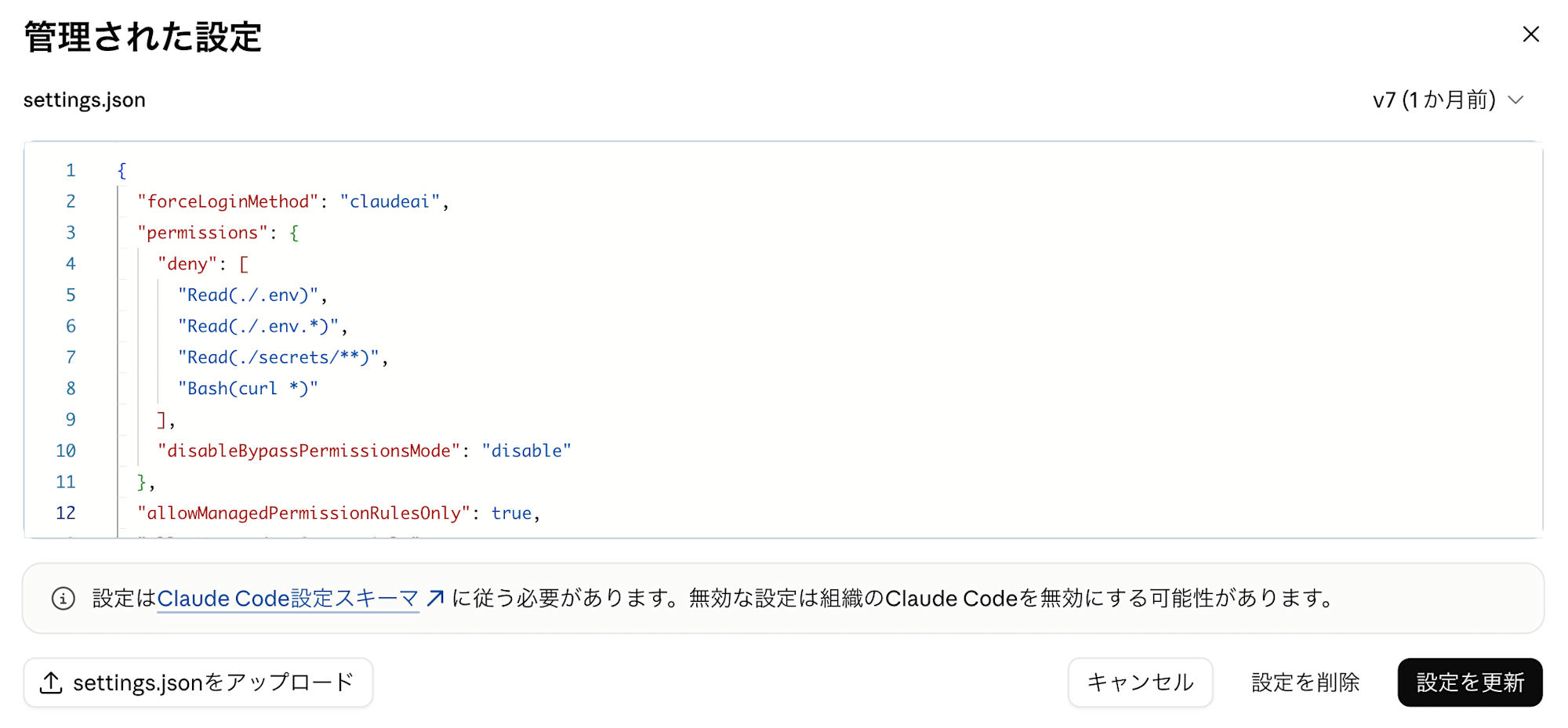
Settings can be configured in quite fine detail, and things like denying execution of specific commands or paths can be done quite flexibly.
Configuration example:
{
  "forceLoginMethod": "claudeai",
  "permissions": {
    "deny": [
      "Read(./.env)",
      "Read(./.env.*)",
      "Read(./secrets/**)",
      "Bash(curl *)"
    ],
    "disableBypassPermissionsMode": "disable"
  },
  "allowManagedPermissionRulesOnly": true,
  "allowManagedMcpServersOnly": true,
  "strictKnownMarketplaces": [],
  "allowManagedHooksOnly": true,
  "sandbox": {
    "enabled": true,
    "failIfUnavailable": true,
    "allowUnsandboxedCommands": false
  },
  "disableAutoMode": "disable",
  "disableRemoteControl": true
}
To highlight some easy-to-understand points:
- Restricting login methods and the organizations allowed to log in (can also be distributed from Claude organization settings, but distributing the file via MDM in advance is recommended)
- Controlling execution of specific commands or paths
- Configuring allowed/denied MCP servers
- Denying auto-approval mode
- Enforcing specific hooks
- Forcing log transmission via OpenTelemetry
and more can be configured.
It's not uncommon for SaaS services to reserve granular control for higher-tier plans, but being able to configure this much even in the Claude Team plan for small-to-medium organizations is extremely convenient.
In addition, beyond JSON, checking the organization settings screen showed that on/off toggles for features and similar settings made it appear to be the most feature-rich in terms of configuration.

For ChatGPT Business
In ChatGPT, a service called Codex corresponds to the coding agent service.
Compared to Claude, the organizational settings for Codex in ChatGPT Business are quite simple and minimal.
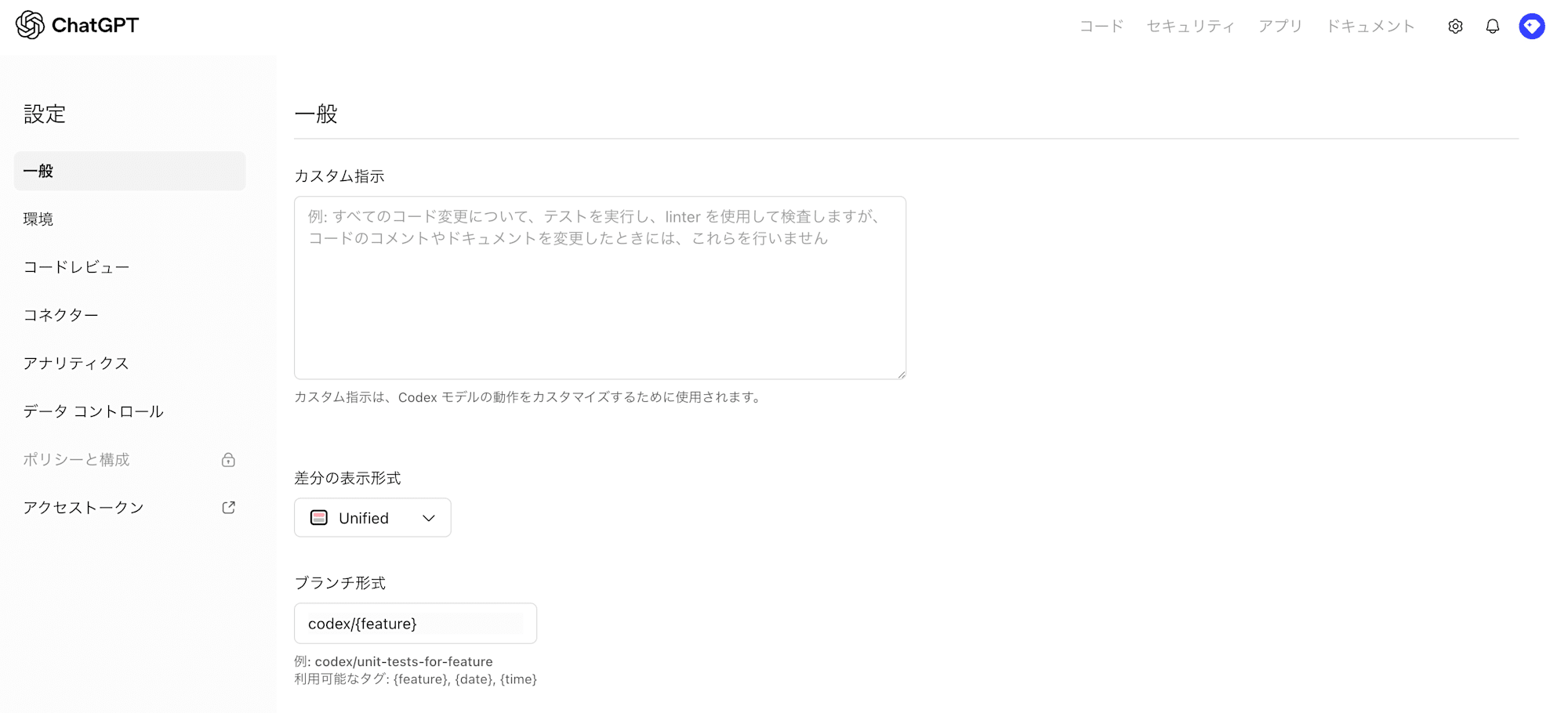
What can be configured by administrators mainly includes the following:
- System prompt settings
- Diff display style
- Git branch format used in Codex
- Container settings when using Codex in a cloud environment, access permissions to GitHub repositories
- Connector (GitHub, Slack, Linear) settings
The policy feature equivalent to Claude Code's managed settings does exist as a function, but since the related settings cannot be enabled without Enterprise, it is effectively an Enterprise-only feature.
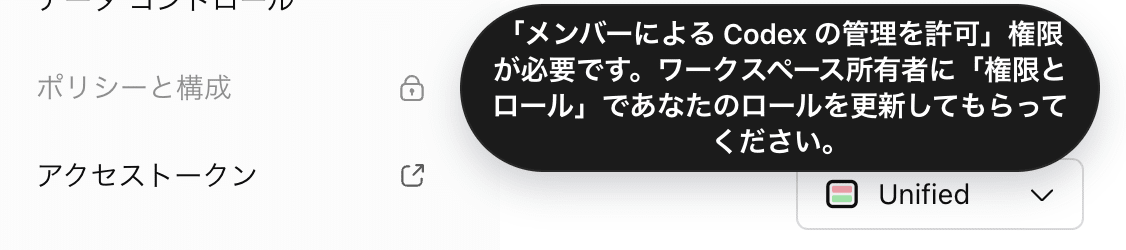

Therefore, with ChatGPT Business, the impression was less about controlling Codex's own behavior and more about configuring features and external connections. (Since policy settings are available in Enterprise, I'd like to try ChatGPT Enterprise as well.)
For Gemini Enterprise Standard
In the case of Gemini, Antigravity is the equivalent of Claude Code or Codex, but its handling is somewhat special.
When using Antigravity included in Gemini Enterprise Standard, an invoiced billing account is required. Note that self-service (online) accounts using credit cards and direct contracts cannot access Antigravity included in Gemini Enterprise Standard.
Your project must have Cloud Billing enabled and use an invoiced account. For more information, see Cloud Billing account types.
Before you begin - Invoiced billing account (confirmed 2026/8/12 23:20)
Antigravity included in Gemini Enterprise Standard allows you to control whether command execution requires approval, sandbox execution, external site access control, and enforcement of log recording.
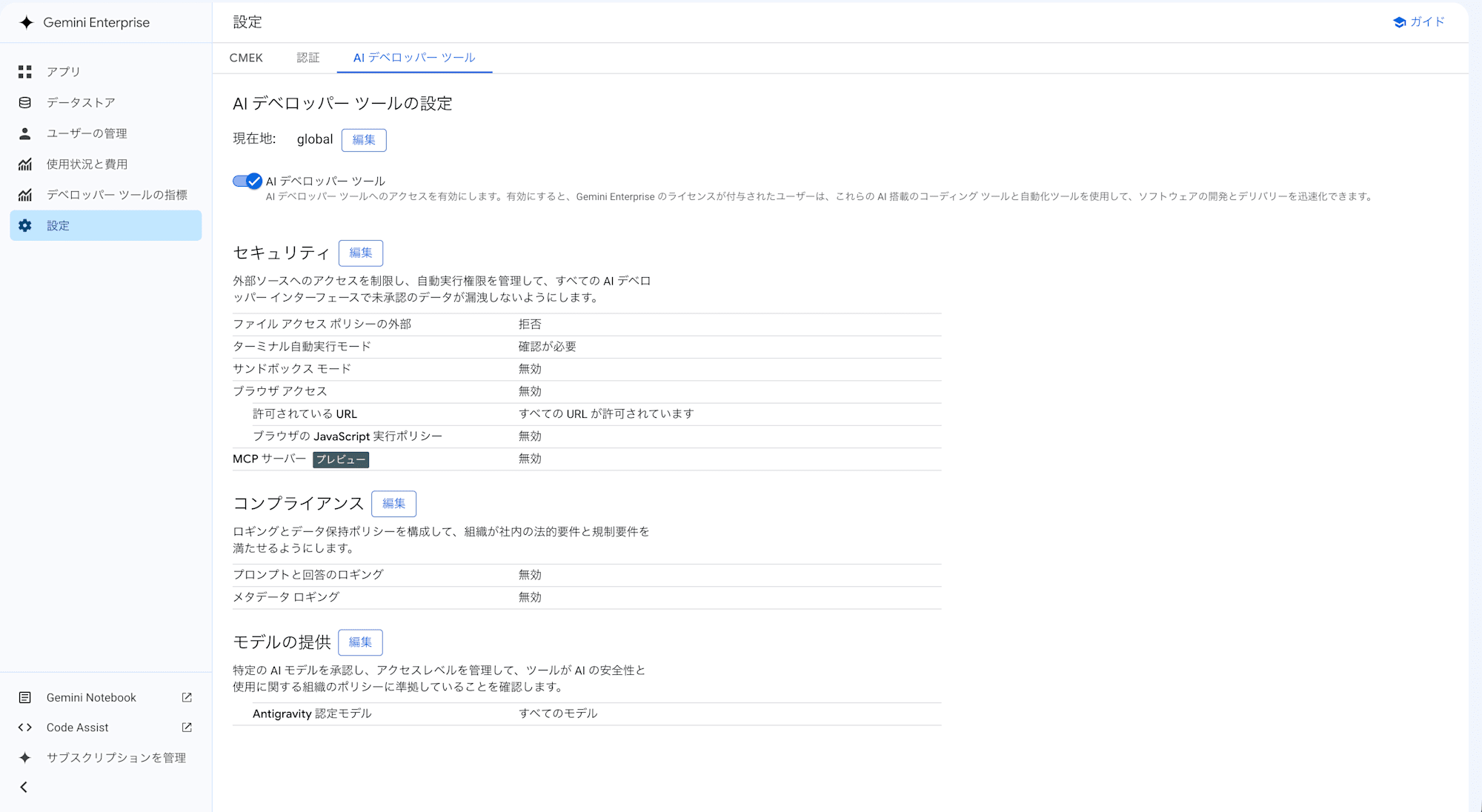
If you're using a self-service (online) account, while not a complete alternative, you can control agent behavior by placing a JSON settings file in a specific directory (~/.gemini/antigravity-cli/settings.json).
However, please note that settings can be overridden by passing specific options at Antigravity startup, so enforcing specific policies is not possible.
Rather than which is superior, I felt there are differences in governance approaches: Claude granularly controls the coding agent's own behavior from the administrator side, ChatGPT Business manages the features and connection targets used in Codex, and Gemini Enterprise Standard manages the usage environment, external access, logs, and so on.
In particular, a distinctive feature of Claude Team is that even on the plan for small-to-medium organizations, administrators can enforce settings for commands, file access, MCP servers, hooks, and more through Claude Code's Managed settings. On the other hand, with ChatGPT, more granular policy control is Enterprise-only, and Business centers on configuring features and external services available in Codex.
For Gemini Enterprise Standard, a simple comparison is difficult due to contract constraints for accessing Antigravity, but mechanisms are in place for the organization to manage external access, usage models, logs, and more.
Even with the same coding agents, there were differences — including fundamental design philosophy — in how much administrators can control behavior in organizational plans. Especially when considering broad deployment to developers, it seems worthwhile to check not just model performance and coding ability, but also the scope of settings that administrators can enforce.
What to Choose? How to Choose?
So far, I've looked at the management settings of these three services from the perspectives of instructions to AI, connections to external services, and coding agents.
Having actually tried them, while all services provide governance features for organizations, there were differences in how much and in what units administrators can exercise control. Therefore, rather than which service is best, it seems better to first organize what the organization wants to manage and then make a selection.
If you want to apply organization-wide rules to AI including regular chat, or if you want fine-grained control over commands, file access, MCP servers, and more for coding agents, I found Claude Team's management approach to be the most straightforward.
In particular, even in the Team plan for small-to-medium organizations, the ability to enforce settings from the administrator side for AI and coding agent behavior felt both distinctive and appealing.
ChatGPT Business, compared to Claude Team, has fewer granular enforcement policies for Codex, but it allows management of a wide range of features — apps, agents, Codex, and more — centered on ChatGPT, all within a workspace. The number of readily available apps in ChatGPT was also overwhelmingly larger in my impression. (Including non-SaaS items, there were over 2,000.)
Since the configurable content is quite simple, it seems like a good option if you want to start with external connection-based usage availability settings and deploy broadly. If more granular governance becomes necessary, you'd consider ChatGPT Enterprise as well.
Gemini Enterprise Standard was distinctive for its granularly prepared connections to Google and Google Cloud services. If you're already operating systems on Google Cloud or want to leverage data accumulated in Google services through generative AI, it seems to be a good fit. Also, if the contract conditions are met, Antigravity can also have external access, command execution, logs, and more managed from the organization side, making it a viable option for those who want to consolidate management of a Google Cloud-centered AI usage environment.
In actual implementation, while model performance is also important, you'll also need to consider pricing, SSO and user management, log storage, data handling, and compatibility with existing internal systems.
Having tried various things, when focusing on governance, I think the optimal choice can be made by organizing in advance what kinds of usage you want to permit, and conversely, what you want to prevent.
Closing
I actually subscribed to the three major services and checked the settings from the perspective of governance when used within an organization.
From a personal standpoint, you tend to focus on model performance and new services and features, but when using them within an organization, the perspective of how much administrators can control also becomes important.
Also, even with similar features, there were differences in management methods and governance targets between each service.
Especially as coding agents come to handle file operations and command execution by AI, it seems necessary to check not just whether they can be used, but also how much the organization can control their behavior.
Since this was a personal subscription, I mainly looked at plans for small-to-medium organizations, but higher-tier plans come with additional governance features. Including features I wasn't able to cover this time, I'd like to compare Enterprise plans as well if the opportunity arises.
Personally, it was interesting to actually subscribe to all three and compare the admin screens side by side, as it let me see differences in each service's design philosophy that are hard to notice when just using them as a regular user.
There are many other generative AI services and various features, so I hope to try some more and write about them somewhere down the line.
That's a wrap for the 15th entry of the "Summer Vacation Science Project Relay" — "I Implemented Claude Team, ChatGPT Business, and Gemini Enterprise Standard, So I Took a Look at Their Settings from a Governance Perspective"!
The next entry will be handed off to Kawa-san, who plans to cover the theme "I built a 4-player voice chat Othello game because WebRTC SFU looked interesting — even though it's a bit late to the party." Stay tuned!
