
I Tried Splitting, Classifying, and Extracting Fields from a Single PDF All at Once with Amazon Textract Insights

This page has been translated by machine translation. View original
Hello, this is Keima.
In practice, it's common for a single PDF to contain multiple types of documents.
Traditionally, you had to implement your own logic for splitting and classifying documents, and then combine it with a separate field-extraction process.
Amazon Textract Insights, which became GA on November 20, 2026, can run everything from text reading to per-document splitting, type classification, and field extraction in a single asynchronous request.
You can also check how confidently each document was classified.
In this article, I prepared a single PDF combining a bank statement, a payslip, a Japanese invoice, and an English invoice, and verified whether it is split and read correctly and how the classification confidence is output.
I also tried the newly added features: Markdown output for RAG, summarization, custom blueprints, and PII redaction (masking).
0. Prerequisites
| Item | Value |
|---|---|
| AWS CLI | 2.42.1 |
| Region | us-east-1 (N. Virginia) |
| Date run | November 22, 2026 |
Textract Insights is currently not available from the Management Console.
According to the FAQ, you need to use the AWS SDKs or the AWS CLI in us-east-1 or us-west-2 to get started.
To get started with Amazon Textract Insights, use the AWS SDKs or the AWS CLI in the US East (N. Virginia) or US West (Oregon) Region.
Source: Amazon Textract FAQs | AWS
1. What Textract Insights can do
Textract Insights reads documents according to a blueprint (a JSON Schema that defines the fields you want to extract, with a description for each field).
A single request can perform the following:
-
Split a file containing multiple document types (up to 3,000 pages) into individual documents
-
Automatically select the most suitable blueprint for each split document
-
Extract fields according to the blueprint and return a confidence score and page position (coordinates) for each value
-
Convert the entire document to Markdown, HTML, or plain text (tabular data can also be output as CSV)
-
Generate document summaries and figure captions
-
Detect personally identifiable information (PII) and output a separate redacted file
You can define your own blueprints, and you can also use ones prepared in advance by AWS.
When I ran aws textract list-blueprints --resource-owner SERVICE in us-east-1, I found 35 types, including Invoice, Bank-Statement, Payslip, and W-2.
The supported languages are English, French, German, Italian, Portuguese, and Spanish, and Japanese is not officially supported.
Amazon Textract Insights supports PDF, PNG, JPEG, and TIFF inputs and processes documents in English, French, German, Italian, Portuguese, and Spanish.
2. Preparing the documents
This time, I combined the following four documents into a single five-page PDF.
The three points I want to verify are:
-
Document boundary detection: can a bank statement spanning two pages be recognized as one document?
-
Type classification: are invoices in both Japanese and English assigned to the same blueprint?
-
Behavior with an unsupported language: how much can be read when a Japanese invoice, whose language is not supported, is mixed in?
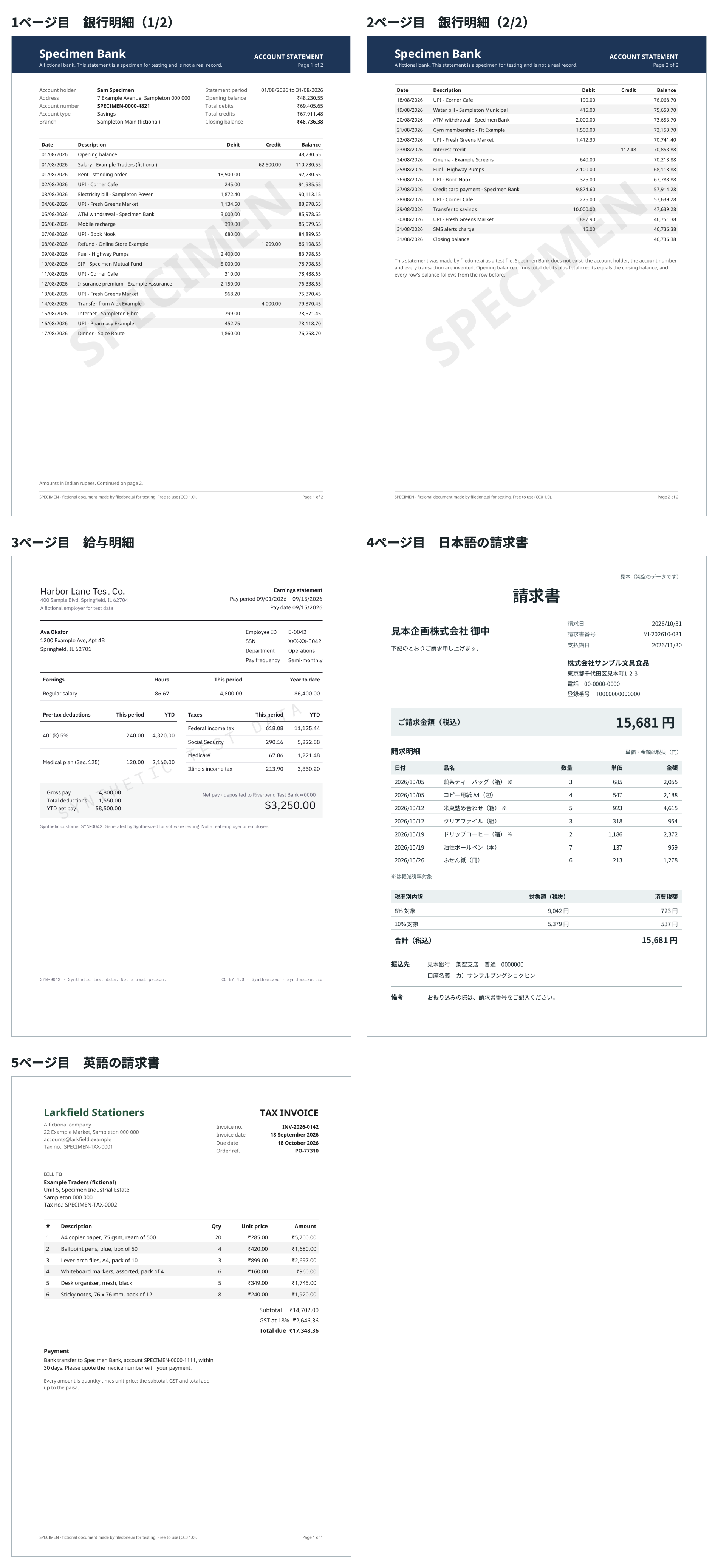
The test PDF (pages 1 to 5, from top left to right)
| Page | Document | Source / License |
|---|---|---|
| 1–2 | Bank statement | Sample bank statement PDF | filedone, CC0 |
| 3 | Payslip | Sample pay stub for testing | Synthesized, CC BY 4.0 |
| 4 | Japanese invoice | A fictitious document created for this article |
| 5 | English invoice | Free sample files for testing | filedone, CC0 |
I merged the four prepared PDFs into one.
pdfunite sample-bank-statement.pdf pay-stub-syn-0042-clean.pdf ja-invoice.pdf sample-invoice.pdf packet.pdf
3. Creating S3 buckets and uploading
Textract Insights reads documents on S3 and writes results to S3 as well.
So I create separate input and output buckets and upload the PDF.
Note that the buckets must be created in the same region where you run the job.
export AWS_PROFILE=<YOUR_PROFILE>
export AWS_REGION=us-east-1
ACCOUNT=$(aws sts get-caller-identity --query Account --output text)
IN=textract-insights-in-$ACCOUNT
OUT=textract-insights-out-$ACCOUNT

aws s3 mb s3://$IN
aws s3 mb s3://$OUT
aws s3 cp packet.pdf s3://$IN/packet.pdf
4. Creating a project and running a job
In Textract Insights, you define the reading settings in advance as a project and specify that project when starting a job.
You register in the project the blueprints that correspond to the documents to be processed.
Official AWS blueprints are provided for common documents.
Representative ones include Invoice, Receipt, Bank-Statement, Payslip, and US-Passport.
This time I use the following three of them.
| Blueprint used | Documents it reads |
|---|---|
| Bank-Statement | Bank statement |
| Payslip | Payslip |
| Invoice | Japanese invoice, English invoice |
If no official blueprint fits your document, or if the fields you need are missing, you use a custom blueprint of your own.
The steps for creating and configuring a custom blueprint are covered later in Chapter 6.
First, I try only the three official blueprints.
The following command registers the three blueprints and creates a project with splitting, Markdown output, and summarization enabled.
PROJECT_ARN=$(aws textract create-project \
  --project-name packet-run1 \
  --extraction-configuration '{
    "BoundingBox": {"State": "ENABLED"},
    "Granularity": {"Types": ["DOCUMENT", "PAGE", "ELEMENT"]},
    "OutputFormat": {"TextFormat": {"Types": ["MARKDOWN", "HTML", "PLAIN_TEXT", "CSV"]}, "AdditionalFileFormat": {"State": "ENABLED"}}
  }' \
  --generative-configuration '{"Summarization": {"State": "ENABLED"}, "FigureCaption": {"State": "ENABLED"}}' \
  --splitter-configuration '{"State": "ENABLED"}' \
  --custom-configuration '{"Blueprints": [
    {"BlueprintArn": "arn:aws:textract:us-east-1:aws:blueprint/public-invoice"},
    {"BlueprintArn": "arn:aws:textract:us-east-1:aws:blueprint/public-bank-statement"},
    {"BlueprintArn": "arn:aws:textract:us-east-1:aws:blueprint/public-payslip"}
  ]}' \
  --query ProjectArn --output text)
echo $PROJECT_ARN
The parameters are summarized below.
-
--extraction-configuration: Extraction settings for the whole document.Granularityis the granularity at which text is returned (whole document, page, or element such as headings and tables), andTextFormatspecifies the output formats. SettingAdditionalFileFormattoENABLEDalso generates standalone files such asresult.mdBoundingBox: Includes the position coordinates of extracted elements on the page in the output
-
--generative-configuration: Enables summarization (Summarization) and figure caption generation (FigureCaption) -
--splitter-configuration: Automatic splitting of mixed documents. It works only when blueprints are registered -
--custom-configuration: The set of blueprints that are candidates for matching. The best blueprint is selected automatically for each document
After creating the project, start a job and wait for it to finish.
JOB_ARN=$(aws textract start-document-insights \
  --input-configuration "{\"S3Uri\": \"s3://$IN/packet.pdf\"}" \
  --output-configuration "{\"S3Uri\": \"s3://$OUT/run1\"}" \
  --project-arn "$PROJECT_ARN" \
  --query JobArn --output text)

while true; do
  STATUS=$(aws textract get-document-insights --job-arn "$JOB_ARN" --query Status --output text)
  [ "$STATUS" != IN_PROGRESS ] && break
  sleep 15
done
echo $STATUS

aws s3 sync s3://$OUT/run1/ results/run1/
# Example output
SUCCEEDED
In my environment, the job for the five-page PDF finished in about one minute.
Under the locally downloaded results/run1/<job ID>/ directory, files are output with the following structure.
# Example output (contents of results/run1/<job ID>/. CSV and images omitted)
0/custom/0/result.json
0/custom/1/result.json
0/custom/2/result.json
0/custom/3/result.json
0/extraction/0/result.json
0/extraction/0/result.md
0/extraction/0/result.html
0/extraction/0/result.txt
...
job_metadata.json
The leading 0/ is the index of the input file, and 0 to 3 under the following custom/ and extraction/ are indexes of the split documents.
-
job_metadata.json: A metadata file summarizing the output paths of each split document and how it matched blueprints -
custom/<number>/: The result of extracting only the specific fields defined in the blueprint. -
extraction/<number>/: The result of comprehensively reading the whole document, independent of the blueprint's field definitions. Use it as context input for an LLM or for full-text search indexing
What is output to job_metadata.json
In addition to the overall job status (job_status), it records, as an array, the custom and extraction output paths for each split document and the blueprint match status (custom_status).
// Example output (first document excerpted from job_metadata.json)
{
  "job_id": "7c0cef51-995c-4fe8-a73b-19dc80972c0b",
  "job_status": "PROCESSED",
  "output_metadata": [
    {
      "asset_id": 0,
      "asset_input_path": {
        "s3_bucket": "textract-insights-in-<ACCOUNT_ID>",
        "s3_key": "packet.pdf"
      },
      "segment_metadata": [
        {
          "extraction_path": "s3://textract-insights-out-<ACCOUNT_ID>/run1/7c0cef51-995c-4fe8-a73b-19dc80972c0b/0/extraction/0/result.json",
          "custom_path": "s3://textract-insights-out-<ACCOUNT_ID>/run1/7c0cef51-995c-4fe8-a73b-19dc80972c0b/0/custom/0/result.json",
          "custom_status": "MATCH"
        }
        // The remaining documents (1-3) are output in the same way
      ]
    }
  ]
}
What is output to custom
One result.json is generated. Note that this file is not output for documents that matched none of the blueprints.
| Key | Contents |
|---|---|
matched_blueprint |
The selected blueprint and its confidence |
document_class |
Document type |
split_document |
Which pages of the original PDF (0-based) |
inference_result |
Extracted values |
explainability_info |
Confidence for each value and the position on the page where it was read |
For the Japanese invoice, the five main keys above are returned as follows.
The basis for each field in inference_result (e.g. INVOICE_DATE) is linked under the same field name in explainability_info.
// Example output (excerpt from custom/2/result.json. All five keys shown, some fields omitted, numbers rounded to 4 decimals)
{
  "matched_blueprint": {
    "arn": "arn:aws:textract:us-east-1:aws:blueprint/public-invoice",
    "name": "Invoice",
    "confidence": 1
  },
  "document_class": {
    "type": "Invoice"
  },
  "split_document": {
    "page_indices": [3]
  },
  "inference_result": {
    "INVOICE_NUMBER": "MI-202610-031",
    "INVOICE_DATE": "2026/10/31",
    "TOTAL": 15681
  },
  "explainability_info": [
    {
      "INVOICE_DATE": {
        "success": true,
        "confidence": 0.9415,
        "geometry": [
          {
            "boundingBox": {"top": 0.1351, "left": 0.8416, "width": 0.0874, "height": 0.0119},
            "page": 1
          }
        ],
        "type": "string",
        "value": "2026/10/31"
      }
    }
  ]
}
The [3] in split_document is a 0-based index, so it refers to page 4 of the original PDF.
On the other hand, page in explainability_info is the page number (1-based) within the individual split document.
What is output to extraction
The reading result of the whole document is output in the following five kinds of files (with this configuration).
| Output | Contents |
|---|---|
result.json |
The whole content and positions split into headings, paragraphs, tables, etc., plus page information and the summary |
result.md |
The whole document as Markdown. Parts recognized as tables become Markdown tables |
result.html |
The whole document as HTML. Parts recognized as tables become <table> |
result.txt |
Plain text of the whole document. Parts recognized as tables become tab-separated |
assets/ |
A CSV for each recognized table, and an image (JPEG) of each page |
Let's look at the contents of each file for the same Japanese invoice in turn.
result.json (excerpt of the summary, page statistics, and a heading element. Coordinates rounded to 4 decimals):
// Example output (extraction/2/result.json)
{
  "document": {
    "summary": "これは見本企画株式会社から株式会社サンプル文具食品への請求書で、2026年10月31日付、請求書番号MI-202610-031です。請求金額は15,681円(税込)で、煎茶ティーバッグ、コピー用紙、米菓詰め合わせ、クリアファイル、ドリップコーヒー、油性ボールペン、ふせん紙の7品目が記載されています。支払期日は2026年11月30日で、振込先は見本銀行架空支店です。"
  },
  "pages": [
    {
      "page_index": 3,
      "statistics": {"element_count": 15, "table_count": 2, "figure_count": 0, "hyperlink_count": 0}
    }
  ],
  "elements": [
    {
      "type": "TEXT",
      "sub_type": "TITLE",
      "locations": [
        {"page_index": 3, "bounding_box": {"left": 0.4302, "top": 0.066, "width": 0.1388, "height": 0.0333}}
      ],
      "representation": {"text": "請求書"}
    }
  ]
}
Unlike page on the custom side, this page_index is the page number (0-based) in the whole original PDF.
result.md (the first row of the line-item table):
| 日付         | 品名           | 数量   | 単価    | 金額    |
|------------|--------------|------|-------|-------|
| 2026/10/05 | 煎茶ティーバッグ (箱) | 3    | 685   | 2,055 |
result.html (the equivalent rows. The closing table tag is omitted):
<table><tr><th><b>日付</b></th><th><b>品名</b></th><th><b>数量</b></th><th><b>単価</b></th><th><b>金額</b></th></tr>
<tr><td>2026/10/05</td><td>煎茶ティーバッグ (箱)</td><td>3</td><td>685</td><td>2,055</td></tr>
result.txt (the equivalent rows. Columns are tab-separated):
日付	品名	数量	単価	金額
2026/10/05	煎茶ティーバッグ (箱)	3	685	2,055
assets/ (CSV of the line-item table. The first column is a 0-based row number):
,日付,品名,数量,単価,金額
0,2026/10/05,煎茶ティーバッグ (箱),3,685,"2,055"
The assets/ directory also stores rectified_image_3.jpg, the image file of the corresponding page.
5. Checking the results
5.1 How the documents were split
Summarizing matched_blueprint (the selected blueprint and classification confidence) and split_document.page_indices (page numbers of the document, 0-based) recorded in custom/<number>/result.json gives the following results.
| Document number | Pages (0-based) | Selected blueprint | Classification confidence | Actual document |
|---|---|---|---|---|
| 0 | 0, 1 | Bank-Statement | 1 | Bank statement |
| 1 | 2 | Payslip | 1 | Payslip |
| 2 | 3 | Invoice | 1 | Japanese invoice |
| 3 | 4 | Invoice | 1 | English invoice |
As a result, all four documents were split at the correct boundaries and classified to the correct blueprints.
The bank statement spanning two pages was correctly recognized as one document, and the Japanese invoice, whose language is not officially supported, matched the Invoice blueprint just like the English invoice.
The classification confidence (matched_blueprint.confidence) was also the maximum value of 1 for all four documents.
However, note that even with a classification confidence of 1, the extracted values are not necessarily perfectly correct. In fact, for the payslip, some extracted fields were missing even though the classification confidence was 1.
Results: selected blueprints and page ranges (click to expand)
Run the commands in this chapter under <job ID>/0/ in the downloaded results directory.
for i in 0 1 2 3; do jq -c '{matched_blueprint, pages: .split_document.page_indices}' custom/$i/result.json; done
// Example output
{"matched_blueprint":{"arn":"arn:aws:textract:us-east-1:aws:blueprint/public-bank-statement","name":"Bank-Statement","confidence":1},"pages":[0,1]}
{"matched_blueprint":{"arn":"arn:aws:textract:us-east-1:aws:blueprint/public-payslip","name":"Payslip","confidence":1},"pages":[2]}
{"matched_blueprint":{"arn":"arn:aws:textract:us-east-1:aws:blueprint/public-invoice","name":"Invoice","confidence":1},"pages":[3]}
{"matched_blueprint":{"arn":"arn:aws:textract:us-east-1:aws:blueprint/public-invoice","name":"Invoice","confidence":1},"pages":[4]}
Results: per-document decisions (job_metadata.json) (click to expand)
jq . ../job_metadata.json
// Example output
{
  "job_id": "7c0cef51-995c-4fe8-a73b-19dc80972c0b",
  "job_status": "PROCESSED",
  "output_metadata": [
    {
      "asset_id": 0,
      "asset_input_path": {
        "s3_bucket": "textract-insights-in-<ACCOUNT_ID>",
        "s3_key": "packet.pdf"
      },
      "segment_metadata": [
        {
          "extraction_path": "s3://textract-insights-out-<ACCOUNT_ID>/run1/7c0cef51-995c-4fe8-a73b-19dc80972c0b/0/extraction/0/result.json",
          "custom_path": "s3://textract-insights-out-<ACCOUNT_ID>/run1/7c0cef51-995c-4fe8-a73b-19dc80972c0b/0/custom/0/result.json",
          "custom_status": "MATCH"
        },
        {
          "extraction_path": "s3://textract-insights-out-<ACCOUNT_ID>/run1/7c0cef51-995c-4fe8-a73b-19dc80972c0b/0/extraction/1/result.json",
          "custom_path": "s3://textract-insights-out-<ACCOUNT_ID>/run1/7c0cef51-995c-4fe8-a73b-19dc80972c0b/0/custom/1/result.json",
          "custom_status": "MATCH"
        },
        {
          "extraction_path": "s3://textract-insights-out-<ACCOUNT_ID>/run1/7c0cef51-995c-4fe8-a73b-19dc80972c0b/0/extraction/2/result.json",
          "custom_path": "s3://textract-insights-out-<ACCOUNT_ID>/run1/7c0cef51-995c-4fe8-a73b-19dc80972c0b/0/custom/2/result.json",
          "custom_status": "MATCH"
        },
        {
          "extraction_path": "s3://textract-insights-out-<ACCOUNT_ID>/run1/7c0cef51-995c-4fe8-a73b-19dc80972c0b/0/extraction/3/result.json",
          "custom_path": "s3://textract-insights-out-<ACCOUNT_ID>/run1/7c0cef51-995c-4fe8-a73b-19dc80972c0b/0/custom/3/result.json",
          "custom_status": "MATCH"
        }
      ]
    }
  ]
}
5.2 Comparing extracted values with the ground truth
I checked the values extracted by the blueprints (inference_result) one field at a time against the ground-truth data (JSON) of each document.
The comparison rules are as follows.
-
Compared fields: fields present in both the ground truth and the blueprint definition. For line items and transaction history, all rows are compared
-
Match criteria: values match if identical. Dates match if they indicate the same day even in a different format, and amounts are evaluated as numbers
-
No result: fields where the ground truth has a value but the extraction result is empty (blank)
| Document | Fields compared | Match | Mismatch | No result |
|---|---|---|---|---|
| Bank statement | 175 | 170 | 5 | 0 |
| Payslip | 35 | 34 | 0 | 1 |
| Japanese invoice | 37 | 30 | 7 | 0 |
| English invoice | 36 | 36 | 0 | 0 |
Comparison results: the 13 fields that did not match (click to expand)
Index numbers in field names are 1-based and correspond to row numbers of the line-item table.
| Document | Field | Ground truth | Extracted value | Verdict |
|---|---|---|---|---|
| Bank statement | transaction_details[3].transaction_description |
UPI - Corner Cafe | UPI Corner Cafe | Mismatch |
| Bank statement | transaction_details[12].transaction_description |
UPI - Corner Cafe | UPI Corner Cafe | Mismatch |
| Bank statement | transaction_details[18].transaction_description |
Dinner - Spice Route | Dinner Spice Route | Mismatch |
| Bank statement | transaction_details[27].transaction_description |
UPI - Book Nook | UPI Book Nook | Mismatch |
| Bank statement | transaction_details[29].transaction_description |
UPI - Corner Cafe | UPI Corner Cafe | Mismatch |
| Payslip | YTDGrossPay |
86,400.00 | (empty) | No result |
| Japanese invoice | SERVICES_TABLE[1].product description |
Sencha tea bags(box) | Sencha tea bags (box) | Mismatch |
| Japanese invoice | SERVICES_TABLE[2].product description |
A4 copy paper(pack) | A4 copy paper (pack) | Mismatch |
| Japanese invoice | SERVICES_TABLE[3].product description |
Assorted rice crackers(box) | Assorted rice crackers (box) | Mismatch |
| Japanese invoice | SERVICES_TABLE[4].product description |
Clear files(set) | Clear files (set) | Mismatch |
| Japanese invoice | SERVICES_TABLE[5].product description |
Drip coffee(box) | Drip coffee (box) | Mismatch |
| Japanese invoice | SERVICES_TABLE[6].product description |
Oil-based ballpoint pens(piece) | Oil-based ballpoint pens (piece) | Mismatch |
| Japanese invoice | SERVICES_TABLE[7].product description |
Sticky notes(pad) | Sticky notes (pad) | Mismatch |
The differences from the originals fall into four patterns, and apart from the one missing value, they are all within the range of notation variance.
-
Missing hyphens (5 in the bank statement): "UPI - Corner Cafe" is recognized as "UPI Corner Cafe"
-
Full-width vs. half-width parentheses (7 in the Japanese invoice): full-width parentheses such as "(box)" are converted to a half-width space plus half-width parentheses, like " (box)"
-
Empty value (1 in the payslip): the year-to-date gross pay (86,400) was returned empty. The original has no explicit gross pay header, and the value was listed as the cumulative base salary
-
Date format difference (treated as a match): "01/08/2026" (day/month/year) in the bank statement was normalized to "08/01/2026" (month/day/year) for all 32 occurrences
The structure of the extraction results is unified across all four documents. As a representative example, here is the response structure for the Japanese invoice.
The extracted value itself is stored in inference_result, and its confidence (confidence) and position (geometry) are stored in explainability_info under the same key name.
| Pattern | Example field | How it is returned |
|---|---|---|
| Basic | INVOICE_NUMBER |
One value, one confidence, and one position |
| Multiple positions | SUBTOTAL |
One value with multiple positions |
| Empty | RECIPIENTADDRESS |
Value is empty. Has a confidence but no position |
| Table | SERVICES_TABLE |
The shape of one row is repeated for each row (7 rows) |
| List of values | TAX_AMOUNTS |
The shape of one item is repeated for each item (2 items) |
| Judgment | LINE_ITEMS_MATCH_SUBTOTAL |
true / false with a confidence and position attached |
Excerpt of results: Japanese invoice (click to expand)
// 出力例(custom/2/result.json から抜粋。success・type・vertices などは省略、数値は小数4桁に丸め。配列は1件目のみ)
{
  "inference_result": {
    "INVOICE_NUMBER": "MI-202610-031",
    "SUBTOTAL": 14421,
    "RECIPIENTADDRESS": "",
    "SERVICES_TABLE": [
      {
        "product description": "煎茶ティーバッグ (箱)",
        "amount": 2055
      }
    ],
    "TAX_AMOUNTS": [
      723
    ],
    "LINE_ITEMS_MATCH_SUBTOTAL": true
  },
  "explainability_info": [
    {
      "INVOICE_NUMBER": {
        "value": "MI-202610-031",
        "confidence": 0.976,
        "geometry": [
          {"page": 1, "boundingBox": {"left": 0.8157, "top": 0.1582, "width": 0.1132, "height": 0.0099}}
        ]
      },
      "SUBTOTAL": {
        "value": 14421,
        "confidence": 0.571,
        "geometry": [
          {"page": 1, "boundingBox": {"left": 0.7264, "top": 0.4943, "width": 0.0277, "height": 0.0098}},
          {"page": 1, "boundingBox": {"left": 0.7269, "top": 0.6035, "width": 0.0275, "height": 0.01}},
          {"page": 1, "boundingBox": {"left": 0.8131, "top": 0.7635, "width": 0.1042, "height": 0.0489}},
          {"page": 1, "boundingBox": {"left": 0.8753, "top": 0.5215, "width": 0.0414, "height": 0.0119}},
          {"page": 1, "boundingBox": {"left": 0.8769, "top": 0.6035, "width": 0.0405, "height": 0.0389}}
        ]
      },
      "RECIPIENTADDRESS": {
        "value": "",
        "confidence": 0.7402
      },
      "SERVICES_TABLE": [
        {
          "product description": {
            "value": "煎茶ティーバッグ (箱)",
            "confidence": 0.7085,
            "geometry": [
              {"page": 1, "boundingBox": {"left": 0.2252, "top": 0.4657, "width": 0.1736, "height": 0.0123}}
            ]
          },
          "amount": {
            "value": 2055,
            "confidence": 0.9687,
            "geometry": [
              {"page": 1, "boundingBox": {"left": 0.8758, "top": 0.467, "width": 0.0408, "height": 0.0117}}
            ]
          }
        }
      ],
      "TAX_AMOUNTS": [
        {
          "value": 723,
          "confidence": 0.8663,
          "geometry": [
            {"page": 1, "boundingBox": {"left": 0.8693, "top": 0.7364, "width": 0.0475, "height": 0.011}}
          ]
        }
      ],
      "LINE_ITEMS_MATCH_SUBTOTAL": {
        "value": true,
        "confidence": 0.7576,
        "geometry": [
          {"page": 1, "boundingBox": {"left": 0.7264, "top": 0.4672, "width": 0.0277, "height": 0.0369}},
          {"page": 1, "boundingBox": {"left": 0.8753, "top": 0.467, "width": 0.0428, "height": 0.1463}}
        ]
      }
    }
  ]
}
5.3 Confidence
Each extracted value is linked in explainability_info to a confidence score (0 to 1; the closer to 1, the higher) and the coordinates of its source position on the page.
// Excerpt of the invoice date from explainability_info of the Japanese invoice read in the Chapter 4 job (coordinates rounded, some parts omitted)
"INVOICE_DATE": {
  "success": true,
  "confidence": 0.9415,
  "geometry": [
    {
      "boundingBox": {"top": 0.1351, "left": 0.8416, "width": 0.0874, "height": 0.0119},
      "page": 1
    }
  ],
  "type": "string",
  "value": "2026/10/31"
}
boundingBox uses a relative coordinate system where the page width and height are each normalized to 1, and it accurately captures the position of the invoice date printed at the top right of the invoice.
5.4 Markdown output and summaries for RAG
In extraction/<number>/result.md, the entire document is output structured as Markdown.
This format can be used as is as preprocessed data when ingesting into a RAG knowledge base.
For the English invoice, the line-item part was output as the following Markdown table.
| #          | Description                             | Qty   | Unit price   | Amount     |
|------------|-----------------------------------------|-------|--------------|------------|
| 1          | A4 copier paper, 75 gsm, ream of 500    | 20    | ₹285.00      | ₹5,700.00  |
| 2          | Ballpoint pens, blue, box of 50         | 4     | ₹420.00      | ₹1,680.00  |
...
|            | Subtotal                                |       |              | ₹14,702.00 |
| GST at 18% |                                         |       |              | ₹2,646.36  |
| Total due  |                                         |       |              | ₹17,348.36 |
It partly includes elements that originally sit outside the table, such as the subtotal and total rows, but it is structured fairly cleanly overall.
I also checked the accuracy of the text summaries: the English documents were summarized appropriately, while in the Japanese invoice the issuer and recipient were reversed in the summary. Since Textract Insights does not officially support Japanese at present, this is an understandable behavior.
What I found quietly useful is that detected tables are also output as individual CSVs. They look handy as input for aggregation in data pipelines or for analysis.
6. Reading the Japanese invoice with a custom blueprint
In Chapters 4 and 5 I used only official AWS blueprints, and even the generic Invoice blueprint extracted the main amounts of the Japanese invoice reasonably well.
However, fields that matter for Japanese qualified invoices (the invoice system), such as the "amount subject to each tax rate" (8% and 10%), are not included in the standard Invoice blueprint.
So, based on the first run's results, I created a custom blueprint specialized for qualified invoices, added it to the project, and ran it again.
6.1 Creating the custom blueprint
jp-qualified-invoice.json:
{
  "class": "JP-Qualified-Invoice",
  "description": "A Japanese qualified invoice (tekikaku seikyusho) under the Japanese consumption tax invoice system. Written in Japanese, titled seikyusho (invoice), with a registration number starting with T and amounts split by the 8% and 10% tax rates.",
  "properties": {
    "registration_number": {"type": "string", "inferenceType": "explicit", "description": "The issuer's invoice registration number: the letter T followed by 13 digits, exactly as printed."},
    "issuer_name": {"type": "string", "inferenceType": "explicit", "description": "Name of the company that issued the invoice, exactly as printed."},
    "recipient_name": {"type": "string", "inferenceType": "explicit", "description": "Name of the company the invoice is addressed to, without the honorific onchu."},
    "invoice_date": {"type": "string", "inferenceType": "explicit", "description": "The issue date in YYYY-MM-DD format."},
    "due_date": {"type": "string", "inferenceType": "explicit", "description": "The payment due date in YYYY-MM-DD format."},
    "taxable_amount_8": {"type": "number", "inferenceType": "explicit", "description": "Total amount subject to the 8% reduced tax rate, excluding tax. Number without currency symbol or separators."},
    "consumption_tax_8": {"type": "number", "inferenceType": "explicit", "description": "Consumption tax for the 8% rate. Number without currency symbol or separators."},
    "taxable_amount_10": {"type": "number", "inferenceType": "explicit", "description": "Total amount subject to the 10% standard tax rate, excluding tax. Number without currency symbol or separators."},
    "consumption_tax_10": {"type": "number", "inferenceType": "explicit", "description": "Consumption tax for the 10% rate. Number without currency symbol or separators."},
    "total_including_tax": {"type": "number", "inferenceType": "explicit", "description": "Total amount billed including tax. Number without currency symbol or separators."},
    "reduced_rate_items": {"type": "array", "inferenceType": "explicit", "description": "Names of the line items marked as reduced tax rate items, in printed order.", "items": {"type": "string"}},
    "has_required_items": {"type": "boolean", "inferenceType": "inferred", "description": "True if the invoice shows all of: issuer name with a registration number, transaction dates, item descriptions with reduced-rate items marked, amounts and tax totalled separately for each tax rate, and the recipient name."}
  }
}
inferenceType is a parameter that specifies how the value of a field is derived.
| Setting | When to use | Example this time |
|---|---|---|
explicit |
The answer is written in the document | Invoice date, registration number, total amount |
inferred |
The answer is not written in the document and requires judgment or calculation | Whether all required items are present |
explicit example: extracting the invoice date
The target date value is printed directly on the invoice.
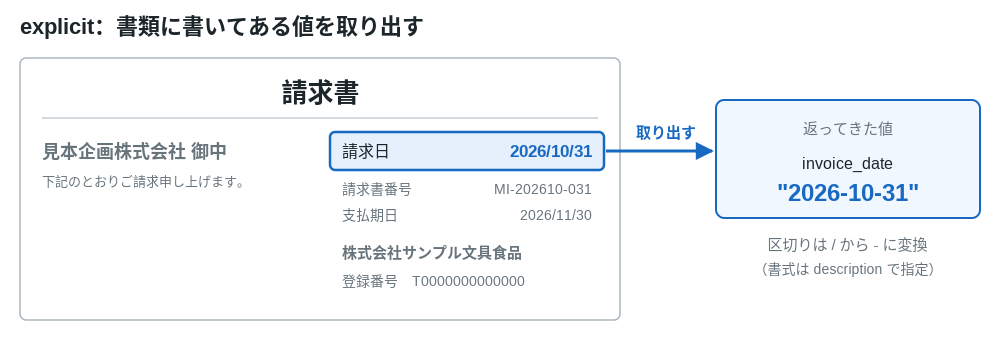
explicit: extracting the printed invoice date
When you want to extract text from the document as is, specify explicit.
// Blueprint definition (excerpt)
"invoice_date": {
  "type": "string",
  "inferenceType": "explicit",
  "description": "The issue date in YYYY-MM-DD format."
}
// Example output (excerpt)
"invoice_date": "2026-10-31"
Even when you want to convert the original notation 2026/10/31 into a format like 2026-10-31, use explicit as long as the underlying value is written in the document. Instruct the desired format in description.
inferred example: judging whether all required items are present
The invoice prints each piece of information, but the judgment result of "whether the required conditions are met" is not written anywhere.
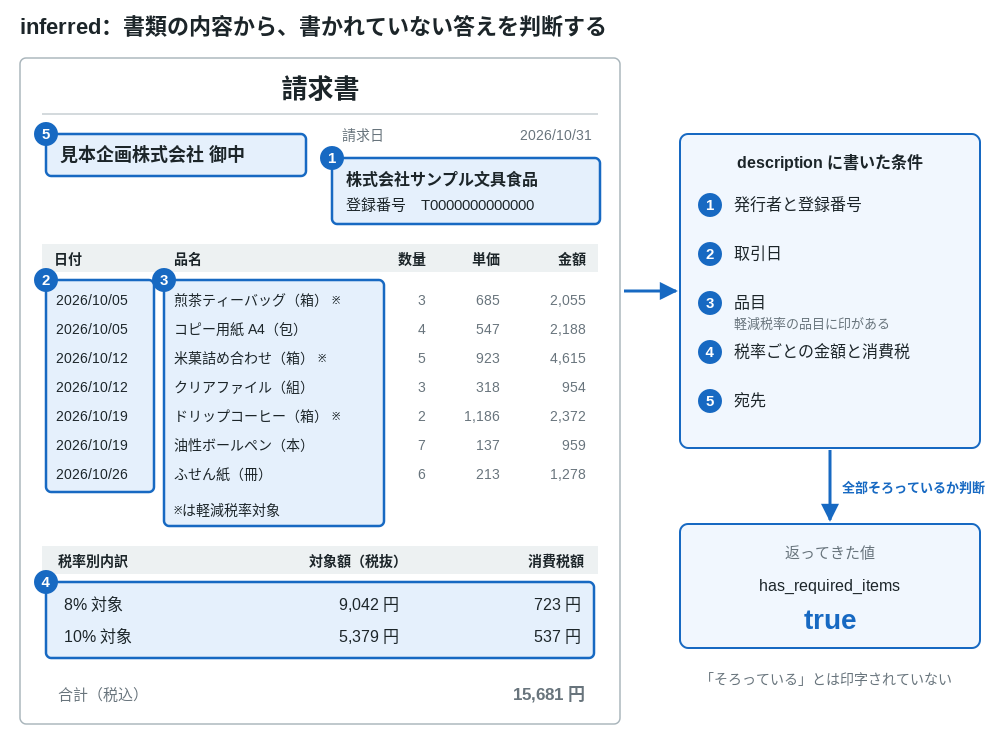
inferred: judging whether the five items are present (numbers correspond to the conditions written in the blueprint)
When you want the model to read the whole document and judge whether the required items are present (recipient, issuer and registration number, transaction date, items, and consideration per tax rate), specify inferred. Write the conditions used as the criteria in description.
// Blueprint definition (excerpt)
"has_required_items": {
  "type": "boolean",
  "inferenceType": "inferred",
  "description": "True if the invoice shows all of: issuer name with a registration number, transaction dates, item descriptions with reduced-rate items marked, amounts and tax totalled separately for each tax rate, and the recipient name."
}
// Example output (excerpt)
"has_required_items": true
This document meets all the requirements, so true was the correct judgment. Note that I have not verified whether false is correctly returned for a document with missing information.
aws textract create-blueprint \
  --blueprint-name jp-qualified-invoice \
  --schema file://jp-qualified-invoice.json \
  --query BlueprintArn --output text
# Example output
arn:aws:textract:us-east-1:<ACCOUNT_ID>:blueprint/140352f743a0
6.2 Adding the custom blueprint and running again
I added the ARN of the newly created blueprint to the project settings created in Chapter 4 and ran it again as a new project.
This project also has the PII redaction feature from Chapter 7 enabled (see Chapter 7 for command details).
-
Extracted value: the value (
inference_result) extracted by Textract Insights -
Document statement (ground truth): the value printed on the invoice. For the recipient, the honorific "onchu" is excluded as the blueprint instructs, and for logical judgment fields with no printed value, I judged by visually checking the original
-
Verdict: dates match if they are the same day and amounts match if they are the same number, even if the notation differs. For strings, any notation variance is judged a mismatch (same criteria as 5.2)
| Field | Extracted value | Document statement (ground truth) | Verdict | Confidence |
|---|---|---|---|---|
| Registration number | T0000000000000 | T0000000000000 | Match | 0.900 |
| Issuer | Sample Stationery & Food Co., Ltd. | Sample Stationery & Food Co., Ltd. | Match | 0.933 |
| Recipient | Mihon Kikaku Co., Ltd. | Mihon Kikaku Co., Ltd. | Match | 0.943 |
| Invoice date | 2026-10-31 | 2026/10/31 | Match (format conversion only) | 0.942 |
| Payment due date | 2026-11-30 | 2026/11/30 | Match (format conversion only) | 0.942 |
| 8% taxable amount | 9042 | 9,042 yen | Match (format conversion only) | 0.885 |
| 8% consumption tax | 723 | 723 yen | Match (format conversion only) | 0.971 |
| 10% taxable amount | 5379 | 5,379 yen | Match (format conversion only) | 0.960 |
| 10% consumption tax | 537 | 537 yen | Match (format conversion only) | 0.971 |
| Total (tax included) | 15681 | 15,681 yen | Match (format conversion only) | 0.953 |
| Reduced-rate items | Sencha tea bags (box), Assorted rice crackers (box), Drip coffee (box) | Sencha tea bags(box), Assorted rice crackers(box), Drip coffee(box) | Mismatch (parentheses and spaces) | 0.808 |
| Whether all required items are present | true | Not printed (judged true by checking the original) | Match | 0.792 |
With the custom blueprint applied, 11 of 12 fields matched the ground truth.
The one mismatch was the reduced-rate items, caused by the full-width/half-width parentheses and space difference where the ground truth's full-width "(box)" was recognized as " (box)". Since the same criteria as 5.2 are applied, it is counted as a mismatch.
For the date fields, the original prints 2026/10/31, but because the description specified the YYYY-MM-DD format, it was normalized and returned as 2026-10-31, as expected.
The three items extracted as reduced-rate items exactly matched the three rows carrying the reduced-rate mark in the document.
Note that in the full-text reading result on the extraction side, the reduced-rate mark printed next to those items was dropped, and the katakana character "ka" followed by a closing parenthesis in the account holder name was misrecognized as the similar-looking kanji for "power" (chikara).
If you use the full-text reading result directly in a pipeline, be careful about OCR accuracy for Japanese-specific symbols and look-alike characters.
7. Redacting personal information
By adding --sensitive-data-configuration to the project settings, you can automatically detect personal information in the extraction results and output a separate masked file.
The project created for the Chapter 6 run was configured with the following command.
JP_BP=<6.1 で作ったブループリントの ARN>

PROJECT_ARN=$(aws textract create-project \
  --project-name packet-run3 \
  --extraction-configuration '{
    "BoundingBox": {"State": "ENABLED"},
    "Granularity": {"Types": ["DOCUMENT", "PAGE", "ELEMENT"]},
    "OutputFormat": {"TextFormat": {"Types": ["MARKDOWN", "PLAIN_TEXT"]}, "AdditionalFileFormat": {"State": "ENABLED"}}
  }' \
  --splitter-configuration '{"State": "ENABLED"}' \
  --sensitive-data-configuration '{"DetectionMode": "DETECTION_AND_REDACTION", "PiiEntitiesConfiguration": {"PiiEntityTypes": ["ALL"], "RedactionMaskMode": "ENTITY_TYPE"}}' \
  --custom-configuration "{\"Blueprints\": [
    {\"BlueprintArn\": \"arn:aws:textract:us-east-1:aws:blueprint/public-invoice\"},
    {\"BlueprintArn\": \"arn:aws:textract:us-east-1:aws:blueprint/public-bank-statement\"},
    {\"BlueprintArn\": \"arn:aws:textract:us-east-1:aws:blueprint/public-payslip\"},
    {\"BlueprintArn\": \"$JP_BP\"}
  ]}" \
  --query ProjectArn --output text)
The job start and completion-wait script is the same as in Chapter 4; only the output destination is changed to s3://$OUT/run3.
The options of --sensitive-data-configuration mean the following.
-
DetectionMode:DETECTIONonly detects, whileDETECTION_AND_REDACTIONdetects and also outputs masked files -
PiiEntityTypes: The types of personal information to mask. SpecifyingALLtargets all types -
RedactionMaskMode: How masked values are replaced. SpecifyingENTITY_TYPEreplaces them with the entity type name, such as[NAME]
Masked files are generated at redacted/result.json in the output directory.
The original result.json is also kept as is, so you can compare before and after masking.
The following compares the blueprint extraction results of the payslip before and after masking.
| Field | Original value | After redaction |
|---|---|---|
| Employee name | Ava / Okafor | [NAME] / [NAME] |
| Employee address | 1200 Example Ave / Apt 4B | [ADDRESS] / Apt [ADDRESS] |
| Pay period start | 2026-09-01 | [CREDIT_DEBIT_CARD_EXPIRY] |
| Pay period end | 2026-09-15 | 2026-09-15 |
| Net pay | 3250 | 3250 |
Names and addresses were replaced with appropriate placeholders. On the other hand, the pay period start date was misidentified as a credit card expiry date ([CREDIT_DEBIT_CARD_EXPIRY]) and replaced, while the end date was left as is, so detection accuracy still seems to vary.
As the official documentation also states, only the two JSON files above are redacted, and all other outputs are written from the unredacted content.
Only these two JSON files are redacted. The additional output files (
result.md,result.html,result.txt), table CSVs, and page images (rectified_image_<page>.jpg) are written from the unredacted content and contain raw values.
Source: Detecting and redacting sensitive data | Amazon Textract Developer Guide
In fact, when I checked the payslip page image (rectified_image_2.jpg) from the run with masking enabled, the employee's name, address, and SSN fields remained unmasked.
8. Pricing estimate
Textract Insights is pay-as-you-go, based on the output format and the number of pages processed.
Based on the official pricing page, the main unit prices are as follows.
| Processing | Price per billing unit |
|---|---|
| Whole-document reading (Extraction) only | $8.50 per 1,000 pages |
| Whole-document reading + page summarization | $9.50 per 1,000 pages |
| Extraction with blueprints (Custom, base price includes 30 fields) | $40.00 per 1,000 pages |
| Figure captions | $0.80 per 1,000 figures |
Source: Amazon Textract pricing | AWS
If the Custom base price is applied to all pages of this five-page PDF, the cost per run is about $0.20 (about 30 yen at 150 yen per dollar).
9. Cleanup
Delete the projects, blueprints, and S3 buckets created for this verification.
aws textract list-projects --query 'Projects[].ProjectArn' --output text
aws textract delete-project --project-arn <PROJECT_ARN>
aws textract delete-blueprint --blueprint-arn <BLUEPRINT_ARN>
aws s3 rb s3://$IN --force
aws s3 rb s3://$OUT --force
10. Summary
I confirmed that even when a single PDF contains multiple types of documents, splitting, classification, and field extraction can be run in one go, with a confidence score for each field. Previously you had to design and implement splitting/classification and extraction separately, so being able to complete them in one request feels very convenient. The fact that position coordinates (BoundingBox) of extracted values are returned is also a handy point for downstream verification and UI integration.
In this verification, I got a sense that even a Japanese invoice, whose language is unsupported, can be read to a certain extent. However, Japanese is currently not officially supported, and these results are merely behavior confirmed in a test environment, so please avoid putting this into production at this stage. I'm looking forward to official Japanese support in future updates and availability in regions such as Tokyo.
