I tried directly specifying TiDB Cloud as a MySQL data source in TiDB Cloud Lake and syncing it

This page has been translated by machine translation. View original
Hello, I'm sora from the Game Solutions Division.
This time, I tried specifying a TiDB Cloud cluster directly as the MySQL data source in TiDB Cloud Lake to see if data could be synchronized.
Conclusion First
- When specifying TiDB Cloud directly as a
MySQLdata source, Snapshot (full copy) could be ingested - However, three things were required: setting
SSL Modetorequire, settingbinlog_formattoROW, and adding aPrimary Key - Real-time synchronization via CDC was not possible because TiDB does not emit MySQL binlogs
- Instead,
Archive Schedulecould be used to sync yesterday's data incrementally on a daily basis, and since MERGE prevents duplicates, it can serve as a substitute for continuous synchronization - Ingestion is slow, and care is needed as staging tables accumulate in the background
Preparing the TiDB Cloud Side
Prepare a TiDB Cloud cluster as the synchronization source.
This time, I created a table called appdb.app_logs on TiDB Cloud Starter and inserted dummy data simulating application logs.
Here is the table definition.
The attributes column holds JSON, so I could also see how it would be converted on the Lake side.
CREATE TABLE appdb.app_logs (
    log_id     BIGINT PRIMARY KEY,
    level      VARCHAR(16) NOT NULL,
    service    VARCHAR(64) NOT NULL,
    message    TEXT,
    attributes JSON,
    logged_at  DATETIME NOT NULL,
    KEY idx_logged_at (logged_at)
);
For generating dummy data, I used the same script as in the following article.
I initially tried with 500,000 rows, but as described later, ingestion was slow and time-consuming, so I reduced it to 20,000 rows partway through.
I also changed binlog_format to ROW on the TiDB side.
SET GLOBAL binlog_format = 'ROW';
This is required when running Snapshot.
Lake's MySQL integration checks whether binlog_format is ROW at connection time, and since TiDB returns STATEMENT by default, execution will stop with a binlog must ROW format error if it is not set to ROW.
Registering the Data Source
Go to Data > Data Sources > Create Data Source and select MySQL – Credentials for Service.
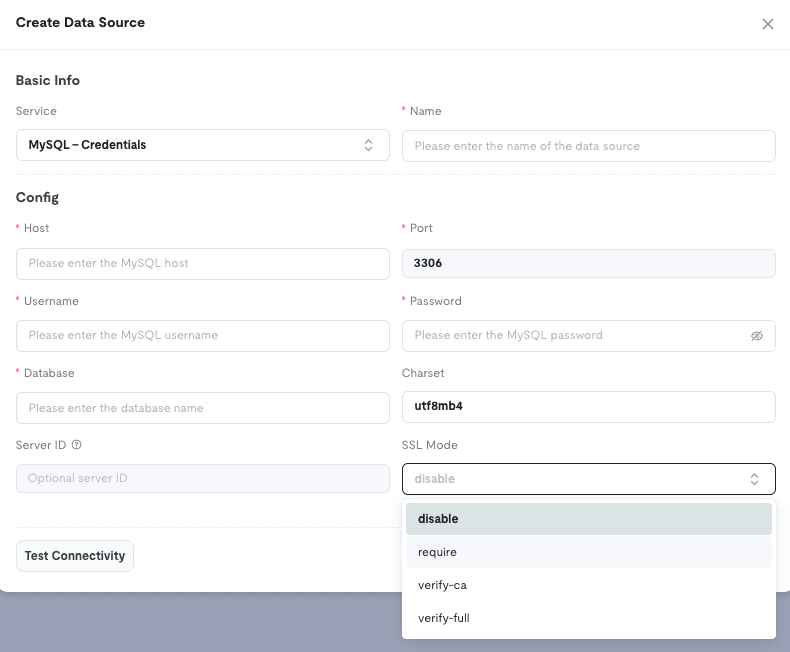
Here are the values to enter.
| Field | Value |
|---|---|
| Host | gateway01.<region>.prod.aws.tidbcloud.com |
| Port | 4000 |
| Username | TiDB Cloud SQL user |
| Password | Password |
| Database | appdb |
| SSL Mode | require |
Select require for SSL Mode.
It is not mentioned in the official documentation, but the actual form has an SSL Mode dropdown where you can choose from four options: disable / require / verify-ca / verify-full.
The default disable will not connect because TiDB requires TLS.
When you press Test Connectivity, the error from TiDB is returned as-is.
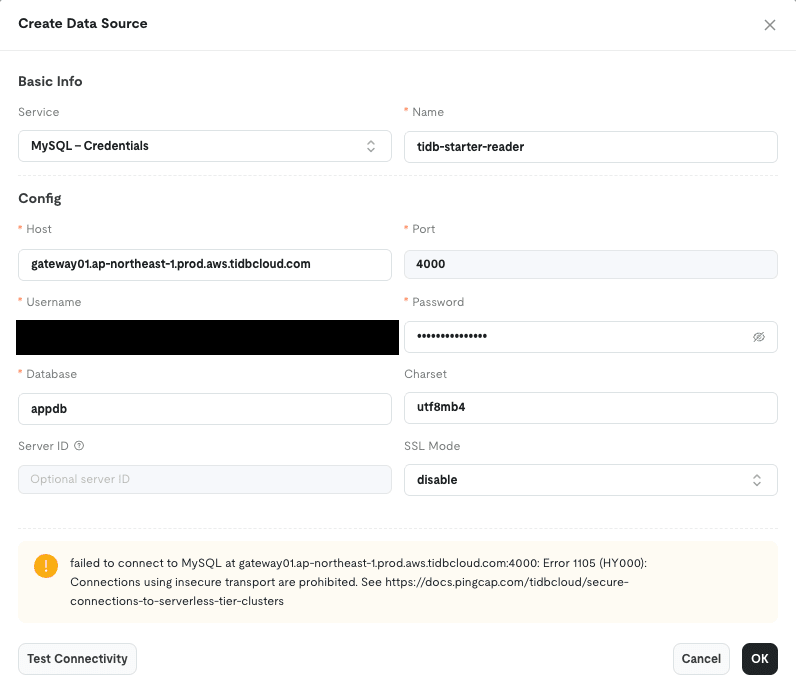
failed to connect to MySQL at gateway01...:4000: Error 1105 (HY000): Connections using insecure transport are prohibited.
verify-ca and verify-full pass this connectivity test, but fail with a TLS configuration error during subsequent task execution (described later).
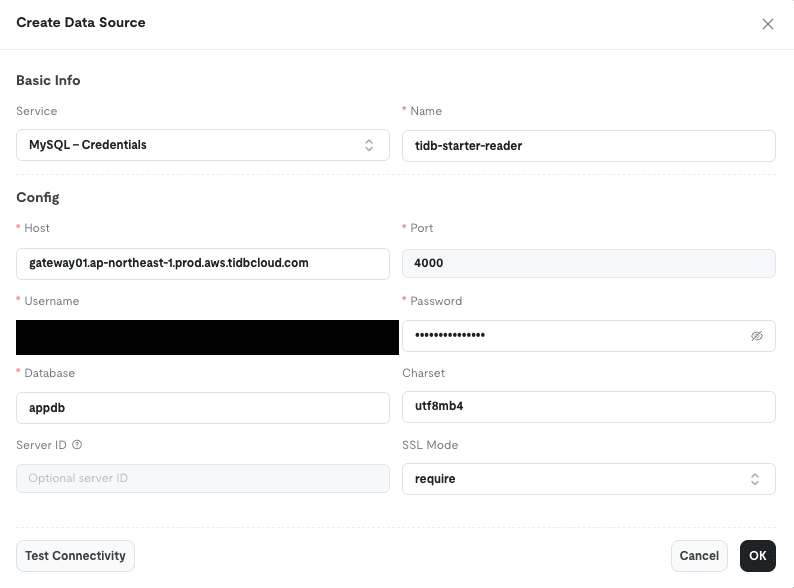
Therefore, it was safer to use require, which works through execution.
Once Test Connectivity passes with require, save the configuration.
Note: When checking the connection source on the TiDB side, the source IP was from Oregon (us-west-2), not the Tokyo region where Lake was created.
The IP also changed with each connection.
If registering the source IP in an access list on Dedicated, be aware of this.
Creating and Running the Snapshot Task
Create a task at Data > Data Integration > Create Task.
Choose from three options for Sync Mode.
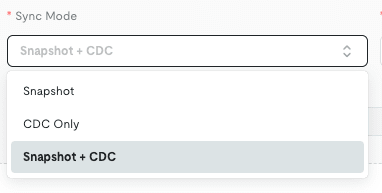
| Mode | Description |
|---|---|
| Snapshot | One-time full copy |
| CDC Only | Continuous synchronization that reads binlog and streams changes |
| Snapshot + CDC | Full copy followed by continuous synchronization |
Select Snapshot here.
Selecting Snapshot reveals fields for Snapshot WHERE Condition and Archive Schedule, but proceed first without a WHERE condition and with Archive Schedule set to Off.
Enter log_id for Primary Key.
It may appear optional for Snapshot, but leaving it empty causes execution to fail with the following error.
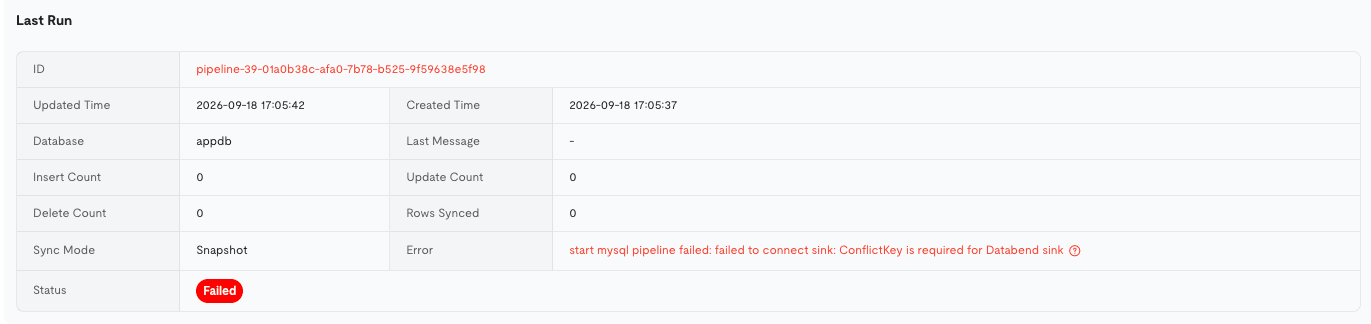
start mysql pipeline failed: failed to connect sink: ConflictKey is required for Databend sink
As indicated by Databend sink, the internals of Lake are Databend.
Ingestion is written using MERGE by primary key, so Primary Key was required.
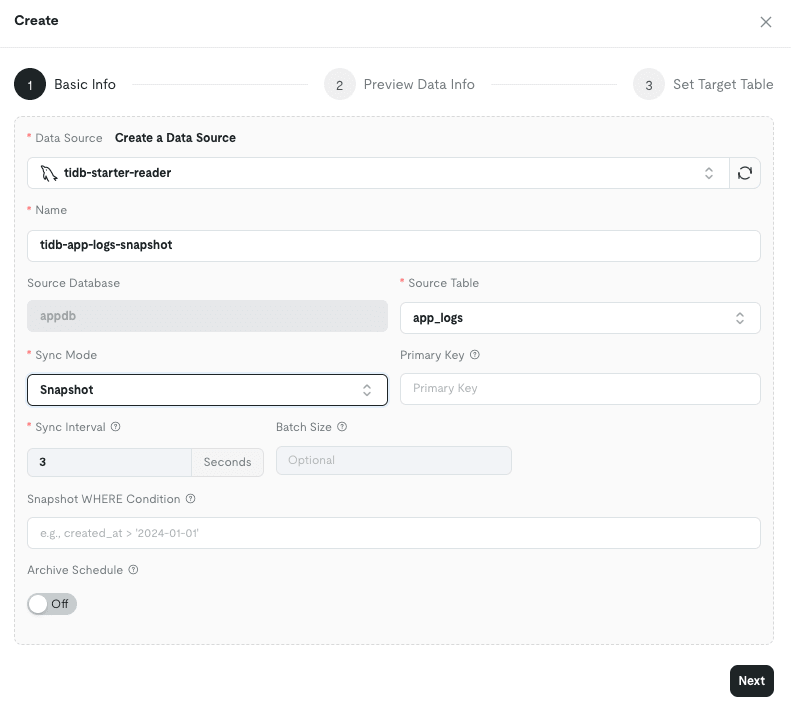
Pressing Next brings up a preview, where you specify the Warehouse, database, and table name as the target.
Selecting New Table under Upload Data To displays the column mapping.
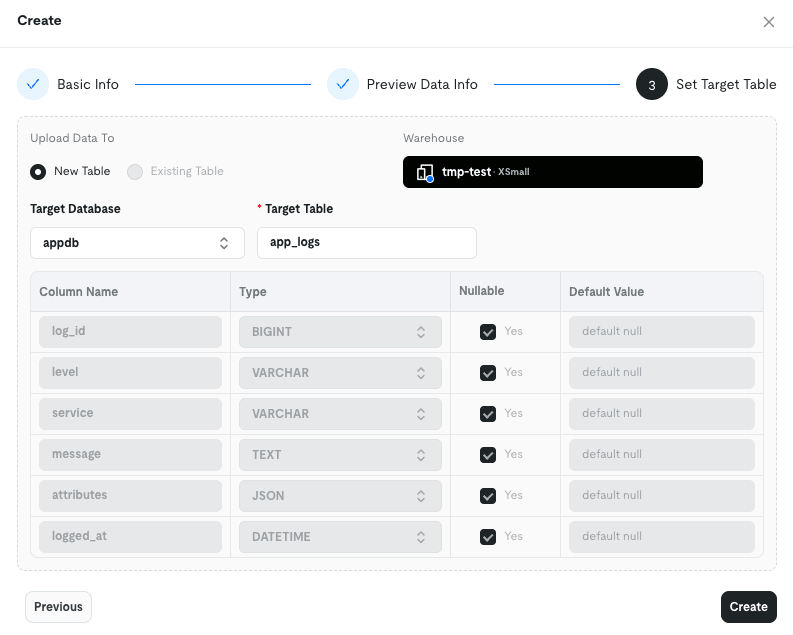
Press Create and then Start to begin ingestion.
At this point, there were three settings to keep in mind.
| Setting | Value | What happens without it |
|---|---|---|
SSL Mode |
require |
verify-* passes the connectivity test but fails with a TLS error during execution |
binlog_format |
ROW |
Fails with binlog must ROW format |
Primary Key |
log_id |
Fails with ConflictKey is required |
Note: If saved with verify-full or verify-ca instead of require, the connectivity test passes, but only execution fails with the following error.
Since the connectivity test passes, you cannot be reassured just because saving succeeded.
start mysql pipeline failed: failed to connect source: failed to create canal: writeAuthHandshake: tls: either ServerName or InsecureSkipVerify must be specified in the tls.Config
Checking Ingestion Speed
The Snapshot ran successfully, but was surprisingly slow — it took about 3.5 minutes to ingest 20,000 rows.
Checking what was being sent to TiDB, Lake was reading 1,000 rows at a time using pagination by primary key.
SELECT * FROM `appdb`.`app_logs` WHERE `log_id` > 1000 ORDER BY `log_id` LIMIT 1000
This SELECT itself completed in a few milliseconds to tens of milliseconds on the TiDB side.
The bottleneck was the write to Lake.
Looking at the SQL History on the Lake side revealed the nature of the writes.
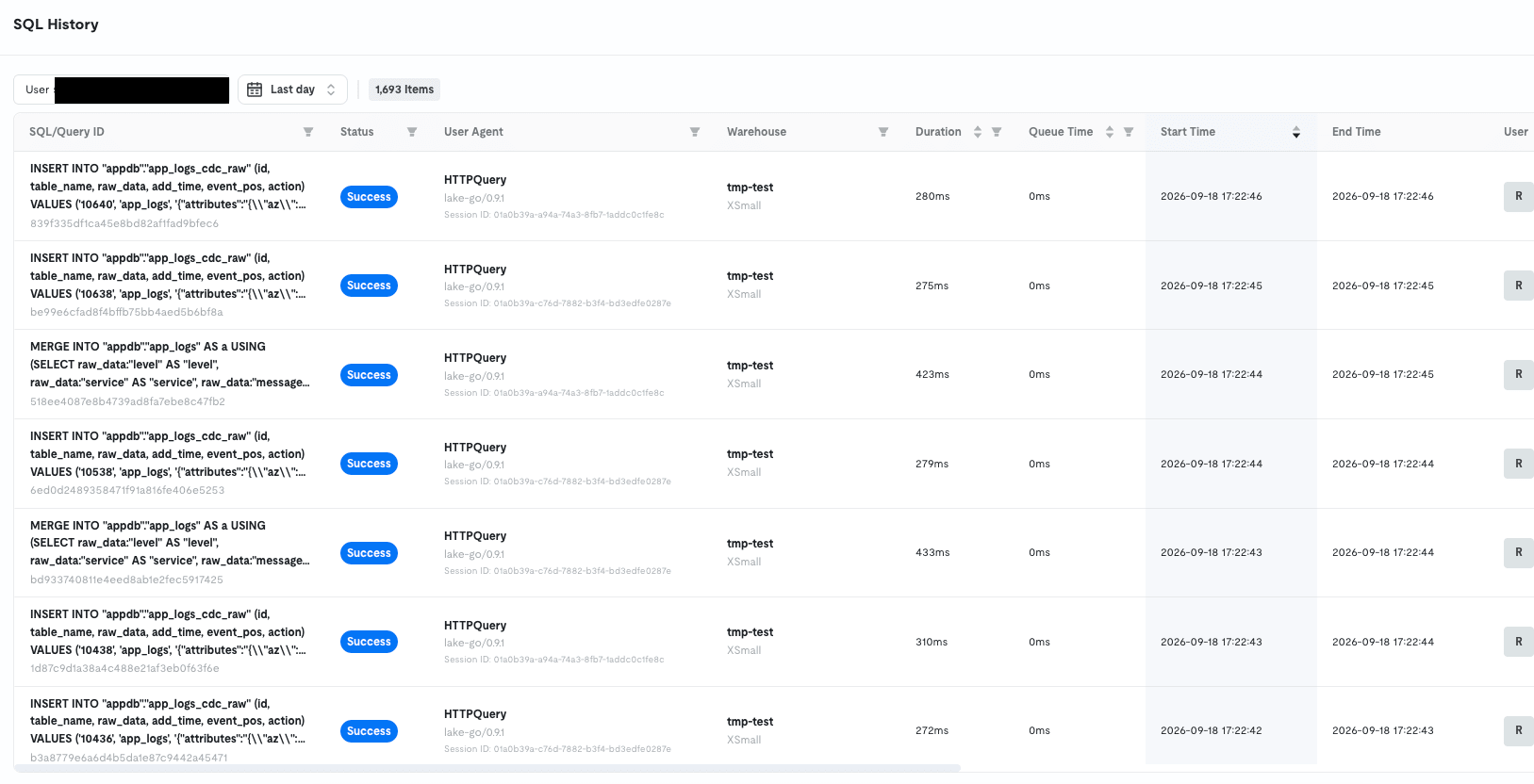
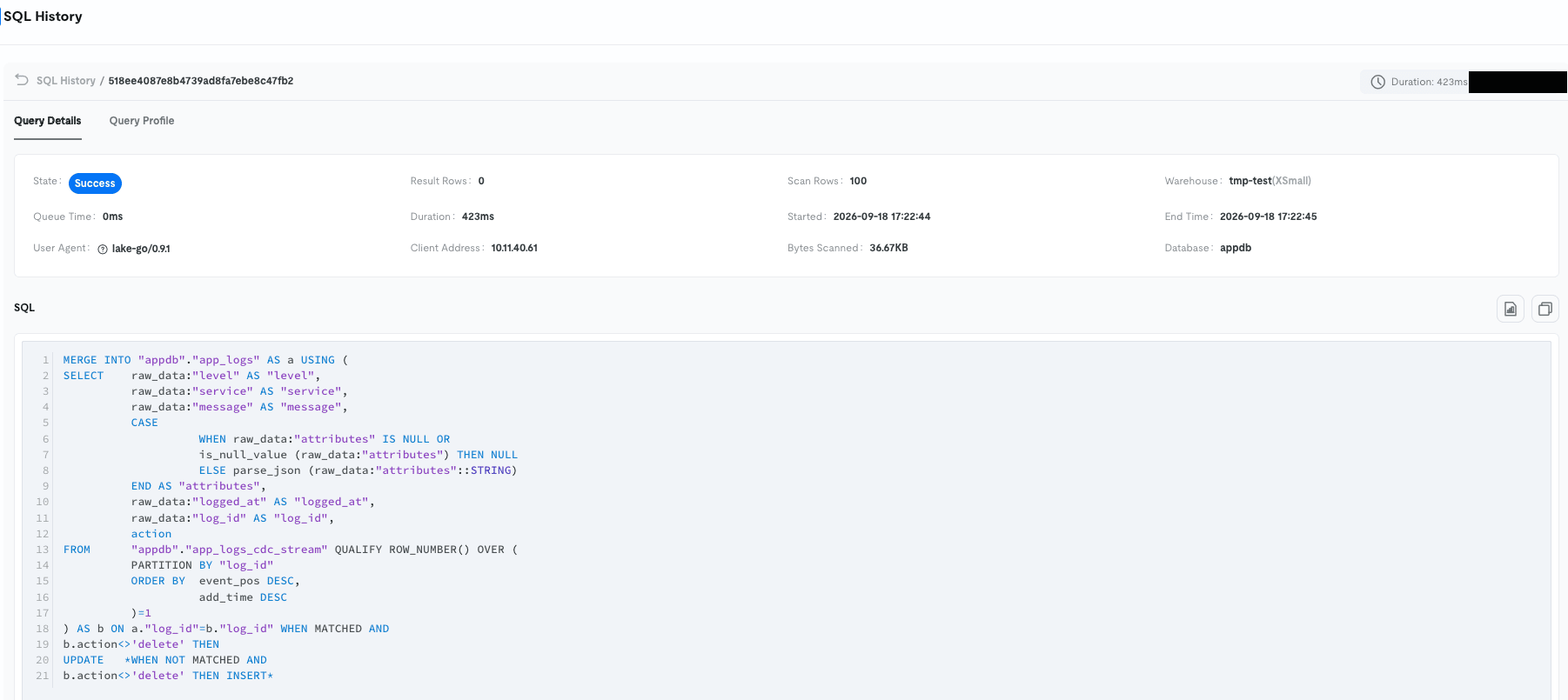
The read rows are INSERTed into a staging table in batches of 100, then MERGEd into the main table in batches of 200.
Even in Snapshot mode, the process internally goes through a CDC staging table and a MERGE path.
Looking at the Query Profile of a single MERGE statement, almost half the time was spent on the storage commit (CommitSink).
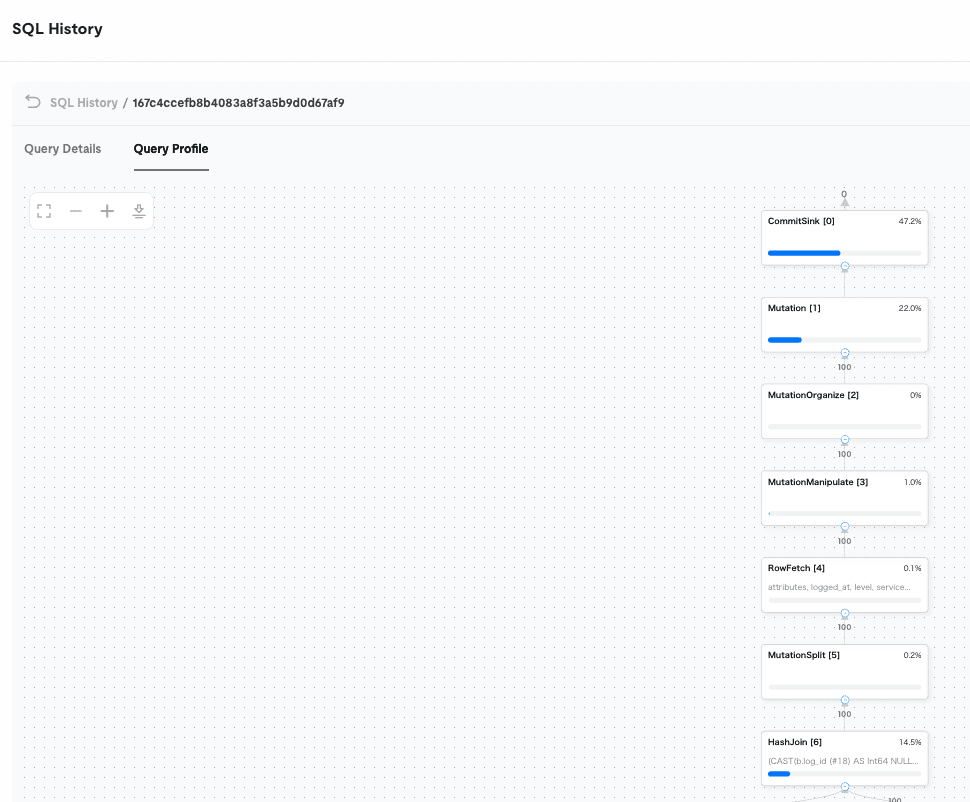
Databend writes Parquet files and metadata to object storage on each write.
That fixed cost accumulates thousands of times in small units of 100 or 200 rows, which is why it is slow.
Type conversions were the same as when ingesting via S3: json became VARIANT and DATETIME became TIMESTAMP.
Note: After ingestion completed, looking at the tables revealed that the staging table app_logs_cdc_raw had the same number of rows remaining as the main table.
Since the raw_data column holds the entire original row as JSON, with this data it was about 1.4 times the size of the main table (1.08MB compared to the main table's 795.75KB).
Notes on Re-running
When redoing the same Snapshot, it was necessary not just to delete the Lake-side table, but to recreate the task entirely.
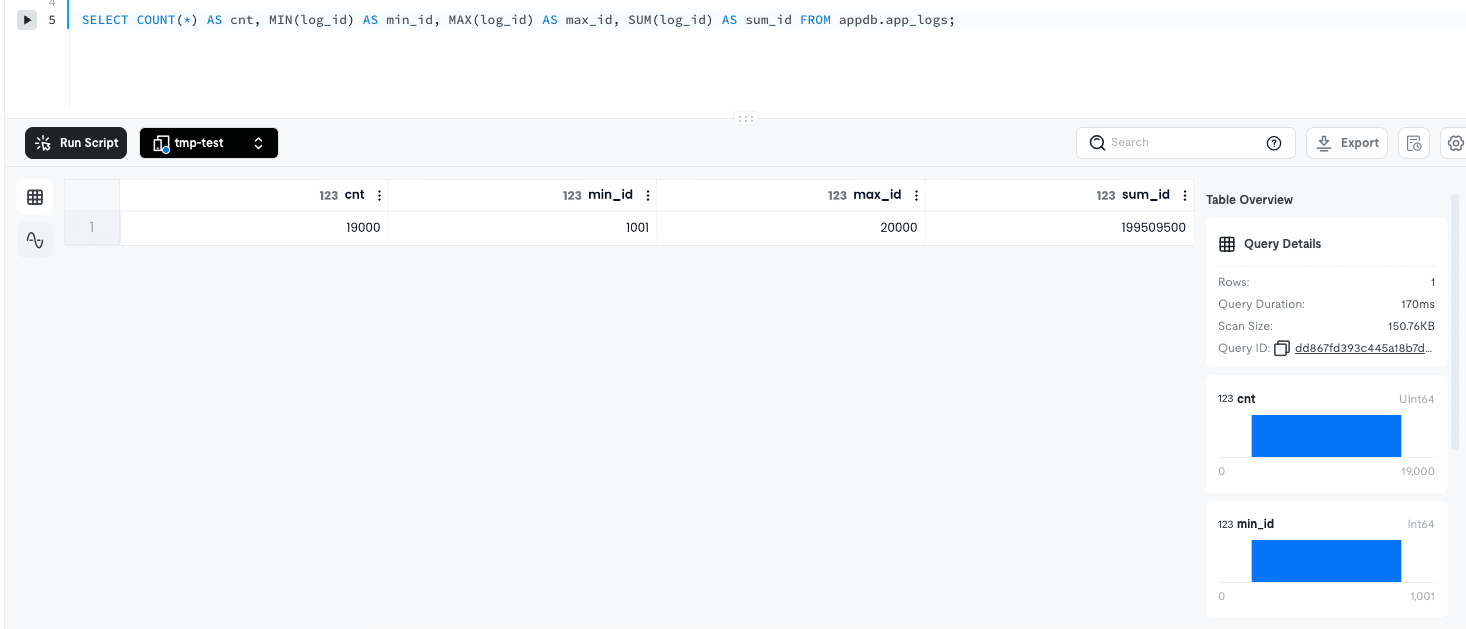
During verification, I reduced the row count, deleted the Lake-side table, and pressed Start on the same task again, only to find that the first 1,000 rows were missing and only 19,000 rows were ingested.
Checking the TiDB-side history showed that the second and subsequent executions started reading from WHERE log_id > '1000'.
The cause was that the initial batch position was retained as a task checkpoint and was not reset even when the Lake-side table was deleted.
Since the same source table can only be linked to one task, I deleted the task and created a new one, after which all 20,000 rows were correctly ingested from the beginning.
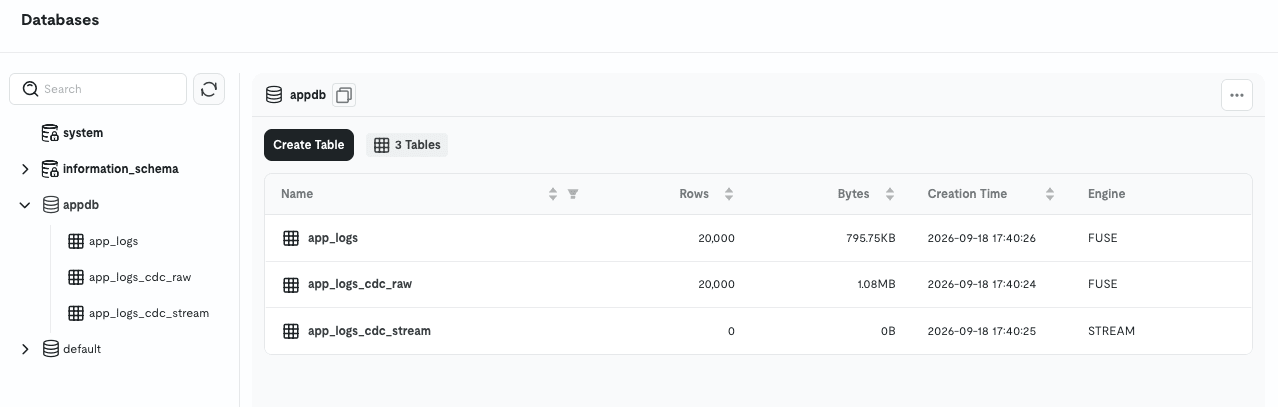
Run History shows Success, so note that you cannot detect missing rows without cross-checking the row count.
Verifying CDC Mode Behavior
Everything so far has been about Snapshot.
I also tried CDC for continuous synchronization, but it did not work when the source was TiDB Cloud.
CDC is a mechanism that continuously streams changes that occur in the source to Lake, reading those changes from the binlog in MySQL.
TiDB has a MySQL-compatible interface, but the official documentation states it does not support the MySQL replication protocol.
Therefore, CDC, which reads binlogs via the replication protocol, does not work with TiDB.
This explains the results for each mode.
CDC Only does not fail.
It stays in Running, and on the TiDB side, a connection is held open as a replica, waiting indefinitely for binlog events that never come.
Not even the target table is created, and only the Warehouse keeps running.
Since no failure appears, it is actually harder to notice.
Snapshot + CDC failed immediately on the other hand.
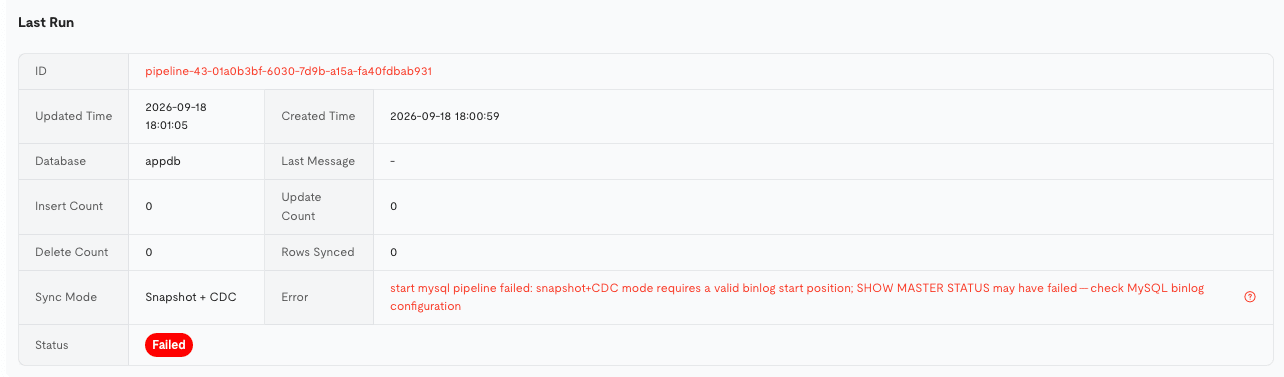
start mysql pipeline failed: snapshot+CDC mode requires a valid binlog start position; SHOW MASTER STATUS may have failed
This mode is designed to hand off from Snapshot to CDC starting from the binlog position at that point.
Therefore, before starting Snapshot, it attempts to secure a valid binlog start position.
TiDB's SHOW MASTER STATUS returns plausible values, but they cannot be used for resumption as MySQL binlog positions, so execution stops before proceeding to Snapshot.
To summarize:
| Mode | Result with TiDB |
|---|---|
| Snapshot | Works |
| CDC Only | Does not fail, but hangs waiting for events |
| Snapshot + CDC | Fails immediately due to invalid binlog position |
TiDB handles change history with TiCDC rather than binlog.
If you want to continuously stream to Lake, the path would be to write to S3 with TiCDC and then read from there.
This path requires TiCDC, which is available on TiDB Cloud Dedicated or Essential and above.
Scheduled Execution with Archive Schedule
The final thing to check was whether, if CDC is unavailable, periodically running Snapshot would work.
Editing the Snapshot task and turning Archive Schedule on reveals four fields.

| Field | Value entered | Role |
|---|---|---|
| Cron Expression | */5 * * * * |
When to execute (every 5 minutes in this case) |
| Timezone | Asia/Tokyo |
Reference for date boundaries |
| Mode | Daily |
Width of the ingestion range (1 day) |
| Time Column | logged_at |
Which column to use for range filtering |
After saving, the task status remains Stopped.
There is no need to press Start — leaving it as-is, it automatically changed to Running and executed at the next Cron timing.
The SQL sent to TiDB at execution time is as follows.
SELECT * FROM `appdb`.`app_logs`
WHERE logged_at >= '2026-09-17 00:00:00' AND logged_at < '2026-09-18 00:00:00'
ORDER BY `log_id` LIMIT 1000
From Mode: Daily and Time Column: logged_at, it automatically adds a WHERE clause for "the previous day's range."
It reads only the incremental data rather than the full dataset.
To verify this, I added 500 rows with yesterday's date on the TiDB side.
The next automatic run read only those 500 rows, and the main table app_logs increased from 20,000 to 20,500 rows.
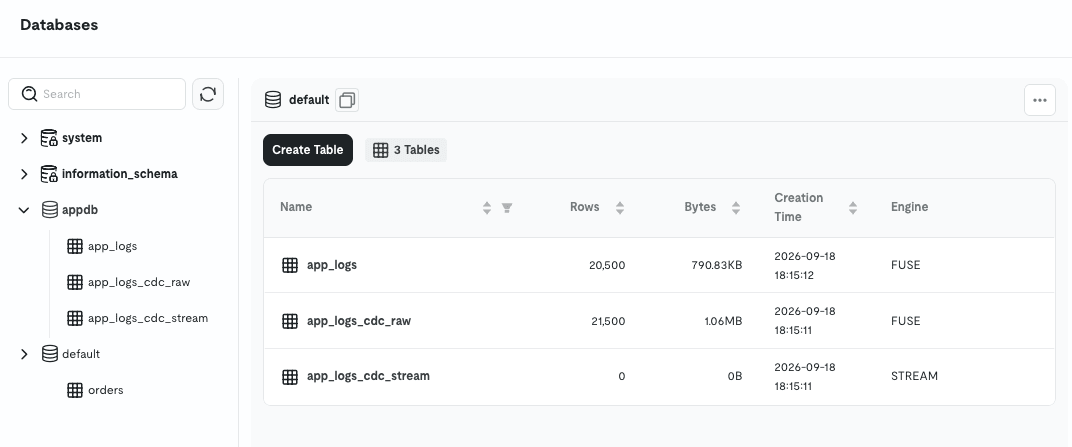
After that, I waited through several executions every 5 minutes without adding anything, but the main app_logs remained at 20,500 rows.
Since writes to the main table use MERGE (upsert) by primary key, reading the same range multiple times simply overwrites without creating duplicates.
This means the incremental data segmented by Time Column can be safely ingested continuously on a daily basis.
It is not real-time synchronization, but for the use case of "periodically offloading logs accumulated in TiDB to Lake," this was sufficient.
The main app_logs has 20,500 rows, while the staging table app_logs_cdc_raw has 21,500 rows.
The staging table is an append-only table that temporarily holds rows read from TiDB during ingestion, and the main table is written from here via MERGE, which deduplicates.
Notes
- Staging may repeatedly read the same portion.
- The 21,500 rows in staging are the initial 20,000 rows plus 500 rows read three times by the schedule (20,000 + 500 × 3).
- In this case,
Modewas kept asDailywhile running every 5 minutes, so all three runs read the same "yesterday (9/17)" portion and appended the same 500 rows three times. - Since the interval can only be chosen from
Daily/Weekly/Monthly, running at a shorter interval than that will result in repeatedly reading the same portion, as shown here. - Once the date changes, the portion being read also shifts, so in actual operations running once a day like
0 1 * * *, a different day is read each time and the same rows are never re-read.
- Staging is not automatically deleted.
- It is append-only, and in this verification it was not automatically cleaned up.
- Even with once-a-day operations, the daily accumulations pile up, so it would be good to plan for cleanup separately, such as manually deleting when no longer needed.
- The Warehouse starts up on every execution.
- Running at short intervals like every 5 minutes incurs charges each time, so for daily archiving, once a day with something like
0 1 * * *is sufficient.
- Running at short intervals like every 5 minutes incurs charges each time, so for daily archiving, once a day with something like
Closing
This time, I tried specifying TiDB Cloud directly as the MySQL data source in TiDB Cloud Lake to see whether data could be synchronized using Snapshot and its periodic execution.
CDC is not possible because TiDB does not emit MySQL binlogs, but using Archive Schedule allows periodic incremental synchronization without going through S3.
I hope this article is useful to someone.