I tried out TiDB Cloud Lake in public preview

This page has been translated by machine translation. View original
Hello, I'm sora from the Game Solutions Department.
This time, I'll write about my experience trying out TiDB Cloud Lake, which started its public preview on June 30, 2026.
I was particularly interested in the ability to query files placed on S3 with SQL without loading them, and the fact that it runs on a completely separate stack from TiDB Cloud clusters, so I'll focus on those aspects.
Please note that the content of this article reflects the state as of September 15, 2026, and may change at GA since it is currently in public preview.
What is TiDB Cloud Lake
It is a data warehouse service for analytical workloads.
It has a configuration that separates compute from storage, with compute organized into units called Warehouses.
You can start it only when needed and stop it when not in use.
Regarding data storage, the pricing page states "physically stored in Amazon S3."
Storage costs are also based on S3 pricing.
In addition to SQL analytics, full-text search, vector search, and geospatial analysis are all included in the same engine.
It also allows querying files on S3 directly without loading them into tables.
Relationship with TiDB Cloud Clusters
This was what I was most curious about.
Since TiDB has TiKV (row store) and TiFlash (column store), it was unclear how TiDB Cloud Lake would relate to them.
After trying it out, it was not a service designed to be used in conjunction with TiDB Cloud clusters.
You can create TiDB Cloud Lake on its own without having any clusters, and the console entry point is also separate.
My understanding is that they are only connected in the sense that they share the same TiDB Cloud account and billing.
Running on a Separate Stack
TiDB Cloud Lake uses a different engine called FuseEngine for its storage layer.
Its metadata also has an independent Raft cluster, unrelated to the cluster-side PD.
The cluster side also uses an architecture called TiDB X, which uses object storage as the persistence layer.
However, that configuration has TiKV-equivalent and TiFlash-equivalent components operating as cache layers on top of it, making it separate from TiDB Cloud Lake.
Data ingestion from clusters into TiDB Cloud Lake is available via MySQL Integration Task (snapshot + CDC) or S3-based loading.
How to Differentiate from TiFlash
| Item | TiFlash (HTAP) | TiDB Cloud Lake |
|---|---|---|
| Data storage location | Inside TiDB cluster, synchronized from TiKV (row store) | Separate storage on the TiDB Cloud Lake side, requires separate ingestion |
| Target data | Only data in TiDB | S3 logs, Kafka, other DBs, can also mix Iceberg |
I think TiDB Cloud Lake is the right choice when you want to mix and analyze data outside the cluster, such as S3 logs, or when you want to aggregate large amounts of data accumulated over a long period.
Trying It Out
Creating TiDB Cloud Lake
From the TiDB Cloud console, go to "My Lake" in the left navigation and click "Try TiDB Cloud Lake" to enter the creation screen.
The post-creation console is also independent and does not navigate back and forth with the cluster-side screen.
Only the billing screen is not on the TiDB Cloud Lake side; you view it in Billing on the TiDB Cloud side.
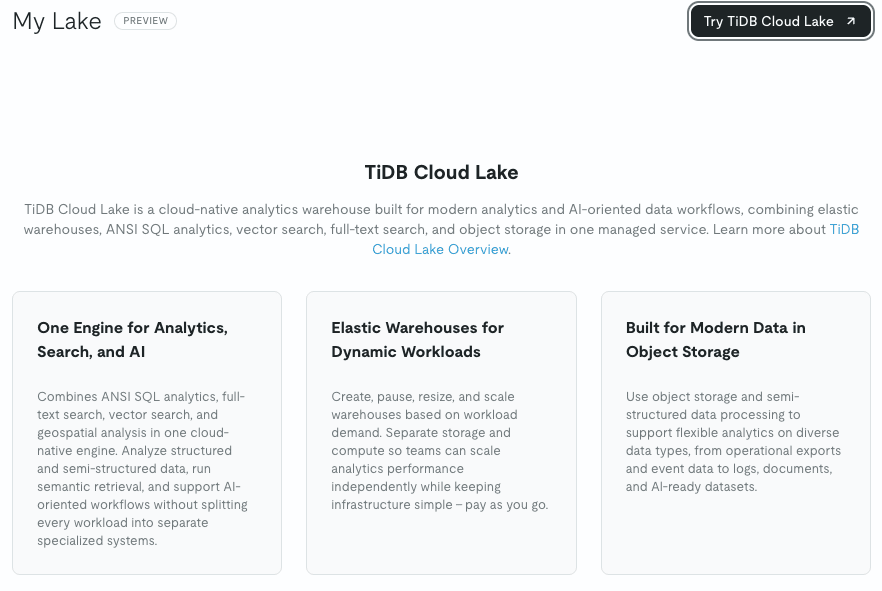
In the creation dialog, you specify the name, plan, cloud, and region.
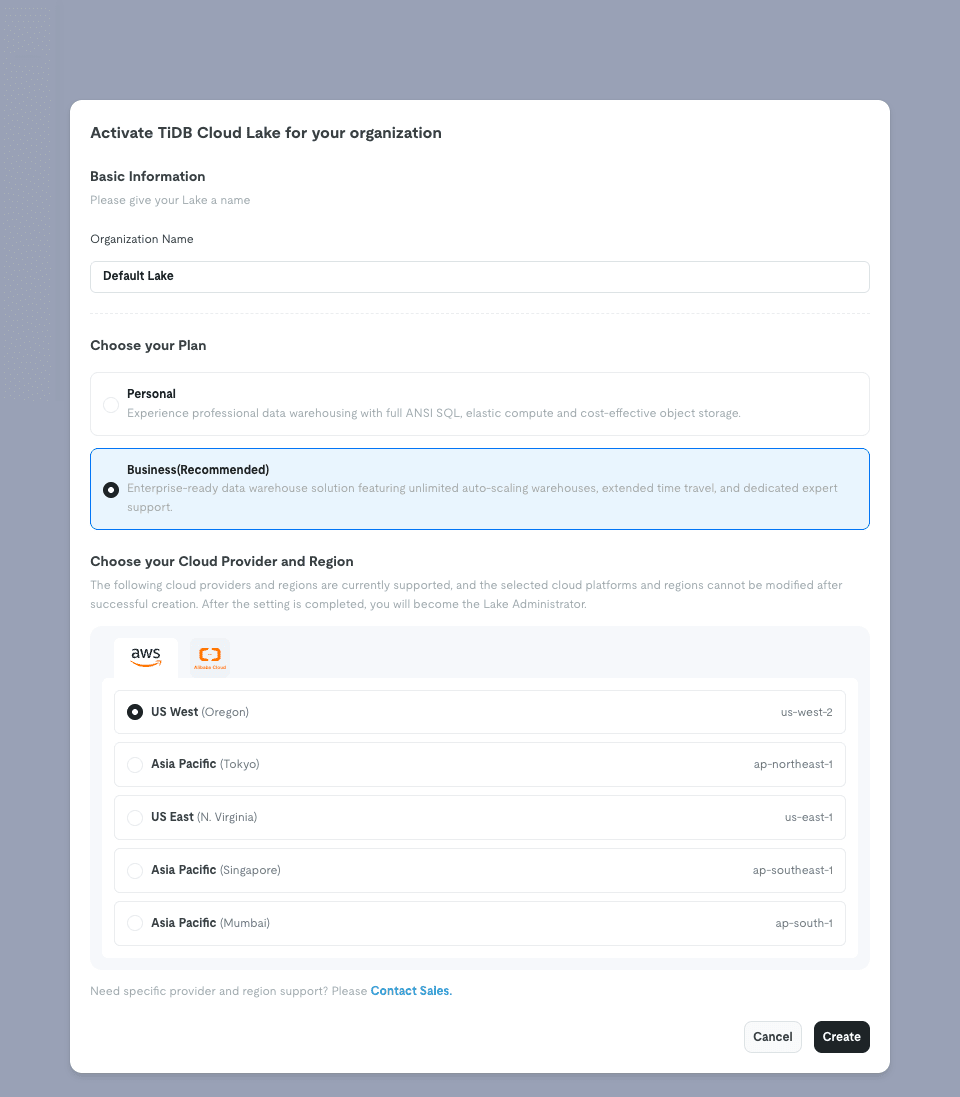
The cloud and region cannot be changed after creation, so this is the only thing to be careful about.
The following cloud providers and regions are currently supported, and the selected cloud platforms and regions cannot be modified after successful creation.
The available clouds are AWS and Alibaba Cloud, and AWS had 5 regions including Tokyo (ap-northeast-1).
For this time, I created it with the Personal plan in the AWS Tokyo region.
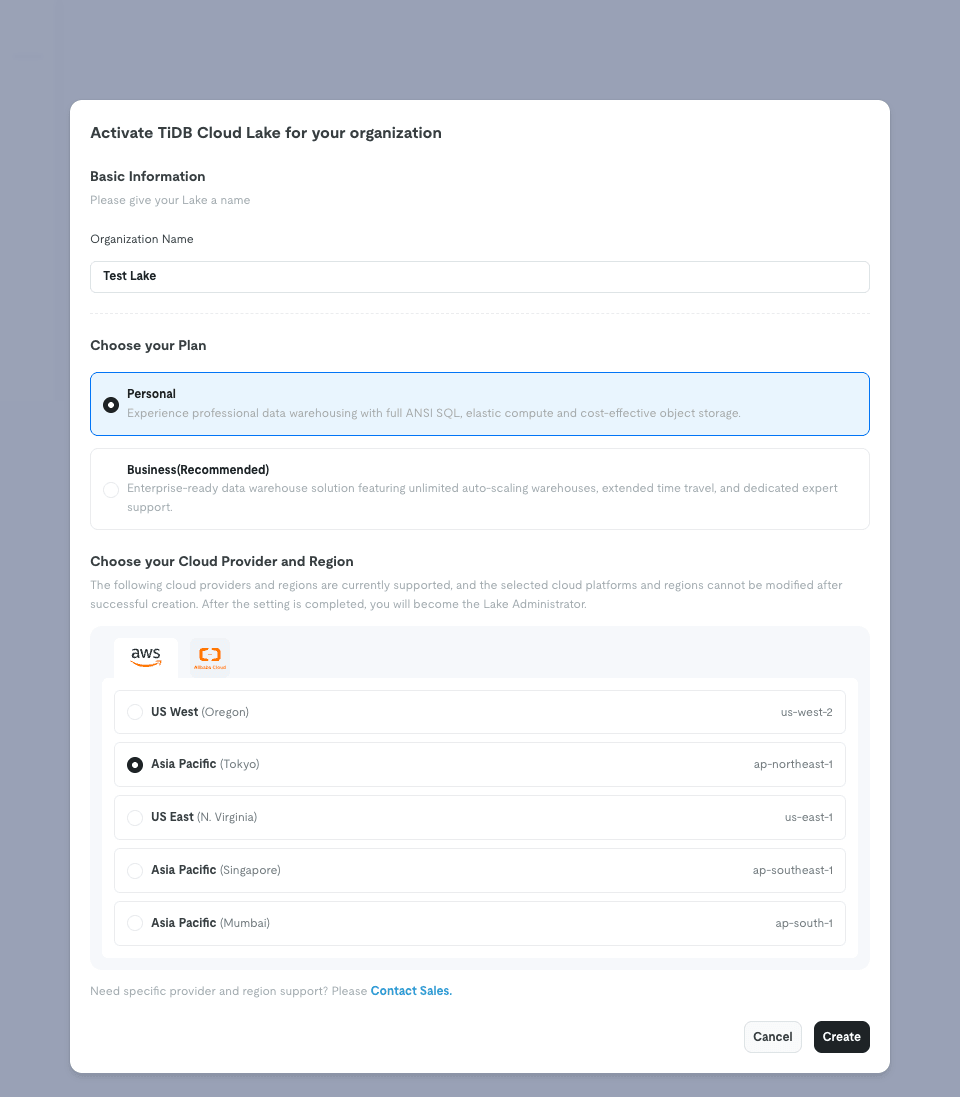
After clicking Create, initialization begins, and based on the Audit Logs timestamps, it completed in about 2 minutes.
State Immediately After Creation
After creation was complete, 8 tutorials were loaded into the Worksheet.
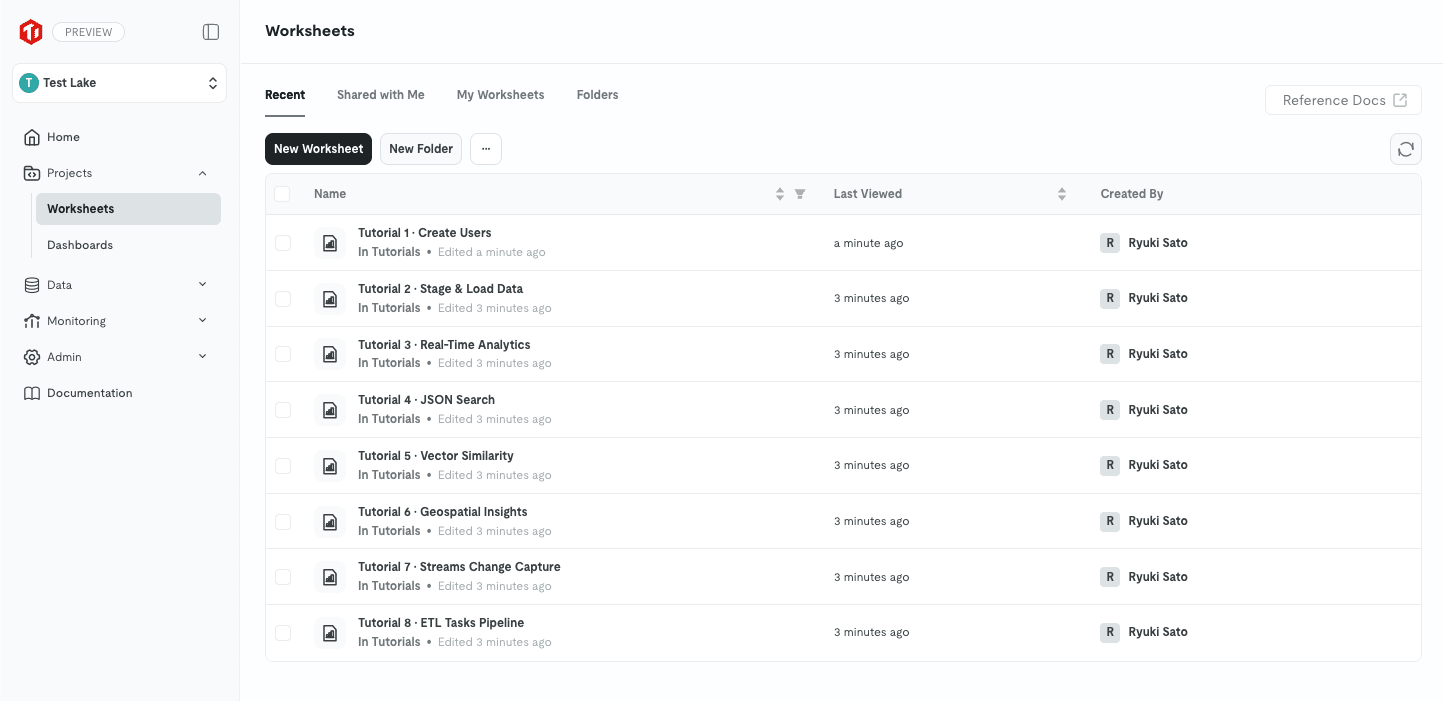
There are 8 tutorials covering user creation, Stage and loading, analytics, JSON search, vector search, geospatial, Stream, and ETL, giving an overview of what this product can do.
From looking at the contents, they appeared to be in a pre-execution state.
A Warehouse named default was also automatically created.
The size was Small, Auto Suspend was 5 minutes, and the status was Suspended.
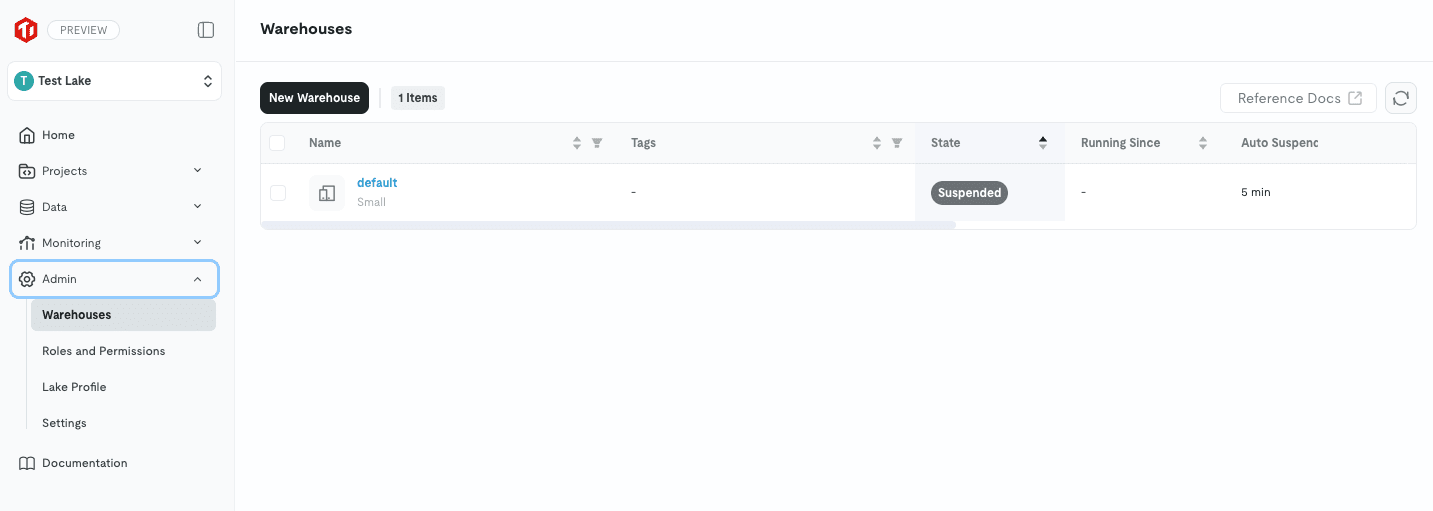
Since it is created in a stopped state, you are not being billed at this point.
Warehouse Settings
The auto-generated default was Small ($3.20/h), so I tried changing it to XSmall ($1.60/h).
Opening Setting from … under Admin > Warehouses, you can change the size without recreating it.
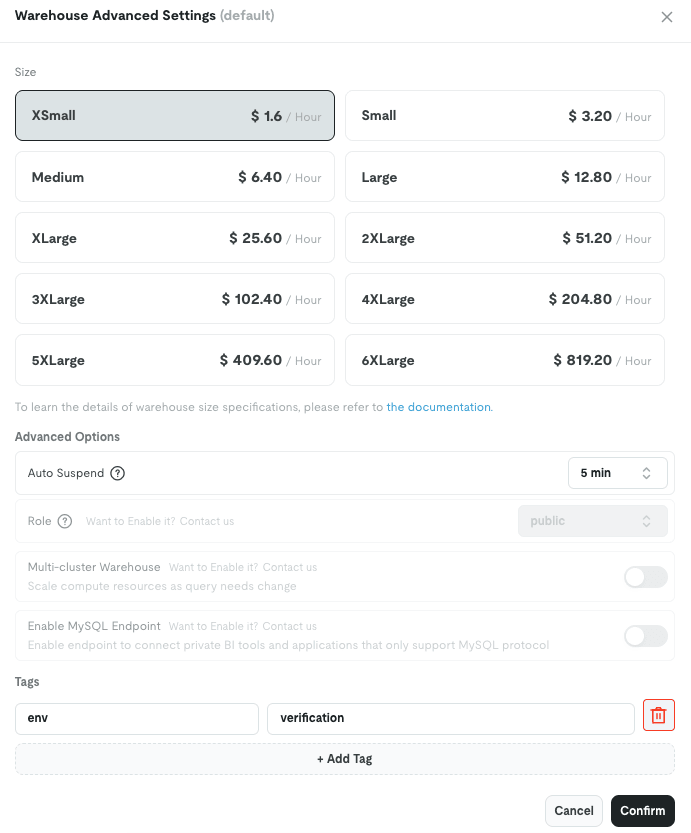
Auto Suspend was in a dropdown format.
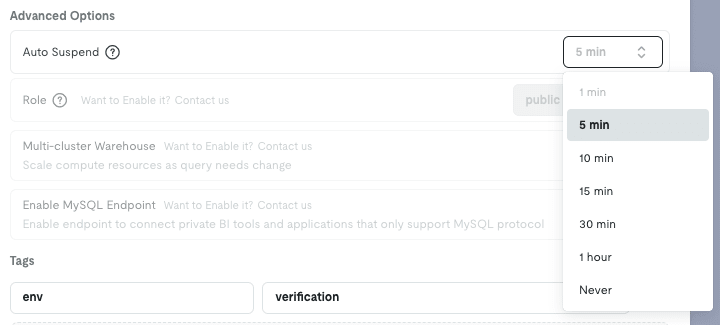
There are 7 options: 1 min / 5 min / 10 min / 15 min / 30 min / 1 hour / Never, with the default being 5 minutes.
Selecting Never disables automatic suspension.
I also tried deletion, and afterward recreated test-warehouse with XSmall for testing.
When created new, it starts in a Running state, and billing begins from that point.
Startup took less than 10 seconds.
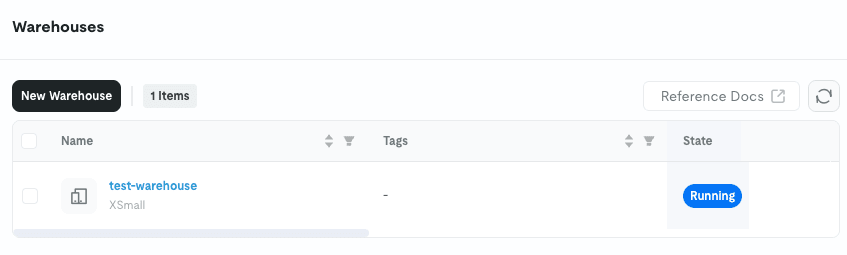
The Warehouse detail screen has an item called Auto Resume: True, and the setting to automatically start when a query comes in while stopped was enabled by default.
In fact, when I executed SQL afterward, the suspended Warehouse automatically became Running.
Some Items Are Disabled
3 items in Advanced Options were grayed out with "Want to Enable it? Contact us" displayed.
| Item | Description | Official Documentation Note |
|---|---|---|
| Role | Specifying the role associated with the Warehouse (fixed to public) |
Disabled by default. Requires a support ticket |
| Multi-cluster Warehouse | Automatic adjustment of cluster count based on demand | Disabled by default. Requires a request, and only available for Business and Dedicated |
| Enable MySQL Endpoint | Endpoint for BI tools that only support the MySQL protocol | Disabled by default. Requires a support ticket |
Role and MySQL Endpoint had no Edition-based restrictions mentioned, and both stated "disabled by default, please apply."
Only Multi-cluster Warehouse requires Business or higher in the Edition feature list as well.
Incidentally, Warehouse creation, deletion, and resizing are under Admin and cannot be accessed from Data or Projects.
Connecting to S3 with an IAM Role
To read S3 data, you register connection information.
There are two methods: using an access key or using an IAM role, so I tried the role method.
The TiDB-side ARN to write in the trust policy is needed, but the official documentation states:
Raise a support ticket to get the IAM role ARN for your TiDB Cloud Lake organization
I thought a support ticket would be required, but selecting AWS – SQS(S3) under Data > Data Sources > Create displayed it on the screen.
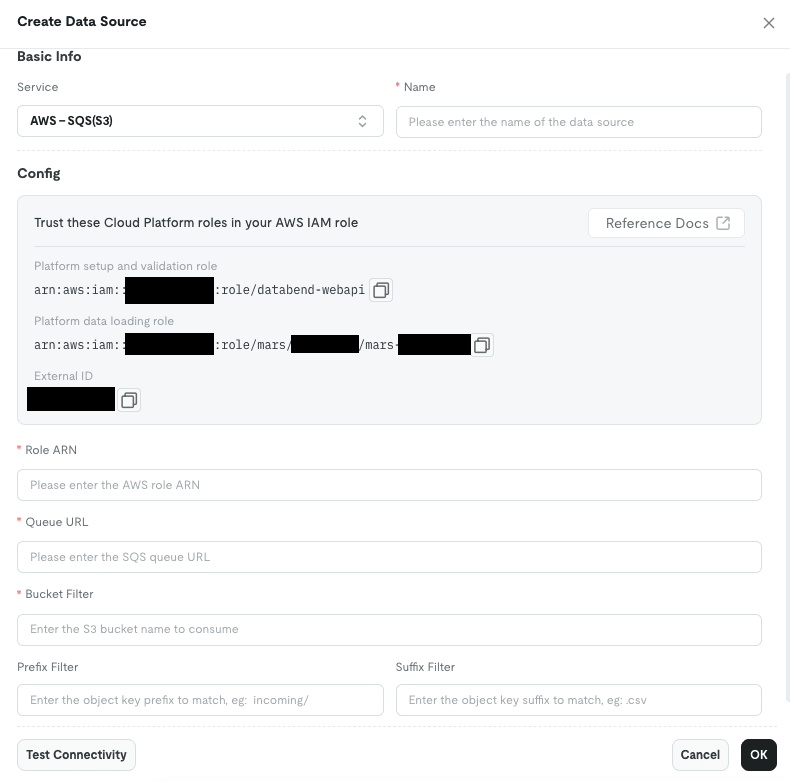
Selecting AWS – Credentials only shows input fields for Access Key / Secret Key, so it was just hard to find.
The External ID is the same value as the Lake Profile ID.
The setup role displayed here is named arn:aws:iam::xxxxxxxxxxxx:role/databend-webapi, which connects to the storage engine discussion mentioned later.
I narrowed the permissions policy to only read and write access to the bucket.
{
  "Version": "2012-10-17",
  "Statement": [
    {
      "Sid": "ListBucket",
      "Effect": "Allow",
      "Action": [
        "s3:ListBucket",
        "s3:GetBucketLocation"
      ],
      "Resource": "arn:aws:s3:::<bucket name>"
    },
    {
      "Sid": "ReadWriteObjects",
      "Effect": "Allow",
      "Action": [
        "s3:GetObject",
        "s3:PutObject"
      ],
      "Resource": "arn:aws:s3:::<bucket name>/tidb-cloud-lake/*"
    }
  ]
}
The reason s3:GetBucketLocation is included is that TiDB Cloud Lake automatically detects the region.
Since the spec falls back to us-east-1 if detection fails, I explicitly allowed it.
For the trust policy, set the two Platform roles shown in the console and the External ID.
{
  "Version": "2012-10-17",
  "Statement": [
    {
      "Effect": "Allow",
      "Principal": {
        "AWS": [
          "arn:aws:iam::xxxxxxxxxxxx:role/databend-webapi",
          "arn:aws:iam::xxxxxxxxxxxx:role/mars/tnxxxxxxx/mars-tnxxxxxxx"
        ]
      },
      "Action": "sts:AssumeRole",
      "Condition": {
        "StringEquals": {
          "sts:ExternalId": "<Lake ID>"
        }
      }
    }
  ]
}
Creating a CONNECTION and Stage
Execute the following in Worksheet.
CREATE CONNECTION lake_s3_conn
    STORAGE_TYPE = 's3'
    ROLE_ARN     = 'arn:aws:iam::<AWS account ID>:role/tidb-cloud-lake-role'
    EXTERNAL_ID  = '<Lake ID>';

CREATE STAGE orders_stage
    URL = 's3://<bucket name>/tidb-cloud-lake/'
    CONNECTION = (CONNECTION_NAME = 'lake_s3_conn');

LIST @orders_stage;
If files are visible with LIST, AssumeRole has succeeded.
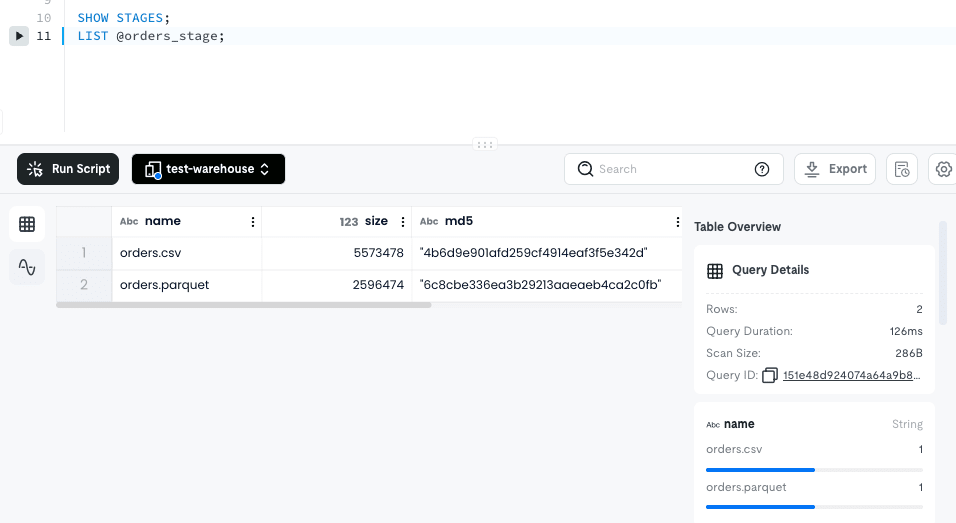
orders.csv was 5,573,478 bytes and orders.parquet was 2,596,474 bytes, matching the uploaded files.
md5 is also returned, so it can be used to verify integrity.
Exporting the SHOW STAGES result lets you check the settings the Stage is holding.
{
  "access_key_id": "",
  "secret_access_key": "",
  "security_token": "",
  "role_arn": "arn:aws:iam::<AWS account ID>:role/tidb-cloud-lake-role",
  "external_id": "la***xl",
  "region": "ap-northeast-1",
  "storage_class": "Standard"
}
The credentials remain empty, confirming that no keys are stored at all.
The region was also correctly detected even though it was not specified.
The External ID is masked, while the role_arn is stored as-is.
Querying S3 Files Without Loading Them
This is what I found most characteristic of TiDB Cloud Lake.
You can query files on S3 directly with SQL without creating a table.
Since the CSV has a header row, I first create a named file format.
This is because SKIP_HEADER cannot be written inline.
CREATE FILE FORMAT csv_with_header
    TYPE = CSV,
    FIELD_DELIMITER = ',',
    RECORD_DELIMITER = '\n',
    COMPRESSION = AUTO,
    SKIP_HEADER = 1;

SELECT $1, $2, $3, $4, $5, $6, $7
FROM @orders_stage (
    FILE_FORMAT => 'csv_with_header',
    PATTERN     => '.*[.]csv'
)
LIMIT 10;
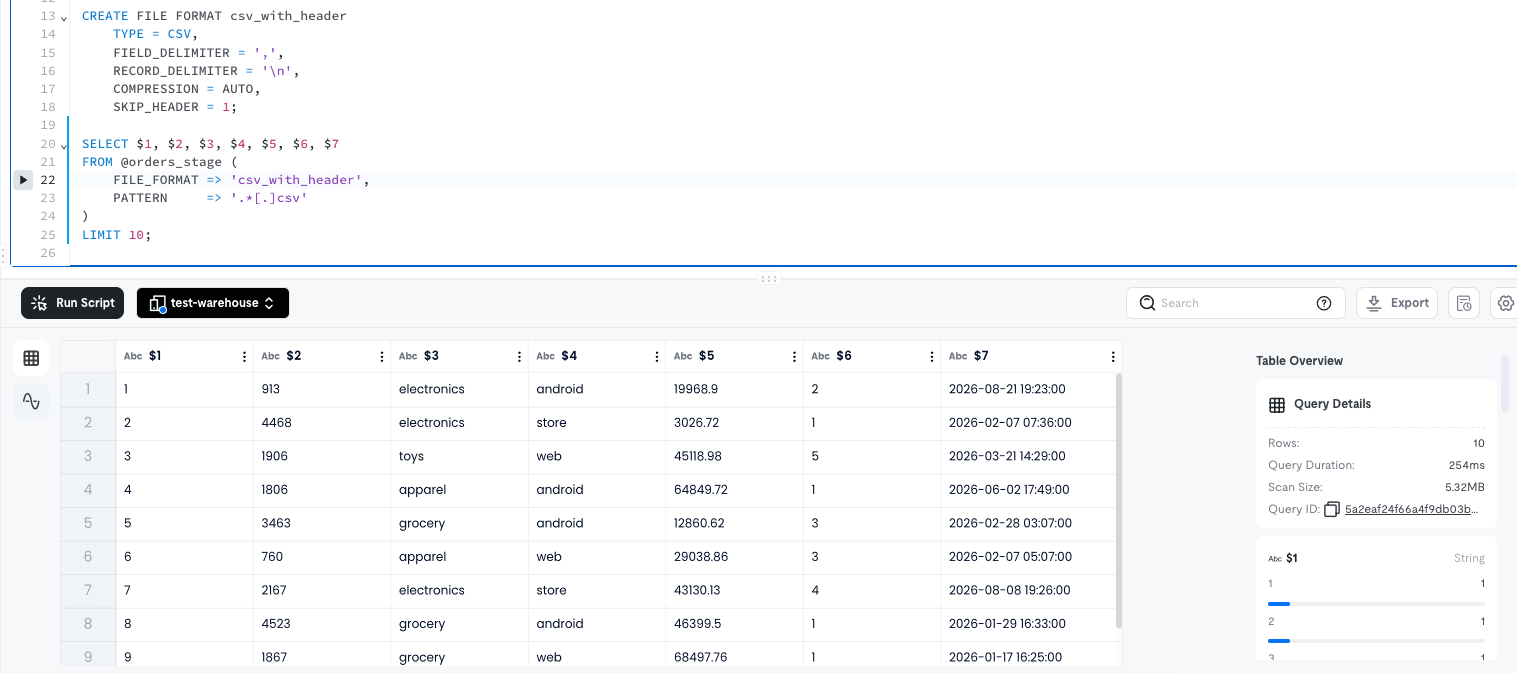
Columns are accessed by positional reference with $1 through $7.
Query Details appears on the right side of the results pane, and the Scan Size was 5.32MB.
Even with LIMIT 10, the entire CSV file is being read.
All types are treated as String.
Since CSV has no type information, this is expected, but casting is required for aggregation.
Parquet could be read with just the built-in specification.
SELECT *
FROM @orders_stage (
    FILE_FORMAT => 'parquet',
    PATTERN     => '.*[.]parquet'
)
LIMIT 10;
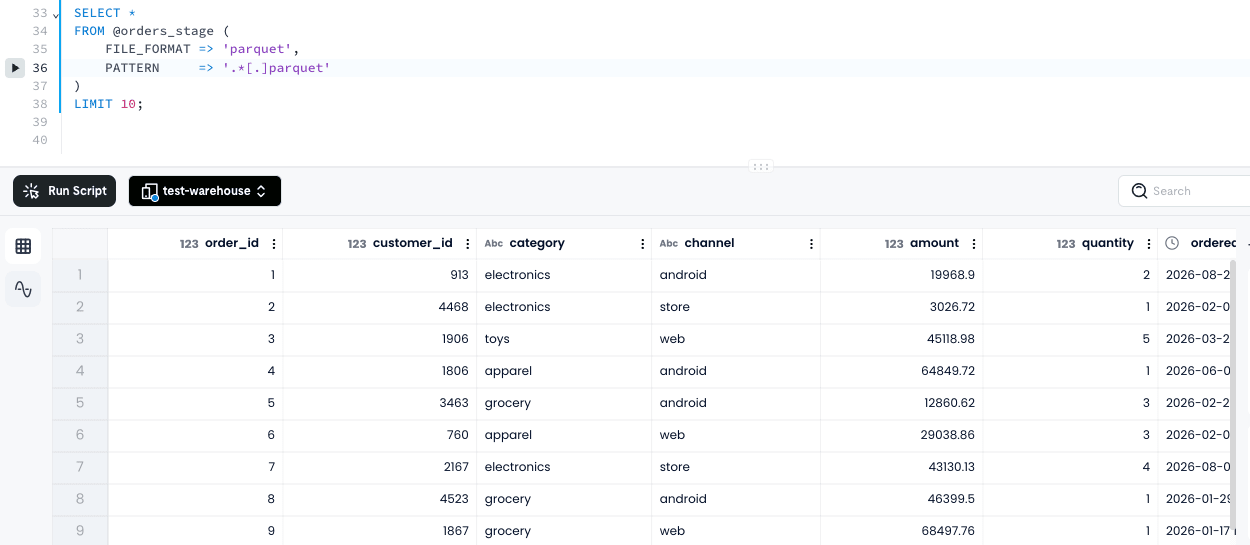
Since column names and types are embedded in the file, no positional references like $1 or casting were needed.
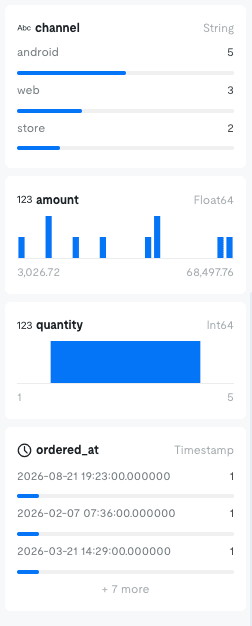
order_id and quantity are recognized as Int64, amount as Float64, and ordered_at as Timestamp.
The column profile in the results pane also changes according to the type: histograms for numeric values and frequency tables for strings.
Loading into a Table and Aggregating
Next, I tried putting the data into a table.
USE default;

CREATE TABLE orders (
    order_id     BIGINT,
    customer_id  BIGINT,
    category     VARCHAR,
    channel      VARCHAR,
    amount       DECIMAL(12, 2),
    quantity     INT,
    ordered_at   TIMESTAMP
);

COPY INTO orders FROM @orders_stage
PATTERN = '.*[.]csv'
FILE_FORMAT = (TYPE = 'CSV', SKIP_HEADER = 1);
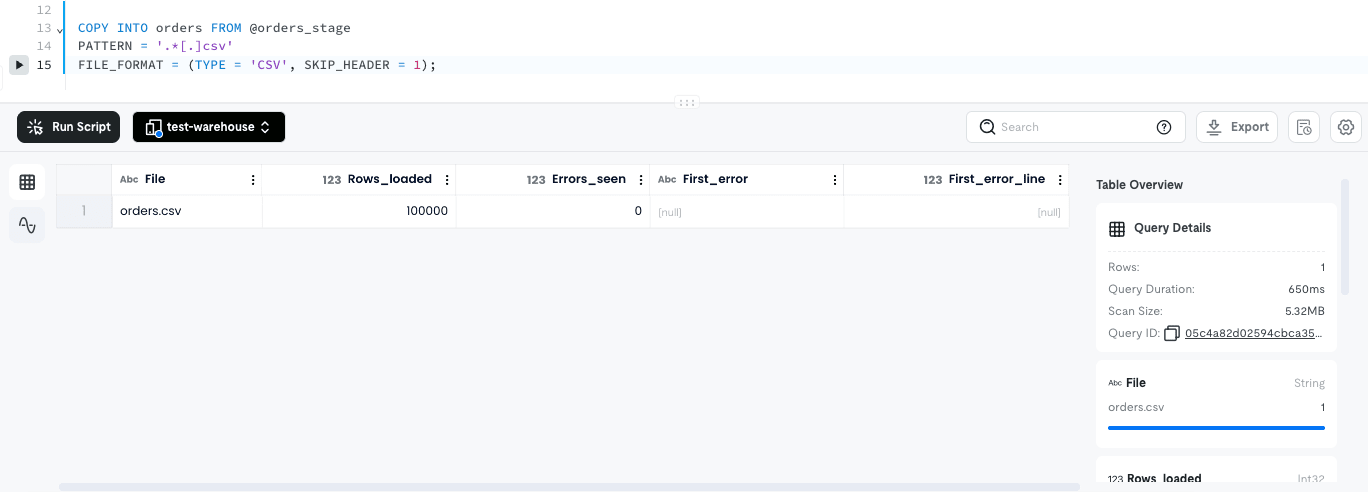
100,000 rows were loaded in 650ms.
The result returns not only Rows_loaded but also Errors_seen, First_error, and First_error_line, so you can track what happened and on which line if there was a failure.
COUNT(*) Returns Without Reading Data
I tried counting the rows after loading.
SELECT COUNT(*) FROM orders;
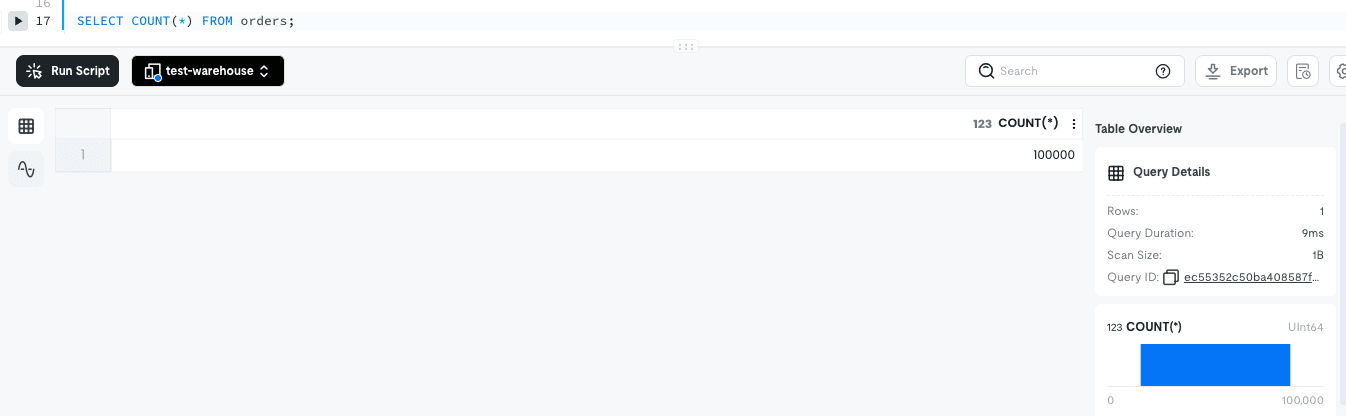
The result was 100000, with a Query Duration of 9ms and Scan Size of 1B.
It returns the answer from table statistics without reading the data.
Doing the same thing with a direct Stage query scanned 5.32MB, so it's clear that loading is faster for repeated queries.
Types Are Converted According to the Definition
DESC orders;
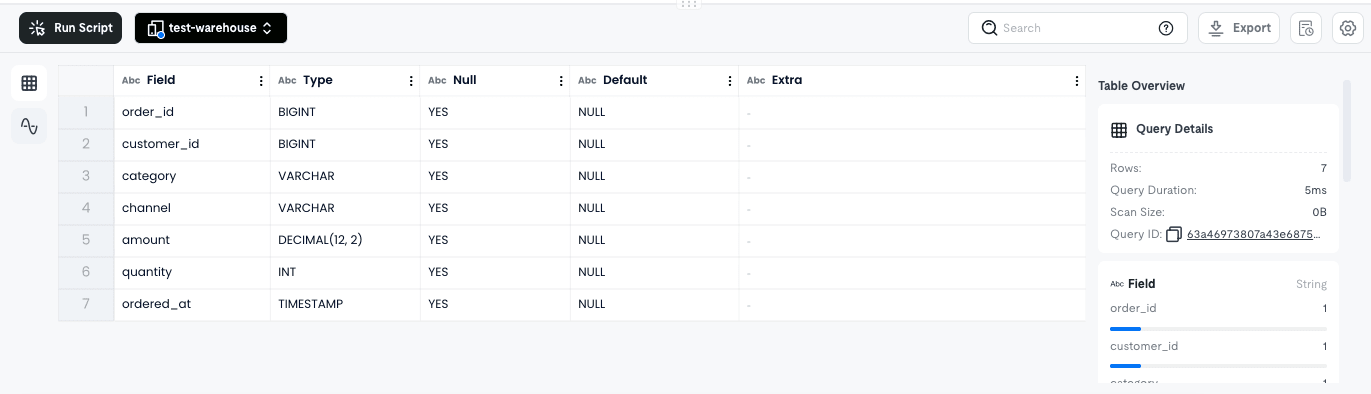
amount was loaded as DECIMAL(12, 2) and ordered_at as TIMESTAMP.
Since all columns were String in direct Stage queries, loading them interprets them with the DDL types.
SELECT * FROM orders LIMIT 5;
order_id,customer_id,category,channel,amount,quantity,ordered_at
75310,1097,books,web,54246.02,2,2026-01-10 18:15:00.000000
75311,1383,grocery,ios,35545.20,3,2026-07-11 22:34:00.000000
75312,4132,apparel,web,47361.31,5,2026-04-07 10:14:00.000000
Incidentally, LIMIT 5 is not returning from order_id = 1.
Since it is distributed storage, row order is not guaranteed, and ORDER BY is required if you want to see from the beginning.
I also tried aggregation.
SELECT
    category,
    COUNT(*)    AS order_count,
    SUM(amount) AS total_amount,
    AVG(amount) AS avg_amount
FROM orders
GROUP BY category
ORDER BY total_amount DESC;
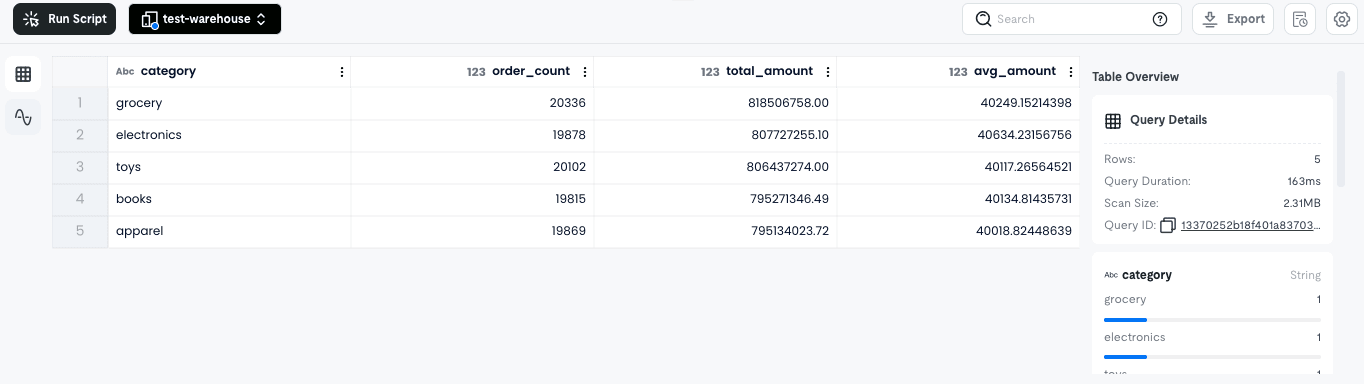
There were approximately 20,000 records in each of the 5 categories, with a total of exactly 100,000 records.
Since the dummy data was assigned to each category with equal probability, all values are nearly identical.
The CREATE Statement Reveals the Internal Implementation
Selecting a table under Data > Databases displays the CREATE statement in the Table Definition tab.
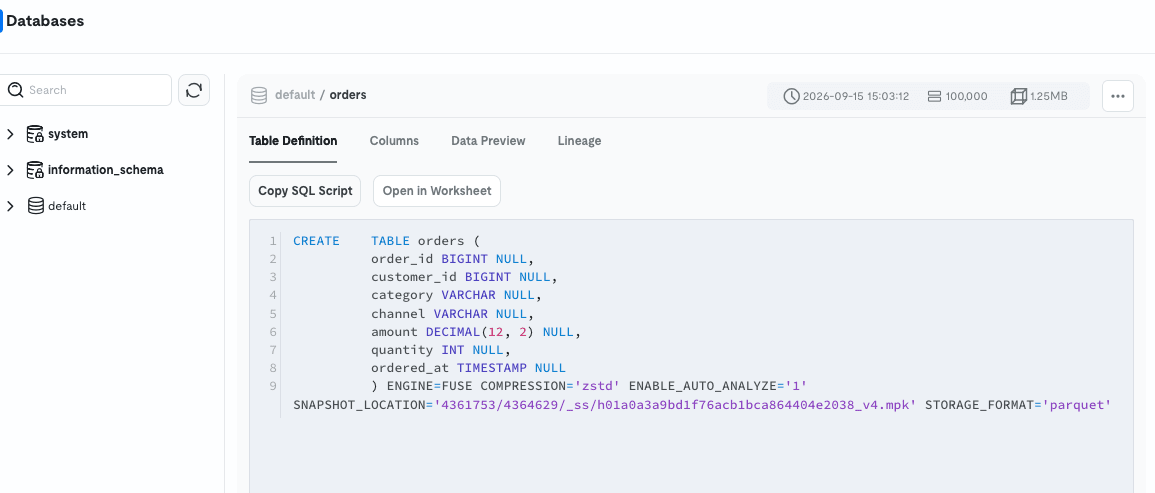
CREATE TABLE orders (
    order_id BIGINT NULL,
    customer_id BIGINT NULL,
    category VARCHAR NULL,
    channel VARCHAR NULL,
    amount DECIMAL(12, 2) NULL,
    quantity INT NULL,
    ordered_at TIMESTAMP NULL
) ENGINE=FUSE
  COMPRESSION='zstd'
  ENABLE_AUTO_ANALYZE='1'
  SNAPSHOT_LOCATION='4361753/4364629/_ss/h01a0a3a9bd1f76acb1bca864404e2038_v4.mpk'
  STORAGE_FORMAT='parquet'
Options that were not in the DDL I wrote have been filled in.
| Option | What It Tells Us |
|---|---|
ENGINE=FUSE |
The storage engine is FuseEngine |
STORAGE_FORMAT='parquet' |
The internal storage format is also Parquet |
COMPRESSION='zstd' |
zstd compression. 100,000 rows at 1.25MB (about 24% of the original CSV) |
ENABLE_AUTO_ANALYZE='1' |
Automatic statistics update is ON by default |
SNAPSHOT_LOCATION |
The substance of time travel. Snapshot version management |
Combining the name FuseEngine with the Platform role name databend-webapi mentioned earlier, you can infer that the base of TiDB Cloud Lake is Databend.
Although it bears the TiDB name, this CREATE statement shows that the storage engine is separate from TiKV and TiFlash.
Writing Back to S3
I tried exporting aggregated results to S3 as Parquet.
I wrote it this way first and failed.
COPY INTO 's3://<bucket name>/tidb-cloud-lake/export/category_summary/'
FROM ( SELECT ... )
CONNECTION = (CONNECTION_NAME = 'lake_s3_conn')
FILE_FORMAT = (TYPE = 'PARQUET');
sql_syntax(1005): Unexpected "CONNECTION", a reserved keyword;
use a different identifier or quote it with backticks.
Looking at the official syntax, the unload side does not have a CONNECTION clause.
You can write it for loading (COPY INTO <table> FROM <location>), but not for unloading (COPY INTO <location> FROM <table>).
Using a Stage as the output destination avoids having to write credentials.
COPY INTO @orders_stage/export/category_summary/
FROM (
    SELECT category, COUNT(*) AS order_count, SUM(amount) AS total_amount
    FROM orders
    GROUP BY category
)
FILE_FORMAT = (TYPE = PARQUET)
DETAILED_OUTPUT = true;
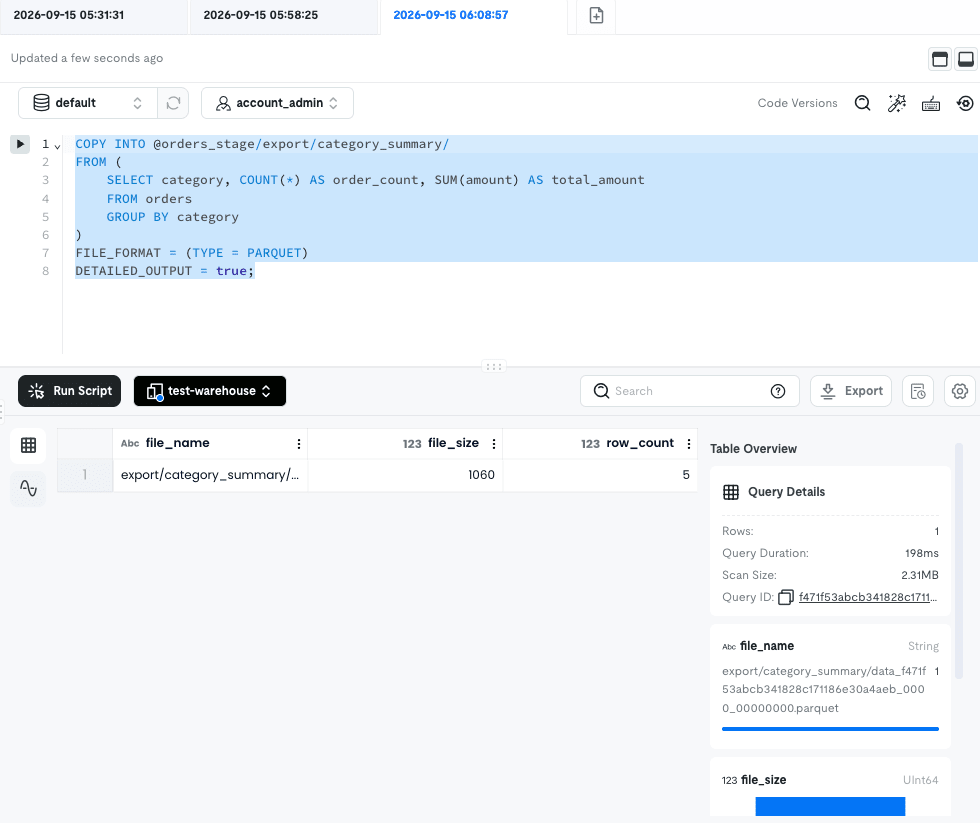
1 Parquet file of 5 rows and 1,060 bytes was output.
The filename is in the format data_<Query ID>_0000_00000000.parquet, and based on the trailing serial number, it appears that large data will be split.
Only the s3:PutObject set earlier was sufficient, and multipart upload-related permissions were not needed.
Creating a Dashboard
You can create dashboards under Projects > Dashboards.
Pressing Create a Tile opens a tile-specific query editing screen, where you write a query and then switch to a chart view.
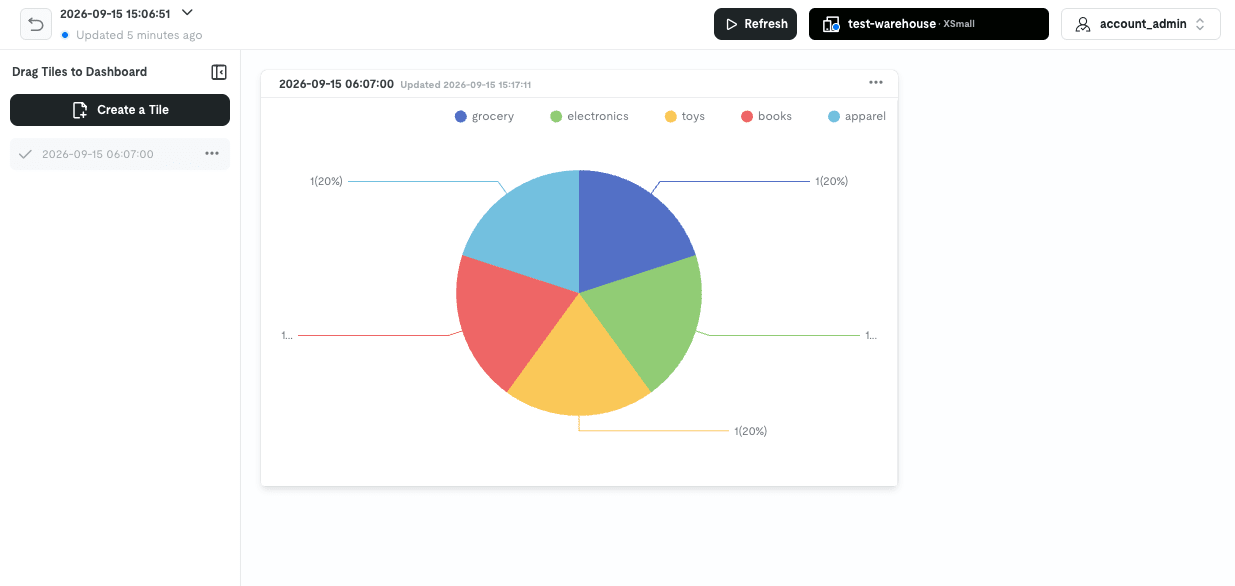
There are 4 chart types: Scorecard / Pie chart / Bar chart / Line chart.
What caught my attention here is that there is a Refresh button and Warehouse selection at the top of the Dashboard screen.
This means it is not a saved image, but rather queries are re-executed in the Warehouse every time you open it.
The documentation explicitly states that enabling MySQL Endpoint disables Auto Suspend, so compared to keeping a BI tool constantly connected, the built-in Dashboard has a cost advantage since you are only billed when you view it.
Data Integrations
Data > Data Integrations is a screen for setting up ingestion through a GUI.
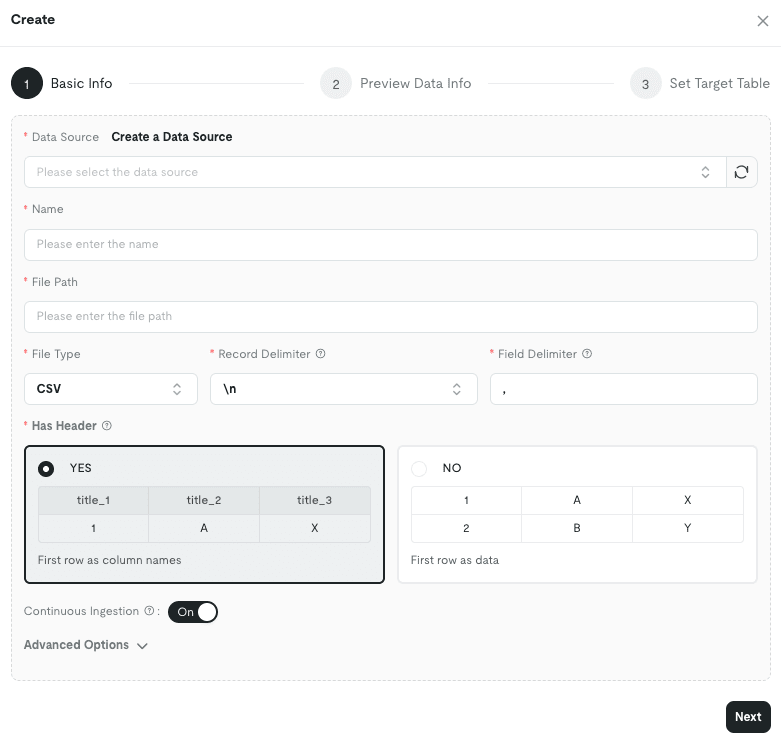
It is a 3-step wizard where you specify the data source, file path, file format, delimiter, and whether there is a header, allowing you to configure what you did with COPY INTO without SQL.
The difference is the Continuous Ingestion toggle; turning it On enables continuous ingestion.
Selecting MySQL or PostgreSQL enables continuous synchronization via snapshot + CDC, so this would be the place to use for continuously streaming data from other databases into TiDB Cloud Lake.
Connection information is registered in Data > Data Sources.
The available types are AWS – Credentials / AWS – SQS(S3) / TiDB / MySQL / PostgreSQL / Kafka / FeiShu Bot, 7 in total.
Task
Data > Task is a screen for organizing SQL with dependencies and scheduling periodic execution.
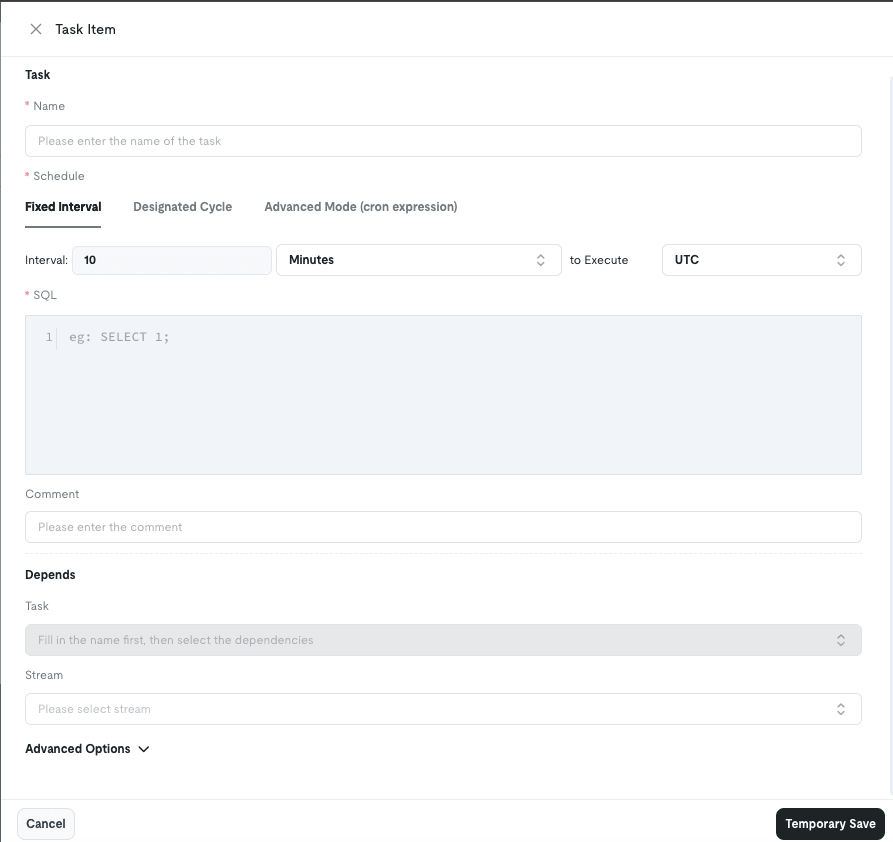
Schedules can be specified as fixed intervals or cron expressions.
Depends allows specifying other tasks and Streams, where a Stream is a virtual table that continuously accumulates change diffs.
Combining them allows you to create a pipeline that "processes only newly added data and writes it to another table."
Monitoring
Under Monitoring > Metrics, you can see storage size, scan volume, query success rate, and Warehouse status all together.
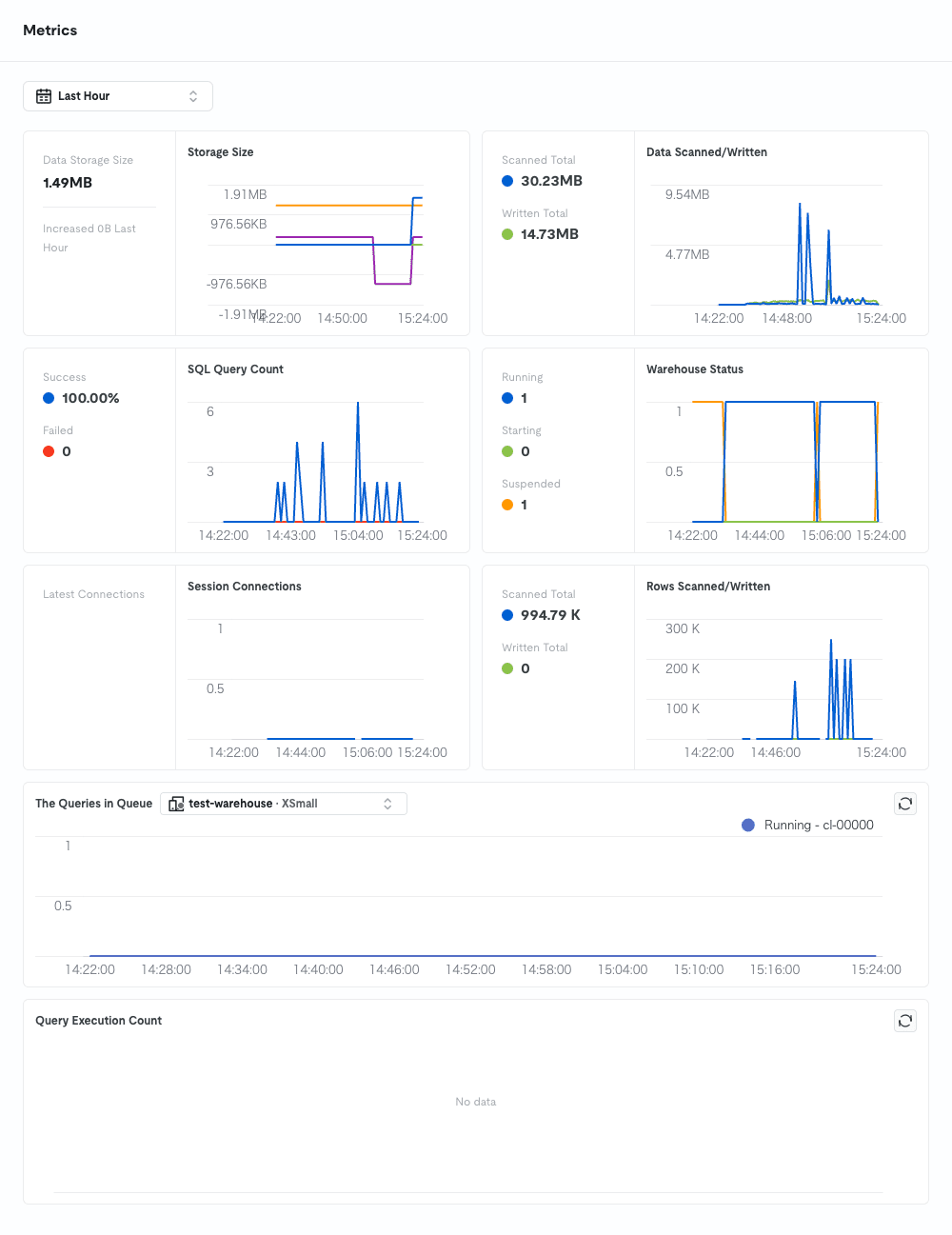
Looking at the Warehouse Status graph, you can see repeated start and stop cycles.
Data Storage Size is the value for the entire Lake, and it was 1.49MB with just 100,000 rows loaded.
Monitoring > SQL History retains executed queries.
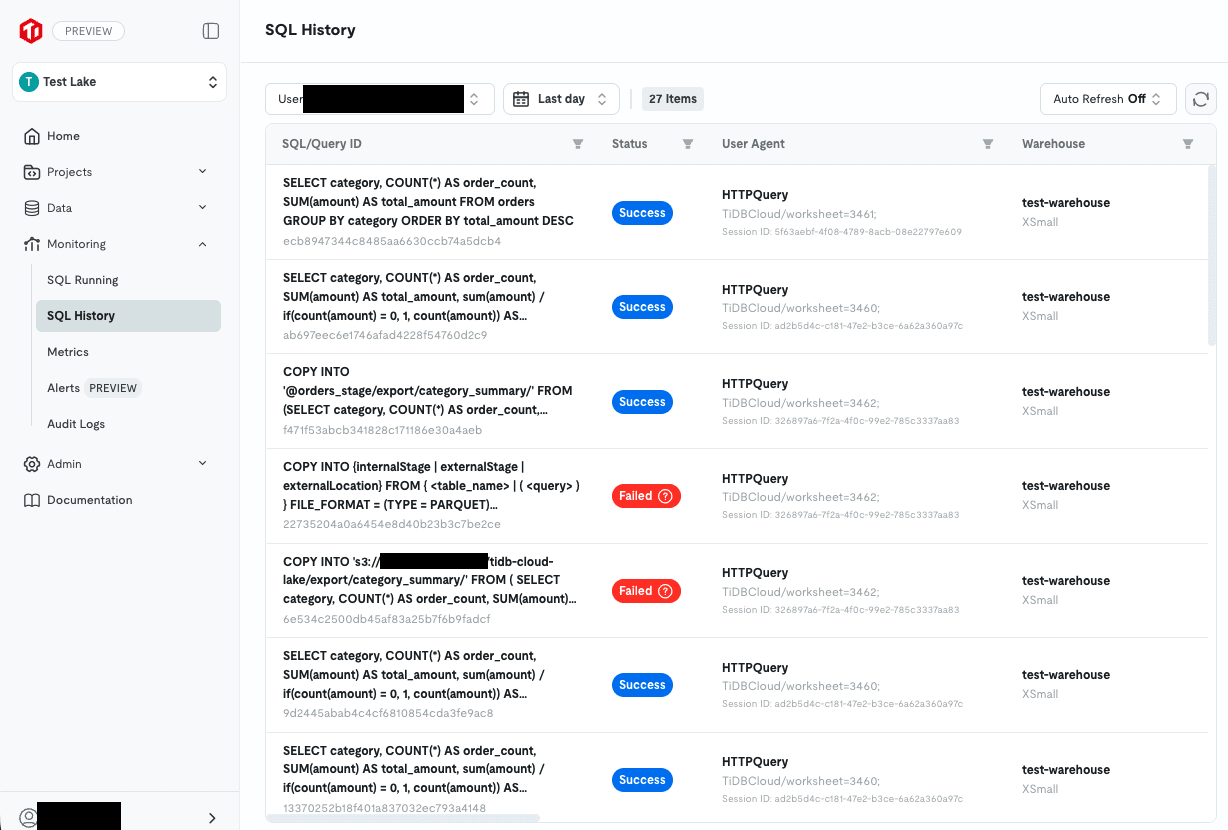
Success/failure status, execution time, queue wait time, and which Warehouse it ran on are all listed.
The User Agent contains the Worksheet ID as TiDBCloud/worksheet=3461, so you can also trace which screen it was executed from.
Incidentally, looking at the CREATE CONNECTION history, the External ID is masked as la***xl, ensuring sensitive information is not stored as-is.
Monitoring > Alerts allows you to configure notifications.
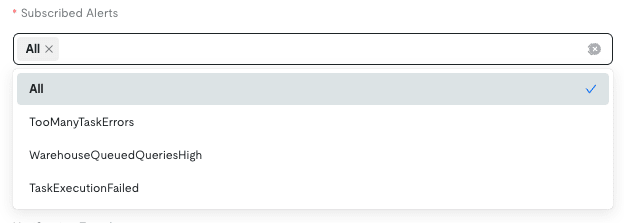
The subscribable types are TooManyTaskErrors / WarehouseQueuedQueriesHigh / TaskExecutionFailed, covering task failures and Warehouse queue buildup.
Notification destinations are Email and Feishu Bot.
Monitoring > Audit Logs retains operation history.
Worksheet edits and configuration changes were recorded along with the executor, IP address, and timestamp.
Supplement: Export of Results Requires Permission
When I tried to download query results as CSV, I got a permission error.

Permission 'EXPORT' verification failed
Please contact owner ... to add the corresponding permission.
I was momentarily confused because I am the Lake Owner yet was told "please contact the owner," but there was an Add EXPORT Permission menu item under … in Admin > Roles and Permissions.
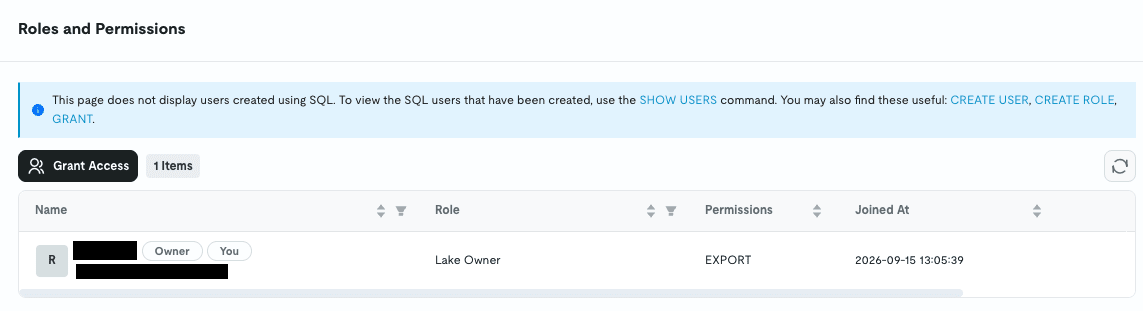
Allows downloading worksheet results
Since DWHs contain customer data, this appears to be a design decision to separate the ability to download results locally into a separate permission.
Pricing
Warehouses are billed per second, with a unit price set for each size.
There are 2 Editions, and the Business unit price is 1.5 times that of Personal.
| Size | Personal Unit Price |
|---|---|
| XSmall | $1.60/h |
| Small | $3.20/h |
| Medium | $6.40/h |
| Large | $12.80/h |
| XLarge | $25.60/h |
Above XLarge, sizes go from 2XLarge to 6XLarge, doubling with each step up.
Unit prices for all sizes are listed below.
Storage is $23.00/month/TB common to both Editions.
As mentioned earlier, since the data is physically stored in S3, S3 pricing is reflected directly.
There is also another charge: a REST API request fee for each SQL query execution, at $1.00/10,000 requests for Personal.
Note that these are prices as of the public preview period, and the official documentation explicitly states they may change at GA.
Which to Use
TiFlash is included in cluster resources, so costs are incurred as long as the cluster is running.
On the other hand, TiDB Cloud Lake costs nothing when the Warehouse is stopped, and using XSmall for just 1 hour a day would be about $48 per month.
It seems the differentiation would be: use the cluster side if you need constant access to data, and TiDB Cloud Lake when you need to work with large amounts of data only occasionally.
However, since the Warehouse starts with each query and then stops after 5 minutes of idling, the actual running time tends to be longer than expected when testing interactively.
Usage charges can be confirmed in Billing on the TiDB Cloud side.
In Closing
This time, I tried out TiDB Cloud Lake in public preview, experimenting with things like querying S3 files directly and loading them into tables for aggregation.
I hope this article is helpful to someone.
