I Tried Controlling Concurrent Connections with Target Optimizer, a New Feature of ALB

This page has been translated by machine translation. View original
On November 20, 2025, a new Application Load Balancer (ALB) feature, Target Optimizer, was released.
Concurrent connection control, which was previously handled on the WAF or web server side, can now be performed more effectively through coordination between the ALB and its targets. I had the opportunity to test whether we can limit the number of concurrent connections to targets behind an ALB to a fixed level and avoid performance degradation caused by excessive connections, so I'll share the results here.
Environment Setup
To mimic an ECS sidecar configuration, I used Docker on EC2 and ran the agent and the application together in --network host mode.
- OS: Amazon Linux 2023 (al2023-ami-2023.9.20251117.1-kernel-6.1-x86_64)
- App: Node.js (delay controlled via a query parameter)
- Agent: AWS Target Optimizer Agent
EC2 (Docker & App)
I started a Node.js application that intentionally introduces a 1-second delay, along with the Target Optimizer agent that relays and controls requests from the ALB.
#!/bin/bash
# 1. システムパッケージを最新化
yum update -y

# 2. Dockerをインストール
yum install -y docker

# 3. Dockerサービスを起動・有効化
systemctl start docker
systemctl enable docker

# 4. Target Optimizer agentイメージをダウンロード
docker pull public.ecr.aws/aws-elb/target-optimizer/target-control-agent:latest

# 5. Node.jsアプリケーションのディレクトリを作成
mkdir -p /app

# 6. 遅延可能なNode.jsアプリケーションを作成(クエリパラメータ ?delay=<ms> で遅延時間を指定)
cat > /app/app.js << 'EOF'
require('http').createServer(async (req, res) => {
  const delay = parseInt(new URL(req.url, 'http://localhost').searchParams.get('delay')) || 0;
  if (delay > 0) await new Promise(r => setTimeout(r, delay));
  res.writeHead(200, {'Content-Type': 'text/plain'});
  res.end(`OK (${delay}ms delay)\n`);
}).listen(8080, () => console.log('Server running on port 8080'));
EOF

# 7. Dockerfileを作成
cat > /app/Dockerfile << 'EOF'
FROM node:alpine
COPY app.js .
CMD ["node", "app.js"]
EOF

# 8. Dockerイメージをビルド
cd /app && docker build -t delay-app .

# 9. Node.jsアプリケーションコンテナを起動
docker run -d \
  --name delay-app \
  --restart unless-stopped \
  --network host \
  delay-app

# 10. Target Optimizer agentコンテナを起動
docker run -d \
  --name target-optimizer-agent \
  --restart unless-stopped \
  --network host \
  -e TARGET_CONTROL_DATA_ADDRESS=0.0.0.0:80 \
  -e TARGET_CONTROL_CONTROL_ADDRESS=0.0.0.0:3000 \
  -e TARGET_CONTROL_DESTINATION_ADDRESS=127.0.0.1:8080 \
  -e TARGET_CONTROL_MAX_CONCURRENCY=1 \
  public.ecr.aws/aws-elb/target-optimizer/target-control-agent:latest
Creating the ALB Target Group
I created an ALB for testing.
When creating the target group, I configured the --target-control-port setting.
This allows the ALB to communicate with the agent through the specified port (3000 in this case) and understand the congestion status.
Create a Target Group with Target Optimizer enabled (CLI)
aws elbv2 create-target-group \
  --name optimized-tg \
  --protocol HTTP \
  --port 80 \
  --vpc-id <VPC-ID> \
  --target-control-port 3000 \
  --region ap-northeast-1

# --target-control-port specifies the communication port with the agent
- Managed rule (GUI) settings
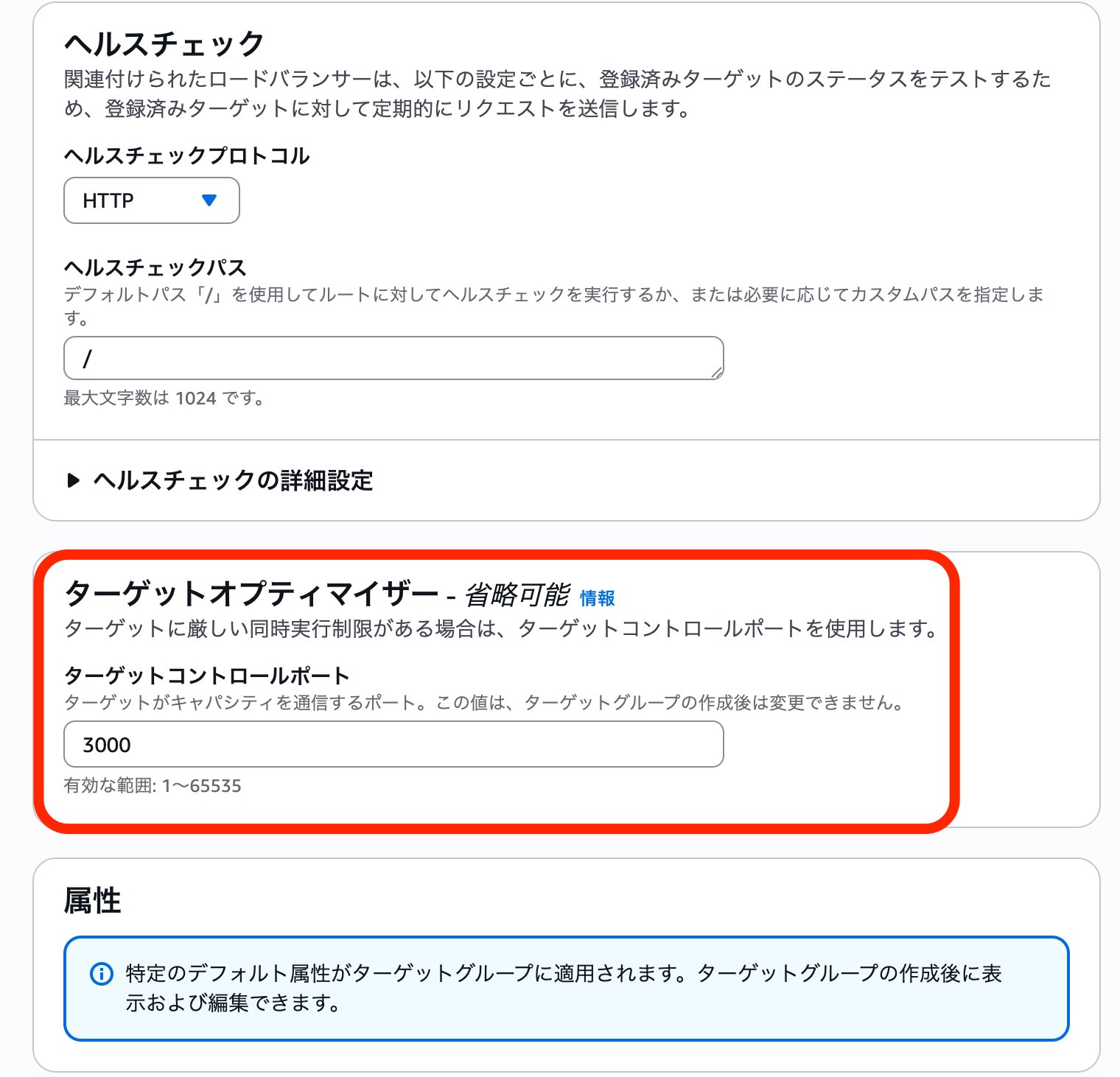
To match the agent on EC2, the target control port was set to "3000". The communication destination was port "80" of the Target Optimizer agent container.
Verification
I intentionally introduced a "1-second" delay for each request and checked how the system behaves when the concurrent connection limit (1 in this case) is exceeded.
Test script
#!/bin/bash
DELAY=${1:-0}
ALB_DNS=$(aws elbv2 describe-load-balancers --region ap-northeast-1 --query 'LoadBalancers[0].DNSName' --output text)
URL="http://$ALB_DNS/?delay=$DELAY"

run_requests() {
  local PARALLEL=$1
  local RESULT=$(seq 1 $PARALLEL | xargs -P $PARALLEL -I {} curl -s --http1.1 -o /dev/null -w "%{http_code}\n" "$URL" 2>/dev/null)
  local S=$(echo "$RESULT" | grep -c "200" || true)
  local F=$(echo "$RESULT" | grep -c "503" || true)
  echo "$S $F"
  sleep 1
}

echo "=== テスト設定 ==="
echo "遅延時間: ${DELAY}ms"
echo "URL: $URL"
echo ""

echo "=== ウォームアップ中(2並列、10秒間)==="
START_TIME=$(date +%s)
WARMUP_SUCCESS=0
WARMUP_FAILED=0

while [ $(($(date +%s) - START_TIME)) -lt 10 ]; do
  read S F <<< $(run_requests 2)
  WARMUP_SUCCESS=$((WARMUP_SUCCESS + S))
  WARMUP_FAILED=$((WARMUP_FAILED + F))
done

echo "ウォームアップ完了: 成功=$WARMUP_SUCCESS, 失敗=$WARMUP_FAILED"
echo ""
sleep 2

echo "=== Target Optimizer 並列負荷テスト (各30秒間) ==="
echo "並列数 | 成功(200) | 失敗(503) | 成功率"
echo "-------|-----------|-----------|-------"

for PARALLEL in 1 2 4 8 16; do
  START_TIME=$(date +%s)
  SUCCESS=0
  FAILED=0

  while [ $(($(date +%s) - START_TIME)) -lt 30 ]; do
    read S F <<< $(run_requests $PARALLEL)
    SUCCESS=$((SUCCESS + S))
    FAILED=$((FAILED + F))
  done

  TOTAL=$((SUCCESS + FAILED))
  if [ $TOTAL -gt 0 ]; then
    RATE=$(awk "BEGIN {printf \"%.1f%%\", ($SUCCESS*100.0/$TOTAL)}")
  else
    RATE="0.0%"
  fi
  printf "%6d | %9d | %9d | %s\n" $PARALLEL $SUCCESS $FAILED "$RATE"
done

echo ""
echo "=== テスト完了 ==="
Results
I applied load by increasing the parallelism from 1 to 16. The setup had 2 EC2 instances, with each agent configured with MAX_CONCURRENCY=1.
| Parallelism | Success (200) | Failure (503) | Success rate |
|---|---|---|---|
| 1 | 15 | 1 | 93.8% |
| 2 | 21 | 9 | 70.0% |
| 4 | 30 | 30 | 50.0% |
| 8 | 30 | 90 | 25.0% |
| 16 | 30 | 210 | 12.5% |
Even as parallelism increased, the number of successes plateaued at "30", and the excess requests returned 503 Service Unavailable, as expected.
※ Why the number of successes is 30: App processing time (1 second) + script wait time (1 second) = about 2 seconds per cycle. In a 30-second test, roughly 15 cycles run, and each of the 2 EC2 instances processed one request per cycle (15 cycles × 2 instances = 30), which is the likely explanation.
Checking the Access Logs
The ALB access logs also confirmed the behavior of Target Optimizer.
- Success log (200)
The processing time (target_processing_time) was 1.004s, showing the response was returned normally after the 1-second delay in the app.
| Item | Value |
|---|---|
| Protocol | http |
| Time | 2025-11-21T16:10:02.724784Z |
| ALB | app/alb-XXXXX/a7c2180283d10881 |
| Client | 203.xx.xx.xx:53426 |
| Target | 172.31.24.14:80 |
| Processing time | request=0.000s / target=1.004s / response=0.000s |
| ELB status | 200 |
| Target status | 200 |
| Received bytes | 144 |
| Sent bytes | 163 |
| Request | GET /?delay=1000 HTTP/1.1 |
| User-Agent | curl/8.11.1 |
http 2025-11-21T16:10:02.724784Z app/alb-XXXXX/a7c2180283d10881 203.xx.xx.xx:53426 172.31.24.14:80 0.000
1.004 0.000 200 200 144 163 "GET http://my-alb-XXXXX.ap-northeast-1.elb.amazonaws.com:80/?delay=1000 HTTP
/1.1" "curl/8.11.1" - - arn:aws:elasticloadbalancing:ap-northeast-1:123456789012:targetgroup/optimized-tg/
41e7338699cf44e9 "Root=1-69208ed9-4b1b24d81a741acd3b4a42dd" "-" "-" 0 2025-11-21T16:10:01.720000Z
"forward" "-" "-" "172.31.24.14:80" "200" "-" "-" TID_7290691baf7245469508aa6a42bd733c "-" "-" "-"
- Failure log (503)
Before reaching the target (the target IP is -), a 503 was returned based on the decision of the ALB or the agent.
This confirmed that Target Optimizer protects the backend app without putting load on it.
| Item | Value |
|---|---|
| Protocol | http |
| Time | 2025-11-21T16:10:01.738713Z |
| ALB | app/alb-XXXXX/a7c2180283d10881 |
| Client | 203.xx.xx.xx:53464 |
| Target | - (not reached) |
| Processing time | request=-1s / target=-1s / response=-1s |
| ELB status | 503 |
| Target status | - |
| Received bytes | 144 |
| Sent bytes | 162 |
| Request | GET /?delay=1000 HTTP/1.1 |
| User-Agent | curl/8.11.1 |
※In ALB access logs, if a request does not reach a target, -1 is recorded in the processing time fields.
http 2025-11-21T16:10:01.738713Z app/alb-XXXXX/a7c2180283d10881 203.xx.xx.xx:53464 - -1 -1 -1 503 - 144
162 "GET http://my-alb-XXXXX.ap-northeast-1.elb.amazonaws.com:80/?delay=1000 HTTP/1.1" "curl/8.11.1" - -
arn:aws:elasticloadbalancing:ap-northeast-1:123456789012:targetgroup/optimized-tg/41e7338699cf44e9 "Root=1
-69208ed9-4a2f731a0e5fabfe6f9d184f" "-" "-" 0 2025-11-21T16:10:01.736000Z "forward" "-" "-" "-" "503" "-"
"-" TID_3e941d6f5423694e9f3f8e512cc30b7c "-" "-" "-"
Summary
This verification confirmed that by using Target Optimizer, requests exceeding the application's limits can be blocked before they reach the target.
Because control is performed at the ALB level (in coordination with the agent), it is a very effective "flow limiting (bulkhead)" measure for protecting the application process.
This time I tested with Docker on EC2, but when deployed with the Amazon ECS sidecar pattern in particular, it can be used for strict per-task control of concurrent executions.
In particular, for "generative AI / LLM applications" where a single request takes a long time to process and there are physical parallelism limits such as GPU resources, please make use of it as a way to keep the whole system running stably.
